AWS Big Data Blog
IAM authentication with OAuth 2.0 for Amazon MQ for RabbitMQ
This is Part 3 of a three-part series on authentication and authorization for Amazon MQ for RabbitMQ. For an overview of all available methods, see Authentication and Authorization Options for Amazon MQ for RabbitMQ. For certificate-based mTLS and SSL authentication, see Part 1. For OAuth 2.0, LDAP, Entra ID, and HTTP authentication, see Part 2.
When you run Amazon MQ for RabbitMQ at scale without AWS Identity and Access Management (IAM) authentication, you face a common challenge: managing static credentials across multiple services, each requiring its own username and password. This approach creates operational overhead through password rotation, credential distribution, and the risk of inadvertent secret disclosure. IAM authentication with OAuth 2.0 removes these static credentials. Clients authenticate with their existing IAM identity instead.
This post covers the key configuration options for using IAM as an OAuth 2.0 provider and demonstrates a multi-tenant use case with vhost-level isolation enforced by IAM roles and broker-level scope aliases.
Amazon MQ for RabbitMQ supports IAM-based authentication through OAuth 2.0, so you have centralized access control without managing broker-local credentials. The clients authenticate using their existing IAM identity. Tokens expire automatically, and access control lives entirely in IAM roles and broker configuration.
Note: IAM authentication for Amazon MQ for RabbitMQ requires RabbitMQ versions 3.13 and 4.2 or later. Amazon MQ for ActiveMQ brokers doesn’t support this feature.
Important: IAM outbound federation must be configured and available in your AWS account before you enable IAM authentication on your broker.
Overview
This post covers two aspects of IAM-based authentication for Amazon MQ for RabbitMQ:
- IAM as an OAuth 2.0 identity provider: How Amazon MQ uses IAM outbound federation and the RabbitMQ OAuth 2.0 plugin to authenticate clients using short-lived JSON Web Tokens (JWTs) issued by AWS Security Token Service (AWS STS), eliminating broker-local credentials.
- Multi-tenant isolation with IAM roles and scope aliases: How per-tenant IAM roles combined with RabbitMQ scope aliases restrict access to specific virtual hosts (vhosts), enforcing tenant isolation at both the authentication and broker layers.
Both capabilities work together to provide credential-free authentication, centralized access control, and a comprehensive audit trail through AWS CloudTrail.
How IAM authentication works
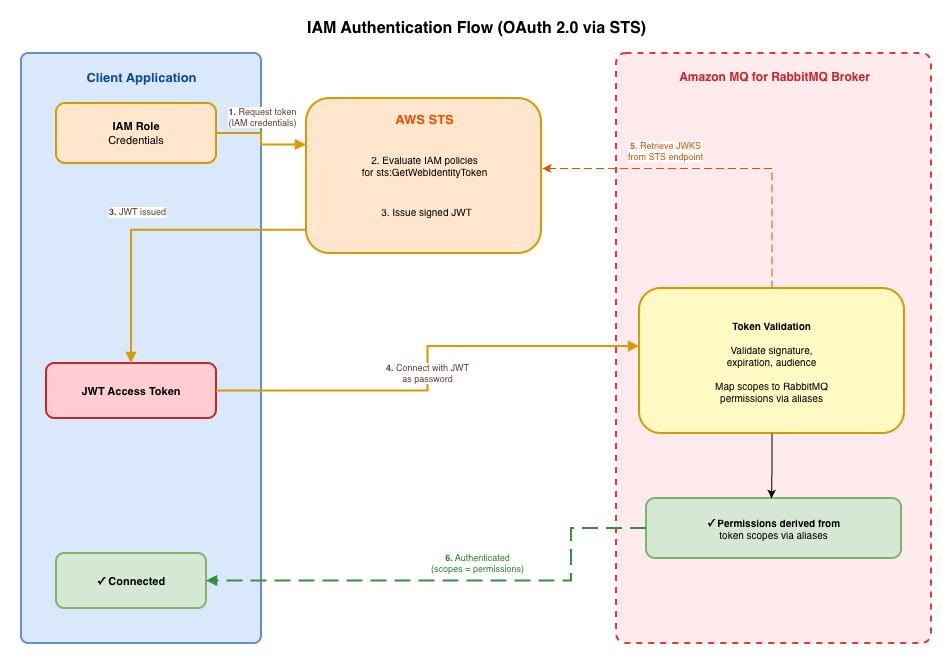
IAM authentication for Amazon MQ for RabbitMQ uses the RabbitMQ OAuth 2.0 plugin with IAM serving as the identity provider through IAM outbound federation. Instead of managing usernames and passwords in the broker, clients authenticate using short-lived JWTs issued by AWS STS.
When a client connects to a broker configured with IAM authentication:
- The client application uses its IAM credentials from an IAM role attached to its AWS Lambda function, Amazon Elastic Container Service (Amazon ECS) task, Amazon Elastic Kubernetes Service (Amazon EKS) pod, or Amazon Elastic Compute Cloud (Amazon EC2) instance to call AWS STS.
- AWS STS evaluates the caller’s IAM policies for
sts:GetWebIdentityToken. - If the policy allows the request, AWS STS issues a signed JWT that encodes the caller’s identity and the permitted RabbitMQ scopes.
- The client connects to the Amazon MQ broker and presents the JWT as an OAuth 2.0 bearer token (passed as the password).
- The broker retrieves the AWS STS public keys through the JSON Web Key Set (JWKS) endpoint and validates the token signature, expiration, and audience claim.
- The broker extracts the caller’s IAM role ARN from the token’s
subclaim, matches it against configured scope aliases, and grants the corresponding RabbitMQ permissions.
The following diagram shows the IAM authentication flow.
Benefits over traditional username/password authentication
The following table compares traditional username/password authentication with IAM-based OAuth 2.0 authentication across the operational dimensions that matter most at scale.
| Aspect | Traditional (username/password) | IAM-based (OAuth 2.0 JWT) |
| Credential management | Manual creation, distribution, and rotation | Automatic through IAM roles. No broker-local credentials |
| Credential lifetime | Static until manually rotated | Short-lived (5 minutes–1 hour). Automatic expiration |
| Access control | Broker-local permissions per user | Centralized through IAM roles mapped to broker scope aliases |
| Audit trail | Broker logs only | AWS CloudTrail logs every token issuance and policy evaluation |
| Tenant isolation | Manual permission configuration per user | Per-role scope aliases enforce vhost restrictions at the broker |
| Onboarding/offboarding | Create/delete RabbitMQ users and distribute credentials | Create/delete IAM roles. No credential distribution needed |
Key configuration
The following rabbitmq.conf snippet shows the essential settings for IAM-based OAuth 2.0 authentication:
Note: The auth_oauth2.jwks_uri value is account-specific. Obtain it by running aws iam enable-outbound-web-identity-federation, which returns an issuer identifier URL. Append /.well-known/jwks.json to form the full JWKS URI.
The following table describes each configuration setting shown in the preceding snippet.
| Setting | Purpose |
| auth_backends.1 = oauth2 | Enables the OAuth 2.0 authentication backend |
| auth_backends.2 = internal | Fallback to internal auth for the system monitoring user |
| auth_oauth2.jwks_uri | Account-specific JWKS endpoint (from IAM outbound federation) for validating token signatures |
| auth_oauth2.resource_server_id | Identifies this broker as a resource server. Must match the --audience value used when requesting tokens |
| auth_oauth2.scope_prefix | Prefix applied to scope values (for example, rabbitmq/) |
| auth_oauth2.additional_scopes_key | JWT claim key where RabbitMQ looks for the identity used in scope alias matching (must be sub for STS JWTs) |
| auth_oauth2.scope_aliases..alias | The IAM role ARN that maps to a set of RabbitMQ permissions |
| auth_oauth2.scope_aliases..scope | The RabbitMQ permissions granted when the alias matches |
| auth_oauth2.https.hostname_verification | Set to wildcard for AWS STS endpoint certificate validation |
| management.oauth_enabled | Enables OAuth token authentication for the Management API/UI |
IAM policy with vhost restriction
The IAM policy condition is what enforces tenant isolation at the authentication layer. The following policy restricts a role to requesting tokens scoped to a specific vhost:
| Policy element | Purpose |
| sts:GetWebIdentityToken | Authorizes JWT token issuance through STS |
| sts:TagGetWebIdentityToken | Allows attaching request tags (such as scope) to the token request |
Vhost-level isolation is enforced at the broker layer through scope aliases (see the following Multi-tenant isolation with IAM section), not through IAM policy conditions. Each IAM role maps to a specific set of RabbitMQ permissions through the broker configuration, and the broker denies any access not granted by the matching scope alias.
Important considerations
- IAM authentication is supported on Amazon MQ for RabbitMQ versions 3.13 and 4.2 or later. It isn’t supported on Amazon MQ for ActiveMQ brokers.
- IAM authentication requires IAM outbound federation to be configured and available in your AWS account. Make sure that the outbound federation is enabled before configuring IAM-based authentication on your broker.
- With AWS STS, you can request web identity tokens with a duration between 300 seconds (5 minutes) and 3600 seconds (1 hour) with the
--duration-secondsparameter. Implement token caching and refresh logic in your client applications to avoid requesting a new token on every connection. - Don’t embed IAM user credentials in application code or environment variables. Attach IAM roles to AWS Lambda functions, Amazon ECS tasks, Amazon EKS pods, or Amazon EC2 instances so that credentials are issued and rotated automatically by the AWS runtime.
- The IAM policy evaluation happens before any broker interaction. If the policy denies the
sts:GetWebIdentityTokenrequest, AWS STS returnsAccessDeniedand no connection is attempted. - Amazon MQ automatically creates a system user named monitoring-AWS-OWNED-DO-NOT-DELETE with monitoring-only permissions. This user uses RabbitMQ’s internal authentication system even on IAM-enabled brokers, and Amazon MQ restricts it to loopback interface access only.
Limitations
- Scope claim configuration: You can’t use a scope claim directly because the JWT token from AWS STS places the caller’s identity (IAM role ARN) in the
subclaim rather than a standardscopeclaim. This requires settingauth_oauth2.additional_scopes_key = suband using scope aliases in the RabbitMQ configuration to map IAM role ARNs to RabbitMQ permissions. This limitation also prevents using IAM policies for authorization fully, requiring RabbitMQ configuration for authorization instead.
For information about how to configure IAM authentication and authorization for your Amazon MQ for RabbitMQ brokers, see the following Implementation guide section.
Multi-tenant isolation with IAM
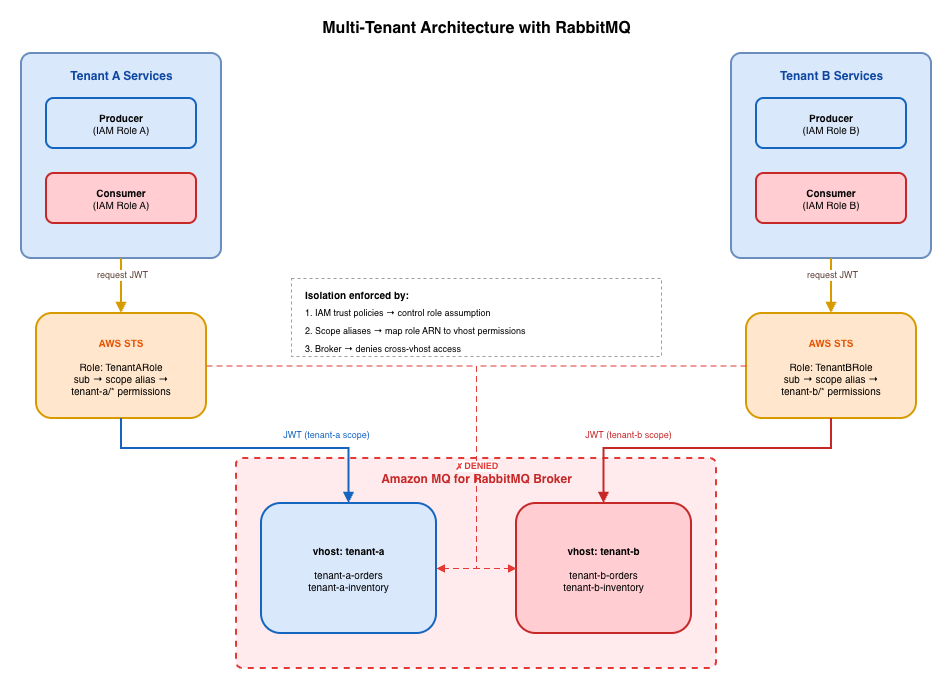
IAM-based authentication is particularly effective for multi-tenant architectures where you need to enforce data isolation across a shared RabbitMQ infrastructure. By combining per-tenant IAM roles with RabbitMQ scope aliases, you enforce isolation at three layers:
- IAM layer: Trust policies restrict which principals (Lambda functions, ECS tasks, EKS pods) can assume each tenant’s IAM role. A service belonging to Tenant A cannot assume Tenant B’s role.
- Broker layer: Scope aliases make sure that each role ARN only receives permissions for its own vhost. Even if a client attempts to connect to a different vhost, the broker denies access because the token’s
subclaim maps to permissions for a different vhost only. - Audit layer: CloudTrail logs every role assumption and AWS STS token request, including the IAM principal and whether the request was granted or denied.
The following diagram shows the multi-tenant architecture.
Broker configuration for multi-tenant isolation
AMQP-only access (default): For tenants that connect through AMQP to produce and consume messages:
With Management API access (optional): For tenants that also need HTTP API access for monitoring or management:
The tag:management scope grants access to the RabbitMQ Management HTTP API, limited to resources the tenant already has permissions for. Most producer/consumer workloads (Lambda, ECS tasks) connect through AMQP and do not need this tag. Add it only for tenants that require monitoring or management capabilities through the HTTP API.
How isolation is enforced
When Tenant A’s service connects to the broker:
- The service assumes
TenantARoleusing its attached IAM role credentials. - AWS STS issues a JWT with
sub=arn:aws:iam::<account-id>:role/TenantARole. - The service connects to the broker with the JWT as the password.
- The broker matches the
subclaim against scope aliases and grantsconfigure:tenant-a/*,write:tenant-a/*, andread:tenant-a/*. - If the service attempts to connect to vhost
tenant-b, the broker returnsNOT_ALLOWED - access to vhost 'tenant-b' refused for user 'arn:aws:iam::<account-id>:role/TenantARole'.
Trust policy for tenant isolation
Each tenant role uses a trust policy that restricts which principals can assume it:
This ensures that only Tenant A’s services can obtain tokens that map to Tenant A’s vhost permissions.
Client authentication pattern
Each client application uses its IAM role credentials to obtain a short-lived token from AWS STS, then presents that token as the password when connecting to the broker:
The token manager caches tokens and refreshes them before expiration, so your application does not request a new token on every connection. For long-running connections outside Lambda (such as Amazon ECS tasks or EC2-hosted services), add connection recovery logic to handle token expiry gracefully and reconnect with a fresh token when needed.
Comparing IAM authentication with other approaches
The following table compares IAM authentication with the other authentication methods available for Amazon MQ for RabbitMQ, so you can choose the approach that best fits your security and operational requirements.
| Aspect | IAM (OAuth 2.0 through STS) | OAuth 2.0 (external IdP) | Username/Password |
| Identity provider | IAM / STS | External OAuth 2.0 IdP | Broker-local |
| Credential type | Short-lived JWT | Short-lived JWT | Static password |
| Credential management | Automatic through IAM roles | Managed by external IdP | Manual creation and rotation |
| Tenant isolation | Per-role scope aliases restrict vhost access at the broker layer | Token scopes | Manual per-user permissions |
| Audit trail | AWS CloudTrail | IdP-specific logs | Broker logs only |
| AWS integration | Native (IAM roles, STS, CloudTrail) | Requires external IdP configuration | None |
Implementation guide
- Using IAM authentication and authorization for Amazon MQ for RabbitMQ – Step-by-step tutorial to enable IAM authentication, configure rabbitmq.conf, obtain a JWT token, and connect through AMQP.
- IAM authentication and authorization for Amazon MQ for RabbitMQ – Concepts on how IAM authentication works, and known limitations.
Cleaning up
To avoid ongoing charges, delete the resources you created during this walkthrough:
- Delete the test IAM roles (
TenantARole,TenantBRole) and their associated trust policies. - If you created a dedicated Amazon MQ broker for testing, delete the broker from the Amazon MQ console.
- Remove any test virtual hosts and their queues from your broker cxfonfiguration.
For production deployments, retain your IAM roles and broker configuration but review your scope aliases periodically to remove unused tenant mappings.
Conclusion
This post demonstrated how IAM-based OAuth 2.0 authentication works for Amazon MQ for RabbitMQ, and how per-tenant IAM roles combined with broker scope aliases enforce multi-tenant isolation. Clients authenticate using their existing IAM roles, AWS STS issues short-lived JWTs, and the broker validates tokens using the AWS STS JWKS endpoint. Scope aliases map each role ARN to vhost-specific permissions, ensuring tenants can only access their own resources.
Combined with the certificate-based authentication covered in Part 1 and the OAuth 2.0, LDAP, Entra ID, and HTTP integrations covered in Part 2, you now have a detailed picture of the authentication and authorization options available for Amazon MQ for RabbitMQ. Choose the approach that fits your identity infrastructure or combine multiple methods for defense-in-depth security.
If you have questions or feedback about this post, leave a comment in the Comments section. For troubleshooting help, visit the AWS re:Post community for Amazon MQ.
For more information about Amazon MQ security, see the following resources:
- Amazon MQ Developer Guide: Security.
- Amazon MQ for RabbitMQ IAM authentication.
- RabbitMQ OAuth 2.0 plugin documentation.
- Amazon MQ samples repository.
- AWS Security Best Practices.