AWS Big Data Blog
Mutual TLS and SSL certificate authentication for Amazon MQ for RabbitMQ
This is Part 1 of a three-part series on authentication and authorization for Amazon MQ for RabbitMQ. For an overview of all available methods, see Authentication and Authorization Options for Amazon MQ for RabbitMQ. For OAuth 2.0, LDAP, and HTTP authentication, see Part 2. For IAM authentication, see Part 3.
When you use Amazon MQ for RabbitMQ to handle sensitive data, standard TLS encryption alone might not meet your compliance requirements. Compliance frameworks like SOX, HIPAA, and PCI DSS often require verification of the identity of both parties in a connection. Features like mutual TLS (mTLS) and SSL certificate authentication can help support those requirements by adding certificate-based identity verification to your messaging infrastructure.
Amazon MQ for RabbitMQ version 4 or later supports two certificate-based security features that address these needs: SSL certificate authentication for passwordless certificate-only login, and mTLS for certificate-based peer verification with username and password authentication. This post explains how each approach works, highlights the key configuration options, and helps you decide which one fits your use case.
Overview
This post covers two certificate-based security features for Amazon MQ for RabbitMQ:
- SSL certificate authentication: Passwordless authentication where clients authenticate solely using X.509 client certificates through the
EXTERNALSASL mechanism. The broker extracts the username directly from the certificate, eliminating the need for passwords. - Mutual TLS (mTLS): Certificate-based peer verification where both the client and broker prove their identities using certificates, while clients still authenticate with a username and password. This secures AMQP connections and the RabbitMQ management interface.
Both features are available for Amazon MQ for RabbitMQ version 4 and above, and both use AWS ARNs for certificate and credential references, integrating with AWS Certificate Manager (ACM), and AWS Identity and Access Management (IAM).
How SSL certificate authentication works
SSL certificate authentication eliminates the need to transmit credentials during connection. The broker extracts the client’s identity from the certificate, though the corresponding user must exist in RabbitMQ’s internal store for authorization. Instead of using certificates only for transport-layer verification, the broker uses the EXTERNAL SASL mechanism to extract the client’s identity directly from the X.509 certificate.
When a client connects to a broker configured with SSL certificate authentication:
- The client initiates a TLS connection and presents its client certificate.
- The Amazon MQ broker assumes an IAM role to retrieve the CA certificate from ACM.
- The broker validates the client certificate against the configured CA certificate.
- The broker extracts the username from the client certificate using the configured field (Common Name, Distinguished Name, or Subject Alternative Name).
- The broker authenticates the client using the extracted username. No password required.
The following diagram shows the SSL certificate authentication flow. On the left, the client application holds only an X.509 client certificate with no credentials. In the center, the arrows show the TLS handshake carrying the client certificate to the broker, and the return path confirming authentication with no password needed. On the right, the Amazon MQ for RabbitMQ broker performs certificate validation, assuming an IAM role to retrieve the CA certificate from ACM. It then uses the EXTERNAL SASL mechanism to extract the username from the certificate’s CN, DN, or SAN field and establishes the authenticated session.
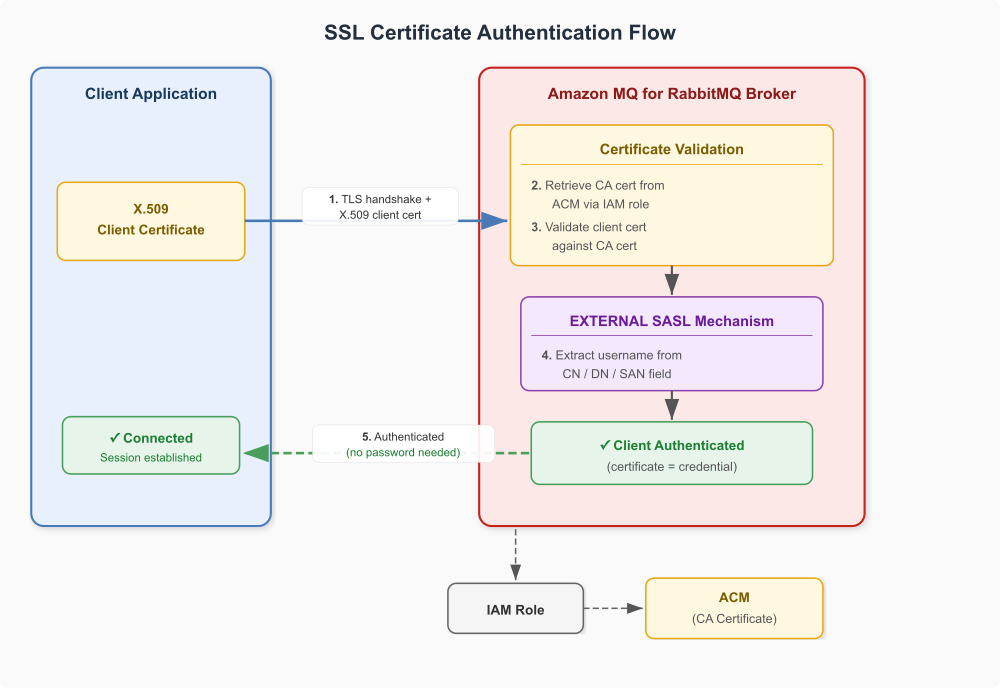
Figure 1: SSL certificate authentication flow
Username extraction options
The broker can extract the client identity from different fields of the X.509 certificate:
ssl_cert_login_from value |
Certificate field used | Example |
common_name |
Common Name (CN) | CN=myapp → username myapp |
distinguished_name |
Full Distinguished Name | CN=myapp,O=MyOrg → username CN=myapp,O=MyOrg |
subject_alternative_name |
Subject Alternative Name (SAN) entry | SAN dns:myapp.example.com → username myapp.example.com |
When you use subject_alternative_name, you also configure ssl_cert_login_san_type (dns, ip, email, uri, or other_name) and ssl_cert_login_san_index to specify which SAN entry to use.
Note: The username extraction options for ssl_cert_login_from apply only to SSL certificate authentication. mTLS doesn’t extract identity from the client certificate.
Key configuration
The following rabbitmq.conf snippet shows the essential settings for SSL certificate authentication:
The following table describes what each setting controls:
| Setting | Purpose |
auth_mechanisms.1 = EXTERNAL |
Enables the EXTERNAL SASL mechanism, authenticating clients using their X.509 certificate instead of a username and password |
ssl_cert_login_from = common_name |
Tells the broker which certificate field to extract the username from |
ssl_options.verify = verify_peer |
Enables client certificate verification |
ssl_options.fail_if_no_peer_cert = true |
Rejects connections from clients that do not present a certificate |
aws.arns.assume_role_arn |
IAM role ARN the broker assumes to retrieve certificates from ACM |
aws.arns.ssl_options.cacertfile |
ARN of the CA certificate in ACM used to validate client certificates |
Note: EXTERNAL and internal serve different purposes. EXTERNAL is the authentication mechanism that verifies client identity using the X.509 certificate. internal is the authorization backend that resolves permissions for the authenticated user from RabbitMQ’s built-in user store.
Important considerations
- Client certificates must be signed by a trusted Certificate Authority (CA). The broker validates the certificate chain during authentication.
- Amazon MQ enforces the use of AWS ARNs for certificate-related settings. Use
aws.arns.ssl_options.cacertfileinstead ofssl_options.cacertfile. - Amazon MQ automatically creates a system user named
monitoring-AWS-OWNED-DO-NOT-DELETEwith monitoring-only permissions. This user uses RabbitMQ’s internal authentication system even on SSL certificate-enabled brokers and is restricted to loopback interface access only. - If any setting requires the use of an AWS ARN, you must also provide
aws.arns.assume_role_arn. - Amazon MQ doesn’t currently support CRL or OCSP for certificate revocation. To revoke a client certificate that’s no longer trusted, replace the CA certificate on AWS Private Certificate Authority (AWS Private CA), re-issue valid client certificates, and apply a configuration update to the broker.
- To rotate certificates, update the CA certificate on AWS Private CA and update the broker configuration. Configuration changes don’t take effect immediately. To apply your changes, wait for the next maintenance window or reboot the broker.
How mutual TLS (mTLS) works
Standard TLS works like visiting a secure website: only the server proves its identity to your browser using a certificate. With mTLS, both your client application and the message broker must prove their identities using certificates. This two-way authentication helps verify that only authorized clients can connect to your broker. Unlike SSL certificate authentication, mTLS still requires a username and password at the application layer.
When your client connects to an Amazon MQ broker with mTLS enabled, the following authentication process occurs:
- The client initiates a TLS connection and presents its client certificate.
- The Amazon MQ broker assumes an IAM role to retrieve the CA certificate from ACM.
- The broker validates the client certificate against the CA certificate.
- The client authenticates with a username and password in the application layer.
- Authentication succeeds, and the broker establishes a secure, encrypted connection with the client.
Note: Unlike SSL certificate authentication, mTLS doesn’t extract the username from the certificate. The client certificate proves transport-layer trust only. The broker validates it against the CA certificate but does not use any certificate fields for application-level authentication. The username provided at login doesn’t need to match the client certificate’s CN.
The following diagram illustrates this two-layer flow. On the left, the client application holds both a client certificate and a username and password. In the center, the arrows show the TLS handshake carrying the client certificate to the broker, followed by the credentials. On the right, the Amazon MQ for RabbitMQ broker performs certificate validation at the transport layer, assuming an IAM role to retrieve the CA certificate from ACM. It then authenticates the username and password at the application layer before establishing the secure connection to the client.
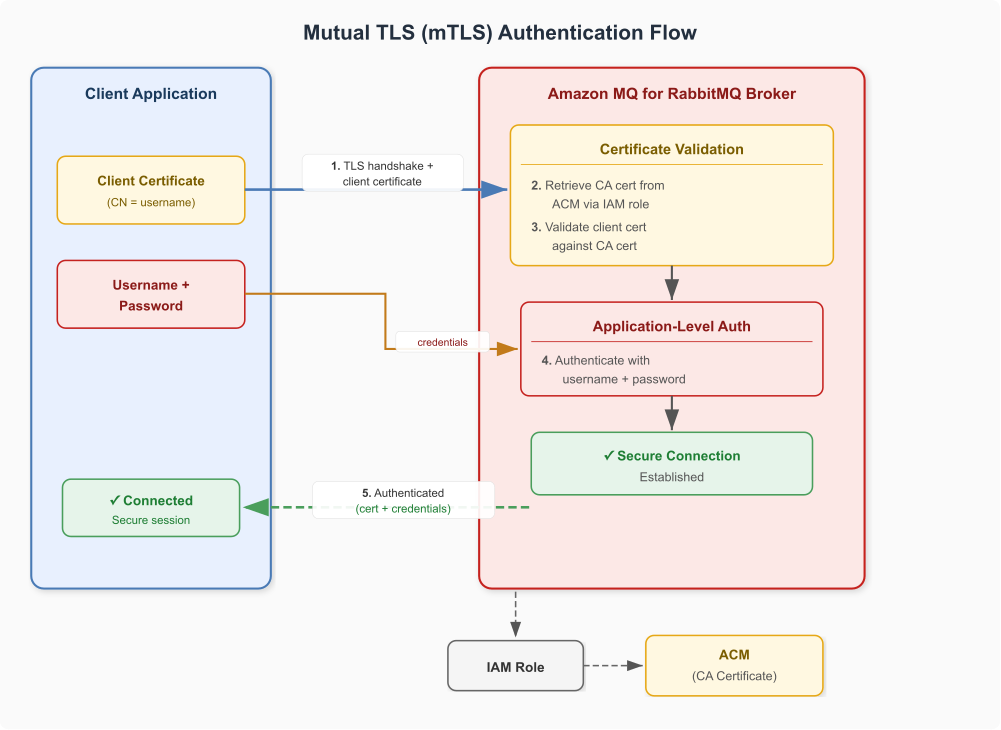
Figure 2: Mutual TLS authentication flow
With mTLS, you can secure:
- Client connections to the AMQP endpoint.
- The RabbitMQ management interface.
- Connections to OAuth 2.0 identity providers.
- HTTPS authentication server connections.
- Lightweight Directory Access Protocol (LDAP) server communications.
Key configuration
The following rabbitmq.conf snippet shows the essential settings for mTLS:
The following table describes the mTLS-specific settings and their purpose:
| Setting | Purpose |
ssl_options.verify = verify_peer |
Enables client certificate verification for AMQP connections |
ssl_options.fail_if_no_peer_cert = true |
Rejects connections from clients that do not present a certificate |
management.ssl.verify = verify_peer |
Enables client certificate verification for the RabbitMQ management interface |
aws.arns.ssl_options.cacertfile |
ARN of the CA certificate in ACM used to validate client certificates for AMQP |
aws.arns.management.ssl.cacertfile |
ARN of the CA certificate in ACM used to validate client certificates for the management interface |
Certificate requirements
Both SSL certificate authentication and mTLS require three types of certificates:
- Server certificate: Authenticates the broker to clients. Obtain from AWS Private Certificate Authority (AWS Private CA) and reference using an AWS ARN.
- Client certificates: Authenticate each client application to the broker. Issue from your organization’s CA or AWS Private CA.
- CA certificate: Validates client certificates on the broker side. Store in ACM and reference in the broker’s SSL configuration.
Comparing SSL certificate authentication and mTLS
Use the following table to decide which method fits your security requirements:
| Aspect | SSL certificate authentication | Mutual TLS (mTLS) |
| Authentication mechanism | EXTERNAL SASL — certificate is the sole credential |
Transport-layer cert verification + username/password at application layer |
| Password required | No | Yes |
| Username source | Extracted from certificate (CN, DN, or SAN) | Provided by client at login |
| SASL mechanism | EXTERNAL |
PLAIN (default) |
| Management interface cert verification | Not included by default | Supported through management.ssl.verify |
| Key config directive | auth_mechanisms.1 = EXTERNAL |
ssl_options.verify = verify_peer |
| Use case | Passwordless environments, PKI-managed identities | Adding cert verification to existing credential-based auth |
| Compliance fit | Environments requiring no passwords on the wire | Frameworks requiring two-factor (something you have + something you know) |
Choose SSL certificate authentication when eliminating passwords entirely from your messaging layer, or when your PKI infrastructure already manages client identities. Choose mTLS when adding transport-layer certificate verification to an existing deployment that relies on username/password authentication, or when compliance frameworks mandate two-factor authentication.
Additional SSL options
Both methods support the following additional configuration options:
| Configuration | Description |
ssl_options.depth |
Maximum certificate chain depth for verification |
ssl_options.hostname_verification |
Hostname verification mode: wildcard or none |
ssl_cert_login_san_type |
SAN type when using Subject Alternative Name: dns, ip, email, uri, or other_name |
ssl_cert_login_san_index |
Zero-based index of the SAN entry to use |
Implementation guides
For step-by-step deployment and validation instructions, see the following resources:
- Amazon MQ for RabbitMQ mTLS tutorial – Configure and test mTLS using the AWS Command Line Interface (AWS CLI).
- Using SSL certificate authentication tutorial – Configure and test SSL certificate authentication using the AWS CLI.
- Amazon MQ samples repository – AWS Cloud Development Kit (AWS CDK) stacks and sample code for both methods.
Both tutorials use AWS CDK for infrastructure deployment and include validation scripts to test connectivity.
Conclusion
SSL certificate authentication and mTLS each address different security requirements for Amazon MQ for RabbitMQ. SSL certificate authentication uses the X.509 certificate as the sole credential through the EXTERNAL SASL mechanism, eliminating passwords entirely. mTLS adds transport-layer certificate verification on top of existing username/password authentication, giving you two-factor security. If you are building a regulated environment, SSL certificate authentication removes passwords from the wire entirely, which might help support security requirements in frameworks that address credential management. If you’re incrementally hardening an existing deployment, mTLS lets you add transport-layer verification without changing how clients authenticate. In the next post in this series, we cover OAuth 2.0, LDAP, and HTTP authentication for Amazon MQ for RabbitMQ.
To get started with Amazon MQ for RabbitMQ, see the Amazon MQ service page.
Additional resources
For more information about Amazon MQ security, see the following resources:
- Amazon MQ Developer Guide: Security
- SSL certificate authentication for Amazon MQ for RabbitMQ
- Amazon MQ for RabbitMQ mTLS tutorial
- Amazon MQ samples repository
- AWS Security Best Practices