AWS Big Data Blog
Query Amazon S3 Tables from Amazon EMR Trino using the Iceberg REST endpoint
Organizations running analytics on Amazon Simple Storage Service (Amazon S3) data lakes often struggle with the operational overhead of managing Apache Iceberg tables, including compaction, snapshot expiration, and metadata tracking, while still needing fast, interactive SQL access across large volumes of data. Amazon S3 Tables, a capability of Amazon S3, addresses this by providing a purpose-built storage layer with native Apache Iceberg support and automated table maintenance. When you query S3 Tables from Amazon EMR using Trino and the Iceberg REST endpoint, you get a fully managed, open-standards-based analytics stack without the undifferentiated heavy lifting of table upkeep.
When paired with Amazon EMR running Trino, organizations gain access to a high-performance distributed SQL query engine capable of processing large-scale datasets. Trino’s ability to query data across multiple sources, combined with the automated optimization features of S3 Tables, creates a flexible analytics platform. The integration uses Apache Iceberg’s REST catalog specification, providing a standardized interface that supports compatibility across different compute engines while maintaining full control over query execution and data processing logic.
This architectural pattern is particularly valuable for organizations seeking to modernize their data platforms without vendor lock-in, as it relies on open standards and formats. The solution delivers high-throughput query performance with distributed SQL execution while significantly reducing the operational burden of managing table metadata, compaction, and snapshot lifecycle management. In this post, we show you how to create and query Amazon S3 Tables using Trino on Amazon EMR through the Apache Iceberg REST catalog endpoint.
Solution overview
This implementation demonstrates a complete integration between the Trino distribution on Amazon EMR and Amazon S3 Tables through the Apache Iceberg REST catalog endpoint. The architecture uses several key AWS services working in concert:
Amazon EMR serves as the managed compute layer, providing a scalable Hadoop framework that hosts the Trino query engine. Amazon EMR handles cluster provisioning, configuration management, and automatic scaling, allowing teams to focus on analytics rather than infrastructure management.
Apache Trino acts as the distributed SQL query engine, offering ANSI SQL compatibility and the ability to process queries across massive datasets with low latency for interactive workloads. Its connector architecture supports integration with various data sources, including the Iceberg REST catalog.
Amazon S3 Tables provides the storage and catalog layer, managing Apache Iceberg tables with built-in optimization. The service automatically handles compaction, snapshot expiration, and metadata management, reducing operational overhead while maintaining query performance. S3 Tables exposes a REST API endpoint that conforms to the Apache Iceberg REST catalog specification, which provides standardized integration with any Iceberg-compatible engine.
Apache Iceberg REST endpoint serves as the communication protocol between Trino and S3 Tables. This RESTful interface handles catalog operations including namespace management, table creation, metadata retrieval, and transaction coordination. The endpoint supports AWS Signature Version 4 authentication for secure access to table resources.
The data flow follows this pattern: Users submit SQL queries through the Trino CLI or JDBC interface. Trino’s Iceberg connector communicates with the S3 Tables REST endpoint to retrieve table metadata and plan query execution. The query engine then reads data directly from S3 using optimized file formats (Parquet, ORC) while using Iceberg’s metadata layer for partition pruning and predicate pushdown. Write operations follow a similar path, with Trino coordinating with S3 Tables to commit new data files and update table metadata atomically.
This architecture delivers several key benefits: separation of compute and storage for independent scaling, automated table maintenance reducing operational costs, open-source format compatibility preventing vendor lock-in, and fine-grained access control through AWS Identity and Access Management (IAM) and AWS Lake Formation integration.
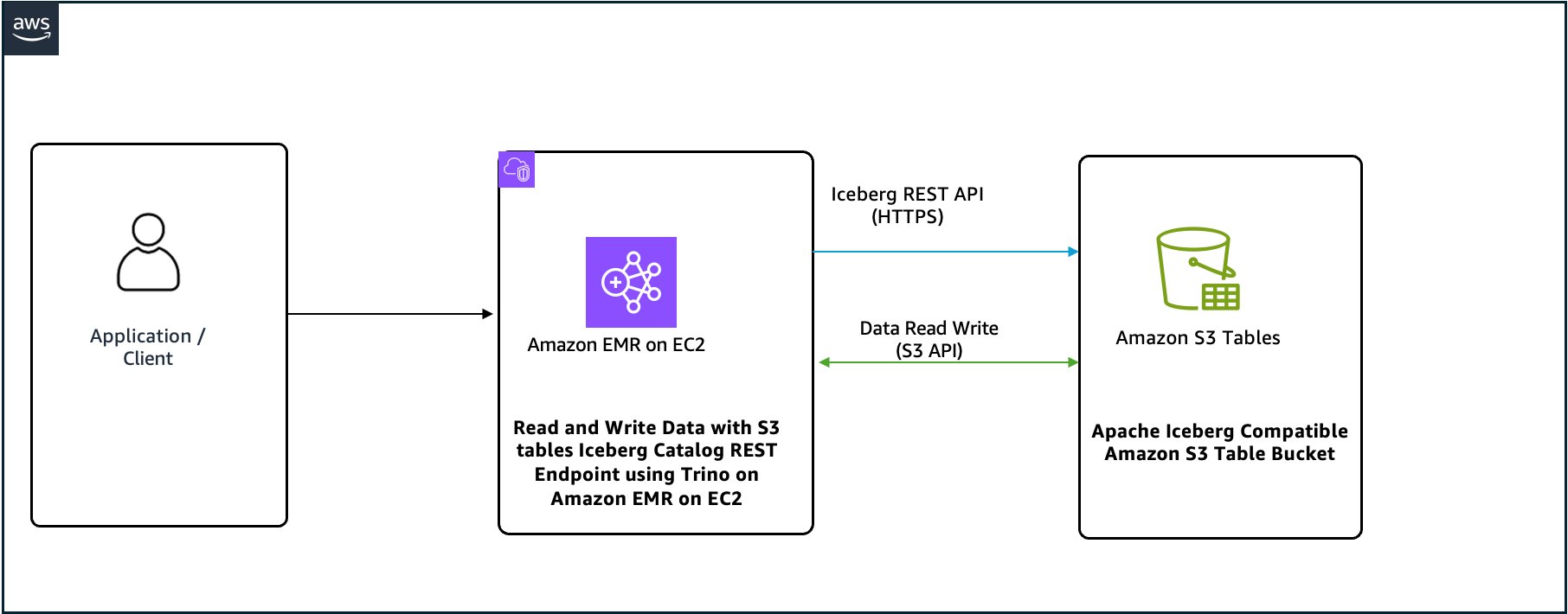
Figure 1: Solution architecture for querying Amazon S3 Tables from Trino on Amazon EMR
Prerequisites
Before getting started, make sure that you have the following:
- An active AWS account with billing enabled.
- An AWS Identity and Access Management (IAM) user with specific permissions to create and manage resources, such as a virtual private cloud (VPC), subnet, security group, IAM roles, Amazon EMR, Interface VPC endpoints, S3 Tables bucket and S3 buckets.
- Sufficient VPC capacity in your chosen AWS Region.
For this post, we create the solution resources in the US East (N. Virginia) Region (us-east-1) using AWS CloudFormation templates. In the following sections, we show you how to configure your resources and implement the solution.
Note: Querying Amazon S3 Tables through Trino on Amazon EMR requires Trino version 475 or later, available in Amazon EMR 7.11 and later.
Part A: Configure Amazon S3 Tables integration with Trino on Amazon EMR using AWS CloudFormation
In this post, you use the CloudFormation template emr-trino-s3tables.yaml.
- This template deploys the following resources: a VPC with one private subnet, an S3 Tables interface VPC endpoint for private access, and an Amazon EMR cluster running Trino integrated with Amazon S3 Tables through the Apache Iceberg REST catalog endpoint.
- It also creates an S3 Tables bucket, a general-purpose S3 bucket, IAM roles, and security groups.
- At deploy time, it dynamically generates the Trino catalog configuration and bootstrap script.
To create the solution resources, complete the following steps:
- Launch the stack
emr-trino-s3tables.yamlusing the CloudFormation template.

- Provide the parameter values as listed in the following table.
| Parameters | Description | Sample value |
| Stack Name | Name of CloudFormation stack | emr-s3tables-trino |
| VPC CIDR block | IP range (CIDR notation) for this VPC. | 10.0.0.0/16 |
| Private Subnet CIDR block | IP range (CIDR notation) for the private subnet in the second Availability Zone. | 10.0.1.0/24 |
| Resource name Prefix | Short prefix applied to every resource name | emr-s3tables |
| S3 Tables bucket name | Name of S3 table Bucket | trinoemrs3tablebuck |
| EMR release | Release version of Amazon EMR | EMR 7.12 |
The stack creation process can take approximately 15 minutes to complete. You can check the Outputs tab for the stack after the stack is created, as shown in the following screenshot.
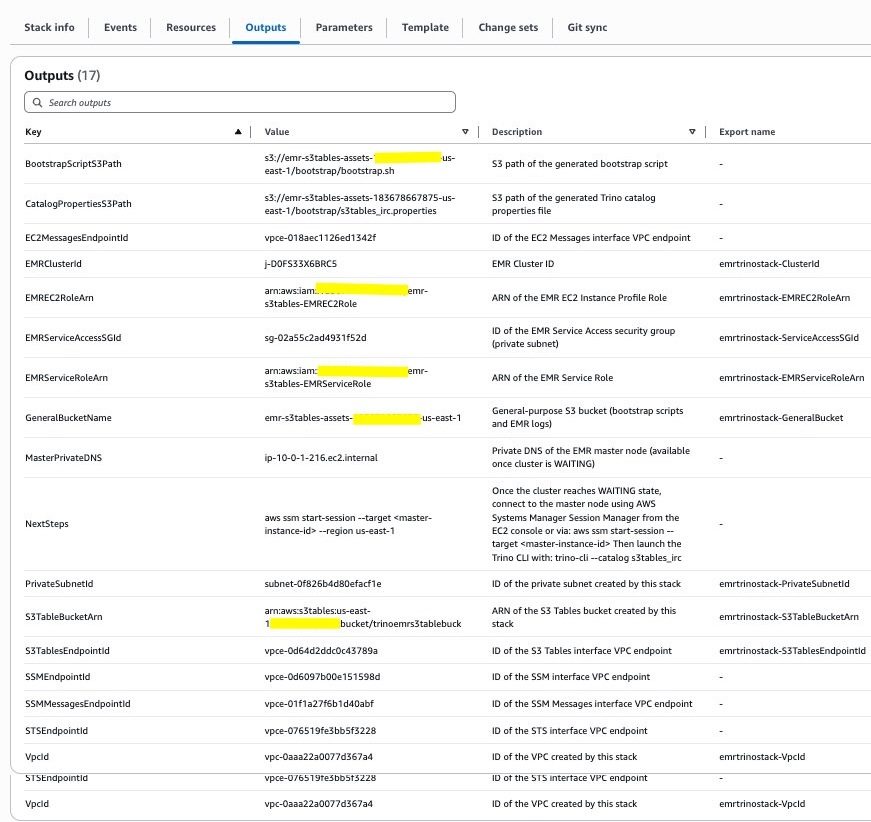
Figure 3: CloudFormation stack outputs
Understanding the deployment
The CloudFormation template performs several key tasks:
- Infrastructure provisioning: Sets up the Amazon EMR cluster with Trino, VPC, subnet, security group, and S3 table bucket.
- Configuration: Creates necessary Trino configuration files.
- Integration configuration: Sets up the Iceberg REST connector for S3 Tables.
Part B: Connecting Trino to Amazon S3 Tables with Iceberg REST endpoint
The CloudFormation template automatically configures the S3 Tables catalog in Trino on Amazon EMR. In the next section, we examine the configuration that drives this integration.
1. Catalog configuration details
A catalog in Trino on Amazon EMR is the configuration that grants access to a specific data source. Each Trino on Amazon EMR cluster can have multiple catalogs configured, allowing access to different data sources simultaneously.
As part of this setup, the CloudFormation template creates a catalog properties file at /etc/trino/conf/catalog/s3tables_irc.properties with the following configuration:
2. S3 Tables Iceberg REST endpoint configuration properties
The following table lists the key properties in the catalog configuration on Trino:
| Property name | Description |
| iceberg.rest-catalog.uri | REST server API endpoint URI (necessary). |
| iceberg.rest-catalog.warehouse | Warehouse ID or location for the catalog (necessary). For S3 Tables, this is the ARN for the S3 table bucket as shown in the preceding properties example. |
| iceberg.rest-catalog.sigv4-enabled | Must be set to ‘true’ (necessary) |
| iceberg.rest-catalog.signing-name | Must be set to ‘s3tables’ (necessary) |
| iceberg.rest-catalog.view-endpoints-enabled | Must be set to ‘false’ (necessary) |
| fs.hadoop.enabled | Must be set to ‘false’ |
| fs.native-s3.enabled | Must be set to ‘true’ |
| s3.iam-role | Amazon Resource Name (ARN) of the IAM role with permissions to S3 Tables. In this post, we use the same role, which is the service role for Amazon EMR. |
| s3.region | AWS Region, for example us-east-1 |
This configuration establishes a connection between Trino and the S3 Tables REST endpoint. You can have multiple catalogs registered, one per S3 table bucket, which is determined by the iceberg.rest-catalog.warehouse property.
3. Configure Amazon EMR service IAM role trust relationships
The Amazon EMR service role requires proper trust relationships to function correctly. Navigate to the IAM console and configure the trust policy for your Amazon EMR service role:
This trust policy establishes two critical relationships:
- The Amazon EMR service can assume the role to manage cluster operations.
- The EC2 instance profile can assume the role to access S3 Tables with elevated permissions.
4. Working with S3 Tables in Trino on Amazon EMR
Now that you have Trino on Amazon EMR set up and configured to work with S3 Tables, you can explore how to work with this integration.
4.1. Connecting to Trino on Amazon EMR
Navigate to Amazon EMR and select Connect to the primary node using AWS Systems Manager Session Manager for passwordless SSH.
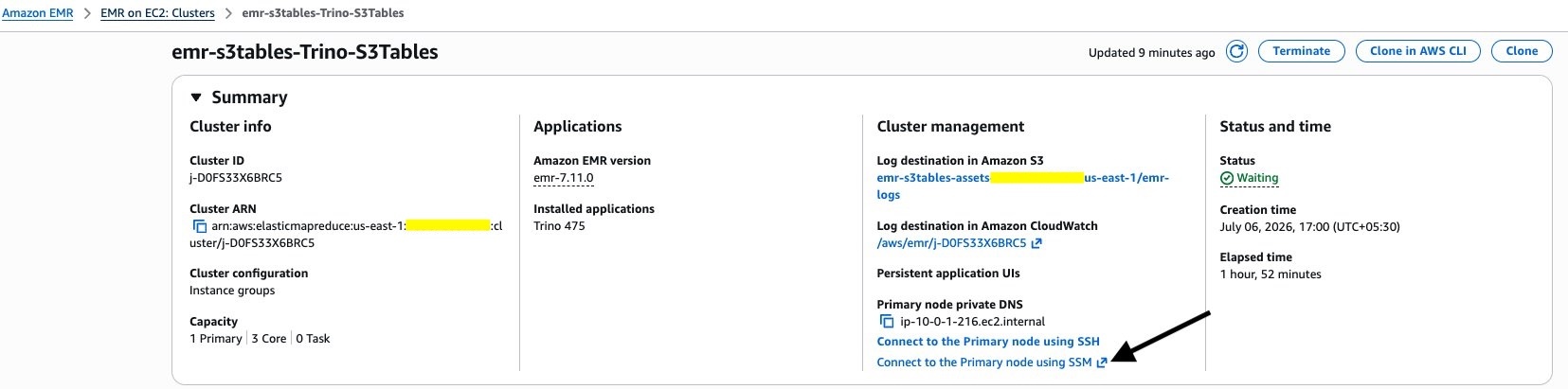
Figure 4: Connecting to the primary node with Session Manager
When you’re connected, you can use the Trino CLI with your S3 Tables catalog:
This connects you to the Trino on Amazon EMR using the S3 Tables integration you configured.
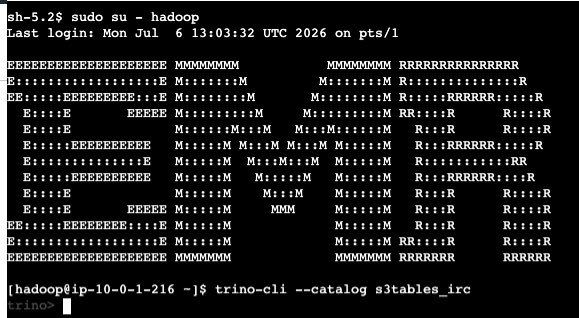
Figure 5: Trino CLI connected to the S3 Tables catalog
4.2. Examples: Creating and querying tables
In this section you run through some example queries to demonstrate the functionality.
4.2.1 Creating a namespace
First, you create a namespace (schema) in S3 Tables. A namespace in S3 Tables is a logical container or organizational unit that helps group related tables and objects together.
4.2.2 Creating a table
Create a table with various data types. You don’t need to specify the table type as Iceberg explicitly because you’re connecting to the Iceberg catalog. You can use all standard Iceberg capabilities, such as partitioning and sorting. Furthermore, some of the important Iceberg table properties that support table maintenance operations are configured with default values. You also have the option to edit the configurations using S3 Tables maintenance APIs.
Table property explanation:
format = 'PARQUET': Specifies Parquet as the file format for optimal compression and query performance.sorted_by = ARRAY['customer_id']: Defines sort order within data files, improving query performance forcustomer_idfilters.
Verify the table creation:
You should see customers in the output, confirming the table exists in the S3 Tables catalog.
4.2.3 Inserting data
You can insert some sample data into your table. You can also use an existing table in any of the catalogs configured in Trino on Amazon EMR to read data and write into the S3 table with an INSERT INTO ... SELECT statement.
This INSERT operation demonstrates Trino’s ability to write data to S3 Tables. Behind the scenes, Trino:
- Writes data files in Parquet format to S3.
- Communicates with the S3 Tables REST endpoint to register the new files.
- Atomically commits the transaction, updating table metadata.
4.2.4 Querying data
Execute a SELECT query to retrieve and verify the inserted data:
The query should return all eight customer records with proper formatting. You can also execute more complex analytical queries:
These queries demonstrate Trino’s SQL capabilities and the integration with S3 Tables for both read and write operations.
4.3 Explore advanced features
S3 Tables with Iceberg provides several features for data management:
4.3.1 Time travel queries
Step 1: Check available snapshots.
Step 2: Query the table as of a specific snapshot.
4.3.2 Schema evolution
Cleaning up
To clean up the resources, navigate to CloudFormation and delete the stack that you created.
Conclusion
This solution demonstrates an integration between Amazon EMR Trino and Amazon S3 Tables using the Apache Iceberg REST catalog specification. In this post, we showed you how to create and query S3 Tables from Trino on Amazon EMR. The architecture delivers several advantages for modern data platforms:
Operational simplicity: S3 Tables eliminates the complexity of managing Iceberg table metadata, compaction schedules, and snapshot lifecycle policies. The service handles these operations automatically, allowing data teams to focus on analytics rather than infrastructure maintenance.
Performance at scale: The architecture is designed for large-scale workloads. Trino distributes query execution across the cluster while Iceberg’s metadata layer helps the engine locate only the relevant data files. Features like partition pruning, predicate pushdown, and columnar file formats can help improve performance for both interactive and batch workloads.
Cost efficiency: This architecture separates compute and storage, so you can scale each independently based on workload requirements. S3 Tables automatically compacts small files to help reduce storage overhead, and Amazon EMR clusters can scale dynamically so you pay for compute only when needed.
Open standards and portability: By using Apache Iceberg’s open table format and REST catalog specification, this solution avoids vendor lock-in. Other Iceberg-compatible engines can access tables created in S3 Tables including Apache Spark, Apache Flink, and Dremio, providing flexibility in tool selection.
Fine-grained access control: Integration with IAM and resource-based policies provides access control at the table bucket, namespace, and table level. For fine-grained access at the column and row level, you can integrate with AWS Lake Formation. AWS Signature Version 4 authentication supports secure communication between Trino and S3 Tables.
ACID transactions: Iceberg’s transaction model guarantees atomicity, consistency, isolation, and durability for all table operations. This supports reliable concurrent reads and writes, making the platform suitable for production workloads requiring data consistency.
This architectural pattern is particularly well-suited for organizations building modern data lakehouses, migrating from traditional data warehouses, or consolidating multiple analytics platforms. The combination of the managed compute of Amazon EMR, Trino’s versatile query engine, and the automated table management of S3 Tables creates a strong foundation for data-driven decision making.
To learn more about the services and features discussed in this post, see the following resources: