AWS Big Data Blog
Streamline your Amazon Redshift maintenance event notifications with Amazon Simple Notification Service
In this post, we take you through customization options for managing the schedule of your Amazon Redshift maintenance events, along with Amazon Redshift maintenance tracks for optimizing cluster performance. We also walk you through how to set up Amazon Redshift event notifications using Amazon SNS.
For provisioned clusters, Amazon Redshift periodically performs maintenance to apply fixes, enhancements, and new features to your cluster. Amazon Redshift assigns a 30-minute maintenance window. To prioritize business continuity and to align with your operational needs, this maintenance window is fully customizable, either programmatically or through the AWS Management Console for Amazon Redshift. For more information, see Managing clusters using the console.
A robust notification system is available to inform you about maintenance activities on your Amazon Redshift clusters to help you plan effectively and maintain communication with your users about scheduled system updates. Using the Amazon Redshift integration with Amazon Simple Notification Service (Amazon SNS), you can enable notifications of an upcoming maintenance events by creating an Amazon Redshift event notification subscription.
Customizing your provisioned cluster maintenance events
Amazon Redshift provides several ways to control how AWS maintains your provisioned clusters. The following are the primary customization options available:
- Modifying the schedule for upcoming maintenance events: You can control when we deploy updates to your clusters.
- Deferring upcoming maintenance: You can defer non-mandatory maintenance updates for a defined period of time.
- Choosing a maintenance track to optimize performance: You can choose whether your cluster runs the most recently released version or the version released prior to the most recently released version.
- Receiving notifications of upcoming maintenance: You can set up notifications for upcoming maintenance events scheduled for your clusters.
There is no set maintenance window for Amazon Redshift Serverless. When a new version becomes available for a workgroup’s chosen track, Amazon Redshift Serverless typically applies the update during an idle period as long as there is no pending track update request. If the workgroup doesn’t experience an idle period within 14 days, Redshift Serverless forces the version update.
Modifying the schedule for upcoming maintenance events
If a maintenance event is scheduled for a given week, it starts during the assigned 30-minute maintenance window. While Amazon Redshift is performing maintenance, it terminates queries or other operations that are in progress. If there are no maintenance tasks to perform during the scheduled maintenance window, your cluster continues to operate normally until the next scheduled maintenance window.
You can change the scheduled maintenance window by modifying the cluster, either programmatically or by using the Amazon Redshift console. You can find the maintenance window and set the day and time it occurs for the cluster under the Maintenance tab.
Deferring upcoming maintenance
Amazon Redshift provides additional control over cluster maintenance by deferring upcoming maintenance for up to 60 days. This feature is invaluable when you need uninterrupted cluster access during critical business periods. For instance, if your cluster’s maintenance window is set to Thursday from 5:30–6:00 UTC, and you need to have nonstop access to your cluster for the next 2 weeks, you can defer maintenance to a date 2 weeks from now. We don’t perform maintenance on your cluster during a specified deferment.
While standard maintenance can be deferred, mandatory updates—such as critical security patches, which typically occur at most annually, or hardware updates—must proceed as required. In these cases, Amazon Redshift notifies you through both the console and your Amazon SNS subscription, marking these as pending events, and implements these changes regardless of deferral settings to maintain the security and reliability of your infrastructure.
While performing deferred maintenance on Amazon Redshift clusters with Amazon Redshift data sharing configured, maintaining version compatibility between producer and consumer clusters is crucial for supporting reliable data sharing. As a best practice, you should keep producer and consumer clusters within two versions of each other to minimize potential compatibility issues. For instance, if a producer cluster is running version P195, consumer clusters should be between P193 and P197. To support effective version management, you can also use notification systems that provide timely alerts about planned cluster patching, enabling proactive version alignment and reducing the risk of potential data sharing disruptions.
Choosing a maintenance track to optimize cluster performance
Amazon Redshift offers two maintenance tracks that provide you control over how and when cluster version updates are applied, helping to ensure optimal performance while minimizing business disruption. The Current track automatically applies updates during your scheduled maintenance window, keeping your cluster on the latest version with the newest features and improvements. For organizations requiring additional validation time, the Trailing track delays version updates after release, allowing thorough testing of your workloads in development environments before production deployment.
Using the Amazon Redshift Trailing track in your production environment, and the Current track in your testing and development environment, gives you additional diligence and time to evaluate the latest release. This approach enables you to validate version updates thoroughly before they reach your production environment. Additionally, scheduling maintenance windows during off-peak hours and establishing a communication protocol to notify stakeholders about upcoming maintenance events minimizes potential impact on production because of maintenance events.
Receiving notifications of upcoming maintenance events
By setting up an Amazon SNS email notification, you can receive real-time updates about your cluster’s maintenance details directly in your inbox. See Amazon Redshift provisioned cluster event notifications for maintenance event categories along with event ID, severity, and notification descriptions.
Set up Amazon Redshift event notifications using Amazon SNS
This section demonstrates how you can set up Amazon SNS notifications for Amazon Redshift maintenance events. For setting up the event notification, we showcase the following two options in this post:
- Using the console
- Using an AWS CloudFormation stack
Amazon SNS notifications can also be set up using AWS Command Line Interface (AWS CLI).
Prerequisites
We assume you have already deployed an Amazon Redshift provisioned cluster. For more information on creating a provisioned cluster, see Creating a cluster.
You also need AWS Identity and Access Management (IAM) permission to create event subscriptions in an Amazon Redshift cluster and topics in Amazon SNS. For more information, see Setting up access for Amazon SNS.
Using the console
In this section, you set up notifications for Amazon Redshift maintenance events from the AWS console.
- Open the Amazon Redshift console.
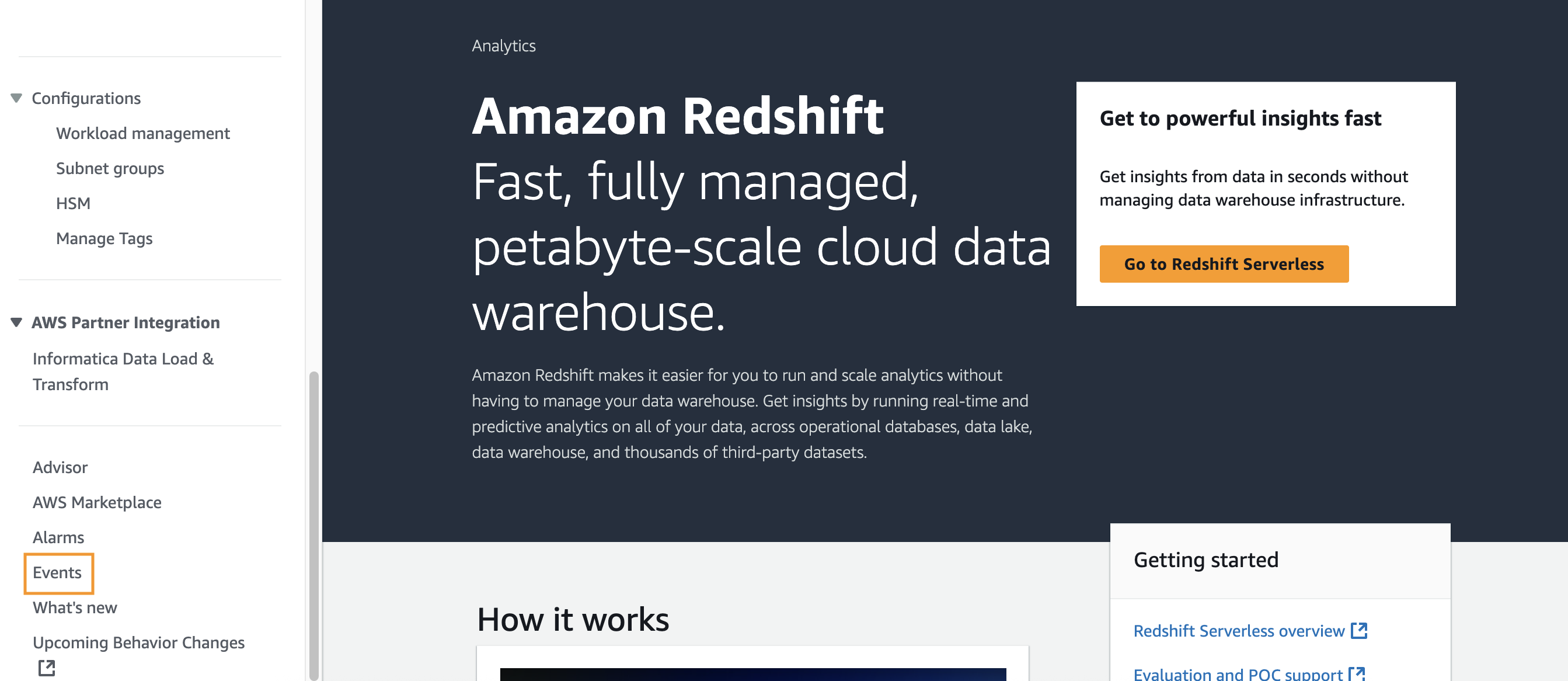
- In the left navigation pane, choose Amazon Redshift and then choose Events.
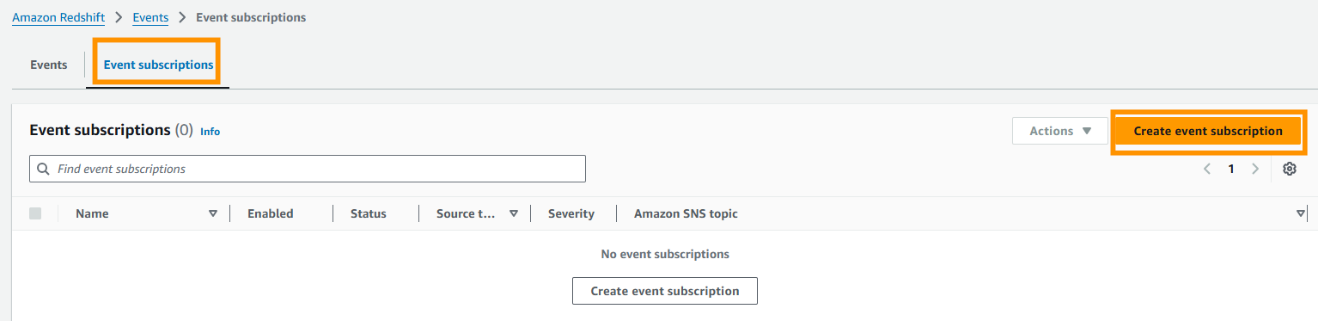
- Select Event Subscriptions and then choose Create event subscription.
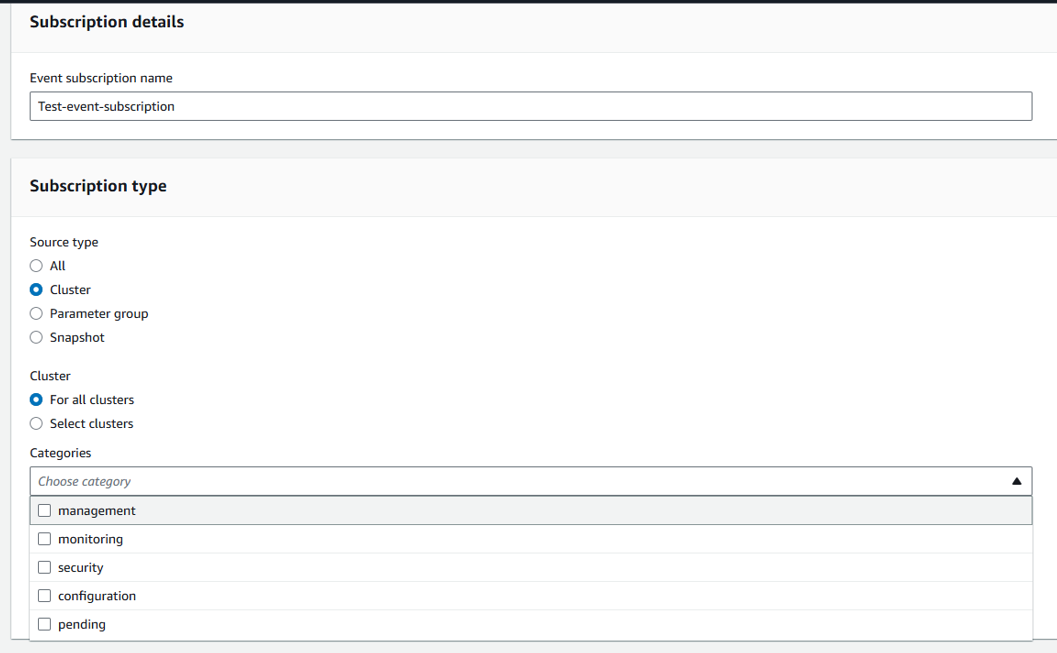
- On the Create event subscription page, enter the following information:
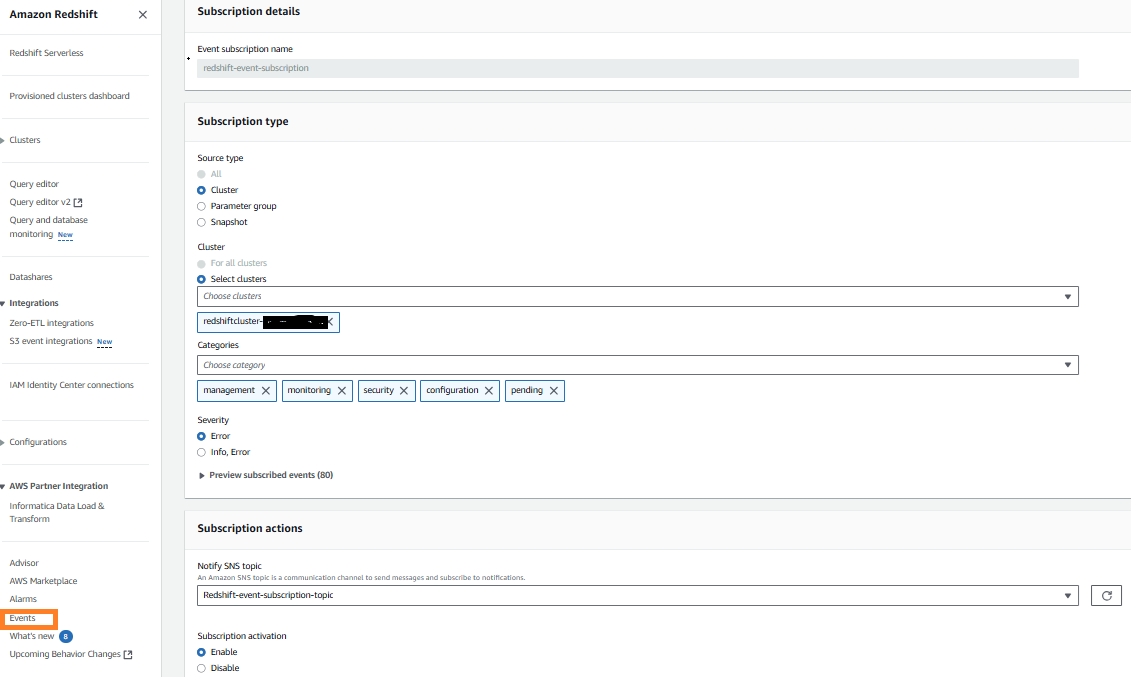
- In the Subscription details section, under Event subscription name, enter a name for the event.
- In the Subscription type section, under Source type, select Cluster.
- For Cluster, choose Select clusters, and then select your cluster IDs.
- For Categories, select your categories.
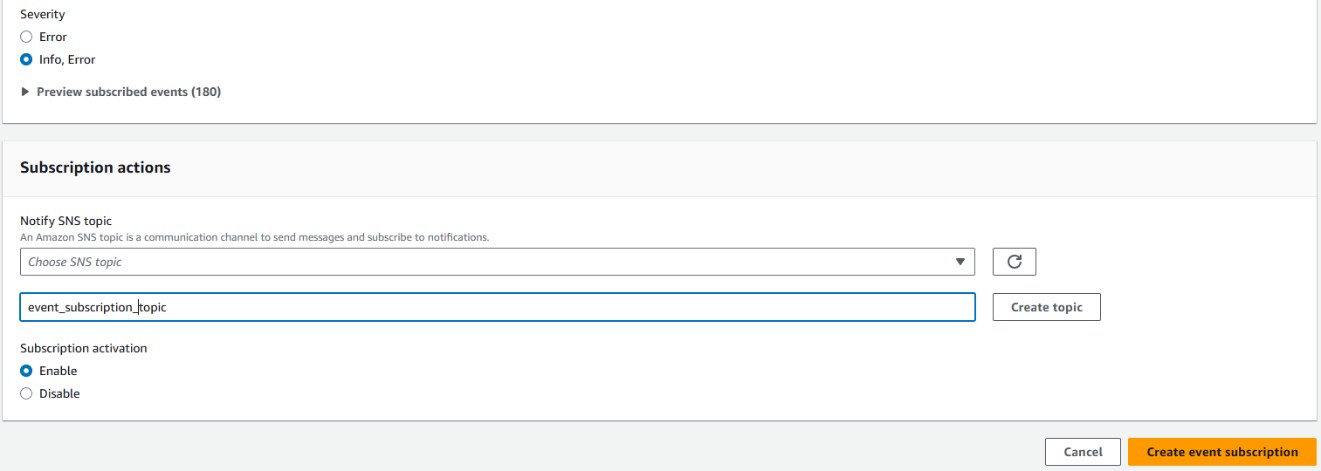
- For Severity, select either Error or Info, Error.
- In the Subscription actions section, select an existing topic or choose Create a new Amazon SNS topic, enter a topic name and then choose Create topic. See create a topic for information about creating a new topic using the Amazon SNS console.
- Choose Create event subscription.
- Under the Event subscriptions section, you can now see the new event subscription.
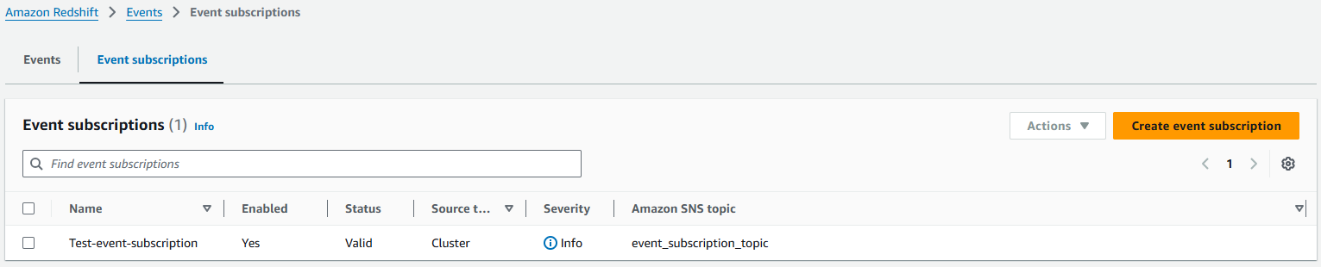
- In the Amazon SNS console, choose Topics and select the topic you configured in Amazon Redshift events in the previous step.
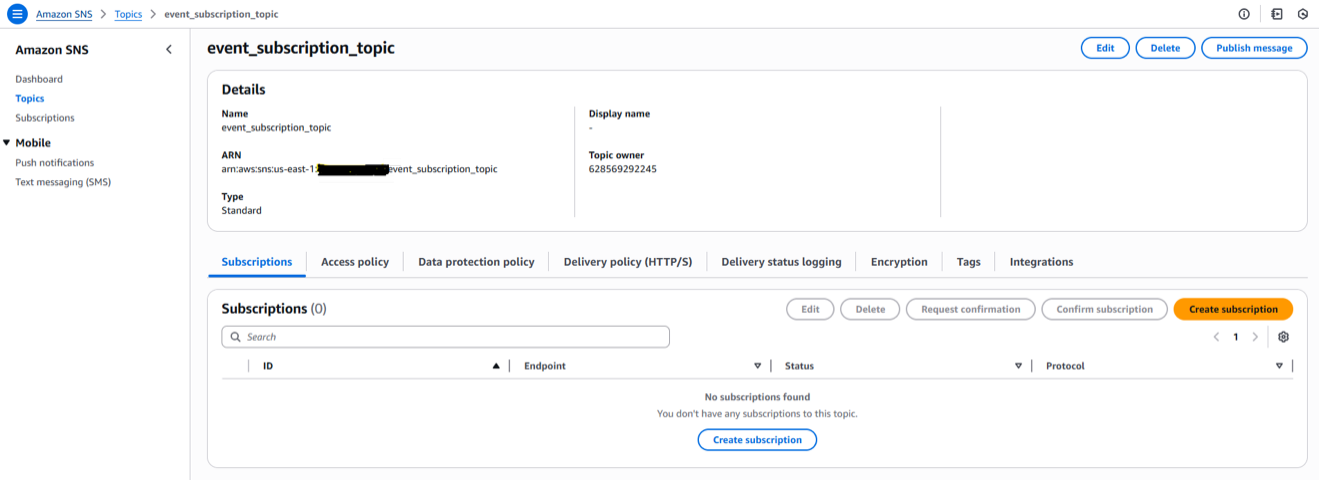
- Choose Create Subscription, under Protocol choose Email and enter a valid email address and choose Create Subscription. You can also select additional protocols based on your preference.
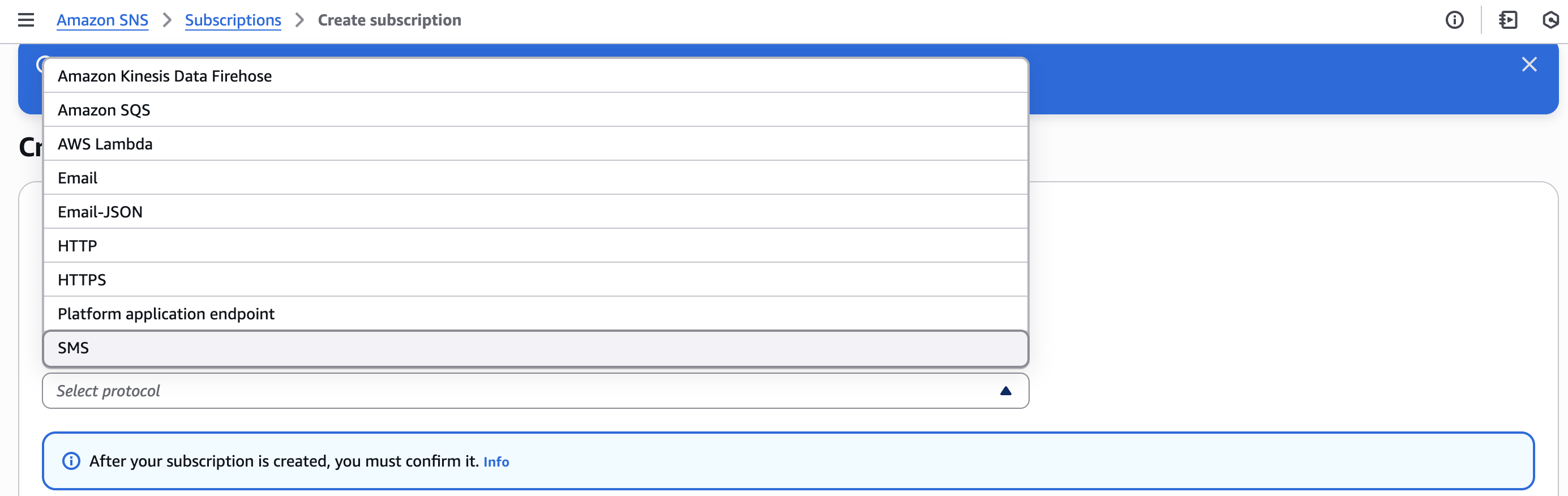
- Choose Pending Subscription and choose Request Confirmation. After the confirmation email is received, choose the Confirm Subscription link in the email.

These event notifications work at the AWS account level.
Using an AWS CloudFormation stack
In this section, you build and configure event notifications on existing Amazon Redshift clusters using an AWS CloudFormation stack:
- Download this CloudFormation template.
- Go to the AWS CloudFormation console.
- Choose Create Stack and select With new resources (standard).
- Under Specify template, select Upload a template file.
- Select Choose file and upload the CloudFormation template you downloaded in Step 1 and choose Next.
- In Stack Name, enter
AmazonRedshift-EventSubscription. - Enter the Parameters as follows:
- For ClusterIdentifier, enter the value for your Amazon Redshift cluster. This can be found by navigating to the Amazon Redshift console and locating the cluster identifier. To subscribe for all clusters in your account, leave this field blank.
- For EmailAddress, enter a valid email address.
- For EventSubscriptionName, enter the value for your event subscription. (for example,
Redshift-event-subscription). - For MonitorAllClusters, select from dropdown:
- Select False if you entered a cluster identifier (subscribing to notification for one cluster)
- Select True if you want to monitor all clusters.
- For Severity Level, select from dropdown:
- Select Error if you want to subscribe to error notifications only.
- Select Info if you want to subscribe to both error and information notifications.
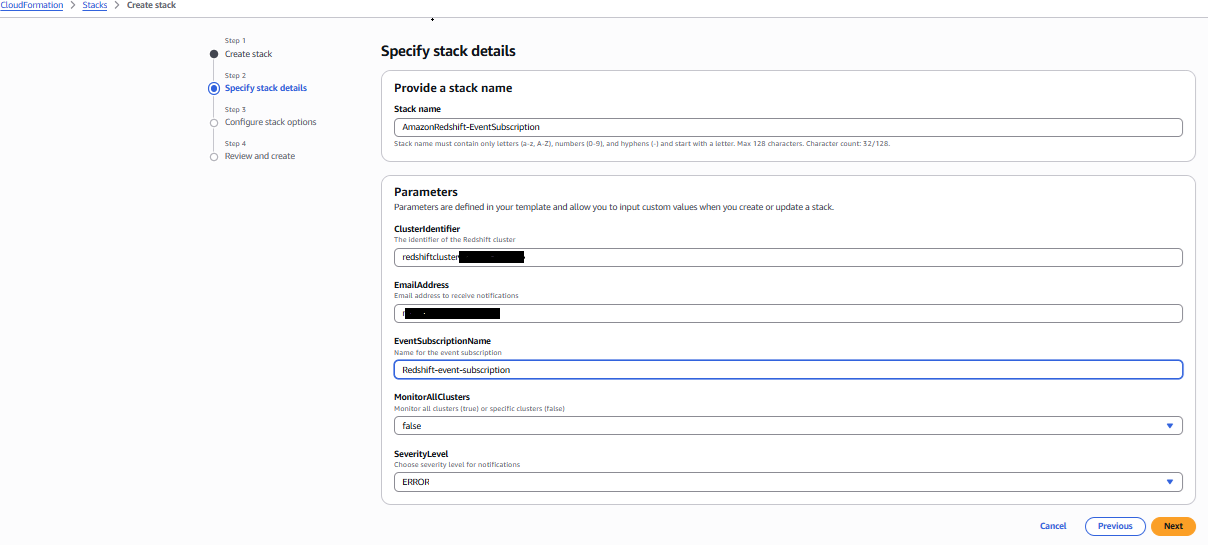
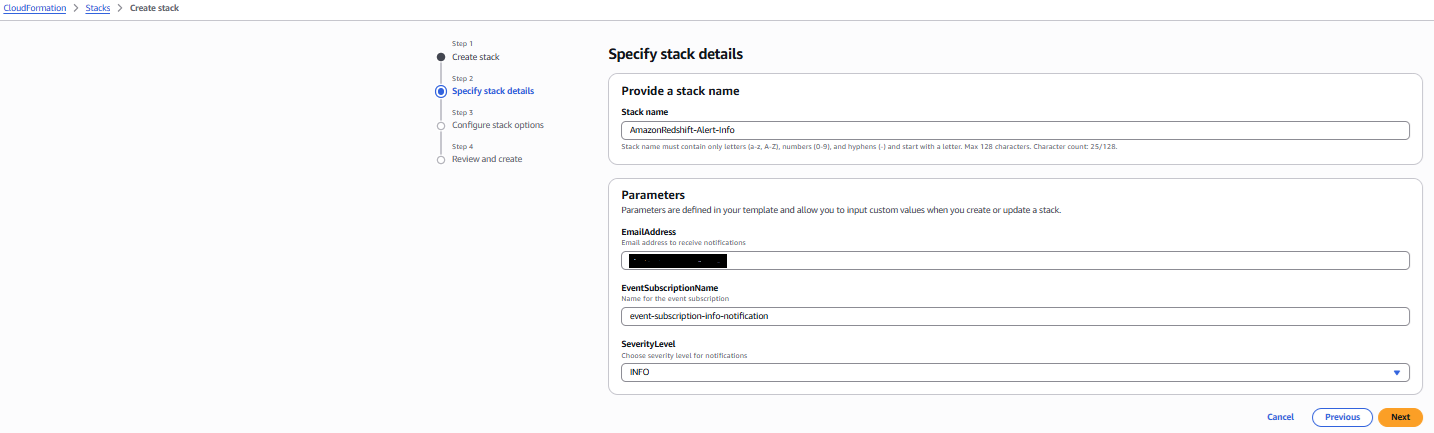
- Choose Next, review the final page, and choose Submit.
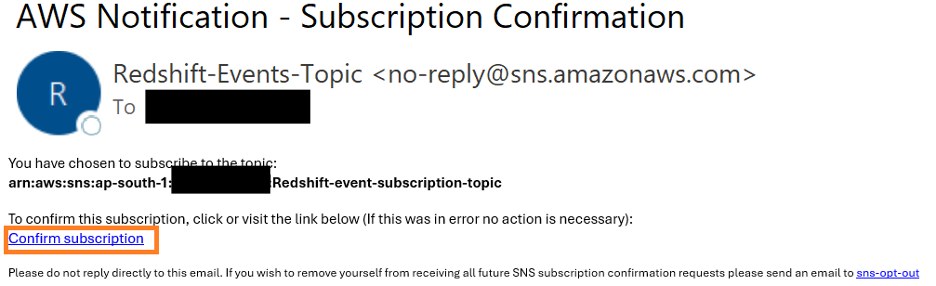
- You will receive an email with subject AWS Notification – Subscription Confirmation. Choose Confirm subscription.
- Go to the Amazon Redshift console and under Events, verify the event subscription.
Sample email notifications from Amazon SNS
In this section, we show you some examples of notification emails sent through Amazon SNS based on the configuration:
Database Update notification:
Amazon Redshift regularly releases cluster versions. The Scheduled Database Update notification, shown in the following screenshot, is sent before an upcoming Amazon Redshift patch version upgrade.

System Update notification:
AWS performs regular updates to the underlying hardware and operating system of Amazon Redshift clusters, including security patches and performance improvements. The Scheduled System Update notification, shown in the following screenshot, is sent before scheduled hardware and OS updates.

If you’re running your non-production clusters on the Current track and production services on the Trailing track, you can receive notifications when your non-production clusters undergo patching, so you can proactively test the release before it goes to your production servers. You can promptly report issues with the update through the AWS Support Center console. If the reported issues are still present when your production clusters are scheduled for the same patch in the Trailing track, you can defer maintenance until the concerns are resolved for stability. To learn how to change tracks for an Amazon Redshift cluster, see Switching between tracks.
Stay informed about version updates using RSS feeds
To stay informed about the latest cluster versions released for Amazon Redshift, you can also use the RSS feed of the Cluster versions for Amazon Redshift page in your monitoring toolkit. Unlike real-time cluster notifications, this feed serves as your window into documentation updates, giving you early updates into published features and best practices. While it won’t alert you about immediate cluster maintenance or security patches, you’ll be notified whenever Amazon updates their cluster management documentation. By adding this RSS feed to your preferred reader, you’re subscribing to a continuous stream of AWS documentation updates, helping you to maintain a proactive rather than reactive approach to your data warehouse management.
Setting up an RSS feed for your Amazon Redshift documentation is straightforward and offers multiple options to suit your workflow preferences. The key is to first choose your preferred RSS reader, such as Slack or Microsoft Outlook, or your preferred web-based RSS feed reader. To start receiving notifications about AWS documentation updates, add the RSS feed URL to the reader to start receiving updates. After setup, you will receive notifications whenever the Amazon Redshift cluster management documentation is updated, helping to keep you informed about new features and best practices.
You can also see the updates directly on the Cluster versions for Amazon Redshift page to stay informed whenever a new version has been released and before it’s scheduled to be released to your cluster.
Cleanup
If you don’t need the Amazon SNS notification created for this post, delete the Amazon SNS topics from the Amazon SNS console to avoid incurring future charges. If you have configured the notification using AWS CloudFormation, delete the stack to delete related configurations. See Amazon SNS Pricing for pricing information for the service.
Conclusion
In this post, you learned how to configure maintenance event notifications for Amazon Redshift provisioned clusters using Amazon SNS. We also explained the details of Amazon Redshift maintenance activities, including how to manage the schedule for upcoming maintenance by using Amazon Redshift maintenance tracks to optimize cluster performance, and using RSS feeds to receive real-time updates about critical cluster information.Upgrading your Amazon Redshift clusters to the suggested maintenance track is critical for optimizing cluster performance and to help to ensure that the latest fixes, security patches and enhancements are applied to your clusters. Seamless integration with the Amazon SNS notification system helps ensure that you’re informed of maintenance events ahead of time, so that you can prepare for them. This proactive approach helps you to plan effectively and maintain communication with your users about scheduled system updates.
To learn more about Amazon Redshift cluster versions and maintenance windows, see to Cluster versions for Amazon Redshift, Cluster maintenance, and MaintenanceTrack.