AWS Compute Blog
Architecting for IOPS and throughput performance on AWS Outposts racks
AWS Outposts extend AWS infrastructure, services, APIs, and tools to on-premises locations for workloads that require low latency, local data processing, or data residency.
In this post, you learn how to configure instances running on an Outpost to support the required IOPS and throughput for your application. The actual IOPS available to an instance is determined by the Amazon Elastic Compute Cloud (Amazon EC2) instance type selected, Amazon Elastic Block Store (Amazon EBS) storage type, and number of volumes available. The lowest performing subsystem limits your overall IOPS and throughput. This post explains each subsystem’s performance impact and provides guidance on sizing Outpost EC2 instances and storage to deliver the target IOPS and throughput values. We focus on EBS-attached volumes rather than instances using EC2 instance store storage.
Performance considerations
When designing for IOPS and high throughput, consider two main drivers with the lower value taking precedence. The first is the performance of the EC2 instances and the second is the supported IOPS and throughput of the attached EBS volumes.
At the time of publishing, Outposts supports first-generation (c5, m5, r5, g4dn) and second-generation (c7i, m7i, r7i, c8i, m8i, r8i) instance families, which are all EBS-optimized instances. These instances provide dedicated bandwidth to the EBS volume I/O, minimizing traffic contention and ensuring optimal storage performance. When attached to an EBS-optimized instance, General Purpose SSD (gp2 and gp3) volumes deliver at least 90 percent of their provisioned IOPS performance 99 percent of the time each year. For detailed instance type specifications and features, see the Amazon EC2 Instance Types Guide.
The starting point for any design is to understand the performance capability of the selected EC2 instance. Looking at Amazon EBS specifications, the columns titled “Baseline / Maximum IOPS” and “Baseline / Maximum throughput” shows the performance of memory optimized R instance family.
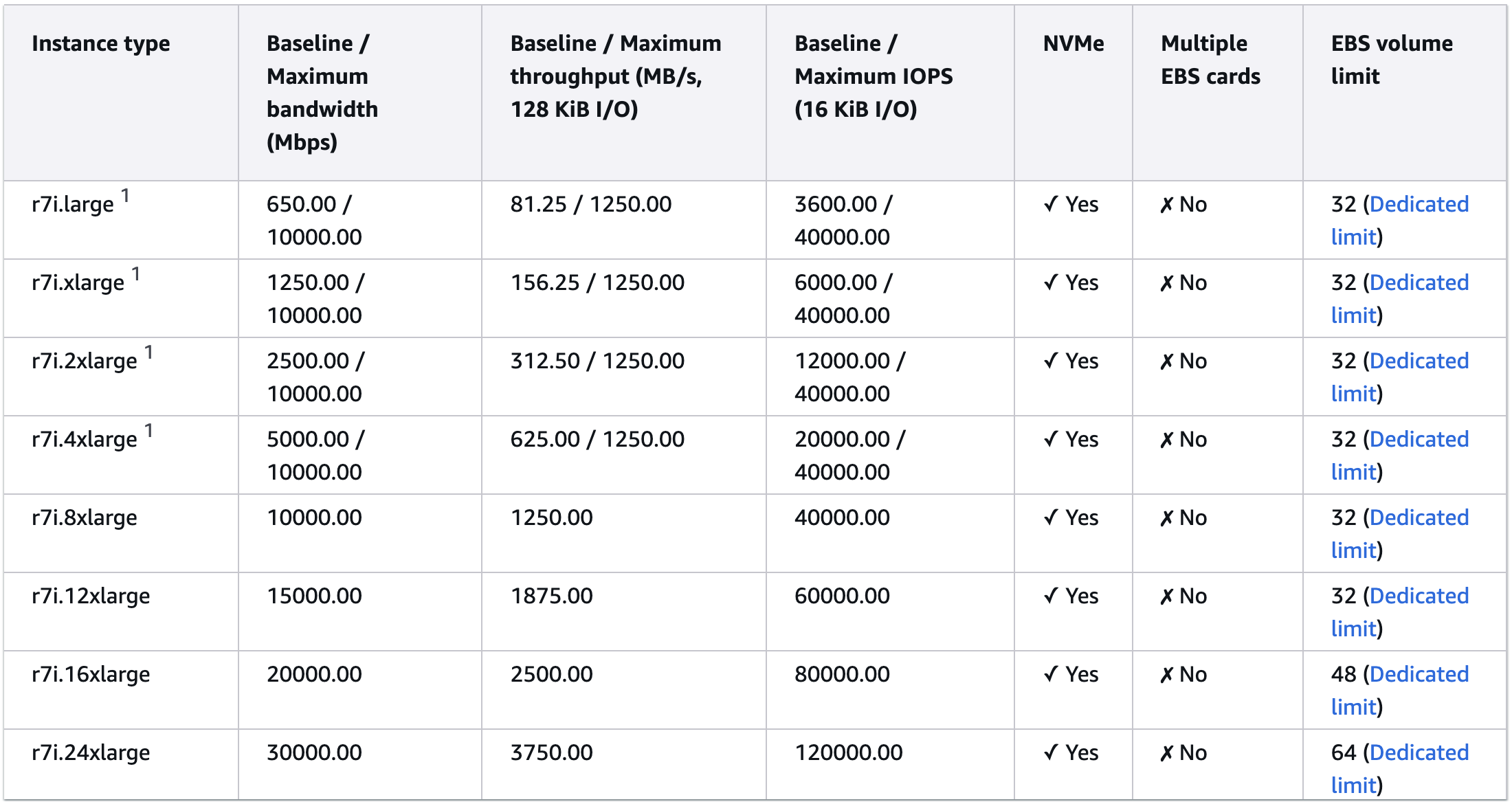
1 These instances can sustain the maximum performance for 30 minutes at least once every 24 hours, after which they revert to their baseline performance.
However, your EC2 instance performance will be constrained if your attached EBS volume(s) have a lower baseline IOPS and throughput.
EBS performance
Outposts racks support two types of EBS storage: General Purpose gp2 only in first-generation Outposts racks, and General Purpose gp2 and gp3 volume types in second-generation Outposts racks. The gp2 storage type supports volumes of between 1 GiB and 16 TiB. Volumes 33.33 GiB and smaller are provisioned with the minimum of 100 IOPS, while volumes larger than 33.33 GiB are provisioned with 3 IOPS per GiB of volume size up to the maximum of 16,000 IOPS, which is reached at 5,334 GiB (3 IOPS X 5,334 GiB). See gp2 volume performance for details on how this is calculated. For gp2 volumes larger than 1,000 GiB, the baseline performance exceeds the burst performance, so burst performance becomes irrelevant. For consistent performance, we also recommend using a volume size of at least 334GiB to deliver a consistent bandwidth of 250 MiB/s, gp2 volumes deliver throughput between 128 MiB/s and 250 MiB/s depending on the volume size, with larger volumes delivering higher throughput up to maximum 250 MiB/s.
On Outposts, the gp3 storage type supports volume sizes up to 16 TiB, IOPS up to 16,000, and throughput up to 1,000 MiB/s. To reach the maximum IOPS provisioned at 500 IOPS per GiB of volume size for gp3, you must use at least a size 32 GiB volume with an EC2 instance that can also support up to 16,000 IOPS. To reach maximum throughput, your volume needs to provide at least 4,000 IOPS, which is achieved with a 8 GiB or larger volume.
Use AWS Identity and Access Management (AWS IAM) policies to control which principals can create, attach, detach, or delete EBS volumes. This is especially important when using multi-volume configurations where data spans across multiple volumes. On Outposts, Amazon EBS encryption is enabled by default — all EBS volumes are automatically encrypted at rest using AWS Key Management Service (AWS KMS) keys with no measurable impact on IOPS or throughput performance. Data is encrypted on the local NVMe storage using AES-256. For additional control, you can use AWS KMS customer-managed keys to manage the encryption keys for your volumes.
However, for the Amazon Relational Database Service (Amazon RDS) database engines supported on Outposts as well as EC2, database and EC2 instance storage is striped across multiple volumes providing several times the baseline throughput and the burst IOPS of a single volume. When small I/O operations are physically sequential, EBS attempts to merge them into a single I/O operation up to the maximum I/O size. Similarly, when I/O operations are larger than the maximum I/O size, EBS attempts to split them into smaller I/O operations. For the best performance, use larger packet sizes up to the maximum I/O size supported.
Calculating IOPS
When calculating the supported IOPS for your workload, start by choosing the instance type that supports your target IOPS, and then size the EBS both in terms of volume size and the number of attached volumes. To achieve maximum EBS performance, the combined IOPS of all attached volumes must meet or exceed the maximum IOPS supported by the instance. When selecting a general purpose EBS volume size, each GiB of EBS adds IOPS up to the maximum supported baseline IOPS (16,000 IOPS for gp2 and gp3). When designing high-performance workloads on Outposts, verify that your gp3 storage configuration is sized to meet the aggregate IOPS requirements of your workload.
As an example, the r7i.12xlarge delivers a maximum of 60,000 IOPS with an EBS throughput of 1,875 MB/s (see Figure 2). To reach this ceiling using gp2 EBS volumes — where each GiB provides 3 IOPS up to a maximum of 16,000 IOPS per volume — you would need to attach:
- Three volumes of at least 5,334 GiB each (delivering 16,000 IOPS per volume = 48,000 IOPS combined)
- One volume of at least 4,000 GiB (delivering the remaining ~12,000 IOPS)
This brings the total provisioned IOPS to 60,000, matching the instance’s maximum IOPS. By contrast, gp3 EBS volumes support a baseline IOPS performance of 3,000 included in the price of the storage, with the ability to provision additional IOPS up to the maximum supported 16,000 per gp3 volume on Outposts racks. IOPS are provisioned at a rate of 500 IOPS per GiB of volume size, so the maximum can be reached by provisioning a 32 GiB or larger volume as opposed to the 5,334 GiB volume required to get 16,000 IOPS with gp2. That means to deliver 60,000 IOPS of performance using an r7i.12xlarge instance with gp3 EBS storage, you would need to attach:
- Three volumes of at least 32 GiB each (delivering 16,000 IOPS per volume = 48,000),
- One volume of at least 24 GiB (delivering remaining ~12,000 IOPS).
This means only 56 GiB of gp3 EBS storage is required to meet performance requirements, instead of 20,002 GiB of gp2 EBS storage. For maximum performance, make sure the provisioned EBS volume(s) IOPS matches the bandwidth ceiling of your instance type. If you’re using EBS RAID configurations, note that arrays larger than 8 volumes often yield diminishing performance returns because of increased I/O overhead.
Calculating throughput
Throughput is equally important to IOPS for a performant architecture. Throughput measures the volume of read/write operations that can be processed per second. On Outposts, up to 1,000 MiB/s throughput per volume can be achieved using EBS gp3 storage, and EBS gp2 can provide up to 250 MiB/s throughput per volume. While gp2 and gp3 EBS storage on Outposts both provide up to 16,000 IOPS per volume, gp3 can provide up to 4x as much throughput, making it a better choice for high performance databases on second-generation Outposts racks.
Like IOPS, while gp2 throughput scales based on volume size, you can provision additional throughput for gp3 EBS volumes. EBS gp3 storage delivers a consistent baseline throughput performance of 125 MiB/s. You can provision additional throughput up to the 1,000 MiB/s maximum supported on second-generation Outposts racks at a ratio of 0.25 MiB/s per provisioned IOPS, which can be reached using an 8 GiB gp3 volume. To get the maximum supported IOPS and throughput performance using gp3 EBS storage with Outposts, use at least a 32 GiB volume. When designing high-performance workloads on Outposts, verify that your gp3 storage configuration is sized to meet the aggregate throughput requirements of your workload.
Refer to the earlier section on performance considerations to confirm your selected EC2 instance can provide as much throughput as your EBS storage volume(s) to avoid performance bottlenecks.
RDS IOPS considerations
At the time of publishing, Outposts racks support the RDS for SQL Server, RDS for MySQL, RDS for Oracle, and RDS for PostgreSQL database engines. Database instance performance varies depending on the EC2 instance type selected for the database, the EBS volume type selected for RDS database storage, the database engine selected, and the size of the RDS database storage. The following tables show expected IOPS for database instances using gp2 and gp3 EBS volume types respectively, as shown in the General Purpose SSD Storage section of the Amazon RDS user guide.
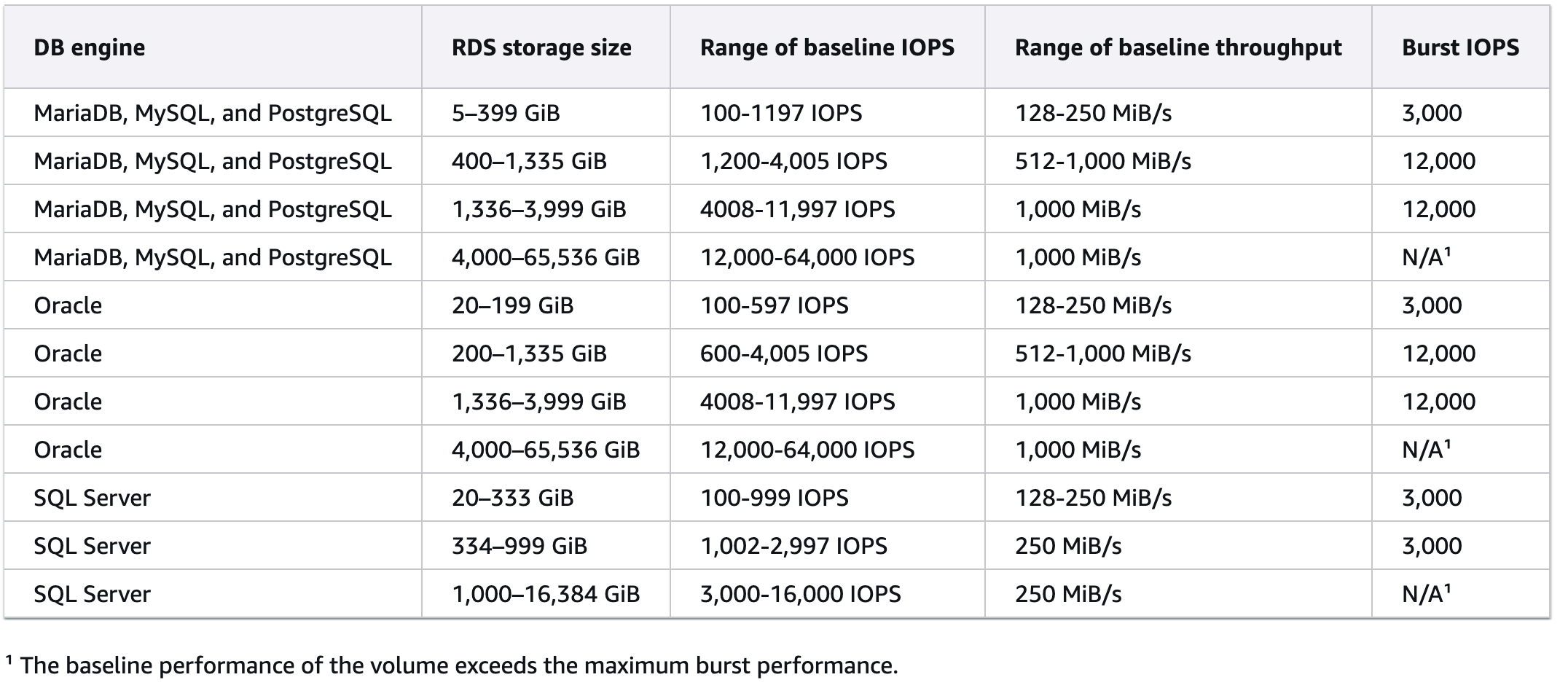
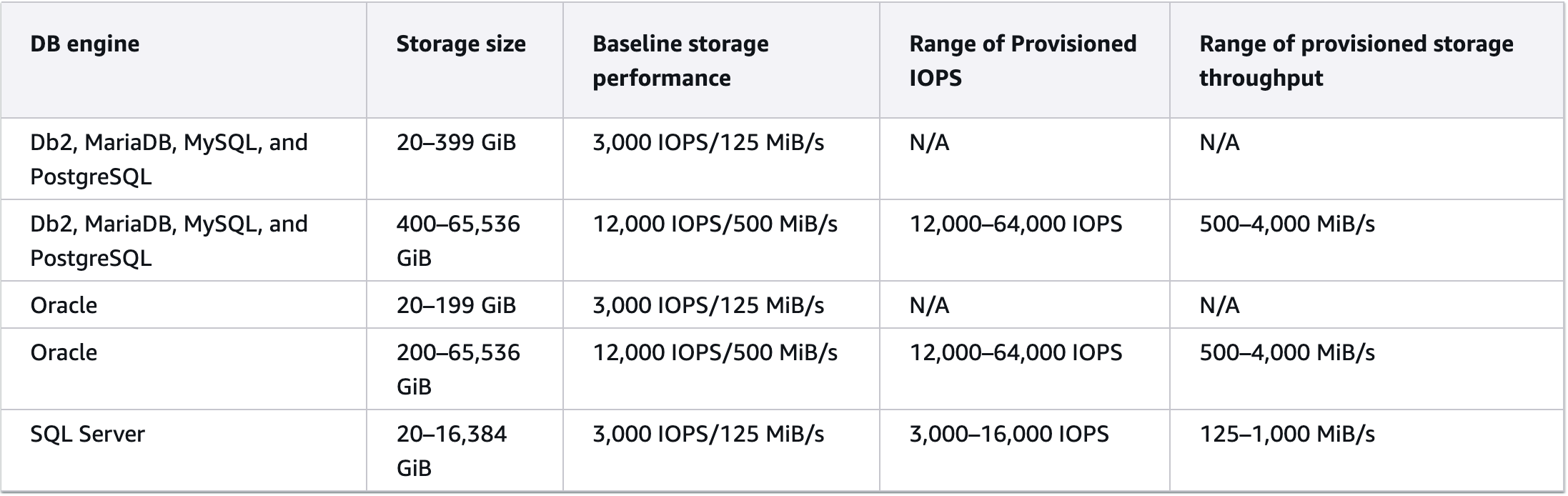
To calculate your database instance performance, consider all influencing factors. For example, if you wanted to support the maximum IOPS of 16,000 shown for the SQL Server RDS database engine, you would need:
- 32 GiB gp3 volume, OR
- 5,334 GiB gp2 volume.
- At least an r5.4xlarge, which can provide a baseline 18,750 IOPS. If using a second-generation Outposts rack, r7i.4xlarge and r8i.4xlarge instances provide a baseline of 20,000 IOPS. However, they are constrained by the lowest performing subsystem, which would be the amount of I/O the database engine can support (16,000 for SQL Server).
The storage type and size have the biggest impact on IOPS performance. For high I/O databases, we recommend either purchasing additional gp2 storage for your first-generation Outpost rack (understanding you might need to provision more storage than needed to meet your IOPS requirements), or using second-generation Outposts racks which support the more performant gp3 EBS storage type for your database workloads. Also consider that Outposts racks have a fixed storage capacity, and aggregate workload IOPS should be reviewed.
Monitoring IOPS
To check that the infrastructure is sized correctly to meet your IOPS expectations, use Amazon CloudWatch EBS volume metrics. You can monitor your EBS volume performance and set CloudWatch Alarms if the values exceed, for example, 70% of the total. Metrics such as VolumeReadBytes and VolumeWriteBytes provide information on the read and write operations in a specified time period based on bytes, and likewise VolumeReadOps and VolumeWriteOps provide the same information based on completed operations. You can monitor the time taken for read and write operations for an Amazon EBS volume using the VolumeTotalReadTime and VolumeTotalWriteTime metrics respectively using the Average statistic. Use IAM policies to restrict who can view, create, or modify CloudWatch alarms and dashboards for your Outpost resources. This prevents unauthorized users from suppressing critical storage performance alerts.
You can also use the Latency Injection action in AWS Fault Injection Service to run controlled experiments to test your architecture and monitoring based on this metric to improve your resiliency to storage performance degradation. You can access real-time detailed performance statistics for Amazon EBS volumes that are attached to Nitro-based Amazon EC2 instances. You can combine these statistics to derive average latency and IOPS, or to check whether I/O operations are completing. You can also view the total amount of time that your application has exceeded your EBS volume’s or the attached instance’s provisioned IOPS or throughput limits. By tracking increases in these statistics over time, you can identify whether you need to increase your provisioned IOPS or throughput limits to optimize your application’s performance. The detailed performance statistics also include histograms for read and write I/O operations, which provide a distribution of your I/O latency by keeping track of the total number of I/O operations completed within a latency band. See Monitor your Outposts rack and Monitoring best practices for AWS Outposts for general Outposts monitoring guidance.
When running FIS experiments, follow the principle of least privilege by scoping IAM roles to specific resources, and always configure stop conditions to automatically halt experiments that exceed expected impact thresholds.
Conclusion
This post explains how to size EC2 instances and EBS storage on Outposts racks to meet your IOPS and throughput requirements, helping you avoid performance bottlenecks for database and application workloads. You can monitor EBS storage performance through CloudWatch and create alarms to alert you when your instance approaches its IOPS threshold. To learn more about Outposts and how to architect for IOPS and throughput performance for your workloads, reach out to your AWS account team, or visit the AWS Outposts contact page.