AWS Compute Blog
Architecting SASE solutions using AWS Local Zones
Organizations with geographically distributed workforces face a critical challenge: providing secure, low-latency access to applications without routing all traffic through centralized data centers. Traditional hub-and-spoke network architectures create latency bottlenecks and degrade user experience, forcing a trade-off between security and performance.
This post explores how you can use AWS Local Zones and Secure Access Service Edge (SASE) solutions to eliminate that trade-off. You will learn key design principles, implementation strategies, and technical considerations for deploying SASE solutions at the edge. We’ve seen that understanding your user locations and traffic volumes up front helps you make effective design decisions.
Key challenges for deploying SASE solutions
SASE solutions require virtual security appliances such as firewalls, secure web gateways, and zero trust network access (ZTNA) connectors. You deploy these appliances close to end users so that traffic inspection does not add latency to the user experience. With AWS Local Zones, you can deploy these virtual security appliances from AWS Marketplace closer to end users.
When you architect SASE solutions using Local Zones, you need to address several key technical challenges. Latency requirements: When end users are far away from an AWS Region, applications requiring security inspection experience significant latency overhead that affects overall performance and user experience. Geographic coverage: In some cases, workforces are spread across distributed locations far from an AWS Region. You need solutions that deliver consistent service quality and security capabilities to users across your covered locations.
Hybrid connectivity: Many applications maintain dependencies on on-premises data centers in areas far away from an AWS Region. Design traffic routing carefully to avoid unnecessary network paths and reduce traffic hairpinning or network flapping. Security consistency: Implement uniform security controls across all distributed locations while maintaining performance. This requires consideration of service placement and routing architecture.
Before looking at the SASE-specific design, it helps to understand what Local Zones provide. The following diagram shows how Local Zones extend AWS infrastructure from the Region out to metropolitan areas closer to end users.
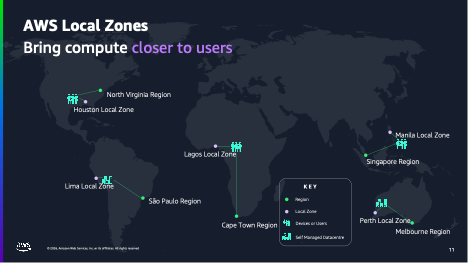
Figure 1: High-level AWS infrastructure diagram showing how Local Zones bring compute closer to users
As the diagram shows, Local Zones place compute closer to end users. This especially benefits those far from an AWS Region.
Prerequisites
To follow the guidance in this post, you should be familiar with:
- AWS Local Zones and how they extend AWS infrastructure to metro areas.
- Amazon Elastic Compute Cloud (Amazon EC2), Amazon Virtual Private Cloud (Amazon VPC), and core AWS networking concepts.
- SASE architecture concepts and virtual security appliance deployment models.
Architecture considerations
When you design SASE solutions with Local Zones, you can follow several key best practices across infrastructure, control plane, and traffic management.
Infrastructure deployment
At the infrastructure level, focus on deploying virtual security appliances to optimize coverage and performance. Start by selecting and configuring Amazon EC2 instances optimized for maximum network throughput. Choose instance families that provide the compute and networking capabilities required for traffic inspection workloads, with enhanced networking enabled for high packets-per-second performance.
Design a scalable cluster management strategy that adapts to varying workload demands while maintaining consistent security posture. As you deploy these clusters, establish proper multi-tenant isolation to maintain security boundaries between different organizational units, keeping user resources separate from management infrastructure.
Control plane architecture
The SASE control plane requires particular attention in distributed deployments. Deploy control components in an AWS Region to manage security appliances across all Local Zone locations. This provides a single point of policy distribution and configuration management. From this centralized vantage point, you can implement policy management that maintains consistency in security enforcement across all locations.
Visibility matters as much as policy enforcement. Implement standardized telemetry collection mechanisms, such as Amazon CloudWatch metrics and logs, across all locations so you can maintain observability and resolve issues proactively. As your deployment grows, automate configuration deployment using infrastructure as code (IaC) tools such as AWS CloudFormation or Terraform. This keeps deployment consistent across all edge locations and reduces manual errors when operating at scale.
Traffic management
Traffic management completes the architecture of a well-designed SASE solution. Use Amazon Route 53 with geoproximity routing and health checks to direct users to the nearest security inspection point, minimizing inspection latency. If an appliance fails, Route 53 automatically reroutes traffic to the next-nearest Local Zone. For critical deployments, maintain standby capacity in the parent Region as a fallback.
Deploy VPN endpoints in Local Zones closest to your user populations to reduce connection latency for remote users while maintaining high availability through health-checked failover across multiple locations. Plan your Internet Service Provider (ISP) connectivity for redundancy and performance requirements across different geographical locations, and implement geographic load-balancing mechanisms to distribute traffic efficiently across available resources.
You also need to consider the egress path, which is how traffic exits after inspection. For internet-bound traffic, use the Local Zone’s direct internet egress to avoid routing back through the parent Region. For traffic destined to applications in an AWS Region, traffic traverses the AWS private network between the Local Zone and its parent Region. Validate egress paths using VPC Flow Logs and traceroute to confirm traffic is not taking unintended hops.
The following diagram shows how the Local Zones architecture applies to a SASE use case, routing user traffic to a nearby Local Zone for inspection.
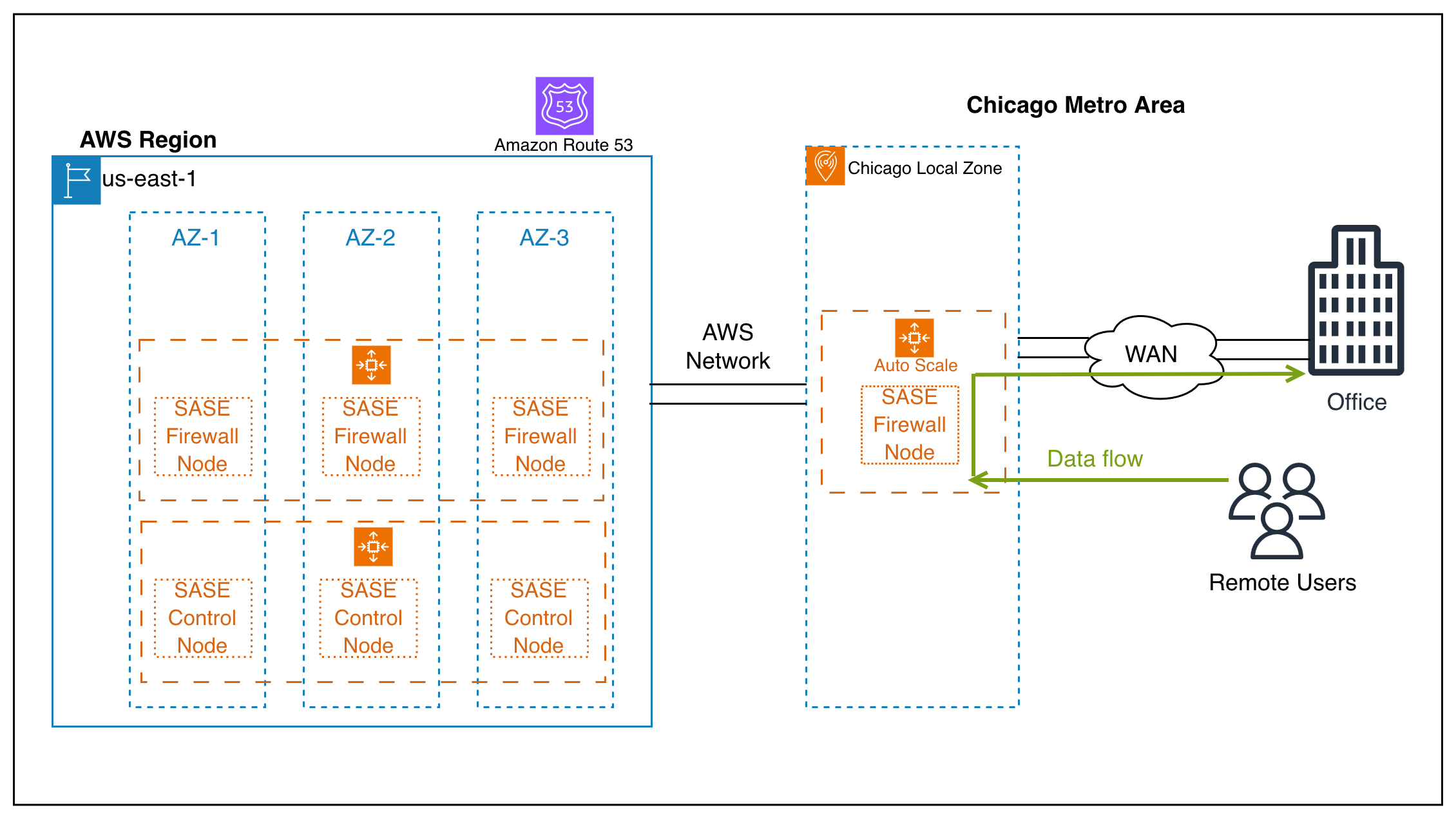
Figure 2: Enterprise SASE deployment using virtual network firewalls across Local Zones to secure remote user and branch office access
As the diagram shows, remote users and branch offices connect to virtual network firewalls running in the Local Zone closest to them. Each Local Zone performs local traffic inspection that reduces latency for the SASE use case. The control nodes in the parent AWS Region manage policy and configuration across all locations.
Reference implementation approach
This section outlines the key phases for implementing a SASE solution across AWS Local Zones, from initial planning through validation.
Phase 1: Plan your deployment
Begin by mapping your user locations and latency expectations to identify which Local Zones are closest to your user populations, and determine which applications require local security inspection. With this map in hand, calculate capacity needs per location based on expected traffic volumes and security inspection requirements. Then define the specific inspection capabilities you need at each location, whether that is firewall, secure web gateway, ZTNA, or a combination.
One key design decision at this stage is whether to route all user traffic through the Local Zone appliance (full tunnel) or only corporate-bound traffic (split tunnel). Full tunnel provides complete traffic visibility but requires higher instance throughput. You can validate your choice by using VPC Flow Logs and CloudWatch network metrics to measure actual traffic volume per user during a pilot deployment.
Phase 2: Configure networking infrastructure
With your plan in place, enable the target Local Zones in your AWS account and create a VPC that extends into your chosen Local Zones by creating subnets in each one. Configure route tables to direct traffic through your virtual security appliances.
Security at the network layer is critical. Set up security groups that permit the required traffic flows for your SASE inspection chain. Add inbound rules for user VPN connections (for example, UDP 4500/500 for IPsec), outbound rules to target applications, and management access from the parent Region. Add network ACLs as an additional layer of defense at the subnet level to restrict traffic to expected protocols and port ranges.
Phase 3: Deploy virtual security appliances
Launch your chosen virtual security appliance from AWS Marketplace in each target Local Zone. Use M6i or M6g instances, or newer instances optimized for network throughput. For example, m6i.xlarge provides up to 12.5 Gbps network bandwidth. Deploy scalable clusters of 2–20 instances depending on location traffic volume, and configure elastic network interfaces for traffic inspection with separate inbound and outbound interfaces.
Enable enhanced networking and verify that the instance supports the throughput required for your expected traffic volume. This validation step is critical before moving to production, because undersized instances can become bottlenecks that negate the latency benefits of Local Zone placement.
Phase 4: Configure the control plane
Deploy your centralized SASE management components in the parent AWS Region and establish connectivity between the regional management infrastructure and your Local Zone appliances. Push security policies from the central management console to all distributed appliances to maintain consistent enforcement.
For observability, configure centralized logging and telemetry collection using Amazon CloudWatch. Enable VPC Flow Logs on Local Zone subnets to capture traffic metadata for compliance auditing and security analysis. Use this data for troubleshooting and demonstrating regulatory compliance.
Phase 5: Set up traffic routing
Configure Amazon Route 53 with geoproximity routing policies to direct users to the nearest Local Zone. Set up health checks that automatically fail over if a Local Zone appliance becomes unhealthy. Deploy VPN endpoints in each Local Zone for remote user connectivity.
After your routing is configured, test end-to-end connectivity and verify that traffic routes through the nearest security inspection point. This confirms that your geoproximity policies work as intended and that users receive the expected latency benefits.
Phase 6: Validate and optimize
With your deployment live, verify latency improvements by comparing round-trip times to the parent AWS Region and to the Local Zones. Monitor appliance utilization metrics (CPU, network throughput, and concurrent sessions) in Amazon CloudWatch, and adjust cluster sizes at each location based on observed traffic patterns. Validate that security policies are applied consistently across all locations.
Configure CloudWatch alarms to trigger scaling actions. For example, scale out when average CPU exceeds 70% or network throughput exceeds 80% of instance capacity over a 5-minute period. Use CloudWatch anomaly detection to identify unusual traffic patterns that might indicate a misconfigured routing policy or a security event.
Capacity planning
Local Zones provide the same elasticity as AWS Regions to scale your virtual security appliances based on demand. To optimize your deployment:
- Use Amazon EC2 Auto Scaling to automatically adjust the number of appliance instances based on traffic patterns and utilization metrics.
- Create On-Demand Capacity Reservations to support applications that must provide guaranteed availability at all times.
- Design your architecture to work across multiple instance families, giving you flexibility to use the most suitable compute resources available at each location.
- For cost optimization, consider using Compute and EC2 Instance Savings Plans for steady-state appliance instances that run continuously, while relying on On-Demand pricing for burst capacity during peak traffic periods.
Before production deployment, validate that your chosen virtual appliance functions correctly in the target Local Zone and test network dependencies to confirm expected performance.
Clean up
If you deploy resources following this guidance and no longer need them after your testing, terminate EC2 instances, release Elastic IP addresses, delete Capacity Reservations, and remove associated networking resources (subnets, route tables, security groups, Route 53 policies) to avoid ongoing charges.
Conclusion
This post explored how you can deploy SASE solutions on AWS Local Zones. Local Zones bring three key benefits to SASE architectures. They reduce security inspection latency by placing appliances closer to users, apply consistent security enforcement across geographically distributed locations, and eliminate the need to backhaul traffic to centralized data centers. Organizations continue to expand their operations to more geographic locations. The combination of AWS Local Zones and SASE solutions from partners such as Palo Alto Networks provides a scalable approach for delivering secure connectivity to users anywhere.
Learn more
For instructions to opt in to a Local Zone and launch your Amazon EC2 instance, see the AWS Local Zones Getting started page. To learn where AWS Local Zones are available globally, check out the AWS Local Zones locations page.