AWS Compute Blog
Scheduling email campaigns at scale with Amazon EventBridge Scheduler
Scheduling email campaigns becomes more complex when you need to send email to millions of recipients at the unique time best suited for each customer. Consider these examples:
- A flash sale might need to hit inboxes at 9 AM local time across every time zone.
- A follow-up email (often known as a drip sequence) might need to send a second message exactly 3 days after the first message per subscriber.
- A re-engagement campaign might target users who haven’t logged in for 30 days.
The scheduling requirements involve multiple considerations. You’re sending hundreds of millions of messages, each at its own optimal moment personalized to the recipient’s time zone and behavior.
In this post, we walk through how to use Amazon EventBridge Scheduler to personalize email notifications to each recipient. We create one schedule per recipient to deliver each email at its individually optimal moment, with zero idle compute cost. We also show how Amazon EventBridge Scheduler handles higher volumes. Amazon EventBridge Scheduler supports billions of schedules. By default, you have a quota of 10 million schedules.
Solution overview
When every recipient has their own ideal delivery time, you need a scheduling layer that can hold billions of individual send intents and fire each one at the right moment. Most teams reach for one of three familiar patterns, each with tradeoffs that become painful at scale.
- Batch cron jobs: A job runs every hour, queries for all messages due in the next window, and sends them out. Recipients get email in imprecise hourly batches. At scale, the batch job itself becomes a bottleneck, processing millions of rows per run, competing for database connections, and creating a sudden spike in load on the email provider.
- Delay queues: You can use Amazon Simple Queue Service (Amazon SQS) as a delay queue. A delay queue postpones the delivery of new messages to a customer for a set time. A limitation of this approach is that Amazon SQS caps delays at 15 minutes.
- Third-party campaign tools: Offload to a SaaS email platform. This works until you need tight integration with your application data, custom send-time optimization, or control over delivery infrastructure. You’re also paying per-recipient fees that compound at scale.
All three approaches either sacrifice precision (batching), hit architectural limits (delay queues), or surrender control (third-party tools).
The building block approach
Amazon EventBridge Scheduler treats each email send as a discrete scheduled action. Instead of “process all messages due this hour,” you express the intent directly: “send this email to this person at this time.” Amazon EventBridge Scheduler holds that intent with zero compute cost until the moment arrives, then triggers the scheduled action. See the Amazon EventBridge Scheduler User Guide for the full API reference and current service quotas.
For email campaigns, Amazon EventBridge Scheduler becomes the send-time dispatcher, the component that schedules every email in a campaign for its individually optimal moment, whether that’s timezone-adjusted, behavior-triggered, or sequence-driven.
Architecture diagram
The architecture follows an event-driven, per-recipient scheduling pattern for an email campaign. To start the campaign, you first define the target audience and the content they receive. Next, you need a way to create the per-recipient schedule. To do that for a campaign that can contain millions of recipients, you need a scalable mechanism to create the schedules. You can achieve this with an AWS Step Functions state machine, a serverless workflow service that coordinates multiple AWS services into structured, visual workflows called state machines. In this solution, we orchestrate the creation of the schedules by using a Distributed Map state within the state machine, which lets us fan out and accelerate schedule creation. It does this by splitting a large dataset into chunks and processing them across thousands of parallel child executions. It reads the recipient list from Amazon Simple Storage Service (Amazon S3), applies time zone logic per recipient, and creates an individual Amazon EventBridge Scheduler resource for each recipient in parallel. After the workflow creates all schedules, the execution completes.
The actual email delivery happens later, entirely decoupled from the campaign creation step. At the scheduled time, Amazon EventBridge Scheduler invokes Amazon Simple Email Service (Amazon SES) directly, passing the template name and personalization data as template variables. For campaigns requiring complex personalization logic (conditional content, real-time suppression checks, or data enrichment), you can optionally route through an AWS Lambda function before SES. If you need to adjust timing or content for specific recipients, you can update their individual schedules directly without reprocessing the entire campaign.
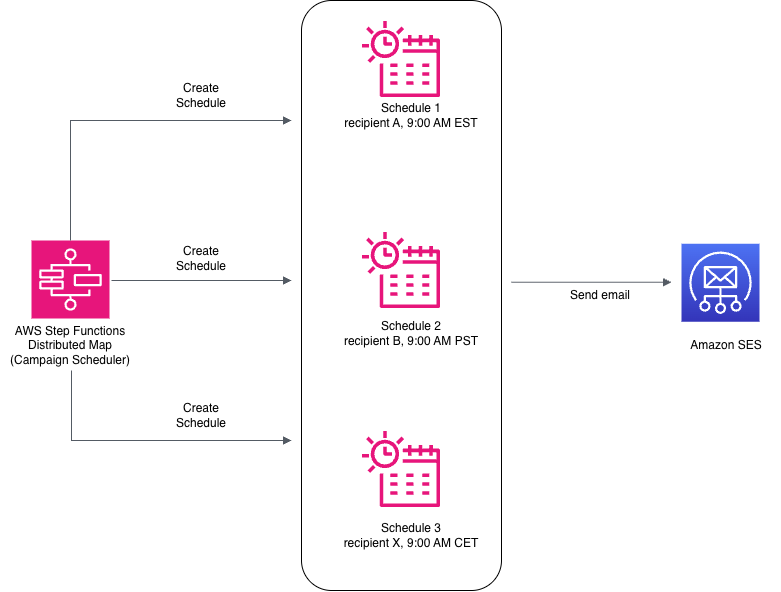
Figure 1: Per-recipient email scheduling architecture with Amazon EventBridge Scheduler
Walkthrough
The solution uses four core components that work together: a campaign manager to define send-time rules, Step Functions Distributed Map to fan out and accelerate schedule creation, Amazon EventBridge Scheduler to hold each per-recipient intent and deliver through Amazon SES directly, and automatic cleanup through schedule self-deletion.
How it works
- Create the campaign: A marketer defines the campaign: audience segment, email template, and send-time rules (for example, “9 AM in each recipient’s local time zone” or “24 hours before a Black Friday sale”).
- Campaign manager fans out: An AWS Step Functions workflow uses Distributed Map to iterate over the recipient list and create one Amazon EventBridge Scheduler schedule per recipient per campaign step directly through SDK integration. Each schedule encodes the exact send time for that individual.
- Amazon EventBridge Scheduler fires at the right moment: At each recipient’s scheduled time, Amazon EventBridge Scheduler invokes Amazon SES directly through a universal target, passing the template name and personalization data (recipient name and attributes) as template variables.
- SES personalizes and sends: Amazon SES renders the email template with the provided data and delivers the message.
- Schedule self-deletes:
ActionAfterCompletion='DELETE'prevents the accumulation of spent schedules.
Prerequisites
To follow along with this walkthrough, you need the following:
- AWS account and permissions: An active AWS account with permissions to create Amazon EventBridge Scheduler schedules, AWS Step Functions state machines, and Amazon SES identities, along with an AWS Identity and Access Management (IAM) role for Amazon EventBridge Scheduler to invoke Amazon SES.
- Development environment: Python 3.13 or later, AWS SDK for Python (Boto3) version 1.26 or later, and AWS Command Line Interface v2 (AWS CLI v2).
- Amazon SES configuration: Move your Amazon SES account out of sandbox mode to allow sending to arbitrary recipients.
Scaling the fan-out with Step Functions
For campaigns with millions of recipients, use AWS Step Functions Distributed Map to parallelize schedule creation. When you want to activate a campaign, you trigger a Step Functions workflow. This workflow fans out and creates schedules across the recipient list by using a Distributed Map with direct SDK integration. The direct SDK integration between Step Functions and Amazon EventBridge Scheduler lets each child execution call CreateSchedule directly. The following state machine definition reads recipients from an Amazon S3 CSV file and creates schedules in parallel:
Concurrency alignment with Amazon EventBridge Scheduler API limits
Step Functions Distributed Map supports up to 10,000 concurrent child workflows. Each child calls the CreateSchedule API directly, which has a default rate limit of 5,000 TPS. This limit is sufficient for most campaigns. If your campaign volumes require higher throughput, check your current quotas in the Service Quotas console and request an increase.
To avoid throttling, set MaxConcurrency below the CreateSchedule TPS quota. A value of 2,500 provides a comfortable buffer to account for bursts and retries without requiring a quota change. For larger campaigns, request an increase through AWS Service Quotas (adjustable to tens of thousands) and raise MaxConcurrency to match.
Canceling a campaign
A schedule group is an Amazon EventBridge Scheduler resource used to organize schedules. For this use case, we have a schedule group per campaign. If you need to pull a campaign (error in content, legal issue, or strategy change), you can cancel all scheduled sends for that campaign by deleting the entire schedule group. The following code shows how to cancel all pending sends for a campaign:
Operational considerations
Moving to production introduces a few scaling and reliability concerns to plan for.
Handling invocation spikes at delivery time
When a mass campaign schedules millions of messages for the same time, this creates cascading pressure across two limits:
- Amazon EventBridge Scheduler invocations throttle limit: The default is 1,000 TPS per AWS Region, and it is adjustable to tens of thousands of TPS through AWS Service Quotas. Amazon EventBridge Scheduler queues invocations internally and retries with exponential backoff when the downstream target throttles.
- Amazon SES sending quotas: Your SES account has a per-second sending rate. If the effective invocation rate exceeds this, messages fail with throttling errors. Align Amazon SES sending quotas with your campaign volume. Check your current SES quota in the Service Quotas console and request an increase before launching large campaigns. See Amazon SES best practices for deliverability at scale.
To handle an invocation spike, we recommend using the FlexibleTimeWindow feature of Amazon EventBridge Scheduler. Setting MaximumWindowInMinutes lets Amazon EventBridge Scheduler spread invocations across a time window rather than firing them all at the exact second. Size the window based on your campaign: divide the total schedules by your effective TPS to determine the minimum spread needed. For example, 500,000 schedules at 5,000 TPS need at least a 2-minute window.
Cost model
You pay for Amazon EventBridge Scheduler on a per-invocation basis.
Cleanup
To avoid ongoing charges, delete the resources created during this walkthrough:
- Delete any runtime-created schedule groups.
- Delete the Step Functions state machine.
Note: If you have active schedules still waiting to fire, deleting the schedule group will cancel all pending sends.
IAM role for Amazon EventBridge Scheduler and Step Functions
The Step Functions state machine needs an execution role with permissions to create schedules, send email, and pass the role to the Amazon EventBridge Scheduler service. Amazon EventBridge Scheduler needs permissions to call SES. The following policy shows the combined permissions for both scenarios:
This policy scopes the scheduler:CreateSchedule and scheduler:CreateScheduleGroup actions to resources prefixed with campaign-*, following least-privilege principles.
A condition restricts the iam:PassRole permission so that it can only pass the role to the Amazon EventBridge Scheduler service.
Conclusion
In this post, we walked through how to use Amazon EventBridge Scheduler to personalize email campaign delivery for each recipient. An email campaign system has two core problems: deciding what to send and deciding when to send it. Most teams over-engineer the “when” with polling infrastructure, batch jobs, and queue chains. Amazon EventBridge Scheduler collapses that into a single CreateSchedule API call per recipient.
To get started, explore Amazon EventBridge Scheduler on the AWS Management Console. Browse Serverless Land patterns for more than 20 Amazon EventBridge Scheduler patterns and other use cases beyond email campaigns.
Suggested tags: Amazon EventBridge, architecture, events, modernization, serverless.