AWS Contact Center
Ensure outbound and transfer call delivery by configuring caller ID in Amazon Connect
1. Introduction
When an agent places a call is placed through a quick connect or the number pad using the contact control panel (CCP), the outbound caller ID depends on whether the agent is already on an active call. This blog explains how Amazon Connect Customer selects the caller ID in each scenario and how to present the appropriate caller ID.
A valid caller ID matters. Calls that show a recognizable caller ID are answered more often and are trusted by the person receiving them. Calls that arrive as “anonymous” or “unknown” are often ignored, filtered, or rejected by carriers. In Amazon Connect Customer, a valid outbound caller ID is mandatory. If a queue has no caller ID, the call is blocked before it is placed.
Configure a valid phone number in the outbound caller ID field of every queue, not only the queues used for direct outbound calling. Set it on the outbound queue for outbound calls, and on the inbound queue for agent-initiated transfers. A common pitfall is to configure only the outbound queues and overlook the inbound queues used during transfers. To understand why, the next section walks through how Amazon Connect Customer selects the caller ID.
2. How Amazon Connect Customer selects the caller ID
2.1 Use case 1: Direct outbound dialing (agent not on an active call)
The queue here is the default outbound queue of the agent’s routing profile. If its outbound caller ID number field is empty, no agent on that routing profile can place an outbound call. The agent sees this error:
Invalid outbound configuration. Before you can place an outbound call, you must associate a phone number with this queue. Contact your administrator for further assistance.
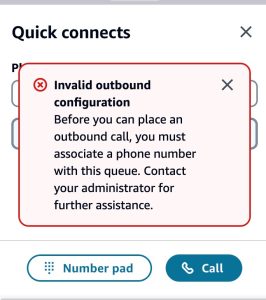
Figure 1: Error message when the caller ID of an outbound queue is not configured
Once the outbound caller ID number field is set, as shown in the figure 2, agents can place outbound calls. The call displays the caller ID you configured.
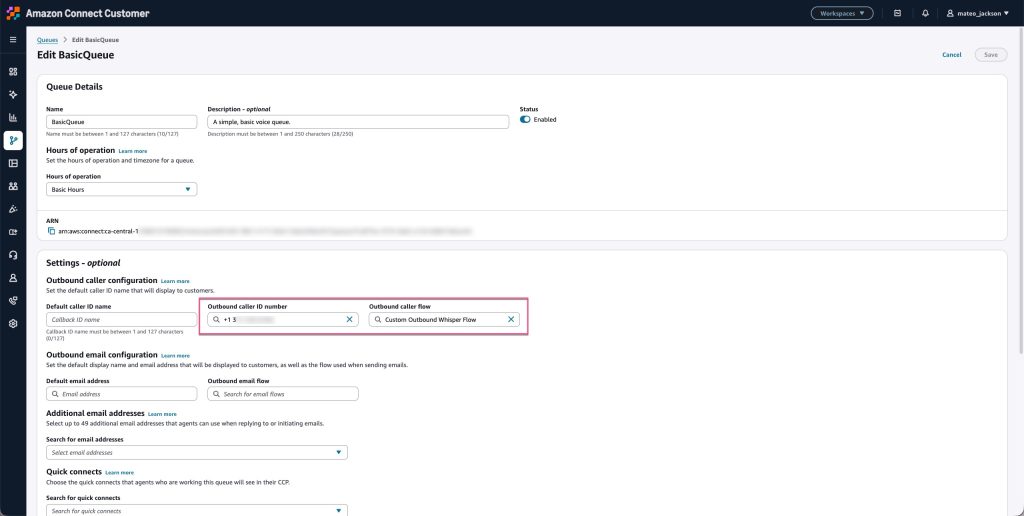
Figure 2: Set outbound caller ID in a queue
You can override this caller ID using an outbound whisper flow the call phone number block to set a destination-specific number (for example, replacing +1 xxx xxx xxxx with +52 xxx xxx xxxx for calls to Mexico). An outbound whisper flow executes after an outbound call connects but before the parties are joined, allowing you to dynamically set the Caller ID based on the destination. As a general principle, use a local Caller ID wherever supported.
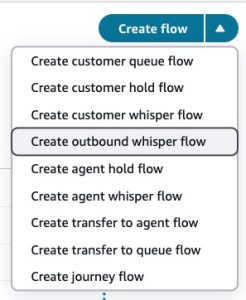
Figure 3: Create outbound whisper flow
1. Define a condition that checks whether the dialed number begins with the +52 prefix shown in the figure 4.
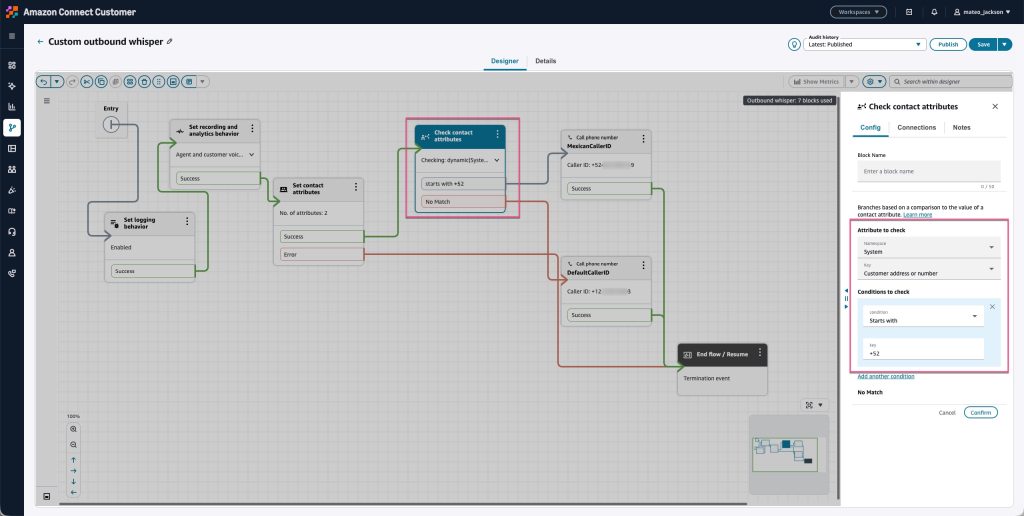
Figure 4: Check contact attributes
2. if matched, connect that branch to the call phone number block, and set a valid local caller ID (+52 xxx xxx xxxx) claimed in your Amazon Connect Customer instance shown in the figure 5.
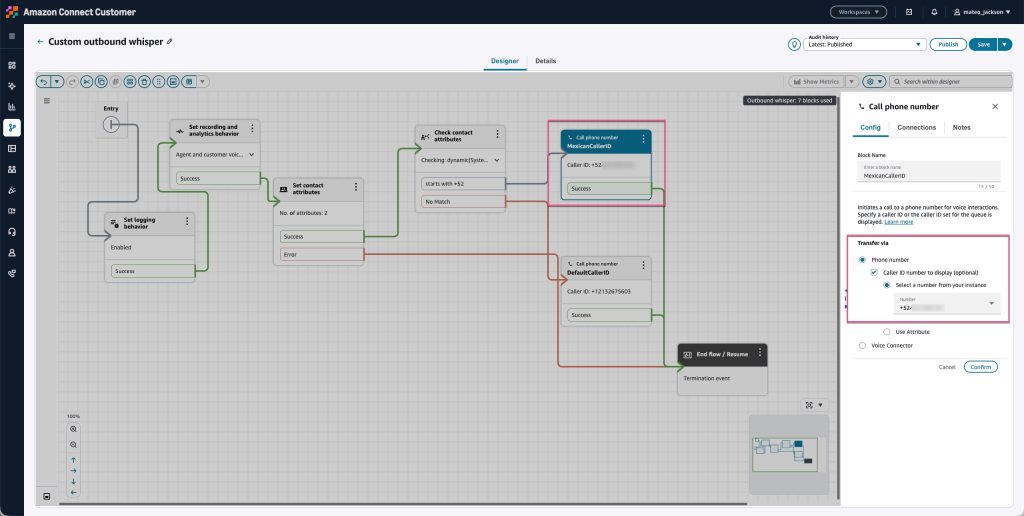
Figure 5: Set a valid caller ID
2.2 Use case 2: Agent-initiated transfer (agent on an active call)
In this case, the caller ID is sourced from the inbound queue that originally received the call, not from the outbound queue. This applies when the agent transfers to an external number using a quick connect of type phone number or the number pad in CCP. If that inbound queue has no outbound caller ID number defined, the transfer fails, even when the routing profile’s outbound queue is set correctly.
Neither the outbound queue nor an outbound whisper flow can override the inbound queue’s caller ID. This is by design: the caller ID comes from the queue where the call originates. The agent sees this error:
Error while adding a participant. Please try again. If the error persists, contact your administrator.
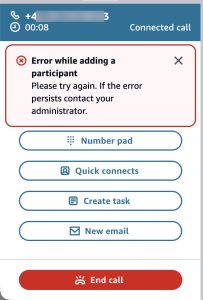
Figure 6: Error message when the inbound queue has no Caller ID configured and the agent initiates a transfer
So how should a contact center set the caller ID when an agent transfers a caller to an external destination properly? Consider the following use case.
A real-world scenario: a travel agency transferring to local vendors
A travel agency serves U.S. customers who travel abroad, for example to Mexico or Canada. A customer calls the agency’s U.S. hotline and reaches an agent. To complete a booking, the agent transfers the customer to a local vendor, such as a hotel or a ground-transport provider in the destination country.
Here is the call path:
1. A U.S. customer calls the hotline and lands in a U.S. inbound queue. That queue has no Caller ID configured, or has a U.S. Caller ID. The destination cannot be predicted in advance. An agent may need to transfer the call to a local vendor in any country.
2. The agent uses a quick connect of type phone number or enters a phone number through the number pad to reach a vendor, for example, in Mexico. Because the agent is on an active call, Amazon Connect Customer takes the caller ID from the inbound queue, which is empty or a U.S. number.
- If the inbound queue has no valid caller ID, the transfer is blocked. The agent sees the error described above.
- If the inbound queue has a U.S. Caller ID, the carrier in the destination country may filter or reject the call. Even if the call gets through, the probability of it being answered is lower than when using a local Caller ID. This is why a local Caller ID is recommended where supported.
3. The goal is straightforward. When the destination is a number in Mexico, the call should present a valid local caller ID in Mexico, not an anonymous or U.S. number. The local carrier then delivers the call. The most reliable way to achieve this is a flow-based transfer that sets a valid local caller ID.
Set the caller ID with a flow-based transfer
Create a new transfer to queue flow. There are two approaches, depending on how many destinations you support.
- Option 1: A single transfer to phone number block. Best when you have only a few destinations.
- Option 2: Multiple transfer to phone number blocks, selected by Amazon Lex intents or number recognition. Best suited for deployments with many destinations.
Option 1: A single transfer to phone number block
Use a transfer to queue flow shown in the figure 7.
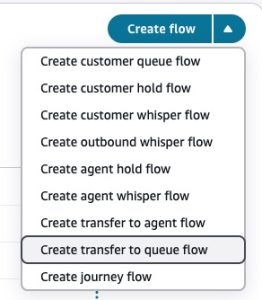
Figure 7: Create transfer to queue flow
In the flow, use the transfer to phone number block. Set the destination number and set the caller ID to a local number in Mexico with the +52 prefix shown in the figure 8.
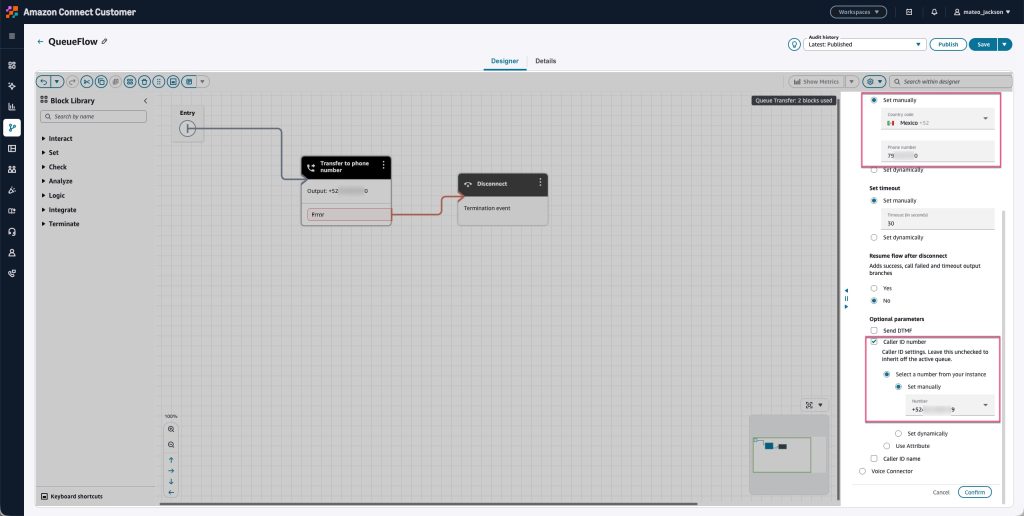
Figure 8: Set the caller ID to a local number
Set this flow on a quick connect of type queue. You can select any queue in the definition; the queue itself has no effect for this setup. What matters is the caller ID you set in the flow shown in the figure 9.
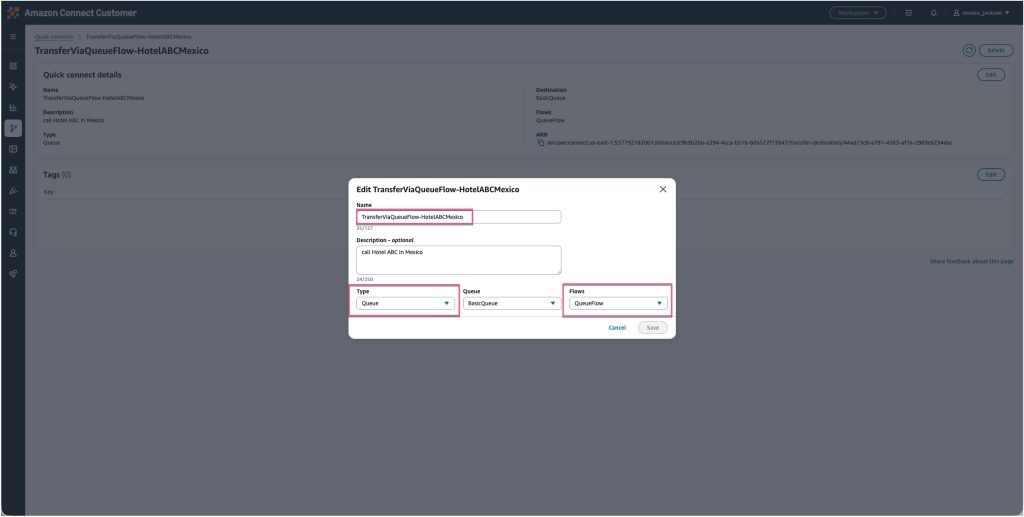
Figure 9: Create a quick connect of type queue and associate a flow
Option 2: Multiple transfer to phone number blocks, selected by Amazon Lex intents or number recognition
You do not need a separate quick connect for each destination. In a transfer to queue flow, use an Amazon Lex bot by following the best practices to recognize what the agent wants. For example, if the agent asks to transfer to a hotel in Mexico, the flow uses the local Mexican caller ID to dial the destination in Mexico. If the agent asks to transfer to a hotel in Canada, another block uses the local Canadian caller ID to dial the destination in Canada shown in the figure 10.
For many destinations, store the destination and caller ID mapping in an Amazon DynamoDB table, and use an AWS Lambda function to look it up by intent. This avoids creating many transfer to phone number blocks. For ad-hoc destinations, the agent clicks the quick connect, enters the phone number via DTMF or voice, a Lex bot recognizes and validates the number, a fulfillment Lambda function normalizes it to the international E.164 format, and the contact flow sets the correct local caller ID before placing the call.
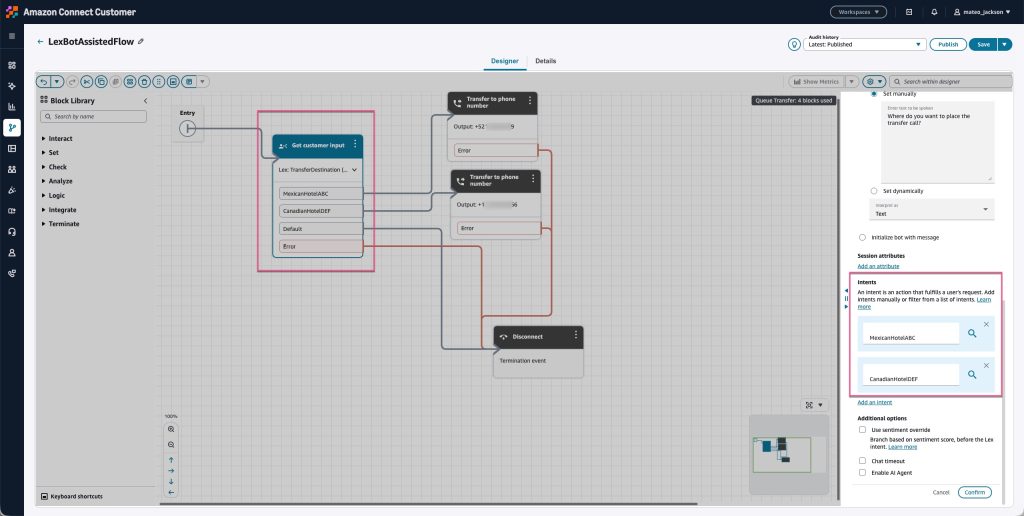
Figure 10: Define branches based on Lex bot intents
Set this flow on a quick connect of type queue. You can select any queue; it has no effect for this setup. Only the caller ID set in the flow matters.
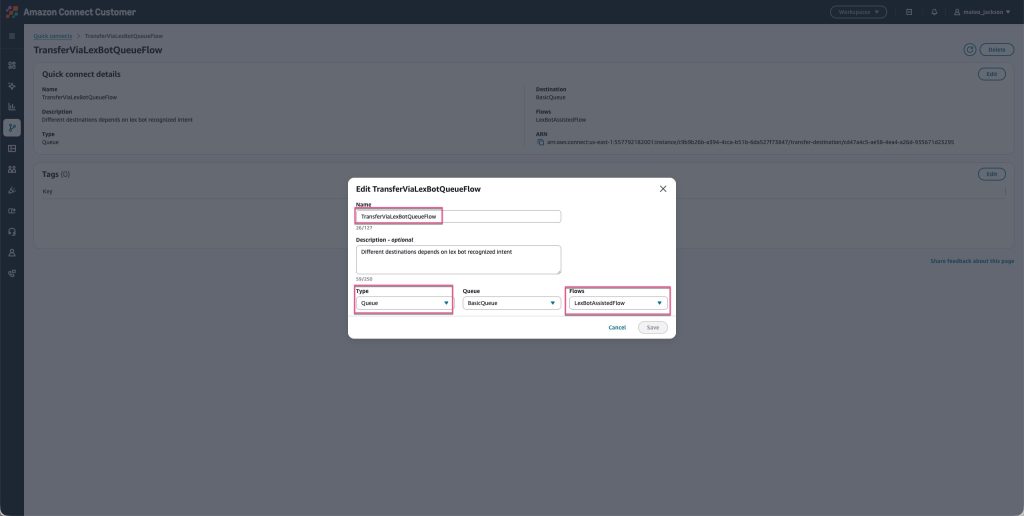
Figure 11: Create a quick connect of type queue and associate a flow
3. Conclusion
For direct outbound calls, using the number pad or a quick connect with the type phone number, the caller ID can be modified by an outbound whisper flow with the call phone number block, according to which external phone number is dialed.
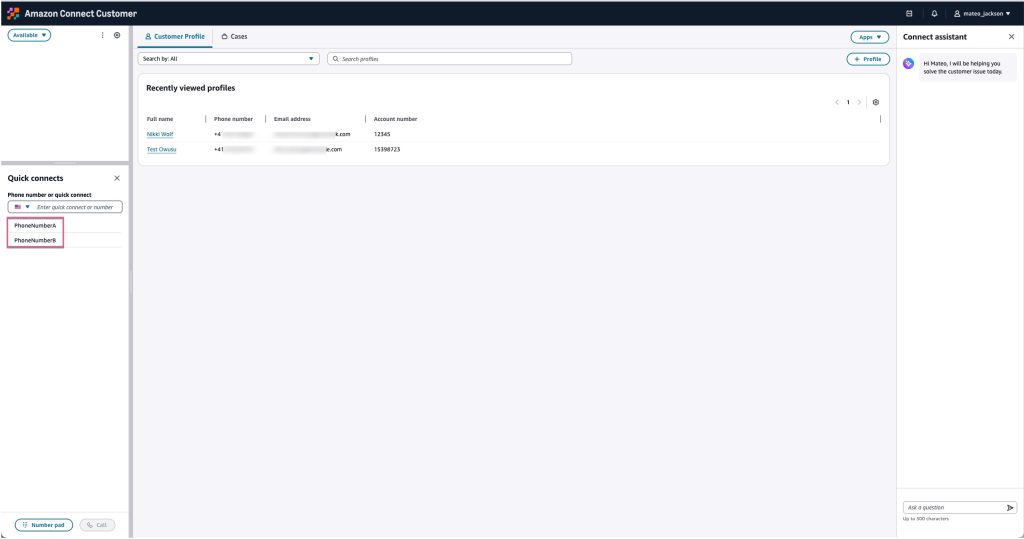
Figure 12: Initiate a direct outbound call
For transfer calls, using a quick connect with the type queue, the caller ID can be modified by a transfer to queue flow with the transfer to phone number block. A quick connect of type queue is only visible to agents during an active call, for transferring that call. When there is no active call, a quick connect of type queue is not shown in the agent’s quick connects panel.
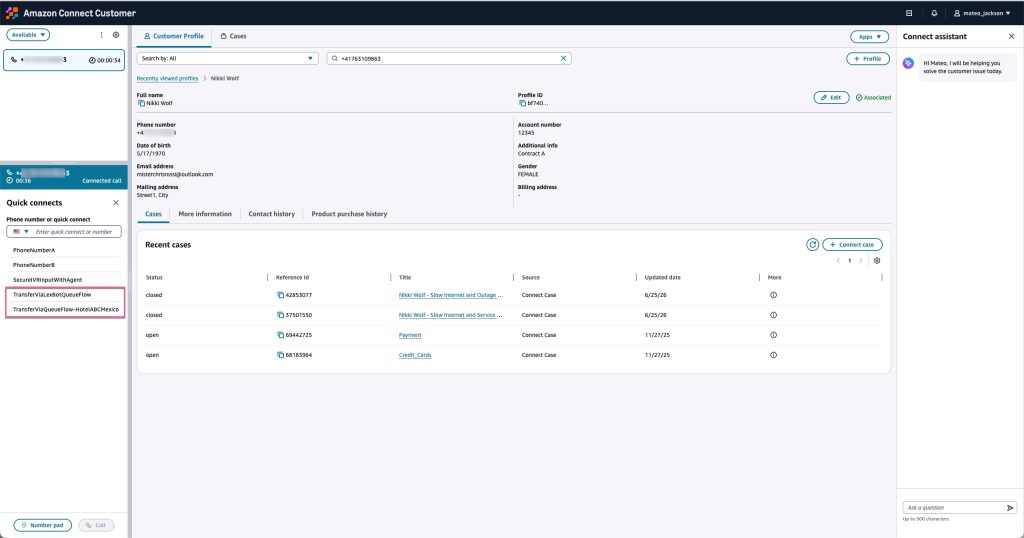
Figure 13: Initiate a transfer call
Set a valid outbound caller ID on every queue: the outbound queue for outbound calls, and the inbound queue for agent-initiated transfers. Do not leave any queue without a caller ID configured. This prevents calls from being blocked. Use a local caller ID wherever it is supported for the destination country. Where local caller ID is not supported, use an international phone number that is allowed as a caller ID for that destination. Not all countries support every number type as a caller ID. Before configuring your numbers, check the Amazon Connect Customer Telecoms Coverage document before configuring your numbers.
Choosing the right Caller ID builds trust with recipients. When calls consistently display a recognizable local number, answer rates stay high. Calls from anonymous or unknown numbers are more likely to be ignored or blocked by carriers. In regulated markets, a valid local Caller ID helps meet telecommunications requirements and avoids carrier-level blocking.
4. References
Amazon Connect Customer Telecoms Country Coverage Guide
Set up outbound calling in Connect Customer
Create quick connects in Connect Customer
Create a routing profile in Connect Customer to link queues to agents
Use the flow designer in Connect Customer to create flows
Flow block in Connect Customer: Call phone number
Flow block in Connect Customer: Transfer to phone number
About the authors
 |
Ying Qian brings 20 years of contact center technology experience, having held roles spanning Solutions Architect, Technical Project Manager, ICT Lead Engineer, and Operations Engineer. At AWS, she works as a Service-Aligned Solutions Architect, leading the Amazon Connect Telephony & Resiliency SME team, and helping customers unlock business value by guiding Amazon Connect implementations aligned with AWS Well-Architected Framework principles. Outside of work, she enjoys jogging, hiking the Alps with her family, and swimming in Lake Constance. |
 |
Bonnie Keller brings more than 20 years of telecom experience. She was part of the Amazon Connect team when the service launched in 2017 and is currently a member of the Amazon Connect Customer Telephony Product team, where she builds telephony features and capabilities that help customers unlock the full potential of their contact center operations. Outside of work, she enjoys staying active with her family. |