AWS Contact Center
Voice-Activated AI Agent with Amazon Connect Customer and Amazon Bedrock
A voice-activated AI agent can make contact center management significantly faster when the AI agents handling your calls need urgent changes. Supervisors running these AI agents on Amazon Connect Customer face a persistent operational challenge. When critical systems go down or AI agent behavior needs immediate adjustment, the path from decision to action involves multiple console logins, manual configuration changes, and time-consuming verification steps. During a large-scale service outage, every minute spent navigating admin interfaces is a minute of degraded customer experience.
A supervisor can pick up the phone, authenticate securely, and say: “Payment processing is down. Turn off the payment intent and update the agent prompt to inform customers. Estimated recovery in 2 hours.” The change takes effect in seconds, without a single console login. This post describes the architecture and design of a voice-activated Supervisor AI Agent built with Amazon Connect Customer, Amazon Bedrock, and the Model Context Protocol (MCP). It shows how the solution gives contact center supervisors secure, conversational control over their AI agents with no console access required. This post focuses on the architecture and design and summarizes what you deploy. The complete deployment code, commands, and step-by-step configuration live in the accompanying GitHub repository.
The challenge: operational agility in AI-powered contact centers
Organizations deploying AI agents in Amazon Connect Customer get significant automation benefits. However, managing those AI agents in real time introduces new operational requirements:
- Outage response: When a backend service goes down, the AI agent’s prompt and available tools need immediate updates. This prevents the agent from attempting failed operations and frustrating customers.
- Intent management: Supervisors need to turn on or off specific AI agent capabilities (intents) based on business conditions or regulatory changes.
- Prompt tuning: AI agent behavior is driven by its system prompt. Adjusting tone, adding temporary instructions, or inserting outage notices requires prompt modifications that traditionally involve console access and careful editing.
- Audit and rollback: Every change must be tracked, backed up, and reversible, especially in regulated industries.
These operations typically require AWS Console access, familiarity with Amazon Connect Customer AI agents APIs, and careful multi-step procedures. For supervisors managing live contact centers, this creates a gap between the speed of decision-making and the speed of execution.
Solution overview
Our Supervisor AI Agent bridges this gap with a secure voice interface. Supervisors call from an approved phone number, and after PIN (personal identification number)-based authentication they converse naturally with an AI agent. That agent has access to nine MCP tools for managing production AI agents.
The solution consists of three layers:
- Secure voice access: Amazon Connect Customer contact flow with phone allow list validation and PIN authentication via AWS Lambda and AWS Secrets Manager
- Conversational AI orchestration: Amazon Bedrock-powered AI agent with a purpose-built supervisor prompt, connected to Amazon Connect Customer AI agents for session management
- MCP tool execution: Nine tools, built as Amazon Connect Customer flow modules saved as tools, that the AI agent invokes mid-conversation to perform real-time operations on production AI agents
Figure 1: High-level architecture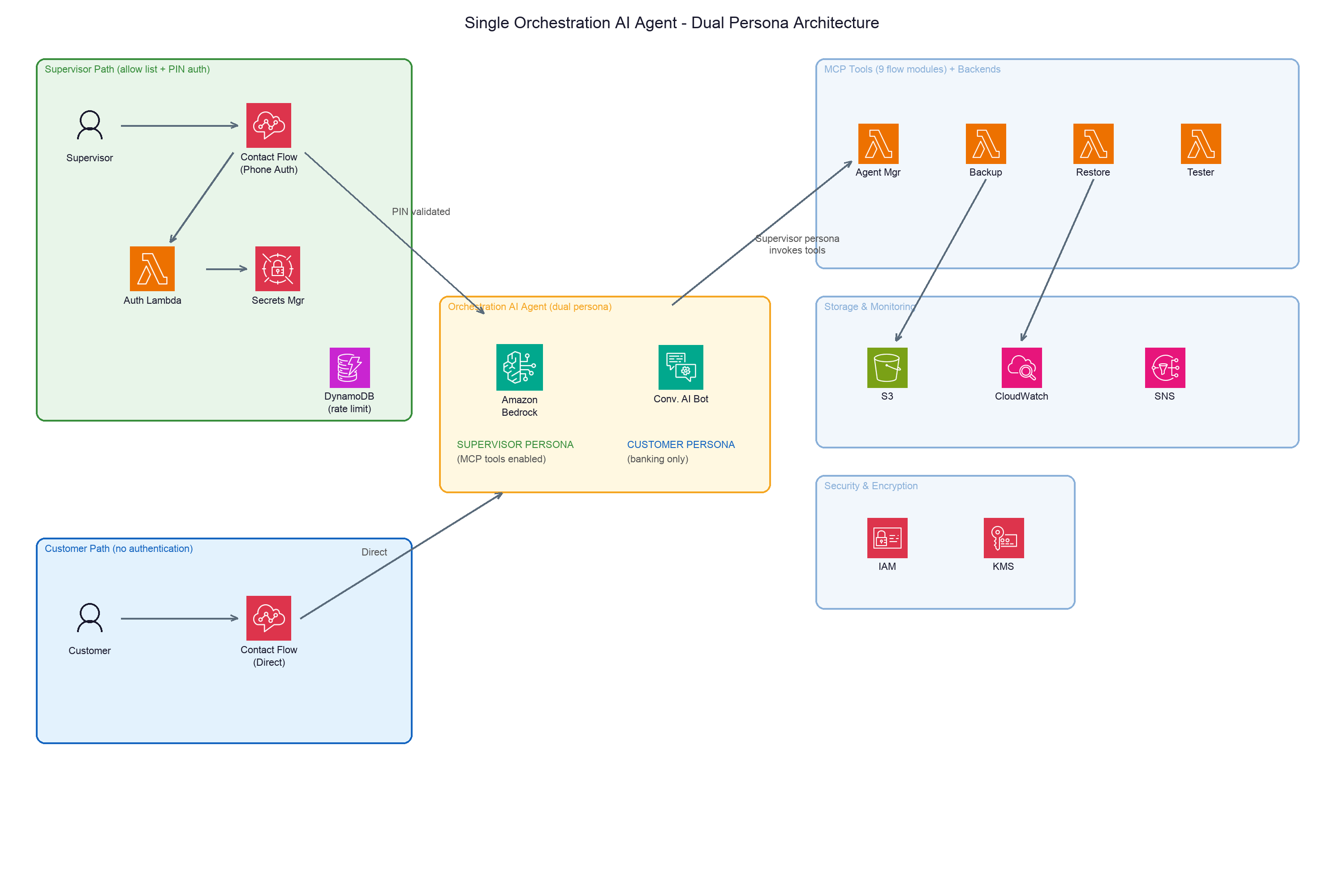
Figure 1: Single Orchestration AI Agent with dual persona architecture. The Supervisor path (allow list + PIN auth) and Customer path (no auth) route to the same agent. The agent activates the appropriate persona based on conversational context — Supervisor Persona (MCP tools enabled) or Customer Persona (banking only). The Supervisor Persona invokes 9 flow-module MCP tools backed by Lambda functions, with storage (S3, CloudWatch, SNS) and security (IAM, KMS).
How it works
At a high level, a supervisor’s call flows through authentication, natural-language understanding, tool execution, and automated validation before control returns to the caller. The following sequence shows each step.
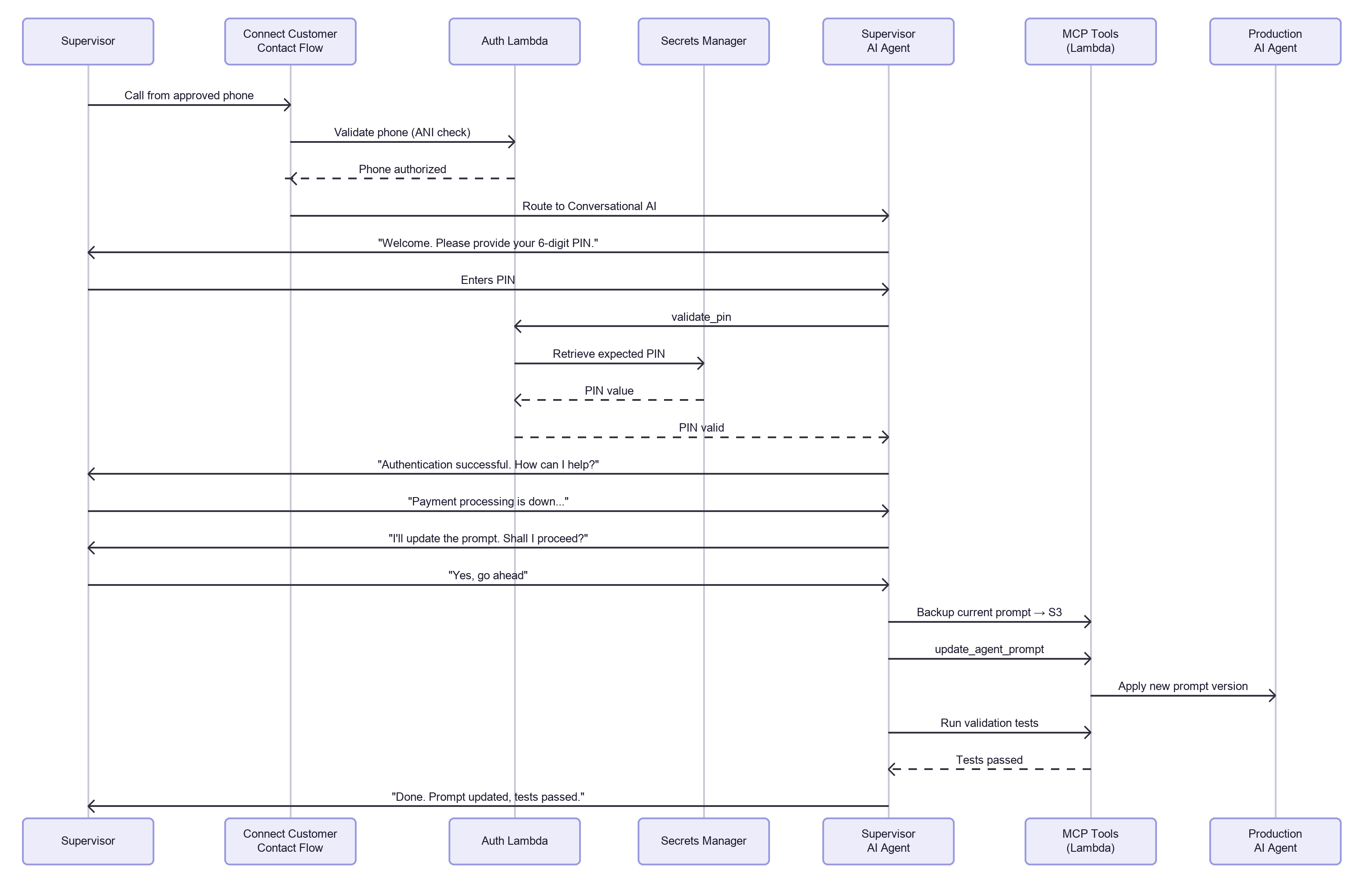
Figure 2: Supervisor AI Agent interaction sequence: showing the end-to-end flow from phone authentication through MCP tool execution and automated validation testing.
- A supervisor calls the dedicated hotline from an approved phone number.
- The contact flow invokes an authentication Lambda that validates the caller’s phone number against an allow list.
- Upon phone authentication, the call connects to the Supervisor AI Agent, a conversational AI bot backed by Amazon Bedrock. The agent’s first action is PIN validation: it invokes the validate_pin tool, which checks the PIN against AWS Secrets Manager through the authentication Lambda. An Amazon DynamoDB table supports brute-force protection, and after three failed attempts the caller is locked out and the call ends.
- The supervisor describes what they need in natural language. The AI agent reasons about the request, selects the appropriate MCP tool, confirms the action with the supervisor, and executes it.
- After execution, the AI agent runs automated validation tests and reports results back to the supervisor.
- When the supervisor says “that’s all,” the AI agent invokes a Return to Control tool that gracefully ends the call.
Architecture deep dive
The following sections break down each layer of the architecture, starting with how the solution authenticates supervisors.
Authentication layer
The authentication flow implements defense in depth with two factors:
- Phone allow list: The supervisor-ai-agent-auth Lambda checks the caller’s ANI (Automatic Number Identification) against an allow list of E.164 phone numbers stored in AWS Secrets Manager. Unauthorized callers hear a rejection message and the call disconnects immediately.
- PIN verification: The Supervisor AI Agent’s system prompt requires PIN validation as its first action. The agent invokes the validate_pin tool, which calls the supervisor-ai-agent-auth Lambda to retrieve the expected PIN from AWS Secrets Manager and validate the input. An Amazon DynamoDB table supports server-side brute-force protection, locking out a phone number for 30 minutes after three failed attempts. Only after successful PIN validation does the agent proceed to any other operation.
The following diagram summarizes how the two authentication factors work together.
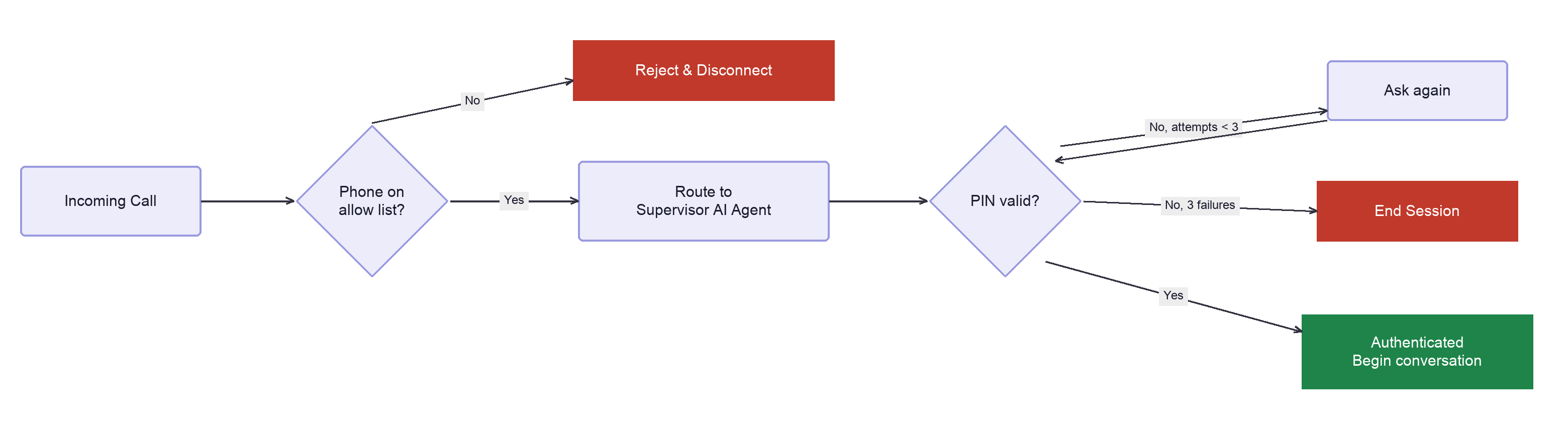
Figure 3: Authentication flow: Phone allow list validation followed by PIN-based authentication with rate limiting and lockout protection after three failed attempts.
This approach avoids storing credentials in code and supports rotation through Secrets Manager. Both the PIN and the phone allow list live in the same secret. Supervisors can add or remove phone numbers by updating the secret directly, with no CDK redeployment required.
Conversational AI layer
After phone authentication, the contact flow hands the call to the Supervisor Conversational AI Bot. This Amazon Lex V2 bot connects to Amazon Connect Customer AI agents. The AI agents service then orchestrates the AI agent session.
The AI agent uses a carefully crafted system prompt that does the following:
- Mandates PIN authentication as the first interaction
- Defines the supervisor persona and conversational style
- Lists available tools with usage guidelines
- Requires confirmation before destructive operations
- Instructs the agent to report test results after every change
- Handles edge cases like ambiguous requests or tool failures
MCP tool layer
The MCP tools are built as Amazon Connect Customer flow modules saved as tools, which the Amazon Connect Customer AI agents orchestration agent invokes mid-conversation. Each flow module includes an Invoke Lambda Function block that calls a backend Lambda by ARN. Most tools route to a single Agent Manager Lambda. That Lambda coordinates the operation and delegates to the Backup, Restore, and Tester Lambdas as needed. In total, the solution runs on five Lambda functions.
| # | Tool | Purpose | Risk Level |
|---|---|---|---|
| 1 | validate_pin |
Authenticate supervisor via PIN | Auth |
| 2 | list_agents |
List all production AI agents | Read-only |
| 3 | get_agent_config |
Get agent configuration, prompt, and tool list | Read-only |
| 4 | list_agent_intents |
List intents with active/inactive status | Read-only |
| 5 | disable_intent |
Disable a specific agent intent | Mutating |
| 6 | enable_intent |
Reactivate a disabled intent | Mutating |
| 7 | restore_all_intents |
Restore all intents to normal | Mutating |
| 8 | update_agent_prompt |
Modify the agent’s system prompt | Mutating |
| 9 | restore_agent_prompt |
Restore prompt from S3 backup | Mutating |
A tenth tool, Complete (Return to Control), gracefully ends the conversation when the supervisor is done.
Every mutating operation follows a three-step safety pattern:
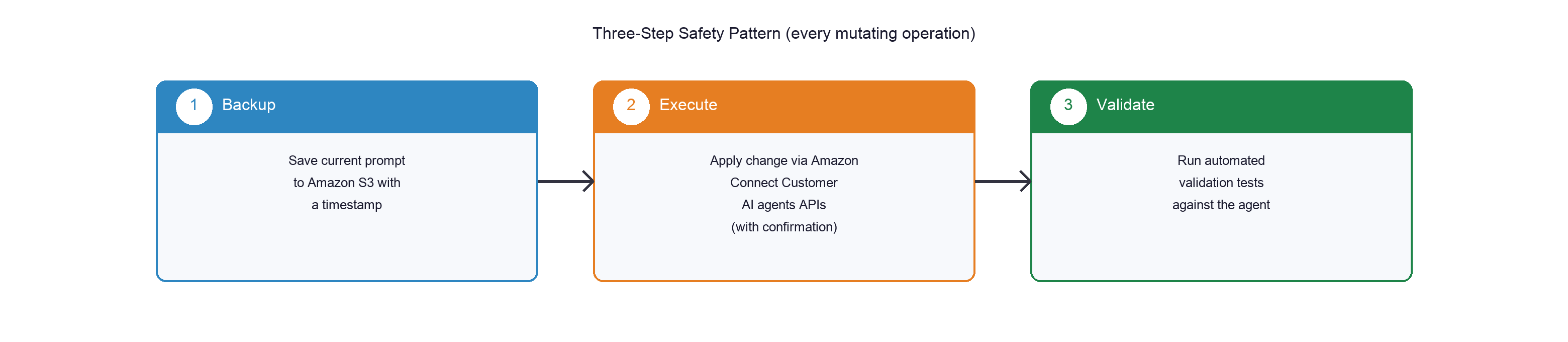
Figure 4: Three-step safety pattern: Every mutating operation follows: (1) Backup current state, (2) Execute change with confirmation, (3) Run automated validation tests.
Two operational modes
The system supports two operational modes, and the AI agent selects between them based on how the supervisor describes the situation.
Full Outage Mode handles situations where entire services or multiple capabilities are unavailable. In this mode, the agent generates a new system prompt that incorporates the outage information and notes which services are affected and which remain available. It also communicates the estimated recovery time to callers.
Intent-Level Mode offers finer control, letting a supervisor selectively turn individual agent capabilities on or off. A supervisor might disable “change card PIN” during a partial outage, for example, while balance inquiries and transfers keep working normally. The agent tracks intent state in Amazon S3 and injects it into the production agent’s prompt so the change takes effect immediately.
Customer-facing flow
The solution includes a customer-facing contact flow that routes callers to the Production AI Agent, the agent whose behavior the supervisor controls. When a supervisor updates the production agent during an outage, customers calling the main line immediately hear the updated messaging. When the supervisor restores normal operations, callers return to standard handling. This closes the loop between a supervisor’s voice command and the live customer experience, as shown in the complete outage management loop:
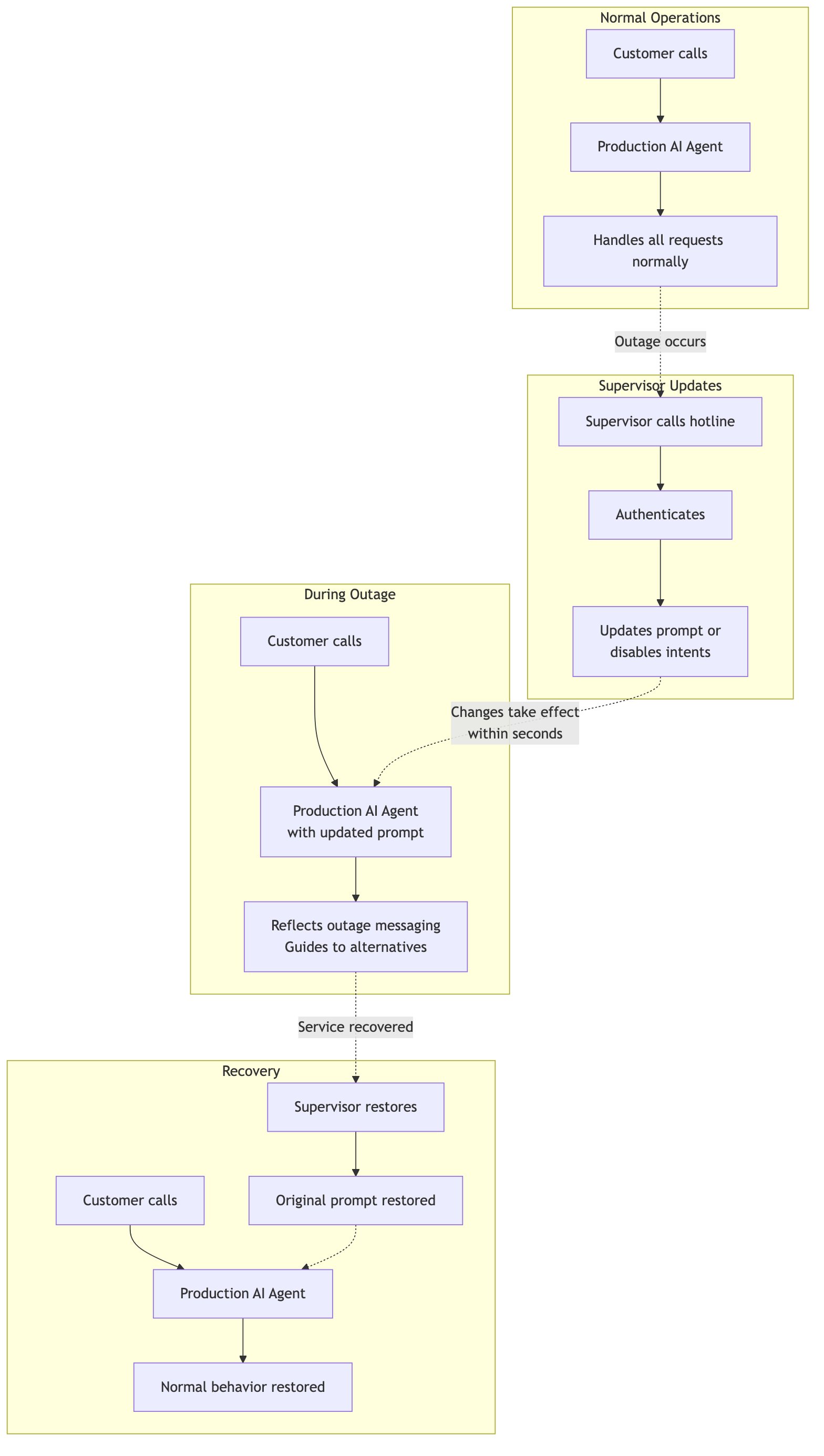
Figure 5: Complete outage management loop: Supervisor updates agent → customers receive outage messaging → supervisor restores → normal operations resume.
Walkthrough: handling a payment outage
Let’s walk through a realistic scenario that shows the solution in action.
Scenario: The payment processing backend is experiencing an outage. The supervisor needs to immediately update the production AI agent to stop attempting payment transactions and inform customers about the issue.
Step 1: Supervisor calls the hotline
The supervisor dials the dedicated number from their approved phone. The contact flow validates their phone number and routes to the Supervisor AI Agent, which authenticates them via PIN.
Step 2: Describe the situation
Supervisor: “Payment processing is down. Account lookups and transfers are still working. Estimated recovery is 2 hours.”
The AI agent parses this natural language input and determines it needs to update the agent prompt with outage information.
Step 3: AI agent confirms the plan
AI Agent: “I understand there’s a payment processing outage with a 2-hour estimated recovery. I’ll update the agent prompt to inform customers that payment processing is temporarily unavailable while account lookups and transfers continue to work normally. A backup of the current prompt will be saved first. Shall I proceed?”
Supervisor: “Yes, go ahead.”
Step 4: Execution with safety net
The AI agent then performs the following steps:
- Backs up the current prompt to Amazon Simple Storage Service (Amazon S3) with a timestamp.
- Invokes update_agent_prompt with the outage information.
- Generates a new prompt version through the Lambda and applies it via the Amazon Connect Customer AI agents APIs.
- Runs automated validation tests against the updated agent.
- Reports the results back to the supervisor.
AI Agent: “Done. I’ve updated the agent prompt with the payment outage notice. Backup saved to S3. Post-change tests passed, and the agent correctly informs customers about the payment outage while continuing to handle account lookups and transfers normally. Is there anything else?”
Step 5: Recovery
Two hours later, the supervisor calls back:
Supervisor: “Payment processing is back up. Restore the original prompt.”
AI Agent: “I’ll restore the agent prompt from the most recent backup. Shall I proceed?”
Supervisor: “Yes.”
AI Agent: “Original prompt restored. Tests passed, and the agent is handling all intents normally again, including payments.”
What you’ll need
This post focuses on the architecture and design of the solution. The complete deployment walkthrough, including all CDK commands, parameters, and configuration steps, lives in the GitHub repository. Before deploying, verify you have the following:
- An AWS account with appropriate permissions to deploy CDK stacks
- An Amazon Connect Customer instance with Amazon Connect Customer AI agents activated
- Amazon Bedrock model access activated in your AWS Region (for example, Anthropic Claude 3.5 Sonnet or another supported foundation model)
- AWS CDK command line interface (CLI) v2 installed (
npm install -g aws-cdk) - Node.js 20.x or later
- Python 3.13 (or 3.12+) for Lambda function dependencies
- IAM permissions to create Lambda functions, S3 buckets, Secrets Manager secrets, CloudWatch alarms, SNS topics, and VPC resources
- A phone number to add to the supervisor allow list (E.164 format)
Deployment
We summarize what the deployment provisions here and keep the full, step-by-step procedure in the GitHub repository so it stays current with the code.
AWS Cloud Development Kit (AWS CDK) with TypeScript deploys the infrastructure. For detailed deployment instructions, including all required parameters, pre-deployment steps, and bootstrap commands, refer to the Getting Started guide in the GitHub repository.
The CDK stack provisions the following resources:
- Five Lambda functions (auth, agent manager, backup, restore, tester) with Python 3.13
- IAM roles with least-privilege permissions scoped to specific resource ARNs
- Secrets Manager secret for PIN storage
- S3 bucket with lifecycle policies (IA at 30 days, Glacier at 90 days)
- Amazon Connect Customer contact flows (supervisor and customer) with authentication logic
- Amazon Simple Notification Service (Amazon SNS) topic with email subscription for alarm notifications
- CloudWatch alarms for auth failures, prompt update failures, test failures, Lambda errors, and throttling
After CDK deployment, one manual step remains. Configure the Supervisor AI Agent in Amazon Connect Customer AI agents by attaching the system prompt and the flow module tools, and create the Complete (Return to Control) tool. The customer-facing Production AI Agent and its Conversational AI bot also require manual console setup. Refer to the for step-by-step guides deployment documentation
Testing the solution
The repository includes a comprehensive end-to-end testing guide covering pre-flight verification and ten test scenarios. Pre-flight checks validate every component before testing:
# Verify AI agent is active with the 10 tools (9 MCP + 1 Return to Control)

aws qconnect get-ai-agent \
--assistant-id <assistant-id> \
--ai-agent-id <agent-id> \
--query '{status:aiAgent.status,tools:length(aiAgent.configuration.orchestrationAIAgentConfiguration.toolConfigurations)}'

# Expected: {"status": "ACTIVE", "tools": 10}
The testing guide walks through several key scenarios. It confirms that calls from a non-approved number are disconnected immediately and that three wrong PIN attempts terminate the call. It exercises the full outage loop, where a supervisor updates the prompt, customers hear the outage messaging, and normal behavior returns once the supervisor restores the agent. It also covers intent-level management: turning a capability off, verifying it is rejected while other intents keep working, then turning it back on. Finally, it validates the backup-and-restore cycle with timestamped backups and graceful termination through the Complete (Return to Control) tool.
Operational considerations
Running this solution in production raises several operational topics worth planning for: security, monitoring, and scaling.
Security
The design applies defense in depth across several layers:
- Phone allow list provides an initial layer of access control independent of AWS IAM
- PIN authentication adds a knowledge factor validated by the Auth Lambda, with Secrets Manager supporting rotation
- Amazon CloudWatch logs MCP tool invocations with caller phone number for audit trails
- Amazon S3 versions prompt backups and intent configurations for forensic analysis.
- Amazon Connect Customer AI agents invokes the tool Lambdas through scoped resource-based permissions, so only the authorized assistant and Connect Customer instance can call them
Monitoring
The CDK stack provisions a layer of Amazon CloudWatch alarms that watch for the failure modes most likely to affect supervisors. A high authentication failure rate (more than 10 failures in five minutes) flags possible brute-force activity. Dedicated alarms also fire on any prompt update failure and on critical post-change validation failures. Per-function alarms cover Lambda errors and throttling across all five Lambdas. Every alarm notifies the on-call team through an Amazon Simple Notification Service (Amazon SNS) email subscription.
Scaling considerations
The architecture scales along a few dimensions:
- The solution supports multiple supervisors calling simultaneously; each gets an independent AI agent session
- Phone allow list and PIN can be managed per-supervisor for granular access control
- Additional MCP tools can be added without modifying the contact flow; you create a new flow module tool and point it at the appropriate Lambda operation
- Serverless architecture means near-zero idle costs with pay-per-use pricing
Repository cleanup
If you deployed the solution from the GitHub repository, remove the resources when you no longer need them to avoid ongoing charges:
- Run
cdk destroyto remove CDK-provisioned resources (Lambda functions, S3 bucket, VPC, CloudWatch alarms, SNS topic) - Manually delete resources not managed by CDK: the Amazon Connect Customer AI agent, Lex V2 bot, Conversational AI bot, flow module tools, and any associated phone numbers
- Delete the Secrets Manager secret created during setup (supervisor PIN and phone allow list)
For detailed cleanup instructions, refer to the teardown section in the GitHub repository README.
Conclusion
The Supervisor AI Agent demonstrates how Amazon Connect Customer, Amazon Bedrock, and the Model Context Protocol can be combined to create a secure, conversational management interface for AI-powered contact centers. A prompt update that previously required a dozen console steps now happens through a single voice call, reducing response time from minutes to seconds. By replacing console-based workflows with natural voice interactions, supervisors can respond to operational events in seconds rather than minutes. This directly improves customer experience during critical moments.
The pattern extends beyond contact center management. Many operational workflows that involve authenticated access, natural language understanding, and tool execution can benefit from this approach. Examples include infrastructure management, security incident response, and business process automation.
The complete source code, CDK infrastructure, and deployment documentation are available on GitHub.
Related resources
- Amazon Connect Customer AI agents documentation
- Amazon Connect Customer AI agent tools (flow modules)
- Model Context Protocol (MCP) specification
- Amazon Connect Customer AI agents API reference
- AWS CDK documentation

Dipkumar Mehta
Dipkumar Mehta is a Principal Consultant for Natural Language AI at AWS. He architects and scales Agentic AI solutions for enterprise contact centers. He leads development of AI products that accelerate adoption of autonomous customer experiences. His work helps organizations move from conversational AI pilots to production-grade agentic deployments on AWS.

Joyson Neville Lewis
Joyson Neville Lewis is a Sr. Conversational AI Architect with AWS Professional Services. Joyson worked as a Software/Data engineer before diving into the Conversational AI and Industrial IoT space. He assists AWS customers to materialize AI outcomes using Voice Assistant/Chatbot and IoT solutions.