AWS Contact Center
Voice to Insight: Low-Latency Transcript Pipelines from Amazon Connect Customer to Amazon Redshift (Part 2)
Introduction
Contact center teams running Amazon Connect Customer consistently face a core data engineering challenge: reducing the end-to-end latency from call completion to transcript availability in the data warehouse. The answer is not a single number. It depends on understanding the interplay of 14 distinct latency factors across the pipeline. The factors include the irreducible 2-5 minutes of Amazon Connect Customer conversational analytics speech-to-text processing plus the configurable seconds-to-minutes of data pipeline delivery into Amazon Redshift.In this two-part post, we present four architecture options for delivering Amazon Connect Customer conversational analytics transcripts to Amazon Redshift – ranging from a fully managed zero-code path (~15 minute latency) to an event-driven Lambda pipeline (~3-7 minute latency) to real-time streaming of partial transcripts during a live call (seconds). This post walks through the latency factors you can and cannot control, and provides a decision framework to help you select the right pattern for your latency, cost, and operational complexity requirements.This is Part 2 of a two-part series.
In Part 1, we covered the end-to-end latency breakdown, the 15 latency factors you can and cannot control, and three architecture options for post-call transcript delivery (Options A, B, and C). In this post, we cover real-time streaming during a live call (Option D), the Redshift schema designed for time-range queries and aggregate reporting, a decision framework, and implementation guidance.
Target audience: Solutions Architects, Data Engineers, and Contact Center Platform teams building analytics pipelines on Amazon Connect Customer.
Level: Advanced (300)
Architecture Option D: Real-Time Streaming-Partial Transcripts During Calls
End-to-end latency: 2–5 seconds per segment (during call) | Complexity: High | Cost: Medium-High | Operational burden: High
This option is fundamentally different – it captures partial transcript segments in near real-time while the call is still in progress. It uses Amazon Connect Customer real-time conversational analytics streaming, which outputs transcript segments to an Amazon Kinesis Data Stream. Streaming materialized views are near-real-time, not truly real-time. New data becomes visible only after a refresh cycle completes.
No Lambda required: Unlike Option B (where Lambda is needed to flatten complex post-call JSON), Option D uses Redshift Streaming Ingestion – a native Redshift capability that reads directly from the Kinesis Data Stream. The JSON parsing happens inside Redshift itself via JSON_EXTRACT_PATH_TEXT functions in the materialized view definition. Real-time transcript segments from conversational analytics are simpler (flat key-value per utterance), making in-database parsing feasible without an intermediate transform layer.
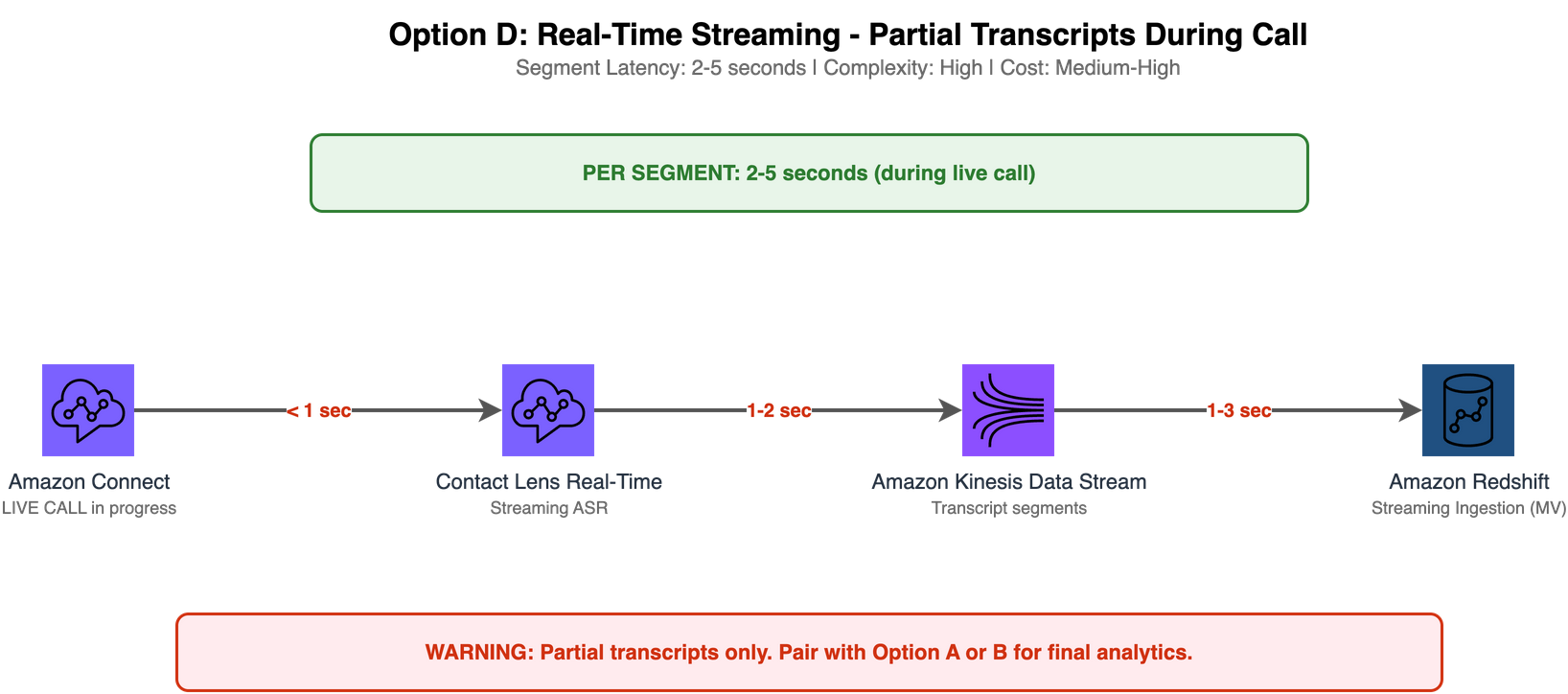
Architecture diagram for Option D showing Amazon Connect Customer real-time conversational analytics streaming outputting transcript segments to an Amazon Kinesis Data Stream, with Amazon Redshift Streaming Ingestion pulling data via a materialized view for near-real-time query ability.
Process Flow:
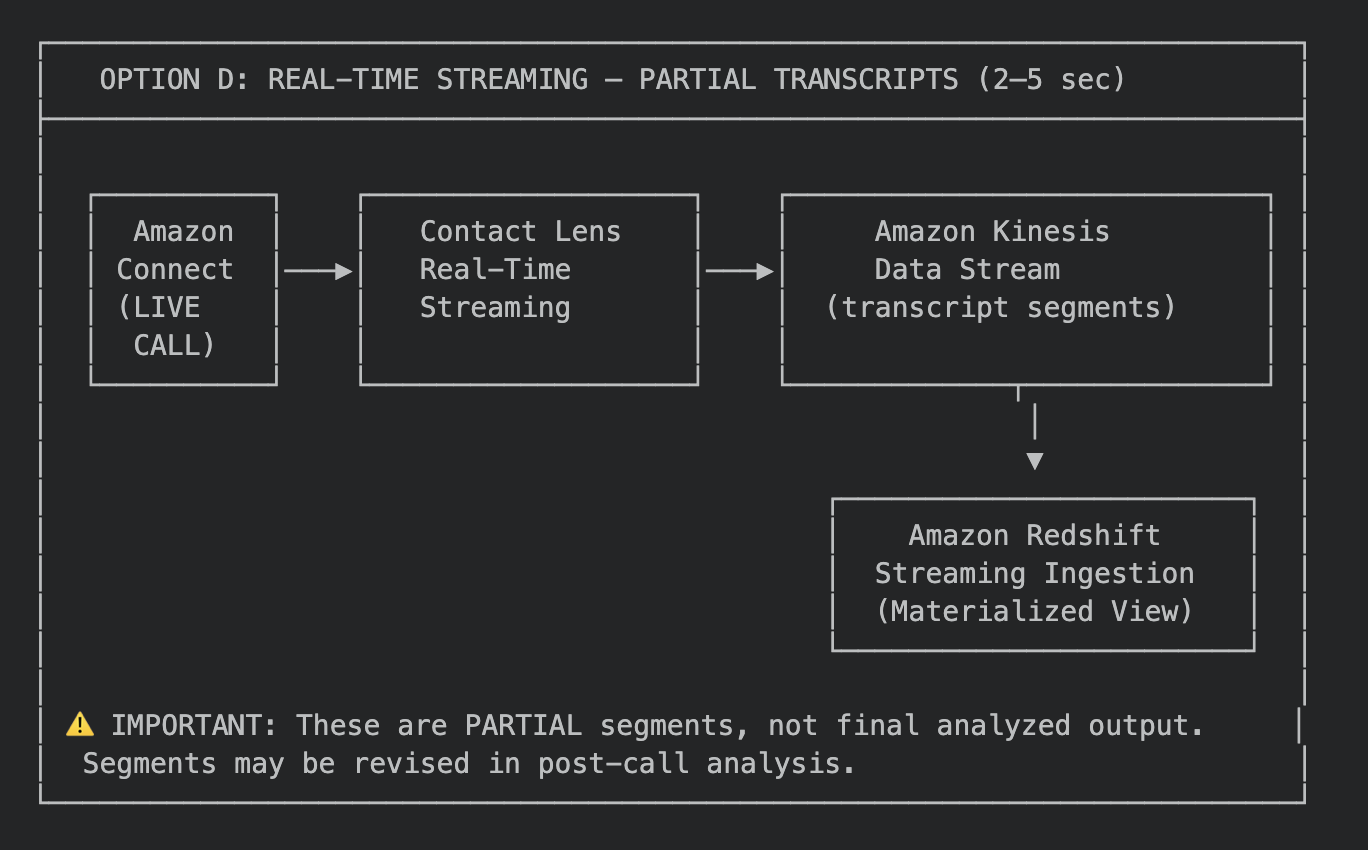
Process flow diagram for Option D showing transcript segments streaming from Amazon Connect Customer conversational analytics through the Kinesis Data Stream into a Redshift streaming materialized view during a live call.
Redshift Streaming Ingestion Configuration Example
-- Create external schema for Kinesis stream

CREATE EXTERNAL SCHEMA kinesis_connect
FROM KINESIS
IAM_ROLE 'arn:aws:iam::123456789012:role/RedshiftStreamingRole';

-- Materialized view for streaming ingestion

CREATE MATERIALIZED VIEW connect.mv_live_transcripts AS
SELECT
  JSON_EXTRACT_PATH_TEXT(from_varbyte(kinesis_data, 'utf-8'), 'ContactId') AS contact_id,
  JSON_EXTRACT_PATH_TEXT(from_varbyte(kinesis_data, 'utf-8'), 'Transcript', 'Content') AS segment_text,
  JSON_EXTRACT_PATH_TEXT(from_varbyte(kinesis_data, 'utf-8'), 'Transcript', 'ParticipantId') AS participant,
  JSON_EXTRACT_PATH_TEXT(from_varbyte(kinesis_data, 'utf-8'), 'Transcript', 'BeginOffsetMillis')::BIGINT AS begin_offset_ms,
  approximate_arrival_timestamp AS ingested_at
FROM kinesis_connect."connect-realtime-transcripts"
WHERE is_utf8(kinesis_data)
  AND JSON_EXTRACT_PATH_TEXT(from_varbyte(kinesis_data, 'utf-8'), 'EventType') = 'TRANSCRIPT';

-- Auto-refresh recommended for production (refreshes on a system-determined schedule)
-- Manual refresh available for on-demand pulls:
-- REFRESH MATERIALIZED VIEW connect.mv_live_transcripts;
--
-- Note: Streaming materialized views are near-real-time, not truly real-time.
-- New data becomes visible only after a refresh cycle completes.

-- Note: Replace 123456789012 with your AWS account ID
-- *AWS Identity and Access Management (IAM)
When to Choose Option D
- You need real-time supervisor dashboards showing live call transcription
- You’re building real-time agent assist applications
- You need to trigger immediate alerts based on keywords or sentiment during calls
- You understand and accept that these are partial segments – not final analyzed transcripts
Critical Caveat
This architecture option is NOT a replacement for post-call analysis (Options A to C in Part 1). Post-call analysis options are still required after the call is completed for full call analysis.
Real-time segments are preliminary. Post-call conversational analytics processing may revise transcription, add sentiment scores, apply personally identifiable information (PII) redaction, and categorize the interaction. For authoritative analytics, pair Option D with Option A or B – use streaming for live monitoring and event-driven loading for final records.
Redshift Schema Example
The following schema supports all four architecture options. It’s designed for both real-time queries and aggregate reporting.
-- Schema: connect
-- Purpose: Amazon Connect Customer transcript analytics

CREATE SCHEMA IF NOT EXISTS connect;

-- Primary Transcript Table
CREATE TABLE connect.contact_transcripts (
  contact_id              VARCHAR(256)    NOT NULL,
  channel                 VARCHAR(20)     DEFAULT 'VOICE',
  language_code           VARCHAR(10)     DEFAULT 'en-US',
  call_duration_sec       INT,
  full_transcript         VARCHAR(65535),
  customer_segments       SUPER,          -- JSON array of customer utterances
  agent_segments          SUPER,          -- JSON array of agent utterances
  customer_sentiment      DECIMAL(5,4),
  agent_sentiment         DECIMAL(5,4),
  categories_matched      SUPER,          -- JSON array of matched categories
  issues_detected         SUPER,          -- JSON array of issues
  pii_redacted            BOOLEAN         DEFAULT FALSE,
  word_count              INT,
  talk_time_customer_pct  DECIMAL(5,2),
  talk_time_agent_pct     DECIMAL(5,2),
  silence_time_pct        DECIMAL(5,2),
  interruptions_count     INT             DEFAULT 0,
  s3_transcript_key       VARCHAR(1024),
  contact_lens_job_id     VARCHAR(256),
  transcript_available_at TIMESTAMP,
  loaded_at               TIMESTAMP       DEFAULT GETDATE(),
  lob_name                VARCHAR(100),
  queue_name              VARCHAR(200),
  agent_id                VARCHAR(256),
  PRIMARY KEY (contact_id)
)
DISTSTYLE KEY
DISTKEY (contact_id)
SORTKEY (loaded_at);

-- Materialized View: Daily KPI Summary
CREATE MATERIALIZED VIEW connect.mv_transcript_daily_summary
AUTO REFRESH YES AS
SELECT
  DATE(loaded_at) AS report_date,
  lob_name,
  queue_name,
  COUNT(*) AS total_transcripts,
  ROUND(AVG(customer_sentiment), 3) AS avg_customer_sentiment,
  ROUND(AVG(agent_sentiment), 3) AS avg_agent_sentiment,
  ROUND(AVG(word_count), 0) AS avg_word_count,
  ROUND(AVG(call_duration_sec), 0) AS avg_call_duration,
  ROUND(AVG(silence_time_pct), 2) AS avg_silence_pct,
  SUM(CASE WHEN customer_sentiment < -0.3 THEN 1 ELSE 0 END) AS negative_calls,
  SUM(CASE WHEN customer_sentiment > 0.3 THEN 1 ELSE 0 END) AS positive_calls,
  SUM(interruptions_count) AS total_interruptions
FROM connect.contact_transcripts
GROUP BY DATE(loaded_at), lob_name, queue_name;

-- Materialized View: Real-Time Streaming (Option D)
-- (See Option D section above for streaming MV definition)
Schema Design Decisions
| Decision | Rationale |
| DISTSTYLE KEY on contact_id | Ensures joins with CTR tables (by contact_id) are co-located |
| SORTKEY (loaded_at) | Optimizes time-range queries (most common access pattern) |
| SUPER data type for arrays | Avoids flattening overhead; supports PartiQL array queries |
| AUTO REFRESH YES on MV | Keeps daily summary within 1 minute of current data |
| VARCHAR(65535) for transcript | Accommodates long calls (up to ~10 hours of speech) |
Decision Framework: Choosing the Right Architecture
Use this decision tree based on your primary requirements:
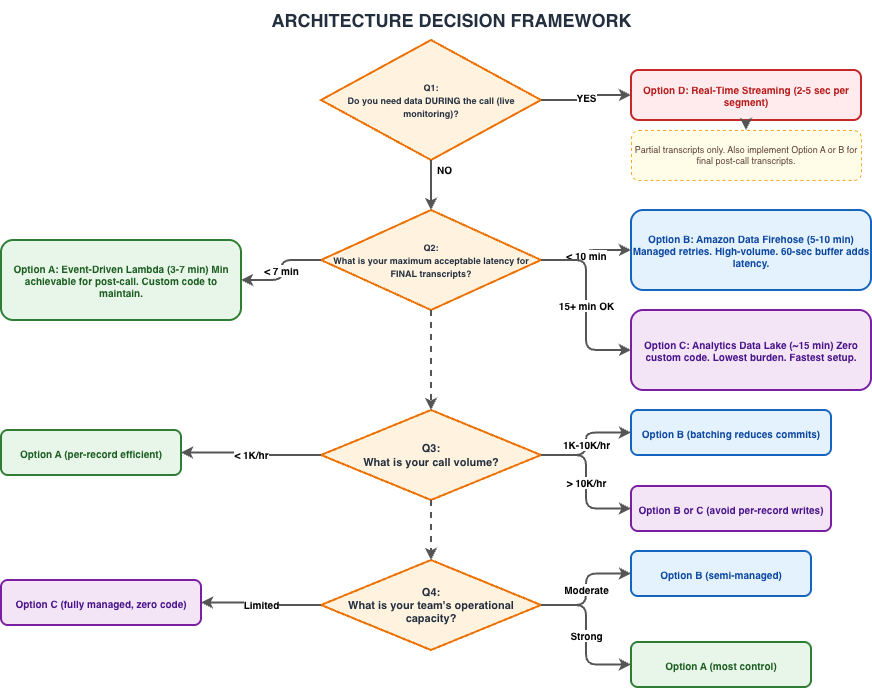
Decision tree diagram guiding architecture selection through four questions: whether data is needed during the call, maximum acceptable latency for final transcripts, call volume, and team operational capacity – mapping answers to Options A, B, C, or D.
Comparison Matrix
| Criterion | Option A | Option B | Option C | Option D |
| Latency | 3-7 min | 5-10 min | ~15 min | 2-5 sec |
| Data completeness | Full final | Full final | Full final | Partial (live) |
| Custom code | Lambda (transform + load) | Lambda (transform only) | None | None (Streaming Ingestion MV) |
| Failure handling | Custom DLQ | Firehose built-in | Managed | Custom |
| Scaling | Lambda auto-scale | Firehose auto-scale | Fully managed | Kinesis shards |
| Cost (1K calls/hr) | ~$15/month | ~$25/month | ~$10/month | ~$50/month |
| Implementation time | 2-3 days | 1-2 days | 2-4 hours | 3-5 days |
| Best for | Low-latency analytics | High-volume reliable delivery | Quick start / PoC | Live dashboards |
Optimization Checklist
For teams implementing Option A (minimum latency), apply these optimizations to shave every possible second from the pipeline:
Infrastructure Optimizations
- ☐ Same Region deployment — All services (Connect, S3, Lambda, Redshift) in one AWS Region
- ☐ Provisioned Concurrency on Lambda — Eliminates 1–3 second cold starts
- ☐ Lambda memory ≥ 512 MB — Faster JSON parsing for large transcripts (CPU scales with memory)
- ☐ EventBridge over S3 Event Notifications → SNS — Fastest event propagation path
- ☐ Redshift Serverless — Auto-scales for variable ingestion loads without capacity planning
Redshift Optimizations
- ☐ SUPER data type for nested JSON arrays — Avoids expensive flattening at ingest time
- ☐ AUTO REFRESH on materialized views — Dashboard queries stay current without manual refresh
- ☐ Short Query Acceleration (SQA) enabled — Prioritizes INSERT statements from Data API
- ☐ Concurrency Scaling enabled — Handles burst ingestion without queuing
Contact Lens Configuration
- ☐ Disable PII redaction if not required by compliance — Saves 15–30 seconds per contact
- ☐ Enable post-call analysis only (not real-time + post-call) if you don’t need Option D — Reduces processing overhead
Monitoring & Alerting
- ☐ Amazon CloudWatch alarm on Lambda Duration (p99 > 10 sec)
- ☐ Amazon CloudWatch alarm on Lambda Errors (> 5 in 5 minutes)
- ☐ Custom metric: Time from transcript_available_at to loaded_at (measures pipeline-only latency)
- ☐ Redshift query monitoring rule: Alert if ingestion queries exceed 30 seconds
Cost Estimation
For a contact center processing 1,000 calls per hour (8,000 calls/day, ~240,000 calls/month) in US East (N. Virginia):
| Component | Option A | Option B | Option C |
| Lambda (invocations + duration) | $3/month | $3/month | $0 |
| EventBridge | $0.24/month | $0.24/month | $0 |
| Amazon Data Firehose | – | $7/month | – |
| S3 (transcript storage) | $5/month | $5/month | $5/month |
| Connect Analytics Data Lake | – | – | Included |
| Redshift Serverless (incremental) | $8/month | $12/month | $5/month |
| CloudWatch (logs + metrics) | $2/month | $2/month | $1/month |
| Total incremental cost | ~$18/month | ~$29/month | ~$11/month |
Note: These are incremental cost estimations for the transcript pipeline only. Base Amazon Connect Customer, Redshift Serverless, and S3 storage costs are not included.
Error Handling and Resilience
Production pipelines must handle failures gracefully. Here are the resilience patterns for each option:
Option A: Dead Letter Queue Pattern
Terraform (HCL) code sample:
# Add SQS DLQ for failed Lambda invocations
resource "aws_sqs_queue" "transcript_dlq" {
  name                      = "connect-transcript-dlq-${var.environment}"
  message_retention_seconds = 1209600  # 14 days
}

resource "aws_lambda_function_event_invoke_config" "transcript_loader" {
  function_name          = aws_lambda_function.transcript_loader.function_name
  maximum_retry_attempts = 2

  destination_config {
    on_failure {
      destination = aws_sqs_queue.transcript_dlq.arn
    }
  }
}
Option B: Firehose Built-In Error Handling
With Amazon Data Firehose, you get automatic delivery failure handling:
- Retry duration: Up to 24 hours (configurable from 0-7200 seconds)
- Error output: Failed records are written to an S3 error prefix for manual inspection
- Backpressure: Firehose buffers automatically if Redshift is temporarily unavailable
Idempotency
All options should implement idempotent writes to handle duplicate deliveries:
-- Use MERGE/UPSERT pattern instead of INSERT
MERGE INTO connect.contact_transcripts AS target
USING (SELECT '{contact_id}' AS contact_id) AS source
ON target.contact_id = source.contact_id
WHEN NOT MATCHED THEN
  INSERT (contact_id, channel, language_code, ...)
  VALUES ('{contact_id}', '{channel}', '{language}', ...);
Production Hardening Considerations
Address the following areas for production use cases, that are beyond the scope of this demonstration:
- Security: Implement VPC endpoints for S3 and Redshift, enable AWS KMS encryption for data at rest and in transit, apply least-privilege AWS Identity and Access Management (IAM) policies, and consider using AWS Secrets Manager for database credentials.
- Networking: Place Lambda functions inside a VPC with appropriate security groups if your Redshift cluster is VPC-attached. Configure NAT Gateways for outbound internet access if needed.
- Observability: Implement distributed tracing with AWS X-Ray, create CloudWatch dashboards for pipeline latency SLIs, and set up composite alarms for cascading failures.
- Data quality: Add schema validation at the Lambda layer, implement data quality checks before Redshift ingestion, and set up notifications for unexpected transcript formats.
- Disaster recovery: Configure cross-region replication for critical S3 data, maintain Terraform state in a remote backend with versioning, and document runbooks for common failure scenarios.
- Cost governance: Set up AWS Budgets alarms, implement auto-scaling boundaries, and review Redshift Serverless RPU limits against your expected workload.
Scaling Considerations
The architectures presented here are designed for typical enterprise contact centers processing 500-10,000 calls per hour. For hyper-scale deployments (>50,000 concurrent calls):
- Option A: Lambda concurrency limits (default 1,000 per Region) may require a quota increase. Consider implementing an SQS buffer between Amazon EventBridge and Lambda to smooth traffic spikes during peak hours.
- Option B: Amazon Data Firehose scales automatically but monitor the Redshift COPY command parallelism. Use multiple Firehose delivery streams partitioned by queue or line of business for very high volumes.
- Option C: The Analytics Data Lake handles scale transparently – this is one of its key advantages for large deployments.
- Option D: Kinesis Data Stream shard count must be provisioned for peak throughput. Use enhanced fan-out consumers if multiple applications read from the same stream.
Cleanup
Part 2 introduces additional billable resources beyond those in Part 1. To avoid ongoing charges, remove the resources you created once you finish evaluating the real-time pipeline:
- Redshift streaming materialized view: Drop the streaming materialized view (for example, DROP MATERIALIZED VIEW connect.mv_live_transcripts;) and the external schema created for the Kinesis stream (DROP SCHEMA kinesis_connect;).
- Kinesis Data Stream: Delete the Kinesis Data Stream used for real-time segments. Provisioned-capacity streams bill per shard-hour, so tear them down promptly.
- Amazon SQS dead letter queue: Delete the DLQ created for failed Lambda invocations if it is no longer needed, along with any associated alarms.
- Real-time conversational analytics: Disable real-time conversational analytics streaming in your Amazon Connect Customer flow if you no longer need during-call segments, to stop generating streaming data.
- Redshift objects and Lambda: Drop any tables, materialized views, and staging objects created for this exercise, and delete Lambda functions and their IAM roles and CloudWatch log groups.
- Amazon S3: Apply S3 lifecycle policies to expire or archive transcript data, retaining data only as long as your compliance requirements dictate.
Conclusion
Across this two-part series, we examined the full spectrum of transcript delivery architectures. The journey from voice to insight – from the moment a customer hangs up the phone to when their transcript is queryable in Amazon Redshift – is governed by physics (speech processing takes time) and architecture choices (everything after the transcript lands in S3).
Key takeaways:
- The irreducible floor is 2-5 minutes – Conversational analytics processing is AWS-managed and cannot be accelerated. Accept this as the minimum cost of getting a final, analyzed transcript
- Option A (EventBridge to Lambda to Redshift Data API) delivers the practical minimum of ~3-7 minutes for final transcripts. Choose this when every minute matters
- Option C (Analytics Data Lake) is the right starting point for most organizations. No custom code, ~15-minute latency, and you can always add Option A later if latency requirements tighten
- Option D (real-time streaming) solves a fundamentally different problem – live supervisor monitoring during calls. It’s complementary to, not a replacement for, post-call analytics pipelines
- Combine options when needed. A contact center analytics solution built for operational reliability often pairs Option D (live dashboards) with Option A or B (final transcript analytics) and Option C (ad-hoc exploration)
The architecture you choose depends on where you sit on the latency-complexity spectrum. Start with the simplest option that meets your SLA, monitor the pipeline latency, and evolve toward lower-latency patterns only when the business case justifies the added operational complexity.Try this in your own environment by starting with:
Phase 1 (Week 1-2): Enable the Analytics Data Lake (Option C)
Start with the fully managed path. Enable the Connect Analytics Data Lake, create a Redshift Spectrum external schema, and begin querying transcript data. This gives your analytics team immediate access with no custom engineering code required and validates that the data meets your reporting needs.
Phase 2 (Week 3-4): Evaluate latency requirements
With data flowing, measure how quickly your business consumers need refreshed data. If 15-minute latency meets your SLA, you’re done – stay with Option C. If stakeholders need faster refresh (common for quality assurance and compliance teams), proceed to Phase 3.
Phase 3 (Week 5-6): Implement Option A or B for low-latency delivery
Deploy the event-driven Lambda pipeline (Option A) or Amazon Data Firehose pipeline (Option B) alongside the Analytics Data Lake. Use the Data Lake as your backup and ad-hoc exploration layer. The custom pipeline feeds your time-sensitive dashboards and alerting systems.
Phase 4 (Optional): Add real-time streaming (Option D)
Only implement real-time streaming if you have validated business requirements for during-call monitoring – such as real-time supervisor escalation dashboards or automated agent-assist triggers.
Important Disclaimer: All code samples, SQL statements in this post are provided as conceptual demonstrations and starting references only. Always conduct thorough security reviews, load testing, and compliance assessments before deploying to production environments. Adapt all configurations to align with your organization’s security posture, governance policies, and operational standards.
For more information about Amazon Connect capabilities, visit the Amazon Connect documentation. Ready to transform your customer service experience with Amazon Connect? Contact us.
Additional Resources
- Amazon Connect Customer conversational analytics documentation
- Amazon Connect Analytics Data Lake
- Amazon Redshift Streaming Ingestion
- Amazon Redshift Data API
- Amazon Event Bridge S3 event integration
- Amazon Data Firehose to Redshift
- Terraform AWS Provider – Lambda
About the Author
 Jinesh Shah is a Data & AI Consultant at AWS Professional Services, specializing in data engineering, transformation, analytics, and agentic AI solutions across data lakes, data warehouses, and databases. He works with enterprise customers to architect modern data platforms — building intelligent data pipelines, automated transformation workflows, and AI-driven agents that streamline data operations on AWS.