AWS Contact Center
Voice to Insight: Low-Latency Transcript Pipelines from Amazon Connect Customer to Amazon Redshift (Part 1)
Introduction
Contact center teams running Amazon Connect Customer consistently face a core data engineering challenge: reducing the end-to-end latency from call completion to transcript availability in the data warehouse. The answer is not a single number. It depends on understanding the interplay of 14 distinct latency factors across the pipeline. The factors include the irreducible 2-5 minutes of Amazon Connect Customer conversational analytics speech-to-text (automatic speech recognition, or ASR) processing and Natural Language Processing (NLP) plus the configurable seconds-to-minutes of data pipeline delivery into Amazon Redshift.In this two-part post, we present four architecture options for delivering Amazon Connect Customer conversational analytics transcripts to Amazon Redshift – ranging from a fully managed zero-code path (~15 minute latency) to an event-driven AWS Lambda pipeline (~3-7 minute latency) to real-time streaming of partial transcripts during a live call (seconds). This post walks through the latency factors you can and cannot control, and provides a decision framework to help you select the right pattern for your latency, cost, and operational complexity requirements.
Target audience: Solutions Architects, Data Engineers, and Contact Center Platform teams building analytics pipelines on Amazon Connect Customer.
Level: Advanced (300)
Business Context: Why Transcript Latency Matters
In modern contact center operations, the speed at which call data becomes available for analytics directly impacts business outcomes. Consider these real-world scenarios where latency matters:
- Real-time agent coaching: Supervisors reviewing live and recently completed calls need transcripts within minutes to provide same-shift coaching feedback. In many contact center workflows, delayed feedback means the coaching opportunity is lost. To change agent habits, interventions must happen in near-real-time.
- Compliance and quality assurance: Financial services and healthcare organizations must flag compliance violations quickly – often within the same business hour – to prevent recurring issues across subsequent calls.
- Customer escalation correlation: When a frustrated customer calls back within minutes, support teams need the previous call’s transcript immediately to provide context-aware resolution.
- Operational dashboards: Contact center directors monitoring real-time dashboards expect sentiment trends and category distributions to reflect calls from the last 5-15 minutes, not yesterday’s data.
- Fraud detection: Insurance and banking contact centers use transcript keywords and sentiment anomalies to flag potential fraud – effectiveness drops dramatically if detection happens hours after the call.
The latency requirement varies by use case, and as we’ll see, so does the architecture complexity. The goal of this post is to give you the knowledge to match your business SLA to the right engineering pattern and avoid over-engineering (or under-engineering) your pipeline.
Prerequisites
To implement the architectures described in this post, you’ll need:
- Amazon Connect Customer instance with conversational analytics activated (post-call analytics at minimum; real-time for Option D)
- Amazon Redshift Serverless workgroup (or provisioned cluster) with appropriate AWS Identity and Access Management (IAM) roles for Data API access
- S3 bucket configured as the storage location for your Amazon Connect Customer instance’s call recordings and analysis output
- AWS account with permissions to create Lambda functions, Amazon EventBridge rules, Kinesis streams, and IAM roles
- Terraform >= 1.5 (if using the provided infrastructure-as-code samples)
- Python 3.12 runtime (for Lambda function code)
- Familiarity with Amazon Connect Customer’s Contact Trace Record (CTR) schema and Conversational Analytics output format.
Understanding the End-to-End Data Journey
Before diving into architecture options, let’s trace the full journey of a transcript, from the moment a customer hangs up the phone to when that transcript becomes queryable in Amazon Redshift.
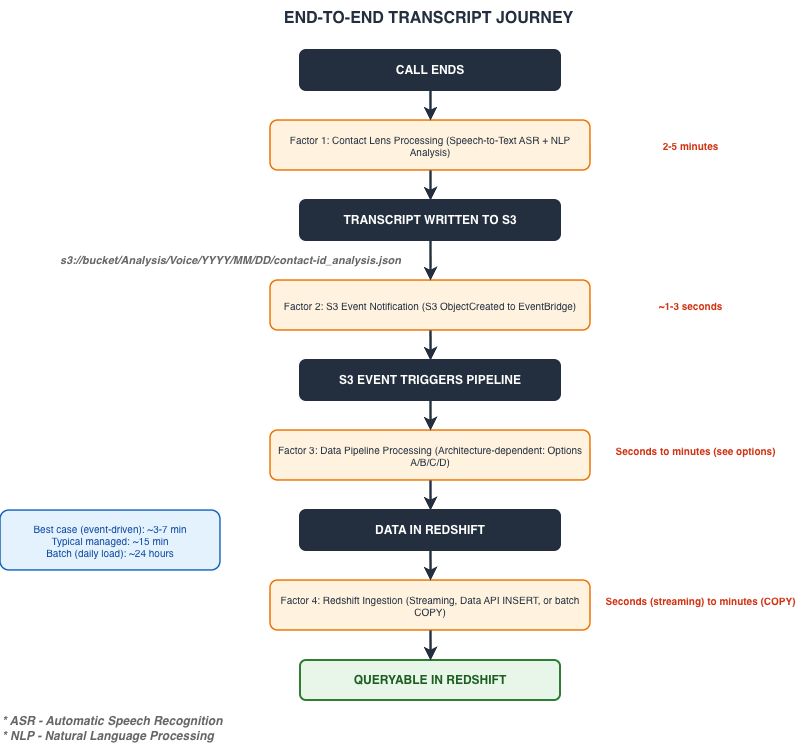
Data flow diagram – showing the end-to-end journey of a transcript from call completion through Amazon Connect Customer conversational analytics processing, S3 storage, event-driven pipeline, and into Amazon Redshift. Shows timing annotations at each stage.
Key latency benchmarks:
- Best case (event-driven): ~3-7 minutes
- Typical managed: ~15 minutes
- Batch (daily load): ~24 hours
Real-time vs. post-call:
- Real-time conversational analytics: Transcript segments available during the call (via Kinesis) – but these are partial, not final
- Post-call conversational analytics: Full transcript with sentiment, categories, redaction – available 2-5 min after call ends
Latency Factor Deep Dive: The Variables
Understanding what you can and cannot optimize is fundamental to making the right architecture choice. Each factor is categorized by controllability.
Uncontrollable Factors (AWS-Managed)
| # | Factor | Latency | Notes |
| 1 | Audio recording finalization | 5-15 sec | After disconnecting, recording file is closed |
| 2 | Conversational analytics ASR (speech-to-text) | 30-90 sec | Proportional to call duration |
| 3 | Conversational analytics NLP (sentiment, categories) | 30-60 sec | Runs after transcription completes |
| 4 | S3 write latency | 1-3 sec | Negligible |
| 5 | S3 to EventBridge propagation | 1-5 sec | Fastest event delivery method |
| 6 | Analytics Data Lake managed ingestion | ~10-15 min (typical) | If using managed path |
| 7 | Call duration effect on ASR | Variable | Longer calls = more processing |
Key insight: Conversational analytics processing (2-5 minutes) is the AWS-managed processing layer and is the single largest non-reducible delay factor. The transcript doesn’t exist until conversational analytics finishes. Everything downstream of that S3 write is where architecture choices matter.
Partially Controllable Factors
| # | Factor | Latency | Optimization |
| 8 | Personally Identifiable Information (PII) redaction (if turned on) | 15-30 sec | Disable if not required by compliance |
Fully Controllable Factors
| # | Factor | Latency | Optimization |
| 9 | Lambda cold start | 0.5-3 sec | Use Provisioned Concurrency |
| 10 | Lambda processing time | 1-5 sec | Increase memory to 512 MB+; optimize JSON parsing |
| 11 | Amazon Data Firehose buffer interval | 60-300 sec | Set to 60 sec (minimum) for low latency |
| 12 | AWS Glue ETL job startup | 2-5 min | Avoid for real-time; use Lambda instead |
| 13 | Redshift COPY command | 10-60 sec | Use Data API or streaming ingestion |
| 14 | Redshift Streaming Ingestion (from Kinesis) or Redshift Data API | 1-5 sec | Streaming is best for real-time workloads. Data API is best for single-record inserts. |
| 15 | Network latency (cross-region) | 50-200 ms | Co-locate all services in one Region |
The single most important takeaway: Based on the factors described, the practical minimum achievable delay for a final, complete transcript in Redshift is approximately 3-7 minutes after the call ends. This floor is dominated by conversational analytics processing time. No architecture choice can reduce it below this.
For organizations needing data during the call, real-time conversational analytics streaming via Amazon Kinesis provides partial transcript segments in seconds – but these are not the final analyzed output.
Architecture Option A: Minimum Latency – Event-Driven Lambda Pipeline
End-to-end latency: ~3-7 minutes | Complexity: Medium | Cost: Low | Operational burden: Moderate
This architecture delivers the practical minimum latency achievable for final post-call transcripts. It uses Amazon EventBridge to detect new transcript files in Amazon S3 the moment they appear, after conversational analytics is completed. It triggers an AWS Lambda function to parse and transform the data and writes directly to Amazon Redshift using the Data API (for single-record INSERT) or using Kinesis streaming ingestion (batch commits via materialized view refresh in seconds).
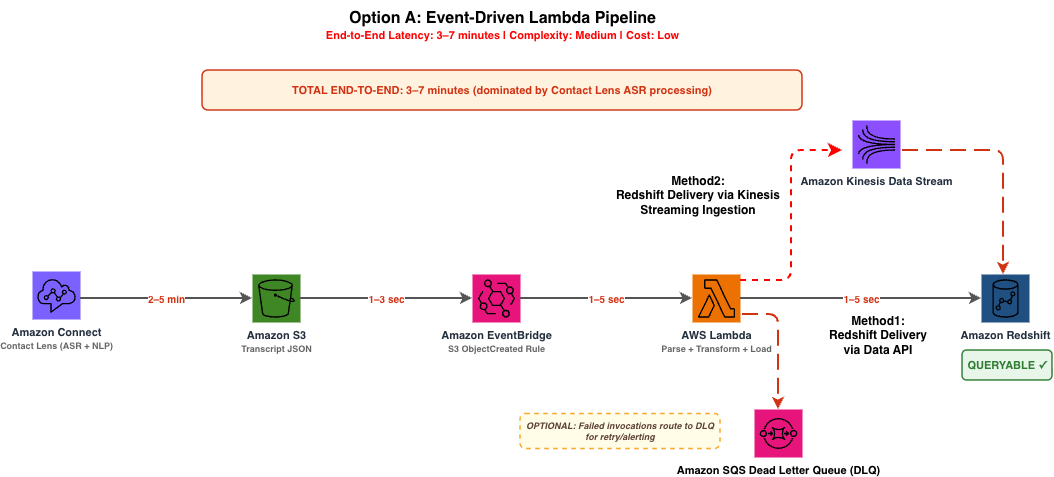
Architecture diagram for Option A showing Amazon EventBridge detecting S3 object creation events, triggering AWS Lambda to parse transcript JSON and write directly to Amazon Redshift via the Data API or Kinesis streaming ingestion.
Process Flow:
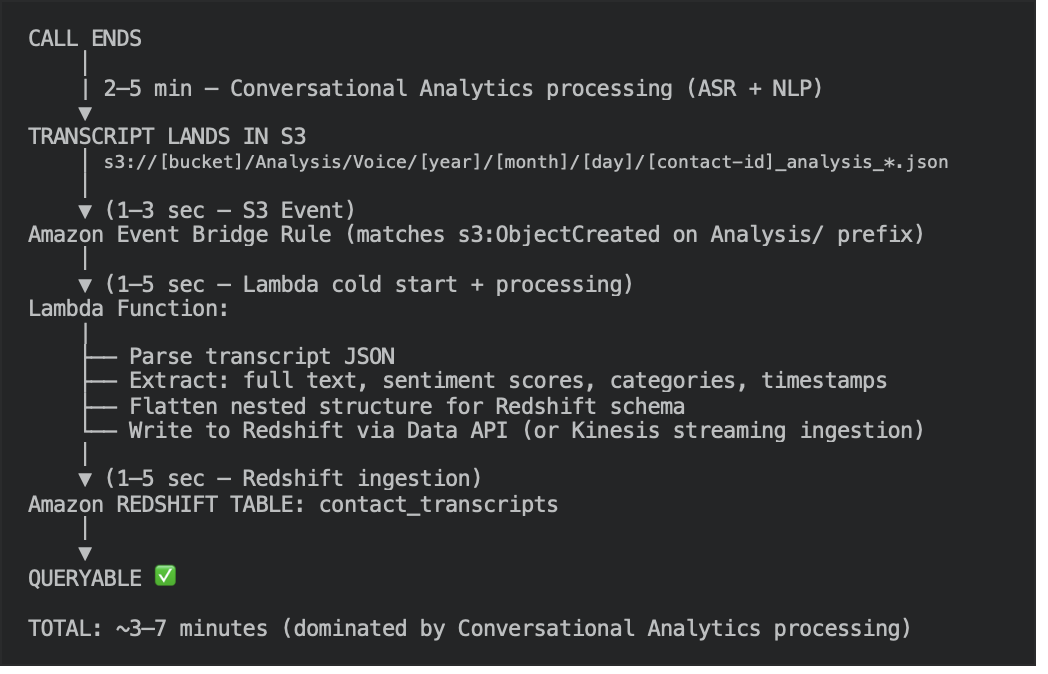
Why This Is the Fastest Option
Every component is designed for event-driven, single-record processing:
- Amazon EventBridge detects the S3 ObjectCreated event within 1-3 seconds (faster than SQS-based polling).
- Lambda executes in a single invocation per transcript file – no batching delay.
- Amazon Redshift Data API is asynchronous and accepts individual INSERT statements without requiring a persistent connection.
Data API vs Kinesis Streaming Ingestion for Redshift Delivery
In Option A, Lambda has two delivery methods to write the flattened transcript into Redshift:
Method 1: Redshift Data API (recommended default)
Lambda calls redshift-data.execute_statement() with an INSERT/MERGE SQL statement. The Data API is asynchronous – it queues the statement and Redshift executes it.
Characteristics:
- One API call per transcript (single-record INSERT)
- No persistent connection needed (serverless-friendly)
- Latency: 1-5 seconds per record
- Simple – just SQL over HTTPS
Method 2: Kinesis Streaming Ingestion
Lambda writes the flattened record into a Kinesis Data Stream (via kinesis.put_record()). Redshift pulls from that stream using a Streaming Ingestion Materialized View.
Characteristics:
- Lambda writes to Kinesis (milliseconds)
- Redshift pulls in batches via materialized view refresh (seconds)
- Higher throughput – Redshift pulls many records per refresh cycle
- Requires provisioning a Kinesis Data Stream + Streaming Ingestion Materialized View
When to Choose Option A
- You need final transcripts queryable in under 7 minutes
- Your contact center processes fewer than 10,000 calls/hour (Lambda concurrency is sufficient)
- You have engineering capacity to maintain custom Lambda code
- You want granular control over the parsing and transformation logic
Architecture Option B: Balanced – Amazon Data Firehose to Redshift
End-to-end latency: ~5-10 minutes | Complexity: Low | Cost: Medium | Operational burden: Low
This option introduces Amazon Data Firehose as a managed delivery stream between Lambda and Redshift. Lambda still parses the transcript, but instead of writing directly to Redshift, it puts a flattened record into Firehose – which batches and delivers via the COPY command.
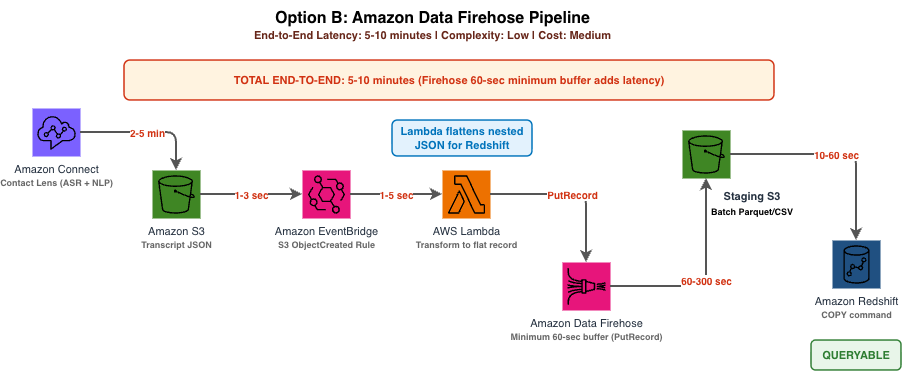
Architecture diagram for Option B showing an S3 event triggering AWS Lambda, which puts records into Amazon Data Firehose for batched delivery to Amazon Redshift via the COPY command.
Process Flow:
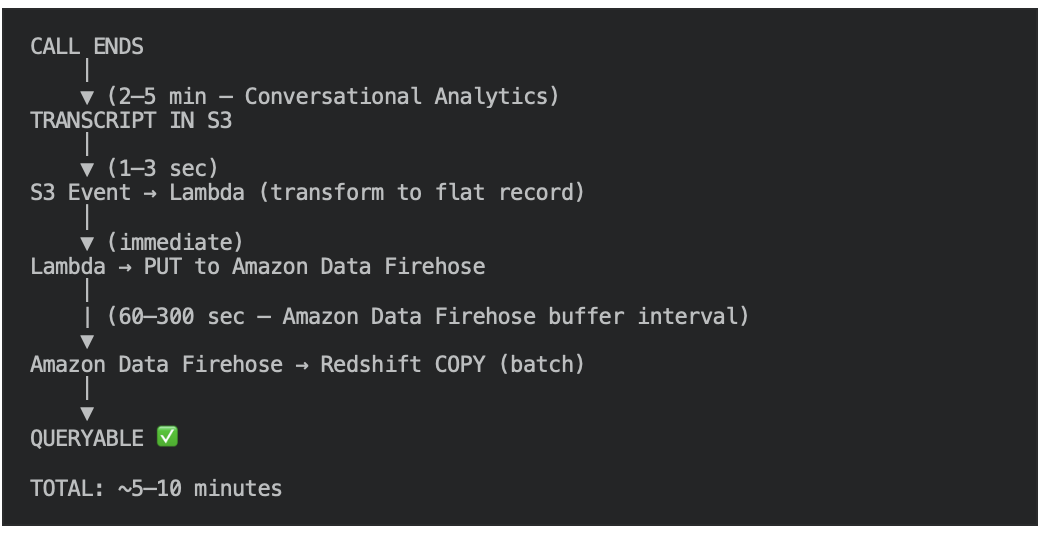
The Firehose Buffering Tradeoff
Amazon Data Firehose introduces a configurable buffer that adds latency in exchange for higher throughput and lower Redshift load:
| Buffer Setting | Value | Impact |
| Buffer interval | 60 seconds (minimum) | Flushes every 60s regardless of data volume |
| Buffer size | 1 MB | Flushes when accumulated data reaches 1 MB |
For minimum latency, set the buffer interval to 60 seconds. For cost optimization with high-volume contact centers (>1,000 concurrent calls), increase to 300 seconds to batch more records per COPY command.
Key Advantages Over Option A
- Built-in retry logic – Firehose automatically retries failed deliveries for up to 24 hours
- S3 backup – Every record is backed up to S3 before delivery (useful for replay)
- No connection management – Firehose handles Redshift COPY credentials and connection pooling
- Automatic batching – Reduces Redshift commit overhead for high-volume scenarios
When to Choose Option B
- Latency of 5-10 minutes is acceptable
- You process high call volumes (>5,000 calls/hour) where batching reduces Redshift commit pressure
- You want built-in delivery guarantees without custom retry logic
- You prefer a more operationally simple pipeline with fewer failure modes
Architecture Option C: Zero-ETL – Connect Analytics Data Lake to Redshift
End-to-end latency: ~15 minutes | Complexity: Very Low | Cost: Low | Operational burden: Minimal
This is the simplest option and requires no custom code, no Lambda functions, and no infrastructure to maintain. The Amazon Connect Customer built-in Analytics Data Lake automatically ingests conversational analytics data — sentiment scores, categories, talk-time and interruption metrics — into an AWS Glue Data Catalog. Note that the data lake contains these analytics metrics only; it does not contain the verbatim transcript text. With the Analytics Data Lake, you can query this analytics data from Amazon Redshift via federated query using Amazon Redshift Spectrum or through a zero-ETL integration.
What Option C delivers: conversational analytics metrics — overall and per-participant sentiment scores, categories, talk and non-talk time, talk speed, interruptions, and response times — plus companion tables (Contact Record, Agent Events, Contact Evaluation Record, Contact Flow Events).
Limitation: The verbatim transcript text is not available in the data lake. To deliver the actual transcript words to Amazon Redshift, use Option A or Option B, which read the conversational analytics output JSON from the Amazon S3 Analysis/Voice/ prefix. Option C is the right choice when your use case is analytics and reporting on these metrics rather than full-text transcript access. For the complete list of available tables and columns, see Contact analytics data in the Connect Customer data lake.
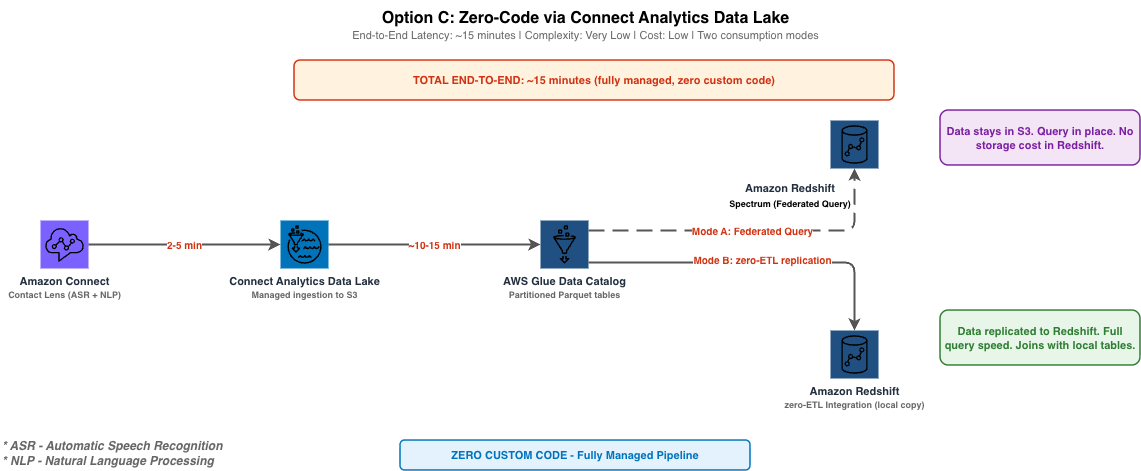
Architecture diagram for Option C showing the Amazon Connect Customer Analytics Data Lake automatically populating the AWS Glue Data Catalog, with Amazon Redshift querying via Spectrum (federated) or a zero-ETL integration (materialized).
How It Works
- Activate the Analytics Data Lake in your Amazon Connect Customer instance settings
- The data lake automatically receives contact records (CTRs), conversational analytics metrics (sentiment, categories, talk-time, interruptions), agent events, and evaluation forms — but not the transcript text itself.
- Data is registered in the AWS Glue Data Catalog as partitioned Parquet tables
- Query from Redshift using Redshift Spectrum (external tables) – Mode A – or – set up a zero-ETL integration for materialized copies – Mode B
Mode A: Federated Query (Redshift Spectrum)
Data stays in the Data Lake (S3/Glue Catalog) – Redshift queries it in place via external tables. No data movement, no storage cost in Redshift, always-fresh data.
Best for: Ad-hoc exploration, infrequent queries, cost-sensitive workloads.
Redshift Spectrum Query Example (Mode A)
-- Create external schema pointing to the Connect Analytics Data Lake

CREATE EXTERNAL SCHEMA connect_datalake
FROM DATA CATALOG
DATABASE 'amazon_connect_analytics'
IAM_ROLE 'arn:aws:iam::123456789012:role/RedshiftSpectrumRole'
REGION 'us-east-1';

-- Query transcript data directly (no ETL pipeline needed)

SELECT contact_id, channel, categories,
sentiment_overall_score_customer, sentiment_overall_score_agent,
talk_time_customer_ms, talk_time_agent_ms,
interruptions_total_count, disconnect_timestamp
FROM connect_datalake.contact_lens_conversational_analytics
WHERE disconnect_timestamp >= DATEADD(hour, -24, GETDATE())
ORDER BY disconnect_timestamp DESC;

-- Note: Replace 123456789012 with your AWS account ID.
Mode B: Zero-ETL Integration (Data Physically in Redshift)
- Data is automatically replicated from the source into Redshift managed storage
- No pipeline code, no Lambda, no Firehose. AWS manages the replication.
- Data materialized locally in Redshift with full query performance, indexes, and materialized view support
The zero-ETL integration for Amazon Redshift creates an automatic, continuous replication from a supported source (in this case, the AWS Glue Data Catalog tables that the Connect Analytics Data Lake populates) into Redshift managed storage.
What “zero-ETL” Actually Means
It’s not that there’s no data movement – data is replicated from S3 into Redshift storage. The “zero” refers to zero customer-written ETL code. You don’t write a Lambda, a Glue job, or a Firehose pipeline. AWS handles:
- Detecting new/changed data in the Glue Catalog
- Reading the Parquet files from S3
- Converting and loading into Redshift columnar format
- Maintaining schema synchronization (new columns, partitions)
When to Use Which
- Use Federated Query (Spectrum) when:
- You want zero Redshift storage cost
- Queries are ad-hoc / infrequent
- You’re OK with slower scan performance
- You’re exploring data before deciding to materialize it
- Use zero-ETL Integration when:
- You need fast, repeated queries (dashboards, reports)
- You join transcript data with other Redshift tables (agent roster, queue config, CRM data)
- You need materialized views for KPI aggregation
- You want the simplicity of zero-code but with full Redshift query performance
When to Choose Option C
- When ~15-minute latency is acceptable for your use case
- You need conversational analytics metrics (sentiment, categories, talk-time) for dashboards and reporting — not the verbatim transcript text.
- You want zero operational burden – no Lambda, no Firehose, no custom code
- You’re building analytics dashboards (not real-time alerting)
- You’re evaluating Amazon Connect Customer and want the fastest path to a working pipeline
- Your team has limited engineering capacity for infrastructure maintenance
Cleanup
The architectures in this post provision billable resources. To avoid ongoing charges, remove the resources you created once you finish evaluating the pipeline:
- AWS Lambda functions and Amazon EventBridge rules: Delete the transcript-processing Lambda function and disable then delete the EventBridge rule that targets it. Remove any associated IAM roles and CloudWatch log groups.
- Amazon Data Firehose delivery streams (Option B): Delete the Firehose delivery stream. Firehose incurs charges based on data volume ingested, so delete it when no longer needed.
- Kinesis Data Streams (Option A Method 2 and Option D): Delete the Kinesis Data Stream. Provisioned-capacity streams bill per shard-hour, so tear them down promptly.
- Amazon Redshift: For Redshift Serverless, no explicit teardown is required beyond dropping the objects you created; you are billed only for compute used. Drop external schemas, materialized views, and staging tables. For provisioned clusters, delete the cluster (take a final snapshot first if you need to retain data). For zero-ETL integrations, delete the integration and the target database.
- Amazon S3: Apply S3 lifecycle policies to expire or archive transcript data, or delete the analysis prefixes if the data is no longer needed. Retain data only as long as your compliance requirements dictate.
Conclusion
In this post, we traced the full journey of a transcript from call completion to queryable data in Amazon Redshift, identified 15 latency factors (7 uncontrollable, 1 partially controllable, 7 fully controllable), and presented three architecture options for post-call transcript delivery:
- Option A (3-7 min): Event-driven Lambda – minimum achievable latency for final transcripts
- Option B (5-10 min): Amazon Data Firehose – managed delivery with built-in retries for high-volume environments
- Option C (~15 min): Connect Analytics Data Lake – zero custom code, fully managed
The single most important takeaway: the irreducible latency floor is 2-5 minutes (conversational analytics ASR processing). Every architecture choice optimizes after the transcript lands in S3.
In Part 2 of this series, we cover a separate use case with Architecture Option D (real-time streaming during live calls), the Redshift schema designed for time-range queries and aggregate reporting, a decision framework to help you choose the right architecture for your data pipeline, optimization checklists, cost estimation, and production hardening guidance.
*Important Disclaimer: All code samples and SQL statements in this post are provided as conceptual demonstrations and starting references only*. Always conduct thorough security reviews, load testing, and compliance assessments before deploying to production environments. Adapt all configurations to align with your organization’s security posture, governance policies, and operational standards.
For more information about Amazon Connect capabilities, visit the Amazon Connect documentation. Ready to transform your customer service experience with Amazon Connect? Contact us.
Additional Resources
- Amazon Connect Customer conversational analytics documentation
- Amazon Connect Customer Analytics Data Lake
- Amazon Redshift Streaming Ingestion
- Amazon Redshift Data API
- Amazon Event Bridge S3 event integration
- Amazon Data Firehose to Redshift
- Terraform AWS Provider – Lambda
About the author
 Jinesh Shah is a Data & AI Consultant at AWS Professional Services, specializing in data engineering, transformation, analytics, and agentic AI solutions across data lakes, data warehouses, and databases. He works with enterprise customers to architect modern data platforms — building intelligent data pipelines, automated transformation workflows, and AI-driven agents that streamline data operations on AWS.