Containers
AI-powered event-driven Amazon EKS AMI updates with GitOps
Keeping Amazon Elastic Kubernetes Service (Amazon EKS) worker nodes updated with the latest Amazon Machine Images (AMIs) is critical for security, performance, and compliance. However, manual AMI updates are time-consuming, error-prone, and can lead to delayed patching of critical vulnerabilities. This post demonstrates an automated solution that combines AI-powered risk analysis with GitOps principles to streamline Amazon EKS AMI updates while maintaining appropriate human oversight through familiar GitHub workflows.
The challenge
Organizations running production EKS clusters face several challenges when managing AMI updates. Teams must regularly check for new EKS-optimized AMI releases manually. Each AMI update requires analysis of CVEs, compatibility issues, and potential breaking changes. Updates need review and approval before deployment to production. Rolling out new AMIs requires careful orchestration to avoid downtime. Additionally, compliance requirements demand detailed records of who approved what and when.
The solution
This solution automates the entire AMI update lifecycle through a streamlined three-phase approach:
- Detection Phase – Automated twice-daily checks detect new EKS-optimized AMIs.
- AI Analysis & GitHub PR Phase – Amazon Bedrock analyzes risks and creates Pull Requests for human review.
- GitOps Deployment Phase – ArgoCD and Karpenter orchestrate zero-downtime rolling updates.
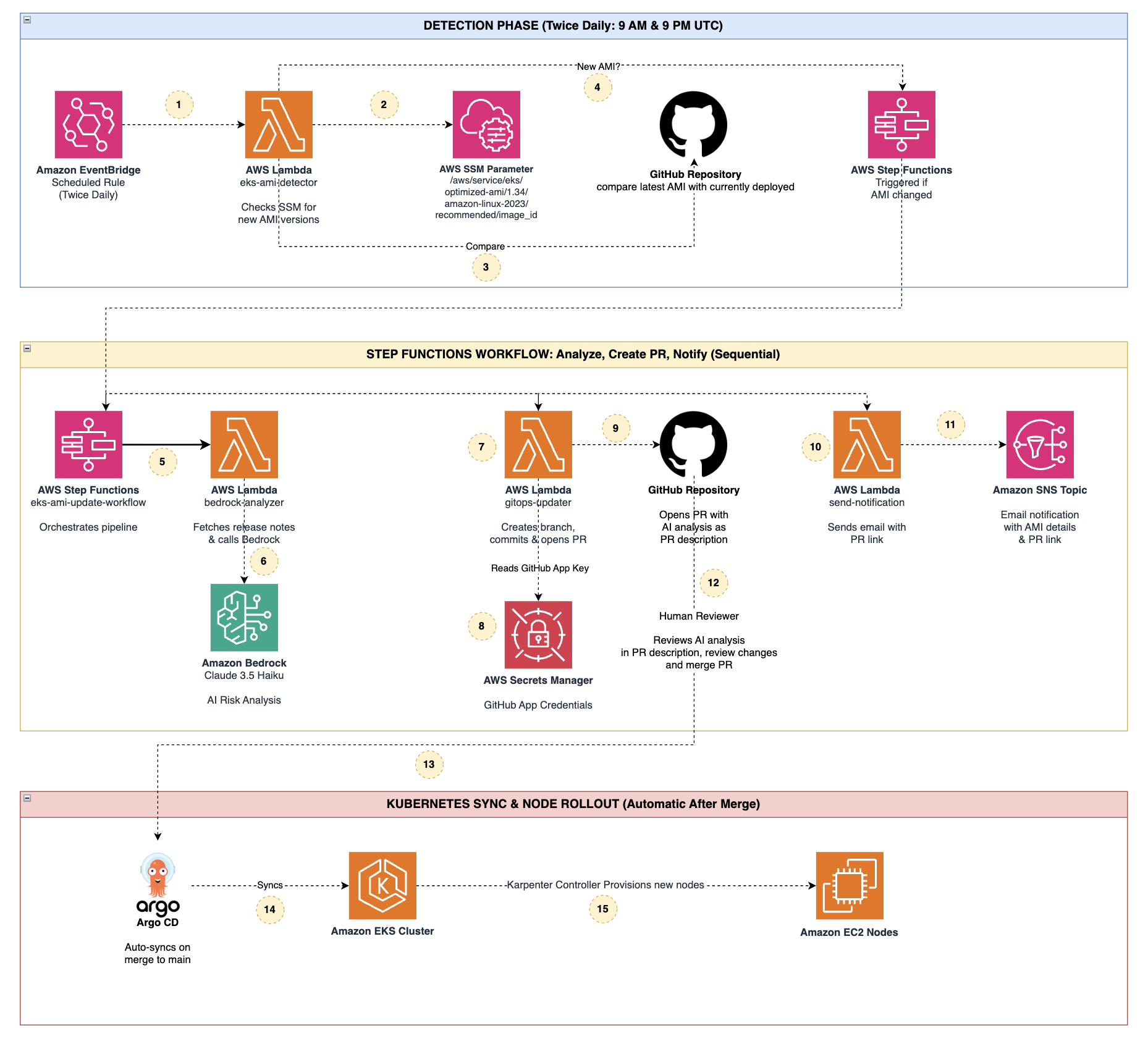
Architecture overview
The solution integrates multiple AWS services with GitOps tooling to create an event-driven, AI-assisted workflow that runs twice daily at 9 AM and 9 PM UTC.
Phase 1: Detection Phase
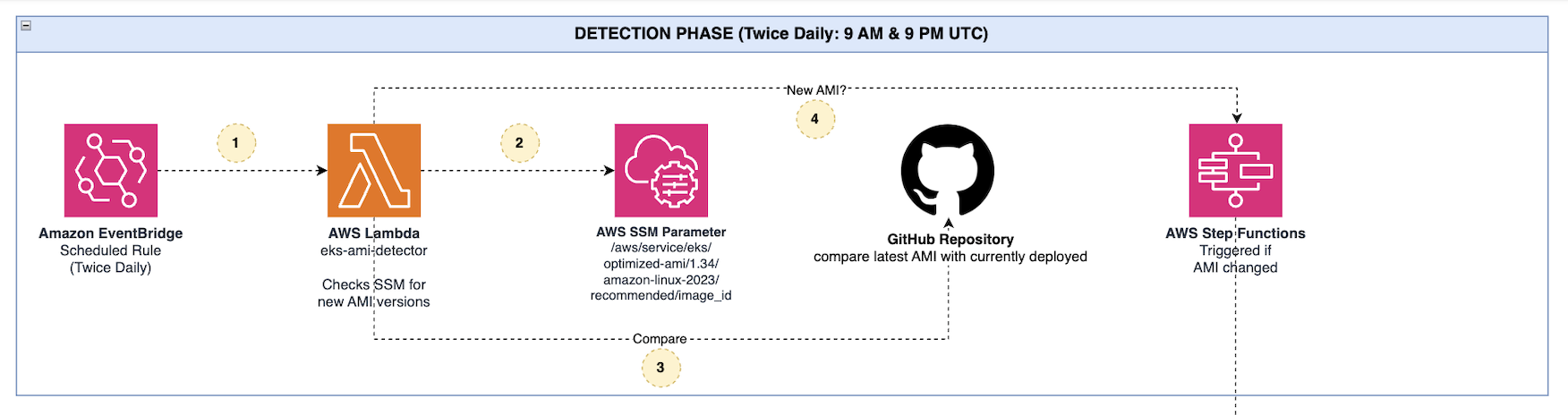
The detection phase identifies new AMI releases through the following components:
- Amazon EventBridge Scheduled Rule – Triggers the detection AWS Lambda twice daily (9 AM & 9 PM UTC).
- AWS Lambda (eks-ami-detector) – Queries AWS Systems Manager Parameter Store for the latest EKS-optimized AMI ID.
- AWS System Manager Parameter Store – Provides the canonical source for EKS AMI recommendations (/aws/service/eks/optimized-ami/1.34/amazon-linux-2023/recommended/image_id).
- GitHub Repository – Acts as the source of truth for the currently deployed AMI ID. The Lambda compares the latest AMI retrieved from AWS System Manager against the AMI ID stored in the repository to determine if an update is required.
- AWS Step Functions – Triggered when a new AMI version is detected.
When the detector Lambda identifies a version change, it triggers the AWS Step Functions workflow to begin the analysis phase.
Phase 2: AI Analysis and GitHub PR Phase
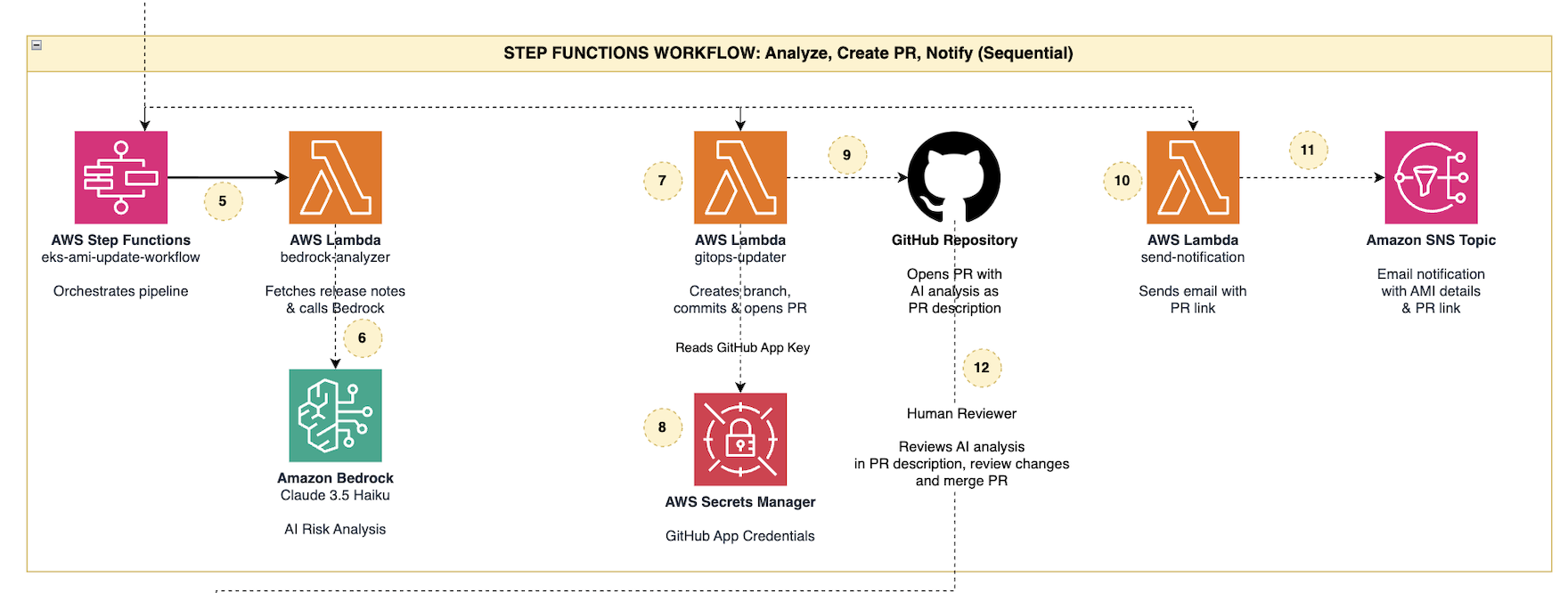
This simplified phase uses Amazon Bedrock for intelligent risk analysis and uses GitHub Pull Requests for human approval. The AWS Step Functions workflow orchestrates three sequential Lambda functions:
1. bedrock-analyzer
- Fetches AMI release notes from AWS Systems Manager
- Retrieves GitHub App credentials (App ID, Installation ID, and Private Key) from AWS Secrets Manager
- Invokes Amazon Bedrock (Claude 3.5 Haiku) for AI-powered risk analysis
- Generates a comprehensive report with risk scores, CVE analysis, and recommendations
Here is prompt being used to have Analysis:
prompt = f"""Analyze this Amazon EKS AMI update using the actual release notes below. New AMI ID: {ami_id} Previous AMI ID: {previous_ami} SSM Parameter: {parameter_name} ACTUAL EKS AMI RELEASE NOTES (from github.com/awslabs/amazon-eks-ami/releases): {release_notes} Based on the actual release notes above, provide your analysis in JSON format: {{ "risk_score": 1-10, "recommendation": "APPROVE or REJECT", "summary": "brief one-line summary of actual changes", "pr_description": "a detailed markdown PR description with: actual changes from release notes, CVEs patched, package versions updated, risk assessment, and review guidance" }}"""
2. gitops-updater
- Authenticates with GitHub using App credentials retrieved from AWS Secrets Manager
- Creates a new branch in the GitHub repository
- Updates the Karpenter EC2NodeClass configuration with the new AMI ID
- Commits changes with rich metadata (AMI ID, timestamp, analysis summary)
- Opens a Pull Request with the complete AI analysis embedded in the PR description
3. send-notification
- Sends an email notification using Amazon Simple Notification Service (Amazon SNS)
- Includes the PR link and AMI details
- Alerts the review team to examine the proposed changes
Human Review Process
The human reviewer examines the AI-generated risk analysis directly in the GitHub PR description, reviews the proposed configuration changes, and makes an informed decision to:
- Approve: Merge the PR to trigger automated deployment
- Reject: Close the PR to prevent the update
This approach uses familiar GitHub workflows while maintaining a complete audit trail through Git history.
Phase 3: Kubernetes Sync & Node Rollout
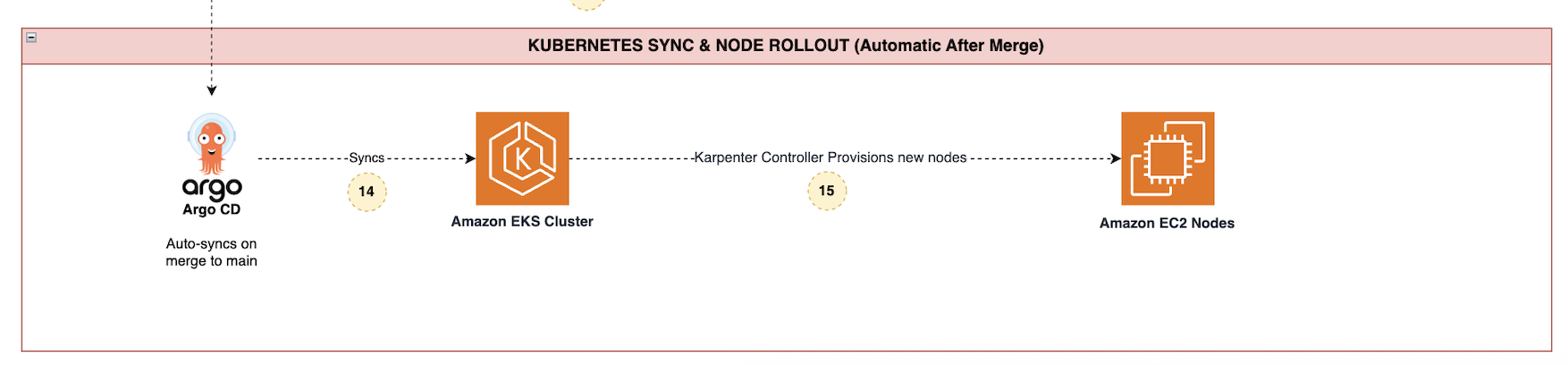
After the PR is merged to the main branch, the deployment phase executes automatically:
ArgoCD Sync
- Detects the Git commit on the main branch
- Automatically syncs the updated EC2NodeClass manifest to the EKS cluster
Karpenter Orchestration
- Observes the EC2NodeClass update with the new AMI ID
- Provisions new EC2 nodes with the updated AMI
- Gracefully drains old nodes to maintain workload availability
- Completes the rolling update with zero downtime
Implementation guide
Prerequisites
Before deploying this solution, ensure that you have:
- An existing Amazon EKS cluster (version 1.34 or later)
- Karpenter installed and configured in your cluster
- ArgoCD installed with auto-sync enabled
- A GitHub repository for storing Karpenter configurations
- GitHub App installed on your repository with required permissions (App ID, Installation ID, and Private Key)
- AWS Command Line Interface (AWS CLI) and kubectl configured
- Amazon Bedrock access enabled in your AWS account
Important: Before proceeding, follow the README instructions in the Git repository to set up your environment and deploy the Karpenter EC2NodeClass configuration. First-time users must have the EC2NodeClass already deployed in their GitHub repository before running this solution.
Deployment steps
Complete the following steps to deploy the solution.
- Fork the repository before deploying the solution. You need your own copy of the repository with write access to configure the required GitHub App credentials. To do so, navigate to the aws-samples GitHub repository and fork the repository to your personal or organizational GitHub account. Follow the README instructions in the repository to set up your environment, install the GitHub App on your forked repository, and deploy the Karpenter EC2NodeClass configuration before proceeding.
- After you fork the repository, clone your copy locally using the following command:
- Next, deploy the AWS CloudFormation stack (takes approximately 2–3 minutes).
aws cloudformation create-stack \
--stack-name eks-ami-update \
--template-body file://cloudformation-template.yaml \
--capabilities CAPABILITY_NAMED_IAM \
--parameters \
ParameterKey=NotificationEmail,ParameterValue=your-email@example.com \
ParameterKey=GitHubAppId,ParameterValue=<your-github-appid>\
ParameterKey=GitHubAppInstallationId,ParameterValue=<your-githubapp-installationid>\
ParameterKey=GitHubAppPrivateKey,ParameterValue=$(base64 -i your-app.private-key.pem | tr -d '\n') \
ParameterKey=GitHubRepoOwner,ParameterValue=<your-github-org> \
ParameterKey=GitHubRepoName,ParameterValue=<your-repo-name> \
ParameterKey=GitHubFilePath,ParameterValue=karpenter-configs/clusters/your-cluster/nodeclass.yaml \
ParameterKey=GitHubBranch,ParameterValue=main \
ParameterKey=EKSVersion,ParameterValue=1.34- Confirm the SNS email subscription sent to your email address
CloudFormation resources created
The deployment creates the following AWS resources:
| Resource | Description |
| AWS Secrets Manager Secret | GitHub App credentials storage |
| Amazon SNS Topic + Subscription | Email notifications |
| 5 AWS Identity and Access Management (IAM) Roles | Per-function AWS Lambda roles and AWS Step Functions role |
| 4 AWS Lambda Functions | Detector, Amazon Bedrock analyzer, notification sender, GitOps updater |
| Amazon Bedrock Guardrail | Content filtering for AI analysis |
| AWS Step Functions State Machine | Orchestrates the workflow (Analyze → Create PR → Notify) |
| Amazon EventBridge Rule | Twice-daily AMI polling schedule |
Solution testing:
To test the solution, you can trigger the workflow manually without waiting for an AMI release. Run the following command to invoke the detector Lambda function:
i. Invoke the detector Lambda to trigger the full workflow. This command manually triggers the AMI detection process:
aws lambda invoke \
--function-name eks-ami-detector \
--payload '{}' \
--cli-binary-format raw-in-base64-out \
/tmp/response.json && cat /tmp/response.json
ii. Review and Merge the PR
- Check your email for the notification with the details of Amazon Bedrock AI Analysis and PR link.
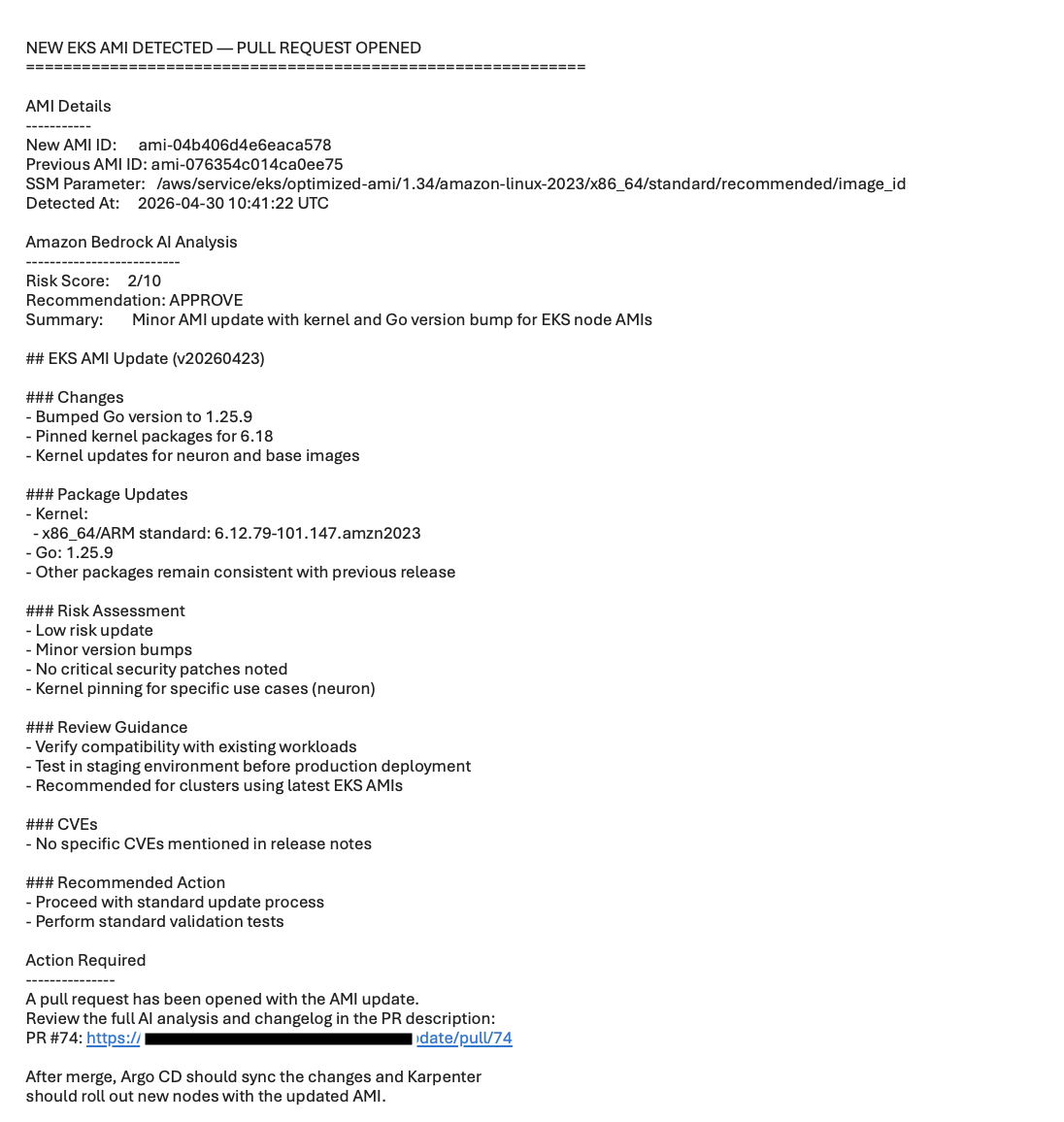
- Open the PR in GitHub—the description contains the full Amazon Bedrock analysis.
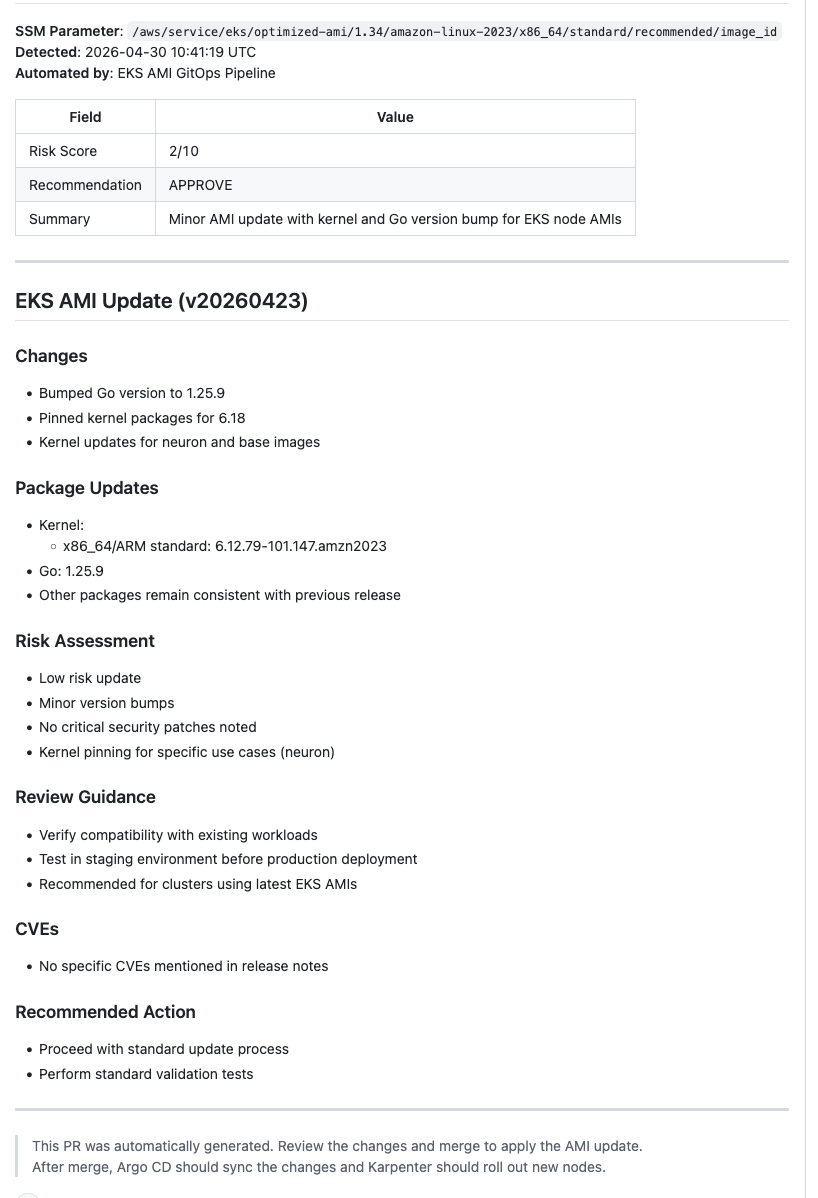
- Review the YAML diff (AMI ID change).
- Merge the PR to apply the update.
iii. Verify Argo CD Auto-Sync
After merging, verify Argo CD picks up the change:Update the kubectl auth :aws eks update-kubeconfig –region <region> –name <cluster-name>Now run the following commands to verify Argo CD Auto-Sync:kubectl get application karpenter-nodeclass -n argocd -o jsonpath='{.spec.syncPolicy}’kubectl get ec2nodeclass default -o yaml | grep ami-
Troubleshooting
If you encounter issues during deployment or testing, check the following:
- SNS subscription not confirmed – Check your email inbox (including spam folder) for the SNS subscription confirmation email and click the confirmation link.
- GitHub App authentication failure – Verify your GitHub App is installed on the repository with read and write permissions. Ensure that the App ID, Installation ID, and Private Key stored in AWS Secrets Manager are correct and the key hasn’t expired.
- Amazon Bedrock model access denied – Ensure that you have enabled Claude 3.5 Haiku model access in your AWS account region through the Amazon Bedrock console.
- ArgoCD sync failures – Verify your ArgoCD Application is configured with auto-sync enabled and has the correct repository URL and path.
- Step Functions execution failures – Check CloudWatch Logs for the Lambda functions to identify specific error messages and verify IAM permissions.
Cleanup
To clean up, use the following command to delete the CloudFormation stack that we created during this walkthrough:
aws cloudformation delete-stack --stack-name eks-ami-update
Conclusion
This solution demonstrates how combining AI-powered analysis with GitOps principles can transform EKS AMI management from a manual, error-prone process into an automated, intelligent workflow. By using Amazon Bedrock for risk analysis and GitHub Pull Requests for human oversight, organizations can maintain security and compliance while significantly reducing operational burden.The architecture is production-ready, cost-effective, and extensible. Teams can customize the AI analysis prompts, adjust approval workflows, or integrate additional validation steps to meet their specific requirements.
Next steps
To get started with this solution:
- Deploy in non-production to familiarize your team with the workflow.
- Customize the Amazon Bedrock prompt to align with your organization’s risk assessment criteria.
- Configure ArgoCD sync policies to match your deployment requirements.
- Set up monitoring for Lambda functions and Step Functions workflow.
- Document your process and train reviewers on interpreting AI-generated risk reports.
Additional resources
- Amazon EKS Best Practices Guide
- Karpenter Documentation
- ArgoCD Documentation
- Amazon Bedrock Developer Guide
- AWS Step Functions Best Practices
About the authors
 |
Prafful is a DevOps Engineer at AWS, based in Gurugram, India. Having started his professional journey with Amazon, he specializes in DevOps and Generative AI solutions, helping customers navigate their cloud transformation journeys. Beyond work, he enjoys networking with fellow professionals and spending quality time with family. Connect with him on LinkedIn. |
 |
Apoorv is a Lead DevOps Engineer at AWS, focused on designing resilient CI/CD pipelines, container orchestration, and automating cloud infrastructure at scale. He is passionate about bridging AI/ML innovations with DevOps practices to drive operational excellence. Outside of work, Apoorv enjoys spending time with his family and loves talking about and playing cricket. Connect with him on LinkedIn. |
 |
Ashish is a Delivery Consultant at AWS Professional Services with over 9 years of experience in cloud-native application development, containerization, and infrastructure automation. He specializes in building scalable solutions and is passionate about leveraging AI/ML to enhance cloud-native workloads. Outside of work, Ashish enjoys spending time with his family and playing outdoor sports. Connect with him on LinkedIn. |