AWS Database Blog
Building a multi-tenant CRM with Amazon Aurora DSQL
A multi-tenant customer relationship management (CRM) system serves many customer organizations (tenants) from shared infrastructure: every tenant needs its own accounts, contacts, and opportunities, and no tenant can ever see another tenant’s data. On a traditional relational database, that work carries real operational weight, from sizing instances for peak load to scheduling maintenance windows and rotating credentials. Onboarding a tenant can mean provisioning capacity rather than a single write.
Amazon Aurora DSQL, a serverless, PostgreSQL-compatible distributed SQL database, removes most of that operational overhead. There are no instances or replicas to manage, it scales automatically, it gives strong read-after-write consistency, and connections authenticate with AWS Identity and Access Management (IAM) tokens rather than stored passwords.
This post assumes familiarity with the core design patterns of Amazon Aurora DSQL, which Building scalable applications on Amazon Aurora DSQL covers in depth. Rather than re-explain them, this post focuses on what changes when the workload is multi-tenant.
In this post, you learn how to design and implement a multi-tenant CRM on Amazon Aurora DSQL using the pooled tenancy model. You see how tenant isolation is enforced in a centralized data-access layer and explore the design considerations specific to Amazon Aurora DSQL. Then you use a provided deployment script to run a working proof of concept on Amazon Elastic Container Service (Amazon ECS) Express Mode.
Architecture overview
The following diagram shows the architecture.
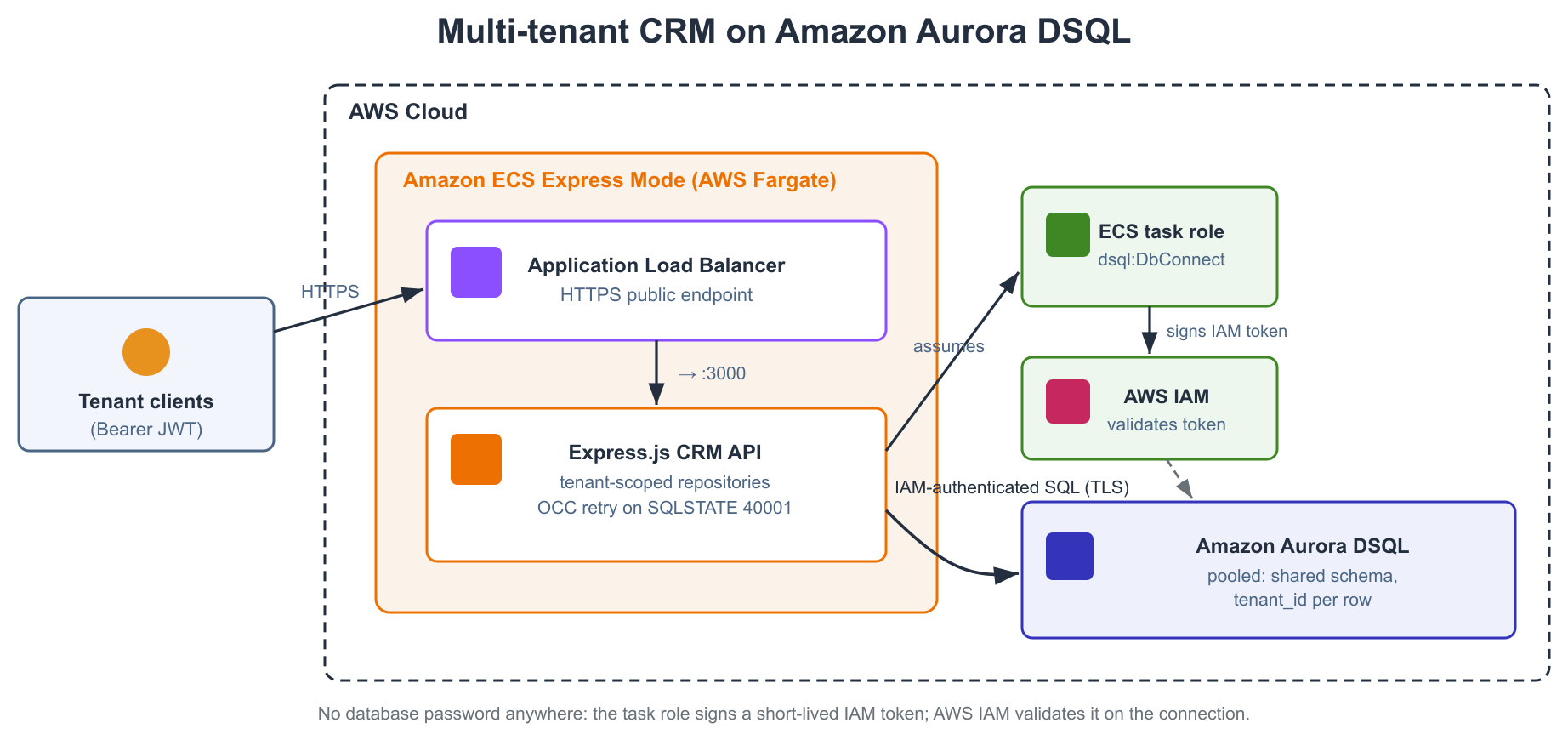
Figure 1: Architecture of the pooled multi-tenant CRM. Tenant clients send HTTPS requests to Amazon ECS Express Mode on AWS Fargate, which connects to Amazon Aurora DSQL over an IAM-authenticated connection.
The service runs on Amazon ECS Express Mode, which provisions a managed AWS Fargate service with automatic scaling, load balancing, and networking. It pairs well with Amazon Aurora DSQL because neither requires you to manage instances.
The architecture uses three AWS services, each chosen for a specific reason:
Amazon ECS Express Mode is the compute layer: your containerized Node.js application on AWS Fargate, with automatic scaling, load balancing, and an HTTPS endpoint.
Amazon Aurora DSQL is the data layer: every tenant’s records in a shared schema, with strong read-after-write consistency and IAM-authenticated connections.
IAM is the security layer: short-lived tokens decide which compute can reach the database, minted by the Amazon Aurora DSQL connector from the task role.
Inside the task, the application is layered: routes validate input and call tenant-scoped repositories, middleware resolves and validates the tenant context, and the repositories reach Amazon Aurora DSQL through parameterized queries. Write paths go through an Optimistic Concurrency Control (OCC) retry wrapper, covered later, and all connections go through the Amazon Aurora DSQL connector.
The full request flow is as follows:
- Client sends an HTTPS request that identifies its tenant.
- Amazon ECS Express Mode routes the request through its load balancer to the
Express.jsapplication running on AWS Fargate. - Application resolves the tenant, validates it, and runs tenant-scoped business logic. Every query is filtered by tenant_id.
- Amazon Aurora DSQL stores and retrieves data with strong consistency using a connection authenticated through IAM.
How Amazon Aurora DSQL simplifies multi-tenant workloads
Amazon Aurora DSQL removes several operational tasks that multi-tenant workloads usually require on a managed relational database:
- No database infrastructure. Create a cluster, get an endpoint, write SQL. No instance sizing or read replicas, and it scales with the workload, so onboarding a tenant is a write rather than a capacity exercise.
- Strong consistency by default. An account created by a tenant’s user is visible to the next request, so there is no read-your-writes problem to design around.
- PostgreSQL compatibility. Familiar tools and drivers work, including psql and node-postgres.
- IAM-based authentication. Short-lived IAM tokens replace database passwords, so there are no credentials to store or rotate. The chain is short: create an IAM role with dsql:DbConnect permission on your cluster, then assign it to the Amazon ECS Express Mode service as its task role. At runtime, the Amazon Aurora DSQL connector uses those task-role credentials to generate short-lived auth tokens, which Amazon Aurora DSQL validates against IAM before accepting the connection.
- No maintenance windows. Patches and minor-version upgrades apply with no downtime, so there is no window to negotiate across tenants in different time zones. Schema changes are non-blocking too: CREATE INDEX ASYNC builds in the background while the table serves traffic, though DDL, GRANT, and REVOKE can fail concurrent transactions with a schema conflict.
Choosing a multi-tenancy model
There are three common ways to isolate tenants in a relational database:
Cluster per tenant: a separate Amazon Aurora DSQL cluster per tenant. This gives the strongest isolation, since tenants share no schema, data, or endpoint, and because Amazon Aurora DSQL is serverless and billed by use, an idle cluster costs nothing beyond the storage its data occupies. The trade-off is fan-out rather than infrastructure: nothing to size or rebalance, but every per-cluster task multiplies, including an endpoint to route to, its own IAM grants, and a migration run per tenant. The default quota is 20 single-Region clusters per account per Region, which can be raised through Service Quotas.
Schema per tenant: one cluster, a separate PostgreSQL schema for each tenant. Amazon Aurora DSQL currently allows up to 10 schemas per database, and a cluster currently has one database, so schema-per-tenant suits a small, fixed set of tenants.
Single shared schema: one schema, with every row tagged by a tenant_id. This is the simplest to implement and fastest to onboard, since adding a tenant is one INSERT, and it makes the most of the automatic scaling of Amazon Aurora DSQL. The cost is that the application, not the database, keeps tenants apart.
This post implements the pooled model, which best illustrates the Amazon Aurora DSQL design considerations that follow. For the strongest isolation available today, prefer a cluster per tenant. In the pooled model, isolation is the application’s responsibility. For defense in depth, you can extend this boundary into the database with security_barrier views. Amazon Aurora DSQL does not support row-level security, and security_barrier only forces the view’s own filter to run first: the view needs a per-session tenant value to filter on, and the runtime role needs no privileges on the base tables.
Designing the data model
The CRM needs a tenant registry plus the core CRM entities. Every tenant-scoped table carries a tenant_id column, which is the pooled model’s isolation discriminator:
Design considerations for Amazon Aurora DSQL
A tenant_id on every row. The discriminator column is the backbone of the pooled model. It also anchors every secondary index, so tenant-scoped lookups stay selective as the shared tables grow.
UUIDs as primary keys. The implementation generates UUIDs with crypto.randomUUID(). Random UUIDs distribute writes evenly across the key space of Amazon Aurora DSQL, avoiding the single-shard hot spot a monotonically increasing key creates. It pairs that with tenant_id-leading secondary indexes, which group each tenant’s entries and keep its reads selective. Whether that grouping becomes a hot spot depends on the suffix: a random UUID keeps the range divisible, a monotonic or low-cardinality one concentrates writes. See Primary keys in Amazon Aurora DSQL.
Referential integrity with foreign keys. This schema uses foreign keys: contacts.account_id and opportunities.account_id reference accounts.id. A single-column foreign key proves the account exists, not that it belongs to the requesting tenant. The sample closes that gap in the application, checking the parent is in the same tenant_id before inserting. The database can do it instead. Add UNIQUE (tenant_id, id) to accounts, keep the UUID primary key, and declare FOREIGN KEY (tenant_id, account_id) REFERENCES accounts (tenant_id, id): a cross-tenant insert is then rejected with SQLSTATE 23503. Amazon Aurora DSQL accepts a unique constraint as a foreign-key target, so the primary key does not change. The polymorphic activities.related_id has no foreign key.
Asynchronous indexes. Secondary indexes build in the background and don’t block reads or writes:
Inline PRIMARY KEY and UNIQUE constraints (for example UNIQUE (tenant_id, email) on users) create immediately-valid backing indexes as part of CREATE TABLE. Only standalone CREATE INDEX ASYNC statements build asynchronously.
Database migrations
Amazon Aurora DSQL currently requires each Data Definition Language (DDL) statement to run in its own transaction, so the migration runner executes each CREATE TABLE and CREATE INDEX separately. CREATE INDEX ASYNC returns a job_id and builds the index in the background, so the runner blocks on sys.wait_for_job until the build finishes, which keeps migrations deterministic in CI:
Enforcing tenant isolation
Two pieces work together. First, a middleware resolves the tenant for every request from a verified token, not a client-supplied header, and rejects unknown or inactive tenants before any data access:
Second, every repository function requires a tenant ID and filters by it:
Derive the tenant from a verified identity rather than a raw client-supplied header: an X-Tenant-Id header lets any caller claim any tenant. The sample verifies a signed bearer token and reads the tenant from its claim. In production an identity provider issues that token and you verify it against the provider’s published keys, reading a claim such as custom:tenant_id.
Testing the boundary. src/repositories/tenantIsolation.test.ts drives every repository function against a mock client and asserts that each statement filters on tenant_id and binds the caller’s tenant to it, so removing a predicate fails the suite instead of passing quietly. A coverage guard enumerates the repository exports and fails on any the sweep does not reach.
Connecting to Amazon Aurora DSQL
The official connector handles IAM token generation and refresh, parses the AWS Region from the cluster hostname, and verifies the server certificate by default:
No password, no TLS certificate management, no credential rotation. Amazon Aurora DSQL currently caps any single connection at one hour. Setting maxLifetimeSeconds to 3,300 (55 minutes) lets the pool retire connections proactively.
Creating the least-privilege role. The role must exist and be mapped to the task role before the first connection. As the admin: CREATE ROLE app_runtime WITH LOGIN, then AWS IAM GRANT app_runtime TO ‘your-task-role-arn’, then GRANT the table privileges it needs. Without the IAM GRANT, connections fail with SQLSTATE 28000 even though the task role holds dsql:DbConnect. See scripts/setup-db.sh.
Working with CRM data
Creating a contact shows application-level referential integrity and tenant scoping together, inside an OCC-aware transaction:
Handling concurrent writes without locks
Amazon Aurora DSQL uses Optimistic Concurrency Control instead of locking: transactions proceed without locks and conflicts are detected at commit, surfacing as SQLSTATE 40001. pool.transaction() retries them with exponential backoff, so the repository code stays ordinary. pool.query() does not retry:
The callback must be idempotent, because it may run more than once. Generating UUIDs before the transaction begins keeps retries safe.
Staying within the transaction limits
Amazon Aurora DSQL currently caps a single transaction at 3,000 modified rows, 10 MiB of modified data, and 5 minutes of execution time. A bulk operation on a busy tenant, such as marking every open activity on an account as done, can exceed one of those in a single UPDATE, so batch it in a resumable loop whose predicate makes each iteration idempotent:
Security considerations
The design applies several security principles that fit the pooled multi-tenant model:
Centralized tenant isolation. Every query filters by tenant_id, resolved once per request in middleware, so handlers reach data only through tenant-scoped repositories.
Tenant validation. The tenant comes from a verified token claim, and requests for unknown or inactive tenants are rejected before any data access.
Least-privilege database role. The runtime connects as app_runtime, a custom role that has only the table privileges it needs, rather than the cluster admin role.
IAM database authentication. No database passwords in configuration or environment variables. The application’s own token-signing key, APP_JWT_SECRET, is a plaintext environment variable, which is a demo convenience: in production, verify tokens against an identity provider’s JWKS or load the key from AWS Secrets Manager.
No internal error details. The API returns generic messages for unhandled exceptions.
Try it yourself
You can deploy a working proof of concept that implements everything described in this post. The source code, the deployment script, and the full API endpoint reference are in the sample repository.
Prerequisites. You need the following:
- An AWS account with permissions for Amazon Aurora DSQL, IAM, and Amazon ECS.
- The AWS CLI configured for your Region.
- AWS CloudShell, which has psql and
Node.jspreinstalled, or Docker,Node.js22, and psql locally.
Deploy, then create the schema and the runtime role:
Cost. The cluster bills per use, but the Amazon ECS Express Mode service runs continuously. Expect low single-digit US dollars per day while the stack is up.
Clean up
When you are finished, remove the stack so it stops incurring charges:
This permanently deletes the Amazon Aurora DSQL cluster and every tenant’s data, along with the Amazon ECS service, the container image, and the IAM roles. It cannot be undone, so run it only against a cluster you created for this walkthrough.
Conclusion
In this post, you designed and implemented a multi-tenant CRM on Amazon Aurora DSQL using the pooled tenancy model, with isolation in a centralized data-access layer and tenant_id on every row. The lesson that matters most is that the tenant must come from a verified token claim, never a client-supplied header. Alongside it: foreign keys for existence paired with tenant-scoped ownership checks, asynchronous index creation, OCC retries, and batching that respects the row and byte caps. The same patterns carry to any transactional multi-tenant workload on a distributed SQL database.
The full source code, including the schema for all six CRM tables and the complete set of API route handlers, is available in the sample repository. To get started with Amazon Aurora DSQL, see the Amazon Aurora DSQL overview page and the Amazon Aurora DSQL User Guide.