AWS Database Blog
Building Node.js applications with Sequelize ORM and Amazon Aurora DSQL
High-concurrency Node.js applications such as hotel and travel booking platforms handle many overlapping reads and writes at once: guests search for rooms, reserve, check in, check out, and pay. Node.js suits this workload because its single-threaded event loop keeps thousands of in-flight database operations moving without a thread per request. Pairing Sequelize with Amazon Aurora DSQL gives that event loop a serverless, horizontally scalable SQL backend. You can grow from a demo to production with minimal changes to your data layer.
Sequelize is a mature object-relational mapper for Node.js, offering model definitions, associations, validations, and a promise-based query API. It speaks to PostgreSQL through the node-postgres (pg) driver. Because Aurora DSQL is PostgreSQL-compatible, Sequelize can target it with only a few adaptations that this post walks through end to end.
In this post, you build a working hotel reservation application that shows the reusable patterns for connecting Sequelize to Aurora DSQL. You will learn how to:
- Define Sequelize models with UUID primary keys suited to the distributed architecture of Aurora DSQL.
- Model relationships and weigh database-enforced foreign keys against application-level UUID references.
- Connect with AWS Identity and Access Management (IAM) authentication using the Aurora DSQL Connector for node-postgres, which generates and refreshes IAM tokens for you.
- Handle optimistic concurrency control (OCC) with retry logic that uses exponential backoff and jitter.
- Run create, read, update, and delete (CRUD) operations for a hotel domain: guests, rooms, reservations, and payments.
Why Sequelize with Aurora DSQL?
The serverless architecture of Aurora DSQL helps reduce the operational overhead of a relational backend, giving you a familiar programming model on a database that scales on its own. The combination works well for a few reasons:
- A familiar ORM with a large ecosystem: You get the declarative models, associations, hooks, validations, and migrations Node.js developers already know. The main adaptation for Aurora DSQL is UUID primary keys and deliberate relationship modeling.
- PostgreSQL wire compatibility through node-postgres: Sequelize talks to Aurora DSQL over the PostgreSQL protocol using the
pgdriver, so the standardpostgresdialect and the query API you already use (create(),findAll(),include) apply. - Straightforward OCC retry integration: Because Sequelize is promise-based, retry logic is only a wrapper function that catches serialization errors and retries with backoff.
- No stored database credentials: The connector generates and refreshes short-lived IAM tokens automatically, helping to reduce credential management and capacity planning.
Solution overview
You create a Node.js application that models a hotel reservation platform with the following entities:
- Guests: people who book rooms, each with a loyalty tier (
standard,silver,gold, orplatinum). - Rooms: bookable rooms with a number, type (
standard,deluxe,suite,penthouse), nightly rate, and occupancy. - Reservations: records linking a guest to a room, with check-in and check-out dates and a status that moves from
confirmedtochecked_intochecked_out(orcancelled). - Payments: records for completed stays, capturing the amount and method (
credit_card,debit_card, orloyalty_points).
The following diagram shows the architecture. A Sequelize application connects through the pg driver to an Amazon Aurora DSQL cluster over TLS, authenticating with short-lived IAM tokens instead of a static password. The Sequelize models (Guest, Room, Reservation, Payment) map to Aurora DSQL tables, and an OCC retry helper wraps writes that can hit a concurrency conflict.
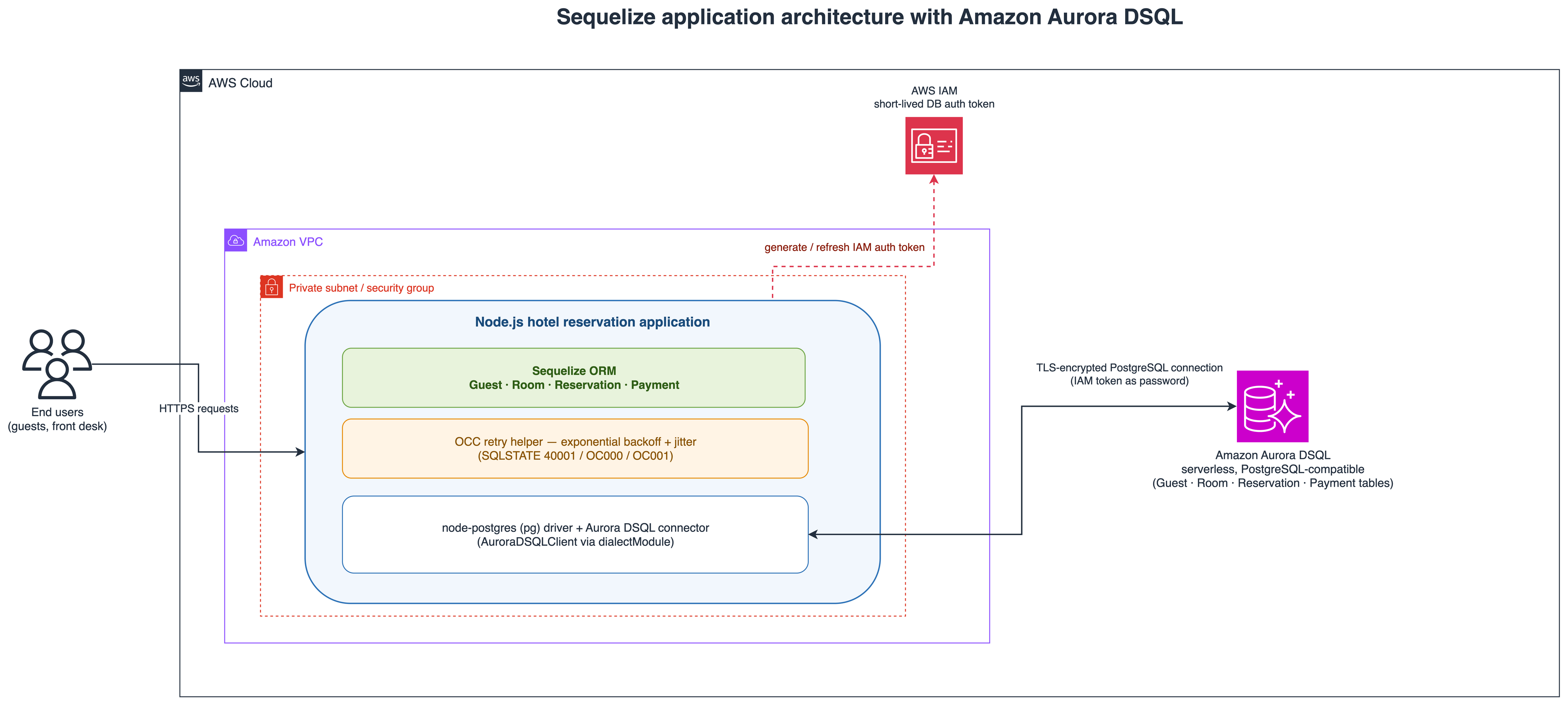
Figure 1: Sequelize application architecture with Amazon Aurora DSQL
When you run the application:
- Sequelize uses the
postgresdialect, but its underlying client is replaced with the Aurora DSQL connector’sAuroraDSQLClient. When a connection opens, the connector generates an IAM token, detects the AWS Region from the cluster endpoint, and negotiates TLS. - It authenticates and creates its tables, running each
CREATE TABLEas its own statement, because Aurora DSQL runs one data definition language (DDL) statement per transaction. - The models are defined and associated, giving Sequelize the metadata for eager loading.
- It runs the full hotel workflow: registering guests, setting up rooms, and processing reservations end to end (create, check in, check out, pay), then history, availability, and revenue queries.
- A loyalty-tier update runs inside the OCC retry helper, showing how concurrent write conflicts are handled.
Key considerations
Using any ORM with the distributed architecture of Aurora DSQL takes a few adaptations. The PostgreSQL compatibility and migration guide covers more.
- UUID primary keys: Aurora DSQL recommends UUID v4 keys, which need no cross-node coordination. Declare them with
type: DataTypes.UUIDanddefaultValue: DataTypes.UUIDV4. Sequences and identity columns (withCACHE) also work for integer IDs. - Choosing a relationship strategy: Aurora DSQL supports foreign key constraints (generally available since August 2026), so this sample enforces referential integrity in the database:
reservationreferencesguestandroom, andpaymentreferencesreservationandguest. It keeps the defaultON DELETE NO ACTION, per AWS guidance to preferNO ACTIONorRESTRICToverCASCADEfor unbounded child rows. Application-level UUID relationships (constraints: false) remain a valid alternative. - Connector and driver compatibility: The connector replaces node-postgres’s Client through the
dialectModuleoption and setsclientMinMessages: 'ignore',standardConformingStrings: false, andkeepDefaultTimezone: trueso Sequelize sends no session SET commands Aurora DSQL rejects. Unlike some drivers, there is no advisory-lock reset to patch. - Single DDL statement per transaction: Aurora DSQL runs one DDL statement per transaction, so this sample runs each
CREATE TABLEas its own rawsequelize.query(ddl, { raw: true })after setting the search path, rather thansequelize.sync(). - No SAVEPOINT support: Aurora DSQL has no
SAVEPOINT, so avoid transactions that rely on savepoints. This sample uses single-statement writes in autocommit mode, sidestepping them entirely. - IAM authentication: Aurora DSQL uses time-limited IAM tokens instead of static passwords, and the connector generates and refreshes them automatically.
- Optimistic concurrency control: When two transactions modify the same row, one gets a serialization error (
SQLSTATE 40001, codeOC000orOC001) and must retry. Both codes are safe to retry.
Prerequisites
Before you begin, make sure that you have the following:
- An AWS account.
- The AWS Command Line Interface (AWS CLI) v2, configured with credentials.
- Node.js 20 or later, which the Aurora DSQL connector requires, and npm.
- An Aurora DSQL cluster (single-Region is sufficient for this tutorial). Step 1 walks through the creation process.
- An IAM user or role with the minimum permissions shown in the following policy.
IAM permissions configuration
Use the following IAM policy. ClusterSetup covers the one-time cluster creation step, and DatabaseAccess is what your application uses at runtime:
Replace region and account-id with your values. The dsql:DbConnectAdmin is used as the admin user, and dsql:DbConnect as a non-admin application user (Step 6).
Important: After you create your cluster, scope both statements to your specific cluster ARN (replace /* with /<cluster-id>) and remove dsql:CreateCluster. The wildcard is needed initially only because the cluster ID is unknown before creation.
Estimated time and costs
This tutorial takes about 15–20 minutes and generates minimal database activity. Aurora DSQL charges for Distributed Processing Units (DPUs) and storage (GiB-month). See Amazon Aurora DSQL Pricing. Delete the cluster after testing to avoid ongoing charges.
Solution walkthrough
In this walkthrough, you create an Aurora DSQL cluster, clone the sample, configure Sequelize, review the models, connection, and OCC retry helper, and run the application.
Step 1: Create an Aurora DSQL cluster
First, configure an AWS CLI named profile for the IAM user, keeping its credentials isolated from other profiles:
This prompts for the access key ID, secret access key, a default Region (for example, us-east-1) and output format (json). Verify the profile:
The response shows your account ID, user ARN, and user ID.
Now create a single-Region Aurora DSQL cluster:
Note the cluster ID from the output, then retrieve the endpoint:
Wait for the status field to show ACTIVE. The endpoint field is the host name your application connects to (for example, abc123def456.dsql.us-east-1.on.aws).
Step 2: Clone the sample and install dependencies
Clone the repository and change into the sample directory:
Install the dependencies:
The project depends on sequelize, the pg driver, pg-hstore, and the @aws/aurora-dsql-node-postgres-connector package. The connector pulls in the AWS SDK pieces needed to mint IAM tokens, so no separate signer is required.
Note: To run the sample right away, skip to Step 7. The next sections walk through the key code (models, connection, retry logic) and the Aurora DSQL-specific adaptations.
Step 3: Define the Sequelize models
In src/models.js, you define four models with Sequelize’s define() API. Each uses a UUID primary key and is bound to a schema so queries stay schema-qualified. The excerpt shows the Guest and Reservation models; Room and Payment follow the same pattern:
Key design decisions:
- Every model declares
type: DataTypes.UUIDwithdefaultValue: DataTypes.UUIDV4, so keys are generated with no cross-node coordination. - Each model sets
schema: SCHEMA, which schema-qualifies every query (for example,"hotel"."reservation"). This matters most for a non-admin user, whose defaultsearch_pathwould otherwise resolve an unqualified name to a same-named table inpublicit cannot access. - Relationship columns such as
guestIdandroomIdare plainUUIDfields. The Sequelize associations supply the metadata for eager loading throughinclude, while the database enforces the corresponding foreign keys, which you set up next.
The following entity-relationship diagram shows how the four models map to tables and how their foreign keys relate.
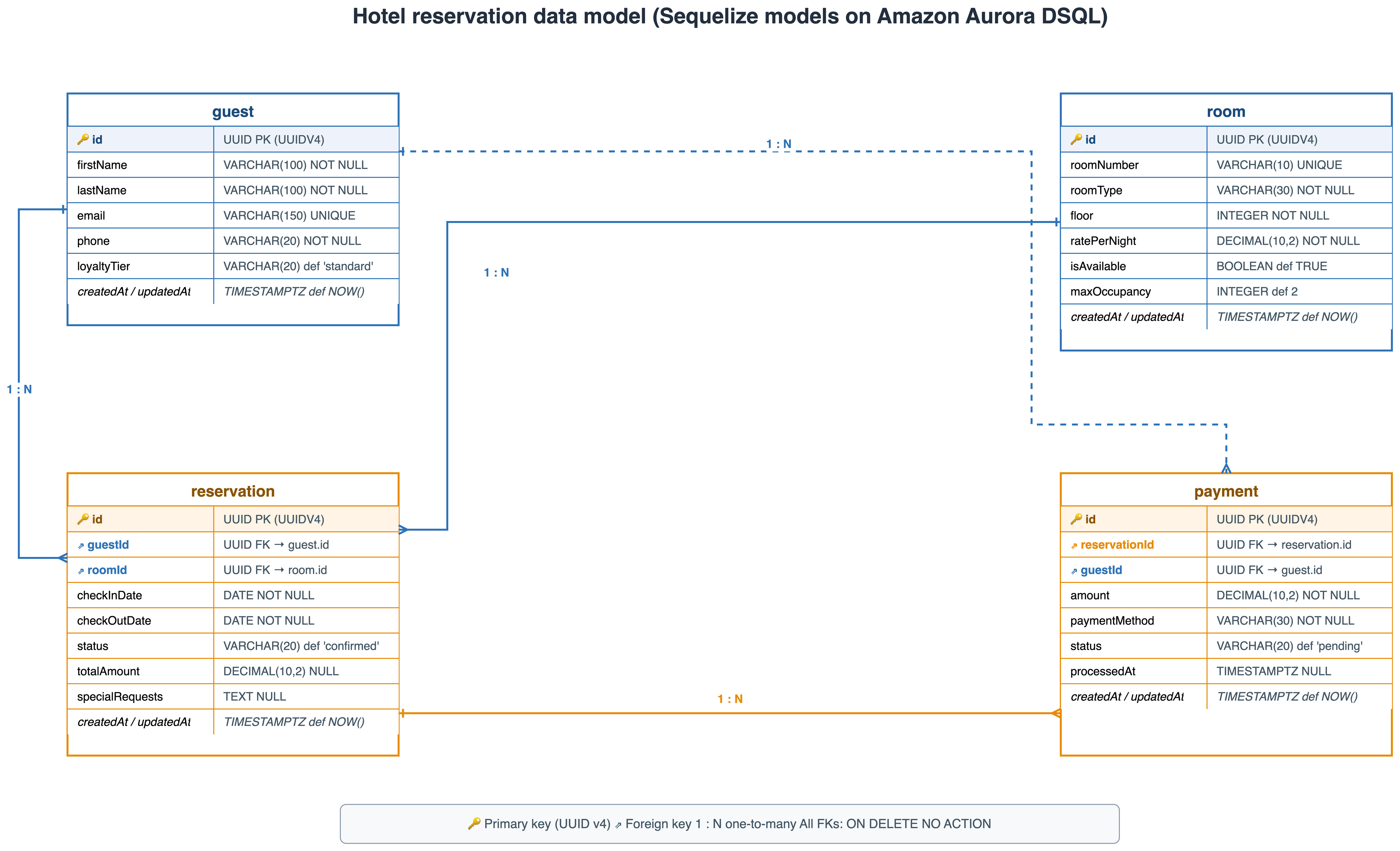
Figure 2: Hotel reservation entity-relationship model
Step 4: Configure the Aurora DSQL connection
In src/db.js, you create the Sequelize instance and wire in the connector through Sequelize’s dialectModule option. Sequelize still uses the postgres dialect and the pg driver, but node-postgres’s Client is replaced with the connector’s AuroraDSQLClient, which handles IAM token generation and Region discovery:
Table creation runs each statement individually (Aurora DSQL allows one DDL statement per transaction), creating referenced tables (guest, room, and reservation) before the tables that reference them, with foreign keys declared inline:
Key points:
- The connector auto-detects admin versus non-admin users from the username and mints the matching token, so there is no manual signer code anywhere in the application.
- The AWS Region is discovered from
CLUSTER_ENDPOINT, soCLUSTER_REGIONis not required at runtime. (You still set an explicit--regionfor the AWS CLI token commands in Step 6.) - Setting Sequelize’s
searchPathoption puts Sequelize into search-path mode, which disables bind parameters and inlines values as SQL literals. This sample avoids that by leavingsearchPathunset and schema-qualifying the models instead. - Foreign keys use the default
ON DELETE NO ACTION, and the table creation order satisfies the reference dependencies. - Writes go through a Sequelize model, so its
UUIDV4default assigns eachid. The column’sgen_random_uuid()default is a fallback for direct SQL inserts.
Step 5: Implement OCC retry logic
In src/retry.js, a small utility retries an operation on an Aurora DSQL OCC conflict. It checks the SQLSTATE first (Sequelize wraps the underlying pg error on error.parent or error.original) and falls back to matching the Aurora DSQL-specific OCC codes in the message text:
Usage in the application (src/app.js) applies the helper to a loyalty-tier update. It re-reads the guest inside the closure so each attempt acts on the latest row, writing only the changed column:
Design principles:
- Re-read before retry: the wrapped function fetches the latest state on each attempt, since retrying a stale in-memory row would only reproduce the conflict.
- Backoff and scoped updates: wait times grow with jitter (about 50 ms, 100 ms, 200 ms) to avoid a thundering herd, and passing
fields: ['loyaltyTier']tosave()writes only the changed column, shrinking the conflict surface. - Autocommit-safe: a single-statement write commits on its own and is safe to retry. For a multi-statement unit, open a managed
sequelize.transaction()inside the retried function so each attempt starts fresh.
A note on the connector’s own retry: the connector’s built-in OCC handling applies only to work run through its transaction() method. Through Sequelize’s dialectModule, queries never call that method, so the built-in retry does not engage, which is why the sample provides its own query-level helper.
Step 6: Set up a non-admin application user (optional)
For production, use a least-privilege application user instead of admin. In Aurora DSQL, every non-admin database user maps 1:1 to an IAM identity through the AWS IAM GRANT command.
Note: This step requires an IAM user with permissions to create IAM policies and modify Aurora DSQL cluster access. If your current user lacks these permissions, ask your AWS account administrator.
1. Verify your IAM user has dsql:DbConnect. The DatabaseAccess statement from the Prerequisites already includes both dsql:DbConnectAdmin and dsql:DbConnect.
2. Create the database role and schema (connect as admin). Open src/setup_app_user.sql, replace <AWS_ACCOUNT_ID> and <IAM_USERNAME> with your values, then run it as admin (the AWS CLI token command needs an explicit Region here):
The script creates a hotel_app role, links it to your IAM identity with AWS IAM GRANT, creates a hotel schema, and grants the privileges the application needs:
3. Connect as the non-admin user. Set the environment variables and run the app:
The connector selects a standard (non-admin) token for hotel_app. No sts:AssumeRole is required. The IAM credentials that authenticate the API call are linked to the database role through AWS IAM GRANT.
Step 7: Run the application (admin user)
Admin access is needed only for the one-time schema and table creation. Set the environment variables and run:
When you run npm start, the application runs the full workflow against your cluster and logs its progress, as the following output shows. Because npm start clears these tables before seeding, point it at a database or schema dedicated to this sample, not one that holds real data.
The console output resembles the following (abbreviated):
Note: If you see “Missing required environment variable CLUSTER_USER,” confirm your environment variables are set in the current shell session.
Optionally, confirm the foreign keys are in place and enforced. Connect as admin and run:
The query returns four foreign keys (reservation referencing guest and room; payment referencing reservation and guest), each validated and using NO ACTION on delete.
Step 8: Clean up demo data
After you review the tables and data the demo created, remove the demo rows with the cleanup script, which deletes in child-to-parent order to respect the foreign keys:
Production and security considerations
For production deployments, apply these practices:
- Authentication and tokens: Aurora DSQL replaces static passwords with short-lived IAM tokens, so none are stored in the application. The connector mints a fresh token whenever the pool opens or replaces a connection. After the pool is open, a connection stays valid up to the Aurora DSQL maximum of 60 minutes, even after the token expires.
- Principle of least privilege: Grant only
dsql:DbConnectto your application’s runtime role, and reservedsql:DbConnectAdminfor schema setup or migration roles. Scope both to your specific cluster ARN, use a non-admin database user with its own schema at runtime (see Step 6), and avoid broad actions likedsql:*. - Credential hygiene: Use IAM roles (Amazon Elastic Compute Cloud (Amazon EC2) instance profiles, ECS task roles, or IAM Roles Anywhere) rather than long-lived access keys. The connector uses the default AWS credential chain, so no secrets are embedded in the application.
- TLS encryption in transit: Aurora DSQL requires TLS for all connections, and the connector negotiates it automatically. Don’t disable certificate verification in production.
- Network isolation: Deploy your application within an Amazon Virtual Private Cloud (Amazon VPC) and use VPC endpoints to reach Aurora DSQL without traversing the public internet.
- Connection pooling and limits: Set
pool.max,pool.min,pool.acquire, andpool.idleto match your concurrency. Design within Aurora DSQL limits: up to 10,000 connections at 100 per second (burst 1,000). A single write transaction can change up to 3,000 rows and 10 MiB and run up to 5 minutes. - Observability and health checks: Add structured logging with correlation IDs, and monitor pool health, OCC retry counts, and error rates with Amazon CloudWatch. Add a lightweight
SELECT 1health check, assrc/test_connection.jsdoes, so your load balancer can detect unhealthy instances.
Clean up
To avoid ongoing charges for the resources created in this walkthrough, remove them when you’re finished.
Delete the Aurora DSQL cluster
Remove the tables without deleting the cluster
Drop the tables in child-to-parent order so the foreign keys are respected:
Conclusion
In this post, you built a hotel reservation application with Sequelize and Amazon Aurora DSQL. The adaptations are modest: UUID primary keys, the connector wired in through Sequelize’s dialectModule, individual DDL execution, schema-qualified models, and an OCC retry helper. It enforces referential integrity with database foreign keys (generally available since August 2026), with application-level UUID relationships as an alternative. These patterns apply broadly to Node.js workloads on Aurora DSQL.
To take this further, deploy the application across multiple Regions using multi-Region clusters in Aurora DSQL for active-active writes, or connect as a non-admin user with a custom schema to explore multi-tenant patterns.
Get started by cloning the aurora-dsql-samples repository and running it against your own cluster. For more, see the Aurora DSQL User Guide. For Sequelize docs, see sequelize.org. To learn more, refer to Introducing Amazon Aurora DSQL on the AWS Database Blog.