AWS Database Blog
Category: Technical How-to
Stream live data from Amazon Keyspaces to S3 vector for real time AI applications
In this post, you learn how to build a real-time AI movie recommendation system by streaming live data changes from Amazon Keyspaces to Amazon S3 vector storage. The post shows how to use Keyspaces change data capture streams to capture database modifications, convert them into vector embeddings using Amazon Bedrock, and store them in S3 Vector indexes for similarity searches that give AI applications access to fresh data within milliseconds.
Turbocharge your applications with Amazon DocumentDB 8.0
Amazon DocumentDB 8.0 brings in support for MongoDB 8.0 API driver compatibility while maintaining support for applications built using MongoDB API versions 6.0 and 7.0. This post explores the new features in Amazon DocumentDB 8.0 and demonstrates how they improve performance and cost efficiency.
Conversational Oracle EBS operations with CloudWatch MCP and Kiro CLI
In this post, you learn how to implement conversational operations for Oracle E-Business Suite (Oracle EBS) on AWS by connecting Kiro CLI with your monitoring infrastructure through the MCP. We walk through the technical architecture that enables natural language queries to retrieve CloudWatch metrics, analyze logs, and execute operational commands.
Augment DMS SC with Amazon Q Developer for code conversion and test case generation
You can use the AWS Database Migration Service Schema Conversion (AWS DMS SC) with generative AI feature to accelerate your database migration to AWS. This feature automatically handles the conversion of many database objects during migration by using traditional rule-based techniques and deterministic AI techniques. In this post, we demonstrate how Amazon Q Developer delivers generic solutions for complex AWS DMS SC issues, intelligently converts database stored procedure code from source to target database-compatible code, and automatically generates comprehensive test cases to validate your migrated database objects.
Enabling nested transactions in Amazon DynamoDB using C#
In this post, I introduce a framework for managing atomicity, consistency, isolation, and durability (ACID) compliant transactions in Amazon DynamoDB using C#, featuring support for nested transactions. This capability allows you to implement sophisticated logic with finer control over data consistency and error handling within your .NET applications. With this nested transaction framework, you can isolate issues, allow for partial rollbacks, and build maintainable, modular workflows on top of the built-in transactional capabilities of DynamoDB.
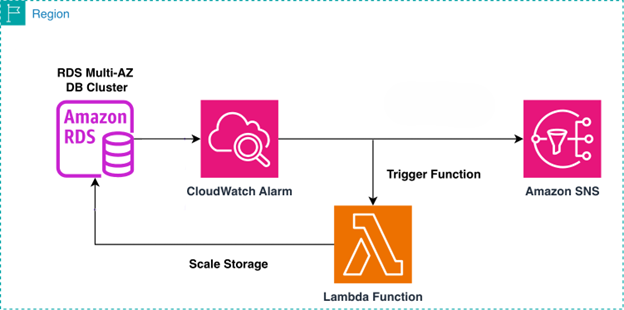
Automatically scale storage for Amazon RDS Multi-AZ DB clusters using AWS Lambda
In this post, we walk you through building an automated storage scaling solution for Amazon RDS Multi-AZ clusters with two readable standbys. We use AWS Lambda to execute scaling logic, Amazon CloudWatch to detect and alarm on storage thresholds, and Amazon SNS to deliver timely notifications. This combination provides event-driven automation, native AWS integration, and operational visibility without requiring third-party tooling.
Synchronizing a Backup on-premises Db2 Server with Amazon RDS for Db2
In this post, we provide guidance on implementing a hybrid architecture where a self-managed Db2 instance remains synchronized with Amazon RDS for Db2 via continuous archive log application, ensuring organizations maintain strategic deployment options without compromising the advantages of cloud-native managed services.
Automated parameter and option group change monitoring in Amazon RDS and Amazon Aurora
In this post, you will learn how to build a serverless monitoring solution sending detailed alerts whenever Amazon RDS parameter groups are modified, including which databases are affected and whether a restart is required.
Export Amazon SimpleDB domain data to Amazon S3
As AWS continues to evolve its services to better align with customer needs and modern workloads, we’re excited to introduce a new export functionality for Amazon SimpleDB . By using this feature, you can export domain data to Amazon S3 in JSON format, unlocking new opportunities for long-term storage, and migration to purpose-built databases. The export generates a complete JSON representation of Amazon SimpleDB data. In this post, we walk you through how to use the new export functionality, highlight best practices, and share monitoring functionality to help you make the most of it.

Migrate Cloud SQL for MySQL to Amazon Aurora and Amazon RDS for MySQL Using AWS DMS
In this post, we demonstrate how to migrate from Cloud SQL for MySQL 8+ to Amazon RDS for MySQL 8+ or Amazon Aurora MySQL–Compatible using AWS DMS over an AWS Site-to-Site VPN. We cover preparing the source and target environments, exemplifying cross-cloud connectivity, and setting up DMS tasks.