AWS Database Blog
Configure Optimize CPU on Amazon RDS for SQL Server
Amazon Relational Database Service (Amazon RDS) for SQL Server now offers the Optimize CPU feature, which enabled control over vCPU allocation through core count modification setting. SQL Server licensing costs can consume a significant portion of your database budget, especially when you’re paying for vCPUs that aren’t fully utilized. This post demonstrates how to implement the Optimize CPU feature to potentially reduce licensing costs while maintaining performance for both new and existing Amazon RDS instances, along with performance benchmarking results and cost implications.
Solution Overview
You can use the AWS Management Console to implement the solution or automate the process. SQL Server performance typically depends on selecting appropriate instance types, with memory and storage (input/output operations per second (IOPS) and throughput) being critical factors. Although online transaction processing (OLTP) workloads are generally memory or I/O bound rather than CPU-intensive, optimizing CPU resources can provide cost benefits without compromising performance.
In this post, we demonstrate how to configure CPU optimization for new and existing RDS instances, show you performance benchmarking results, and help you understand the implications of the cost. In this solution, we will:
- Creating new Amazon RDS instance with optimized CPU settings
- Modifying existing instances
- Performing restore operations with CPU optimization
- Performance testing across various configurations
- Cost-benefit analysis
The following diagram shows the solution architecture.

Prerequisites
Before implementing this solution, ensure you have:
- An active AWS account
- AWS Command Line Interface (AWS CLI) installed and configured
- A nonproduction environment for testing
- Understanding of the Optimize CPU feature and how it impacts Amazon RDS for SQL Server pricing and performance.
The solution involves the creation and utilization of new AWS resources. Therefore, it will incur costs on your account. Refer to AWS Pricing for more information.
We strongly encourage that you set this up in a non-production environment and run end-to-end validations before implementing this solution in your production environment.
Implement the CPU optimization
There are three different ways to optimize CPU. You can create a new RDS instance, modify an existing RDS instance, or restore an instance. The next sections provide a step-by-step guide to implementing each option.
Option 1: Create a new RDS instance
To create a new RDS for SQL Server instance with optimized CPU feature, complete the following steps:
- On the Amazon RDS console, choose Create database.
- Choose Standard create.
- Choose Microsoft SQL Server as the engine type.
- For Database management type, choose Amazon RDS.
- Choose a SQL Server Edition. For this post, we chose Enterprise Edition.
- Choose a supported SQL Server Version. We chose SQL Server 2022 latest minor version.
- Choose Dev/Test for Templates.
- Under Settings, enter a name for the instance and a primary username and password for the primary user.
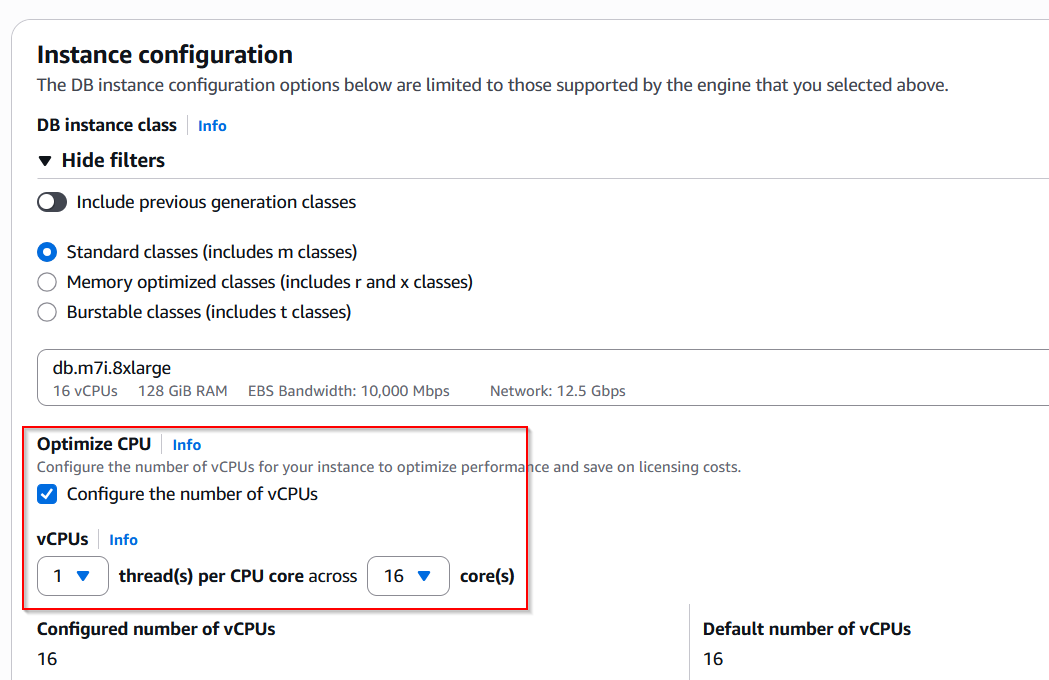
- For Instance configuration, select Standard classes and choose your desired instance class. In this post, we have chosen db.m7i.8xlarge.
- In the Optimize CPU section, select Configure the number of vCPUs.
- Configure the desired core count. Hyperthreading is disabled by default for instances starting from 7th generation that support Optimize CPU.
These settings are shown in the following screenshot.
- Under Connectivity, choose Don’t connect to an EC2 compute resource, IPv4 Network type, and the VPC and subnet group you have created.
- Choose No for Public access.
- For VPC security group, select Choose existing and choose the security group you’ve created.
- You can leave the rest of the settings default.
- Choose Create database and wait for Amazon RDS to provision the instance.
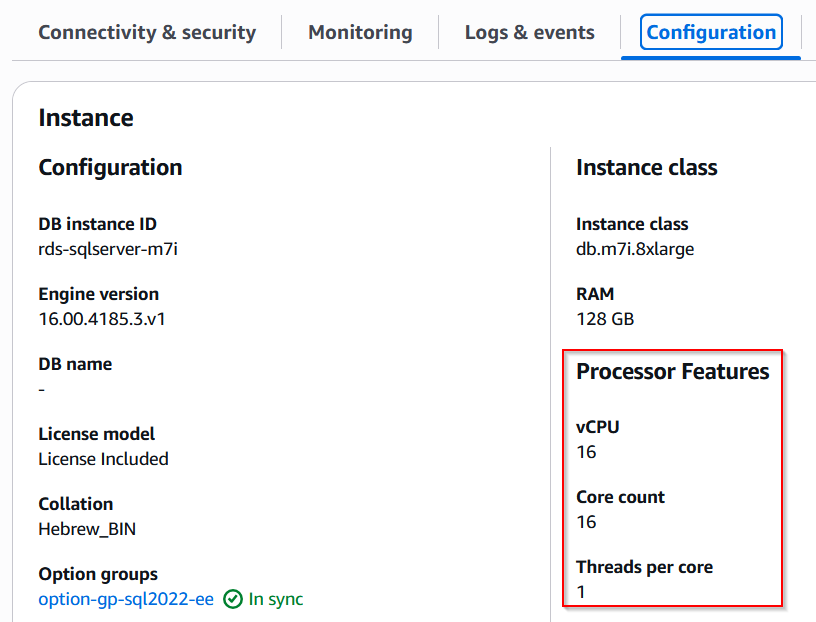
- When the instance is Available, select the name of your DB instance. Select the Configuration tab to view the vCPU count, Core count and Threads per core configuration, as shown in the following screenshot.
Option 2: Modify an existing Amazon RDS instance
You can modify an existing instance to change the optimize CPU configuration using the following AWS CLI command.
The following code is for Windows:
The following code is for Mac:
Option 3: Restore an instance
While restoring an instance from snapshot, you can configure the optimize CPU configuration using the following AWS CLI command.
Point-in-time restore
The following code is for Windows:
The following code is for Mac:
Performance test configurations
To help you understand how optimize CPU affects performance, we conducted tests that simulate typical OLTP database workloads. We established a comprehensive testing environment using the following components:
- Instances:
db.r7i.12xlargeRDS instance with SQL Server 2022 Enterprise Editiondb.r6i.12xlargeRDS instance with SQL Server 2022 Enterprise Editiondb.m6i.8xlargeRDS instance with SQL Server 2022 Enterprise Editiondb.m7i.8xlargeRDS instance with SQL Server 2022 Enterprise Edition
- Storage configuration – 2 TiB io2 storage with 64,000 IOPS
- Client machine – m6i.12xlarge instance
- Testing tool – HammerDB with TPCC-like workload
A single-AZ deployment was chosen to eliminate synchronous replication latency and focus on pure performance metrics. The test database consisted of 8,000 warehouses with the Use All Warehouses option selected to maximize I/O workload simulation.
Testing methodology
Our performance assessment used HammerDB’s Autopilot feature, implementing a systematic approach:
- Progressive scaling of virtual users until reaching performance plateau
- Exponential increase in user load to test various concurrency scenarios
- Triple execution of each test scenario for statistical validity
- Averaging of results for reliable performance metrics
By using this methodology, we:
- Identified maximum sustainable transaction rates
- Measured system behavior under varying load conditions
- Established repeatable and reliable performance baselines
- Validated performance consistency across different RDS instances through performance test results
We configure the following series of virtual users: 16, 32, 64, 128, 256, 384, 512, 1024 in an exponential progression.
Tests to compare db.r6i.12xlarge against db.r7i.12xlarge
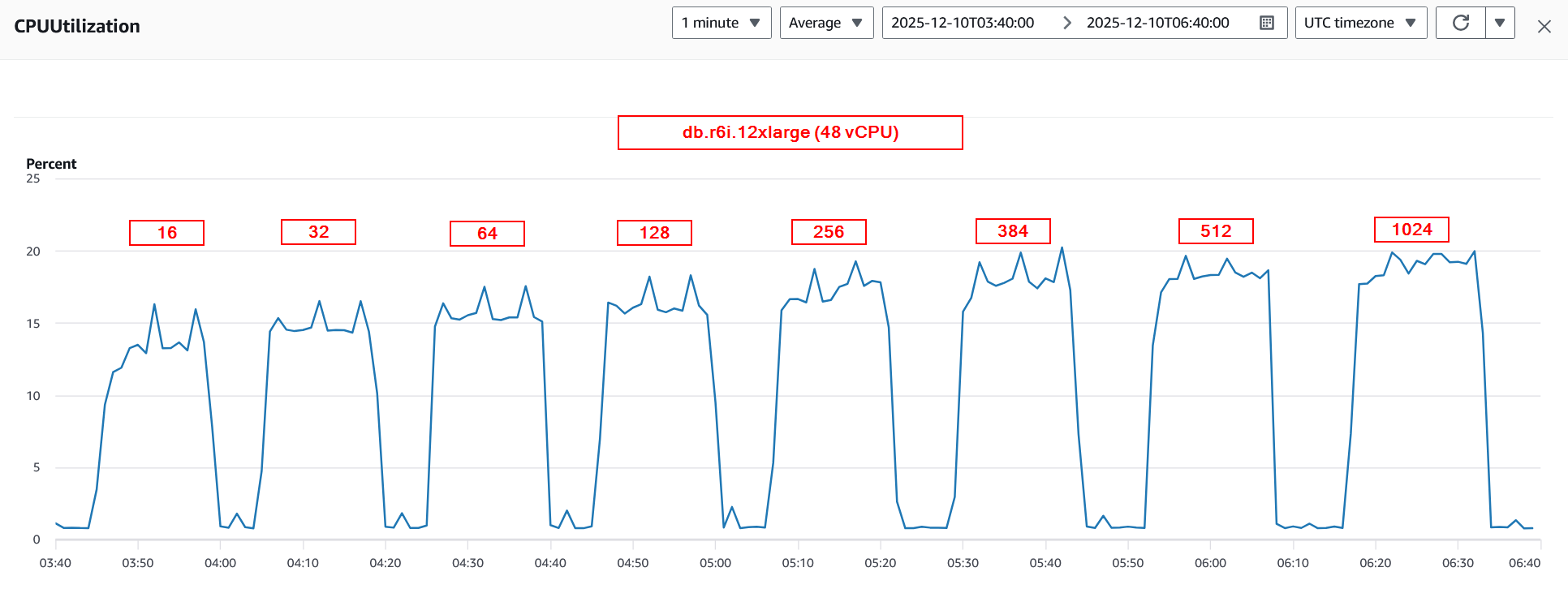
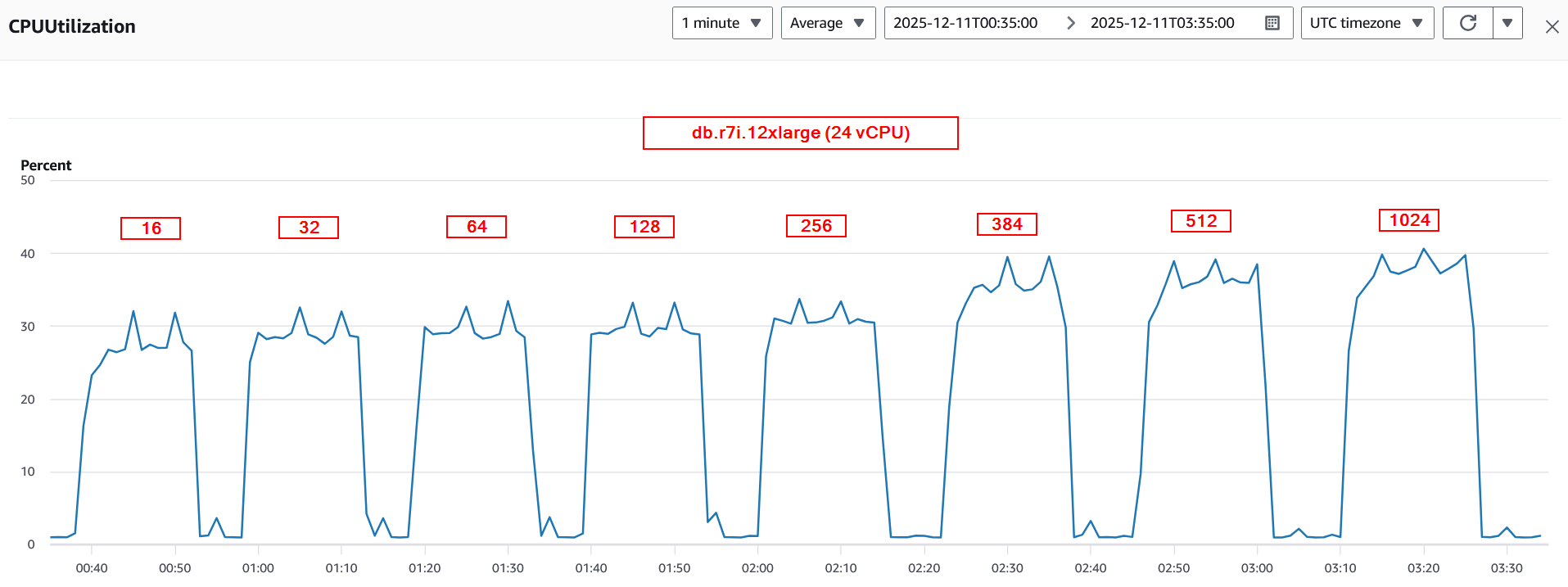
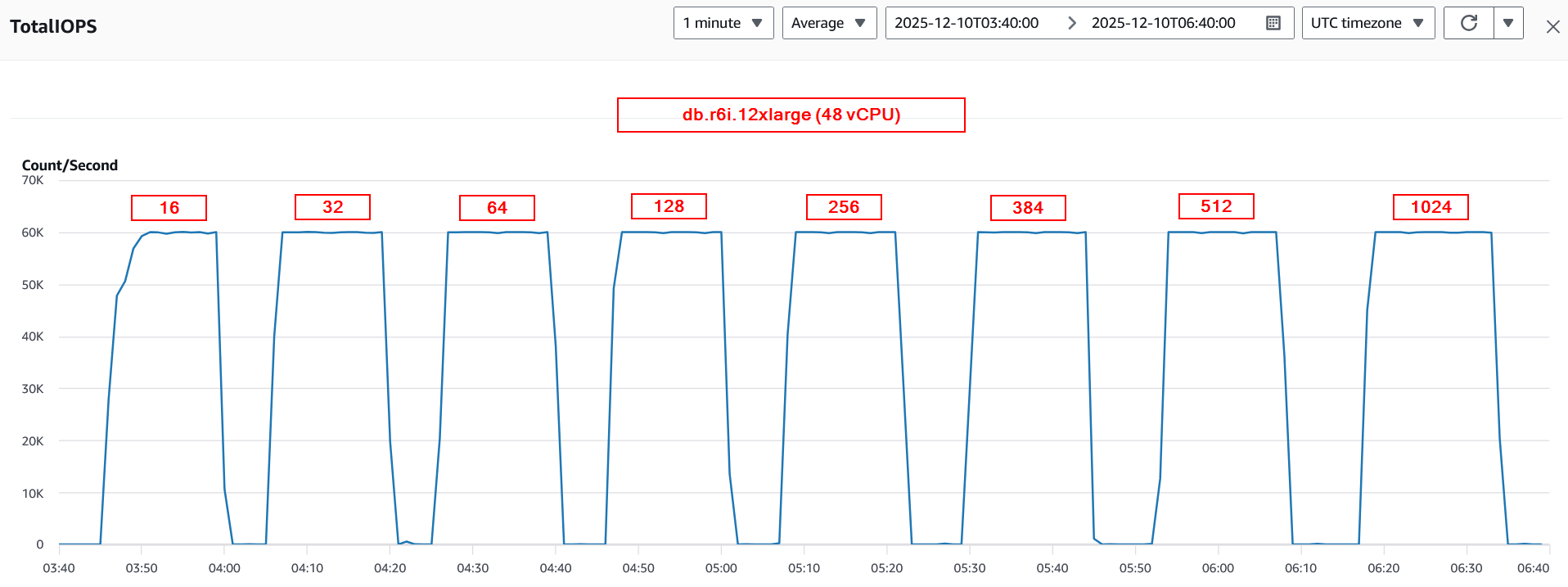
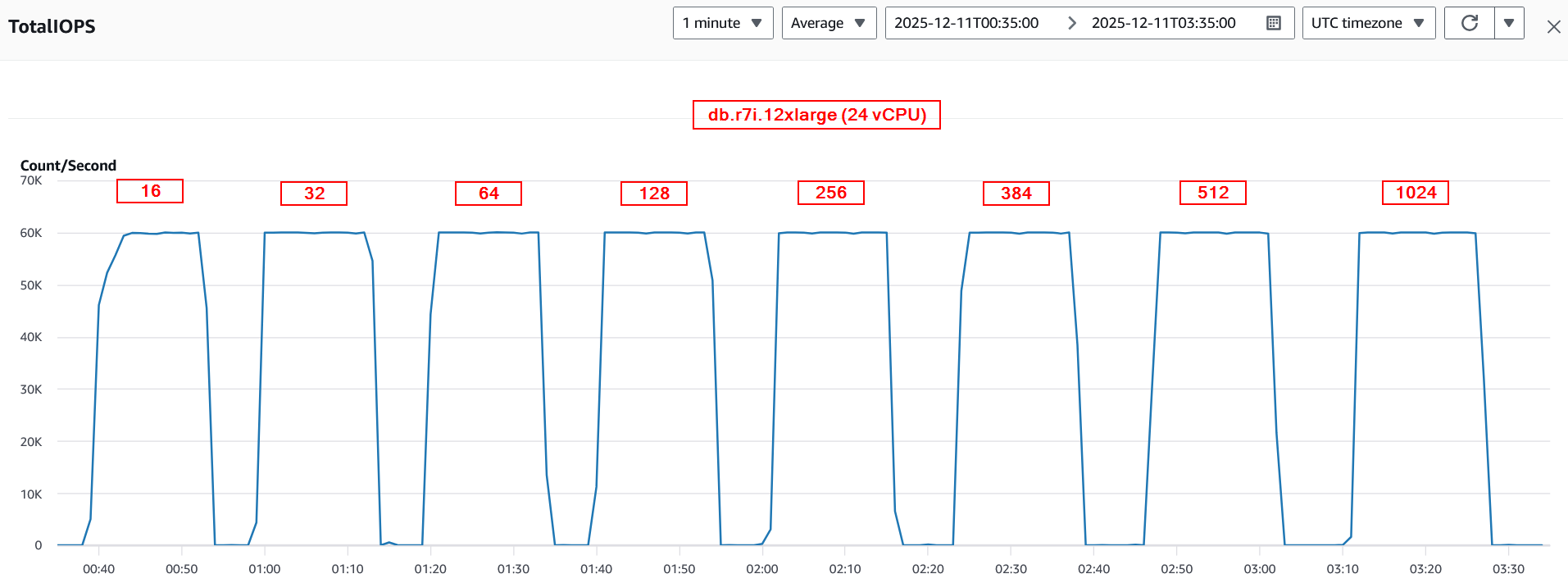
We started the test comparing r6i instance class that has 48 vCPU (24 cores with hyperthreading enabled) against 24 vCPU (24 cores with hyperthreading disabled). Both the instances support up to 60,000 IOPS. The following figure represents the performance tests. The r7i instance class performance is in fact slightly better with up to 512 virtual users as compared to the r6i instance class. The following graph shows a performance comparison with varying number of virtual users.

The following graph represents average CPU utilization for the series of tests captured between the instances. The r6i instance registered a max CPU utilization of 20%, and the r7i instance showed 40% when 1024 virtual users were executing queries concurrently. 40% is a comfortable threshold for most database instances.
The following figure shows that the test maxes out the IOPS (60,000) supported by the instance class and size. To learn more about supported storage IOPS and throughput, visit Amazon EBS optimized instance types.
Tests to compare db.m6i.8xlarge against db.m7i.8xlarge
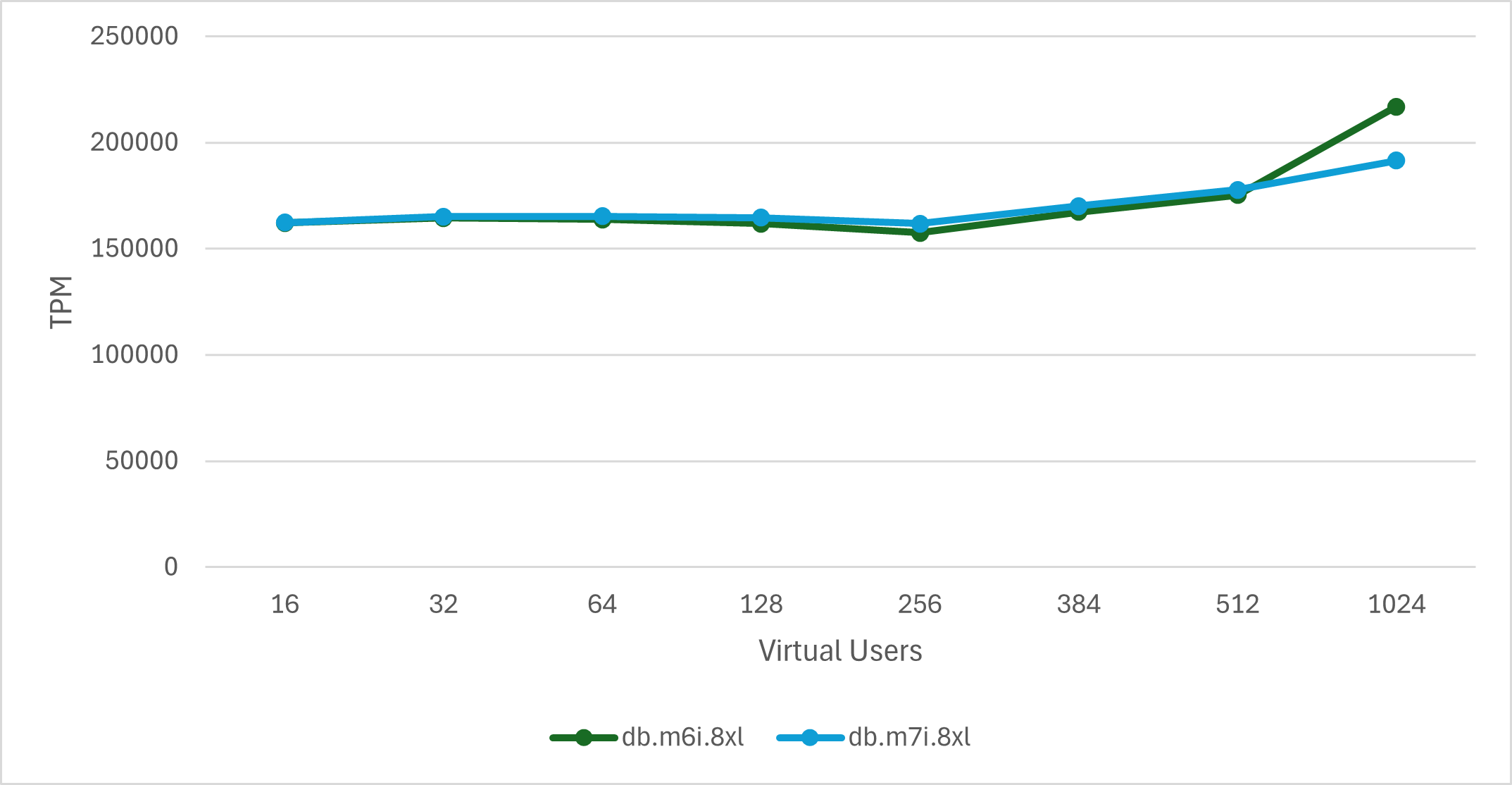
We continued the tests to compare the performance of m6i that is configured with 32 vCPU against m7i instance class with 16 vCPU. Both instance types have a baseline IOPS value of 40,000. The result of the tests is shown in the following graph. The m7i instance class performance is comparable to the m6i instance class up to 512 concurrent virtual users.
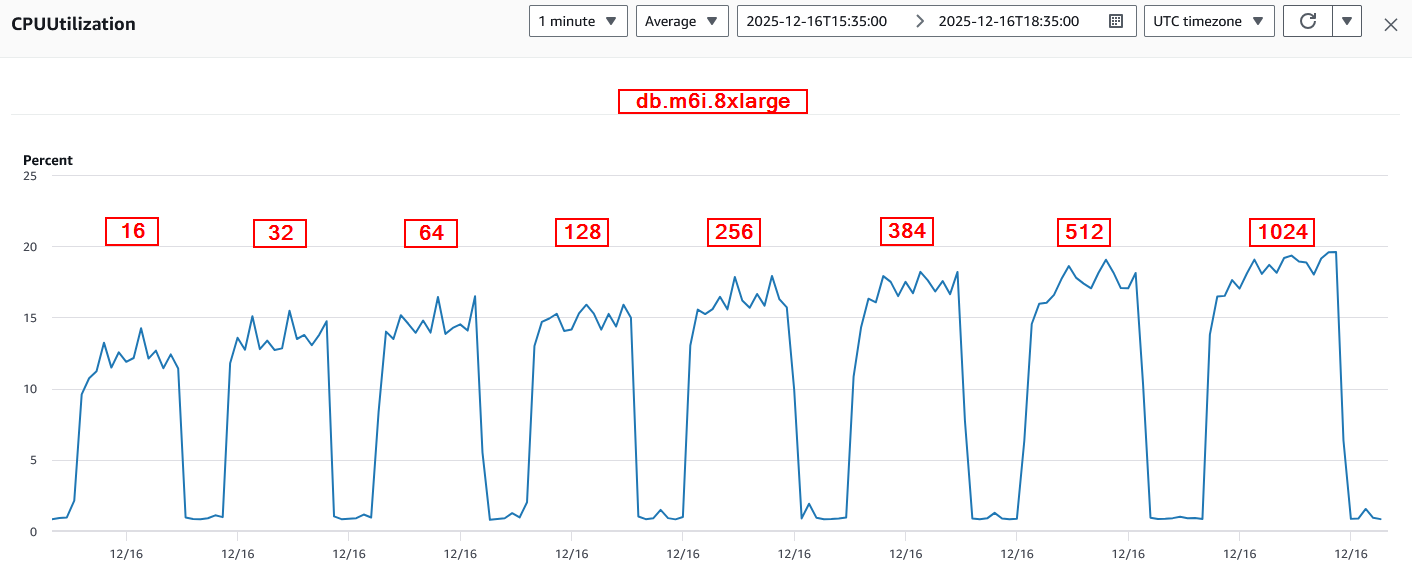
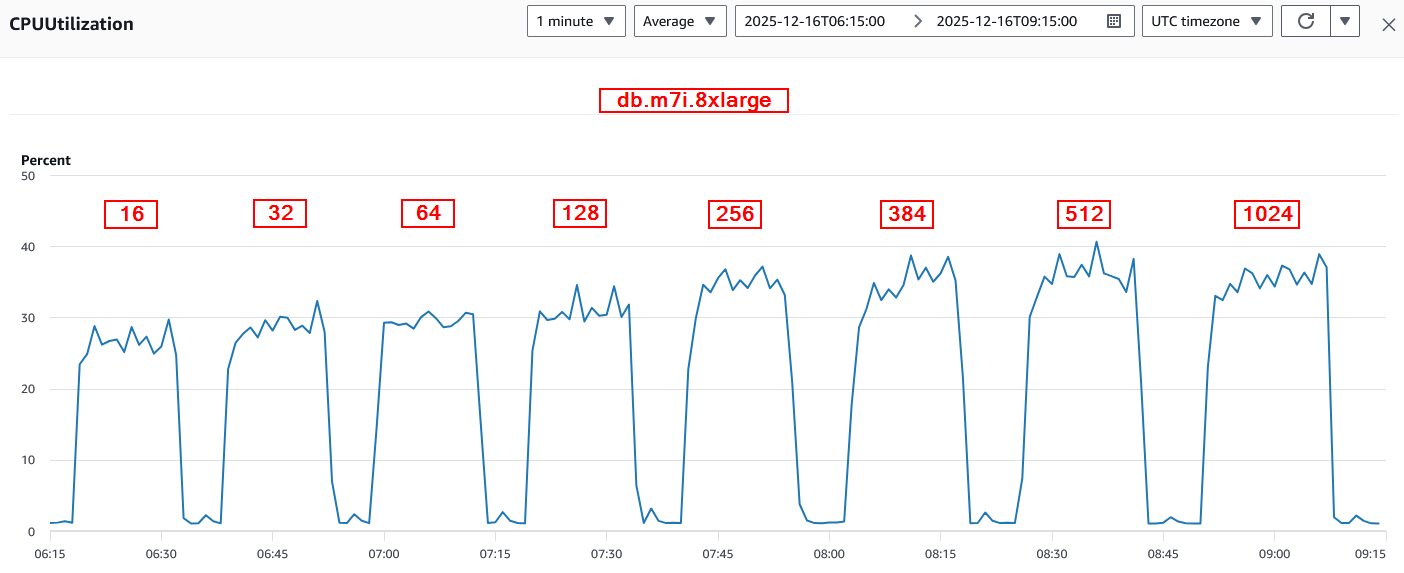
The following graph shows the CPU utilization of the instances. The CPU utilization on m6i instance is low, between 15–20%, whereas the m7i instance registered a maximum of 40%. With 50% less CPU compared to the m6i instance, it’s expected that the CPU utilization of the m7i instance is higher but is well below the comfortable threshold of 70–80%.
For each of these test cases, we maxed out the provisioned IOPS that are supported on each instance. From the metric, we could see that the benchmark utilizes the limit of 40,000 IOPS of the instances. The following figure shows total IOPS with a varying number of virtual users.


Summary of performance testing
Performance test results for RDS for SQL Server on db.r6i.12xlarge, db.r7i.12xlarge, db.m6i.8xlarge and db.m7i.8xlarge are summarized in the following table.
| db.r6i.12xlarge | db.r7i.12xlarge | db.m6i.8xlarge | db.m7i.8xlarge | |
| CPU Count | 48 vCPU (24 * 2) | 24 vCPU (24 * 1) | 32 vCPU (16 * 2) | 16 vCPU (16 * 1) |
| TPM | 327668 | 328791 | 171104 | 169794 |
| Relative performance (%) | 100 | 100.34 | 100 | 99.23 |
| IOPS/CPU | 1250 | 2500 | 1250 | 2500 |
| 0.34% | -0.77% |
The performance of the new generation instance classes (m7i and r7i) with hyperthreading disabled, reducing the number of vCPU by 50% is comparable to 6th generation instance classes. From the benchmark data, we saw an increase of CPU utilization when the workload increases. However, the utilization is below the 95th percentile utilization (~80%), which is what most DB administrators are comfortable with. The instance was able to match the number of transactions per minute (TPM) of instances that have double the amount of CPU. We strongly suggest that you test your workloads on the specific instance class in a non-production environment before making the change in your production environment.
Cost benefits
The Optimize CPU feature for RDS for SQL Server provides customers with significant cost-saving opportunities without compromising performance. Because SQL Server licensing is charged per vCPU, reducing active vCPUs can directly lower costs, especially for Enterprise Edition licenses. This feature is particularly beneficial for development or test environments where maximum performance isn’t always necessary, potentially reducing costs by 25–50%. For production workloads, customers can right-size CPU allocation based on actual utilization patterns while maintaining performance standards. To maximize benefits, organizations should monitor CPU utilization, start optimizations in test environments, and gradually implement changes in production. Regular review of configurations and performance metrics enables optimal cost-efficiency while meeting workload demands. The following is a table comparison between default CPU and Optimize CPU configuration of 7th generation instances that were used for benchmarking.
| db.r7i.12xlarge | Compute(1) | SQL license(2) | Windows license(3) | Total(1)+(2)+(3) | Price reduction | ||
| Enterprise | 48 vCPU | $4380.00 | $13140.00 | $1611.84 | $19131.84 | ||
| Enterprise | 24 vCPU | $4380.00 | $6570.00 | $805.92 | $8755.92 | −54.2% | |
| db.m7i.8xlarge | |||||||
| Enterprise | 32 vCPU | $2079.04 | $8760.00 | $1074.56 | $11913.60 | ||
| Enterprise | 16 vCPU | $2079.04 | $4380.00 | $537.28 | $6996.32 | −41.2% | |
Clean up
To avoid recurring charges, delete the instance(s) that you no longer need. To clean up your resources, complete the steps at Delete the RDS for SQL Server DB instance.
Conclusion
The Optimize CPU feature for Amazon RDS for SQL Server represents a significant advancement in cloud resource optimization, offering customers the flexibility to fine-tune their database instances for both performance and cost-efficiency. Our comprehensive testing demonstrates that reducing vCPU count can maintain optimal performance while substantially reducing licensing costs. The performance benchmarks clearly show that workloads running on reduced CPU configurations maintained consistent throughput levels, with our test scenarios achieving over 100% relative performance even with significantly fewer vCPUs. This indicates that many SQL Server workloads can operate efficiently with optimized CPU configurations, potentially saving organizations tens of thousands of dollars annually in licensing costs. As organizations continue to optimize their cloud spending, the Amazon RDS Optimize CPU feature provides a powerful tool for achieving significant cost savings while helping database performance meet business requirements.