AWS Database Blog
Invoke AWS services directly from Amazon RDS for SQL Server 2025
What if your database could invoke a machine learning (ML) model, call a custom business service, or trigger an email notification, all inside the T-SQL transaction that needs the result? With SQL Server 2025 on Amazon Relational Database Service (Amazon RDS), it can. With the new built-in stored procedure sp_invoke_external_rest_endpoint, your database logic can issue HTTPS requests and consume responses in a single synchronous call. This removes the middleware tier you used to build, deploy, and monitor only to bridge your data and your services. With this capability, your database becomes a first-class participant in your service mesh.
The endpoint is protocol-agnostic: AWS services, internal microservices, third-party APIs, if it has an HTTPS endpoint, your database can reach it.
In this post, we walk through three real-world examples that show the breadth of what is possible:
- Amazon SageMaker — score a customer against a custom ML model in real time, inline with the insert that created the record.
- A custom Python web service on Amazon Elastic Compute Cloud (Amazon EC2) — call proprietary business logic hosted in your own virtual private cloud (VPC), with all traffic staying private.
- Amazon Simple Email Service (Amazon SES) — send a transactional email the moment a critical event is recorded.
These three examples represent categories of integration: managed AI/ML, private custom compute, and AWS services. The pattern works with any HTTPS endpoint.
Solution overview
The sp_invoke_external_rest_endpoint procedure accepts a URL, an HTTP method, optional headers, and a JSON payload. It performs the request synchronously and returns the response code, headers, and body. On Amazon RDS for SQL Server 2025, it has the same documented limits as on a self-managed installation: 4,000 characters each for @url and @headers, and a maximum @timeout of 230 seconds. By default, it sends a Content-Type of application/json; charset=utf-8. Confirm that your target endpoint accepts the charset directive, because some APIs validate the media type strictly.
Different targets use different authentication patterns:
- AWS services such as Amazon SageMaker and Amazon SES require AWS Signature Version 4 (SigV4) signing on each request, which
sp_invoke_external_rest_endpointdoes not perform itself. We route those calls through an authentication layer: a customer-owned HTTPS endpoint, such as an Amazon API Gateway endpoint backed by an AWS Lambda function. The Lambda function receives the database request and uses the AWS SDK to sign the outbound AWS API call with SigV4, using the temporary credentials of the function’s IAM role, which has only the specific actions each example needs. SageMaker and SES share this same signing path, but each is a separate call from the database, not a single combined call. - Targets that accept a static API key or a bearer token, such as a custom web service, need no authentication layer. They use a
DATABASE SCOPED CREDENTIAL: SQL Server stores the secret encrypted with the database master key and injects it as request headers at call time, so the secret never appears in query text, the plan cache, or trace logs. The credential name must be the endpoint URL.
The following diagram illustrates the request flow for the three worked examples.
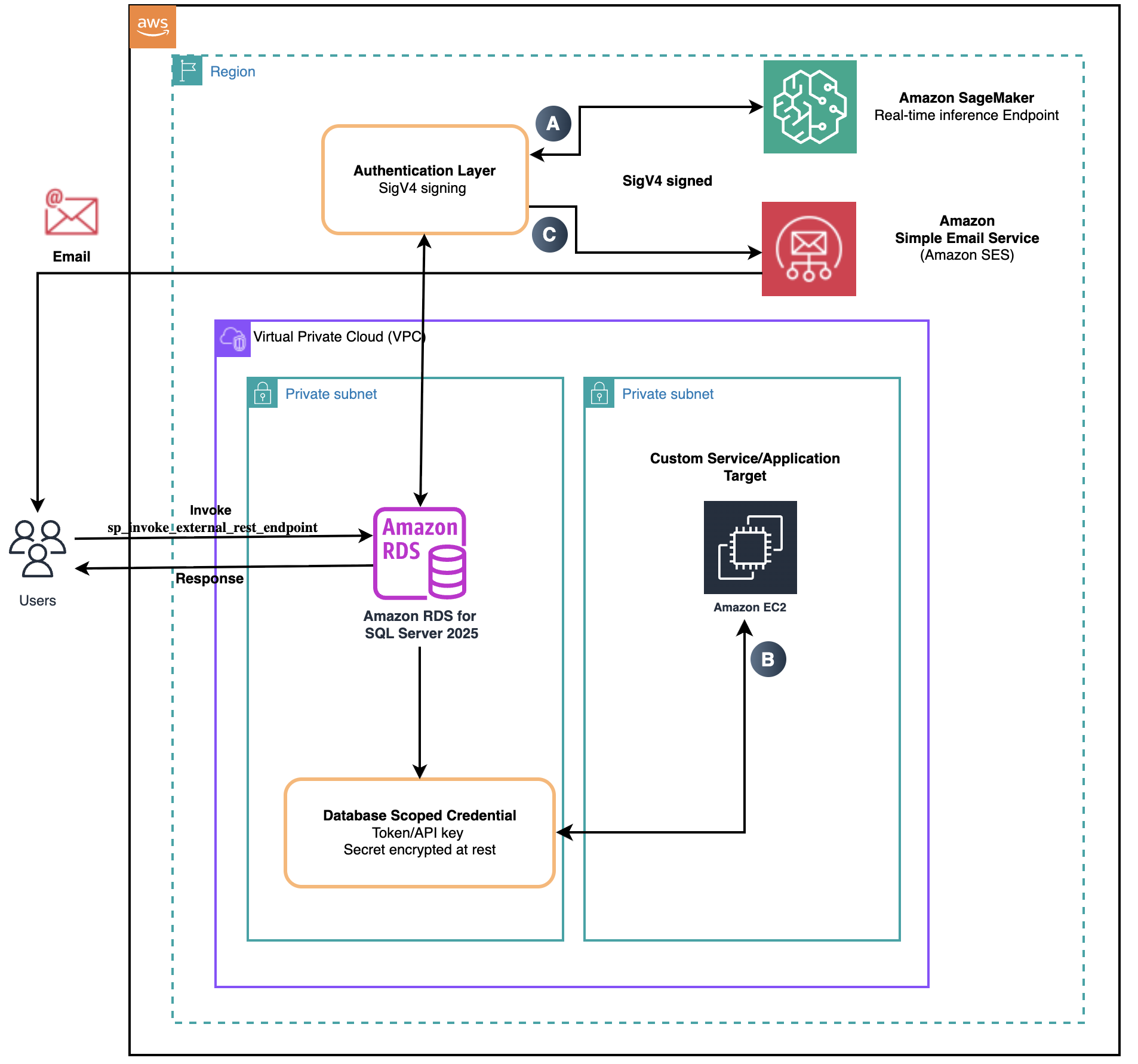
Figure 1 — Request flow from Amazon RDS for SQL Server 2025 through an authentication layer (for SigV4-signed AWS calls) or a database-scoped credential (for token-based targets) to the three example targets, with the response returning to the database
Prerequisites
Before you start, make sure you have the following:
- An AWS account with permission to deploy the resources you choose for the authentication layer, the EC2-hosted custom service, and any networking they require.
- Amazon RDS for SQL Server 2025 (Standard or Enterprise edition), engine version 17.0.4015.4 or later, with
sp_invoke_external_rest_endpointenabled as described in the next section. - Network connectivity from the RDS instance to each target’s HTTPS endpoint (HTTPS outbound on port 443).
- For the email example, an Amazon SES sender identity (an email address or domain) that you have verified.
- SQL Server Management Studio (SSMS) or any SQL client capable of connecting to RDS for SQL Server.
The SageMaker and SES examples use a sample T-SQL helper procedure, dbo.aws_call (not a built-in), that you create once. It accepts an AWS service name, an action, and a JSON parameter document, and calls sp_invoke_external_rest_endpoint to post that request to the authentication layer. The authentication layer is a customer-owned HTTPS endpoint. An example of an authentication layer is an Amazon API Gateway REST API with an AWS Lambda integration: Amazon API Gateway exposes a secure REST API endpoint over HTTPS with a trusted TLS certificate, which sp_invoke_external_rest_endpoint requires, and forwards the request from dbo.aws_call to the Lambda function. The Lambda function signs the outbound AWS API call with SigV4 using the temporary credentials of its AWS Identity and Access Management (IAM) role (which has only the specific action each example needs), invokes the AWS service, and returns the response through the authentication layer to the database. The EC2 example calls the endpoint directly with a DATABASE SCOPED CREDENTIAL and needs neither the wrapper nor the authentication layer.
Enable sp_invoke_external_rest_endpoint on Amazon RDS
The sp_invoke_external_rest_endpoint procedure is disabled by default on Amazon RDS for SQL Server. You enable it with a custom DB parameter group in three steps: create a new parameter group, set the external rest endpoint enabled parameter to 1, and attach the parameter group to your DB instance.
After the parameter group reaches the in-sync state on the DB instance, verify the configuration from T-SQL by reading sys.configurations. The value_in_use column should be 1.
A. Real-time inference on a custom-trained model with Amazon SageMaker
This example scores new customer records against a custom churn model in real time.
Customer scenario
A wireless service provider stores customer interactions in the dbo.customer_activity table. The business wants to identify customers who might be at risk of leaving the service (churn) as soon as new activity is recorded, so retention teams can act immediately. To support this, the company uses a custom-trained XGBoost ML model deployed to an Amazon SageMaker real-time inference endpoint named churn-xgb-prod. The same pattern applies to other model frameworks.
Solution overview
When a new record is inserted into the dbo.customer_activity table, a trigger uses sp_invoke_external_rest_endpoint to invoke the SageMaker endpoint with the customer attributes that the model requires. The endpoint returns a churn probability score between 0 and 1, which is written back to the same row, making it immediately available to downstream applications, reporting, and retention workflows.
As described earlier, the call passes through the authentication layer, which signs the request to SageMaker with an IAM role. The scoring call runs synchronously inside the triggering transaction, so you can capture and log an HTTP error that the endpoint returns in the TRY...CATCH block. Note that a transport-level failure, such as a timeout or an unreachable endpoint, raises an error that rolls back the insert. If the row must persist regardless of the scoring call, invoke the helper from the application or a scheduled job instead of from the trigger.
Implementation details
Configure the authentication layer described in the Solution overview to permit sagemaker-runtime.InvokeEndpoint, and grant its IAM role the sagemaker:InvokeEndpoint permission for the target endpoint ARN.
Create a helper stored procedure, dbo.score_customer_activity, that takes the customer features, scores them on the SageMaker endpoint, and returns the churn probability. It calls the sample dbo.aws_call wrapper, which builds the request and invokes sp_invoke_external_rest_endpoint through the authentication layer.
Create a trigger on dbo.customer_activity that calls the helper on insert and updates the new row with the returned score.
To build the example end to end:
- Deploy the model to a SageMaker real-time endpoint (
churn-xgb-prod). - Deploy the authentication layer and grant its IAM role
sagemaker:InvokeEndpoint. - Create the
dbo.aws_callwrapper and thedbo.score_customer_activityhelper. - Create the
AFTER INSERTtrigger ondbo.customer_activity. - Insert a row and confirm the
churn_scorecolumn is populated.
Expected outcome
Insert a customer activity row, which fires the trigger and scores it:
The churn_score column is populated automatically with the model’s prediction. For example, a score of 0.0837 indicates an estimated 8.37 percent probability that the customer will churn, available immediately for retention workflows.
| customer_id | state | acc_length | churn_score |
| 4001234567 | CA | 128 | 0.0837 |
Considerations
Amazon SageMaker real-time endpoints suit low-latency, per-record inference such as churn prediction. Requests support payloads up to 6 MB and processing times up to 60 seconds, within the 230-second sp_invoke_external_rest_endpoint timeout. For large-scale reprocessing, SageMaker batch transform is more efficient than per-record real-time calls. Cost is driven mainly by the endpoint instance type and how long it stays provisioned, so right-sizing is the primary lever.
Earlier SQL Server versions
If you’re running an earlier version of SQL Server on Amazon RDS, you can implement a similar churn-scoring workflow with Better Together: Amazon SageMaker Canvas and RDS for SQL Server, which uses SageMaker Canvas, Amazon Simple Storage Service (Amazon S3), and a scheduled batch export to train a model and write predictions back.
B. Calling a custom web service hosted on Amazon EC2
This example calls a private credit-scoring service that runs entirely inside your VPC.
Customer scenario
A financial services team owns a Python web service that performs proprietary credit scoring. The service runs on Amazon EC2 inside a private VPC and exposes a REST API. The application teams want stored procedures and triggers on Amazon RDS for SQL Server to call this service inline during their workflows, and they require that no traffic leave the VPC.
Solution overview
The sp_invoke_external_rest_endpoint procedure requires HTTPS with a publicly trusted TLS certificate, but the Python service on EC2 typically exposes plain HTTP inside the VPC. To connect the two without using the internet, the team places an Amazon API Gateway private endpoint in front of the service. The database calls a private DNS name that presents an AWS-managed certificate, reachable only through an interface VPC endpoint in the database’s VPC, and an AWS Lambda function in the same VPC forwards each request to the EC2 service over HTTP. All traffic stays inside the VPC.
The web service requires an x-api-key header for application-level authentication. The key is stored in a DATABASE SCOPED CREDENTIAL named for the private API Gateway URL and referenced with @credential, so SQL Server injects it as a request header at call time. The key is encrypted at rest and never appears in query text, the plan cache, or trace logs.
Implementation details
Create the interface VPC endpoint for execute-api, deploy a private API Gateway, deploy a Lambda function in the same VPC that forwards requests to the EC2 instance, and configure the EC2 security group to accept inbound traffic only from the Lambda security group.
Create a database master key (one time per database) and the database-scoped credential that holds the API key. The credential name is the endpoint URL:
Create a helper stored procedure, dbo.compute_credit_score, that calls sp_invoke_external_rest_endpoint with @credential and parses the score and rating from the response. SQL Server injects the x-api-key header automatically at call time, so the key value never appears in the procedure text or plan cache.
Call the helper from a stored procedure that orchestrates the loan-application workflow and writes the results back to dbo.loan_applications.
Expected outcome
Run the workflow procedure for an application, then read the row:
The loan_applications row carries the score and rating from the in-VPC Python service. For example, an application is scored 742 with a rating of Good and an HTTP status of 200.
| application_id | customer_id | credit_score | credit_rating | scoring_http_status |
| 7000125 | 4001234567 | 742 | Good | 200 |
Considerations
A private API Gateway requires an interface VPC endpoint and a resource policy that allows it. If you prefer not to use API Gateway, an Application Load Balancer with an AWS Certificate Manager (ACM) certificate also meets the trusted-TLS requirement, with the helper and credential name pointing to the load balancer DNS name.
Application-level authentication (an API key, mutual TLS, or short-lived tokens) is still required even with private networking, and you can rotate the key with ALTER DATABASE SCOPED CREDENTIAL without changing procedure code.
Earlier SQL Server versions
If you’re running an earlier version of SQL Server on Amazon RDS, you can implement a similar pattern with Trigger AWS Lambda functions from Amazon RDS for SQL Server database events, which uses Amazon CloudWatch Logs, a metric filter and alarm, and an AWS Lambda function to forward database-derived events to a downstream service.
C. Sending email from the database with Amazon Simple Email Service
This example sends a transactional email the moment a critical event is recorded.
Customer scenario
An operations team wants an email notification sent the moment a critical event is recorded in the database, such as a failed payment batch or a flagged high-value transaction, without building and operating a separate notification or mail subsystem. They want the email to go out as part of the same database operation that records the event.
Solution overview
When a new record is inserted into the dbo.critical_alerts table, a trigger uses sp_invoke_external_rest_endpoint to call the Amazon SES SendEmail action with the alert subject and body, and writes the returned message ID back to the same row.
As in the SageMaker example, this call passes through the same authentication layer for SigV4 signing. The call runs synchronously inside the triggering transaction, so you can capture and log an error that Amazon SES returns in the TRY...CATCH block. As in the SageMaker example, a transport-level failure raises an error that rolls back the insert. If the row must persist regardless of the email, invoke the helper from the application or a scheduled job instead of from the trigger.
Implementation details
Configure the authentication layer to permit the ses.SendEmail operation, and grant its IAM role the ses:SendEmail permission. Verify the sender identity (an email address or domain) in Amazon SES so that it can be used as the Source address.
Create a helper stored procedure, dbo.send_alert_email, that builds the Amazon SES request and invokes sp_invoke_external_rest_endpoint through the authentication layer.
Create a trigger on dbo.critical_alerts that calls the helper on insert and writes the returned message ID back to the row.
To build the example end to end:
- Verify the sender identity in Amazon SES.
- Configure the authentication layer to permit
ses.SendEmailand grant its IAM roleses:SendEmail. - Create the
dbo.aws_callwrapper and thedbo.send_alert_emailhelper. - Create the
AFTER INSERTtrigger ondbo.critical_alerts. - Insert a row and confirm the email is sent and the
message_idcolumn is populated.
Expected outcome
Insert a critical alert, which fires the trigger and sends the email:
The trigger calls Amazon SES, which sends the email and returns a message ID. The row records the returned message_id.
| alert_id | subject | message_id |
| 90001 | Critical: failed payment batch 4471 | 0101019f1a224938-a468d9cf-ec48-4830-8cc5-87f98d6a840c-000000 |
Considerations
Choose the Amazon SES API approach when you want a single, IAM-governed pattern for every external call the database makes, with no separate mail subsystem to configure or secure. SQL Server Database Mail remains a good fit when you need its native email features, such as built-in attachments or asynchronous queuing that does not hold the triggering transaction.
Amazon SES returns a MessageId when it accepts the email for delivery. Verify the sender identity (an email address or domain) before sending. Amazon SES applies a per-account sending quota and a maximum send rate, so for high insert volumes send the email from a scheduled job or queue rather than inline in a trigger. Configure bounce and complaint handling (for example, with an Amazon SES configuration set that publishes to Amazon Simple Notification Service (Amazon SNS)) to protect your sender reputation.
Earlier SQL Server versions
If you’re running an earlier version of SQL Server on Amazon RDS, you can send email using Database Mail, which Amazon RDS for SQL Server supports through the msdb.dbo.sp_send_dbmail stored procedure.
Clean up
To avoid ongoing charges:
- Delete the SageMaker endpoint and endpoint configuration when not in use.
- Delete any AWS resources like the EC2 instance, the private API Gateway, Lambda function, and the VPC endpoint created for this example.
- Drop the helper procedures and database-scoped credentials with
DROP DATABASE SCOPED CREDENTIAL. - Delete the Amazon SES sender identity if you verified it only for this example.
Extend the pattern to other services
The two patterns in this post extend to any HTTPS endpoint your database can reach, so you can apply them well beyond these three examples. You can enrich or analyze rows with AWS artificial intelligence and machine learning (AI/ML) services such as Amazon Comprehend and Amazon Translate because they’re inserted, archive records to Amazon S3, publish events to Amazon SNS or Amazon EventBridge, or start an AWS Step Functions workflow, all from a stored procedure or trigger. The same approach reaches internal services and third-party APIs, so database events can drive the systems your workload already uses.
Conclusion
In this post, you learned how to invoke the sp_invoke_external_rest_endpoint stored procedure on Amazon RDS for SQL Server 2025 to call AWS services and external HTTPS endpoints directly from your database. The three worked examples in this post (Amazon SageMaker, a custom service on Amazon EC2, and Amazon SES) illustrate the mix-and-match pattern and the authentication options that make it possible.
We welcome your feedback. Leave your comments or questions in the comments section.