AWS Database Blog
Migrating to Amazon ElastiCache for Valkey: Best practices and a customer success story
Amazon ElastiCache for Valkey is a fully managed, high-performance, and cost-effective in-memory caching solution that serves as a drop-in alternative to Redis OSS. As an open source fork of Redis OSS 7.2.4, Valkey is maintained under the permissive BSD 3-clause license, addressing concerns arising from Redis OSS’s transition from BSD-3-Clause to a dual-license model (RSALv2 and SSPLv1) in March 2024, which prompted the creation of Valkey as an open-source fork.
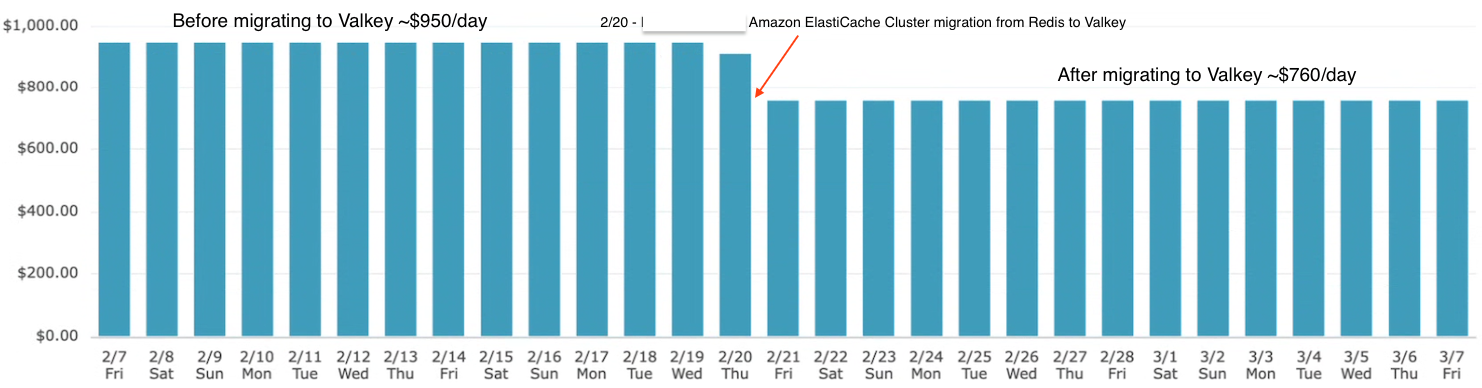
In this post, we provide a guide to migrating from Redis OSS to ElastiCache for Valkey, incorporating different migration strategies and AWS best practices. Additionally, we highlight a customer’s successful migration to Valkey, which maintained their robust performance standards while achieving a 20% reduction in ElastiCache cluster costs.
Understanding ElastiCache and Valkey
ElastiCache is a fully managed in-memory caching service designed to deliver sub-millisecond latency by storing frequently accessed data in memory. It supports multiple engines (Valkey, Memcached, and Redis OSS) and automates tasks such as cluster setup, scaling, patching, and backups, so developers can concentrate on application logic while AWS manages the infrastructure. With the ElastiCache Serverless option, you can automatically scale capacity up or down based on workload demands without managing clusters, making it straightforward to optimize cost and performance.
Valkey is an open source, high-performance key/value datastore stewarded by the Linux Foundation and backed by over 50 companies, including AWS, Google, and Oracle. As a fork of Redis OSS 7.2.4, Valkey is a drop-in replacement and supports a rich set of data types—strings, numbers, hashes, lists, sets, sorted sets, bitmaps, and hyperloglogs—and offers expressive commands for in-place data operations. It also provides Lua scripting and module plugins for extending functionality with custom commands and data types. ElastiCache for Valkey integrates this engine into the AWS ecosystem, supporting compatibility with existing Redis OSS-based applications while introducing performance and cost optimizations.
Valkey is ideal for session caching and session stores for high-traffic applications, real-time analytics and streaming enrichment, message queuing in distributed systems, gaming leaderboards for real-time scores, low-latency machine learning (ML) feature stores, and user profile storage. The high performance and rich feature set of ElastiCache for Valkey make it a natural choice for organizations seeking to modernize their caching across a wide range of use cases.
Benefits of migrating to ElastiCache for Valkey
For our customer, the decision to migrate from ElastiCache for Redis OSS to Valkey was driven by both licensing and business requirements. The customer wanted to move away from licenses that introduced restrictions, preferring instead the flexibility of the permissive BSD 3-clause license. This provided the freedom to continue scaling deployments without legal or contractual constraints.
The customer also needed to meet strict business requirements: reducing operational costs, improving performance consistency, and providing a zero-downtime migration path for applications that power millions of daily bookings. Valkey’s API compatibility with Redis OSS 7.2 made it possible for the customer to adopt it as a drop-in replacement without application code changes. At the same time, enhanced multi-threading and asynchronous I/O gave the customer confidence in handling high-concurrency workloads at scale, and memory-efficient data structures reduced resource consumption and helped lower costs. With ElastiCache for Valkey, the customer was able to achieve 20% savings in node-based configurations and gain the ability to scale seamlessly, supported by the AWS managed infrastructure and automation. This combination gave the customer a cost-efficient, resilient caching layer that aligned directly with its operational and business goals.
Customer migration success story
A global leader in the travel technology industry migrated their Redis OSS clusters to ElastiCache for Valkey. The migration was driven by the need to remain open source, reduce costs, enhance performance, and maintain a robust, scalable caching layer for high-traffic applications.
The customer executed the migration with minimal disruption. Instead of a snapshot-based approach that didn’t include the latest cluster data, the customer chose the in-place upgrade process provided by ElastiCache. This made it possible to preserve live in-memory data, avoid downtime risks, and streamline cutover operations compared to snapshot restores. Following the migration, the customer closely monitored Valkey logs in Amazon CloudWatch alongside application logs in its Splunk instance. This provided comprehensive visibility across both infrastructure and application layers, supporting performance validation, latency tracking, and end-to-end application stability.
The migration completed without downtime, with only a short period of slightly elevated latencies observed in some applications. Although not required, the customer had also taken backups in advance to enable rapid restoration if needed. With this approach, the customer achieved a 20% reduction in operational costs while maintaining or improving performance metrics, including sub-millisecond latency for session caching and real-time data processing. Importantly, the migration required no application code changes, thanks to Valkey’s API compatibility with Redis OSS.
The customer’s adoption of AWS managed services, including ElastiCache for Valkey, also enabled faster innovation cycles. Development teams were able to use blue/green deployment strategies, reducing rollback costs to zero and making it straightforward to deliver new capabilities without fear of downtime. This combination of Valkey’s performance and the operational excellence of AWS helped the customer strengthen the resilience and scalability of its customer-facing applications.
A key area where the customer uses ElastiCache for Valkey is in its ML platform feature stores. Feature stores are essential for ML operations because they provide a consistent way to manage, version, and serve features across use cases. The customer operates both offline and online feature stores: offline stores, built on Amazon Simple Storage Service (Amazon S3) and other batch systems, support model training and batch inference at scale, whereas online feature stores, backed by ElastiCache for Valkey, deliver ultra-low latency access to features needed for real-time inference. By serving features within single-digit millisecond response times, Valkey makes sure the customer’s ML models can power personalized recommendations, pricing optimizations, and fraud detection in real time.
Through this migration, the customer demonstrated how enterprises can move to Valkey with minimal disruption, unlock cost savings, and build a foundation that supports real-time applications and advanced ML use cases at global scale.
The following graph shows the cost of running ElastiCache clusters before and after migrating to Valkey, showing 20% daily savings.
Memory Efficiency Improvements in Valkey 8
Valkey 8 introduced a set of architectural changes that significantly reduce per-key memory overhead, with further enhancements in 8.1 that continue to improve efficiency and scalability. Together, these improvements make a meaningful difference for high-density caching workloads.
In Valkey 8.0, the introduction of the dictionary-per-slot design and key embedding reduces metadata overhead at the hash slot level. Instead of maintaining separate dictionaries for each key, Valkey groups keys more efficiently within each slot, cutting per-key overhead by roughly a few dozen bytes. In large datasets, this translates into substantial savings—especially in clusters with millions of keys.
Valkey 8.1 builds on this foundation with additional internal optimizations that further streamline memory layout and allocator efficiency. While the improvements are more incremental than 8.0’s structural changes, they compound the overall benefit, particularly in real-world production workloads with mixed data types and access patterns.
For customers migrating from Redis OSS or older versions, these improvements can result in up to 40% memory savings, depending on dataset characteristics and cluster configuration. To put that into perspective: A workload with 100 million keys, each averaging 1 KB in size, might require roughly 100 GB of memory on Redis. With Valkey 8.x optimizations, that same dataset could fit in 60–80 GB, saving 20–40 GB of memory. At larger scales—such as billions of keys—this can translate into hundreds of gigabytes, or even terabytes, of memory savings.
Beyond raw memory savings, these changes also improve cache efficiency and operational performance. Reduced metadata overhead leads to better CPU cache locality, lower memory fragmentation, and more predictable performance under load. In cluster mode, the simplified data structures also contribute to improved stability and faster operations at scale. In practice, this means customers can scale more efficiently, reduce infrastructure costs, and maintain higher performance—all without changing application code when migrating to Valkey.
Migration strategies
ElastiCache for Valkey supports three primary migration strategies: in-place upgrade, snapshot-based migration, and online migration. Each method caters to different workload requirements and operational constraints, providing flexibility for organizations. In this section, we provide the detailed steps for each strategy.
In-place upgrade
The in-place upgrade is the simplest and fastest method for migrating from ElastiCache for Redis OSS to Valkey, offering zero downtime for most configurations. Our customer used this approach to transition its clusters seamlessly. The process includes the following steps:
- Identify the parameter group related to Redis OSS cluster you want to upgrade.
- Create a new parameter group with the same values as Redis OSS but using the Valkey family. We do not recommend using the default parameter group for all clusters.
- Navigate to the ElastiCache console and select the Redis OSS cache cluster.
- Choose Modify from the Actions menu.
- In the Modify ElastiCache section, under Cluster settings, select Valkey as the engine option and the newly created parameter group.
- Confirm the engine change by selecting Yes under Apply Immediately, then choose Modify.
- Follow the same procedure for global clusters by creating separate parameter groups in each AWS Region.
- Monitor the cluster status, which will change to Modifying during the upgrade, typically completing within minutes for small to medium datasets.
- Verify that the cluster appears under Valkey caches on the ElastiCache console upon completion.
- Validate application connectivity using the existing endpoint, confirming no code changes are needed.
For clusters running ElastiCache for Redis OSS versions prior to 5.0.6, expect a brief 30–60 second downtime due to DNS updates during failover, consistent with standard patching scenarios. The customer mitigated this by making sure clusters were on compatible versions, minimizing disruption. Post-upgrade, monitor performance using CloudWatch metrics like CacheHits, CacheMisses, and CPUUtilization.
Snapshot-based migration
Snapshot-based migration involves creating a backup of the Redis OSS cluster and restoring it to a new ElastiCache for Valkey cluster. This method is suitable for smaller datasets or non-critical workloads where brief downtime is acceptable. The process consists of the following steps:
- Create a snapshot of the source Redis OSS cluster using either the ElastiCache console or AWS Command Line Interface (AWS CLI)
- Create a new ElastiCache for Valkey cluster, specifying the desired node type and configuration (for example, cluster-mode enabled or disabled).
- During cluster creation, select the snapshot to restore using the ElastiCache console or AWS CLI
- Wait for the cluster to become available and the snapshot restoration to complete.
- Update the application configuration to point to the new Valkey cluster endpoint.
- Validate application functionality by simulating production workloads.
- Monitor performance metrics using CloudWatch to confirm expected behavior.
Downtime occurs during snapshot creation and restoration, ranging from minutes for small datasets (such as 1 GB) to hours for larger ones (such as 100 GB).
Online migration from Amazon EC2 hosted Redis OSS to ElastiCache for Valkey
For organizations running self-managed Redis OSS on Amazon Elastic Compute Cloud (Amazon EC2), online migration enables data replication to an ElastiCache for Valkey cluster with minimal downtime. The process consists of the following steps:
- Validate compatibility between the source (Amazon EC2 hosted Redis) and Redis OSS target (Valkey) clusters, verifying matching shard counts and disabling encryption in-transit if enabled.
- Initiate replication using the StartMigration API or AWS CLI
- Monitor replication progress using valkey-cli INFO or CloudWatch metrics like ReplicationLag and ReplicationBytes.
- When replication is complete (ReplicationLag reaches zero), use the CompleteMigration API to promote the Valkey cluster as the primary
- Update the application to point to the new Valkey cluster endpoint.
- Validate application behavior by testing production workloads.
- Monitor performance using CloudWatch to support stability.
Online migration supports both cluster-mode enabled and disabled configurations but is not available for serverless setups or r6gd node types. The customer used this method for specific workloads, providing continuous reads and writes during replication. If issues arise, the source cluster remains primary until CompleteMigration is called, allowing rollback by canceling the migration.
Key considerations and best practices
Successful migrations require more than a change in engine. Planning, validation, and optimization help reduce risk and ensure a smooth transition. This section describes the key considerations and best practices for migrating from Redis OSS to ElastiCache for Valkey. We also highlight lessons learned from this customer’s migration to illustrate how these practices can be applied in real-world scenarios.
Compatibility and differences
Valkey’s API compatibility with Redis OSS 7.2 makes sure most applications require no code changes. The customer uses Jedis, Lettuce, and Spring Data Redis as client libraries, all of which are fully supported by Valkey. Its enhanced I/O threading and multi-core utilization improve performance for high-concurrency workloads, while existing commands remain consistent (with minor differences such as renamed commands like FLUSHALL). The customer performed thorough pre-migration testing and reported no issues during validation across its diverse workloads.
Pre-migration preparation
Make sure the target Valkey cluster has sufficient memory, accounting for Valkey 8.0’s 16-byte-per-key savings. If the source cluster uses encryption in-transit, disable it temporarily during replication. Take a snapshot of the source cluster as a backup, as the customer did to enable rollback if needed. Verify that the source cluster meets prerequisites, such as Redis OSS 5.0.6 or higher, no AUTH enabled, and matching database counts.
Post-migration validation
Test application functionality by simulating production workloads against the new Valkey endpoint. Monitor CloudWatch metrics like CacheHits, CacheMisses, CPUUtilization, and MemoryUsage. This customer used these metrics to confirm sub-millisecond latency post-migration. If using third-party tools, make sure they support Valkey’s metrics format.
Cost optimization
Use serverless configurations for dynamic scaling or reserved instances for predictable workloads to optimize costs. Valkey’s serverless option, with 100 MB minimum storage (90% lower than Redis OSS’s 1 GB), is ideal for variable traffic. Reserved nodes retain existing discounts when switching to Valkey, further reducing costs.
Migration duration and downtime
In-place upgrades for small datasets complete in minutes with no downtime, except for pre-5.0.6 clusters, which might experience 30–60 seconds of downtime during DNS propagation. Snapshot-based migrations incur downtime proportional to dataset size, whereas online migrations minimize downtime by allowing continuous operations during replication. The customer’s in-place upgrades were completed with minimal disruption, aligning with its goal of seamless, uninterrupted deployments.
Rollback options
For in-place upgrades, ElastiCache supports rolling back a Valkey 7.2 cache to Redis OSS 7.1. Rollbacks use the same process as an upgrade but use Redis OSS 7.1 as the target version. The endpoint and other aspects of the application will not be changed by the rollback, and you will experience no downtime. For online migrations, the source cluster remains primary until complete migration, allowing rollback by canceling the migration. Snapshot-based migrations revert using the backup snapshot. This customer maintains snapshots as a safety net ensuring data integrity. Note: Rollback is currently supported only from Valkey 7.2 to Redis OSS 7.1. Rollback from Valkey 8.0 is not supported via the in-place downgrade path.
Other considerations
Customers often inquire about migration duration, downtime, and data integrity. In-place upgrades, as used by the customer, are typically seamless, with potentially 30–60 seconds of downtime for older versions. Snapshot-based migrations require planned downtime, whereas online migrations offer near-zero downtime. AWS supports data preservation during in-place and online migrations, with no loss of keys, values, or TTLs. The customer validated data integrity post-migration, confirming no application code changes were needed due to Valkey’s compatibility.
Conclusion
Migrating to ElastiCache for Valkey offers significant benefits: freedom from licensing restrictions, up to threefold performance improvements, up to 40% memory savings, up to 33% lower price, and simplified operations through the AWS managed infrastructure. The customer’s successful migration demonstrates the power of Valkey’s cost-efficiency and performance enhancements, achieving a significant cost reduction while maintaining sub-millisecond latency for its global travel platforms. By following AWS best practices and choosing the appropriate migration strategy—in-place upgrade, snapshot-based, or online migration—organizations can achieve a seamless transition.
To get started, explore the Amazon ElastiCache User Guide and create your first serverless Valkey cache today.