AWS Database Blog
Natural language queries on Oracle Database 26ai: Getting started with Select AI on Amazon RDS for Oracle with Amazon Bedrock
We’re excited to announce the availability of Oracle Database 26ai on Amazon Relational Database Service (Amazon RDS) for Oracle. This is Oracle’s first AI-native database release on Amazon RDS, with generative AI, vector search, and machine learning built directly into the engine. Amazon RDS handles backups, patching, Multi-AZ high availability, and read replicas, so you can focus on building AI-powered applications rather than managing infrastructure.
In this post, we demonstrate one of the most impactful new capabilities: Select AI. With Select AI, you can query relational data using natural language prompts powered by foundation models (FMs) on Amazon Bedrock. Ask your database “Who are our top five customers by revenue this quarter?” and get back the correct SQL and its results without writing a single line of code. Under the hood, the Oracle DBMS_CLOUD_AI package constructs a prompt that includes your table schemas and sends it to the foundation model of your choice. It runs the generated SQL against your live data and returns the result, all within the same database session.
This architecture removes the operational burden of building AI infrastructure yourself. Amazon Bedrock is fully managed and serverless. There are no GPUs to provision, no models to host, and no inference endpoints to maintain. You access foundation models from providers such as Anthropic, Meta, and Amazon through a single API, and you can switch between them by changing one attribute in your DBMS_CLOUD_AI profile. Security follows the Amazon RDS model you already rely on. Select AI requests travel over virtual private cloud (VPC) interface endpoints, so your data stays within your VPC and does not traverse the public internet. Because DBMS_CLOUD_AI is native PL/SQL, you build generative AI features with the SQL skills you already have. There is no separate AI stack to learn or maintain.
This is Part 1 of a three-part series exploring the AI capabilities of Oracle Database 26ai on Amazon RDS. Here, we walk through Select AI end to end, from configuring Amazon Bedrock credentials to running natural language queries. Part 2 covers Retrieval Augmented Generation (RAG) with Oracle AI Vector Search. Part 3 focuses on GraphRAG with SQL property graphs, combining graph traversal, vector search, and relational filtering in a single SQL query.
AI capabilities in Oracle Database 26ai on Amazon RDS
Oracle Database 26ai on Amazon RDS with Amazon Bedrock unlocks the following capabilities:
| Capability | What it does | Example use cases |
| Select AI (NL2SQL) | Translates natural language prompts into SQL, executes the query, and returns results within a single SQL session | Business analysts query revenue data without writing SQL. Executives get instant answers from dashboards |
| DBMS_CLOUD_AI.GENERATE | Invokes foundation models from PL/SQL for chat, summarization, translation, and synthetic data generation | Summarize support tickets stored in CLOB columns. Generate realistic test data for dev/QA environments. Translate product descriptions |
| Oracle AI Vector Search | Stores, indexes, and searches vector embeddings alongside relational data using standard SQL | Semantic search over product catalogs. Find similar customer profiles. Power recommendation engines |
| Retrieval Augmented Generation (RAG) | Combines vector search with large language model (LLM) generation to ground AI answers in your actual business data | AI assistants that answer questions using your company’s internal documents and database records |
| In-database ONNX inference | Runs ML models inside Oracle with no external API calls, including embeddings, classification, and regression | Generate embeddings at insert time. Classify transactions as fraudulent in real time. Score leads without roundtrips |
| Select AI with Property Graphs | Queries graph relationships using natural language prompts over SQL Property Graphs | “Show me the shortest supply chain path between Supplier X and Customer Y” |
Solution overview
After you complete this walkthrough, you can do the following:
- Create AWS Identity and Access Management (IAM) credentials and store them inside Oracle using
DBMS_CLOUD.CREATE_CREDENTIAL. - Configure a VPC interface endpoint so your private Amazon RDS instance can reach Amazon Bedrock without traversing the internet.
- Create and manage
DBMS_CLOUD_AIprofiles that point to Amazon Bedrock foundation models, including Claude Sonnet and Amazon Nova. - Generate synthetic test data directly from the LLM into your Oracle tables.
- Run natural language queries against your own tables using the
SELECT AISQL syntax. - Use
DBMS_CLOUD_AI.GENERATE()for chat, SQL explanation, and summarization.
The following diagram illustrates the end-to-end architecture.
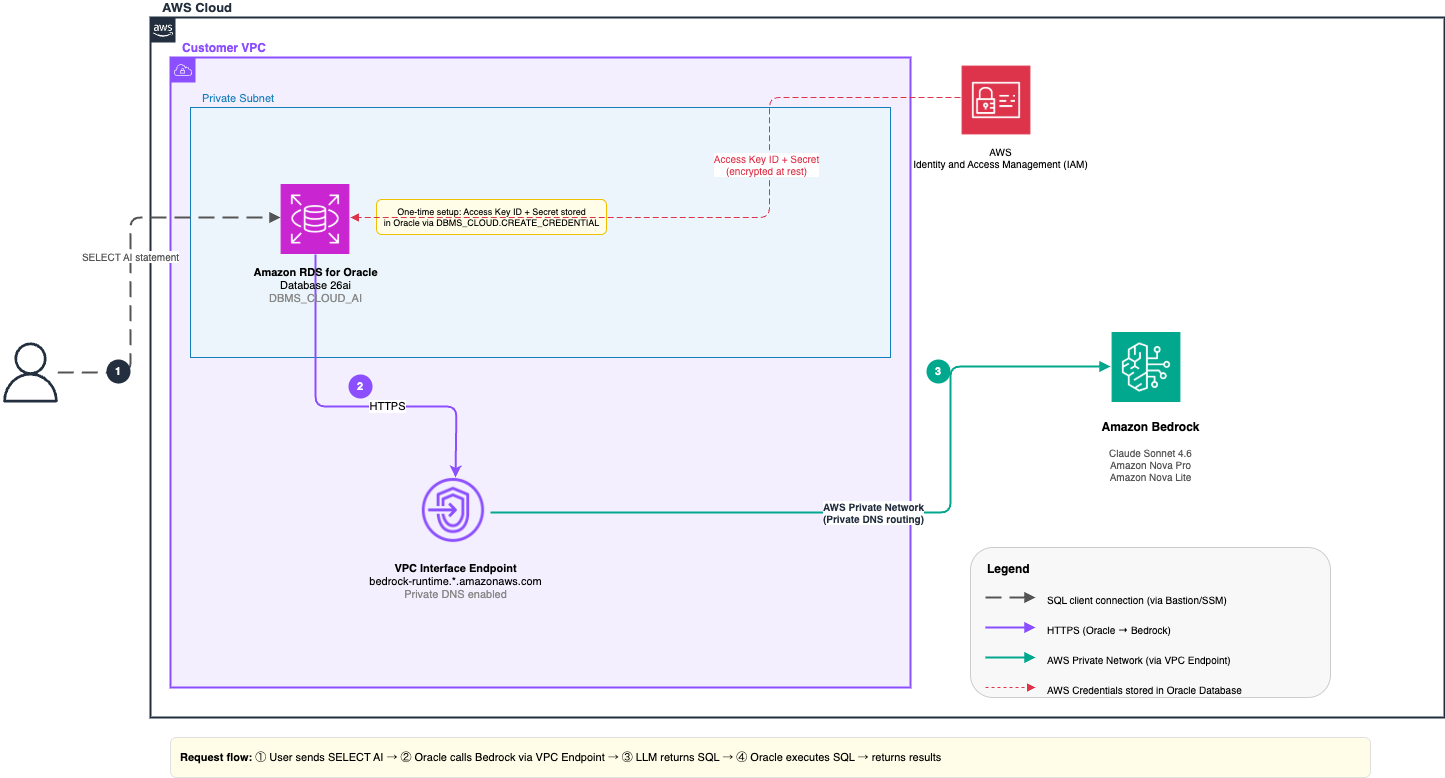
Figure 1: Select AI on Amazon RDS for Oracle 26ai with Amazon Bedrock
The key components are:
| Component | Role |
| Amazon RDS for Oracle Database 26ai | Includes DBMS_CLOUD_AI and executes Select AI queries |
| Amazon Bedrock | Provides managed access to foundation models (Claude, Nova) |
VPC interface endpoint (bedrock-runtime) |
Routes Amazon Bedrock API calls from the private Amazon RDS subnet without traversing the internet |
| IAM credentials | Access Key ID + Secret stored in Oracle through DBMS_CLOUD.CREATE_CREDENTIAL. Used by Oracle to sign every Amazon Bedrock call with SigV4 |
How it works: A user types a natural language question in their SQL client. Oracle intercepts the SELECT AI statement and builds a prompt containing the question and schema metadata of the target tables. It sends the request over HTTPS to Amazon Bedrock through the VPC interface endpoint, signed with the IAM user’s access keys. The LLM returns generated SQL, which Oracle runs against live data and returns the result set, all within the same SQL session.
Prerequisites
Before you begin, verify you have the following:
- An Amazon RDS for Oracle Database 26ai instance deployed in a private VPC subnet. In this post, we focus on a private Amazon RDS for Oracle instance because that is the common pattern and recommendation for database instances. You can also make the instance publicly available for testing purposes.
DBMS_CLOUDandDBMS_CLOUD_AIpackages installed (verify as described in Step 1).- An AWS account with permissions to create IAM users and VPC endpoints.
- Amazon Bedrock available in your target AWS Region. Amazon Bedrock makes most foundation models available by default. Verify in the Amazon Bedrock console under Model access if needed.
- SQL Developer, SQLcl, or another Oracle SQL client connected to your Amazon RDS instance through a bastion host or AWS Systems Manager Session Manager port forwarding.
- The VPC ID, subnet IDs, and security group ID associated with your Amazon RDS instance.
- A database user (for example, AIUSER) that has EXECUTE privileges on both
DBMS_CLOUDandDBMS_CLOUD_AI. Create one if needed before proceeding:
Step 1: Verify DBMS_CLOUD_AI is available
Before configuring anything, confirm that the required packages are installed. In Amazon RDS for Oracle 26ai, the DBMS_CLOUD and DBMS_CLOUD_AI packages are installed by default when you create the instance.
You should see four rows: DBMS_CLOUD and DBMS_CLOUD_AI, each with PACKAGE and PACKAGE BODY. If these packages are absent, verify that your Amazon RDS instance is running Oracle Database 26ai.
Step 2: Create a VPC interface endpoint for Amazon Bedrock runtime
The Amazon RDS for Oracle DB instance must be able to reach the Amazon Bedrock runtime endpoint (bedrock-runtime.<region>.amazonaws.com) on port 443 (HTTPS). To keep this traffic private within the AWS network and avoid the need for internet access, create a VPC interface endpoint for the Amazon Bedrock runtime service. This is the recommended approach because it keeps your Amazon RDS instances private. In this example, we use a VPC interface endpoint.
The other option is to use a NAT gateway. With a NAT gateway, the DB instance’s subnet must have a route to the internet through the NAT gateway. For details about configuring a NAT gateway, see Option 2 in the Amazon VPC network requirements section of the documentation.
Create the endpoint
- On the AWS Management Console, navigate to VPC, Endpoints, then Create endpoint.
- For Service category, choose AWS services.
- In the Service name search, enter
bedrock-runtimeand selectcom.amazonaws.<your-region>.bedrock-runtime. - For VPC, select the VPC where your Amazon RDS instance resides.
- For Subnets, select the same subnets used by your Amazon RDS DB subnet group.
- For Security groups, attach a security group that allows inbound TCP port 443 from the Amazon RDS instance’s security group.
- For Policy, choose Full access.
- Turn on Private DNS names. This is critical. It causes Oracle to resolve
bedrock-runtime.<region>.amazonaws.comto a private IP, routing traffic within the VPC. - Choose Create endpoint and wait for the state to show Available.
Step 3: Grant network ACL access for the Amazon Bedrock endpoint
Oracle enforces outbound network access through Access Control Lists (ACLs). Grant the AIUSER user permission to make outbound HTTP/HTTPS connections to bedrock-runtime.<your-region>.amazonaws.com:
Verify DNS resolution
After the endpoint is active, confirm Oracle resolves the Amazon Bedrock hostname to a private IP:
Sample output:
Step 4: Create AWS credentials and store them in Oracle Database
DBMS_CLOUD_AI authenticates to Amazon Bedrock using an IAM Access Key ID and Secret Access Key. To set this up, you create a dedicated IAM user with the minimum permissions required to invoke Amazon Bedrock foundation models, then generate a set of access keys for that user. After you have the credentials, you store them inside the Oracle database by calling DBMS_CLOUD.CREATE_CREDENTIAL. Oracle encrypts the keys at rest, and DBMS_CLOUD_AI uses them transparently to sign every outbound Amazon Bedrock API request.
Step 4a: Create an IAM user for Amazon Bedrock access
Create an IAM user or role with the following policy (or attach it to an existing identity).
To restrict access to specific models, replace the wildcard with specific model ARNs, for example:
Step 4b: Generate access keys
- Open the newly created user and go to the Security credentials tab.
- Under Access keys, choose Create access key.
- Select your use case, then choose Create access key.
- Copy or download the Access key ID and Secret access key.
Security note: These are long-term credentials. For production, consider rotating them periodically through the IAM console. The IAM user should have no console access (no password).
Step 4c: Store the IAM user’s access keys in Oracle
Amazon Bedrock model access: As of 2025, most Amazon Bedrock foundation models are available by default and do not require explicit enablement. You can verify or adjust model availability for your account and Region in the Amazon Bedrock console under Model access. The following models have been validated with
DBMS_CLOUD_AIon Amazon RDS for Oracle 26ai:
| Model Name | Model ID | Notes |
| Anthropic Claude Sonnet 4.6 | us.anthropic.claude-sonnet-4-6 |
Best NL2SQL accuracy — recommended |
| Anthropic Claude Haiku 4.5 | us.anthropic.claude-haiku-4-5-20251001-v1:0 |
Fastest / lowest cost |
| Amazon Nova Pro | us.amazon.nova-pro-v1:0 |
Capable AWS native model |
| Amazon Nova Lite | amazon.nova-lite-v1:0 |
Ultra-fast for simple queries |
Important: Cross-region inference prefixes: Model IDs for Anthropic Claude and Amazon Nova Pro require the
us.prefix, which routes the request through a cross-region inference profile for higher availability. Using the base model ID without this prefix returnsORA-20400: HTTP 400.
Use DBMS_CLOUD.CREATE_CREDENTIAL to store the access key and secret key from Step 4a inside the Oracle credential store. Oracle encrypts these credentials and makes them accessible only to the owning user.
Verify the credential was created successfully:
The username column shows the Access Key ID you provided. The secret key is stored encrypted and is not returned in queries.
Step 5: Create sample tables
To demonstrate Select AI, we use an ecommerce schema. If you have existing tables, skip to Step 6 and reference your own tables in the profile’s object_list.
Step 6: Create a DBMS_CLOUD_AI profile
A profile is the core configuration object for Select AI. It specifies the AI provider, the credential used for authentication, the Amazon Bedrock model to invoke, and the database tables whose schema is included in the prompt context.
By default, DBMS_CLOUD_AI connects to bedrock-runtime.us-east-1.amazonaws.com. To use an Amazon Bedrock runtime endpoint in a Region other than us-east-1, include the region and target_language attributes in the profile attributes JSON. Set region to the Region where your Amazon Bedrock runtime endpoint is located (for example, us-west-2). If you set region, you must also include target_language (or source_language). You must set both attributes together, even for actions that do not use translation, such as chat or runsql. The target_language value affects only the translate action. This pairing is required because of a known limitation of the Oracle DBMS_CLOUD_AI package. If you include only target_language without region, the profile continues to use bedrock-runtime.us-east-1.amazonaws.com. If your VPC interface endpoint is in a different Region, Oracle attempts to connect to a Region where no endpoint exists through the public internet, and every call times out with ORA-30699 unless your network configuration allows public access.
The following example creates a profile using Anthropic Claude Sonnet 4.6 through Amazon Bedrock cross-Region inference (CRIS):
The object_list tells Oracle which tables and views to include when constructing the schema context for the LLM. Oracle automatically reads column names, data types, and column comments from the data dictionary and incorporates them into the prompt. You do not need to describe your schema manually.
You can create multiple profiles pointing to different models and switch between them per session:
Activate a profile for your session and verify it:
Step 7: Generate synthetic data
After you configure the AI profile with Amazon Bedrock access, you can use DBMS_CLOUD_AI.GENERATE_SYNTHETIC_DATA to automatically populate your tables with realistic test data. This procedure uses the LLM (through the specified AI profile) to generate contextually appropriate records.
The object_list parameter accepts a JSON array that specifies the target tables and the number of records to generate for each.
Run the following PL/SQL block to generate synthetic data across the four tables:
This generates 50 customers, 250 products, 500 orders, and 1,000 order items. This gives you a realistic dataset for testing queries, reports, and application logic without manually crafting test data.
Under the hood, Oracle reads each target table’s DDL, constraints, and metadata, then prompts the LLM to produce realistic rows that honor data types and foreign keys. You can customize the generation with:
sample_rows: Send existing records as examples so generated data matches the style of your real data.user_prompt: Inject rules such as “UK postcodes only” or “movies released in 2009.”- Table statistics (enabled by default): Uses column high/low values and distinct-value lists to bound output.
- Column comments: Add hints to columns (for example, allowed Status values) that the LLM follows during generation.
- Unique constraints: Automatically discards duplicate rows from the LLM response.
Step 8: Run natural language queries with Select AI
With the profile set and data loaded, you can query your relational data in plain English using the SELECT AI SQL syntax. Oracle intercepts the statement, builds a prompt combining your question with the table schema metadata from object_list, calls the Amazon Bedrock model, and returns the result.
Preview the generated SQL before executing
Use showsql to inspect the SQL the LLM generates without running it. This is useful for validating accuracy and building confidence:
Sample output:
Execute and return results
Switch to runsql to run the generated SQL and return results:
Return results as a natural language narrative
The narrate action returns a plain-English summary of the query results suitable for business reports and dashboards:
Sample output for the first query:
Explain existing SQL in plain English
The explainsql action takes an existing SQL query and returns a plain-English explanation. This is useful for documentation and onboarding:
Sample output:
Step 9: Use DBMS_CLOUD_AI.GENERATE() for additional AI tasks
In addition to the SELECT AI syntax, DBMS_CLOUD_AI.GENERATE() provides direct access to the Amazon Bedrock model for tasks that do not require a database schema context, such as freeform chat, summarization, and SQL generation from a prompt.
Summarize text
Beyond summarizing inline text, you can point DBMS_CLOUD_AI.GENERATE directly at a document stored in an Amazon Simple Storage Service (Amazon S3) bucket. The following query retrieves a PDF from Amazon S3 and converts it to text using DBMS_VECTOR_CHAIN.UTL_TO_TEXT. It then passes the content to the LLM for summarization, all in a single SQL statement:
Under the hood, three functions chain together in a single SQL statement. DBMS_CLOUD.GET_OBJECT fetches the PDF document from your Amazon S3 bucket using the specified credential. DBMS_VECTOR_CHAIN.UTL_TO_TEXT converts the binary content into plain text that the LLM can process. DBMS_CLOUD_AI.GENERATE sends the extracted text to Amazon Bedrock through the AI profile and returns a summary. To allow your Amazon RDS for Oracle instance to reach Amazon S3, you need two additional prerequisites: a VPC gateway endpoint for Amazon S3 added to the route table associated with your Amazon RDS subnet (so traffic stays off the public internet), and an IAM policy attached to the user created in Step 4a that grants s3:GetObject and s3:ListBucket permissions on the target bucket.
Troubleshooting
The following table lists common errors you might encounter, along with the root cause and fix.
| Error | Root Cause | Fix |
ORA-30699: network connection failed: connection timed out |
No VPC endpoint for bedrock-runtime, or "region" is missing or wrong in the profile |
Create the bedrock-runtime VPC interface endpoint in the correct Region. Add "region": "<your-region>" to every profile |
| DNS resolves to a public IP | Private DNS names not enabled on the VPC endpoint | Edit the endpoint and enable Private DNS names |
ORA-20400: HTTP 400 |
Model ID is single-region / on-demand format (legacy) | Add the us. cross-region inference prefix to the model ID |
ORA-20404: HTTP 404 |
Model not available in this Region, or access not enabled | Verify model availability in your Region at Amazon Bedrock → Model access. Confirm the model ID is correct |
ORA-20400: HTTP 403 |
IAM user lacks bedrock:InvokeModel permission |
Verify the BedrockInvokeModelPolicy is attached to the IAM user |
ORA-20001: profile not found |
Profile not created or name is misspelled | Run SELECT profile_name FROM user_cloud_ai_profiles |
ORA-29024: Certificate validation failure |
Oracle wallet missing the Amazon Bedrock CA certificate | On Amazon RDS, the pre-installed wallet at file:/rdsdbdata/rds-metadata/dbms_cloud_wallet already includes the required CAs, so no action is needed |
Clean up
To remove the resources created in this walkthrough:
On the AWS Management Console, complete these steps:
- For IAM → Users, delete the IAM user created in Step 4a.
- For VPC → Endpoints, delete the
bedrock-runtimeVPC interface endpoint.
Conclusion
In this post, we walked through the end-to-end configuration of Select AI on Amazon RDS for Oracle Database 26ai with Amazon Bedrock as the AI provider. We covered creating AWS credentials in the IAM console, storing credentials in Oracle, setting up the VPC endpoint, and running natural language queries, all on a private Amazon RDS instance with no public internet access.
Select AI removes the SQL expertise barrier for data consumers while keeping AI logic inside the trusted Oracle environment. Business analysts can query production data directly from SQL Developer or an Oracle-connected tool using plain English. Database administrators retain full control over which tables they expose to the model, which foundation models are active, and which IAM credentials are used. All of this is managed through Oracle’s standard profile and credential system.
This is the first post in a three-part series on Oracle Database 26ai and Amazon Bedrock:
- Part 1 (this post): Natural language queries with Select AI and
DBMS_CLOUD_AIon Amazon RDS. - Part 2: Build a RAG pipeline with Oracle 26ai native vector search and Amazon Bedrock.
- Part 3: In-database GraphRAG with Oracle Database 26ai on Amazon RDS and Amazon Bedrock.