Resolving PostgreSQL replication lag with heartbeat tables in change data capture scenarios
In this post, you will learn how to resolve PostgreSQL replication lag using heartbeat tables during database migrations that rely on change data capture (CDC) to keep the source and target in sync until cutover. We will cover the root cause of replication slot stalls, how heartbeat tables prevent WAL accumulation, and how to implement them using AWS Database Migration Service (AWS DMS) or Debezium.
Replication lag during a CDC-based migration can be counterintuitive. Your source PostgreSQL database shows high activity, yet the migration’s replication falls behind. Left unchecked, this stalls the migration, exhausts disk on the source, and delays cutover. The culprit is typically a stalled replication slot, which occurs when your migration task tracks only a subset of tables while the database generates heavy writes elsewhere. PostgreSQL’s Write-Ahead Log (WAL) accumulates because the replication slot’s Log Sequence Number (LSN) does not advance, even as the cluster remains busy.
PostgreSQL manages WAL retention through replication slots. A replication slot tracks the LSN up to which a consumer (such as AWS DMS or Debezium) has confirmed receipt of changes. PostgreSQL retains WAL segments until each active replication slot has advanced past them. When a slot stalls, even temporarily, WAL files accumulate on disk, replication lag grows, and in some cases, disk space exhaustion can impact the source database and stall the migration.
Problem statement
Your CDC pipeline shows persistent, growing replication lag, yet the source database is clearly active. The issue occurs because a busy database doesn’t always mean busy tables within your replication scope.
This issue surfaces in several common scenarios:
Partial table replication: Your CDC task only captures a defined set of tables, while the source database generates heavy writes to others that are outside the replication scope.
Multiple CDC tasks: When replication is split across several tasks, some tasks may cover low-traffic tables while the bulk of write activity belongs to tables tracked by other tasks. Each task has its own replication slot, and the quieter slots can stall even while the cluster stays busy overall.
Multiple databases on the same cluster: PostgreSQL generates WAL at the cluster level, not per database. If your cluster hosts multiple databases and only some are being replicated, heavy write activity in the non-replicated databases still advances the cluster WAL, but the replication slot tied to the quieter database does not move.
In all of these cases, the result is the same. The CDC consumer reads the WAL stream but doesn’t find new records matching its replication scope frequently enough to advance the replication slot’s LSN. This causes WAL to accumulate on disk and replication lag to grow.
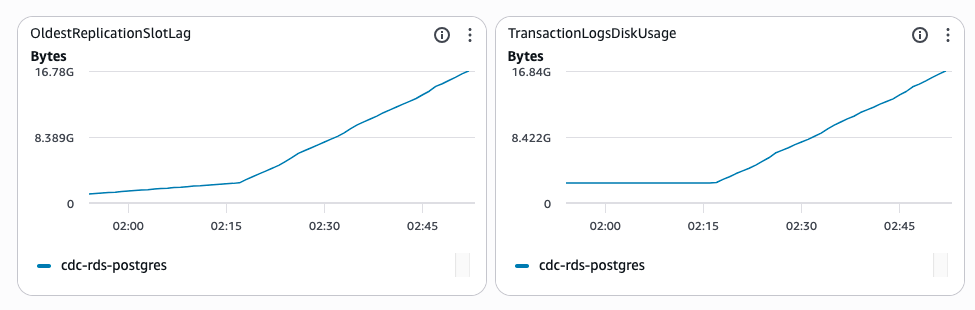
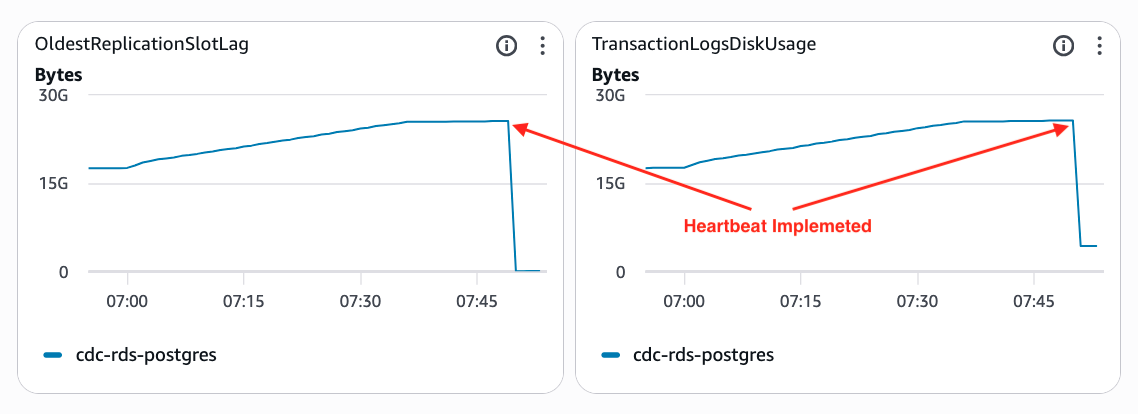
If you’re running on Amazon Relational Database Service (Amazon RDS) or Amazon Aurora PostgreSQL-Compatible Edition, two Amazon CloudWatch metrics are particularly useful for detecting this condition:
OldestReplicationSlotLag: Shows the amount of WAL data on the source that has not been consumed by the most lagging replication slot.
TransactionLogsDiskUsage: Shows how much storage is being used for WAL data. When a replication slot lags significantly, this value can increase substantially.
Figure 1: Amazon CloudWatch metrics climbing as a stalled replication slot retains WAL
An important nuance: both metrics are reported at the Amazon RDS instance level, not per replication slot. When multiple replication slots exist on the same instance, these metrics reflect the worst-case slot: the one that has fallen furthest behind. This means a single stalled slot, for example a quiet CDC task covering low-traffic tables, can drive up these metrics for the entire instance. This happens even if your other replication slots are healthy and current.
Understanding PostgreSQL replication slots and WAL
PostgreSQL’s logical replication is built on the WAL, a sequential log of every change made to the database. Each record in the WAL is identified by a Log Sequence Number (LSN): a monotonically increasing pointer that represents a position in the log.
A replication slot is a persistent object in PostgreSQL that:
Tracks the LSN up to which a downstream consumer has confirmed receipt.
Prevents PostgreSQL from removing WAL segments that the consumer hasn’t yet processed.
Survives database restarts, ensuring no changes are lost even if the consumer disconnects temporarily.
The critical behavior to understand is this: PostgreSQL retains WAL segments until each active replication slot has advanced its confirmed LSN past those segments. If a slot’s LSN doesn’t advance (because the consumer isn’t reading new records for its tracked tables), WAL files pile up.
In a scenario where the source database generates millions of changes per hour to non-replicated tables, the replication slot can remain effectively frozen while disk usage climbs steadily. If left unchecked, this can fill up storage and trigger a storage-full state where writes fail. It also stalls VACUUM from reclaiming dead tuples, causing table bloat. The next section shows how heartbeat tables prevent both by keeping the slot advancing.
Implementing heartbeat tables
A heartbeat table is a small, dedicated database table that exists solely to generate periodic, predictable WAL records that are included in the replication task’s table list. By regularly writing to this table (typically a timestamp update), you help verify that:
New WAL records are generated that the CDC consumer will read.
The consumer processes these records and advances the replication slot’s LSN.
PostgreSQL can safely discard older WAL segments, preventing disk accumulation.
Replication lag is kept within acceptable bounds.
Think of the heartbeat table as a keep-alive signal for your replication slot. Even when your application tables are quiet (or when non-replicated tables are generating the bulk of WAL activity), the heartbeat helps keep the slot moving forward.
AWS DMS: heartbeatEnable parameter
AWS DMS provides a built-in mechanism for heartbeat tables through the heartbeatEnable endpoint connection attribute. When turned on, DMS automatically creates and manages a heartbeat table in the source database and periodically updates it to keep the replication slot active.
Configuration steps:
Navigate to your AWS DMS source endpoint for Amazon Aurora PostgreSQL-Compatible Edition or Amazon RDS.
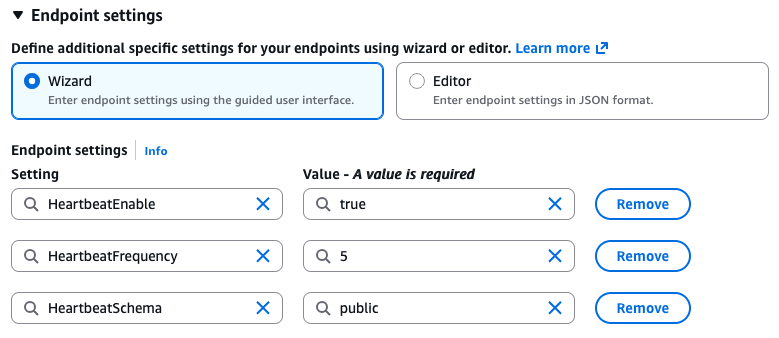
In the endpoint settings, add the following endpoint settings:
Parameter
Description
Recommended value
heartbeatEnable
Turns on the heartbeat feature (default false)
true
heartbeatSchema
Schema where the heartbeat table is created
public (or a dedicated schema)
heartbeatFrequency
Frequency of heartbeat updates in minutes
5 (adjust based on WAL growth rate)
AWS DMS endpoint settings with the heartbeat parameters configured
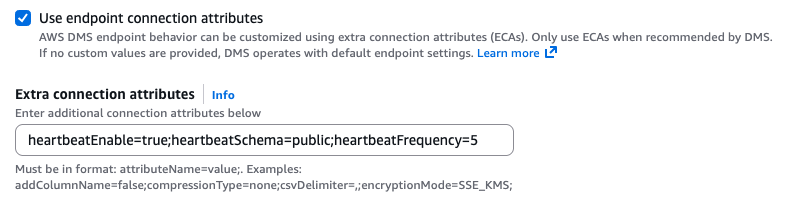
If you prefer to use Extra connection attributes instead of endpoint settings, use the following equivalent configuration:
Figure 2: Configuring heartbeat settings through AWS DMS extra connection attributes
Important considerations:
The DMS source endpoint user must have CREATE TABLE and INSERT/UPDATE privileges on the heartbeatSchema, so that DMS can create and update the heartbeat table.
Unlike the Debezium approach, the AWS DMS heartbeat works at the replication-slot level. DMS automatically creates and manages the heartbeat table in heartbeatSchema and uses it to advance restart_lsn. You don’t need to add the heartbeat table to the task’s table mapping (selection) rules for the feature to work.
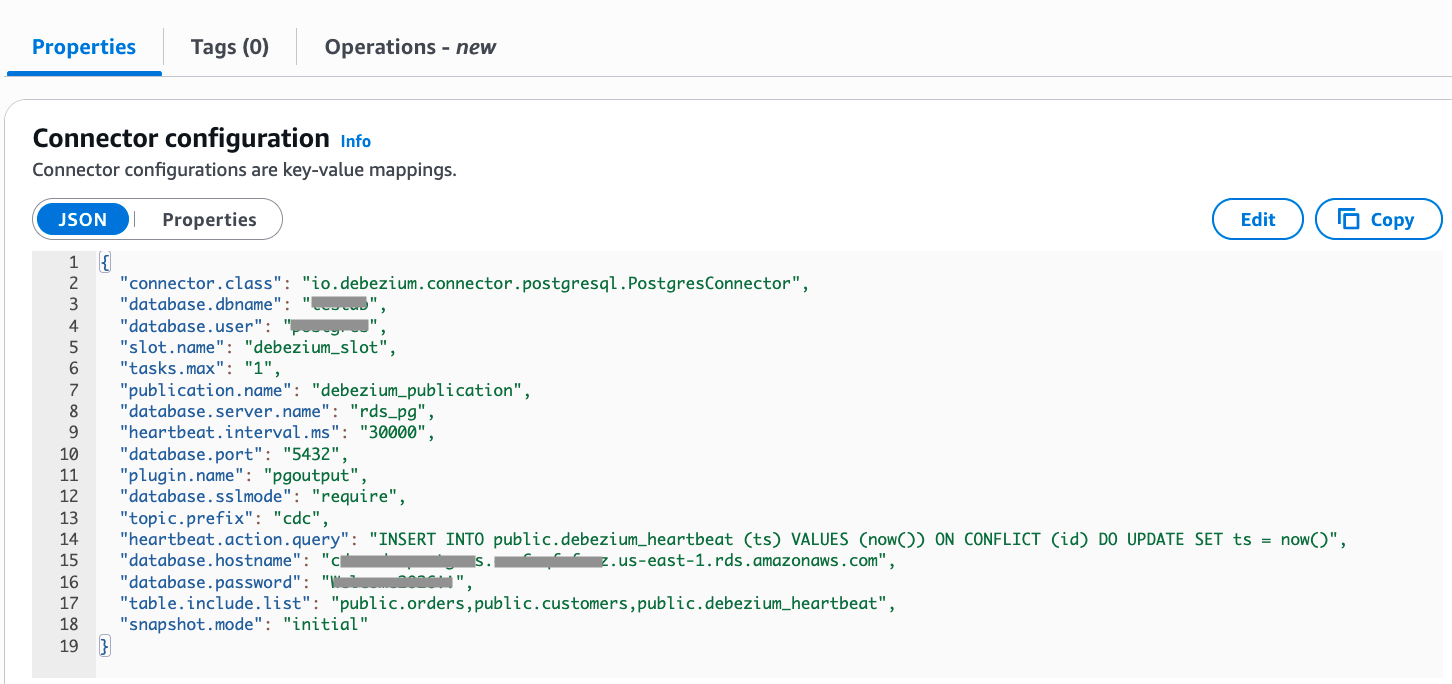
Debezium, an open source tool for CDC, addresses this problem through the heartbeat.interval.ms connector configuration property. When set, Debezium periodically emits a heartbeat event to a dedicated Kafka topic, which in turn causes the connector to advance the replication slot’s confirmed LSN.
Configuration example (connector JSON) that inserts into a user-created heartbeat table in the source PostgreSQL database:
Figure 3: Debezium connector configuration for heartbeat tables
The heartbeat.interval.ms parameter sets how often Debezium emits a heartbeat. In this example, it is every 30 seconds (30000 ms). On each heartbeat, Debezium runs the heartbeat.action.query against the source PostgreSQL database, writing to the user-created public.debezium_heartbeat table on the source. Because that table is included in table.include.list, the write produces a WAL record inside the connector’s replication scope, which advances the slot’s confirmed LSN.
Setting up the heartbeat table in PostgreSQL:
CREATE TABLE public.debezium_heartbeat (
    id SERIAL PRIMARY KEY,
    ts TIMESTAMP WITH TIME ZONE NOT NULL DEFAULT now()
);

-- Grant privileges to the Debezium user
GRANT INSERT, UPDATE ON public.debezium_heartbeat TO debezium_user;
If your Kafka cluster requires manual topic creation, remember to create the heartbeat topic: cdc.public.debezium_heartbeat.
An alternative approach uses PostgreSQL’s pg_logical_emit_message() to write directly to WAL without requiring a table. Debezium still runs the heartbeat.action.query on the same heartbeat.interval.ms cadence. Instead of inserting into a heartbeat table, the query emits a logical decoding message straight into the WAL, which advances the slot’s confirmed LSN. Because there’s no table, you don’t need to create one, add it to table.include.list, or create a Kafka topic for it. This reduces publication and topic-management overhead, but offers less visibility of heartbeat activity during troubleshooting.
For full documentation, refer to the Debezium PostgreSQL connector: WAL disk space consumption.
Best practices for heartbeat frequency
Choosing the right heartbeat frequency depends on your environment:
High WAL generation rate (non-replicated tables): Use a shorter interval (for example, 30 seconds for Debezium, 1–2 minutes for DMS) to prevent rapid WAL accumulation.
Moderate WAL generation rate: A 5-minute interval is typically sufficient for most production workloads.
Disk space constraints: Monitor available disk space on the source database host. If WAL accumulation is a concern, use more frequent heartbeats.
Network and I/O overhead: Heartbeat updates are extremely lightweight (a single row update), so even frequent intervals add negligible overhead.
Replication task table mapping: For Debezium connectors, verify that the heartbeat table is explicitly included in your replication task’s table mapping rules. A heartbeat table that is not replicated provides no benefit.
Monitoring and diagnostics
Proactive monitoring is essential to catch replication slot issues before they impact your migration or pipeline.
Using Amazon CloudWatch metrics for Amazon RDS and Amazon Aurora PostgreSQL-Compatible Edition
For Amazon RDS and Amazon Aurora PostgreSQL-Compatible Edition, monitor the following CloudWatch metrics:
OldestReplicationSlotLag: Shows the amount of WAL data on the source that has not been consumed by the most lagging replication slot.
TransactionLogsDiskUsage: Shows how much storage is being used for WAL data. When a replication slot lags significantly, this value can increase substantially.
Figure 4: Amazon CloudWatch metrics for monitoring replication slot health
Important note: These metrics are reported at the Amazon RDS instance level, not per replication slot. When multiple replication slots exist on the same instance, these metrics reflect the worst-case slot: the one that has fallen furthest behind.
Setting up CloudWatch alarms:
Configure CloudWatch alarms for Amazon RDS/Amazon Aurora PostgreSQL-Compatible Edition:
TransactionLogsDiskUsage: Alert when WAL usage exceeds a threshold (such as 10 GB).
OldestReplicationSlotLag: Alert when lag exceeds your acceptable threshold in bytes (for example, 10 GB / 10,737,418,240 bytes).
Using native PostgreSQL methods with SQL
Connect directly to your PostgreSQL database to run diagnostic queries for detailed replication slot analysis.
Key metrics to monitor:
pg_replication_slots.confirmed_flush_lsn: The LSN up to which the consumer has confirmed receipt. A stalled value indicates the slot isn’t advancing.
pg_replication_slots.restart_lsn: The oldest LSN that PostgreSQL must retain for this slot. The gap between this and the current WAL LSN represents retained WAL.
WAL disk usage: Monitor the size of the pg_wal directory on the source host.
Diagnostic queries:
Check replication slot status and WAL retention:
SELECT
    slot_name,
    plugin,
    slot_type,
    active,
    confirmed_flush_lsn,
    pg_size_pretty(
        pg_wal_lsn_diff(pg_current_wal_lsn(), confirmed_flush_lsn)
    ) AS lag_size,
    restart_lsn,
    pg_size_pretty(
        pg_wal_lsn_diff(pg_current_wal_lsn(), restart_lsn)
    ) AS retained_wal_size
FROM pg_replication_slots;
SELECT pg_size_pretty(SUM(size)) AS total_wal_size FROM pg_ls_waldir();
Output before heartbeat implementation:
total_wal_size
----------------
23 GB
(1 row)
Output after heartbeat implementation:
total_wal_size
----------------
4032 MB
(1 row)
Amazon Aurora PostgreSQL-Compatible Edition:
SELECT pg_size_pretty(coalesce(sum(used_bytes),-1)) "PG_WAL Size Used"
FROM aurora_stat_file()
WHERE filename LIKE 'pg_wal%';
Output before heartbeat implementation:
PG_WAL Size Used
------------------
24 GB
(1 row)
Output after heartbeat implementation:
PG_WAL Size Used
------------------
512 MB
(1 row)
Conclusion
In this post, you learned how to resolve PostgreSQL replication lag in CDC scenarios using heartbeat tables. We covered the root cause of stalled replication slots and implementation approaches using AWS DMS or Debezium. Start by turning on heartbeat tables in your CDC pipeline with an appropriate frequency (30 seconds to 5 minutes depending on your WAL generation rate). Monitor replication slot health using Amazon CloudWatch metrics or PostgreSQL diagnostic queries to verify the solution is working effectively.