AWS Database Blog
Securing multi-team Amazon Neptune with tag-based access control
Organizations running Amazon Neptune at scale often manage multiple graph databases across teams, projects, and environments within a single organization in AWS Organizations. A common challenge emerges. How do you enforce segregation of duties and control which teams can access which clusters? For example, how do you make sure that an analyst on the Anti-Money Laundering (AML) team cannot query the Know Your Customer (KYC) cluster? How do you keep a developer in staging from connecting to the production transaction monitoring graph?
Until now, administrators have maintained separate IAM policies with hardcoded cluster Amazon Resource Names (ARNs) for each team. This approach becomes brittle and error-prone as the number of clusters, teams, and accounts grows. Every time you provision a new cluster, you must update policies across the organization.
In this post, we show you three things. First, how to isolate lines of business on a shared graph infrastructure. Second, how to let a central security team own that isolation as an organization-wide guardrail. Third, how to extend one tag strategy across your entire data tier. Each scenario includes code you can adapt to your environment.
With tag-based access control (TBAC) for Amazon Neptune, you can use AWS resource tags and IAM principal tags as conditions in IAM policies and Service Control Policies (SCPs). For more information about the individual policy patterns, see the Neptune documentation. This post builds on those patterns and shows how they come together in the architecture we see most often at enterprises in regulated industries, a shared graph-database infrastructure where many lines of business share one fleet of clusters.
What makes TBAC different from existing Neptune security
Neptune already provides defense-in-depth. Virtual Private Cloud (VPC) isolation controls which hosts can reach your endpoint, IAM authentication with SigV4 verifies caller identity, and action-based access control such as neptune-db:ReadDataViaQuery and neptune-db:WriteDataViaQuery governs what a principal can do.
TBAC adds a new dimension, which clusters a principal can target. It answers the question “does this caller belong to this resource?” based on tag alignment, complementing the existing “is this caller allowed this operation?” model.
| Layer | Controls | Example |
| VPC / Security Groups | Network access to port 8182 | Only hosts in subnet-abc can reach the endpoint |
| IAM Authentication | Caller identity verification | Request must be SigV4-signed |
| Action-based access control | Which operations are allowed | Allow ReadDataViaQuery but deny DeleteDataViaQuery |
| TBAC | Which clusters a principal can access | Only clusters whose tags match the principal’s tags |
This distinction matters most on a multi-tenant infrastructure. When you consolidate graph workloads, network reachability stops being a boundary, so TBAC becomes the primary isolation layer between teams.
The multi-tenant graph environment model
Before the scenarios, it helps to picture the environment they target. Rather than each team running its own graph infrastructure, a service team operates a fleet of Neptune clusters as an internal service. Each business use case gets its own cluster and these clusters live in a central VPC. They are made reachable across the company network through an AWS Transit Gateway, so any consumer VPC can route to any cluster over private IP addresses. Consumers authenticate with SigV4 and assume IAM roles to query the graphs.
This model is operationally efficient, but it changes the security picture. Because every cluster is routable from everywhere on the network, the network no longer isolates one line of business from another. Two controls must carry that weight instead, identity through IAM authentication and authorization through TBAC. The following scenarios build up that authorization layer.
The following diagram shows how a central SCP evaluates each request against the caller’s tags. Your request succeeds only when both the caller’s LineOfBusiness and ApplicationID tags match the target cluster.
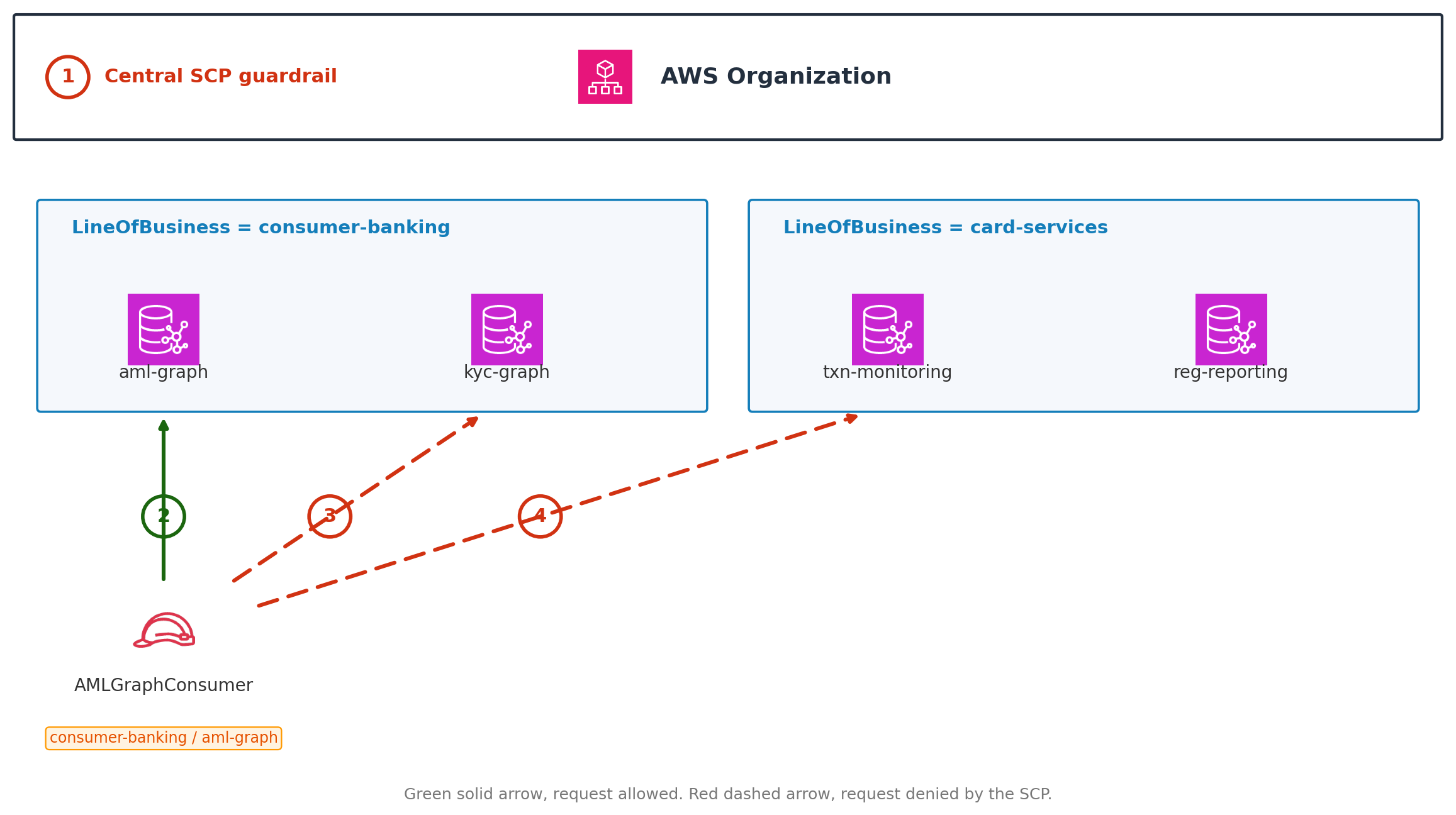
Figure 1: Two-tier TBAC on a shared Neptune environment. The numbered callouts are explained in the following list
- A central SCP applies at the organization level and evaluates every neptune-db request against the caller’s tags.
- The AMLGraphConsumer role, tagged LineOfBusiness = consumer-banking and ApplicationID = aml-graph, reaches the aml-graph cluster because both tags match. The same tags on the Neptune cluster. The request is allowed.
- The same role is denied on the kyc-graph cluster. The line of business matches, but the application does not, so two-tier matching keeps the two apart.
- The same role is denied on the card-services clusters because the line of business does not match.
Prerequisites
Before implementing TBAC, make sure you have the following in place.
- Neptune engine version 1.3.x or later on all target clusters and verify the end of life (EOL) schedule.
- Enable IAM authentication on each Neptune DB cluster.
- Define a tag taxonomy for your organization, which we design next.
A two-tier tag taxonomy
The scenarios use a two-tier taxonomy that mirrors how large enterprises draw their boundaries.
| Tag key | Purpose | Example values |
| LineOfBusiness | Top-level business unit boundary | consumer-banking, capital-markets, card-services |
| ApplicationID | The specific application or cluster | aml-graph, kyc-graph, txn-monitoring, reg-reporting |
| Environment | Deployment stage | production, staging, development |
The two-tier design is deliberate. LineOfBusiness separates major business units, and ApplicationID separates individual applications inside a single unit. Requiring both to match gives you two levels of isolation without ever naming a cluster in a policy.
A note on scope before you rely on this for compliance. TBAC isolates at the cluster level. It does not provide vertex-level or edge-level granularity within a graph, and it applies only when IAM authentication is enabled on the cluster. Connections that do not use IAM authentication bypass these policies entirely. Treat TBAC as one control within a broader program rather than as sufficient evidence of regulatory segregation of duties on its own. Because IAM authentication is disabled by default on new Neptune clusters, we recommend pairing TBAC with a guardrail that prevents clusters from being created without it. A deny-based Service Control Policy cannot enforce this on its own, since the Neptune CreateDBCluster API exposes no condition key for the IAM authentication flag. Use a layered approach instead. Enforce IAM authentication at provisioning time with an AWS CloudFormation Hook or CloudFormation Guard rule backed by approved AWS Service Catalog templates. Detect drift with the AWS Config managed rule neptune-cluster-iam-database-authentication. Auto-remediate non-compliant clusters with an SSM Automation runbook that calls ModifyDBCluster. Note that enabling IAM authentication on an existing cluster restarts the DB engine and terminates open connections, so schedule the remediation during a maintenance window. Deploy these as AWS Control Tower controls or a conformance pack so coverage stays consistent across accounts.
Scenario 1. Line-of-business isolation on a shared environment
In this first scenario, you isolate individual applications on a shared environment even when they belong to the same line of business.
The challenge
Your environment team runs dozens of Neptune clusters in a central VPC, all routable across the company network. The AML and KYC graphs both belong to the consumer-banking line of business, but they are separate applications that must not see each other’s data. A fraud analyst in card-services should reach neither. Because everything is routable, you cannot rely on the network to keep these apart, and maintaining per-cluster ARN lists across dozens of clusters does not scale.
The solution, multi-tag AND matching
Tag every cluster and every principal with both LineOfBusiness and ApplicationID, then require both to match. A principal reaches a cluster only when its business unit and its application both align with the cluster’s tags.
First, tag your clusters.
Next, tag your principals.
Finally, enforce both tags with an SCP.
Each StringNotEquals statement fires its Deny independently. Access survives only when no Deny fires, which means both LineOfBusiness and ApplicationID must match. If you instead placed both keys in a single condition block, the Deny would fire only when both mismatch at once. That would let a principal reach another application inside the same line of business. Separate statements are what give you true two-tier isolation.
The payoff on a shared environment is direct. A new cluster becomes reachable to the right consumers the moment it carries the correct tags, and it is invisible to everyone else by default. No policy is rewritten when clusters come and go.
Scenario 2. A central guardrail owned by the security team
In this scenario, a central security team owns the isolation guardrail so that no individual account can grant itself access to another line of business.
The challenge
On a shared environment, the teams that own clusters also tend to hold broad IAM permissions in their own accounts, sometimes including AdministratorAccess. If isolation depended only on IAM policies inside each account, any team could grant itself access to another line of business. Your security or identity management team needs to enforce isolation centrally, in a way that individual account administrators cannot override.
The solution, SCPs above IAM with centrally controlled tags
An SCP is evaluated before account-level IAM. A Deny in an SCP cannot be overridden by any Allow in a member account, even for an administrator. With that property, a central team can own the isolation guardrail while line-of-business teams keep autonomy over everything else.
The division of responsibility looks like this.
- The security team owns the SCP at the organizational unit (OU) or root level and the definition of the tag taxonomy.
- Line-of-business teams own their clusters, their queries, and their day-to-day IAM, but cannot alter the guardrail.
- A central provisioning pipeline owns tag assignment, so a team cannot re-tag itself into another line of business.
The isolation SCP from Scenario 1 provides the guardrail. The second piece is protecting the tags themselves, because tag-based control is only as strong as control over who can set the tags.
Both statements exempt a single, tightly held provisioning role. Keep that exemption as narrow as possible, a specific account and role name rather than a wildcard character, so the surface that can change tags stays small and auditable.
Sourcing principal tags from your identity provider
Central ownership extends naturally to identity. Rather than tagging thousands of IAM roles by hand, let your identity provider assert the tags at sign-in. A principal assumes a role through Security Assertion Markup Language (SAML) or OpenID Connect (OIDC) federation. The AWS Security Token Service (STS) then attaches the asserted values as aws:PrincipalTag attributes for the session. The mapping of person to line of business then lives in the corporate directory, owned by the same central team, instead of in per-account IAM.
Constrain what the identity provider is allowed to assert in the role trust policy, so a misconfigured directory cannot inject unexpected tags.
The operational result is that access follows the directory. When an analyst moves from the AML team to the KYC team, the directory group changes, the next session carries ApplicationID=kyc-graph, and the guardrail adjusts which clusters they can reach. Zero IAM or SCP changes are required.
Scenario 3. One tag strategy across your entire data tier
In this final scenario, you extend the same tag strategy beyond Neptune to the other databases your teams run.
The challenge
Graph is rarely the only database in the picture. The same lines of business that share a Neptune infrastructure usually also run relational, key-value, wide-column, and in-memory databases. Defining isolation one way for Neptune and a different way for every other service multiplies the chance of a gap. You want one mental model for data-plane isolation across the whole data tier.
The solution, reuse the taxonomy across services
LineOfBusiness and ApplicationID are not Neptune concepts, they are your concepts. Most AWS database services evaluate aws:ResourceTag on their data-plane connect or access action, so the same deny-on-mismatch SCP pattern applies with only the action name changed.
| Service | Data-plane action | Isolation granularity |
| Amazon Neptune | neptune-db:* | Cluster |
| Amazon Neptune Analytics | neptune-graph:* | Cluster |
| Amazon DynamoDB | dynamodb:GetItem, dynamodb:Query, and related | Table |
| Amazon Keyspaces (for Apache Cassandra) | cassandra:Select, cassandra:Modify | Keyspace and table |
| Amazon ElastiCache | elasticache:Connect | Cache and user |
| Amazon MemoryDB | memorydb:Connect | Cluster and user |
| Amazon Aurora DSQL | dsql:DbConnect | Cluster |
A single guardrail statement, repeated per service action, enforces the same boundary everywhere.
Isolation granularity varies by service. Some services evaluate resource tags only on the connect action, which isolates at the cluster level rather than the individual item or topic. Where you need hard isolation between applications, give each application its own cluster and let the connect-level tag check act as the gatekeeper, because every downstream operation depends on a successful connect. Confirm the exact condition-key support for each service in the AWS Service Authorization Reference before you rely on it.
This reuse is the real value of a tag-based approach. Isolation stops being a per-service project and becomes one governed pattern that spans your entire data estate.
Validating your TBAC implementation
Before rolling TBAC to production, validate that policies behave as expected. Neptune data-plane operations are typically invoked with SigV4-signed HTTPS requests to the cluster endpoint, not through the AWS Command Line Interface (AWS CLI). The following examples use awscurl, a curl wrapper that adds SigV4 signatures, for simplicity. You can also use the AWS SDK for your preferred language, or the aws neptune-data CLI commands where available.
Test 1. Positive access with matching tags
Assume a role tagged LineOfBusiness=consumer-banking and ApplicationID=aml-graph, then query the matching cluster. The request should succeed.
The matching cluster returns a normal query result.
Test 2. Negative access with a mismatched application
Using the same role, target the KYC cluster in the same line of business. The ApplicationID mismatches, so the request should be denied.
The mismatched cluster returns an access-denied error instead of data.
Test 3. CloudTrail verification
After testing, verify in AWS CloudTrail that denied requests show the expected reason. Look for events with errorCode of AccessDenied and confirm the request context shows the tag evaluation you expect.
Operational considerations
Propagation timing. Changes to cluster tags take approximately 5 minutes to propagate to data-plane policy evaluation, and IAM policy changes might take up to 10 minutes, as described in the Neptune TBAC documentation. Account for this during deployments and avoid removing an old tag before the new policy is effective.
Automation integration. If you use Infrastructure as Code (IaC) tools such as AWS CloudFormation, Terraform, or the AWS Cloud Development Kit (CDK), apply the taxonomy tags at cluster creation. Have your central pipeline set them then, not afterward. A cluster created without tags is inaccessible under a deny-untagged guardrail until its tags propagate.
Monitoring and alerting. Use AWS Config rules to detect clusters missing required tags, and combine with Amazon EventBridge to alert when a cluster is created without proper tagging.
Handling tag changes during sessions. TBAC evaluates tags at request time. If a cluster’s tag changes while a long-running query is in flight, the running query continues, and the new value applies to subsequent requests.
Conclusion
Tag-based access control turns data-plane security from static, ARN-based policies into dynamic, attribute-driven authorization. On a shared graph infrastructure, where the network no longer separates one team from another, that shift is what makes safe consolidation possible. The three scenarios build on each other. Multi-tag matching isolates lines of business and applications. A central guardrail lets a security team enforce that isolation above IAM. One tag strategy extends the same boundary across your entire data tier.
To get started, define your tag taxonomy by mapping your business-unit and application boundaries to LineOfBusiness and ApplicationID, and decide where Environment applies. Apply the tags through a central pipeline, and source principal tags from your identity provider where possible. Deploy the deny-on-mismatch and deny-untagged SCPs at the OU level, and protect the tags with a mutation guardrail. Confirm positive and negative access with the preceding tests before enforcing broadly.
For more information, see Tag-based access control for Amazon Neptune data-plane operations, IAM database authentication for Neptune, and Service control policies.