Desktop and Application Streaming
Amazon WorkSpaces for Automotive & Manufacturing Engineering
Automotive and Manufacturing (A&M) teams are rethinking how engineering environments are built. Global design teams, GPU-heavy workloads, and strict IP controls demand more than traditional desktops or legacy VDI platforms provide. Computer Aided Design (CAD), Computer Aided Engineering (CAE), visualization, simulation, and AI-assisted design workflows are driving higher GPU requirements. Traditional on-premises workstations and static VDI pools cannot keep pace. Long procurement cycles, rigid performance profiles, and limited resilience slow engineering teams when speed matters most. Many A&M customers are moving to GPU-enabled environments built on Amazon WorkSpaces Personal and Amazon WorkSpaces Applications. Instead of treating virtual desktops as replacements for physical machines, they build a cloud-native engineering access layer integrated with AWS compute, storage, identity, and security services
This post walks through the technical drivers behind that shift and outlines practical architecture guidance for GPU-based engineering environments.
Why GPU-Based Architectures Have Become Foundational
Based on AWS customer engagements, four requirements commonly shape modern designs.
- Distributed Engineering Operations
- Engineering is no longer centralized. Design centers, suppliers, and partners operate across Regions and time zones. They need secure, low-latency access without local data persistence.
- Deploy Amazon WorkSpaces Personal close to engineering teams to minimize latency for CAD and visualization workloads. Leverage multiple Availability Zones and geographically separated deployments for resilience. Centralize identity for consistent access control. Keep engineering data inside AWS to protect intellectual property.
- High-Performance and Elastic GPU Requirements
- Engineering workloads are not uniform. Standard CAD modeling differs from large assembly visualization. Simulation workflows spike CPU and GPU consumption during peak design cycles. Fixed GPU pools create bottlenecks during high demand and waste capacity during slow periods.
- Align GPU instance types with workload requirements. Use higher-performance GPUs only where necessary. Automated provisioning lets capacity follow project phases instead of remaining static.
- IP Protection and Core Security Requirements
- Engineering environments expose critical intellectual property. That includes proprietary vehicle platforms, manufacturing processes, and operational data. Security discussions now involve engineering leads, security operations, and executive stakeholders.
- Secure Amazon WorkSpaces Personal and Amazon WorkSpaces Applications with federated identity, centralized authorization, encryption in transit and at rest, and comprehensive audit logging. Keep data within AWS. Avoid endpoint data residency.
- Infrastructure Modernization Without Disruption
- Legacy VDI and on-prem GPU infrastructure is expensive and inflexible. At the same time, an end-to-end rebuild is rarely feasible for global engineering organizations.
- Adopt phased migrations with hybrid operations. Incrementally introduce Amazon WorkSpaces Personal alongside existing environments. Avoid replicating legacy constraints. Design for elastic GPU provisioning, zero-trust access, and dynamic scaling from the start.
Agentic Workspaces as an Engineering Access Platform
In modern A&M architectures, desktop decisions directly influence engineering throughput, time-to-market, security posture, and cost efficiency. GPU-enabled environments now intersect with compute architecture, storage performance, identity strategy, and resilience planning. Successful implementations treat Amazon WorkSpaces Personal as an engineering access platform, not an isolated desktop service.
Use Case: GPU-Accelerated CAD Design and Visualization
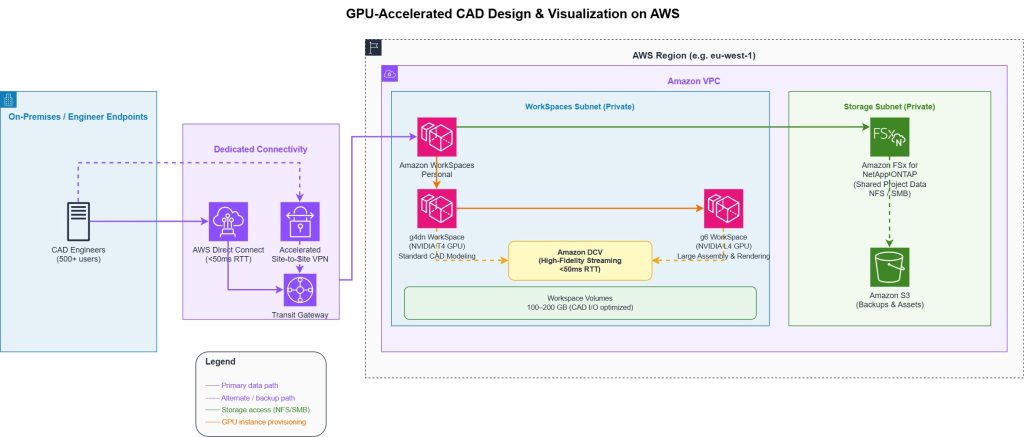
Distributed CAD teams need consistent, high-performance access to graphics-intensive tools without local data persistence or hardware procurement cycles. On-prem workstations create IP exposure at endpoints, rigid capacity, and weeks-long lead times when project demand shifts. Deploy GPU-enabled virtual workstations using Amazon WorkSpaces Personal with Amazon DCV, backed by g4dn instances for CAD and g6 for large assembly visualization and rendering. DCV is designed to deliver responsive interactive sessions when roundtrip latency is kept below 50ms for high-fidelity workloads, per AWS bandwidth recommendations. Storage uses Amazon FSx for NetApp ONTAP for shared data and workspace volumes sized to application I/O, typically 100–200 GB for CAD workloads. AWS IAM Identity Center handles federated identity with centralized access policies, keeping all engineering data inside AWS and eliminating endpoint data residency risk. Regional deployment aligns WorkSpaces to engineering team locations. AWS Direct Connect or accelerated Site-to-Site VPN provides dedicated, predictable connectivity for teams requiring deterministic latency. Engineers move between conceptual design, modeling, and review phases without rebuilding environments — infrastructure adapts to the project, not vice versa. A European automotive OEM used this approach to give 500+ engineers remote access to CAE and 3D tools, eliminating dedicated workstations and enabling secure access anywhere.
Full details are available in the AWS case study
Use Case: CAE Simulation with GPU-Enabled Pre- and Post-Processing
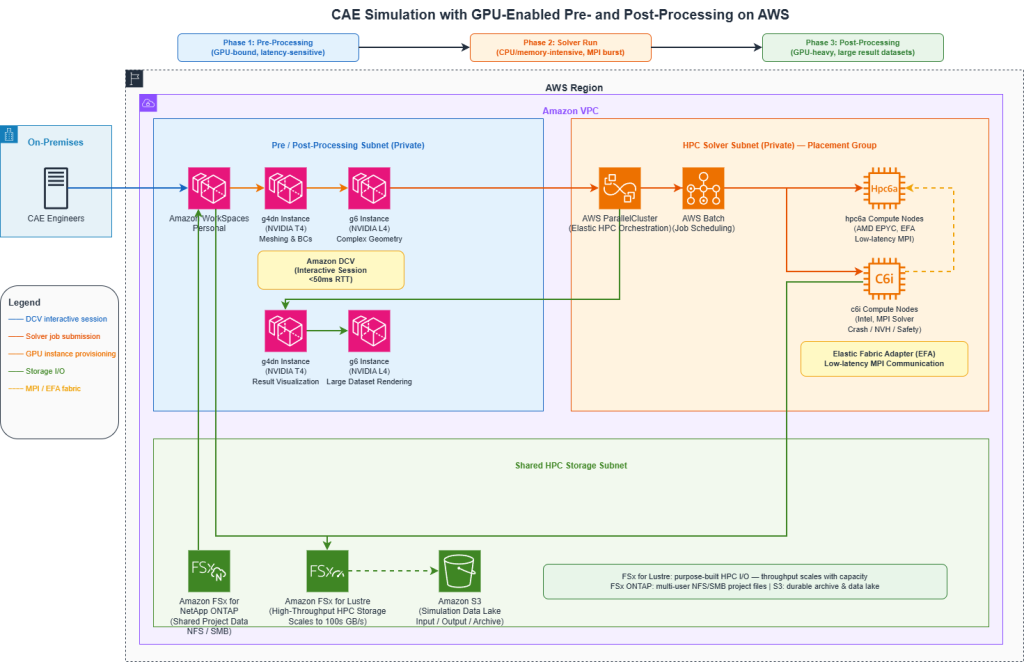
CAE workflows don’t fit a single compute profile. Interactive pre-processing (meshing, boundary condition setup) is GPU-bound and latency-sensitive. Solver runs are CPU and memory intensive, often requiring hundreds of cores for hours. Post-processing and visualization remain GPU-heavy. Fixed environments force compromises at every phase. Combine AWS ParallelCluster or AWS Batch for elastic HPC solver capacity with GPU-enabled Amazon WorkSpaces Personal for interactive pre and postprocessing. Preprocessing runs on g4dn or g6 instances through Amazon WorkSpaces Personal with DCV, keeping the interactive session responsive while solver jobs are queued. Solver workloads burst to HPC clusters using compute-optimized instances (c6i, hpc6a) with placement groups for low-latency MPI communication. Post-processing and visualization return to GPU-enabled WorkSpaces, with g6 instances handling large result datasets and rendering. Amazon FSx for Lustre provides high-throughput shared storage for HPC I/O, with throughput scaling with capacity up to hundreds of GB/s. AWS License Manager tracks ISV license consumption across the environment, and AWS Budgets enforces project-level cost controls tied to simulation cycles. Queue times drop because solver capacity scales with demand rather than sitting idle between design phases. Engineers don’t wait on infrastructure — they move from setup to results to validation without switching environments or waiting for capacity to free up. When an EV manufacturer’s on-premises HPC cluster for crash, NVH, and safety simulations failed, remediation was estimated to take six months. Amazon Web Services delivered a working proof of concept in three weeks and moved to production, eliminating queue wait times with on-demand capacity.
Full details are available in the AWS case study
Common Architecture Patterns
Leading A&M organizations design GPU-based environments across five dimensions.
- Speed and agility: Automated provisioning enables rapid transitions between workload phases and self-service access for engineering teams — eliminating the procurement cycles that slow project starts.
- Security and IP protection: Centralized identity and authorization through enterprise directory integrations, combined with no endpoint data residency and full auditability via AWS CloudTrail, satisfies both engineering and security stakeholder requirements without bolt-on tooling.
- Cost optimization: Pay-for-use GPU capacity aligned to project demand replaces long-term peak commitments. Right-sizing by workload phase — g4dn for standard CAD, g6 for visualization and simulation — eliminates the overprovisioning that makes on-prem GPU pools expensive.
- Operational resilience: Multi-AZ deployments and repeatable environment builds mean engineering teams aren’t blocked by infrastructure failures.
- Engineering flexibility: Instance type changes without rebuilding, plus support for multiple ISV applications in a unified architecture, give engineering leads agility to meet project demands without delays.
The Architecture Anti-Pattern to Avoid
A common mistake is designing cloud virtual desktops as a lift-and-shift VDI replacement. This approach preserves legacy constraints, misses elasticity and right-sizing opportunities, underutilizes native AWS integrations, and limits long-term architectural value. Successful designs position Amazon WorkSpaces Personal and Amazon WorkSpaces Applications as a cloud-native engineering access layer, not a desktop service in someone else’s data center.
Conclusion
For Automotive and Manufacturing customers, GPU-enabled environments are increasingly essential. They are core to engineering velocity, IP protection, and cost control. Architects who treat Amazon WorkSpaces Personal as an enablement layer rather than a desktop replacement gain capabilities that traditional environments cannot provide. That shift — from replication to optimization — is where measurable improvements begin.
Author

Noah Jackson
Noah Jackson is a Solutions Architect at AWS, where he partners with Automotive and Manufacturing customers to design scalable, low-latency virtual desktop and end-user computing solutions. His work focuses on bridging complex engineering workloads with cloud-native architectures to enable performance, security, and global accessibility.