AWS DevOps & Developer Productivity Blog
Automating Incident Investigation with AWS DevOps Agent and Salesforce MCP Server
This post was co-written with Ross Belmont, Senior Director, Rodrigo Duran, Strategist Director at Salesforce
Every minute counts when managing a critical infrastructure incident. Organizations need to quickly identify issues, diagnose root causes, and implement solutions—all while keeping customers informed. AWS DevOps Agent changes this by automating investigation and response, reducing mean time to resolution (MTTR) from hours to minutes.
In this post, you’ll learn how to integrate AWS DevOps Agent with Salesforce Hosted MCP Server to create an autonomous incident investigation workflow. This integration connects customer support cases directly to infrastructure diagnostics, reducing response times, and facilitating consistent incident resolution across your organization.
The Challenge: The Cost of Manual Incident Investigation
Customer complaints like “the website is slow” often trigger hours of investigation across distributed systems, fragmented telemetry, and multiple teams. Your customer support team lacks the deep infrastructure expertise to diagnose root causes, while your DevOps Engineers are constantly interrupted and pulled away from systematic improvements.
This handoff between teams creates friction:
- Increased mean time to detect (MTTD) – Issues sit in queues waiting for the right expert
- Extended mean time to resolve (MTTR) – Manual investigation across Amazon CloudWatch, AWS CloudTrail, application logs, and deployment history is time-consuming
- Context loss – Information gets lost in translation between support tickets and infrastructure analysis
- Reactive problem solving – Teams spend time on symptoms rather than preventing recurring issues
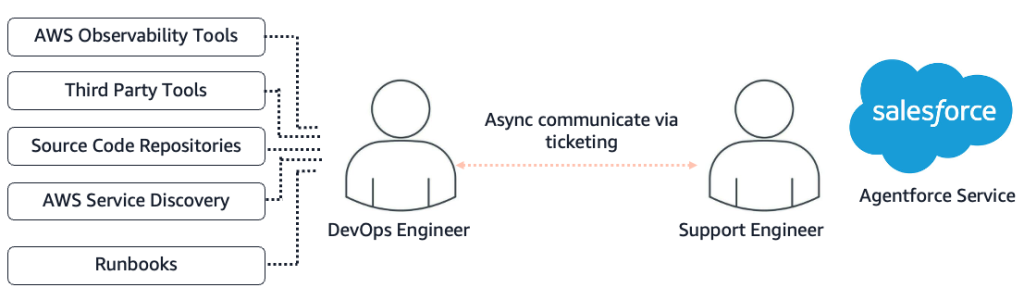
Figure 1 – Manual Support Process without DevOps Agent
AWS DevOps Agent integrated with Salesforce changes this paradigm by connecting support workflows directly to autonomous infrastructure investigation, eliminating manual handoffs and reducing investigation time.
How It Works – A Seamless Flow from Customer Complaint to Infrastructure Diagnosis
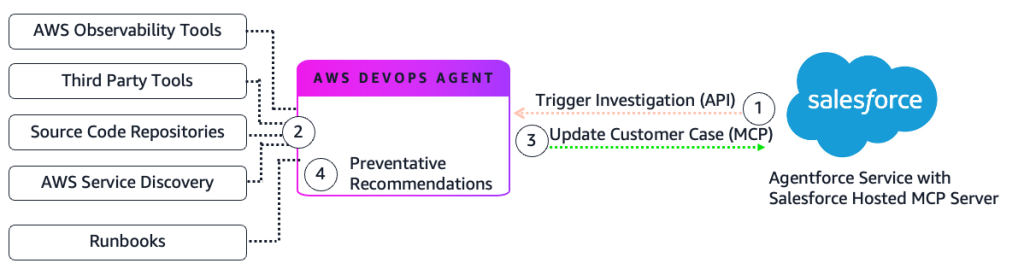
Figure 2 – Automated Support Process with DevOps Agent
- Case Creation: Your customer reports an issue in Agentforce Service (e.g., “My Load Balancer is showing unavailable”). Salesforce Flow detects the new case and triggers the AWS DevOps Agent via an API or webhook call.
- Autonomous Investigation: DevOps Agent starts an investigation and identifies the root cause. The agent queries AWS observability services, third-party platforms like Splunk and Datadog, code repositories, and CI/CD pipelines. It builds a dynamic topology graph to map relationships between application resources.
- Case Enrichment: Investigation findings automatically post back to the Salesforce case, providing your support team with technical context and root cause analysis.
- Preventative Recommendations: The agent suggests architectural improvements to help prevent recurrence.
Real-World Example: The Single Instance Outage
The Incident
A customer opens a case in Agentforce Service reporting an application as unavailable.
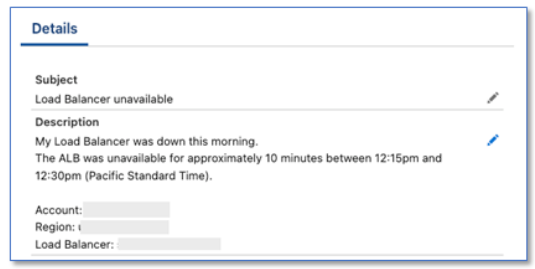
Figure 3 – Agentforce Service case details
The Investigation
Salesforce Flow triggers DevOps Agent when the case is created:
- Case Retrieval: The agent uses the Salesforce soql_query tool to retrieve case details, including the customer’s account, incident description, and timing. The tool is made available via Salesforce Hosted MCP.
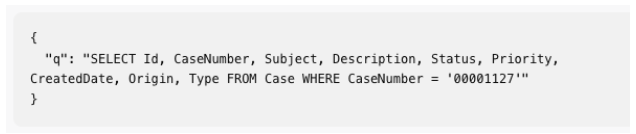
Figure 4 – Salesforce SOQL Query
- Topology Discovery: The agent maps the infrastructure and identifies all components of the application.
- CloudWatch Metrics Analysis: The agent examines metrics during the incident window and discovers the count of requests dropped to zero during the unavailability period.
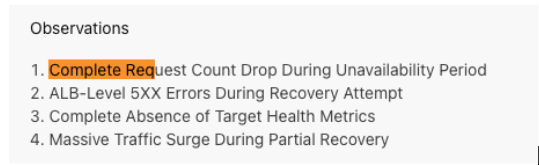
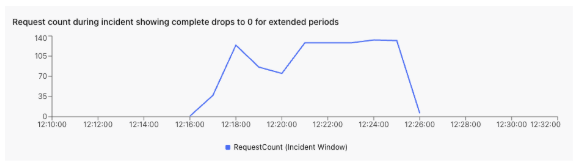
Figure 5 – Request Count Chart
- CloudTrail Event Analysis: The agent discovers a sequence of administrative actions that caused the downtime.
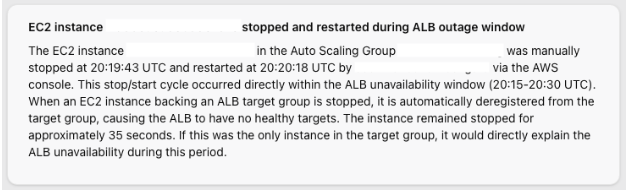
Figure 6 – CloudTrail Analysis
- Root Cause Determination: The agent correlates the administrative actions with the metrics drop, identifying that an EC2 instance termination caused the outage.
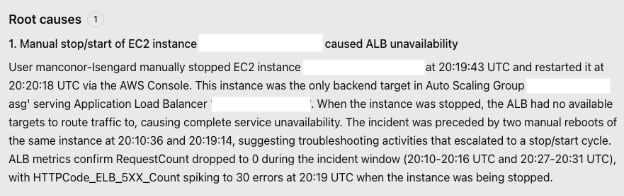
Figure 7 – Root Cause Details
- Case Update: The agent uses the Salesforce create_sobject_record tool to post findings to the case Activity feed. The tool is made available via Salesforce Hosted MCP.
The Result
Your Salesforce case now contains a comprehensive root cause analysis with timeline, affected resources, and contributing factors.
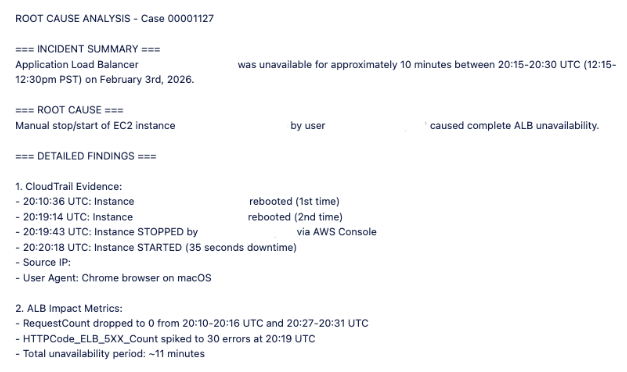
Figure 8 – Agentforce Service case updated with root cause
The Mitigation Plan
The agent generates an actionable mitigation plan showing how to prevent recurrence.
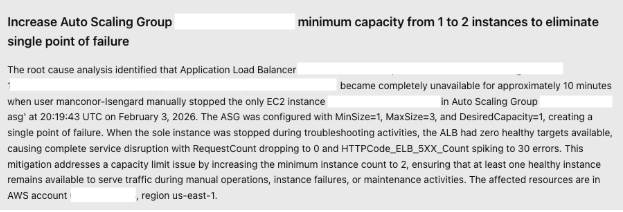
Figure 9 – Mitigation Plan
The agent also provides step-by-step remediation instructions that you can apply immediately. Due to length, this shows a portion of the plan.
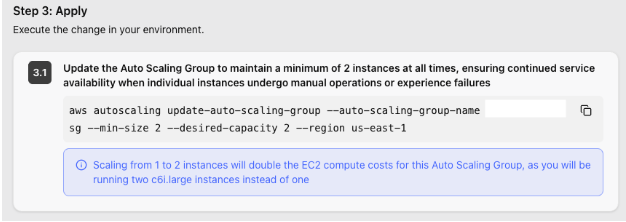
Figure 10 – Step by Step Mitigation instructions
Technical Implementation
Prerequisites: Before implementing this integration, verify you have:
- Agentforce Service with Salesforce Hosted MCP Server enabled
- AWS DevOps Agent Space configured in your AWS account
- Amazon CloudWatch and AWS CloudTrail enabled for observability
- Infrastructure resources tagged for topology mapping (optional)
- Familiarity with Salesforce Flow Builder for workflow automation
This integration requires configuration in both Salesforce and AWS. The following steps provide an overview of the setup process.
- Create Agent Space: Set up a DevOps Agent Space in your AWS account with appropriate IAM roles and permissions.
- Integrate Observability Tools: Connect your operational tools like Splunk, Datadog, or New Relic to provide the agent with telemetry data.
- Connect Code Repositories: Link GitHub, GitLab, or AWS CodeCommit to enable the agent to correlate incidents with recent deployments.
- Build Topology Mapping: Tag your infrastructure resources, so the agent focuses on components relevant to your application.
- Add Skills: Configure the agent with instructions to direct the investigation – for example, to update Agentforce Service cases when investigations are complete.
Highlighted below are the key setup steps:
Create Agent Space
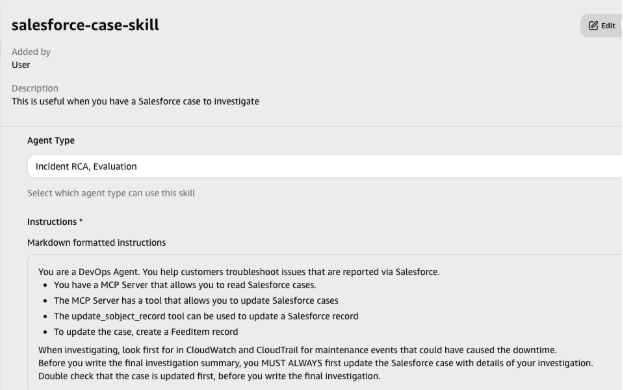
Figure 11 – Agent Skill for Salesforce
Salesforce Hosted MCP Server Setup
The Salesforce Hosted MCP Server enables AWS DevOps Agent to query case data and post investigation findings back to Salesforce. Configure the MCP Server in your Salesforce org using the following steps. For complete instructions, see the Salesforce documentation and the Salesforce Hosted MCP GitHub Repository.
- Enable the Salesforce External MCP Service: Turn on the MCP functionality in your Salesforce org.
- Create External Client App: Register the AWS DevOps Agent as an OAuth client in Salesforce with these settings:
- Use this callback URL: https://api.prod.cp.aidevops.us-east-1.api.aws/v1/register/mcpserver/callback
- Enable OAuth Settings with required scopes (see below)
Add the Salesforce Hosted MCP Server to Your Agent Space
In the AWS Console, register the Salesforce MCP Server with your Agent Space. This connection allows DevOps Agent to query Salesforce case data and post investigation findings.
- Add the Endpoint URL: For your setup, if you’re using a Salesforce Sandbox, your endpoint is: https://api.salesforce.com/platform/mcp/v1/sandbox/sobject-all
- Authentication: OAuth 2.0 with PKCE (Three-Legged OAuth)
- Exchange URL: https://test.salesforce.com/services/oauth2/token
- Authorization URL: https://test.salesforce.com/services/oauth2/authorize
- Scopes: api, sfap_api, refresh_token, einstein_gpt_api, offline_access
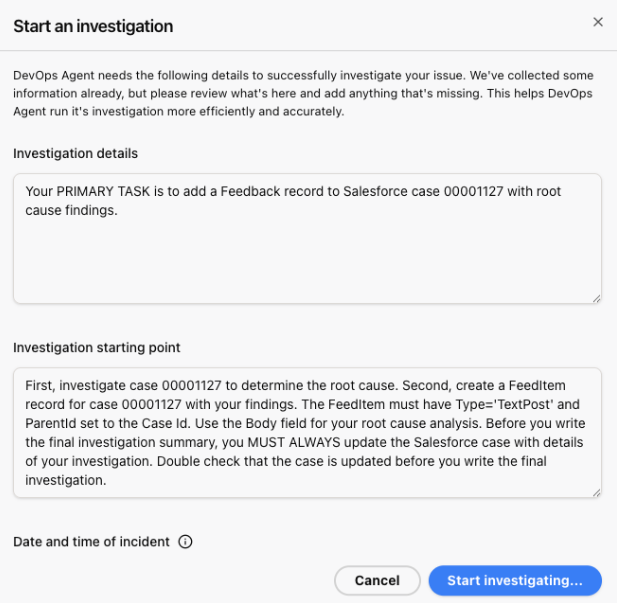
Figure 12 – Starting an Investigation
In the next step, you’ll automate this workflow using Salesforce Flow, so investigations trigger automatically when cases are created.
Using Salesforce Flows
Salesforce Flows automate the connection between case creation and DevOps Agent investigations. Flow is a no-code automation tool that uses a visual drag-and-drop interface (Flow Builder) to automate business processes.
Configure a Flow trigger on your Case object to invoke DevOps Agent automatically when cases are created.
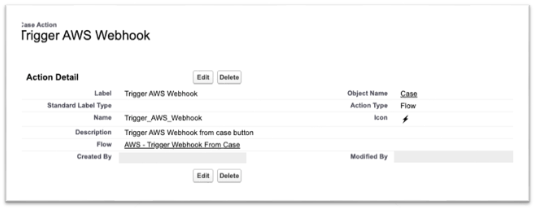
Figure 13 – Salesforce Trigger
The Flow calls the DevOps Agent webhook with case details including the customer account, incident description, and timing. This triggers an autonomous investigation without requiring manual handoff to engineering teams. Due to length, this shows a portion of the Flow.
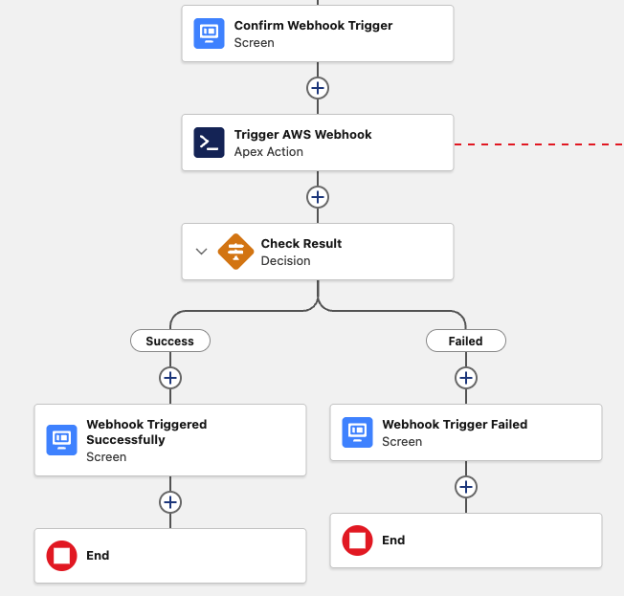
Figure 14 – Salesforce Flow
For implementation details and example code, see this Code repository
Connecting Salesforce Flow to AWS DevOps Agent
Configure how Salesforce Flow invokes the DevOps Agent webhook. Choose one of three integration approaches based on your requirements:
- Option 1: External Service (Recommended for simplicity)External Service Integrate with AWS services using SigV4 (AWS Signature Version 4) authentication through Named Credentials. This no-code approach is the fastest way to establish the connection.
- Option 2: Apex Class (Recommended for custom logic)Create an Apex class that your Flow calls to invoke the webhook. This approach provides flexibility to add custom business logic or error handling before triggering investigations.
Results and Impact
This integration transforms incident response by connecting customer support directly to autonomous infrastructure investigation:
Faster Incident Resolution: Autonomous investigation reduces mean time to resolution (MTTR) by eliminating manual log analysis. The agent detects and diagnoses issues immediately when cases are created, providing 24/7 coverage across time zones.
Reduced Manual Effort: SRE teams focus on systematic improvements instead of responding to individual incidents. Support teams receive technical insights without escalating to engineering, and every investigation follows the same thorough process.
Improved Customer Experience: Customers receive detailed root cause analysis within minutes of reporting an issue. This transparency builds trust, and the agent’s architectural recommendations help prevent recurring problems.
Organizational Learning: Every investigation is documented and searchable, creating a knowledge base of incident patterns. The agent identifies recurring issues across cases and suggests infrastructure improvements to address root causes.
Conclusion
Connecting AWS DevOps Agent with a Salesforce Hosted MCP Server creates an autonomous investigation workflow that eliminates manual handoffs between support and engineering teams. This integration reduces mean time to resolution through instant analysis, improves customer experience with rapid root cause updates, and enables proactive prevention through pattern recognition.
About the Authors
This blog post was authored by:
