AWS DevOps & Developer Productivity Blog
Building a Slack-powered AI development agent with Kiro CLI and headless authentication
Every code review discussion, incident response thread, and standup happens in Slack. But when an engineer needs to analyze a service or debug a failing test, they leave Slack, open a terminal, navigate to the repository, run commands, and paste the output back. That round trip takes 30 seconds for someone who knows exactly where to look and 5 minutes for someone less familiar with the codebase. Across a team of 10 engineers doing this 15 times a day, that adds up to over 12 hours of lost engineering time per week.
This post walks through building a ChatOps integration that runs Kiro CLI from a Slack slash command. An engineer types /kiro analyze auth-service for memory leaks, and the results appear directly in the channel—no context switch required. The solution uses AWS Lambda, Amazon API Gateway, and AWS Secrets Manager, and it depends on Kiro CLI’s headless authentication to run without an interactive session.
In this post, you will learn how to:
- Configure a Slack App with a slash command that triggers an AWS Lambda function
- Authenticate Kiro CLI in a headless environment using API key-based authentication
- Build and deploy a container image with Kiro CLI to Amazon Elastic Container Registry (Amazon ECR)
- Deploy the full solution with AWS Serverless Application Model (AWS SAM)
Why headless authentication matters
A Slack slash command triggers a webhook. The webhook invokes a Lambda function. The Lambda function runs Kiro CLI. At no point in this chain is there a browser, a terminal, or a human session.
Without headless authentication, this architecture does not work. Kiro CLI would require an interactive login, and a Lambda function has no display and no way to complete an OAuth flow.
With an API key, Kiro CLI authenticates silently:
export KIRO_API_KEY=ksk_xxxxxxxxxxxxxxxxxxxxxxxxxxxxxxxx
kiro-cli chat --no-interactive "analyze auth-service for memory leaks"
The API key is stored in AWS Secrets Manager, fetched at runtime, and injected into the Lambda environment. The engineer in Slack never sees or manages the key.
Important: API key-based authentication is available for Kiro Pro, Pro+, and Power subscribers. If your subscription is managed by an administrator, your Kiro admin must enable API key authentication first. For details, see API key governance.
Architecture overview
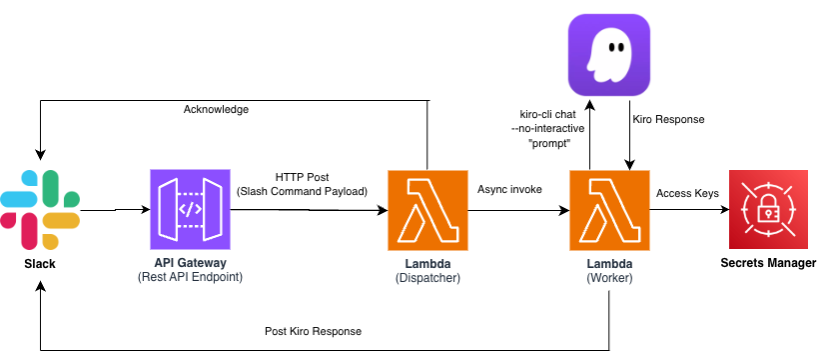
The solution consists of two Lambda functions, an API Gateway endpoint, and AWS Secrets Manager. The request and response follow two separate paths:
- Request path: Slack → API Gateway → Dispatcher Lambda → acknowledge back to Slack (under 3 seconds), then async invoke → Worker Lambda
- Response path: Worker Lambda → Slack response_url (direct HTTPS POST, bypasses API Gateway)
Why two Lambda functions?
Slack requires a response within 3 seconds of a slash command. Kiro CLI analysis takes 10–60 seconds depending on the repository size and prompt complexity. The Dispatcher acknowledges the command immediately and invokes the Worker asynchronously. The Worker runs Kiro CLI and posts results back to Slack through the response_url provided in the original payload. This is a standard pattern for Slack integrations that perform long-running work.
A note on response_url limits: the webhook Slack provides in the slash command payload expires 30 minutes after the command is issued and accepts a maximum of 5 responses. The 10-minute Worker timeout and single response in this solution stay well inside both limits. If you raise the Lambda timeout beyond 30 minutes or add incremental progress updates, these POSTs begin to fail silently – switch to chat.postMessage with a bot token at that point.
Prerequisites
- Before you begin, you need the following:
- An AWS account with permissions to create Lambda functions, API Gateway, Amazon ECR repositories, Secrets Manager secrets, and IAM roles
- An infrastructure-as-code tool for deploying serverless resources (this post uses AWS SAM CLI, but you can adapt the templates to AWS CDK, AWS CloudFormation, Terraform, or your preferred tool)
- Finch or Docker installed for building container images
- A Slack workspace where you have permission to create a Slack App
- A Kiro Pro, Pro+, or Power subscription with API key authentication enabled
Step 1: Gather credentials
You need three credentials before deploying. Collect all of them first, then store them in Secrets Manager in Step 2.
Kiro API key
This authenticates Kiro CLI in headless mode.
- Sign in to
app.kiro.dev - Navigate to API Keys
- Create a new key named
kiro-chatops - Copy the key (starts with
ksk_) – it is shown only once

Slack Signing Secret – This allows the Dispatcher to verify that incoming requests originate from Slack.
- Go to api.slack.com/apps and click Create New App → From scratch
- Name it Kiro Agent and select your workspace
- On the Basic Information page, scroll to App Credentials
- Copy the Signing Secret (32-character hex string)
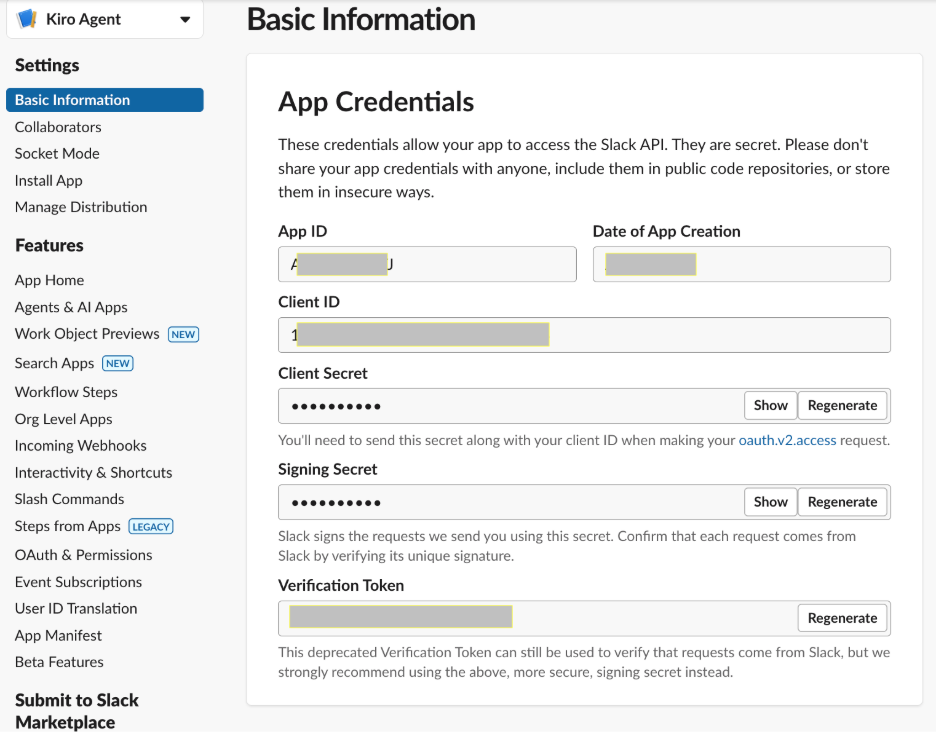
Slack Bot Token – Optional
The Worker posts results using the response_url from the original slash command payload, which is a pre-authenticated webhook that does not require a bot token. Collect a bot token with the chat:write scope only if you extend the solution to post messages independently of a slash command response.
- In your Slack App settings, go to OAuth & Permissions
- Add the Bot Token Scope: chat:write
- Choose Install to Workspace and authorize
- Copy the Bot User OAuth Token (starts with
xoxb-)
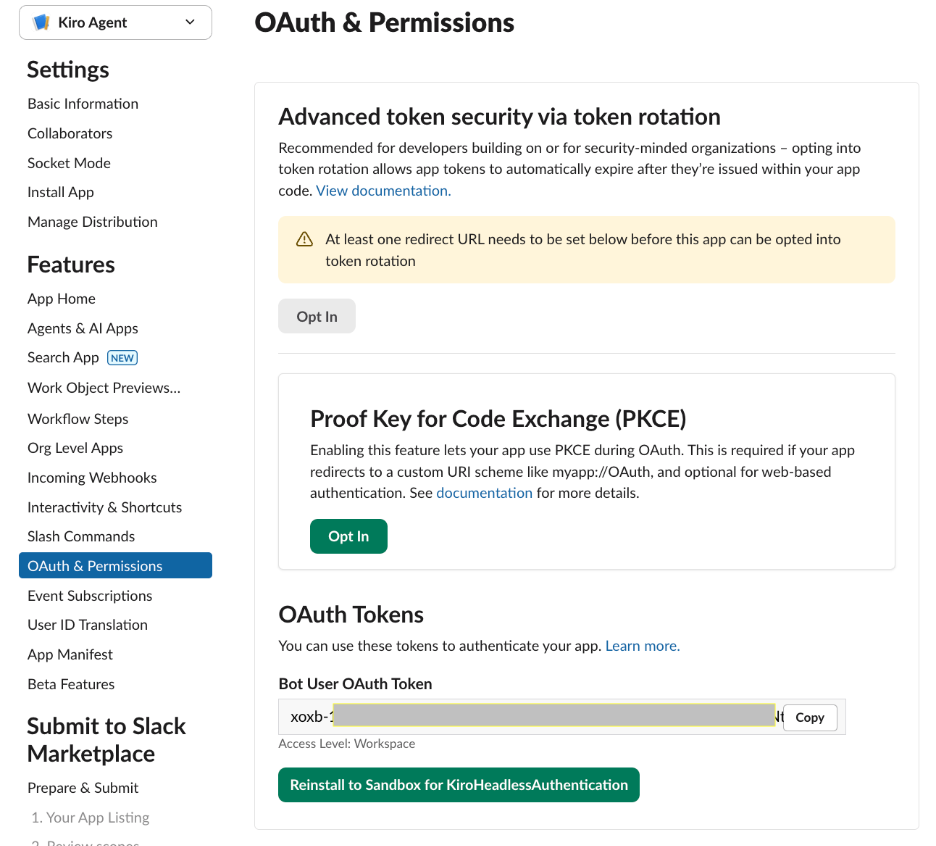
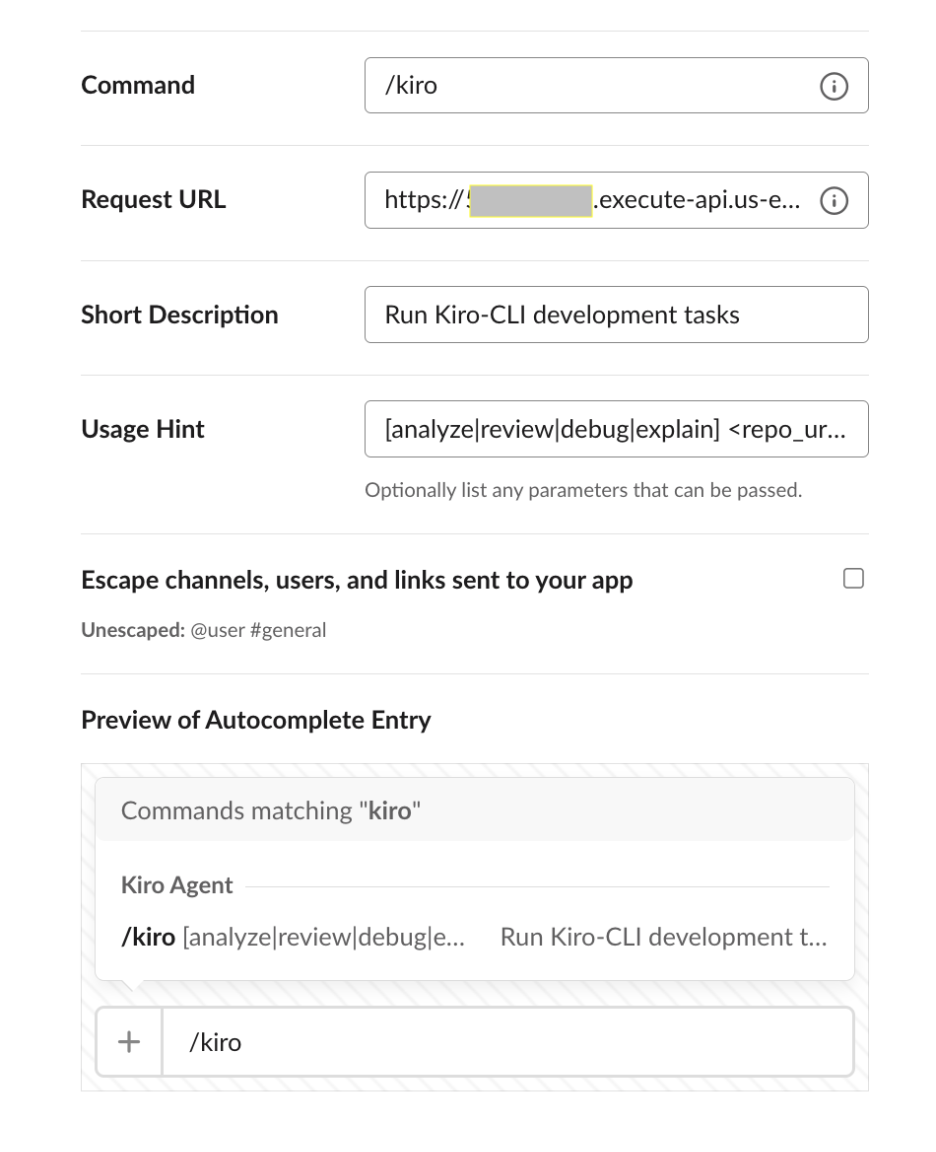
While you are in the Slack App settings, also configure the slash command:
- Go to Slash Commands → Create New Command
- Set Command to
/kiro - Set Request URL to
https://placeholder(update after deployment in Step 6) - Set Short Description to
Run Kiro-CLI development tasks - Set Usage Hint to
[analyze|review|debug|explain] <description>
Step 2: Store secrets in AWS Secrets Manager
Store each credential as a separate secret. The Lambda functions retrieve these at runtime using IAM-scoped access.
If your target repository is private, also store a GitHub Personal Access Token with repo scope. The Worker uses this token to clone the repository inside the Lambda execution environment.
Verify the secrets were created:
Step 3: Build the Dispatcher Lambda
The Dispatcher has three responsibilities: verify that the request came from Slack, acknowledge the slash command within 3 seconds, and invoke the Worker asynchronously.
Request verification – Slack signs every request with HMAC-SHA256 using your app’s signing secret. The Dispatcher must validate this signature before processing payloads. The verification logic constructs a base string from the request timestamp and body, computes the HMAC, and compares it to the signature in the request header:
Reject any request with a timestamp older than 5 minutes to prevent replay attacks. Normalize request headers to lowercase before reading them—API Gateway may preserve the original casing from the client.
Async handoff
After verifying the request, parse the slash command payload to extract text, user_name, and response_url. Then invoke the Worker Lambda with InvocationType="Event" (fire-and-forget) and immediately return an acknowledgment to Slack:
If the user sends /kiro with no arguments, return an ephemeral usage message with examples. The Dispatcher uses the standard Python 3.12 Lambda runtime and requires no container image.
Step 4: Build the Worker Lambda container image
The Worker runs Kiro CLI against a cloned repository and posts results to Slack. Because Kiro CLI depends on git, system libraries (NSS, X11, ALSA), and a binary that exceeds Lambda’s 250 MB layer limit, package the Worker as a container image.
Dockerfile structure
Start from the AWS Lambda Python 3.12 base image. Install git and the shared libraries that Kiro CLI requires, then install Kiro CLI itself:
Two details matter here. First, copy the Kiro CLI binary to /usr/local/bin/ rather than leaving it in /root/.local/bin/—Lambda runs as a non-root user that cannot access /root/. Second, build with --platform linux/amd64 regardless of your local architecture, because Lambda defaults to x86_64.
Worker logic – The handler performs four steps:
- Fetch the Kiro API key (and optionally a Git token) from Secrets Manager
- Clone the repository to
/tmp/repo using git clone --depth 1 - Run kiro-cli chat
--no-interactive "<prompt>"withKIRO_API_KEYandHOME=/tmpset in the environment - Post the output to Slack via the
response_url
Setting HOME=/tmp is required because Kiro CLI writes a session database, and Lambda’s filesystem is read-only except for /tmp. Strip ANSI escape codes from the output before posting—Kiro CLI emits terminal colors that render as garbage in Slack.
The subprocess timeout should be shorter than the Lambda timeout to allow time for error handling and the Slack POST. Set the subprocess timeout explicitly to 540 seconds in the Worker code, rather than relying on the Lambda timeout alone. A 9-minute subprocess limit with a 10-minute Lambda timeout provides a 1-minute buffer.
Truncate output to 3,800 characters before posting. Slack’s message limit is 4,000 characters per block, and the surrounding formatting consumes part of that space.
Build and push to Amazon ECR
Clean up /tmp/repo at the end of every invocation. Lambda may reuse a warm execution environment, so anything left in /tmp persists into the next invocation. Removing the clone in a finally block helps prevent one user’s repository from leaking into a later request and keeps the 512 MB ephemeral storage from filling up across warm invocations.
Step 5: Deploy with AWS SAM
The SAM template defines both Lambda functions, the API Gateway endpoint, and the IAM policies. The Dispatcher uses a standard Python runtime. The Worker references the container image you pushed to Amazon ECR.
Key resource configuration:
| Resource | Runtime | Timeout | Memory | Package type |
| Dispatcher | Python 3.12 | 10 s | 256 MB | Zip |
| Worker | Container | 600 s (10 min) | 1024 MB | Image |
Both functions use AWSSecretsManagerGetSecretValuePolicy scoped to the kiro-chatops/* secret prefix. The Dispatcher also gets LambdaInvokePolicy for the Worker function. Neither function has broader AWS permissions.
The SAM template accepts the ECR image URI as a parameter:
Deploy:
SAM prompts you to confirm IAM role creation and acknowledge that the Dispatcher has no authentication (request verification happens in code via the Slack signing secret). After deployment completes, note the ApiEndpoint output value.
Step 6: Connect Slack to the endpoint
- Go to
api.slack.com/appsand select your Kiro Agent app - Navigate to Slash Commands and edit
/kiro - Replace the Request URL with the ApiEndpoint value from the SAM deployment output
- Choose Save
Step 7: Test the integration
Test directly from Slack by typing in any channel where the app is installed:

/kiro analyze auth-service for memory leaks
Expected behavior:
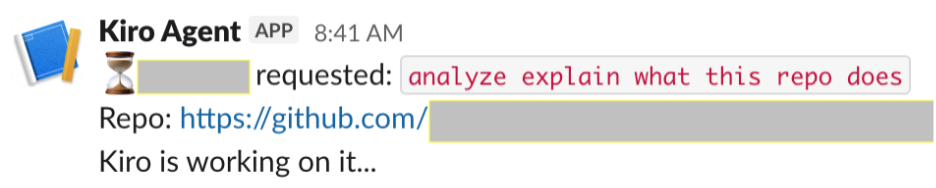
- Slack immediately displays: “@yourname requested: analyze auth-service for memory leaks – Kiro is working on it…”
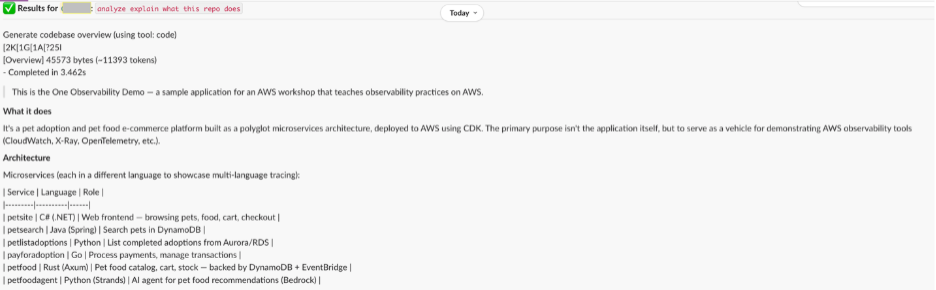
- After 15–60 seconds, the analysis results appear in the channel
You can also invoke the Worker Lambda directly for testing without Slack:
Sending /kiro with no arguments returns a usage help message.
Complete sample code can be found at aws-samples github repository – https://github.com/aws-samples/sample-kiro-chatops-slack-integration
Practical slash command patterns
Once deployed, the value comes from the commands your team uses daily. These patterns map to real engineering workflows:
| Category | Example command |
| Code analysis | /kiro analyze the payment module for error handling gaps |
| Code review | /kiro review the last 3 commits on main for breaking changes |
| Debugging | /kiro debug why the integration tests are failing |
| Knowledge | /kiro explain how the authentication middleware works |
| Sprint support | /kiro summarize all changes merged to main this week |
The value compounds when results are visible to the entire channel. A junior engineer who might hesitate to open a CLI tool can type /kiro explain and get the same analysis and the rest of the team learns from it.
Extending the pattern
Multi-repository support – The basic implementation targets a single preconfigured repository. To support multiple repositories, parse a URL from the slash command text and clone it at runtime. This adds 5-15 seconds of latency and requires a Git token in Secrets Manager for private repositories.
Threaded responses – Post the acknowledgment as a channel message and the full results as a thread reply. This keeps the channel readable while preserving context for long analyses.
Approval workflows – For commands that modify code (for example, “create a PR that fixes this issue”), add a confirmation step. The Worker posts proposed changes with interactive buttons; the action executes only after explicit approval.
Audit logging – Log every invocation to Amazon DynamoDB: who ran it, what they asked, how long it took. This gives engineering leadership visibility into how the team uses AI-assisted development.
Constraints and trade-offs
Constraints:
- Execution time – Lambda has a maximum 15-minute timeout. Complex analyses that exceed this will time out. The Worker is set to a 10-minute timeout with a 9-minute subprocess limit.
- Ephemeral storage – The /tmp volume defaults to 512 MB. A shallow clone (–depth 1) strips Git history, but the working tree alone can exceed this for large monorepos or repositories with binary assets. You can increase ephemeral storage up to 10 GB by setting EphemeralStorage in the SAM template, or scope the clone to a subdirectory with –sparse-checkout for oversized repositories.
- Slack message size – Each Block Kit text block is limited to 3,000 characters. Long outputs are truncated, with full results available in Amazon CloudWatch Logs.
- Package size – Kiro CLI with its dependencies exceeds Lambda’s 250 MB layer limit. A container image (up to 10 GB) is required.
Trade-offs:
- Lambda vs. Amazon ECS on AWS Fargate – Lambda is simpler and cheaper at the low-volume, bursty usage typical of a single team. Model your own break-even point with the AWS Pricing Calculator, since it shifts with average analysis duration and memory size. For high-volume teams, Fargate with a persistent container avoids cold starts. Start with Lambda and migrate if usage grows.
- Public channel vs. ephemeral – Results are posted as in_channel (visible to everyone). For sensitive analyses, change response_type to ephemeral. Consider making this configurable per command.
- Cost – Lambda compute is approximately $0.01-$0.05 per 10-minute execution at 1024 MB. The primary cost factor is Kiro CLI usage based on your subscription tier.
Security considerations
- Request verification — The Dispatcher validates every request using HMAC-SHA256 with the Slack signing secret. Requests with timestamps older than 5 minutes are rejected.
- Secrets management — Credentials are never hardcoded or stored in environment variables. They are fetched at runtime from Secrets Manager with IAM-scoped access.
- Least-privilege IAM — The Dispatcher can only invoke the Worker and read secrets. The Worker can only read secrets. Neither has broader AWS permissions.
- Audit trail — CloudWatch Logs capture every invocation including the command text, user, and Kiro CLI output. Enable AWS CloudTrail for API Gateway to track all incoming requests.
Cleaning up
To avoid ongoing charges, remove all resources when you are done testing:
To remove the Slack App, go to api.slack.com/apps, select Kiro Agent, and click Delete App.
Conclusion
This post demonstrated integrating Kiro CLI into Slack workflows using headless authentication, serverless functions, and secure credential management. The Dispatcher acknowledges instantly, the Worker runs Kiro CLI headless, and results appear in the channel where the team already communicates.
The architecture is deliberately simple – a slash command, an async handoff, and a container that runs a CLI tool. You can extend it with multi-repo support, threaded responses, or approval workflows as your team’s usage patterns emerge.
Start with a single slash command in one channel. The commands your team uses most will tell you where the friction was hiding.