AWS DevOps & Developer Productivity Blog
Feature Flag Orchestration with AWS DevOps Agent and LaunchDarkly
Introduction
Organizations that use feature flags alongside incident response tooling often connect the two manually. When an outage occurs, engineers must identify which flags are relevant, decide whether to disable them, and coordinate the change across teams. This manual process adds latency at the moment it matters most.
You can use AWS DevOps Agent and its MCP server feature to connect to LaunchDarkly’s hosted MCP server, enabling feature flag recommendations during both proactive deployment review and reactive incident response workflows. Once connected, DevOps Agent can query flag state, read targeting rules, and surface recommendations directly within the workflows where engineers make decisions.
This post walks through two primary use cases:
- Pre-deployment review where the release management capabilities in AWS DevOps Agent evaluate changes and a DevOps Agent Skill recommends feature flag coverage before code ships.
- Incident response where DevOps Agent queries LaunchDarkly flag state via MCP and recommends containment actions during active incidents.
We also cover the connection architecture, a reusable DevOps Agent Skill for pre-deployment flag validation, and links to get started.
Defense: Release Management and Proactive Flag Recommendations
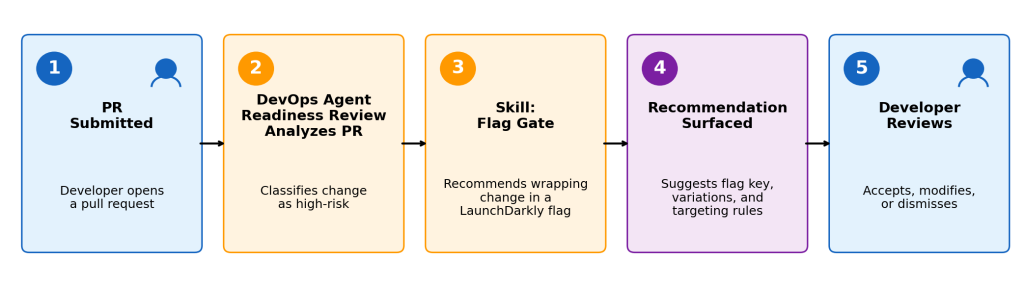
Figure 1: DevOps Agent’s readiness review identifies high-risk PRs and recommends LaunchDarkly feature flag coverage before code ships.
The release management capabilities (now in public preview) in AWS DevOps Agent evaluate code changes before they ship to production.
It performs functional testing in an AWS-managed verification environment, assesses risks to cross-codebase dependencies, evaluates adherence to your organization’s standards and best practices, and mathematically verifies that access control configurations in CloudFormation do not deviate from Well-Architected best practices.
AWS DevOps Agent is designed to be extended and customized to fit your tools, standards, and practices. Using the product’s primitives, you can add Skills that enhance its capabilities. For example, when a high-risk change is identified, a custom Skill can evaluate whether the change has adequate feature flag coverage, operating on deployment metadata and code analysis to identify gaps and surface a recommendation to the developer, such as recommending feature flags with LaunchDarkly when needed.
What the Skill Evaluates
The release readiness flag Skill classifies code changes into risk tiers (Critical, High, Moderate) based on what’s being modified — payments, authentication, database schemas, third-party integrations, new API endpoints, performance-sensitive paths, and more — and recommends feature flags proportional to the risk level.
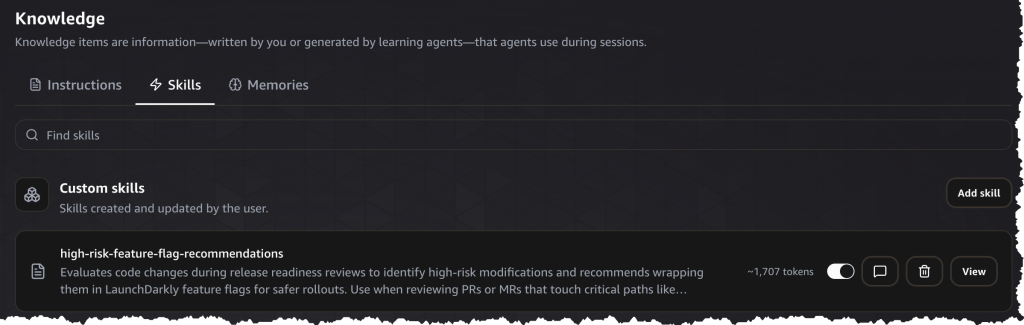
Figure 2: The high-risk-feature-flag-recommendations Skill configured in AWS DevOps Agent’s Knowledge panel.
What the Recommendation Includes
When the Skill identifies a gap, it surfaces a recommendation containing:
- Risk context: Why the change is flagged as high-risk (e.g., “This deployment modifies payment authorization logic across 3 downstream services with no existing rollback mechanism.”)
- Suggested flag configuration: A proposed LaunchDarkly flag key, variations, and default targeting rules aligned with the deployment plan.
- Rollout strategy: A recommended phased rollout (e.g., internal users first, then 5% of traffic, then full rollout) that matches the risk profile.
- Kill-switch behavior: What happens when the flag is turned off — the fallback code path, cleanup considerations, and data consistency implications.
Example Scenario
Consider a team deploying an update to a tax calculation service. The change modifies the tax rate computation logic, affecting all order totals across multiple regions. AWS DevOps Agent evaluates the deployment and classifies it as high-risk. The pre-deployment flag gate Skill then identifies:
- The change touches critical-path tax calculation code.
- No feature flag wraps the new computation behavior.
- The blast radius covers all active checkout sessions.
The Skill surfaces a recommendation: “This deployment modifies tax calculation logic with no existing feature flag coverage. Recommend wrapping the new tax computation in a LaunchDarkly flag (tax-calculation-v2) with a phased rollout targeting internal test accounts first, followed by 5% of production traffic.”
The developer can then action the recommendation, creating the flag in LaunchDarkly, adjusting the suggested configuration to fit their rollout plan, or noting the justification for proceeding without one as part of the deployment record.
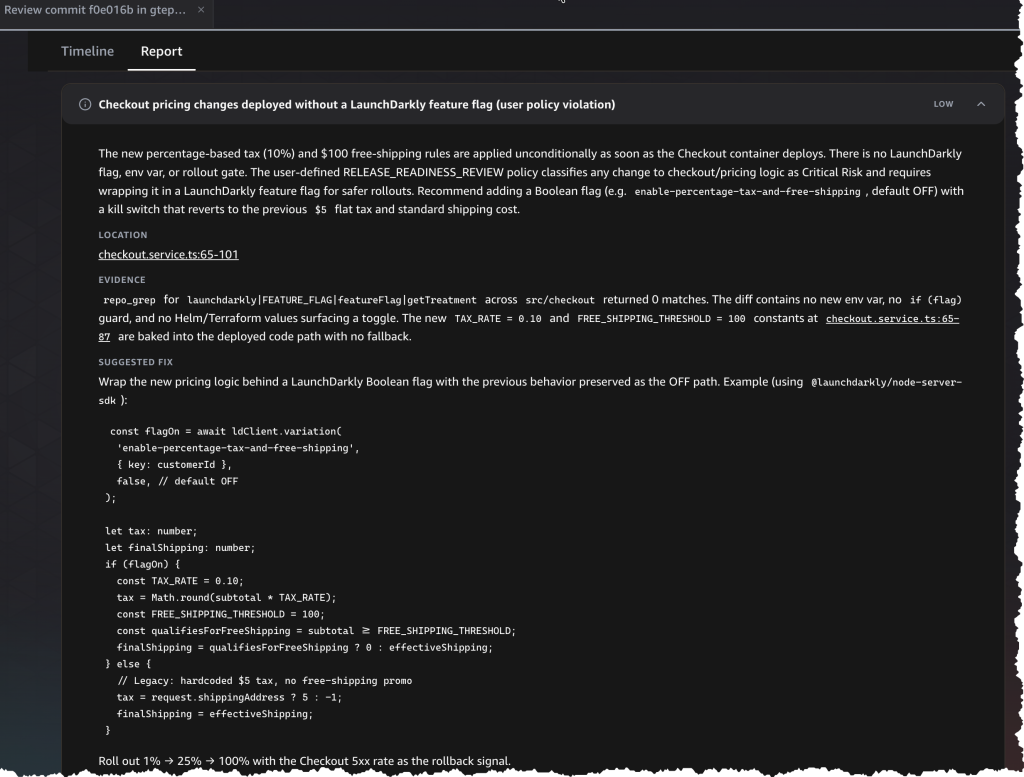
Figure 3: AWS DevOps Agent release management report identifying checkout pricing changes deployed without LaunchDarkly feature flag coverage, including a suggested fix with sample code.
Closing the Loop with Kiro IDE
DevOps Agent’s release management capabilities identify when a deployment needs feature flag coverage. Paired with Kiro IDE, this recommendation becomes actionable without leaving the development workflow.
Kiro connects to LaunchDarkly’s MCP server directly, providing flag integration capabilities during development. When a developer builds a new feature in Kiro, the IDE can query LaunchDarkly via MCP to check whether a flag already exists for that feature and generate code with the flag evaluation built in from the start.
Together, this creates one continuous flow: DevOps Agent identifies the risk and recommends flag coverage → the developer, working in Kiro, generates the flag and wraps the code in a single action → the deployment ships with coverage already in place. No context-switching between tools, no manual flag creation in a separate console.
Developers can also use Kiro’s flag integration independently during feature development, even before a deployment triggers a release management review. The two operate as layered coverage: if Kiro catches it during development, DevOps Agent validates the targeting rules match the rollout plan at deployment time. If the developer bypasses Kiro or uses a different toolchain, DevOps Agent still identifies the gap.
Offense: Flag Recommendations During Incident Response
During an active incident, speed of containment directly affects customer impact. DevOps Agent participates in incident response workflows by querying LaunchDarkly to understand current flag state, then recommending containment actions based on what it finds.
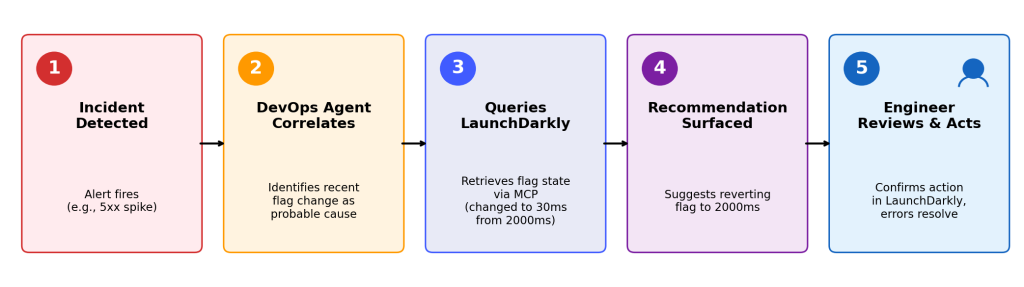
Figure 4: DevOps Agent identifies a flag change (30ms from 2000ms) as the probable cause, queries LaunchDarkly for state, and recommends reverting the value.
When you detect an incident, DevOps Agent correlates the affected service with recent deployments. It queries LaunchDarkly to identify feature flags associated with those deployments and their current state (enabled, targeting rules, rollout percentage). If a relevant flag is enabled, the agent recommends disabling it as a containment option before suggesting a full rollback.
Flag-based containment provides an alternative containment option that can help reduce the time to resolution. Disabling a flag may return behavior to the previous state, which can be faster than a full deployment rollback in some scenarios
Example Scenario
An alert fires indicating sustained 5XX errors on the bot-service. The on-call engineer engages DevOps Agent, which:
- Correlates the HTTP 503 errors with a LaunchDarkly feature flag change: bot-mutation-orchestration-timeout-ms was changed from the default 2000ms to 30ms (the “low latency” variation), applied to all traffic.
- Identifies that the 30ms timeout budget is insufficient for inter-service HTTP calls during bot creation and deletion orchestration, which require DynamoDB reads/writes plus IoT Core calls, causing ReadTimeout exceptions.
- Recommends reverting the bot-mutation-orchestration-timeout-ms flag to its default variation (2000ms) as the containment action, noting this will restore sufficient timeout budget without requiring a code deployment.
The engineer reviews the recommendation, updates the flag variation in LaunchDarkly, and the error rate returns to baseline within minutes.
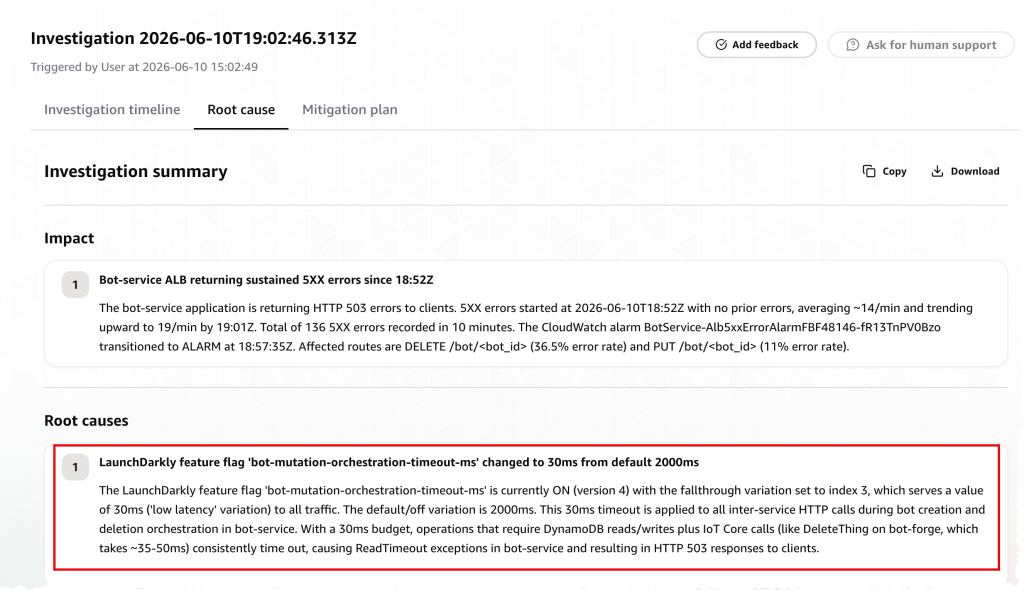
Figure 5: AWS DevOps Agent investigation summary identifying a LaunchDarkly feature flag timeout change as the root cause of sustained 5XX errors
Step-by-Step Mitigation Plans
When DevOps Agent identifies a root cause, it generates a structured mitigation plan with concrete, executable steps. Rather than a generic recommendation, the agent provides:
- Prepare — Document the current error baseline (with ready-to-run CLI commands, e.g., CloudWatch get-metric-statistics) and confirm the problematic configuration is still active before making changes.
- Execute — Revert the specific change (in this case, reverting the LaunchDarkly feature flag bot-mutation-orchestration-timeout-ms from 30ms back to the 2000ms default) with clear instructions on which variation to target.
- Verify — Validate that error rates return to baseline after the change, confirming the mitigation was effective.
Each step includes sub-steps with specific commands, API paths, and success criteria — giving the on-call engineer a clear, auditable runbook rather than a vague recommendation.
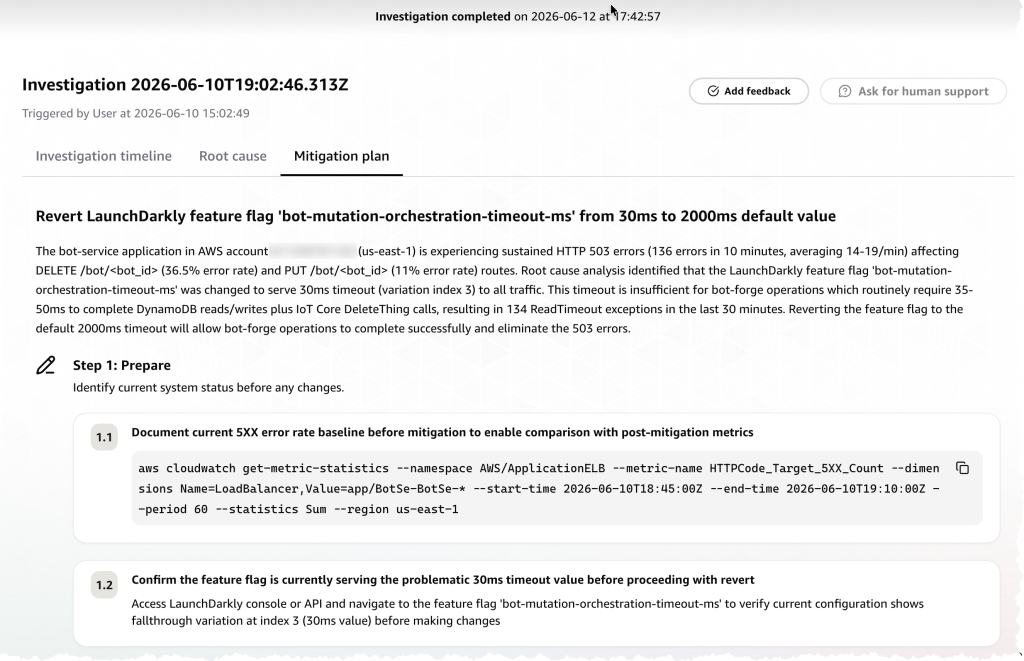
Figure 6: Structured mitigation plan generated by AWS DevOps Agent with executable steps to revert the feature flag and verify resolution.
Below, the LaunchDarkly targeting configuration shows the bot-mutation-orchestration-timeout-ms flag with its available variations. During the incident, the engineer reverted from the “low latency” variation back to “default” to restore the 2000ms timeout budget.
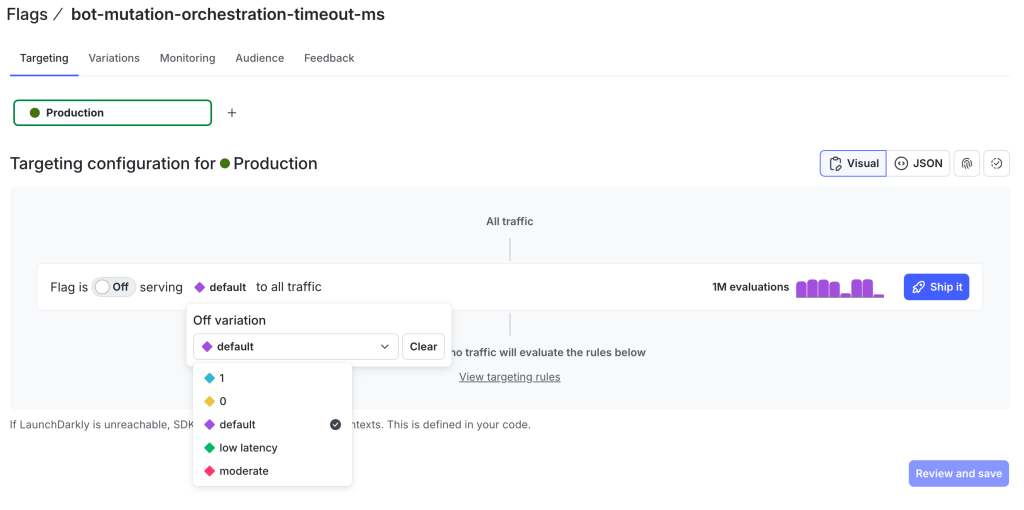
Figure 7: LaunchDarkly targeting configuration for the bot-mutation-orchestration-timeout-ms flag showing available variations including the default and low latency values.
Connecting to LaunchDarkly via MCP
As described in the introduction, DevOps Agent uses its MCP server feature to connect to LaunchDarkly’s hosted MCP server. This section covers the architecture and setup steps.
LaunchDarkly’s MCP server exposes flag management operations as agent-callable tools through the Model Context Protocol (MCP) standard. DevOps Agent connects as a client, giving it the ability to query flag state, read targeting rules, and list flags by project or environment without custom integration code.
Architecture
The connection follows this flow:
- DevOps Agent identifies a need for flag-related context (e.g., during incident response).
- DevOps Agent calls LaunchDarkly’s hosted MCP server using standardized MCP tool definitions.
- LaunchDarkly MCP Server translates the request into LaunchDarkly API calls and returns structured responses (flag state, targeting rules, rollout percentages).
- DevOps Agent uses the response to formulate recommendations presented to the engineer.
Registration and Configuration
To set up the connection:
- Register LaunchDarkly’s hosted MCP server endpoint with DevOps Agent.
- Configure authentication credentials (LaunchDarkly API key with appropriate scopes).
- Validate connectivity by running a test flag query.
For the full setup walkthrough, including detailed configuration steps and permissions requirements, refer to LaunchDarkly’s companion blog post (link placeholder).
The same LaunchDarkly MCP server connection is available in Kiro IDE for flag-aware code generation during development; see the Defense section above for how Kiro completes the pre-deployment workflow.
Example Skill: High-Risk Feature Flag Recommendations
AWS DevOps Agent Skills are modular instruction sets that extend the agent’s capabilities with specialized domain knowledge and investigation methodologies tailored to your infrastructure and operational workflows. AWS DevOps Agent supports a subset of the Agent Skills specification. The format is flexible, but this example is structured into the following sections:
- Risk Classification Criteria — defines what constitutes Critical, High, and Moderate risk changes
- Feature Flag Recommendation Format — specifies the output structure: flag name, flag type, targeting strategy, and kill switch guidance
- Example Recommendations — provides reference examples so the agent produces consistent, actionable output
- Integration Notes — describes how recommendations surface during release readiness reviews
- What NOT to Flag — explicitly scopes out low-risk changes to reduce noise
Below is the full Skill used in this example:
# High-Risk Code Feature Flag Recommendations

When performing a release readiness review, use this skill to identify high-risk code changes and recommend LaunchDarkly feature flags for safer, controlled rollouts.

## Risk Classification Criteria

Evaluate code changes against these risk categories:

### Critical Risk (Always recommend feature flag)
- **Payment/billing logic** — any changes to checkout, payment processing, subscription handling, or pricing calculations
- **Authentication/authorization** — login flows, session management, permission checks, OAuth/SSO integrations
- **Database schema changes** — migrations, new columns, index changes, especially on high-traffic tables
- **Data deletion or mutation** — bulk updates, cascading deletes, data transformations
- **Third-party API integrations** — new external service dependencies or changes to existing integrations
- **Core business logic** — order processing, inventory management, user registration flows

### High Risk (Strongly recommend feature flag)
- **New API endpoints** — especially public-facing or partner APIs
- **Performance-sensitive paths** — changes to hot paths, caching logic, query optimizations
- **Feature rewrites** — replacing existing functionality with new implementations
- **Concurrency changes** — threading, async processing, queue handling modifications
- **Configuration changes** — environment variables, feature toggles, service endpoints

### Moderate Risk (Consider feature flag)
- **UI changes to critical flows** — checkout pages, login screens, dashboard views
- **Logging/monitoring changes** — new metrics, log format changes, tracing modifications
- **Error handling changes** — exception handling, retry logic, fallback behaviors

## Feature Flag Recommendation Format

When recommending a feature flag, provide:

### 1. Flag Name
Use a descriptive, lowercase, hyphenated name:
- `enable-new-payment-processor`
- `use-v2-auth-flow`
- `rollout-order-service-refactor`

### 2. Flag Type
Recommend the appropriate LaunchDarkly flag type:
- **Boolean** — simple on/off for feature enablement
- **Multivariate** — when you need multiple variations (A/B testing, gradual migrations)
- **Number/String** — for configuration values that might need adjustment

### 3. Targeting Strategy
Recommend an appropriate rollout strategy:
- **Percentage rollout** — start at 1-5%, monitor, then increase (default for most changes)
- **User segment targeting** — internal users first, then beta users, then general availability
- **Environment targeting** — enable in staging/canary before production

### 4. Kill Switch Guidance
Explain what happens when the flag is turned off:
- What code path executes when disabled
- Any cleanup or rollback considerations
- Data consistency implications

## Example Recommendations

### Example 1: Payment Processing Change

**Code Change:** Refactored payment gateway integration to support new processor

**Recommendation:**
```CRITICAL RISK: Payment processing changes detected

Recommend wrapping in LaunchDarkly feature flag:
- Flag name: `enable-stripe-v2-integration`
- Flag type: Boolean
- Default: OFF (use existing payment flow)

Rollout strategy:
1. Enable for internal test accounts first
2. Expand to 1% of production traffic
3. Monitor payment success rates and error logs
4. Gradually increase to 100% over 1-2 weeks

Kill switch behavior: Reverts to existing payment processor immediately.
In-flight transactions will complete with their original processor.
```

### Example 2: New API Endpoint

**Code Change:** Added new `/api/v2/orders` endpoint with different response format

**Recommendation:**
```HIGH RISK: New API endpoint with breaking response format

Recommend wrapping in LaunchDarkly feature flag:
- Flag name: `enable-orders-api-v2`
- Flag type: Boolean
- Default: OFF (return v1 format)

Rollout strategy:
1. Enable for specific API clients by client_id targeting
2. Coordinate with consuming teams before enabling
3. Run both versions in parallel during migration period

Kill switch behavior: Returns v1 response format. Ensure v1
serialization logic remains in codebase until flag is permanent.
```

### Example 3: Database Migration

**Code Change:** Adding new index to high-traffic `orders` table

**Recommendation:**
```CRITICAL RISK: Database schema change on high-traffic table

Recommend wrapping dependent code in LaunchDarkly feature flag:
- Flag name: `use-orders-status-index`
- Flag type: Boolean
- Default: OFF (use existing query patterns)

Rollout strategy:
1. Deploy migration to create index (can be done independently)
2. Deploy code that uses new index behind flag
3. Enable flag in staging, verify query performance
4. Enable in production during low-traffic window
5. Monitor query latency and database load

Kill switch behavior: Queries fall back to non-indexed path.
May see temporary performance degradation but no data loss.
```

## Integration Notes

When the release readiness review identifies high-risk changes:

1. **Surface the risk level** clearly in the review summary
2. **Provide the flag recommendation** with copy-paste ready configuration
3. **Explain the rollout strategy** appropriate for the risk level
4. **Document the kill switch behavior** so operators know what to expect

## What NOT to Flag

Not every change needs a feature flag. Avoid recommending flags for:
- Pure refactoring with no behavior change
- Test file additions or modifications
- Documentation updates
- Dependency version bumps (unless major version with breaking changes)
- Code formatting or linting fixes
Activating the Skill
DevOps Agent loads Skill metadata at the start of each workflow and loads the full Skill content when it determines relevance. To ensure the feature flag Skill is consistently applied during release readiness reviews, add a directive to your DevOps Agent Instructions (Agent.md), which is loaded in full at the start of every session:
“When performing release readiness reviews, always load and apply the high-risk-feature-flag-recommendations skill to evaluate code changes for risk and recommend LaunchDarkly feature flags where appropriate.”
This guarantees the agent loads and applies the Skill for every release readiness review rather than relying on relevance detection to surface it.
Getting Started
To begin using feature flag orchestration with AWS DevOps Agent and LaunchDarkly:
- Enable AWS DevOps Agent in your AWS account to start building Skills and connecting MCP servers
- Set up the LaunchDarkly MCP server: Follow the LaunchDarkly MCP server documentation for installation and configuration instructions.
- Read the companion post: LaunchDarkly’s blog post explores why feature flags are essential infrastructure for SRE agents and how the LaunchDarkly MCP Server connects to AWS DevOps Agent for pre-deployment review and incident response workflows.
Conclusion
Feature flag orchestration with AWS DevOps Agent and LaunchDarkly reduces the manual coordination required during both deployment review and incident response. A DevOps Agent Skill surfaces flag recommendations before high-risk changes ship, and during incidents, the agent queries LaunchDarkly to recommend flag-based containment, providing faster resolution with less disruption than full rollbacks.
For developers using Kiro IDE, the same LaunchDarkly MCP server enables flag-aware code generation during development, shifting flag coverage left to the point of authorship. Together, these workflows provide layered coverage: individual developers build with flags, DevOps Agent’s release management capabilities validate coverage at deployment time, and DevOps Agent uses flag state during incident response.