AWS DevOps & Developer Productivity Blog
How CloudFormation express mode accelerates your development cycle
AWS CloudFormation helps you model and provision cloud infrastructure as code using JSON or YAML templates, or through tools like the AWS Cloud Development Kit (CDK) and AWS Serverless Application Model (SAM). Whether you create stacks directly, use change sets for preview, or deploy through CI/CD pipelines and AI agents, the speed of your deployment cycle directly impacts how fast you can iterate.
In March 2024, we published How we sped up AWS CloudFormation deployments with optimistic stabilization, where we explained how CloudFormation provisions resources and what happens during stabilization. That post introduced the CONFIGURATION_COMPLETE event and the optimistic stabilization strategy that reduced deployment times by up to 40%. Today, CloudFormation express mode takes this further.
Express mode is recommended for development workflows where you iterate frequently. It makes your deployments complete faster so you can get immediate feedback. For production deployments where you need resources ready to serve traffic before proceeding, the default behavior remains the right choice. Combined with pre-deployment validation, which catches template errors before provisioning begins, Express mode completes the iterate-faster picture: validate in seconds, deploy in seconds. To understand what express mode gives you, you first need to understand what CloudFormation has always done during deployment.
What CloudFormation does during deployment
When you add an AWS::SQS::Queue to your template and deploy, the queue is created. But can it receive messages yet? Often, no. There’s a window between “resource created” and “resource can serve traffic.” This is true across AWS services. An EC2 instance is “launched” before it can respond to HTTP requests. A CloudFront distribution is “created” before it propagates to edge locations worldwide. An ECS service is “active” before its containers pass health checks and reach desired capacity. And a Lambda function deletion isn’t complete until its network interfaces are cleaned up.
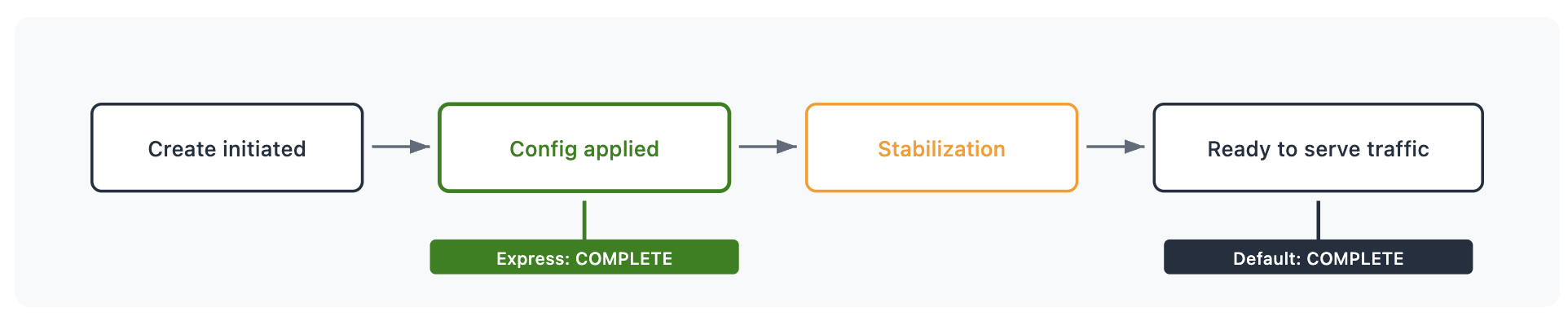
Figure 1: Single resource lifecycle phases
This process is called stabilization. Stabilization means that when a stack operation reports CREATE_COMPLETE, the resources can serve traffic. This is useful for production pipelines where “stack complete” should mean “ready to shift traffic.” Now, with express mode, you have a second option.

Figure 2: Default deployment mode behavior timeline
What Express mode changes
Express mode gives you control over when you want CloudFormation to report completion. With express mode, CloudFormation completes the stack operation as soon as resource configuration is applied. Resources continue becoming ready to serve traffic in the background. CloudFormation communicates this per resource with a status reason: “Resource operation completed using express mode. It may continue becoming available in the background.” You always know which resources have completed configuration and which are still stabilizing. Regardless of mode, CloudFormation still:
- Respects resource dependencies within the stack – if a resource references another resource’s ID or attribute, the referenced resource’s configuration is confirmed first. Resources with no dependencies on each other proceed in parallel.
- Creates, updates, or deletes each resource the same way
- Retries dependent resources that encounter transient failures during the operation
Here’s what that looks like for a deployment: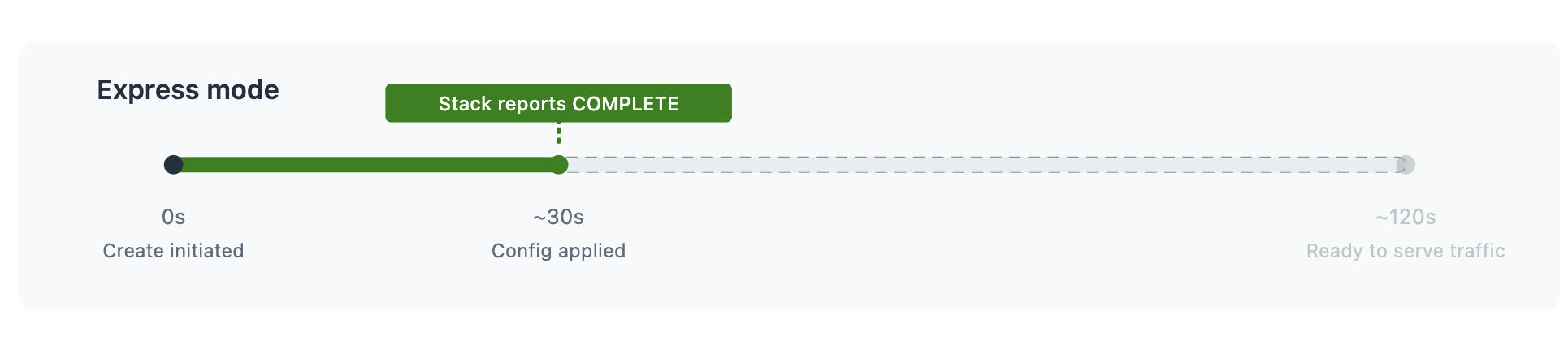
Figure 3: Express mode timeline
The resource takes the same time to become ready to serve traffic in both cases. Express mode makes your iteration cycle faster by not blocking you on the stabilization wait.
When this matters
Development iteration
You’re building a VPC with subnets, a security group, and an ALB. You need the ALB’s DNS name and the security group ID to configure the next layer of your application. You don’t need to send traffic to the ALB right now. You just need to know it exists and get its attributes. With Express mode, you get the ARN, the DNS name, and the security group bindings in seconds. You proceed to your next iteration.
AI agent workflows
An AI agent iterating on infrastructure needs a tight feedback loop: deploy, observe the result, adjust, deploy again. The agent doesn’t need the CloudFront distribution to propagate globally before deciding whether the template is correct. It needs confirmation that the configuration was accepted.
Express mode turns a 5-10 minute CloudFront deployment into a sub-minute confirmation. The agent can validate, refine, and redeploy multiple times in the window a single default deployment would have taken.
Dependent stack deployments
When you deploy multiple stacks in sequence, each stack operation completes faster with Express mode. Whether dependencies exist within a stack or across stacks via import/export, Express mode handles retries and waits to make sure dependent resources can still be provisioned. It moves faster without breaking your dependency chain
Getting started
Enable Express mode per operation with a single parameter:
aws cloudformation create-stack \
     --stack-name my-app \
--template-body file://template.yaml \
--deployment-config '{"mode": "EXPRESS"}'Express mode disables rollback by default for faster iteration. If a resource fails to configure, the stack stays in place and you can fix and retry immediately. To re-enable rollback:
--deployment-config '{"mode": "EXPRESS", "disableRollback": false}'With CDK
cdk deploy --express

#enable rollback
cdk deploy --express --rollback
With SAM
Use the --express flag with sam deploy or sam sync:
sam deploy --express

sam sync --express
To persist the setting, add --save-params and Express mode is saved to your samconfig.toml:
sam deploy --express --save-paramsThe --disable-rollback flag works alongside --express to control rollback behavior within the deployment configuration.
No template changes. No new resource types. The same template deploys the same resources. You’re choosing when to receive the “done” signal.
Additional considerations
Change sets: Express mode is supported with change sets. Specify --deployment-config at create-change-set time, and the configuration is stored with the change set and applied when executed.
Nested stacks: When you enable Express mode on a parent stack, it propagates to all nested stacks in the hierarchy. All resources across the hierarchy complete when configuration is applied.
For a complete list of supported features and limitations, see the CloudFormation Express mode documentation.
Conclusion
Express mode gives you immediate confirmation that your infrastructure configuration is applied, so you can move to your next iteration without waiting for stabilization. It separates “is my configuration correct” from “are my resources serving traffic” and lets you decide which question you need answered right now.
For development iteration, AI agent workflows, and dependent stack deployments where you need resource identifiers rather than traffic readiness, Express mode delivers that answer much more quickly. For production deployments where “stack complete” should mean “ready to serve traffic,” the default behavior remains the right choice.