AWS DevOps & Developer Productivity Blog
Agentic application modernization at scale with Strands and Amazon Transform custom
Introduction
Modernizing applications by upgrading language runtimes, migrating SDKs, and refactoring frameworks is important for cloud adoption but can be labor-intensive at scale. Each repository requires analysis of dependencies and transformation needs; custom transformation logic must be built and validated, and changes are often executed sequentially across codebases. If you have hundreds of applications, this stretches timelines from months to years, while introducing inconsistency across your teams.
To address this, Amazon Web Services (AWS) provides a composable set of building blocks. AWS Transform custom enables reusable, CLI-driven code transformations for upgrading runtimes, SDKs, and frameworks consistently across large portfolios. Strands Agents provides a framework for building multi-agent systems that coordinate complex transformation workflows. Amazon Bedrock AgentCore delivers the managed runtime, memory, and observability to operate these agents reliably in production. Together, they replace manual, sequential modernization with an intelligent, automated approach that scales.
In this post, we show you how to combine these services to build a generative AI–powered, agentic modernization system that can automatically analyze application repositories, determine required changes, create missing transformations, and execute them in parallel at scale.
Solution overview
The solution uses an agentic architecture that separates intelligent decision-making from deterministic execution, enabling automation at scale while maintaining consistency and control. In this post, you will build an AI-driven application modernization system that demonstrates how multi-agent workflows can be applied to large-scale code transformation scenarios. You interact with the system through a React-based frontend or API interface, submitting individual repositories or batch workloads via CSV inputs. Requests are processed asynchronously through an API layer that invokes an orchestrator agent running on Amazon Bedrock AgentCore, which coordinates specialized agents to analyze codebases, identify transformation requirements, and manage execution workflows. Results are stored and surfaced through the interface, allowing users to track progress and review outputs in real time.The workflow begins with repository analysis, where the system inspects application codebases to identify languages, dependencies, and required upgrades such as runtime version changes or SDK migrations. Based on this analysis, the system maps each application to an existing transformation when available. If no suitable transformation exists, a creation agent dynamically generates one using natural language instructions and publishes it to a centralized registry for reuse, creating a continuously improving system where transformation coverage expands over time.
Once transformations are identified or created, an execution agent runs them at scale by invoking AWS Batch jobs that execute the AWS Transform custom CLI, enabling parallel processing across multiple repositories. The orchestrator coordinates all agents, maintains workflow state using Amazon Bedrock AgentCore Memory, and ensures reliable execution through structured task decomposition, tool invocation, and error handling. While the example focuses on application re-platforming, the same architectural pattern can be applied to other large-scale code analysis and automation workflows.
The following architecture diagram (Figure 1) illustrates the various components of our solution as outlined in this section: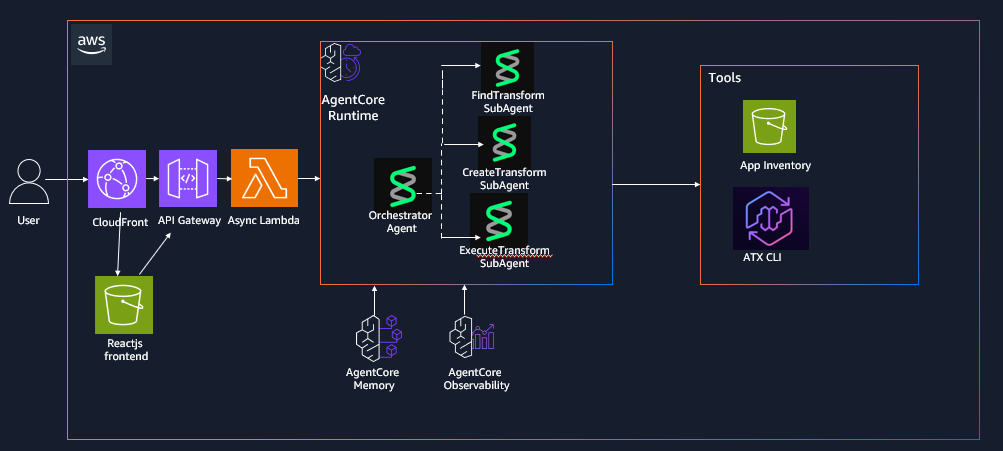
Figure 1: AWS Transform custom Agentic Orchestration Architecture using Strands agents and Amazon Bedrock AgentCore
Prerequisites
Complete the following prerequisites:
- Install the AWS Command Line Interface (AWS CLI).
- Install the AWS SAM CLI v1.100.0+
- Install Docker v20.x+.
- Install Node.js v18.x+
- Install Python v3.11+
- Install the AWS CDK CLI
- Enable access to a Bedrock model for the orchestrator in your deployment region. The default model can be configured through the Amazon Bedrock model access console. To use a different model, set `BEDROCK_MODEL_ID` in `deployment/config.env` before Step 3 and enable access to that model instead. Model access approval can take a few minutes in some accounts, so complete this step before deploying.
Dependencies
The Strands Agents implementation has the following dependencies that are packaged in the DockerFile:
- Strands multi-agent framework: strands-agents
- Strands agent tools and utilities: strands-agents-tools
- HTTP library for API calls: requests
- Amazon Bedrock AgentCore SDK: bedrock-agentcore
- AWS SDK for Python: boto3
Deploy the solution
The solution is available for download on the GitHub repo. This post walks through the CDK + SAM deployment path (Option A in the repository README). The repository also includes a CDK-only option (Option B); see the repository README for details.
Step 1: Clone the repository
git clone https://github.com/aws-samples/aws-transform-custom-samples.git
cd aws-transform-custom-samples/agentic-atx-platform
Step 2: Configure AWS Credentials
# Configure AWS CLI
aws configure
# Verify credentials
aws sts get-caller-identity
Step 3: Deploy ATX CLI Container image and frontend using AWS CDK
# Copy configuration template (defaults work for most setups; edit only to change region or Bedrock model)
cd deployment
cp config.env.template config.env
# Authenticate with Amazon ECR Public (required for the Docker base image pull)
aws ecr-public get-login-password --region us-east-1 | docker login --username AWS --password-stdin public.ecr.aws
# Build the UI placeholder so CDK’s UI stack has ui/dist/ to deploy
cd ../ui && npm install && npx vite build
# Install CDK dependencies and bootstrap (run once per account/region)
cd ../cdk
npm install cdk bootstrap
# Build TypeScript and deploy the three stacks
npx tsc
CDK_DEFAULT_ACCOUNT=$(aws sts get-caller-identity --query Account --output text)
cdk deploy AtxContainerStack AtxInfrastructureStack AtxUiStack --require-approval never
# Note for accounts without a default VPC , pass the VPC context flags to `cdk deploy`:
cdk deploy AtxContainerStack AtxInfrastructureStack AtxUiStack --require-approval never
cdk deploy AtxContainerStack AtxInfrastructureStack AtxUiStack --require-approval never -c existingVpcId=vpc-xxx -c existingSubnetIds=subnet-aaa,subnet-bbb -c existingSecurityGroupId=sg-ccc
# Subnets must be public (auto-assign public IP enabled) or private with a NAT gateway so Fargate tasks can reach Amazon ECR, Amazon S3, and Git repositories.
Step 4: Deploy Strands Agents to AgentCore runtime using AWS SAM
cd ../sam./deploy.sh
# Invoke the deploy Lambda to create the AgentCore Runtime via the bedrock-agentcore-control SDK (takes 2-5 minutes)
aws lambda invoke --function-name atx-deploy-agentcore \ --region us-east-1 \ --cli-binary-format raw-in-base64-out \ --payload '{"action":"deploy"}' \ --cli-read-timeout 900 /tmp/deploy-output.jsoncat /tmp/deploy-output.json
Step 5: Wire the AgentCore runtime ARN into the async invoke Lambda
ACCOUNT_ID=$(aws sts get-caller-identity --query Account --output text)
RUNTIME_ARN=$(python3 -c "import json; print(json.loads(json.load(open('/tmp/deploy-output.json'))['body'])['runtime_arn'])")aws lambda update-function-configuration \ --function-name atx-async-invoke-agent \ --region us-east-1 \ --environment "Variables={AGENT_RUNTIME_ARN=${RUNTIME_ARN},RESULT_BUCKET=atx-custom-output-${ACCOUNT_ID},JOBS_TABLE=atx-transform-jobs}"
Step 6: Rebuild and deploy the frontend with AgentCore API endpoint
# Update the React application with the deployed API endpoint and redeploy it.
API_URL=$(aws cloudformation describe-stacks \ --stack-name AtxAgentCoreSAM \ --region us-east-1 \ --query 'Stacks[0].Outputs[?OutputKey==`ApiEndpoint`].OutputValue' \ --output text)
cd ../ui
VITE_API_ENDPOINT=$API_URL npx vite build./deploy-aws.sh
# This rebuilds the React application with the correct API endpoint, uploads it to Amazon S3, and invalidates the Amazon CloudFront distribution.
Step 7: Access the application
# After deployment completes, retrieve the CloudFront distribution URL from the AWS CloudFormation outputs and open it in your browser to access the application UI.
aws cloudformation describe-stacks \ --stack-name AtxUiStack \ --region us-east-1 \ --query 'Stacks[0].Outputs[?OutputKey==`WebsiteUrl`].OutputValue' \ --output text
Using the application
The UI exposes five tabs covering the complete modernization workflow: browsing available transformations, executing a transformation on a single repository, creating a new custom transformation with natural language, batch-processing a CSV of repositories, and tracking job status. This section walks through two of the most common flows.
Create a custom transformation from natural language
Open the Create Custom tab, describe the transformation in plain English (for example, “Upgrade Spring Boot 2 applications to Spring Boot 3”), and optionally provide a reference repository URL. The creation agent analyzes the source, generates a transformation definition, and publishes it to the ATX registry for reuse across the portfolio.
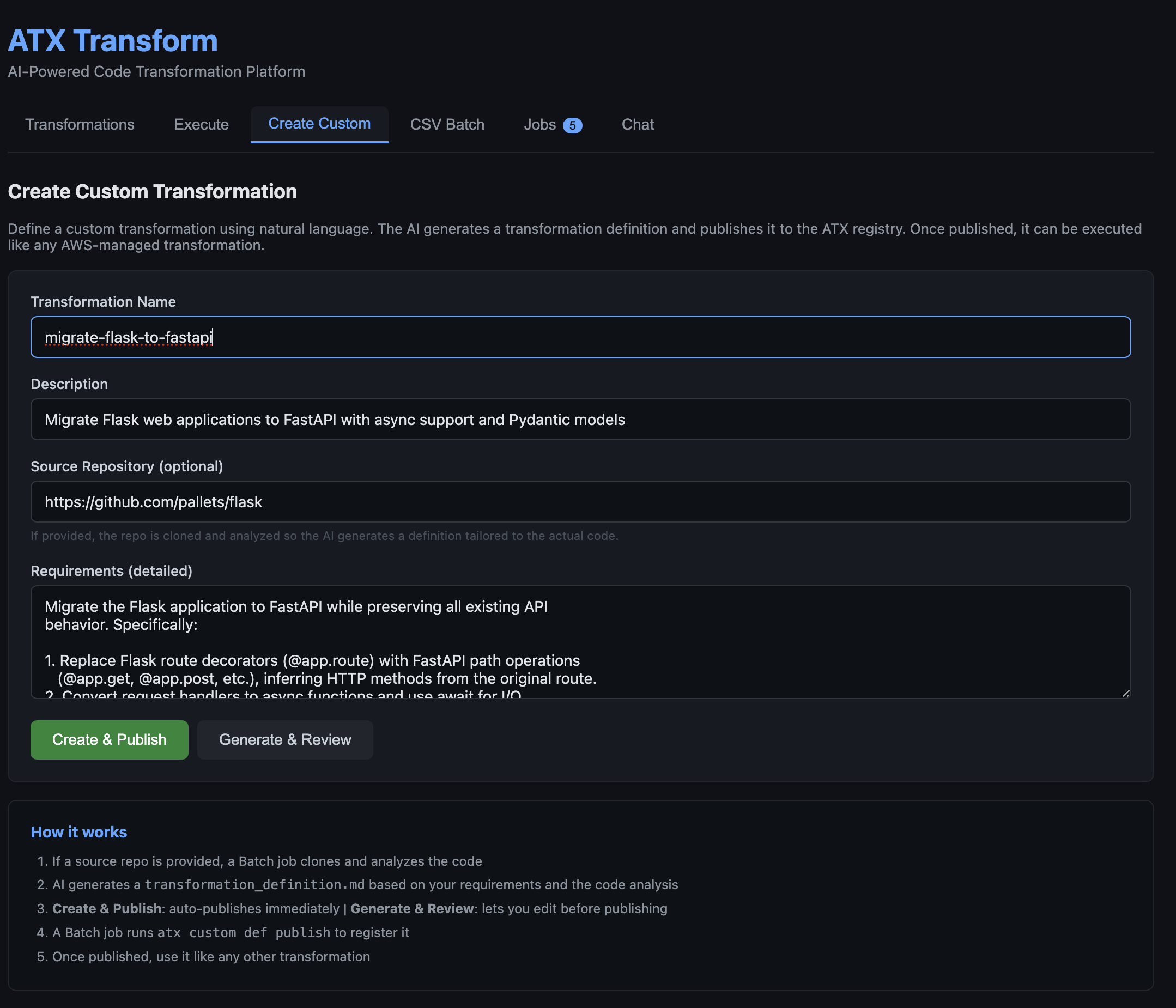
Figure 2: Describing a custom transformation in plain English. The form accepts a name, description, optional reference repository, and natural-language requirements.After submitting, the orchestrator clones the reference repository, analyzes the source, and generates a transformation definition tailored to the actual code patterns found in the codebase. This takes 1–5 minutes depending on repository size. The generated definition is then shown for review in the Jobs tab, where it can be edited before publishing to the ATX registry.
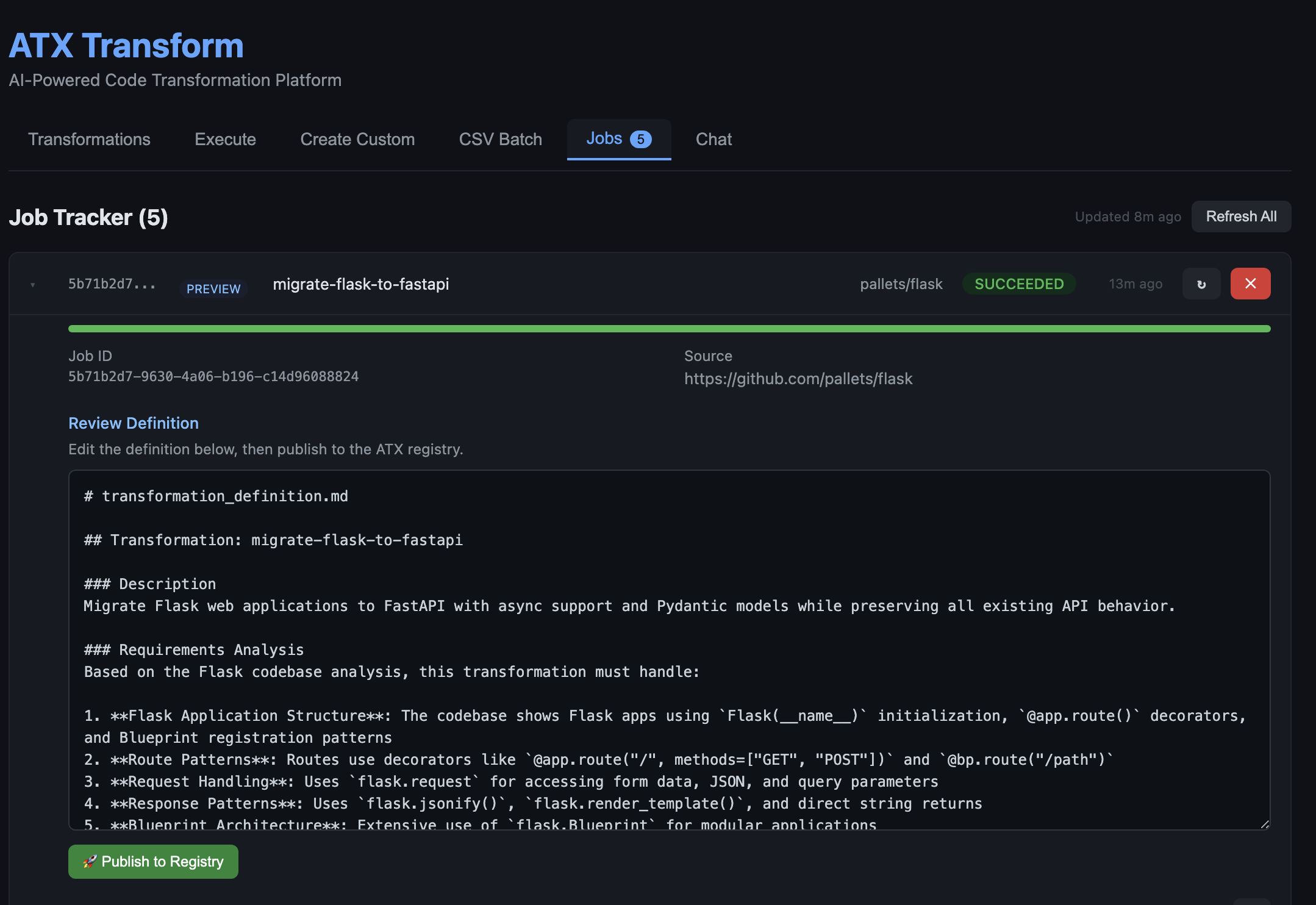
Figure 3: The AI-generated transformation definition shown for review in the Jobs tab. The agent analyzed the Flask codebase and produced a detailed definition covering routes, request handling, response patterns, and Blueprint architecture. The user can edit the definition in-place and click Publish to Registry when ready.Once published, the new transformation appears in the Transformations tab alongside AWS-managed transformations and can be executed the same way on any repository.
Run a batch of repositories from a CSV
Open the CSV Batch tab and upload a CSV listing repository URLs and target transformations. A sample `sample-batch.csv` is included in the repository at `agentic-atx-platform/ui/sample-batch.csv`. The preview shows the parsed rows before submission. On Submit All, each row becomes a separate AWS Batch job running in parallel, and the Jobs tab shows live status as repositories complete.
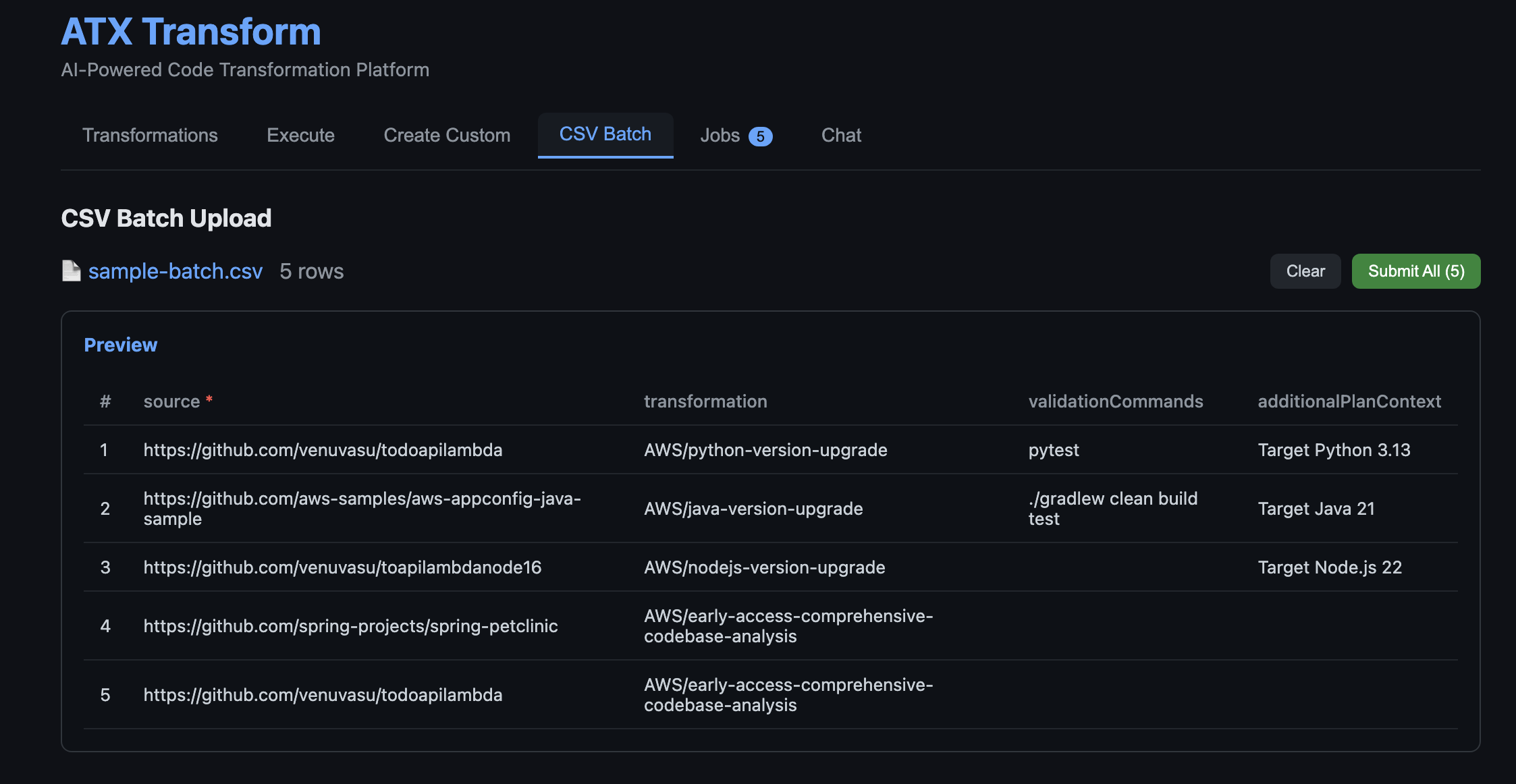
Figure 4: Uploading a batch of repositories for parallel processing. The CSV lists a source repository URL, target transformation, optional validation commands, and additional plan context per row. Each row becomes an independent AWS Batch job on submission.
Clean up
To avoid recurring charges, remove the resources after trying the solution.
Step 1: Delete the SAM Stack
sam delete --stack-name AtxAgentCoreSAM --region us-east-1 --no-prompts
Step 2: Delete the CDK Stacks
Remove the three CDK stacks in reverse order. The S3 buckets are configured with `autoDeleteObjects: true`, so CDK will empty them before deletion.
cd cdk
npx cdk destroy AtxUiStack AtxInfrastructureStack AtxContainerStack --force
Conclusion
In this post, you learned how to build a generative AI–powered, agentic system for application modernization that can analyze application repositories, determine required code changes, create missing transformations, and execute those transformations at scale. By combining AWS Transform Custom for transformation execution with Amazon Bedrock AgentCore for orchestration, and Strands Agents for multi-agent coordination and AWS Transform container solution for parallel processing, this approach demonstrates how intelligent automation can be applied to large-scale code transformation workflows.
This solution directly addresses the challenges of traditional modernization approaches. It reduces manual effort by automating repository analysis and transformation mapping, eliminates gaps in transformation coverage by dynamically generating reusable transformations, and significantly improves scalability through parallel execution using AWS Batch.
By introducing a centralized, agent-driven workflow with built-in observability and state management, organizations can achieve faster, more consistent, and governed modernization across large application portfolios. To get started, deploy the solution in your AWS environment, test it with a sample repository or batch workload, and extend it by creating custom transformations tailored to your applications. You can further integrate this approach into your CI/CD pipelines to enable continuous modernization and accelerate your cloud migration initiatives.
About the authors
 Kanishk Mahajan is Principal – AI/ML with AWS Professional Services. In this role, he leads GenAI and agentic transformations for some of AWS largest customers in Telco and Media & Entertaintment.
 Sandeep Batchu is a Senior Security Architect at Amazon Web Services, with extensive experience in software engineering, solutions architecture, and cybersecurity. Passionate about bridging business outcomes with technological innovation, Sandeep guides customers through their cloud and generative AI journey, helping them design and implement secure, scalable, and resilient architectures in the era of AI-driven transformation.
 Venugopalan Vasudeven (Venu) is a Principal Specialist Solutions Architect at AWS, where he leads Agentic AI initiatives focused on AWS Transform. He helps customers adopt and scale AI-powered developer and modernization solutions to accelerate innovation and business outcomes.