.NET on AWS Blog
Deploy Blazor Server applications on Amazon ECS with AWS Fargate
When modernizing legacy ASP.NET Web Forms applications with tools such as AWS Transform, Blazor Server is often recommended as the target framework. With Blazor, you gain a familiar component-based programming model – but you also inherit a deployment challenge. Blazor Server maintains a persistent WebSocket connection and an in-memory circuit for each browser session, which means your infrastructure must route every request from a browser to the same Amazon Elastic Container Service (Amazon ECS) container instance. If that routing breaks, the circuit is lost and the user sees a reconnection error.
Blazor provides two hosting models.
- Blazor WebAssembly runs as a client-side Single-Page Application (SPA) and can be deployed to Amazon Simple Storage Service (Amazon S3) with Amazon CloudFront.
- Blazor Server stores application state on the server and streams UI updates over a persistent WebSocket connection. This architecture introduces three deployment requirements that this post addresses.
In this post, you deploy a Blazor Server application on Amazon ECS with AWS Fargate. You provision the infrastructure with the AWS Cloud Development Kit (AWS CDK) in C# and expose the application through CloudFront.
This post covers the following topics:
- How the Blazor Server lifecycle constrains the deployment architecture
- How to prepare a Blazor Server application for container deployment behind a load balancer
- A complete AWS CDK stack for Amazon ECS with Fargate, an internal Application Load Balancer, and a CloudFront VPC origin
- How to configure session affinity, WebSocket timeouts, and graceful draining on Amazon ECS
Prerequisites
To follow along with this post, you need the following:
- An active AWS account with permissions to create and manage VPCs, Amazon ECS clusters, and CloudFront distributions
- .NET 10 SDK or later
- AWS CDK v2 installed and bootstrapped in your target account and Region
- Docker for building container images
- Basic familiarity with Blazor, container orchestration, and infrastructure-as-code
Lifecycle of a Blazor Server application
Before you review the infrastructure, consider what happens between a browser and a Blazor Server application.
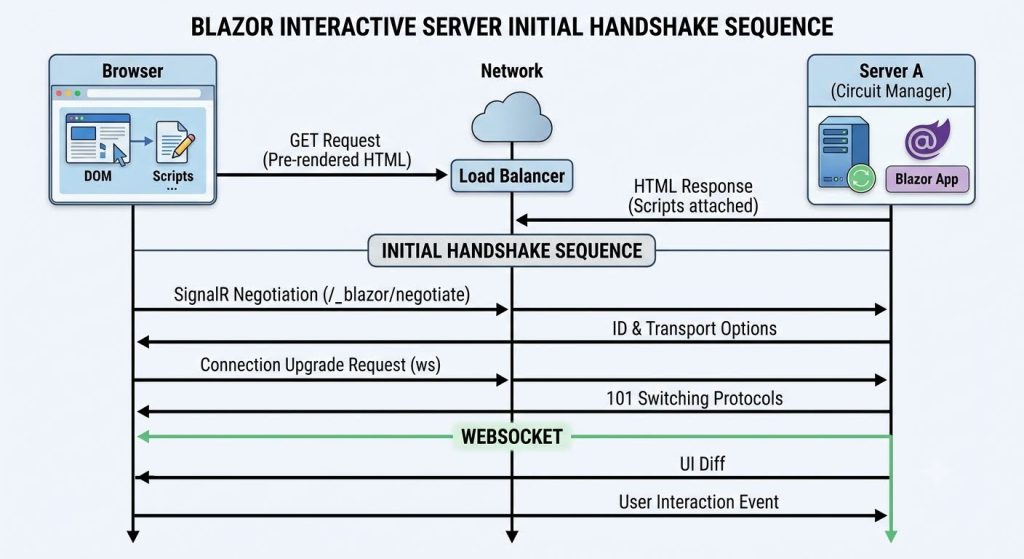
Figure 1: Blazor Server lifecycle
- Initial HTTP request – The browser sends a GET request. The server prerenders the component tree into HTML and returns fully formed markup along with the Blazor JavaScript client (
blazor.web.js), which negotiates the persistent connection. - SignalR negotiation – The script sends a POST request to
/_blazor/negotiate. The server responds with a connection ID and the supported transports, in preference order: WebSockets, Server-Sent Events, then Long Polling. This response binds the client to a specific server instance for the lifetime of the connection. - Connection upgrade – The client opens a WebSocket connection to
/_blazor?id={connectionId}. The server responds with 101 Switching Protocols, which upgrades the connection to full duplex. This WebSocket connection remains open for the entire session. - Circuit creation – After the WebSocket connection is established, the server creates a circuit, which is the server-side representation of one session. A circuit holds the component tree, the current state, the render tree used for diffing, scoped services, and JavaScript interop bindings – all in the memory of a single server process. You cannot serialize, share, or transfer circuits. If the process stops, the circuit is lost.
- Interaction loop – Events such as clicks, keystrokes, and form submissions travel over the WebSocket connection. The server dispatches each event to the relevant component, re-renders the affected subtree, diffs the result against the previous tree, and returns a binary UI patch. The JavaScript client applies the patch to the DOM.
Deployment requirements
This lifecycle produces three requirements that shape the deployment architecture on any container platform:
- State resides in server memory. The circuit is bound to one process.
- Connections must be sticky. Every request from a browser must reach the same task or pod.
- Deployments disconnect users. Replacing a task or pod ends its circuits.
The remainder of this post describes how to meet these requirements on Amazon ECS.
Architecture Overview
An Amazon ECS deployment for Blazor Server must meet the following requirements:
- Route every request from a given browser to the same task for the lifetime of the circuit.
- Keep the WebSocket connection open across every network hop between the browser and that task.
- Store any data that must survive the loss of a circuit outside the task.
Figure 2 shows a Blazor Server application deployed on Amazon ECS with Fargate.
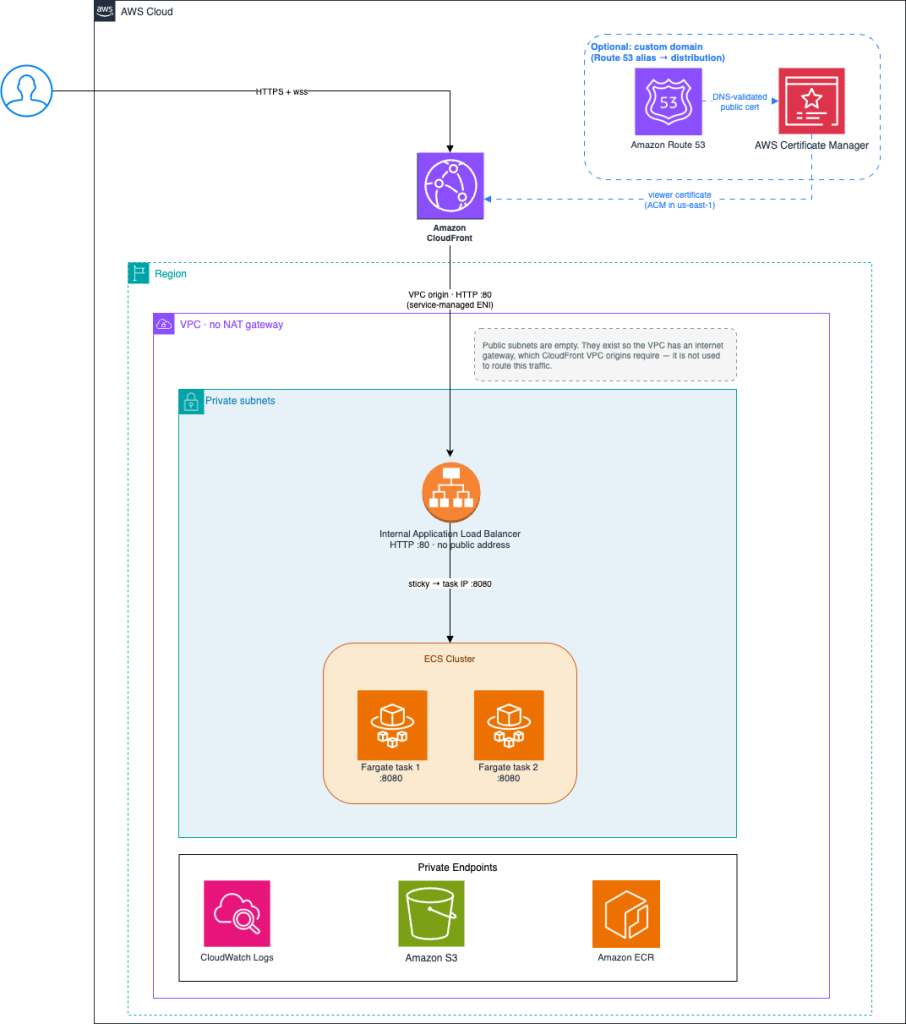
Figure 2: Blazor Server application hosted on Amazon ECS with Fargate
Requests enter through CloudFront, which is the only public endpoint. Behind CloudFront, an internal Application Load Balancer in isolated private subnets forwards traffic to two Fargate tasks on port 8080. The tasks reach AWS APIs through Amazon Virtual Private Cloud (Amazon VPC) endpoints. The load balancer has no public address. CloudFront reaches it through a VPC origin, which is a service-managed elastic network interface (ENI) that CloudFront places in your private subnets. No component in the request path is internet-facing except the distribution. TLS terminates at CloudFront using its default *.cloudfront.net certificate, so you do not need to import a certificate or configure a custom domain to provide a trusted HTTPS endpoint.
Trade-off: This sample places tasks and VPC endpoints in a single Availability Zone to minimize costs. For production workloads, deploy tasks across multiple Availability Zones and create interface endpoints in each Availability Zone. Update endpointSubnets to include all private subnets.
Sizing tip: Each Blazor Server circuit consumes approximately 250 KB of memory for a minimal application. The Microsoft hosting guidance suggests budgeting at least 1.3 GB of application memory for 5,000 concurrent users, or roughly 273 KB per user. Applications with forms, data grids, and per-circuit state consume more.
Size the task or pod for the circuits plus the .NET runtime, the framework, and GC headroom, which together account for a few hundred MB before the first user connects. The 1 GiB task in this post is sized for a sample workload, not for a circuit count derived from arithmetic. Measure your own application under load and set DesiredCount and your autoscaling targets from those measurements.
Create Sample application
Step 1: Create an Amazon ECR repository:
aws ecr create-repository --repository-name anycompany/expense-portal
Step 2: Create the Blazor Server project:
dotnet new blazor -o AnyCompany.ExpensePortal --interactivity Server
Step 3: Add health check endpoints:
/healthfor the load balancer target group health check/alivefor liveness probe
The snippets in this section need the following using directives at the top of Program.cs. The Blazor template does not include them:
using Microsoft.AspNetCore.DataProtection;           // SetApplicationName
using Microsoft.AspNetCore.Diagnostics.HealthChecks; // HealthCheckOptions
using Microsoft.AspNetCore.Http.Connections; // HttpConnectionDispatcherOptions
using Microsoft.AspNetCore.HttpOverrides;            // ForwardedHeaders
using Microsoft.Extensions.Diagnostics.HealthChecks; // HealthCheckResult
builder.Services.AddHealthChecks()
    .AddCheck("self", () => HealthCheckResult.Healthy(), tags: ["live"]);
...
app.MapHealthChecks("/health").AllowAnonymous();
app.MapHealthChecks("/alive", new HealthCheckOptions
{
    Predicate = registration => registration.Tags.Contains("live")
}).AllowAnonymous();
Step 4 - Configure the application to accept X-Forwarded-* headers so that it can determine the original HTTP scheme and client IP address.
builder.Services.Configure<ForwardedHeadersOptions>(options =>
{
    options.ForwardedHeaders = ForwardedHeaders.XForwardedFor | ForwardedHeaders.XForwardedProto;
    options.KnownIPNetworks.Clear();
    options.KnownProxies.Clear();
});
var app = builder.Build();
app.UseForwardedHeaders(); // Must be called before other middleware

// The load balancer overwrites X-Forwarded-Proto with its listener protocol (http), so the
// original scheme is asserted here instead.
app.Use((context, next) =>
{
    context.Request.Scheme = "https";
    return next();
});
Listing 1: Program.cs using directives
Step 5: When you run multiple container instances, configure ASP.NET Core Data Protection to use a shared key store. Without shared keys, antiforgery tokens and authentication cookies created by one instance are invalid on another, which causes silent failures during reconnection. Use AWS Systems Manager Parameter Store as the backing store.
Add the Amazon.AspNetCore.DataProtection.SSM NuGet package:
dotnet add package Amazon.AspNetCore.DataProtection.SSM
Step 6: Configure Data Protection in Program.cs:
builder.Services.AddDataProtection().PersistKeysToAWSSystemsManager("/BlazorApp/DataProtection").SetApplicationName("AnyCompany.ExpensePortal");
This call makes Parameter Store a startup dependency. Two things must be in place before you deploy to Amazon ECS:
- Permissions. The Amazon ECS task role needs ssm:GetParametersByPath, ssm:GetParameter, ssm:GetParameters, and ssm:PutParameter on arn:aws:ssm:<region>:<account>:parameter/BlazorApp/DataProtection*.
- Network reachability. The Amazon ECS stack in this post uses isolated subnets with no NAT gateway, so it also needs a Systems Manager interface endpoint.
If you would rather not take on this dependency while you work through the post, comment out the AddDataProtection block. Everything else in the deployment works without it; you lose only the shared key ring, which matters once you run more than one instance.
Step 7: Add a Dockerfile to containerize the application:
FROM mcr.microsoft.com/dotnet/sdk:10.0 AS buildWORKDIR /srcCOPY . .RUN dotnet publish -c Release -o /app/publish
FROM mcr.microsoft.com/dotnet/aspnet:10.0WORKDIR /appCOPY --from=build /app/publish .EXPOSE 8080ENTRYPOINT ["dotnet", "AnyCompany.ExpensePortal.dll"]
Step 8: Build the image and push it to the repository you created in step 1.
ACCOUNT=$(aws sts get-caller-identity --query Account --output text)REGION=$(aws configure get region)REPO="${ACCOUNT}.dkr.ecr.${REGION}.amazonaws.com/anycompany/expense-portal"
aws ecr get-login-password --region "$REGION" \| docker login --username AWS --password-stdin "${ACCOUNT}.dkr.ecr.${REGION}.amazonaws.com"
docker buildx build --platform linux/amd64 -t "${REPO}:latest" --push .
The application setup is now complete.
Create Amazon ECS Cluster
Step 1: Create the CDK project.
cdk init app --language csharp
Step 2: Replace the generated stack with the code that follows. The application entry point must set Env, because the stack calls PrefixList.FromLookup, and context lookups require a concrete account and Region.
/// <summary>
/// Provisions the AWS platform for running the AnyCompany Blazor Server sample on Amazon ECS (Fargate)
/// </summary>
public class EcsStack : Stack
{
    private const string SharedEcrRepositoryName = "anycompany/expense-portal";
    private const string ImageTag = "latest";

    public EcsStack(Construct scope, string id, IStackProps props) : base(scope, id, props)
    {
        var vpc = new Vpc(this, "Vpc", new VpcProps
        {
            MaxAzs = 2,
            NatGateways = 0,
            SubnetConfiguration = new[]
            {
                new SubnetConfiguration { Name = "Public", SubnetType = SubnetType.PUBLIC, CidrMask = 24 },
                new SubnetConfiguration { Name = "Private", SubnetType = SubnetType.PRIVATE_ISOLATED, CidrMask = 24 }
            }
        });

        var taskSg = new SecurityGroup(this, "TaskSg", new SecurityGroupProps
        {
            Vpc = vpc,
            Description = "AnyCompany expense portal Fargate tasks",
            AllowAllOutbound = true
        });

        var singleAzSubnet = vpc.SelectSubnets(new SubnetSelection { SubnetType = SubnetType.PRIVATE_ISOLATED }).Subnets[0];
        var endpointSubnets = new SubnetSelection { Subnets = new[] { singleAzSubnet } };

        var endpointSg = new SecurityGroup(this, "EndpointSg", new SecurityGroupProps
        {
            Vpc = vpc,
            Description = "Interface endpoints - HTTPS from the Fargate tasks only",
            AllowAllOutbound = true
        });
        endpointSg.AddIngressRule(taskSg, Port.Tcp(443), "HTTPS from the Fargate tasks");

        // S3 gateway endpoint — ECR stores image layers in S3, so pulls need it.
        vpc.AddGatewayEndpoint("S3Endpoint", new GatewayVpcEndpointOptions
        {
            Service = GatewayVpcEndpointAwsService.S3
        });

        // Interface endpoints for ECR (pull images), CloudWatch (logs), and AWS Systems Manager
        // (Data Protection key ring). Isolated subnets have no other route to these APIs.
        vpc.AddInterfaceEndpoint("EcrApiEndpoint", new InterfaceVpcEndpointOptions
        {
            Service = InterfaceVpcEndpointAwsService.ECR,
            Subnets = endpointSubnets,
            Open = false,
            SecurityGroups = new[] { endpointSg }
        });
        vpc.AddInterfaceEndpoint("EcrDockerEndpoint", new InterfaceVpcEndpointOptions
        {
            Service = InterfaceVpcEndpointAwsService.ECR_DOCKER,
            Subnets = endpointSubnets,
            Open = false,
            SecurityGroups = new[] { endpointSg }
        });
        vpc.AddInterfaceEndpoint("CloudWatchLogsEndpoint", new InterfaceVpcEndpointOptions
        {
            Service = InterfaceVpcEndpointAwsService.CLOUDWATCH_LOGS,
            Subnets = endpointSubnets,
            Open = false,
            SecurityGroups = new[] { endpointSg }
        });

        // Required by the Data Protection provider. Without it the container cannot reach
        // Parameter Store and exits during startup.
        vpc.AddInterfaceEndpoint("SsmEndpoint", new InterfaceVpcEndpointOptions
        {
            Service = InterfaceVpcEndpointAwsService.SSM,
            Subnets = endpointSubnets,
            Open = false,
            SecurityGroups = new[] { endpointSg }
        });

        // Shared ECR repository (imported from Step 1).
        var repository = Repository.FromRepositoryName(this, "AppRepo", SharedEcrRepositoryName);

        // ECS cluster + Fargate service + ALB
        var cluster = new Amazon.CDK.AWS.ECS.Cluster(this, "Cluster", new ClusterProps
        {
            Vpc = vpc,
            ClusterName = "anycompany-blazor-ecs"
        });

        var logGroup = new LogGroup(this, "AppLogs", new LogGroupProps
        {
            Retention = RetentionDays.ONE_WEEK,
            RemovalPolicy = RemovalPolicy.DESTROY
        });

        // Internal ALB — no public IP, isolated subnets, unreachable except through CloudFront VPC origin.
        var alb = new ApplicationLoadBalancer(this, "Alb",
            new Amazon.CDK.AWS.ElasticLoadBalancingV2.ApplicationLoadBalancerProps
        {
            Vpc = vpc,
            InternetFacing = false,
            VpcSubnets = new SubnetSelection { SubnetType = SubnetType.PRIVATE_ISOLATED },
            // The 60s default, set explicitly: SignalR keep-alive pings (every 15s) keep a circuit's WebSocket from ever reaching it.
            IdleTimeout = Duration.Seconds(60)
        });

        // Only CloudFront may reach the ALB. VPC origin traffic arrives from CloudFront's
        // origin-facing addresses, so the AWS-managed prefix list is the ingress source.
        var cloudFrontOriginFacing = PrefixList.FromLookup(this, "CloudFrontOriginFacing", new PrefixListLookupOptions
        {
            PrefixListName = "com.amazonaws.global.cloudfront.origin-facing",
            AddressFamily = AddressFamily.IP_V4
        });
        alb.Connections.AllowFrom(cloudFrontOriginFacing, Port.Tcp(80), "HTTP from CloudFront origin-facing IPs");

        var serviceProps = new ApplicationLoadBalancedFargateServiceProps
        {
            Cluster = cluster,
            TaskSubnets = endpointSubnets,
            SecurityGroups = new[] { taskSg },
            ServiceName = "expense-portal",
            Cpu = 512,
            MemoryLimitMiB = 1024,
            DesiredCount = 2,
            MinHealthyPercent = 100,
            MaxHealthyPercent = 200,
            LoadBalancer = alb,
            OpenListener = false,
            HealthCheckGracePeriod = Duration.Seconds(120),
            // Fail a bad deployment in minutes instead of hours.
            CircuitBreaker = new DeploymentCircuitBreaker { Enable = true, Rollback = true },
            // The image is built for X86_64. Set ARM64 here if you build for Arm instead.
            RuntimePlatform = new RuntimePlatform
            {
                OperatingSystemFamily = OperatingSystemFamily.LINUX,
                CpuArchitecture = CpuArchitecture.X86_64
            },
            TaskImageOptions = new ApplicationLoadBalancedTaskImageOptions
            {
                Image = ContainerImage.FromEcrRepository(repository, ImageTag),
                ContainerPort = 8080,
                EntryPoint = new[] { "/bin/sh", "-c" },
                Command = new[] { "exec dotnet AnyCompany.ExpensePortal.dll" },
                Environment = new Dictionary<string, string>
                {
                    ["ASPNETCORE_ENVIRONMENT"] = "Production",
                    ["COMPUTE_PLATFORM"] = "Amazon ECS (Fargate)",
                },
                LogDriver = LogDriver.AwsLogs(new AwsLogDriverProps
                {
                    StreamPrefix = "expense-portal",
                    LogGroup = logGroup
                })
            }
        };

        var service = new ApplicationLoadBalancedFargateService(this, "Service", serviceProps);

        // The Data Protection provider reads and writes the key ring at startup.
        service.TaskDefinition.TaskRole.AddToPrincipalPolicy(new PolicyStatement(new PolicyStatementProps
        {
            Actions = new[]
            {
                "ssm:GetParametersByPath", "ssm:GetParameter",
                "ssm:GetParameters", "ssm:PutParameter"
            },
            Resources = new[]
            {
                $"arn:aws:ssm:{this.Region}:{this.Account}:parameter/BlazorApp/DataProtection*"
            }
        }));

        // HealthCheck also exists in the ECS namespace, so qualify it.
        service.TargetGroup.ConfigureHealthCheck(
            new Amazon.CDK.AWS.ElasticLoadBalancingV2.HealthCheck
        {
            Path = "/health",
            HealthyHttpCodes = "200"
        });

        // Cookie stickiness pins a browser to one Fargate task.
        service.TargetGroup.EnableCookieStickiness(Duration.Hours(1));

        // Drain window for in-flight circuits during deploys/scale-in.
        service.TargetGroup.SetAttribute("deregistration_delay.timeout_seconds", "60");

        // ReadTimeout is CloudFront's OriginReadTimeout: how long the edge waits for the origin
        // to respond. It bounds SignalR long-polling requests (PollTimeout is 45s in the app),
        // not an established WebSocket. Keep it at or below the ALB idle timeout.
        // In C#, jsii exposes the VpcOrigin class as VpcOrigin_.
        var origin = VpcOrigin_.WithApplicationLoadBalancer(alb, new VpcOriginWithEndpointProps
        {
            ProtocolPolicy = OriginProtocolPolicy.HTTP_ONLY,
            HttpPort = 80,
            ReadTimeout = Duration.Seconds(60),
            KeepaliveTimeout = Duration.Seconds(60)
        });

        // Shared by every cacheable static asset path.
        var staticAssetBehavior = new BehaviorOptions
        {
            Origin = origin,
            ViewerProtocolPolicy = ViewerProtocolPolicy.REDIRECT_TO_HTTPS,
            CachePolicy = CachePolicy.CACHING_OPTIMIZED
        };

        // Distribution also exists in the Logs namespace, so qualify it.
        var distribution = new Amazon.CDK.AWS.CloudFront.Distribution(this, "Cdn", new DistributionProps
        {
            Comment = "AnyCompany expense portal (ECS Fargate)",
            DefaultBehavior = new BehaviorOptions
            {
                Origin = origin,
                ViewerProtocolPolicy = ViewerProtocolPolicy.REDIRECT_TO_HTTPS,
                AllowedMethods = AllowedMethods.ALLOW_ALL,
                CachePolicy = CachePolicy.CACHING_DISABLED,
                OriginRequestPolicy = OriginRequestPolicy.ALL_VIEWER
            },
            // Fingerprinted static assets. MapStaticAssets serves these with
            // "Cache-Control: max-age=31536000, immutable", but only the Blazor script lives
            // under /_framework/. The stylesheets and component scripts are served from the
            // application root, so they need their own behaviors or they inherit the
            // CACHING_DISABLED default and are fetched from the origin on every request.
            AdditionalBehaviors = new Dictionary<string, IBehaviorOptions>
            {
                ["/_framework/*"] = staticAssetBehavior,
                ["*.css"] = staticAssetBehavior,
                ["*.js"] = staticAssetBehavior,
                ["/lib/*"] = staticAssetBehavior,
                ["/favicon.png"] = staticAssetBehavior
            },
            PriceClass = PriceClass.PRICE_CLASS_100,
            HttpVersion = HttpVersion.HTTP2_AND_3
        });

        _ = new CfnOutput(this, "Region", new CfnOutputProps { Value = this.Region });
        _ = new CfnOutput(this, "EcrRepositoryUri", new CfnOutputProps { Value = repository.RepositoryUri });
        _ = new CfnOutput(this, "AppUrl", new CfnOutputProps
        {
            Value = $"https://{distribution.DistributionDomainName}",
            Description = "Public application URL (CloudFront)"
        });
        _ = new CfnOutput(this, "InternalAlbDnsName", new CfnOutputProps
        {
            Value = alb.LoadBalancerDnsName,
            Description = "Internal ALB - reachable only from inside the VPC and from CloudFront"
        });
    }
}
Listing 2: CDK project
Requirement 1: Bind a browser to one task
On Fargate, awsvpc networking assigns each task its own ENI and private IP address. The load balancer registers task IP addresses directly as targets, with no node, port mapping, or intermediate proxy. A stickiness cookie therefore resolves to a single task IP address, which maps to a single .NET process that holds a single circuit:
service.TargetGroup.EnableCookieStickiness(Duration.Hours(1));
Choosing a duration: Select a value that exceeds your typical session length. A shorter duration (such as 1 hour) reduces the risk of uneven load distribution, but once the stickiness duration lapses, a browser that reconnects can land on a different task and its circuit is lost. For long-running applications, increase this value to match your expected session duration; the maximum accepted for stickiness.lb_cookie.duration_seconds is 7 days.
This duration and the cookie’s own lifetime are different things. The load balancer encodes the stickiness duration inside the encrypted AWSALB cookie, while the cookie it writes to the browser carries a fixed 7-day Expires value that you cannot configure. Setting a 1-hour duration and then finding a 7-day cookie in the browser’s developer tools is expected. Refer to target group attributes in the Elastic Load Balancing documentation.
After the WebSocket upgrade completes (HTTP 101), the connection is inherently sticky at the TCP level. The Application Load Balancer does not consult the cookie for traffic on that connection. The stickiness cookie ensures that the initial prerender request, the /_blazor/negotiate POST, and the WebSocket upgrade all reach the same task. It also routes the browser back to the correct task during reconnection after a dropped connection, and for any non-WebSocket HTTP requests such as file downloads.
The stickiness cookie must also survive the CloudFront hop. CloudFront defaults are optimized for caching static content, so it removes cookies and caches responses. Both behaviors are incompatible with Blazor Server. The default cache behavior in the following code disables caching and forwards all viewer data:
DefaultBehavior = new BehaviorOptions{ Origin = origin, ViewerProtocolPolicy = ViewerProtocolPolicy.REDIRECT_TO_HTTPS, AllowedMethods = AllowedMethods.ALLOW_ALL, CachePolicy = CachePolicy.CACHING_DISABLED, OriginRequestPolicy = OriginRequestPolicy.ALL_VIEWER}
Fingerprinted static assets use separate behaviors with CACHING_OPTIMIZED. Those behaviors forward no cookies, so CloudFront removes the Set-Cookie header before caching the response. The stickiness cookie is set only on the uncached default behavior.
Be deliberate about which paths those behaviors cover. MapStaticAssets fingerprints assets and serves them with Cache-Control: max-age=31536000, immutable, but in a Blazor Web App only the Blazor script itself lands under /_framework/ (as blazor.web.<hash>.js). The stylesheets, the scoped-CSS bundle, the component scripts, and anything under lib/ are served from the application root. A distribution whose only cached behavior is /_framework/* leaves all of them on the CACHING_DISABLED default. CloudFront then returns Miss from cloudfront for every asset on every request even though the origin marked them immutable. The behaviors in the preceding stack cover those paths as well.
Important: If you add a cached behavior that forwards cookies, you introduce a cross-user session leak.
Note: If your deployment serves the Blazor application from one domain and makes API calls to another domain, verify that the AWSALBCORS cookie (with SameSite=None; Secure) is forwarded correctly through CloudFront. When CloudFront proxies all traffic under the same domain, this is not a concern.
Requirement 2: Keep the WebSocket connection open
To keep the WebSocket connection open, align the timeouts on every hop with SignalR’s own keep-alive, and forward the headers that the upgrade depends on.
SignalR keep-alive – SignalR keeps the connection from going quiet. By default, the server sends a ping every 15 seconds (HubOptions.KeepAliveInterval), and the Blazor client sends one at the same interval. A WebSocket that carries a live circuit therefore never sits idle for more than 15 seconds, even while the user reads a form. The load balancer and CloudFront timeouts only need to be longer than that interval, with margin for a delayed ping.
The stack in this post uses the following values. Each one must be smaller than the one to its right:
KeepAliveInterval (15 s) < LongPolling.PollTimeout (45 s) < CloudFront OriginReadTimeout (60 s) ≤ load balancer idle timeout (60 s)
| Setting | Where it is set | Default | This post |
| HubOptions.KeepAliveInterval | Application | 15 s | 15 s |
| HttpConnectionDispatcherOptions.LongPolling.PollTimeout | Application | 90 s | 45 s |
| CloudFront OriginReadTimeout (ReadTimeout in the AWS CDK) | VPC origin | 30 s | 60 s |
| Application Load Balancer idle timeout | Load balancer | 60 s | 60 s |
Set the keep-alive values explicitly in Program.cs, even though they match the defaults, so that anyone who changes them can see that the infrastructure depends on them:
builder.Services.AddRazorComponents() .AddInteractiveServerComponents() .AddHubOptions(options => { // The load balancer idle timeout and CloudFront OriginReadTimeout depend on these. options.KeepAliveInterval = TimeSpan.FromSeconds(15); // Keep at double KeepAliveInterval, per the SignalR guidance. options.ClientTimeoutInterval = TimeSpan.FromSeconds(30); });
If you raise KeepAliveInterval, keep it well below the load balancer idle timeout, and raise ClientTimeoutInterval and the client’s serverTimeoutInMilliseconds to double the new value.
Application Load Balancer idle timeout – The default of 60 seconds is sufficient, because keep-alive pings reset the idle timer every 15 seconds. Raising it does not help a live circuit, and it keeps dead connections open longer. The stack sets the default explicitly so that the dependency is visible:
IdleTimeout = Duration.Seconds(60)
CloudFront timeouts – There are two separate limits with one being user-configurable.
The origin response timeout, ReadTimeout of the VPC origin, governs how long CloudFront waits for a response from the origin. Its valid range is 1–120 seconds, the default is 30, and you can request an increase through Service Quotas. Values above the quota are rejected outright.
An established WebSocket is not governed by that setting at all. CloudFront applies a separate, non-configurable 10-minute idle timeout to WebSocket connections, closing a connection only after it has seen no bytes from the origin for 10 minutes. There is therefore no need to match ReadTimeout to the 300-second load balancer idle timeout, and no benefit in trying: the edge tolerates longer idle periods than the load balancer does, so the load balancer is the binding constraint.
Long-polling fallback – SignalR falls back to long polling when the WebSocket upgrade fails, for example behind a proxy that blocks upgrades. In long polling, the client sends a request and the server holds it open until it has data to send or until LongPolling.PollTimeout elapses. The default PollTimeout of 90 seconds is longer than both the 60-second OriginReadTimeout and the 60-second load balancer idle timeout. A poll that outlives either hop fails with a 504 from CloudFront, and the client treats the failure as a dropped connection and starts reconnecting. Set PollTimeout to 45 seconds so that the server always answers a poll before CloudFront or the load balancer gives up on it.
In .NET 10, AddInteractiveServerRenderMode does not expose the SignalR connection options directly. The Blazor hub endpoint carries them as endpoint metadata, so set them through an endpoint convention:
app.MapRazorComponents<App>() .AddInteractiveServerRenderMode() .Add(endpoint => { var dispatcherOptions = endpoint.Metadata .OfType<HttpConnectionDispatcherOptions>() .FirstOrDefault(); if (dispatcherOptions is not null) { // Below CloudFront OriginReadTimeout (60s) and the ALB idle timeout (60s). dispatcherOptions.LongPolling.PollTimeout = TimeSpan.FromSeconds(45); } });
Forwarded headers – OriginRequestPolicy.ALL_VIEWER forwards the viewer headers that the handshake requires, including Sec-WebSocket-Key and Sec-WebSocket-Version, which CloudFront needs to proxy WebSockets. The ALLOW_ALL methods permit the POST requests that the SignalR long-polling fallback uses when the WebSocket upgrade fails.
Recovering the original scheme – The application terminates plain HTTP on port 8080, so Request.Scheme is http unless something tells it otherwise. That affects HTTP Strict Transport Security (HSTS) and any absolute URL the application generates.
Setting X-Forwarded-Proto as a custom origin header on CloudFront does not solve this. An Application Load Balancer sets X-Forwarded-Proto itself, from the protocol of the listener that received the request, and it overwrites any inbound value. With an HTTP listener the application receives http no matter what CloudFront sent, Request.IsHttps stays false, and generated URLs come out as http://.
Choose one of the following instead:
- Assert the scheme behind the edge. Because the load balancer is reachable only from CloudFront, and CloudFront redirects viewers to HTTPS, every request arriving at a task originated over HTTPS. Set the scheme explicitly ahead of the rest of the pipeline, in place of UseForwardedHeaders:
var app = builder.Build();app.Use((context, next) =>{context.Request.Scheme = "https";return next();}); - Forward a header the load balancer will not touch. Add a custom origin header under a different name, such as X-Origin-Proto, and map it to
Request.Schemein the same kind of middleware. Use this if you also serve traffic that legitimately arrives over HTTP. - Terminate TLS on the load balancer. With an HTTPS listener the load balancer sets
X-Forwarded-Proto: httpson its own andUseForwardedHeaders()works as written. This requires an AWS Certificate Manager certificate and a domain you control, which is the trade-off this post avoids elsewhere.
Keep UseForwardedHeaders() for X-Forwarded-For, which the load balancer populates correctly and which the application needs for client IP addresses.
Drain tasks during deployments and scale-in
Session affinity keeps a browser bound to one Amazon ECS task, but deployments, scaling events, and failed health checks replace tasks. Draining controls what happens to the requests and circuits on a task while it stops.
The task lifecycle runs in this order:
- Deregistration. The task enters the
DEACTIVATINGstate, and Amazon ECS deregisters it from the target group. The load balancer stops routing new requests to the task and keeps existing connections open for the deregistration delay, which is 60 seconds in this stack. - Connections close. When the delay ends, the load balancer closes the remaining connections, including the WebSocket of every circuit on the task. A circuit’s WebSocket never finishes on its own, so the deregistration delay does not save circuits. It lets in-flight HTTP requests, such as a prerender, a negotiate call, or a long poll, complete.
- Stop signal. Only after deregistration completes does the task move to STOPPING. Amazon ECS sends
SIGTERM, thenSIGKILLafter the container’sStopTimeout, which defaults to 30 seconds and can be raised to 120 seconds on Fargate. - Host shutdown. On
SIGTERM, ASP.NET Core starts a graceful shutdown bounded byHostOptions.ShutdownTimeout, which also defaults to 30 seconds.
Because Amazon ECS waits for deregistration to finish before it sends SIGTERM, the 30-second StopTimeout does not cut the 60-second drain short. The two 30-second defaults in steps 3 and 4 are the closer race: if the host uses its whole shutdown budget, SIGKILL arrives at the same moment. Set ShutdownTimeout a few seconds below StopTimeout:
builder.Services.Configure<HostOptions>(options =>{ // Below the 30s ECS StopTimeout, so shutdown completes before SIGKILL. options.ShutdownTimeout = TimeSpan.FromSeconds(25);});
If your application needs longer to shut down, for example to flush state to an external store, raise StopTimeout on the container definition and raise ShutdownTimeout with it.
Requirement 3: Store state outside the circuit
Session affinity keeps a browser bound to one Amazon ECS task, but that task can be replaced by deployments, scaling events, or failed health checks. To maintain a consistent experience, store any session data that must persist outside the circuit. Consider the following options:
- PostgreSQL on Amazon Relational Database Service (Amazon RDS)
- Redis on Amazon ElastiCache
- Local browser storage, which is bound to a single device
The application then rehydrates the circuit from the stored data whenever the user reconnects.
There are some important considerations since an internal load balancer is used in this architecture:
- Requests from a VPC origin arrive from the CloudFront origin-facing addresses, so use the AWS-managed prefix list as the ingress source:
var cloudFrontOriginFacing = PrefixList.FromLookup(this, "CloudFrontOriginFacing", new PrefixListLookupOptions { PrefixListName = "com.amazonaws.global.cloudfront.origin-facing", AddressFamily = AddressFamily.IP_V4 });alb.Connections.AllowFrom(cloudFrontOriginFacing, Port.Tcp(80), "HTTP from CloudFront origin-facing IPs");
Combined with OpenListener = false on the Amazon ECS pattern, the only ingress rule on the load balancer is port 80 from CloudFront. No rule allows 0.0.0.0/0.
- The
ApplicationLoadBalancedFargateServicepattern with PublicLoadBalancer = falseplaces the load balancer in PRIVATE_WITH_EGRESS subnets. To use a VPC without a network address translation (NAT) gateway and ISOLATED subnets, create the load balancer yourself and pass it to the LoadBalancer property.
Cleanup
To avoid ongoing charges, destroy the resources when you no longer need them.
Step 1: Destroy the CDK stack
cdk destroy AnyCompanyBlazorEcs
Expect this to take several minutes, because CloudFormation waits for the distribution deletion to propagate to the edge locations.
Step 2: Delete the Amazon ECR repository which was created outside the stack
aws ecr delete-repository --repository-name anycompany/expense-portal –force
Step 3: Delete the Data Protection key ring in Parameter Store
for p in $(aws ssm get-parameters-by-path --path /BlazorApp/DataProtection \ --query 'Parameters[].Name' --output text); do aws ssm delete-parameter --name "$p"done
Conclusion
The Blazor Server programming model is what makes the framework a good fit for teams migrating from ASP.NET Web Forms, and it is also what places additional requirements on your infrastructure compared with a stateless API. Circuits reside in the memory of a single process, so you must configure the cluster accordingly.
On Amazon ECS with Fargate, you meet those requirements with a small set of settings:
- Stickiness:
awsvpcnetworking gives each task its own IP address, so target group cookie stickiness binds a browser to one process with no further configuration. - WebSocket longevity: SignalR keep-alive pings every 15 seconds keep the connection active, so the default 60-second load balancer idle timeout is enough. A 60-second
CloudFront OriginReadTimeoutand a 45-second PollTimeoutcover the long-polling fallback. A CloudFront default behavior that disables caching and forwards all viewer data, and middleware that restores the original HTTPS scheme, complete the path. - Draining: Amazon ECS drains a task for the 60-second deregistration delay before it sends
SIGTERM, which lets in-flight requests finish. KeepHostOptions.ShutdownTimeoutbelow the containerStopTimeoutand expect a browser on a replaced task to start a new circuit. - Edge: CloudFront reaches an internal load balancer through a VPC origin, so the distribution is the only public endpoint.
The third requirement has the greatest long-term impact. Session affinity keeps a browser bound to one task only for the lifetime of that task, and no load balancer setting extends that lifetime. Treat the circuit as disposable, store any data that you would miss in PostgreSQL, Redis, or browser storage, and rehydrate on reconnect.
To learn more about Blazor applications and AWS hosting patterns, see: