.NET on AWS Blog
Modernizing SignalR with AWS AppSync Event API
SignalR is an open source library for .NET that adds real-time web functionality to applications. When building real-time features with SignalR, teams often face operational challenges like maintaining WebSocket connections across servers, running always-on infrastructure, and scaling a Redis backplane while keeping latency low. These operational costs grow as user base expands, diverting engineering time from building features.
In this post, you will learn how to migrate SignalR Hub-based architecture to the Event API feature of AWS AppSync, a fully managed, serverless WebSocket solution. You will walk through the architectural differences, see working .NET and React code examples, and get concrete guidance on when this migration makes sense for your application.
Why migrate to AWS AppSync
The Events API feature of AWS AppSync provides a fully managed, serverless approach to real-time communication that reduces operational overhead through automatic scaling, built-in redundancy across multiple Availability Zones, and a pay-per-use model that eliminates always-on infrastructure costs.
Use cases
AWS AppSync works well for these real-time communication scenarios:
- Live dashboards: real-time metrics flow from server to multiple viewers
- Notification systems: broadcasting alerts, updates, or announcements to users
- Collaborative applications: sharing document changes or cursor positions across participants
- Live events: sports scores, stock tickers, or social media streams
- IoT data distribution: sending sensor readings to monitoring interfaces
Understanding SignalR in traditional architecture
SignalR simplifies real-time web functionality for .NET developers. Before exploring the migration, review what SignalR does well and where its architectural limitations appear as your system grows.
What SignalR does well
- Abstracts WebSocket, Server-Sent Events, and long polling into a unified API
- Provides a Hub pattern for Remote Procedure Call (RPC)-style server-to-client messaging
- Integrates naturally with ASP.NET Core middleware
- Supports group management and user targeting
Limitations at scale
- Requires sticky sessions or a Redis backplane (publish-subscribe pattern) for multi-server deployments
- Always-on server infrastructure drives up operational costs
- Connection state lives on the server, creating coupling between clients and server instances
- Scaling decisions require capacity planning and infrastructure management
Understanding the architectural shift
Moving from SignalR to AppSync represents an architectural shift from connection-centric to event-driven design. In SignalR, the server tracks every client connection and pushes data over those persistent connections. With AppSync, you publish events to named channels, and the service handles delivery to all subscribers without your server managing individual connections.
This distinction matters because it eliminates the need for a Redis backplane entirely. Your application publishes a single HTTP POST to AppSync. The Event API then fans out that event to every subscribed client via WebSocket, whether there are 10 or 10,000 clients.
Architecture overview
This solution shows how to migrate from SignalR to AppSync for real-time order updates. The architecture uses three AWS services working together to replace what SignalR managed with always-on infrastructure. Figure 1 shows the end-to-end flow with the React Client, .NET API Server, AWS Secrets Manager, and WebSocket subscribers connected via WebSocket.
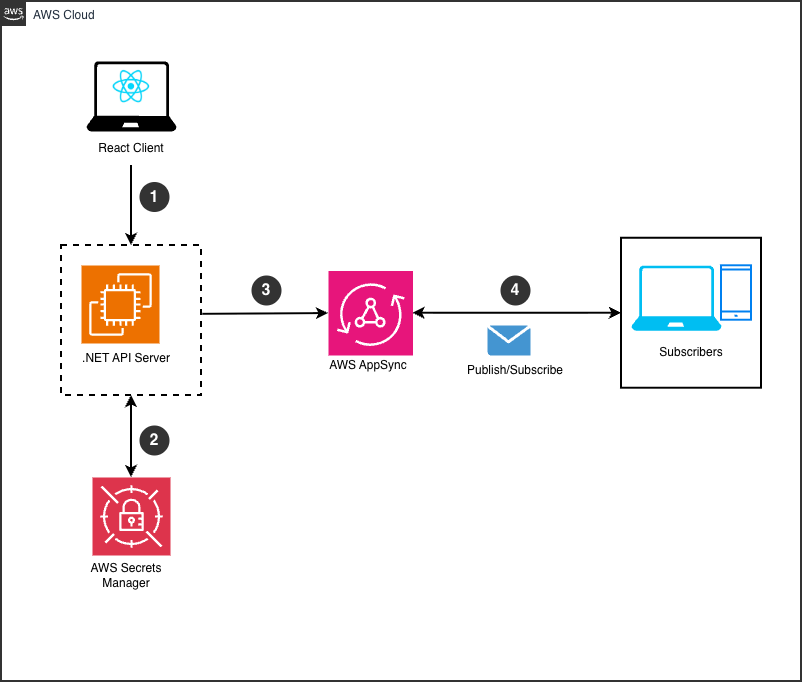
Figure 1: AWS AppSync Event API architecture
Architecture flow
The following steps describes the data flow in this architecture:
- Customer to Order API: The customer places an order through the React frontend.
- Order API to AWS Secrets Manager : The Order API retrieves AppSync credentials (API key and endpoint) securely at runtime.
- Order API to AppSync: The Order API publishes the order event to a domain-specific channel through an HTTP POST request.
- AppSync Event API to subscribed services: The Event API pushes the event to subscribed clients through WebSocket in real time.
Key design principles
This architecture follows four principles:
- Decoupled publisher and subscribers: the Order API publishes once, and the Event API handles distribution to subscribers without additional server logic.
- No server-side WebSocket management: the Order API uses a straightforward HTTP POST. WebSocket complexity is abstracted by AppSync.
- Secure credential handling: API keys and endpoint URLs are retrieved at runtime from Secrets Manager, never stored in code.
- Real-time fan-out: a single order event simultaneously triggers inventory, stock, and shipment workflows without polling or queuing delays.
SignalR vs. AppSync: comparison
Table 1 compares the key architectural and operational differences between SignalR and AppSync Event API.
| Feature | SignalR | AppSync Event API |
| Infrastructure | Self-managed servers | Serverless (AWS managed) |
| Scaling | Manual + Redis backplane | Automatic to millions of connections |
| WebSocket management | Server-side connection tracking | Fully managed by AppSync |
| Cost model | Always-on infrastructure | Pay-per-use (low-traffic to high-traffic scale) |
| Latency | Low with Redis, depends on deployment | Low with global AWS infrastructure |
| Multi-AZ | Complex manual setup | Built-in redundancy across Availability Zones |
Table 1: Comparison of SignalR and AppSync Event API
Prerequisites
Before you start the migration, consider the following resources are in place. Each prerequisite supports a specific part of the architecture described in this post.
- An AWS account with an Event API configured (API key and HTTP endpoint URL).
- The AWS SDK for .NET and the AWSSDK.SecretsManager.Caching package installed in your .NET project.
- An Event API key and endpoint URL stored as a secret in Secrets Manager.
- AWS Identity and Access Management (IAM) role access required for retrieving secrets from Secrets Manager.
- Node.js and npm for the React frontend, with the
aws-amplifypackage installed.
Publishing and receiving events with AppSync
This section walks you through the backend and frontend code that replaces your SignalR implementation. The backend publishes events using HTTP, and the frontend subscribes using WebSocket through AWS Amplify.
Backend: publishing events (.NET)
The following code replaces your SignalR Hub’s IHubContext.Clients.All.SendAsync(“ReceiveMessage”, message) call with an HTTP POST to the AppSync Event API endpoint.
public async Task PublishOrderEventAsync(string message)
{
    // Retrieve API key from AWS Secrets Manager cache
    // Inject ISecretsManagerCache for secure API key retrieval
    var cache = new SecretsManagerCache();
    var apiKey = await cache.GetSecretString("AppSync/EventAPI/ApiKey");

    var endpoint = await cache.GetSecretString("AppSync/EventAPI/Endpoint");

    // Use IHttpClientFactory in production to avoid socket exhaustion
    using var httpClient = new HttpClient();
    httpClient.DefaultRequestHeaders.Add("x-api-key", apiKey);

    // Equivalent to SignalR's SendAsync, formatted for the AppSync Event API
    var payload = new
    {
        channel = "/default/orders",
        events = new[]
        {
            JsonSerializer.Serialize(new
            {
                message = message,
                timestamp = DateTime.UtcNow.ToString("o")
            })
        }
    };

    var response = await httpClient.PostAsJsonAsync(endpoint, payload);
    response.EnsureSuccessStatusCode();
}
Frontend: subscribing to events (React)
The following React component replaces your SignalR connection.on(“ReceiveMessage”, callback) subscription. It uses AWS Amplify to connect to AppSync over WebSocket and receive real-time events as they publish to the channel.
// OrderUpdates.tsx

export function OrderUpdates() {
    // Private state — not exposed outside this component
    const [subscription, setSub] = useState(null);
    const [isConnected, setIsConnected] = useState(false);
    const [orderEvents, setOrderEvents] = useState([]);

    useEffect(() => {
        let channel;

        const connect = async () => {
            try {
                channel = await events.connect('/default/orders');

                channel.subscribe({
                    next: (event) => {
                        setOrderEvents(prev => [...prev, event.data]);
                    },
                    error: (err) => {
                        console.error('Subscription error:', err);
                        setIsConnected(false);
                    }
                });

                setIsConnected(true);
                setSub(channel);
            } catch (error) {
                console.error('Connection failed:', error);
            }
        };

        connect();

        // Cleanup on unmount
        return () => {
            if (channel) {
                channel.close();
                setIsConnected(false);
            }
        };
    }, []);
Best practices and considerations
After you get the core integration working, these practices help you run the solution reliably in production. Apply them incrementally as your deployment matures.
Connection management
Reduces connection management overhead by implementing exponential backoff retry strategies and cleaning up resources on disconnection to maintain stable WebSocket connections. In the React component, the cleanup function in useEffect closes the channel on unmount, which prevents memory leaks and dangling subscriptions.
Channel organization
Use hierarchical channel naming to organize events by domain and scope. For example, /orders/customer-123 scopes events to a specific customer, while /orders/status broadcasts to all order subscribers. This structure lets you filter subscriptions without additional backend logic.
Security
Use API keys for development environments and AWS Identity and Access Management (IAM) roles for production workloads. Data is encrypted in transit and at rest through AppSync. AWS operates under a shared responsibility model: AWS secures the infrastructure, and you control access policies and credential rotation. For compliance visibility, AppSync integrates with AWS Security Hub.
Performance
We recommend keeping event payloads under 128 KB for optimal performance to stay within AppSync limits and reduce serialization overhead. For large data sets, publish a reference (such as an order ID) and let clients fetch details on demand. This pattern keeps WebSocket traffic lightweight and improves throughput under high load.
Error handling
Use Amazon CloudWatch to track PublishErrors, SubscriptionErrors, and ConnectionDrops metrics for your Event API. Set alarms on error rate thresholds so you catch degraded connectivity before it affects users. The frontend subscription error handler in the React component logs errors and updates the connection status so your UI reflects the current state accurately.
Monitoring and alerting
Connect your monitoring strategy to the AWS Well-Architected Framework’s operational excellence pillar. Beyond error metrics, track 4xx and 5xx response rates on the HTTP publish endpoint, and monitor connection duration to detect abnormal disconnection patterns. CloudWatch Logs Insights lets you query AppSync logs for slow publish operations.
Testing
Write integration tests that publish events and assert that subscribers receive them within an acceptable time window. Use separate Event APIs for unit tests, integration tests, and end-to-end tests to avoid cross-environment interference. Load testing with a realistic subscriber count helps you validate fan-out behaviour before production deployment.
Environment separation
Provision separate Event APIs for development, staging, and production environments. Store environment-specific API keys and endpoint urls in Secrets Manager under separate secret paths. Consider using separate AWS accounts for each environment for stronger isolation boundaries. This separation prevents test events from reaching production subscribers and makes credential rotation straightforward.
Credential rotation
Rotate Event API keys on a regular schedule using Secrets Manager rotation policies. As the .NET backend retrieves credentials at runtime from Secrets Manager rather than from configuration files or environment variables, rotation takes effect on the next request without a redeployment. Configure rotation to overlap old and new key validity windows so in-flight requests complete successfully.
Audit logging
Enable AWS CloudTrail logging for your Event API to capture who published events, when, and from which source IP. CloudTrail logs integrate with CloudWatch and Security Hub for centralized audit and compliance reporting. This gives you an immutable record of publish operations, which is useful for debugging data delivery issues and satisfying audit requirements.
Cleanup
When decommissioning an Event API, delete the API through the AWS Management Console or AWS CLI to stop incurring charges. Remove associated secrets from AWS Secrets Manager, revoke IAM roles and policies that granted publish or subscribe access and delete any CloudWatch alarms and log groups created for the API. If you provisioned infrastructure using AWS CloudFormation, deleting the stack removes all associated resources automatically.
Conclusion
We have shown you how to migrate from SignalR to the Event API feature of AppSync, moving from self-managed Redis backplanes and always-on servers to a fully managed, serverless architecture. The key benefits of this migration are:
- Reduces connection management overhead: you no longer track connection IDs or manage connection state
- Automatic scaling: the Event API scales to millions of concurrent WebSocket connections without configuration changes
- Reduced operational complexity: AWS handles message distribution, failover, and infrastructure maintenance
- Improved developer productivity: you focus on business logic instead of infrastructure operations
This migration works best for applications with a clear publisher-to-many-subscribers pattern. If your use case requires bidirectional RPC communication, evaluate your requirements before committing to a full migration.
Next Steps
To begin your migration from SignalR to AppSync, take these first steps:
- Start with a pilot channel in development: Choose a single, non-critical SignalR hub and migrate it to an AppSync channel. This limits risk while building team familiarity with the Event API pattern.
- Review the sample code repository: Explore the companion GitHub repository for complete .NET and React implementations, including the IHttpClientFactory pattern for production use.
- Schedule a migration assessment: Audit your existing SignalR hubs to identify which use bidirectional RPC patterns versus broadcast patterns, then prioritize the broadcast-only hubs for migration.