AWS for Industries
How Amazon Bedrock transforms Microsoft Teams conversations into actionable insights
Organizations around the world are growing their usage of Microsoft Teams every year. Currently Microsoft Teams has 320 million users across more than 1 million organizations. Microsoft Teams has multiple uses including file storage and user communication. Companies that are focused on industrial areas such as oil and gas will experience users discussing various topics in Microsoft Teams, such as weekly and daily plans, issues that have occurred in operations, and potential solutions to those problems. However, all of this valuable information remains trapped within the conversations of Microsoft Teams, which makes it difficult to navigate and extract relevant details efficiently. Specifically, if a user needs to find information about the last problem that occurred or any other specific topic, they must sift through numerous conversations with multiple users, which can be a time-consuming and cumbersome process.
Amazon Bedrock provides a managed generative AI platform that organizations can use to develop intelligent, large language model (LLM)-driven applications, such as chat assistants capable of integration with Microsoft Teams to surface insights from conversational data and other relevant sources. Amazon Bedrock is an Amazon Web Services (AWS) fully managed service that offers access to state-of-the-art foundation models (FMs) from leading AI providers and Amazon itself. This means that organizations can use it to build AI-powered chat assistants that embed directly into Microsoft Teams. The assistant can analyze the context of discussions to extract relevant information, summarize key points, and deliver accurate, real-time responses. This integration transforms Microsoft Teams into a searchable, intelligent knowledge base, which removes the need to manually sift through messages while ensuring critical insights are retained and accessible. This solution democratizes knowledge across teams and empowers employees at all levels with fast, contextual information, thereby enhancing decision-making, fostering collaboration, and driving operational excellence.
Specific use case
Large oil and gas companies face challenges in efficiently managing and accessing information within their drilling operations, which can span multiple weeks. When issues arise, teams often struggle to quickly retrieve relevant details and discussions from the vast number of scattered Microsoft Teams conversations. Similarly, reviewing past decisions and rationales for operational choices becomes an arduous task, which hinders the ability to learn from experience and apply those lessons to future projects.
The inability to quickly synthesize information from Microsoft Teams data can lead to delayed decision-making, extended downtimes, increased costs, and potential safety risks. Furthermore, it impedes knowledge sharing and retention, preventing the company from using its collective expertise to maintain a competitive edge.
The integration of Amazon Bedrock language models into Microsoft Teams addresses these challenges by transforming the platform into a searchable knowledge base. The Microsoft Teams conversations are loaded into AWS knowledge bases, which are a store of data that can be efficiently analyzed by LLMs used in Amazon Bedrock. Users can use the AI-powered chatbot to quickly retrieve relevant information, generate summaries, and identify patterns to improve operational efficiency, enhance knowledge sharing, ensure regulatory compliance, foster collaboration, and deliver cost savings through automation.
This becomes more apparent during shift changes at a drilling rig. The next shift must understand what decisions were made or problems encountered during the previous shift of drilling.
Architecture diagram
The architecture for implementing Amazon Bedrock integration into Microsoft Teams is shown in Figure 1. In the first block of Figure 1, the authentication and validation of users is checked against the company’s active directory (AD) groups. In the second block of Figure 1, tokens are generated to give the user access for a specified amount of time. This provides the user with access to the data in the third block of Figure 1. The Microsoft Teams data is continuously ingested to AWS knowledge bases and processed by the LLMs so that the knowledge bases are always up to date with the latest conversations and information. Users can use the ingested data to interact with Amazon Bedrock through the integrated AI-chatbot. A user asks a question to the chatbot, which triggers Amazon Bedrock to generate summaries, reports, and analyses based on the query and the Microsoft Teams data.
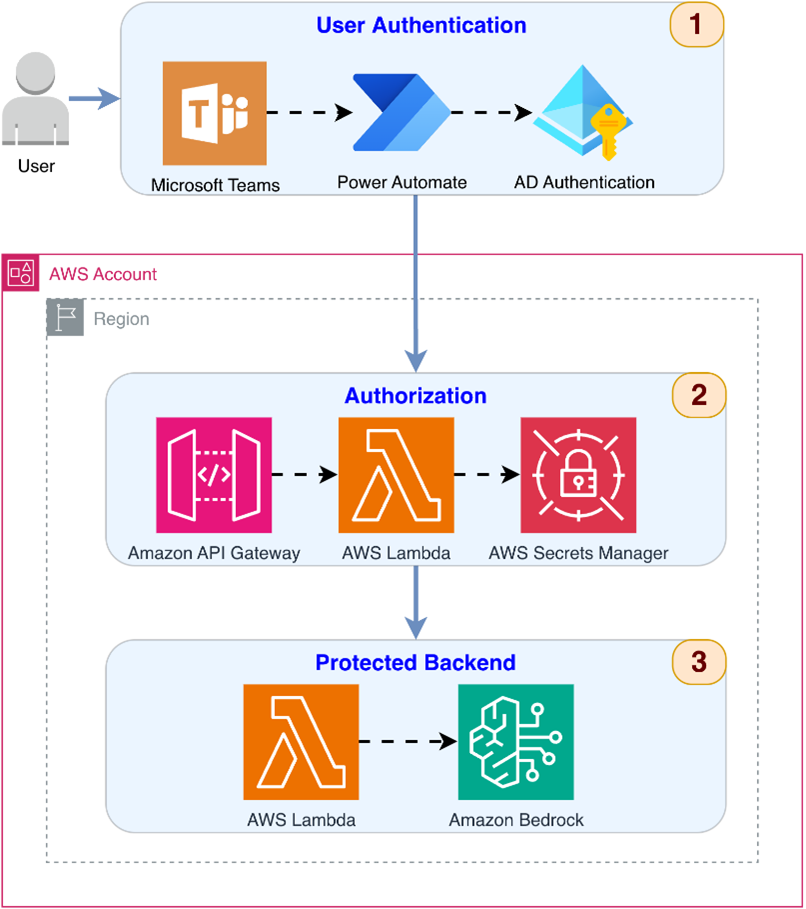
Figure 1: Architecture diagram
Authentication implementation
The authentication implementation for this solution follows a streamlined, automated approach that uses Microsoft Power Automate as the orchestration layer between Microsoft Teams and AWS services. This design provides secure access to the Amazon Bedrock-powered conversational interface while maintaining a seamless user experience within Microsoft Teams.
The authentication process operates as follows:
1. User authorization and bot installation: Users who belong to authorized AD groups are granted permission to install and interact with the custom bot within Microsoft Teams. This initial authorization layer is enforced at the Azure AD level through group-based access control (GBAC). Only users with appropriate group memberships can discover and install the bot application in their Microsoft Teams environment.
2. Chat initiation: When an authorized user initiates a conversation with the bot in Microsoft Teams, the bot application immediately triggers a Power Automate flow. This flow is pre-configured to handle the authentication orchestration between the Microsoft ecosystem and AWS services.
3. Token exchange through Power Automate: Power Automate acts as the authentication broker in this architecture. Upon receiving the chat initiation event:
- Power Automate captures the user’s identity from the Microsoft Teams context (using the existing Microsoft Teams session)
- Initiates a token exchange request with Azure AD on behalf of the user
- Requests a JWT token with the required scopes and audience configured for the AWS API Gateway
- Azure AD validates the user’s identity and group memberships
- Azure AD issues a JWT token containing user claims, group memberships, and authorization scopes
- Power Automate receives and temporarily holds the JWT token for the subsequent API call
4. API Gateway request with JWT: Power Automate constructs the HTTPS request to the API Gateway endpoint, including:
- The user’s query or message from Microsoft Teams in the request body
- The JWT token in the Authorization header as a Bearer token
- More context information such as conversation ID and channel details
- The request is sent over HTTPS to ensure encryption in transit
5. AWS Lambda Custom Authorizer validation: Before the request reaches the backend processing AWS Lambda, API Gateway invokes a Lambda Custom Authorizer function. This authorizer performs comprehensive JWT validation:
- Token extraction: Retrieves the JWT from the Authorization header
- Signature verification: Validates the cryptographic signature using Azure AD’s public keys (obtained from the JWKS endpoint and cached for performance)
- Claims validation: Verifies critical claims including:
- Audience (aud): Confirms the token is intended for this specific API Gateway
- Issuer (iss): Ensures the token was issued by the trusted Azure AD tenant
- Expiration (exp): Checks that the token hasn’t expired
- Not Before (nbf): Verifies the current time is after the token’s valid start time
- Issued At (iat): Validates the token creation timestamp is reasonable
- Authorization check: Extracts and validates group membership claims from the token payload, confirming the user belongs to at least one authorized AD group
- User context extraction: Retrieves user information (Object ID, email, and display name) from token claims for logging and personalization
6. IAM policy generation and enforcement: Based on the validation results, the Lambda Custom Authorizer generates an AWS Identity and Access Management (IAM) policy document:
- If valid: Returns an “Allow” policy with the user’s context attached, permitting the request to proceed to the backend Lambda
- If invalid: Returns a “Deny” policy, causing API Gateway to reject the request with a 403 Unauthorized response
7. Backend processing and user context: When authorization succeeds, the backend Lambda function receives:
- The original user query from Microsoft Teams
- User context information (ID, email, and name) passed from the authorizer
- This context enables personalized responses, user-specific logging, and audit trails
8. Microsoft Teams chat data loaded into AWS knowledge base: Asynchronously a scheduled Lambda pulls recent conversational data from Microsoft Teams and stores that data in Amazon Simple Storage Service (Amazon S3), which is used as the knowledge base for Amazon Bedrock to analyze.
9. Response flow: The backend Lambda processes the query with Amazon Bedrock, generates a response, and returns it through the API Gateway. Power Automate receives the response and posts it back to the Microsoft Teams conversation, completing the interaction cycle.
Security benefits of this architecture
- Zero trust principle: Every request is authenticated and authorized, regardless of source
- Separation of concerns: Authentication (Power Automate/Azure AD) is separated from authorization (Lambda Authorizer)
- Stateless design: No session management required, improving scalability and reducing attack surface
- Defense in depth: Multiple validation layers (Azure AD groups, token signature, claims validation, and Lambda authorizer)
- Audit trail: User context logged at every stage through Amazon CloudWatch Logs for compliance and security monitoring
- Least privilege: Users only granted access to resources explicitly authorized through group memberships
Power Automate role as authentication orchestrator
Power Automate serves as the critical bridge in this architecture because it does the following:
- Has integration with both Microsoft Teams and Azure AD
- Can securely request and handle JWT tokens without exposing them to client-side code
- Provides a low-code/no-code interface for authentication flow management
- Supports error handling and retry logic for token acquisition
- Enables centralized management of the authentication workflow
- Can log authentication events for audit purposes
This implementation establishes that only authenticated and authorized users can access the Amazon Bedrock knowledge base while maintaining comprehensive audit trails through CloudWatch Logs for compliance and security monitoring. The use of Power Automate as the orchestration layer streamlines the authentication flow and reduces the complexity of token management, making the solution more maintainable and reliable.
Conclusion
The integration of Amazon Bedrock with Microsoft Teams transforms trapped conversational data into a strategic asset. This solution uses AI to extract insights from chat histories and gives access to organizational decisions so that employees can make decisions faster and be more informed about operations.
The oil and gas use case demonstrates the real-world impact, where quick retrieval of relevant information can mean the difference between minimal downtime and costly operational delays. However, the benefits extend beyond emergency response. This approach helps organizations across industries use their siloed decisions to drive innovation, establish compliance, and improve the bottom line.
If your teams rely heavily on Microsoft Teams and struggle to effectively manage the wealth of information in your chat histories, then this solution offers a proven, scalable path forward. The preceding steps outline a clear path for taking the first step toward unlocking the value of your conversational data stored in Microsoft Teams with Amazon Bedrock.