AWS for M&E Blog
Building intelligent media supply chain automation using Amazon Bedrock AgentCore
The media industry is experiencing a fundamental shift in how content is processed, analyzed, and monetized. Recent breakthroughs in vision-based generative AI models have dramatically reduced both the cost and complexity of understanding video content at scale. By introducing these models into media supply chain workflows, organizations can reduce manual tagging and metadata generation costs while increasing accuracy and consistency. Read more about AWS solutions for video understanding in Media2Cloud on AWS Guidance, Scene and ad-break detection and contextual understanding for advertising using generative AI, and Automate video insights for contextual advertising using Amazon Bedrock Data Automation.
The potential of AI in media workflows extends beyond predefined workflows. Many parts of content supply chains rarely follow linear, predictable paths and are highly nuanced. For example, preparing video metadata for different distribution channels (including social media, websites, and streaming platforms) requires varying treatments based on genre, platform requirements, regulatory considerations, and real-time audience engagement metrics. This is where AI agents come in—autonomous systems that reason and make dynamic decisions without rigid pre-programming. These agents intelligently orchestrate complex workflows, adapting to unique content requirements and business rules in real time.
In this blog post, we demonstrate how to build an agentic system for media operations using Strands Agents and Amazon Bedrock AgentCore. This system dynamically generates accurate video metadata following specific format guidelines according to the compliance requirements of different distribution channels.
Solution overview
The solution architecture is a comprehensive application with a UI to upload videos for analysis. Users then interact with a multi-agent backend system built using Strands Agents and Amazon Bedrock AgentCore to refine raw metadata for different downstream use cases.
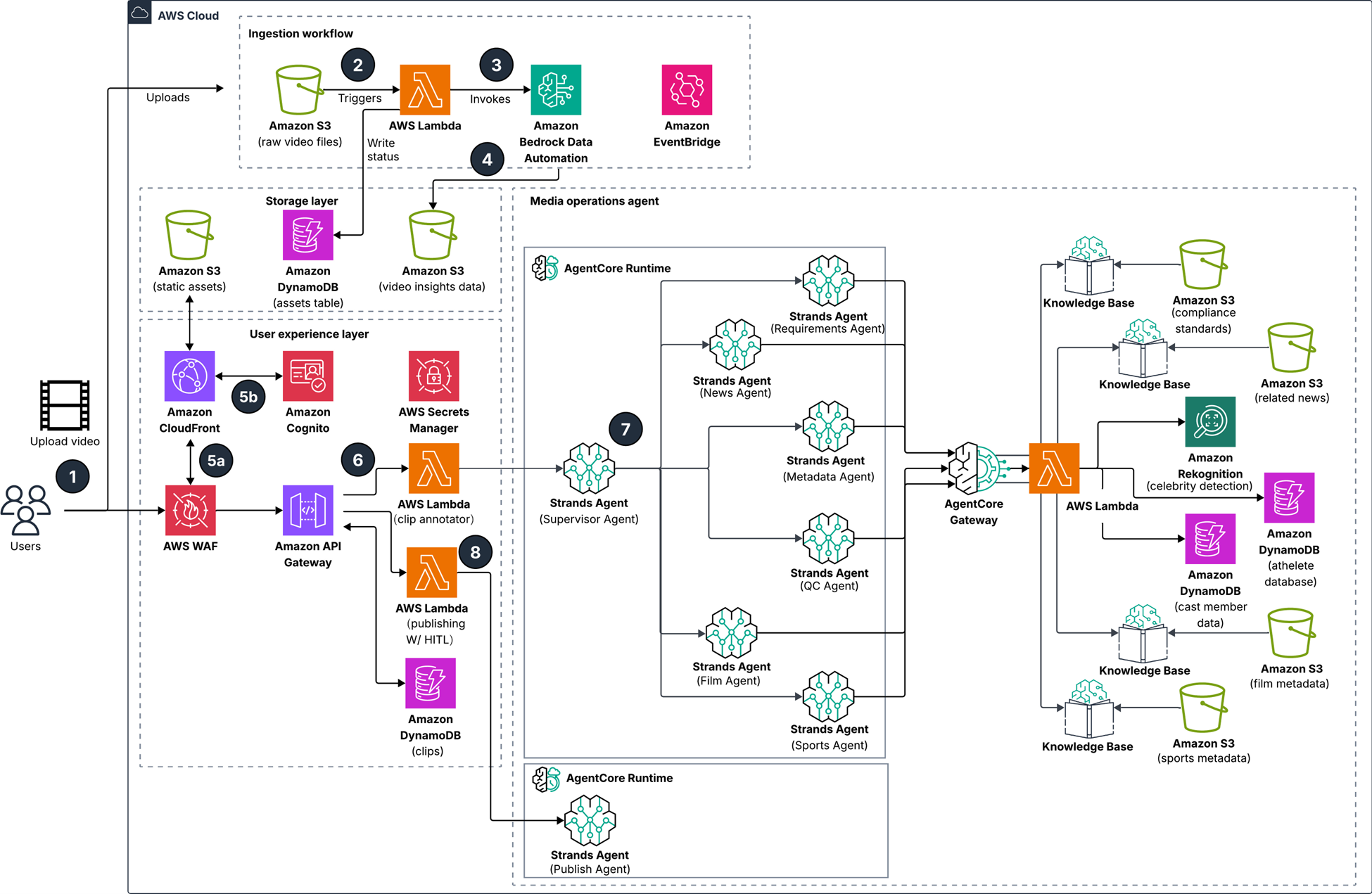
Figure 1: Solution architecture
Workflow, as shown in figure 1:
- User uploads raw video to Amazon Simple Storage Service (Amazon S3) and sends prompts to generate asset metadata using a web interface.
- An AWS Lambda function is triggered based on the video object on Amazon S3.
- The Lambda function invokes an Amazon Bedrock Data Automation job and writes the job status to an Amazon DynamoDB table.
- The Bedrock Data Automation job writes video insights data to Amazon S3 upon completion. An Amazon EventBridge rule triggers an update of the job status in the DynamoDB table.
- The web interface redirects the user to an authentication workflow through AWS WAF and an Amazon Cognito user pool.
- The web interface sends the user request to Amazon API Gateway, which invokes a Lambda function to trigger the media operation agent workflow
- A Strands supervisor agent delegates to collaborator Strands agents based on the user query, running on Amazon Bedrock AgentCore Runtime. Each collaborator agent uses tools such as Amazon Bedrock Knowledge Bases, Amazon Rekognition, and DynamoDB tables through Amazon Bedrock AgentCore Gateway to support individual tasks broken down by the supervisor agent. When all tasks are complete, the results are returned to the user through the web interface.
- Users verify the response or provide final edits before invoking the Lambda function to trigger the publishing agent on AgentCore Runtime and publish results to downstream channels
This post focuses on the multi-agent portion of the architecture. You start with one agent—Sports Agent—that enriches metadata for sports videos. You will build the agent, augment tools using AgentCore Gateway for Model Context Protocol (MCP) consumption and deploy the agent to AgentCore Runtime. This is an example to explain various components of Strands and AgentCore before scaling to the entire multi-agent system.
Prerequisites
To follow the walkthrough presented in this post, make sure you have the following:
- An AWS account with requisite permissions, including access to Amazon Bedrock, Amazon Bedrock AgentCore, DynamoDB, Amazon S3, and S3 vectors.
- Run the media-operations-agents.yaml AWS CloudFormation stack to deploy the required resources.
- Run the 00-prerequisites.ipynb notebook to install third-party libraries such as FFmpeg, OpenCV, and webvtt-py before executing the notebooks.
- The end-to-end code examples are available in the GitHub repository.
Example use case
Media broadcasters face a significant operational challenge: hundreds of thousands of video clips from sporting events—such as the following image—require manual analysis and tagging for downstream distribution channels. This labor-intensive process creates bottlenecks in content delivery and limits the speed at which highlights reach audiences.

Figure 2: Still from a sporting event video
The following figure shows the basic steps of the process, which include:
- Upload the video input to an S3 bucket
- Process it through Bedrock Data Automation
- Save the video metadata to an S3 bucket

Figure 3: Process to analyze and tag video
Consider this highlight clip from a basketball game. When analyzed through Bedrock Data Automation (BDA)—a managed service that extracts deep insights from video including celebrity detection, logo detection, and scene segmentation—the video-level summary might read:
In a professional basketball arena, a high-stakes game unfolds between two teams in red and white uniforms. The action centers on a player in red (number 14) who drives to the basket and attempts a powerful dunk. The opposing team in white (number 8) tries to block the shot. The dunk attempt is contested by multiple players from both teams. The crowd cheers loudly as the play unfolds. The red team player successfully completes the dunk, increasing their lead. The scene captures the intensity and excitement of professional basketball, with players demonstrating athleticism and competitive spirit. While this summary captures the action, it lacks critical metadata such as where the game was played, which teams are competing, and the name of player 14. Without this contextual information, the clip remains difficult to categorize, search, and distribute effectively. Gaps like this make media supply chain processes highly manual.
Building sports agents using Strands Agents
What if an agent could reason through the available video content and automatically retrieve the missing information? For sports content, broadcasters typically need:
- Complete event or game name designation
- Accurate venue details and location information
- Clearly stated participating team names
- Key player names prominent in the video
This is where Strands Agents is useful. Strands is an open source, model-first SDK from AWS for building production-ready agent and multi-agent workflows quickly. For more information about Strands Agents, see Introducing Strands Agents, an Open Source AI Agents SDK. The most basic form of a Strands agent combines three components: tools, a model, and a prompt. The agent uses these three components to complete tasks autonomously. The following is a flow diagram of the agent:
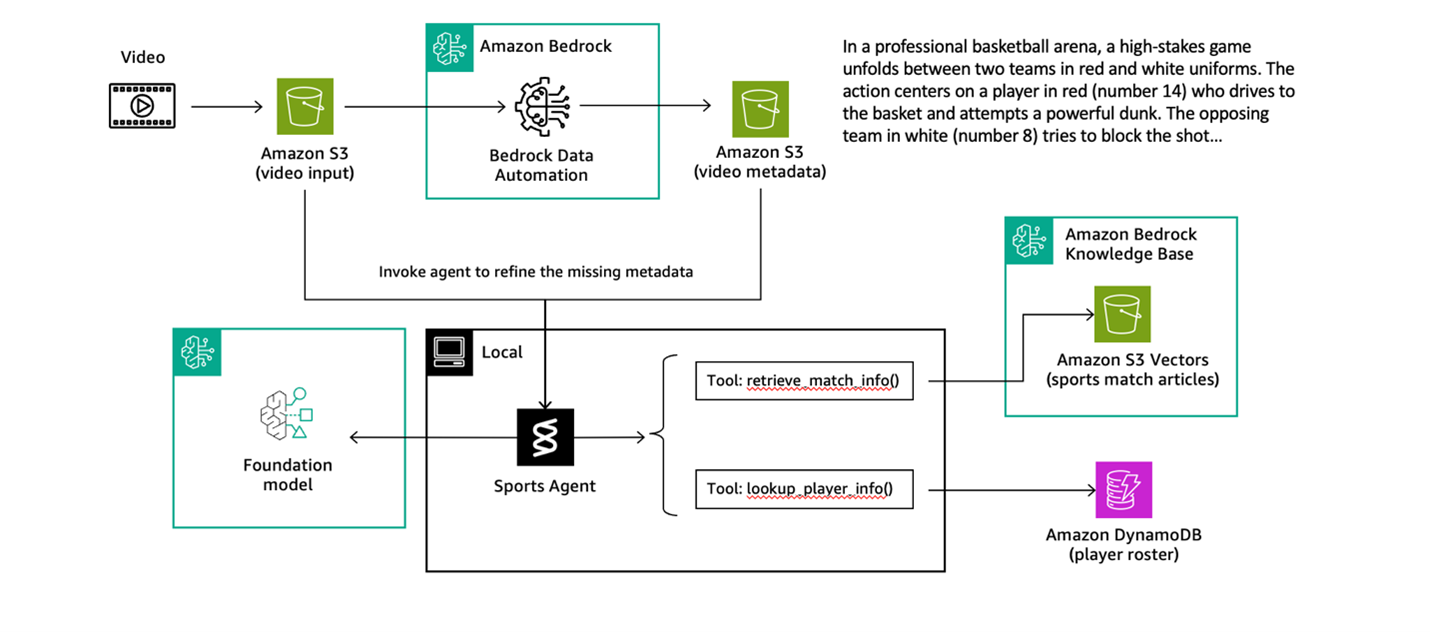
Figure 4: Flow diagram of the sports agent
For this agent, we created two specialized tools: one for knowledge base search and another for database lookup.
Tool 1: Knowledge base retrieval searches sports articles and match reports to identify teams, venues, dates, and game context. This tool connects to a knowledge base containing recent sports coverage, enabling the agent to match video content with published game information.
Tool 2: Player database lookup retrieves detailed player information (name, position, height, and weight) using the team’s name and jersey number. After the agent identifies which teams are playing, it can precisely look up individual players visible in the footage.
Here’s how these tools are defined and integrated with Strands.
The reasoning model used to orchestrate the tools is Anthropic Claude Sonnet 4.5:
agent_model_id = 'global.anthropic.claude-sonnet-4-5-20250929-v1:0'
The system prompt provides instructions for the model’s behavior.
With the tools, model, and prompt defined, creating the agent is straightforward using Strands, the frames will automatically determine when to use which tool, how to chain their outputs, and how to synthesize a complete answer. Go to GitHub to review the code that puts the pieces together. For more information about the orchestration mechanism of Strands Agents, see the Agent Loop documentation.
The end-to-end code is available in create-an-sports-agent.ipynb.
Scaling agentic tooling using AgentCore Gateway
You’ve built a local agent using Strands that can analyze sports videos and enrich them with contextual information. This works great for development and testing, but what happens when you want to scale this solution for production? What if other teams want to build agents that also need access to match information and player data? Running agents in the cloud and sharing tools across multiple agents, teams, and applications requires a different approach.
This is where Amazon Bedrock AgentCore Gateway becomes essential. AgentCore Gateway is a managed service that exposes your agent tools as secure, scalable APIs following the Model Context Protocol (MCP), an open protocol that standardizes how AI agents connect to external tools, data sources, and services. It acts as a centralized hub for your agent tools, making them searchable and discoverable by authorized agents.
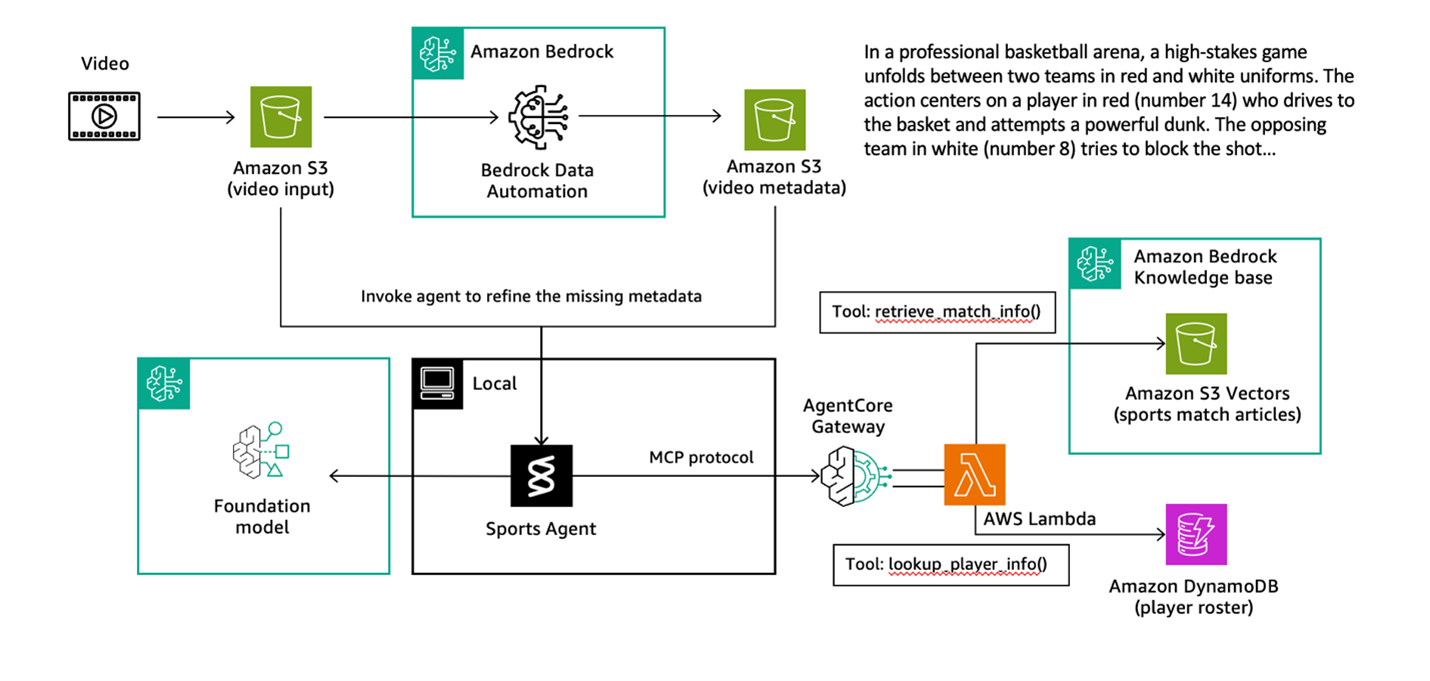
Figure 5: Flow diagram of the solution including AgentCore Gateway
As shown in the preceding diagram, the architecture involves two key setup steps:
- Create an AgentCore Gateway with Amazon Cognito for authentication. Amazon Cognito manages inbound authentication using OAuth2 client credentials flow. This flow validates client credentials and issues JSON Web Tokens (JWTs) that agents must present when accessing your tools.
- Move the tool logic into Lambda functions and register them as gateway targets. When registering a Lambda function as a gateway target, you define outbound permissions—including API keys, outbound OAuth, and execution roles for AWS resources. You also provide an API specification that defines how the tool should be called by the agent.
AgentCore Gateway then automatically transforms the registered tool targets—in this case, your Lambda functions—into a centralized MCP-compatible hub that your agents can access remotely.
After being set up, the AgentCore Gateway becomes an MCP server that can be connected to your agent. When invoked, you authenticate through Amazon Cognito to retrieve a temporary access token, which allows your agent to list and invoke tools from the AgentCore Gateway. See the example code snippet showing how to trigger AgentCore Gateway from your Strands agent.
The same Agent class works seamlessly with gateway-hosted tools. Strands abstracts away the complexity—your agent code remains clean and focused, whether tools are local or remote. The full code is available in sports-agent-with-gateway.ipynb.
Deploy Sports Agent to AgentCore Runtime
You’ve now built an agent locally using Strands and scaled your tools with AgentCore Gateway. The final step is deploying the agent. This is why you need Amazon Bedrock AgentCore Runtime. AgentCore Runtime is a managed container service that runs your agents in AWS-managed infrastructure with automatic scaling and built-in monitoring—eliminating the operational overhead of managing infrastructure. See the following updated agent diagram.
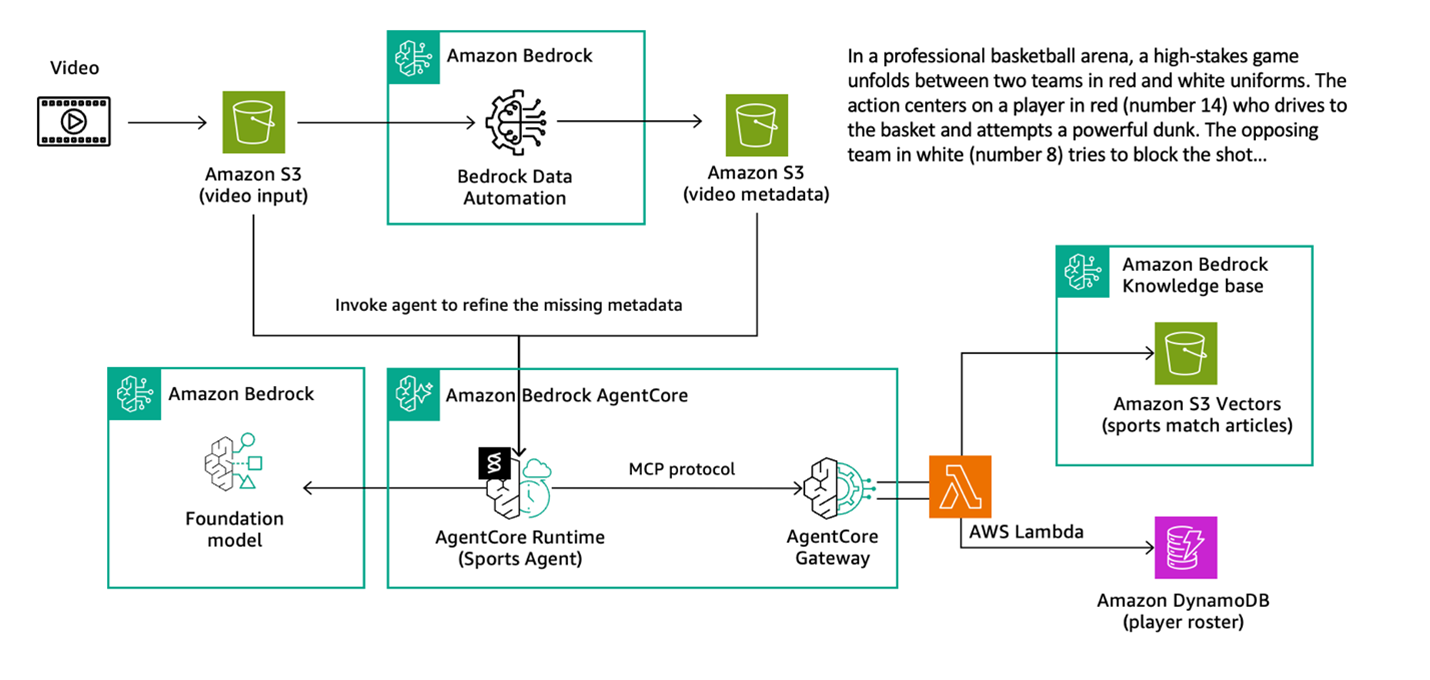
Figure 6: Updated flow diagram including AgentCore Runtime
To deploy to AgentCore Runtime, adapt your agent code to use the BedrockAgentCoreApp framework. This framework creates an HTTP server with required endpoints (/invocations for requests and /ping for health checks) and handles authentication automatically. For more information, see Get started with Amazon Bedrock AgentCore Runtime.
What these changes do:
BedrockAgentCoreApp: Creates an HTTP server with/invocationsand/pingendpointsapp = BedrockAgentCoreApp(): Initializes the runtime environment that manages requests and responses@app.entrypoint: Marks your function as the main request handler that receives the payload and contextapp.run(): Starts the HTTP server when the container launches
Deploying using the AgentCore Starter Toolkit is straightforward. Configure the runtime with your entrypoint file, execution role, and authentication settings—the toolkit handles building the Docker container, pushing it to Amazon Elastic Container Registry (Amazon ECR), and creating the runtime. Security is built in from the start. The authorizer_configuration validates JWT tokens on incoming requests, verifying they originate from allowed Amazon Cognito clients. This validation mechanism controls access to your agent endpoints. See the configuration code in GitHub.
The agentcore_runtime.launch() method initiates the build and deployment process, which typically takes a few minutes while the container is provisioned and health checks are performed. An endpoint Amazon Resource Name (ARN) is returned for invoking the remote agent.
To test your deployed agent, authenticate to get an access token, then invoke the agent using something like this example.
The runtime validates the JWT token, forwards the request to your containerized agent, retrieves the gateway URL from AWS Systems Manager Parameter Store, connects to the gateway, discovers tools, and processes the request—all automatically. Your agent is now deployed with enterprise-grade security, scalability, and observability.
For detailed implementation steps, see the sports-agent-on-runtime.ipynb notebook.
Scaling to multi-agent orchestration
Take the concept with one agent that you just went through and scale it out to a multi-agent design using Strands and Bedrock AgentCore. The following diagram shows a fleet of agents and how they work together.
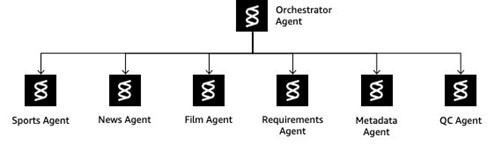
Figure 7: Multi-agent architecture
Instead of building monolithic agents that try to handle everything, this architecture creates specialized agents coordinated through an intelligent orchestrator (shown in the preceding diagram). This provides separation of concerns, composability, extensibility, and reusability across diverse media operations tasks.
| Strands Agent | Description | Prompts | Tasks |
| Orchestrator Agent | Central coordinator that analyzes queries, routes to specialized agents, and manages multi-step workflows | Prompt file url link |
Query type detection Intelligent routing Workflow coordination Multi-agent orchestration |
| Sports Agent | Analyzes sports videos and enriches with contextual information | Prompt file url link |
Extracts teams, players, scores, and key moments Matches video content with game databases Retrieves player information from DynamoDB |
| News Agent | Extracts structured information from news segments | Prompt file url link |
Identifies who, what, when, where, and why Analyzes news content and context |
| Film Agent | Recognizes and analyzes film and movie content | Prompt file url link |
Identifies movies, actors, and scenes Retrieves cast information Analyzes production details |
| Requirements Agent | Retrieves compliance rules and formatting requirements | Prompt file url link |
Searches compliance knowledge bases Returns character limits and formatting rules Provides JSON schemas for metadata |
| Metadata Agent | Generates compliant metadata from content analysis | Prompt file url link |
Combines content, compliance rules, and schemas Produces structured JSON metadata Enforces regulatory compliance |
| QC Agent | Validates metadata against compliance requirements | Prompt file url link |
Checks metadata compliance Returns Pass/Fail reports Identifies specific issues and violations |
The orchestrator intelligently routes requests handling a diverse set of query types. For example, you can ask basic queries like the following. These queries are picked up by the Orchestrator Agent, which passes the query to the Sport Agent to obtain the answer.
Query: What teams are playing in this video?
Output: The teams playing in this video are the Metropolitan Knights (in red uniforms) and the Alpine Wolves (in white uniforms).
Query: Who are the key figures from this video?
Output: The key figures from this video are Thompson (#14) from the Metropolitan Knights in red, who executed the powerful dunk, and Smith (#8) from the Alpine Wolves in white, who attempted to defend against the shot.
The following are examples of more sophisticated queries:
Query:
Generate compliant social media metadata for this video
This query would be sent to the Orchestrator Agent, which then passes it to the Sports Agent, Requirements Agent, Metadata Agent, and QC Agent to produce the output in JSON.
Output:
Query:
The Orchestrator Agent will pass this query to the Requirements Agent and QC Agent to produce a Pass/Fail report)
Output:
For complete implementation details, workflow examples, and deployment instructions, see the example code on GitHub.
Clean up
The sample code created several AWS resources including Amazon Bedrock Knowledge Bases with S3 vectors, DynamoDB tables, Lambda functions, an AgentCore Gateway, an Amazon Cognito user pool, and AgentCore runtimes. To remove the resources created for this solution and avoid ongoing charges, run the 9-cleanup-optional.ipynb notebook.
Conclusion
In this post, you’ve seen how you can combine Strands Agents and Amazon Bedrock AgentCore to create a powerful architecture for media operations. This approach directly addresses key challenges in content supply chain workflows:
- Intelligent orchestration: Breaking complex media analysis into specialized agents allows for focused, accurate reasoning while maintaining workflow context
- Scalable tool architecture: The separation between agent logic (using Strands) and tool execution (using AgentCore Gateway) creates a modular system that mirrors how media operations teams work
- Production-ready deployment: AgentCore Runtime provides managed infrastructure with automatic scaling, built-in security, and observability, eliminating operational overhead
This architecture serves as a foundation you can extend and adapt to your specific media workflows. Whether you’re building content analysis tools, compliance validation systems, or automated metadata generation pipelines, these patterns provide a robust starting point. We invite you to build upon this Strands and AgentCore architecture to transform your media operations.