AWS Messaging Blog
Isolate email reputation in Amazon SES Mail Manager with tenant management
When AnyCompany’s new IT outsource team misconfigured the email settings on 200 of the company’s multifunction printer/scanners, it had two bad outcomes. First, nobody received their scanned documents in their inboxes. Somewhat predictably, many users rescanned the same documents multiple times before creating support tickets. Second, the misconfiguration along with the multiple failed attempts resulted in a “bounce storm” that was quickly reported by a major email service provider, but unfortunately ignored by the IT team.
Within 48 hours, the bounce rate crossed the provider’s threshold. The company’s entire Amazon Simple Email Service (Amazon SES) account lost its sending reputation. Password resets, order confirmations, and service notifications from every business unit on the account started landing in spam or failing to deliver. The damage spread because every sender on the account, from the mission-critical billing system to the misconfigured printers, shared the same reputation score.
This is a preventable problem. With Amazon SES tenant management you can isolate email reputation per tenant inside a single account so one misbehaving sender cannot affect the rest. If you use Amazon SES Mail Manager for Simple Mail Transfer Protocol (SMTP) filtering, routing, archiving, or relay, you can activate tenant isolation. To do so, tag each message with the X-SES-TENANT header in your Mail Manager rule set. In this post, you will compare five architectural patterns for applying the X-SES-TENANT header, from static per-tenant endpoints to AWS Lambda driven runtime resolution.
This post complements Isolate email suppression per tenant with Amazon SES. That post explains how tenant-level suppression lists prevent cross-tenant bounce and complaint contamination, which is the “what happens after the message is tagged” story. This post focuses on the upstream problem: how to get the X-SES-TENANT tag onto messages when your senders are legacy appliances, printers, or applications that can’t set custom MIME headers. Together, the two posts cover the full tenant isolation pipeline, from tagging through delivery and suppression.
This post provides architectural guidance. For step-by-step implementation, refer to the Amazon SES documentation.
How SES tenant isolation works
Amazon SES tenant management isolates reputation per tenant inside a single Amazon SES account. Each tenant acts as a container organized around sending identities, configuration sets, and the resulting reputation metrics. Amazon SES attributes bounces, complaints, and Trust and Safety signals to the tenant, not the account, so a deliverability issue in one tenant doesn’t affect the others.
A critical benefit of tenant isolation: when one tenant’s reputation degrades beyond a threshold, Amazon SES can pause sending for that tenant only. Other tenants continue delivering normally. Without tenant isolation, a reputation issue affects the entire account. This pause-and-contain mechanism is one of the strongest reasons to adopt tenant management, especially for accounts with diverse sender types.
You associate a message with a tenant by passing the TenantName parameter on the Amazon SES API v2 SendEmail operation, or by adding an X-SES-TENANT Multipurpose Internet Mail Extensions (MIME) header to an SMTP message. For a detailed walkthrough of tenant management concepts, including identity ownership, the ses:TenantName AWS Identity and Access Management (IAM) condition key, and tenant-level suppression lists, see Improve email deliverability with tenant management in Amazon SES.
How Mail Manager works
Mail Manager processes inbound and outbound SMTP traffic through a pipeline of three components:
- Ingress endpoint: an authenticated SMTP endpoint that accepts connections from your senders. Mail Manager ingress endpoints handle SMTP only, not the Amazon SES API.
- Traffic policy: filters connections based on sender attributes (IP, TLS version, authentication) before messages reach rule processing.
- Rule set: an ordered list of rules. Each rule has conditions (match on envelope sender, recipient, source IP, or header values) and actions (Add header, Write to S3, Invoke Lambda, Send to internet, SMTP relay, Drop).
The “Add header” rule action is what makes tenant isolation possible for legacy senders: it injects the X-SES-TENANT SMTP header before the “Send to internet” action hands the message to Amazon SES for delivery.
With the “Add header” rule action inserted before the “Send to internet” action in the same rule, Mail Manager effectively tags the message with the SMTP header that defines the tenant. When Amazon SES processes the send, it reads the X-SES-TENANT header and attributes the message to the corresponding tenant.
Amazon SES performs tenant attribution only during send processing. A Send to internet action, or a Lambda function that calls SendEmail with the TenantName parameter or X-SES-TENANT header, activates tenant management. An SMTP relay action forwards to a third-party SMTP server (Google Workspace, Microsoft 365, or on-premises mail), so Amazon SES doesn’t process the send and tenant attribution doesn’t apply. Write to S3 and Drop don’t hand messages to Amazon SES, so they don’t activate tenant management either. This post describes flows that include a Send to internet action or a Lambda function calling SendEmail.
Understanding the outbound email flow
An outbound message flows from the SMTP client to the Mail Manager ingress endpoint, passes through the traffic policy and rule set, then routes through Amazon SES to the internet.

Figure 1: Outbound email flow from an SMTP client through Mail Manager to Amazon SES
Compare the patterns
Before diving into each pattern, use this table to identify which one fits your workload. You can then read only the pattern section that applies, or read all five for the full picture.
| Consideration | Pattern 1 | Pattern 2 | Pattern 3 | Pattern 4 | Pattern 5 |
| Works for legacy and appliance senders | — | Yes | Yes | Yes | Yes |
| Retrieve tenant from static value | Yes | Yes | Yes | Yes | Yes |
| Retrieve tenant from source IP or sender condition | — | Yes | Yes | Yes | Yes |
| Retrieve tenant from runtime lookup or body inspection | — | — | — | Yes | Yes |
| Records Send in Mail Manager log | Yes | Yes | Yes | — | — |
| Tenants per Region | Up to 10,000 | ~50 | 400 (per-tenant Send) or 1,560 (chained) | Up to 10,000 | Up to 10,000 |
One difference cuts across the patterns: where the tenant mapping lives determines what it takes to change it. Patterns 2 and 3 hold the mapping in rule-set configuration, so adding or removing a tenant is a rule-set edit and deployment (a control-plane change, not a data change). Patterns 4 and 5 resolve the tenant from a runtime source such as a database, so onboarding or offboarding a tenant is a data update that takes effect without a deployment. In Pattern 1, the sender supplies the tenant, so there’s no mapping to maintain in Mail Manager at all.
Pattern 1: The SMTP sender sets the header before Mail Manager

Figure 2: Pattern 1, where the SMTP sender sets the tenant header before Mail Manager
If the SMTP sender (a backend service, internal tool, or any application that can add a custom MIME header) sets X-SES-TENANT on the message before connecting to the Mail Manager ingress endpoint, the message arrives pre-tagged. The rule set only needs a Send to internet action.
Pattern 1 fits customers who already use Mail Manager for filtering, archiving, or compliance and whose sending applications can add one header at send time. You keep Mail Manager gateway capabilities without adding Add header or conditional logic to the rule set.
Pattern 2: Mail Manager adds a static header with Add header

Figure 3: Pattern 2, where a Mail Manager rule adds a static tenant header
A rule with Add header followed by Send to internet attaches a fixed tenant value to each message. This pattern fits a one-tenant-per-endpoint model: provision one authenticated ingress endpoint per tenant, give each tenant its own SMTP credentials, and attach a rule set that injects the tenant value.
For example, an enterprise provisions one endpoint for facilities-printer notifications and a second for corporate alerts. The Send to internet action’s IAM role grants permission only to that tenant’s Amazon SES identities, preventing a misrouted client from sending as another tenant.
You can group tenants behind one endpoint when they share a sending configuration. The header value and IAM scope live in the rule-set configuration, and no code runs at send time.
Pattern 3: Mail Manager derives the header from rule conditions
If multiple tenants share an endpoint but have stable distinguishing attributes (like source IP), one rule set handles each of them. Rule conditions match on envelope properties, and matching rules run an Add header action that sets X-SES-TENANT to the correct value.

Figure 4: Pattern 3, where Mail Manager derives the tenant header from rule conditions
Mail Manager rule sets allow 40 rules with up to 10 conditions and 10 actions per rule, but caps Send to internet and SMTP relay actions at 10 per rule set (counting every occurrence). One Send to internet per tenant rule tops out at 10 tenants.
To support more tenants, separate header-setting from delivery:
- Rules 1 to 39: Each matches a distinguishing condition and runs a single Add header action.
- Rule 40: A catch-all with no conditions and a single Send to internet action.
Each message matches at most one header-setting rule, picks up its tenant header, and passes through the catch-all. The effective ceiling is now 39 tenants per rule set with one Send to internet action and one IAM role.
Scale limits of Pattern 3
Pattern 3’s ceiling depends on how you structure the rule set. Two cases:
Case A: Chained structure (39 Add header rules + 1 Send to internet rule): Each rule set uses one Send to internet action, so the 10-action cap isn’t binding. Capacity is 39 tenants per rule set × 40 rule sets per Region = 1,560 tenants per Region.
Case B: Per-tenant Send to internet (each tenant rule has its own Send action): The 10-action cap binds at 10 tenants per rule set. Capacity is 10 tenants per rule set × 40 rule sets per Region = 400 tenants per Region.
The two cases trade off scale against IAM scoping. Case A shares one IAM role across all tenants in the rule set. Case B gives each tenant its own IAM role at the cost of 4× fewer tenants.
Amazon SES supports up to 10,000 tenants per account (adjustable). Workloads that exceed a few hundred tenants, or need runtime tenant changes, can use Pattern 4 or Pattern 5.
Pattern 4: Mail Manager calls Lambda for runtime tenant resolution
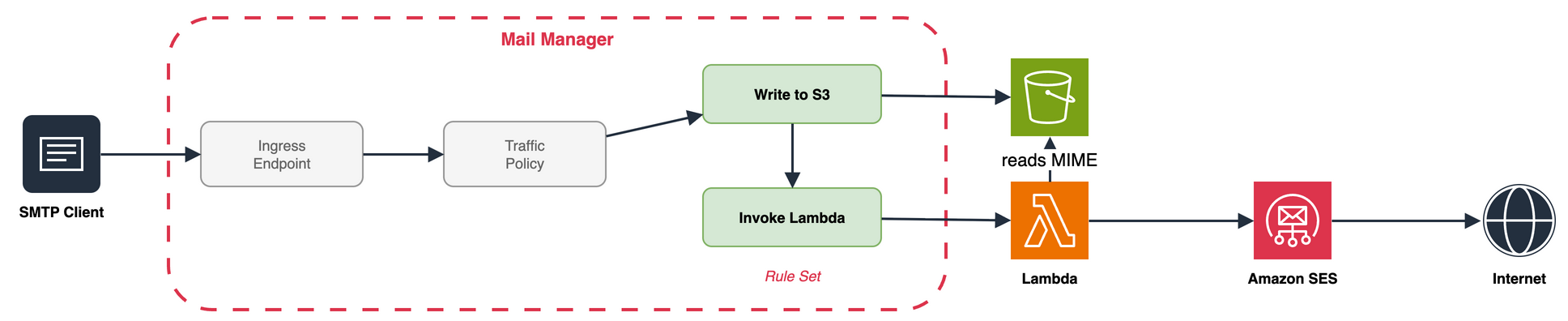
Figure 5: Pattern 4, where Mail Manager invokes a Lambda function for runtime tenant resolution
Some tenant values require runtime logic, such as a database lookup on the sender IP, an external policy service, or content inspection. For these cases, the Mail Manager Invoke Lambda action runs a Lambda function inside the rule chain.
The Lambda event carries only metadata (headers, envelope sender, recipients, verdicts), not the MIME body. The function also can’t modify the message for downstream actions. Lambda must therefore handle delivery.
The rule writes the raw MIME to Amazon S3 with Write to S3, then invokes the Lambda function with the message ID. The function fetches the object and determines the tenant through the runtime logic your workload requires. That logic might be a database lookup (for example, an Amazon DynamoDB query), a call to an external policy service, or inspection of the message body. It then calls the Amazon SES API v2 SendEmail operation, passing the resolved tenant in the TenantName parameter. Delivery permissions live on the function’s execution role, which carries the ses:TenantName condition key.
The Lambda function is yours to build and maintain. This gives you full control over the tenant resolution logic and everything downstream (retries, dead-letter queues, observability), but it also means you own the operational overhead: code updates, monitoring, and cost management.
Mail Manager can invoke the function synchronously or asynchronously. Synchronous invocation (REQUEST_RESPONSE) keeps Lambda in Mail Manager’s critical path: Mail Manager waits up to 30 seconds for the function to return, and retries on failure. Asynchronous invocation (EVENT) hands control to Lambda instead, so Mail Manager invokes the function and moves on. There are no additional Mail Manager charges for the Lambda invocation beyond standard Lambda pricing.
Pattern 5: Mail Manager stages to Amazon S3, Lambda delivers asynchronously

Figure 6: Pattern 5, where an Amazon S3 event triggers a Lambda function that delivers the message
In Pattern 4, Mail Manager invokes the function directly through the Invoke Lambda rule action. Pattern 5 removes that direct invocation: the Mail Manager rule ends at Write to S3, and an Amazon S3 event notification triggers the Lambda function instead. Mail Manager’s work finishes at the write, and delivery becomes fully event-driven.
The rule set has two actions: write the raw MIME to Amazon S3, followed by an explicit Drop action. The Drop action prevents accidental duplicate delivery if a Send to internet action is inadvertently added to the rule later. The Lambda function handles delivery through the Amazon SES API, so Mail Manager’s job ends at writing the MIME to Amazon S3. The Amazon S3 event routes to the function directly or through Amazon Simple Queue Service (Amazon SQS) or Amazon EventBridge for fan-out and back-pressure.
The function reads the object, performs the tenant lookup, and calls SendEmail with the TenantName parameter. The Mail Manager critical path is minimal, and Lambda retries use the Lambda retry model with dead-letter queue support. The same Amazon S3 object fans out to multiple consumers (delivery, analytics) without changing the Mail Manager rule.
The Lambda function is yours to build and maintain. The upside is full control over the function and everything after it: tenant resolution logic, retries, dead-letter queues, and observability. The tradeoff is cost and upkeep, since you own code updates, monitoring, and operational overhead.
The other tradeoff is less visibility. After Write to S3, the Mail Manager log no longer records the delivery outcome.
Secure tenant attribution with IAM
Regardless of which pattern sets the X-SES-TENANT header, the Send to internet action’s IAM role should enforce tenant boundaries. Scope the IAM role with a Condition element that includes the ses:TenantName condition key.
Example IAM policy:
This policy allows the role to send email only when the message is attributed to the facilities-printers tenant. Messages tagged with any other tenant value, or messages with no tenant header, are denied.
In Pattern 1, the sender sets the header, the IAM role on the Send to internet action validates that the claimed tenant matches the role’s permissions. In Pattern 2, the Add header action sets a fixed value, and the IAM role confirms the header matches the expected tenant for that endpoint. In Pattern 3 with a chained structure, a single Send to internet action services all tenants. Scope its role to the set of valid tenant names so untagged messages (those matching no Add header rule) fail authorization. For Patterns 4 and 5, the Lambda function’s execution role carries the ses:TenantName condition key, providing the same enforcement at the API call level.
Paused tenants
Each of the five patterns handles paused tenants the same way. When Amazon SES pauses a tenant (through a reputation policy or manually), sends for that tenant fail with a rejection error. Other tenants keep delivering. The failure surfaces depending on the pattern:
- Patterns 1 to 3: Mail Manager records the rejection in the rule set log.
- Patterns 4 and 5: The rejection surfaces in the Lambda function’s Amazon CloudWatch Logs.
- Patterns 1 to 5: Amazon SES publishes tenant status changes to Amazon EventBridge (such as Sending Status Disabled).
Mail Manager won’t re-route or retry a paused tenant send. Graceful handling (queueing, failover, notification) belongs in the Lambda function in Patterns 4 and 5.
Observability
Observability for these patterns draws on three sources, each answering a different question:
Mail Manager vended log: which rule actions ran, and whether Amazon SES accepted the message from a Send to internet action. Mail Manager delivers this log to a destination you configure: Amazon CloudWatch Logs, Amazon S3, or Amazon Data Firehose. Query CloudWatch Logs with CloudWatch Logs Insights, or query Amazon S3 with Amazon Athena to surface IAM denials, configuration errors, and throttling.
Amazon SES event publishing: the final delivery outcome (delivered, bounced, or complaint), routed through a configuration set. This applies to every pattern.
Lambda Amazon CloudWatch Logs: for Patterns 4 and 5, where delivery runs inside the Lambda function, the acceptance result and any application errors.
To trace a message end to end, correlate these sources. For Patterns 1 to 3, the Mail Manager log and Amazon SES event publishing cover the flow. For Patterns 4 and 5, add the Lambda function’s CloudWatch Logs, since the Mail Manager log ends at Invoke Lambda (Pattern 4) or Write to S3 (Pattern 5).
Limits that shape the architecture
Review the Amazon SES Mail Manager service quotas before committing to a pattern. These quotas most often drive your pattern choice:
| Resource | Default | Where it matters |
| Maximum message size (SMTP ingress) | 40 MB | Patterns 1 to 5 |
| Authenticated ingress endpoints per Region | 50 | Pattern 2 per-tenant endpoints |
| Rule sets per Region | 40 | Pattern 2, Pattern 3 partitioning |
| Rules per rule set | 40 | Pattern 3 |
| Send to internet action per rule set | 10 | Pattern 3 tightest constraint |
| Actions per rule | 10 | |
| Conditions per rule | 10 | |
| Addresses per address list | 100,000 | Pattern 3 consolidation |
| Tenants per account (Amazon SES) | 10,000 (adjustable) | Patterns 4 and 5 ceiling |
| Lambda concurrent executions per Region | 1,000 (adjustable) | Patterns 4 and 5 throughput ceiling |
| Lambda timeout (Mail Manager InvokeLambda) | 30 seconds | Pattern 4 synchronous path |
| S3 event notification destinations per prefix | 1 (use Amazon EventBridge for fan-out) | Pattern 5 fan-out design |
| Lambda invocation payload (synchronous) | 6 MB | Pattern 4 metadata-only (body in S3) |
| Sending quota per 24 hours (Amazon SES) | 200 in sandbox (adjustable in production) | Patterns 1 to 5 |
| Maximum send rate (Amazon SES) | 1 message/second in sandbox (adjustable in production) | Patterns 1 to 5 |
Conclusion
The five patterns in this post show how to architect tenant tagging, whether through static endpoints, rule-set headers, or runtime resolution, so you can choose the approach that fits your workload.
Next steps
- Create your first ingress endpoint and rule set in the Mail Manager console.
- Create your first tenant.
- Review the tenant management page.
- Review the Amazon SES product detail page for pricing and Regional availability.
- Read the Amazon SES Mail Manager documentation.
- Learn how tenant-level suppression lists prevent cross-tenant contamination in Isolate email suppression per tenant with Amazon SES.