AWS Messaging Blog
Upgrade business messaging with RCS on AWS
SMS remains a reliable workhorse for business-to-consumer reach, but it isn’t without its hurdles. Messages from unrecognized numbers are frequently ignored or flagged as spam, and the limitations of plain text can’t provide the interactive experiences modern customers expect. Rich Communication Services (RCS) on AWS End User Messaging addresses these challenges as the next generation of mobile messaging.
Before we get into the technical implementation, it is important to understand what RCS is, why it’s becoming the new standard for business-to-consumer (B2C) communication, and the strategic value it brings to your messaging stack.
The problem with traditional business messaging
Traditional SMS has long been confined to a “narrow lane” of one-directional alerts—think one-time passcodes (OTP) and basic shipment updates. Because these messages arrive from generic-looking short codes or long codes, recipients have no native way to verify the sender’s legitimacy. As a result, users often do the rational thing: they ignore the message or treat it with suspicion.
What is RCS?
RCS is the next-generation messaging protocol developed by the GSM Association (GSMA) to update traditional Short Message Service (SMS) and Multimedia Messaging Service (MMS). Unlike SMS, which relies on the cellular signaling channel, RCS is entirely IP-based, operating over data connectivity (Wi-Fi or mobile data). This shift allows RCS to bring high-resolution media and interactive capabilities directly to the default messaging application.
The core innovation is the RCS Agent—your verified sending identity. Instead of a random number, recipients see your brand name, logo, and a verified checkmark. This shift from “unknown sender” to “verified brand” transforms the recipient’s behavior from passive ignore to active engagement. When customers trust the sender, they stop only reading alerts and start completing workflows, asking questions, and engaging with AI-powered agents built on services like Amazon Bedrock.
The business case for RCS
We can see the future of RCS by looking at markets where over-the-top (OTT) apps like WhatsApp are dominant. In those regions, businesses use messaging for full-lifecycle order management, customer service, and complex scheduling. In markets without that OTT distribution, businesses have been stuck with one-way SMS notifications.
RCS levels this playing field. By bringing a branded, verified identity natively to the default messaging app, it opens up a range of interactive use cases previously reserved for dedicated apps or websites.
Where to start?
When evaluating RCS for your program, we recommend starting with your highest-volume transactional messages. These are often the easiest to migrate because they follow predictable templates. More importantly, they provide the most immediate ROI by maximizing the visibility of your verified identity across your largest customer touchpoints.
To illustrate the business impact across industries:
- Ecommerce: Order confirmations arriving from a verified brand logo eliminate the “Is this legitimate?” hesitation customers have with SMS from generic numbers. Customers click tracking links confidently because they recognize the sender immediately.
- Healthcare: Appointment reminders with verified provider identity reduce no-shows and eliminate verification calls. Patients respond more quickly to verified communications and handle appointment management through messaging rather than calling the office.
- Financial services: Fraud alerts with verified bank identity increase response rates and reduce phishing confusion. Customers see their bank’s logo and verified badge and know the alert is legitimate — enabling faster fraud detection and prevention.
Prerequisites
Before you begin the registration process, make sure that you have the following prerequisites in place:
- An active AWS account with billing configured.
- Access to AWS End User Messaging.
- AWS Identity and Access Management (IAM) permissions to create and manage RCS agents and origination identities.
- Existing SMS infrastructure to serve as a fallback.
- A planned timeline that accounts for carrier approval lead times, which vary by country and carrier.
- A budget for registration and verification fees.
Timeline, planning, and costs
Adopting RCS requires careful planning for both timelines and budgets. Carrier approval timelines vary by country and carrier — approval is not instant. Plan and verify that your processes, such as opt-in consent collection and brand asset preparation, are in place well before your intended launch date.
Registration and usage fees also differ significantly by market. Currently, AWS End User Messaging supports RCS in the United States and Canada, with additional countries planned for future rollout.
- United States: This market uses a per-segment (160-character) pricing model similar to SMS. It features a higher initial barrier to entry, including a one-time agent setup fee and an annual brand vetting fee.
- Canada: Canada utilizes a distinct message-based model (“Basic” vs. “Single” messages) rather than segments. Notably, it currently lacks the one-time setup and annual vetting fees found in the US, though a monthly maintenance fee applies globally to all active agents.
Also note that RCS is billed only upon successful delivery, whereas SMS is charged at the time of the request. For the latest rates and a breakdown of carrier-specific content violation fees, see AWS End User Messaging pricing.
Note: You are charged only for successfully delivered messages, not delivery attempts. In the United States, long messages are billed per 160-character segment; however, for the Rest of the World (ROW), messages exceeding 160 characters are billed as a single ‘RCS Single’ message. When automatic fallback occurs, you are typically charged only for the successful SMS delivery. While rare, note that if both the RCS and SMS messages reach the device (dual-delivery), charges for both may apply. For more details, see the RCS billing and pricing model.
RCS and SMS: Better together
RCS works alongside SMS to create a reliable messaging solution with automatic SMS fallback. AWS End User Messaging ensures reliable delivery by intelligently handling three common scenarios where RCS may be unavailable, triggering an automatic fallback to SMS:
- Carrier-specific availability — Your RCS agent may be approved on some carriers but still pending on others, or a carrier may not have deployed RCS infrastructure yet. AWS detects this upfront using carrier lookup data and automatically routes via SMS so that the message is delivered.
- Device compatibility — Not all devices support RCS, even if the carrier does. This includes older Android models, devices with RCS disabled, or iPhones running versions earlier than iOS 18. AWS detects this compatibility upfront where possible and automatically routes the message via SMS so that it reaches the recipient.
- Temporary connectivity — A device may support RCS but lack data connectivity at the moment of delivery (for example, traveling through a tunnel or with data roaming turned off). The device still has cellular coverage for SMS. AWS falls back to SMS so that the message is delivered.
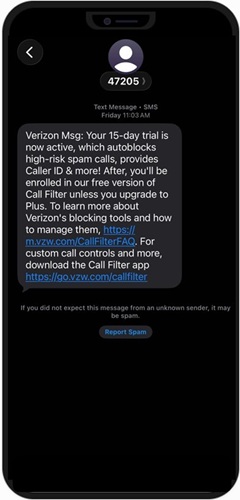
Figure 1: A typical SMS business message often appears from an unrecognizable short code, making it difficult for customers to verify the sender before clicking a link or replying.
When RCS delivery falls back to SMS because of a lack of data connectivity or other availability reasons, AWS uses sticky sending. The service prioritizes the origination number that most recently delivered successfully to that destination—maintaining that preference for 24 hours before retrying RCS. This ensures consistent, recognizable delivery across various connectivity and compatibility scenarios.
Effective phone number management is the foundation for fallback behavior. AWS provides three ways to send messages, each with different fallback behavior:
- Pool-based sending — AWS selects from identities in a specific pool containing your RCS agent and SMS phone numbers. This is the recommended approach for production deployments. Pools give you precise control over which identities are used while AWS handles automatic routing and fallback.
- Account-level sending — AWS automatically selects the best identity from your entire account. This is similar to the default behavior in Amazon Simple Notification Service (SNS), where you cannot isolate traffic into specific pools. This approach is ideal for development, testing, or simple deployments where a single identity is used for all messaging use cases within a country.
- Direct send — You specify an exact RCS agent as the origination identity. The message fails if RCS isn’t available. Use this for testing or when you want to handle fallback yourself.
For production messaging where delivery is critical, use pool-based or account-level sending for reliable delivery. Pools route your fallback SMS messages through consistent, recognizable numbers your customers trust.
RCS vs. SMS at a glance
For a detailed comparison of capabilities, see the following table.
| Feature | SMS | RCS |
| Character limit | 160 characters | No practical limit |
| Media support | MMS (compressed) | High-resolution images, video, audio |
| Read receipts | No | Yes |
| Typing indicators | No | Yes |
| Interactive buttons | No | Yes |
| Branded identity | Basic (Sender ID) | Full (Verified Profile) |
| Delivery over internet | No | Yes |
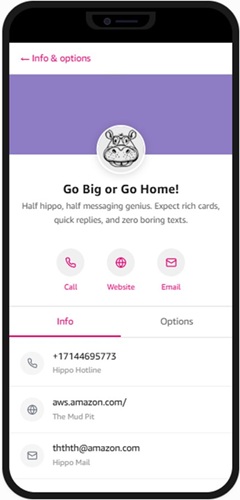
Figure 2: The final result – A verified brand profile featuring your logo, banner image, and custom brand colors—elements that significantly increase trust and click-through rates compared to standard SMS.
The recommended adoption path
Consider a phased approach to RCS adoption that aligns with your operational readiness. First, register your brand and get carrier approval. Next, move your existing SMS use cases to RCS. Finally, after you are comfortable with the channel, test and expand with advanced use cases.
How to register
Brand asset requirements
Before submitting your registration, prepare the following brand assets. Carriers reject assets that don’t meet exact specifications, so verify these requirements before submitting.
| Asset | Requirements |
| Logo | 224×224 pixels, PNG with transparency, under 50 KB |
| Banner | 1440×448 pixels, PNG or JPEG, under 200 KB |
| Brand Color | Hex format (e.g. #1A73E8), minimum 4.5:1 contrast ratio |
Note: A 4.5:1 contrast ratio means your brand color must be at least 4.5 times brighter (or darker) than its background. This threshold meets WCAG 2.1 Level AA standards, ensuring your brand name is legible for users with moderate vision loss or color blindness. To verify compliance, use a Contrast Checker to test your hex code against a solid white background.
Use case selection
Your use case determines what types of messages you can send in production. Select carefully before submitting — the use case does not affect approval timeline, but it does determine your message restrictions and how carriers perceive your traffic.
| Use Case | What you can send |
| OTP | Authentication codes and security verification only |
| Transactional | Order updates, shipping notifications, account alerts |
| Promotional | Marketing campaigns and offers (requires opt-in consent) |
| Multi-use | Combined transactional and promotional messaging |
Why not just choose Multi-use for everything?
While Multi-use offers the most flexibility, it is often subject to stricter carrier scrutiny during the vetting process. Carriers prefer single-purpose agents (like OTP) because they provide a more predictable and trustworthy experience for the recipient. If you have a high-volume OTP use case, registering it separately can help protect your sender reputation from being impacted by the lower engagement rates typically associated with promotional marketing.
Important: Agents must be use-case specific. Sending message types that don’t match your registered use case could result in suspension.
Registration steps
To submit your registration, complete the following steps:
- Sign in to the AWS Management Console and open the AWS End User Messaging console.
- In the navigation pane, under Configurations, choose RCS agents.
- Choose Create RCS Agent. This creates an AWS RCS Agent and then immediately guides you through creating a testing registration in a single workflow.
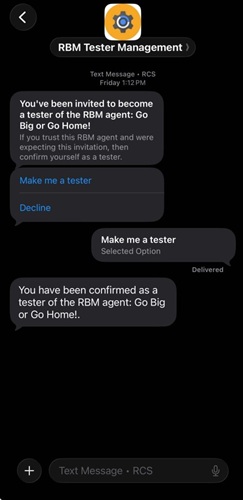
Figure 3: Once your agent is created in the AWS console, your registered test devices will receive an invitation like this one. Tapping ‘Make me a tester’ allows you to immediately see your branded content in action.
- The next screen shows an introduction to RCS and explains the setup process. Review the information and choose Next to continue.
- On the Agent details page, set the following:
- Friendly name — A console-only label for your AWS RCS Agent. This is an internal name for your reference (stored as a tag) and is not the name displayed on recipients’ phones. The friendly name is not available through the API.
- Deletion protection — (Optional) Enable to prevent accidental deletion of the agent.
- Tags — (Optional) Add tags to organize and identify your agent.
- In the Brand information section of the same page, enter the following:
- Display name — The brand name that recipients see alongside your RCS messages.
- Description — A brief description of your brand or business.
- Use case — Select the primary use case for your RCS messaging (for example, transactional notifications, marketing, or customer support).
- In the Brand assets section of the same page, upload the following:
- Logo — 224 × 224 pixels, PNG with transparency, under 50 KB.
- Banner image — 1440 × 448 pixels, PNG or JPEG, under 200 KB.
- Brand color — A hex color code (for example,
#1A73E8) with a minimum contrast ratio of 4.5:1 against a white background.
Important: Some brand assets cannot be changed after the agent is submitted for registration. Prepare your final brand assets before creating the agent. If you want to experiment first, you can quickly create a test agent using this flow, then create a fresh AWS RCS Agent with finalized brand assets later.
- On the Compliance keywords page, configure your keywords and auto-response messages.
- On the Review page, verify all your settings.
- Choose Validate and submit to create the AWS RCS Agent and submit the testing registration.
Testing and production launch phases
Launching RCS follows a distinct path from testing to production:
- Testing Registration: The initial guided console flow creates your AWS RCS Agent and a testing agent, or RBM Agent(RCS Business Messaging Agents). This allows you to validate your integration immediately by sending messages to registered test devices without waiting for carrier approval.
- Country Launch Registrations: After testing is complete, you must submit separate country launch registrations for each production market.
Carrier review and approval
- Independent Approval: Each country launch registration undergoes a separate review process by every carrier in that target country.
- Partial Reach: Approval is per-carrier. You are considered “partially approved” as soon as at least one carrier approves your agent, allowing you to start sending production messages to recipients on that carrier’s network via the
SendTextMessageAPI. - Timelines: For both the U.S. and Canada, expect the carrier approval process to take several months. To avoid delays, verify that all registration fields are accurate and, for U.S. launches, provide a clear screen recording demonstrating your intended use case.
Important considerations
Multi-level identity: Think of the AWS RCS Agent as your brand’s unified identity. Under this one resource, you will have multiple RCS for Business IDs: one for your testing agent and separate IDs for each country launch (e.g., one for the US and one for Canada).
Carrier approval is per-carrier, not all-at-once: You do not need to wait for every carrier to approve before you begin sending. As soon as an individual carrier approves your agent, you can reach that carrier’s subscribers.
Sandbox testing: Testing with sandbox agents does not require carrier approval and can begin immediately upon submission. Note that testing messages are charged at standard RCS rates.
Finality of configurations: Brand assets are defined on each specific registration and are final after submission. While minor updates are permitted through supporting documentation, significant structural changes require creating a new agent. Plan your configuration carefully before you submit.
Accuracy matters: Filling out registration forms incorrectly can result in lengthy delays or rejection. Double-check all information before submitting and verify that business documents are current and valid. In this early phase of RCS adoption, carriers have been approving recognizable brands more readily.
Managing costs and usage
Monitor your RCS message volume through Amazon CloudWatch metrics and set up billing alerts to track spending against your SMS baseline. For more information, see AWS End User Messaging pricing.
Conclusion
In this post, we showed you how RCS on AWS End User Messaging solves customer engagement challenges through verified branding, interactive features, and automatic SMS fallback. You get a branded messaging experience with the reliability of SMS built in. Evaluate your current SMS message volume and identify high-priority transactional messages that would benefit from verified branding. Consider migrating these high-impact use cases first to establish your brand presence and improve customer trust.
Get started today
Ready to implement RCS? Here are your next steps:
- If you’re ready to register: Contact your AWS account team or AWS Support to begin the registration process.
- If you want to learn more: Review the AWS End User Messaging and RCS documentation.
- If you’re still evaluating: Start by auditing your current SMS message volume and identifying high-priority transactional messages that would benefit from verified branding.