Migration & Modernization
Automate Your Landing Zone Creation with AWS Transform
When enterprises embark on their cloud migration journey, they bring years of operational maturity from running their workloads on-premises: separate environments for development, testing, and production, often segmented by business unit, with dedicated infrastructure, network boundaries, and identity controls for each. Translating these well-established patterns into cloud-native constructs like account structures, organizational units (OUs), and service control policies (SCPs) is where the complexity begins, and where foundational decisions shape your security posture, compliance boundaries, and cost structure for years to come.
Before migrating workloads to AWS, enterprises design a landing zone: a multi-account environment with defined account structures, identity and access management, networking, security guardrails, and centralized logging. Setting one up requires coordination and experience across AWS Organizations, AWS Control Tower, AWS IAM Identity Center, Service Control Policies, AWS Config, and AWS CloudTrail.
Traditionally, this process involves:
- Discovery workshops to understand business units, compliance requirements, and environment separation needs
- Architecture design to map OUs, accounts, and SCPs to organizational requirements
- Deployment of AWS Control Tower, OUs, accounts, and policies
- Iterative review cycles between migration teams, security, and business stakeholders
For most enterprises, landing zone deployments typically take 4-8 weeks. Complex regulated environments can stretch to 12 weeks, and that is only the first step. Enterprise migration projects involve many interconnected steps, from discovering your source environment and analyzing application dependencies, to grouping servers into migration waves, setting up network resources, and executing the workload migration itself.
Faster to first workload
AWS Transform addresses each of these steps with specialized agents that work together as an orchestrated workflow powered by AI. With its landing zone agent, it tackles the stage that historically took weeks — designing and building a landing zone which supports your migration plans. By embedding landing zone design directly into the migration workflow, AWS Transform compresses the timeline from “we need to plan our environment” to “we’re ready for Wave 1”:
Consistency — Each landing zone is designed to follow AWS recommended best practices, whether it’s your first migration or your fiftieth
Confidence — The capability explains why it’s recommending each design decision, so stakeholders understand the rationale
Continuity — Workload accounts are designed with your migration waves in mind, so there’s no gap between foundation and execution
Governance — Human-In-The-Loop approval ensures no changes reach your AWS environment without explicit review and sign-off
Traceability — Full approval workflows, resource tagging, and audit history
How the landing zone agent works
The landing zone agent works through natural-language conversation, guided by context from your broader migration workflow. It draws on your application inventory, migration wave plans, and business requirements to propose an account structure tailored to your organization. You can ask questions about the proposal, request changes, and iterate until the design reflects your needs before anything is deployed. By establishing a multi-account foundation aligned with the AWS Well-Architected Foundations from the start, it sets you up for success when you later want to layer on additional security controls, modernize workloads, and reduce tech debt across your cloud footprint.
Prerequisites
To use AWS Transform and its landing zone agent’s capabilities, confirm you have the following:
- AWS IAM Identity Center enabled in a selected target region. This should be the same region as the primary landing zone operating region.
- Access to AWS Transform in a supported AWS Region
- Access to the organization management account or delegated admin account
- While AWS Transform offers migration and modernization of enterprise workloads at no cost, budget approval will be required for AWS Control Tower, AWS Organizations, AWS Config, AWS CloudTrail, and related service costs, which will be provisioned as part of the landing zone deployment for your organization.
If AWS Control Tower is not yet enabled in your organization, the agent provides an automated workflow to initialize AWS Control Tower in your organization and deploys the remaining landing zone foundation components.
For full details on connector permissions, deployment options, and IaC formats, see the Build landing zone documentation.
Landing zone design as part of your migration workflow
You can create your landing zone foundation and workload migration accounts as part of the end-to-end migration workflow, or through separate dedicated jobs. For example, your platform team might use one job to establish the foundation (OUs, governance, networking), while your migration team uses another job to execute migration waves at the target workload accounts. AWS Transform recognizes the existing landing zone in your AWS Organization regardless of which job created it and can expand it with workload accounts informed by your migration planning data. Migration planning is often an iterative process—you define migration waves, design your network and account structure, and then refine your wave plan based on new insights. AWS Transform supports this iterative workflow by maintaining shared context and artifacts across each stage. This allows users to move seamlessly between migration planning and landing zone design, continuously refining both until they arrive at an aligned architecture that meets their migration requirements and business objectives. The landing zone agent uses context from your migration planning to guide you through two phases:
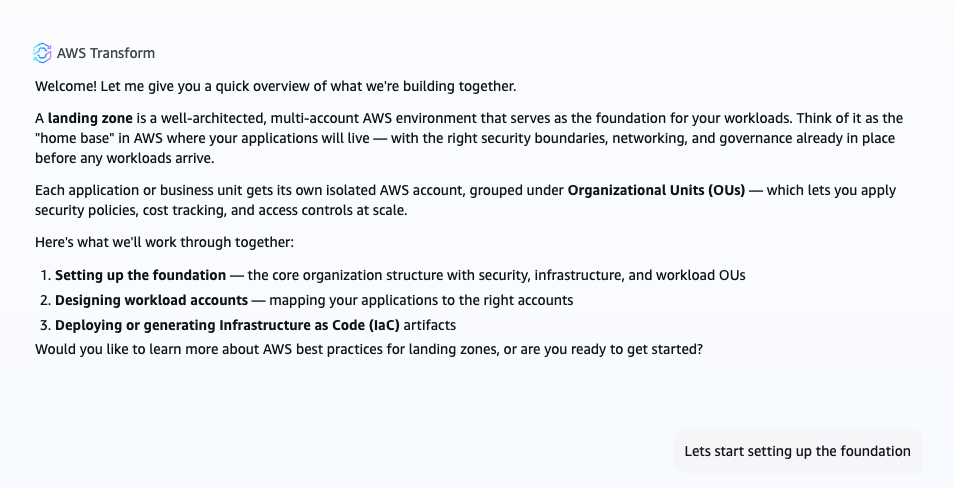
Figure 1: The AWS Transform landing zone agent within the migration workflow, showing how Foundation Setup and Workload Account Design connect to wave planning and execution steps.
Phase 1: Foundation setup
The new landing zone agent establishes your core landing zone infrastructure. Following the AWS Prescriptive Guidance for multi-account strategy, the agent recommends and deploys the following foundation structure:
- Root organization structure — the top-level hierarchy that all subsequent OUs and accounts inherit policies from
- Security OU — automatically provisioned with a Log Archive account (centralized and immutable logging for all AWS API activity) and an Audit account (read-only cross-account access for compliance review and logging resource changes)
- Mandatory controls — preventive and detective guardrails enforced across your organization via AWS Control Tower baselines
- Recommended SCPs — five additional Service Control Policies built by AWS field experts with knowledge collected over the years, covering root access, IAM user creation, AWS CloudTrail protection, EBS encryption, and internet gateway restrictions
The agent also recommends unique account email addresses using alias conventions (e.g., aws-admin+audit@example.com).
Phase 2: Workload account design informed by your migration plan
The landing zone agent pulls context from your AWS Transform workspace — your migration waves, application inventory, and business requirements — and if more information is needed it asks targeted discovery questions such as:
- How many business units or teams will use AWS?
- Do you operate under compliance frameworks like HIPAA, PCI-DSS, or FedRAMP?
- Do workloads handle sensitive data (PII, PHI, financial)?
- What’s your preference for environment separation — separate accounts or shared?
- What does growth look like over the next 12–24 months?
Using your answers, it proposes an OU and account structure under the Workloads OU, complete with reasoning behind each design decision — for example: “These three applications share a database dependency, so I’ve grouped them in a single account to avoid cross-account data access complexity during migration.”
You can ask the agent questions about the proposal, request changes, and iterate through natural conversation before accepting the design. It follows migration-aware principles like:
- Workloads in each migration wave are mapped to accounts that reflect their on-premises architecture — preserving application groupings, dependency relationships, and environment boundaries
- Compliance-sensitive workloads get dedicated Regulated sub-OUs
- Critical or sensitive-data applications get single-app-per-account isolation
- Tightly coupled applications with shared dependencies are grouped together
Works for greenfield and brownfield migrations
Some migration customers already have an AWS presence or a landing zone in place. The landing zone agent capability supports brownfield environments — it detects your existing organization structure and recommends only the changes needed to fill gaps against AWS recommended best practices. Instead of starting from scratch, you’ll see targeted guidance like: “Your foundation has Security and Infrastructure OUs but no Sandbox OU.” This makes it equally valuable for organizations expanding an existing environment as it is for greenfield migrations.
Flexible deployment options
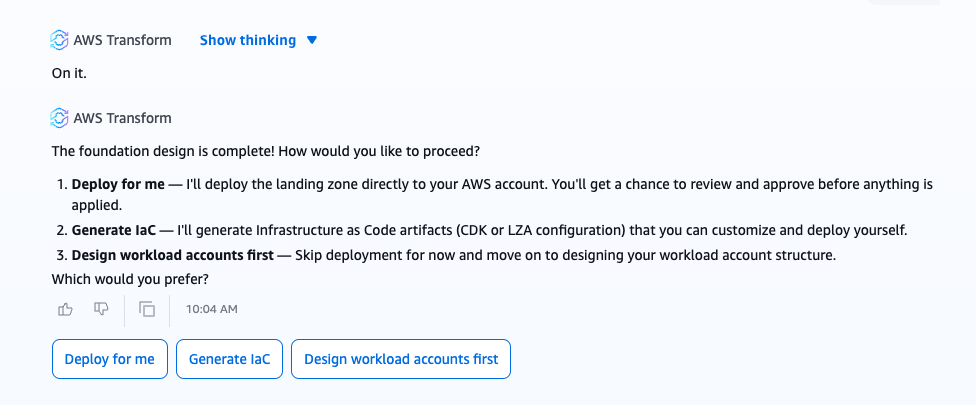
Figure 2: The AWS Transform deployment interface showing options for deployment
When the design is complete, you choose how to deploy:
- Deploy for me — The agent deploys the foundation OUs, accounts, and SCPs directly to your AWS Organization
- I’ll deploy on my own — It generates Infrastructure as Code (IaC) artifacts in your preferred format: AWS Cloud Development Kit (AWS CDK) (TypeScript) or Landing Zone Accelerator on AWS solution (LZA) compatible YAML files
The landing zone agent follows a Human-In-The-Loop (HITL) design — a deliberate architectural choice that keeps humans in control of infrastructure decisions while the agent handles the complexity of design and configuration generation. The agent recommends and prepares, but a human always makes the final decision before any changes reach your AWS environment. Every recommendation includes explicit reasoning, so reviewers understand not just what will be deployed but why. Approvals are required when the agent is asked to perform deployments. Deployment requests automatically route to the Approvals tab, where a user with the admin role in AWS Transform reviews the landing zone configurations before granting approval. Each submission triggers a new review cycle; all decisions are tracked for audit purposes, and deployments proceed only after receiving confirmation.
Expand your control and governance
The landing zone agent goes beyond deploying infrastructure; it expands your control and governance. Beyond the mandatory AWS Control Tower guardrails, the agent recommends five additional SCPs that address the most common security gaps AWS sees in early-stage migrations: unrestricted root access, long-lived IAM credentials, disabled audit trails, unencrypted storage, and accidental public internet exposure.
AWS field experts identified baseline policies that accelerate your first production workload providing the minimum viable governance layer. The agent applies them to your Infrastructure, Sandbox, and Workloads OUs while leaving the Security OU under the AWS Control Tower native management. For the full SCP policy names and detailed configurations, see the Build landing zone documentation.
For customers with advanced compliance requirements, the generated Landing Zone Accelerator (LZA) configuration provides a natural integration path for layering additional governance — including Resource Control Policies (RCPs) for data perimeter enforcement, Declarative Policies for immutable resource configuration baselines, and centralized backup and tagging policies.
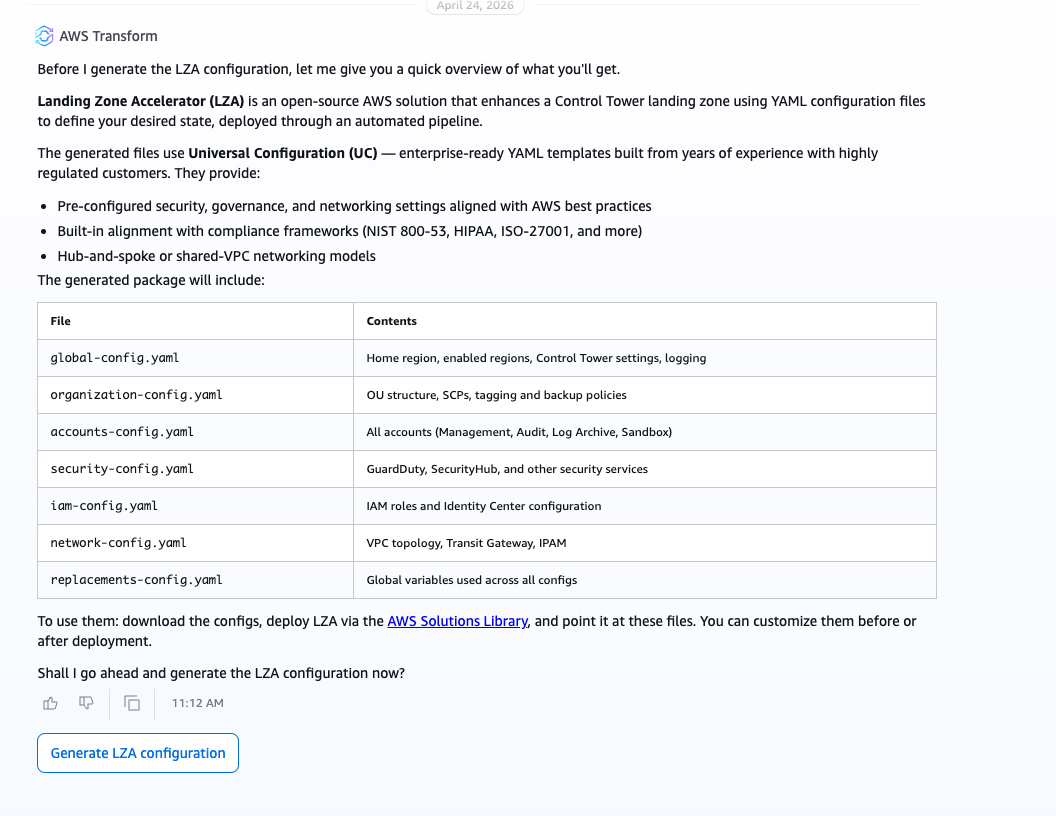
Figure 3: The AWS Transform governance layer architecture showing LZA Universal Configuration detailed configuration files
Automatic resource tagging helps maintain traceability. Resources are tagged with CreatedBy: AWSTransform along with workspace and execution IDs for traceability.
Clean up
The landing zone agent in AWS Transform creates resources that incur ongoing AWS charges, including AWS Control Tower, AWS Config, and AWS CloudTrail. If you are evaluating this capability in a test environment and want to remove the resources, note that the Log Archive account contains centralized audit logs and the Audit account holds compliance data. Back up this data before proceeding — deleting these accounts without a backup results in permanent data loss. Remove the Service Control Policies applied during setup from each OU (Infrastructure, Sandbox, and Workloads).
Before deleting OUs, ensure all accounts within them are moved or closed. Close any workload accounts provisioned during Phase 2 (Workload Account Design). If you no longer need the AWS Organizations structure, you can remove the organization after all accounts are closed or migrated. Note that removing an organization is irreversible. See Decommissioning an AWS Landing Zone.
If you enabled AWS IAM Identity Center specifically for this test, refer to the AWS IAM Identity Center documentation for steps to disable it in your organization. If AWS IAM Identity Center was already in use before the landing zone setup, retain it and remove only the groups and permission sets created during deployment.
Conclusion
Building a well-governed landing zone is a critical and historically time-consuming step in any enterprise migration. The landing zone agent in AWS Transform helps remove that bottleneck by embedding foundation design directly into the migration workflow, using generative AI to compress weeks of manual effort into hours of guided, intelligent collaboration. Whether you are migrating your first workloads to AWS or expanding an existing multi-account environment, this capability helps you start with a strong foundation — one that is governed, migration-aware, and ready for your first wave.
Don’t let landing zone setup hold back your migration timeline. Open the AWS Transform console, create a workspace, and build your landing zone today. Within hours, you can go from planning to a governed, migration-ready AWS environment.