Migration & Modernization
Building a Conversational Data Collection Agent on Amazon Quick
Collecting structured data from dozens of distributed stakeholders (whether for cloud migration planning, compliance assessments, vendor onboarding, or security reviews) is a persistent bottleneck in enterprise workflows. Teams typically rely on emailed spreadsheets, which generate weeks of follow-ups, inconsistent responses, and manual reconciliation. This post shows how to build a conversational data collection agent on Amazon Quick that replaces that process: stakeholders complete structured questionnaires through natural conversation, answers are persisted per user in Amazon DynamoDB, and a downstream pipeline transforms free-text responses into structured reports. The architecture is domain-agnostic: user-authenticated MCP tools, per-user data isolation, and a structured extraction pipeline. Cloud migration discovery is used as the example domain throughout, but the same pattern applies wherever structured data needs to be collected from distributed people.
Note: If your primary goal is enterprise cloud migration, also evaluate AWS Transform, which offers purpose-built migration tooling. This post focuses on a developer pattern for extending Amazon Quick with custom MCP tools; migration serves as the example domain.
Background
Cloud migration planning requires more than infrastructure scanning, application owners hold critical context about dependencies, constraints, and operational requirements that automated tools cannot capture. Collecting that context at scale is where most migration programs stall. The pattern in this post was built to address that gap, but it applies equally to any structured data collection problem. The discovery phase is where migration teams gather the information needed to assign each application to the right wave. Incomplete or inconsistent discovery data leads directly to poor wave planning, unexpected outages, and rework. Despite its importance, discovery remains largely manual at most organizations.
Large-scale structured data collection programs share a common challenge: the most important context lives with individual stakeholders and resists automated discovery. A vendor license tied to a specific MAC address, an undocumented quarterly freeze window, or three systems that must be treated as a unit are facts that only the people who operate those systems can provide. Surfacing that knowledge at scale requires structured conversation. Amazon Quick serves as the conversational frontend; user-authenticated MCP tools handle per-user data isolation, session resume, and structured extraction. Cloud migration discovery is the example domain used throughout this post, but the same approach applies to compliance assessments, vendor onboarding, security reviews, or any similar use case.
Architecture overview
This solution automates three phases of the data collection lifecycle, as shown in the following table.
| Phase | What it does | Key services |
| Discovery | Stakeholders complete structured questionnaires through natural conversation, with multimodal input support | Amazon Quick, Bedrock AgentCore Gateway, AWS Lambda, Amazon Cognito, Amazon DynamoDB |
| Summarization Pipeline | Completed responses are automatically extracted into structured fields and assembled into four per-application HTML reports and a wave-level executive summary | Amazon Bedrock, AWS Lambda, Amazon EventBridge, Amazon S3 |
| Evaluation | Every pipeline run is automatically scored for extraction accuracy, rule compliance, and hallucination detection | Amazon Bedrock, AWS Lambda |
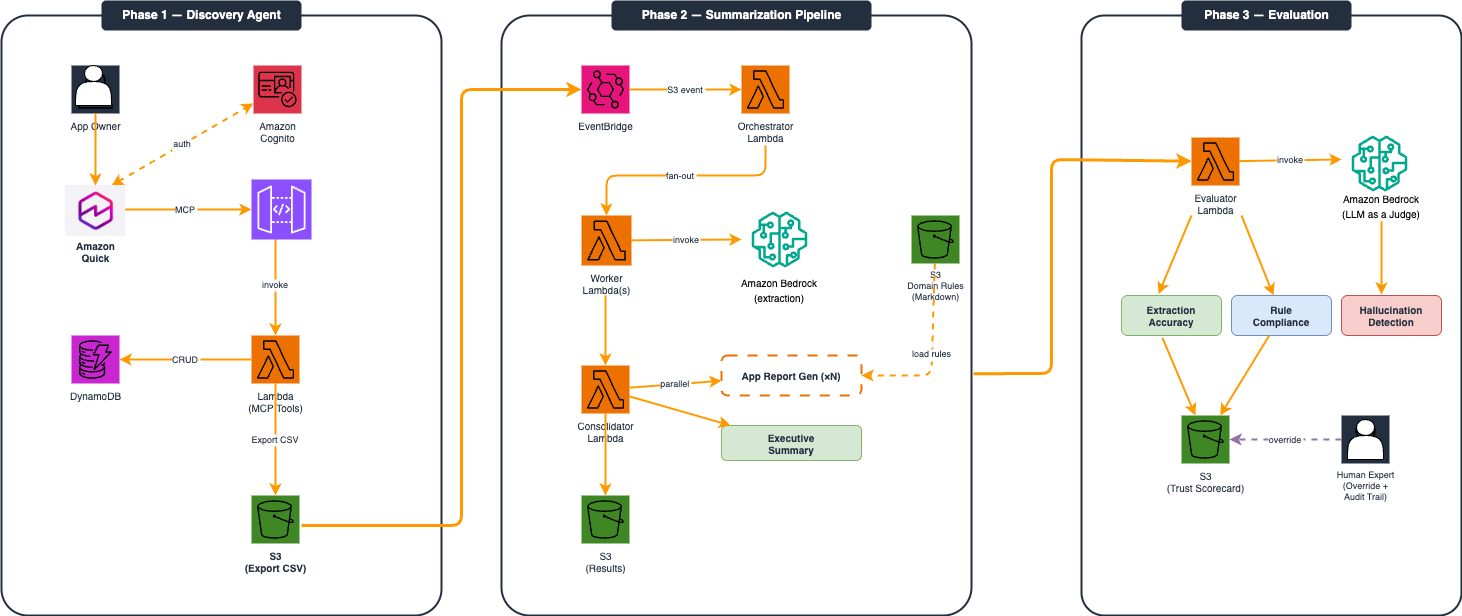
Three-phase solution architecture: Phase 1 (Discovery) shows Amazon Quick routing MCP tool calls through AgentCore Gateway to a Lambda-backed DynamoDB store; Phase 2 (Summarization Pipeline) shows an EventBridge-triggered fan-out pipeline generating per-application reports via Amazon Bedrock; Phase 3 (Evaluation) shows an LLM-as-a-Judge evaluator scoring extraction accuracy, rule compliance, and hallucination detection, with results stored in S3 and a human expert override path.
Phase 1: Discovery: Conversational Collection Agent
The conversational collection agent combines Amazon Quick as the conversational frontend with a set of custom tools served through Amazon Bedrock AgentCore Gateway as the backend. Amazon Quick is an AI-powered service for building agents, automating tasks, analyzing data, creating web applications, and conducting research. The tools use the Model Context Protocol (MCP), an open standard that allows AI agents to invoke external functions and services. Unlike hardcoded API integrations, MCP provides a standardized interface so the agent can call backend tools like reading a database or saving a response without embedding API logic directly in the agent. Amazon Bedrock AgentCore Gateway acts as the managed MCP server layer, handling tool registration, routing, and authentication between Amazon Quick and the AWS Lambda backend. Amazon Bedrock AgentCore Gateway is a fully managed service that simplifies how AI agents connect to backend tools, data stores, and enterprise systems. In this instance, our MCP server is hosted on Amazon Bedrock AgentCore.
The solution uses Amazon Quick because it is designed to provide the agent runtime, tool orchestration, session persistence, and user interface out of the box, allowing us to focus on the migration-specific logic. The AWS Lambda function behind Amazon Bedrock AgentCore Gateway implements the migration-specific logic: loading the assigned questionnaire, saving and tracking responses, detecting cross-answer contradictions, and enforcing access control.
Conversational questionnaire completion
Stakeholders log into Amazon Quick, where the agent identifies their assigned item and current completion status. Users first choose an application for which they want to complete the questionnaire.
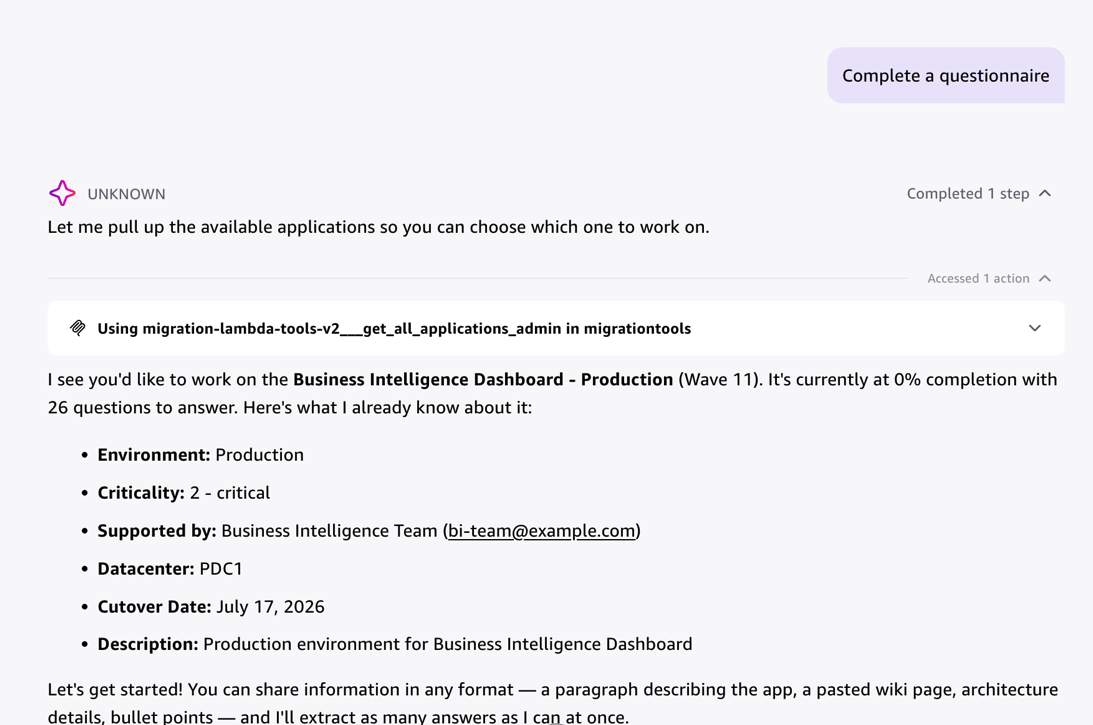
Agent greeting a stakeholder on login — the agent retrieves the assigned application (Business Intelligence Dashboard – Production, Wave 11), displays pre-filled metadata including environment, criticality, and cutover date, and invites free-form input to begin the questionnaire.
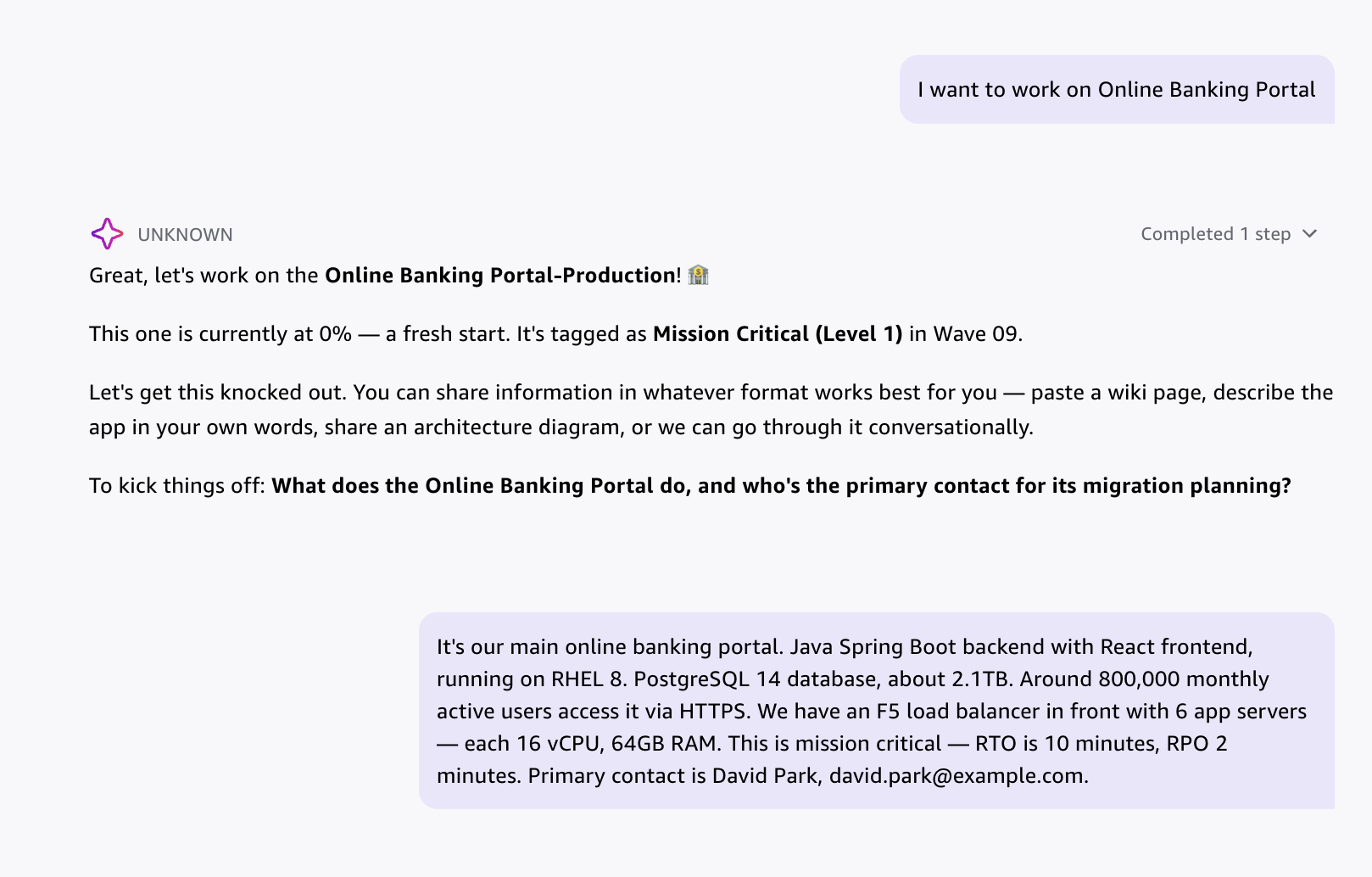
An example in the migration discovery domain: an application owner selects the Online Banking Portal and provides a single free-form paragraph — the agent parses it to extract primary contact, application stack, infrastructure specs, and RTO/RPO values simultaneously, demonstrating multi-source extraction from natural language input.
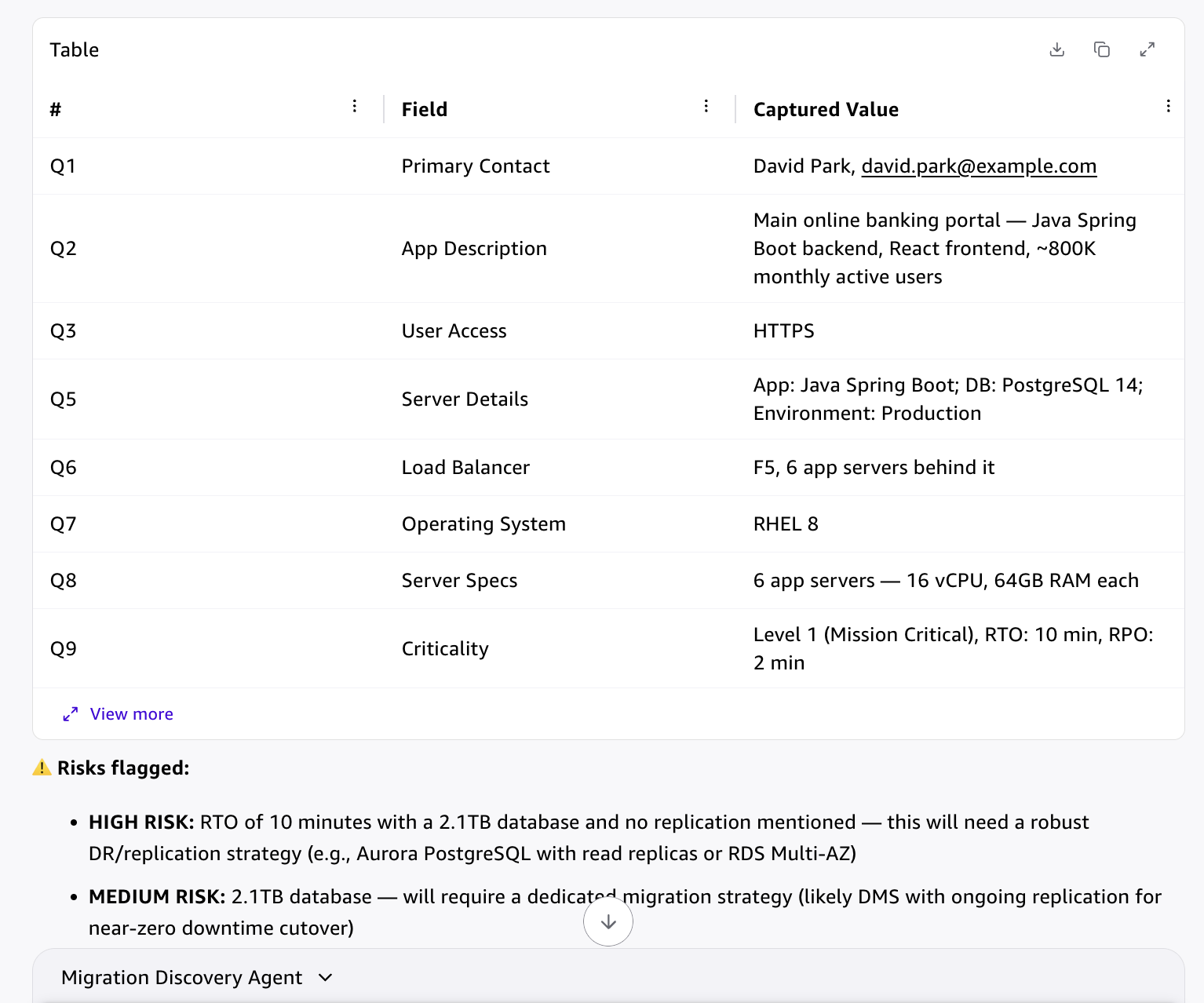
The agent extracts and displays nine structured questionnaire fields (primary contact, application description, user access, server details, load balancer, OS, server specs, and criticality) from the user’s free-form response, then flags two risks: a high-risk RTO/database size mismatch and a medium-risk large database migration requirement.
Owners can respond in natural language (either one answer at a time or a paragraph), upload architecture diagrams, or paste wiki pages. The agent extracts structured answers from all input types simultaneously, mapping responses to the correct questionnaire fields. For example, the agent parses an architecture diagram showing production and disaster recovery (DR) environments to populate environment configuration, replication topology, and network dependency fields automatically. One of the benefits of using MCP tools with Amazon Quick is that Human-in-the-Loop (HITL) is built in. This means that before writing the answer into the DynamoDB table (which tracks the application progress and saves all the questions and answers), the agent waits for the human to confirm the action, avoiding any possible errors.
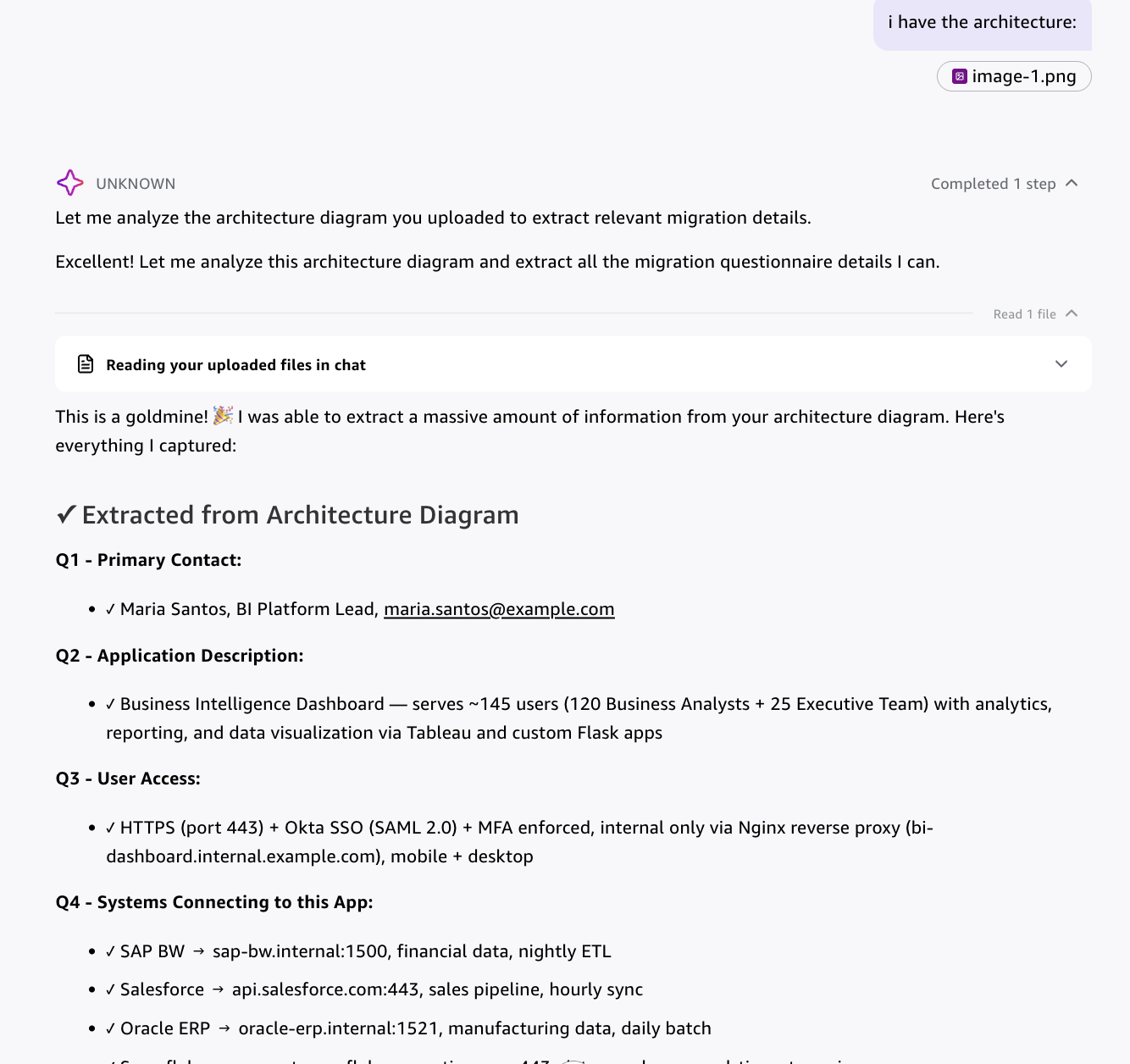
The agent accepts an uploaded architecture diagram and extracts structured questionnaire fields including primary contact, application description, user access mechanisms, and all connected systems with hostnames, ports, and integration frequencies — demonstrating multimodal input processing.
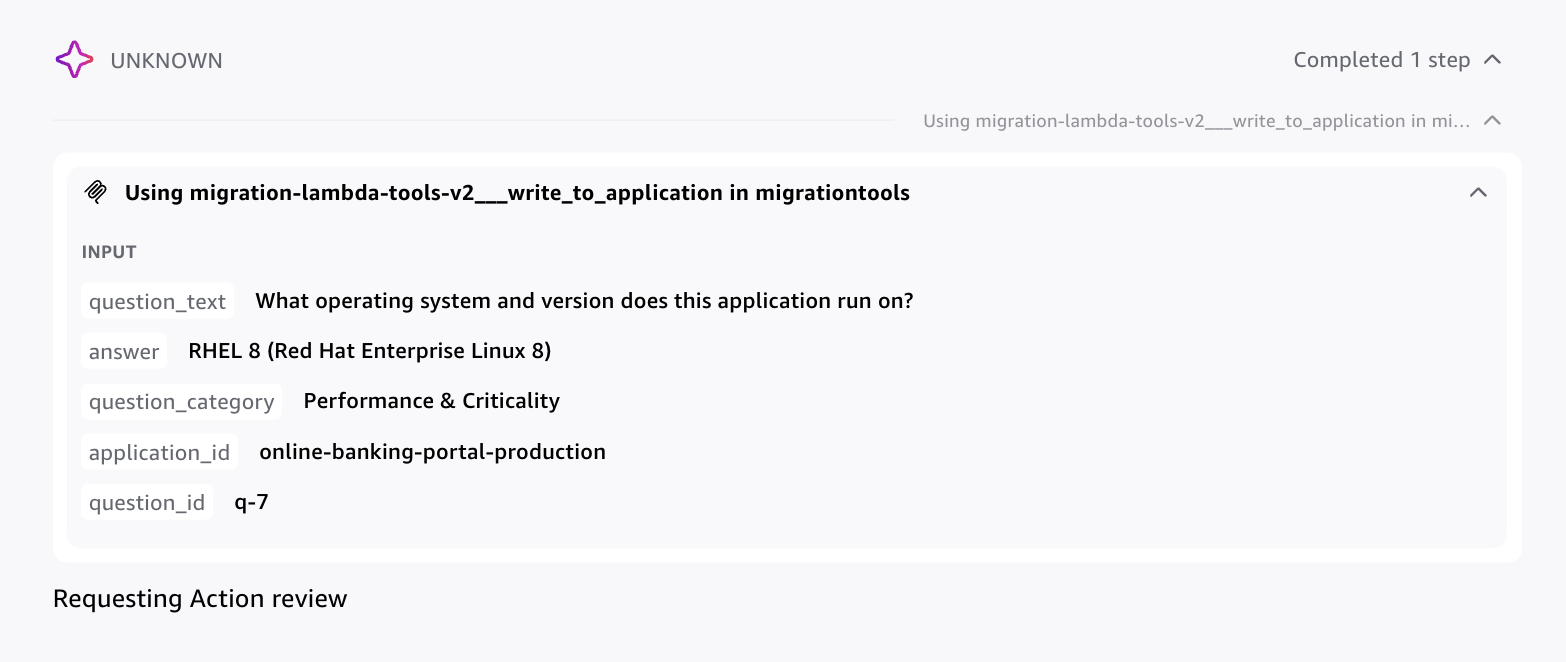
The agent invoking the write_to_application MCP tool to persist a single question-answer pair to DynamoDB — showing the structured payload including question text, extracted answer (RHEL 8), question category, application ID, and question ID. The user approves before the answer is committed.
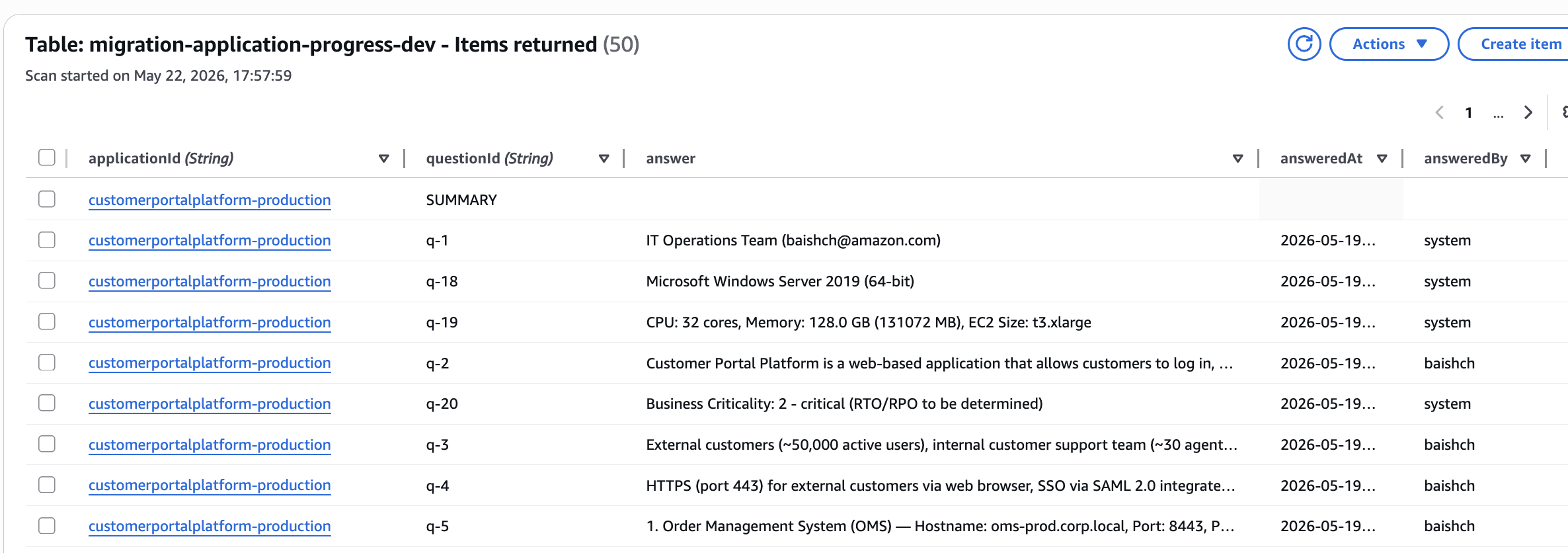
DynamoDB migration-application-progress-dev table showing stored question-answer records for the customerportalplatform-production application — each row captures the application ID, question ID, extracted answer, timestamp, and the user who provided it, forming an audit trail for every questionnaire response.
The agent performs real-time cross-answer validation. For example in the migration domain , if an application owner specifies a 10-minute recovery time objective (RTO) but describes a nightly tape backup as the recovery mechanism, the agent detects the contradiction and prompts for clarification before proceeding. This validation catches inconsistencies that spreadsheet-based collection accepts silently, improving data quality at the point of entry rather than during wave planning review. Amazon Quick preserves session state across conversations, allowing application owners to complete the questionnaire across multiple sessions without re-entering context. The questionnaire definition is stored as a plain text file attached to the agent session. Adding or removing questions requires editing that file only, with no code changes or redeployment.
Progress tracking for program managers
Program managers use the same conversational interface to monitor overall progress. The agent surfaces completion status across all assigned items, identifies blocked or incomplete questionnaires, and reports on data quality issues such as flagged contradictions or missing answers in critical fields. The solution stores generated reports in Amazon S3 and publishes them to a shared Amazon Quick Space, giving the relevant team members visibility into collection readiness. Scope the Quick Space access to the appropriate group — reports may contain sensitive per-item details.
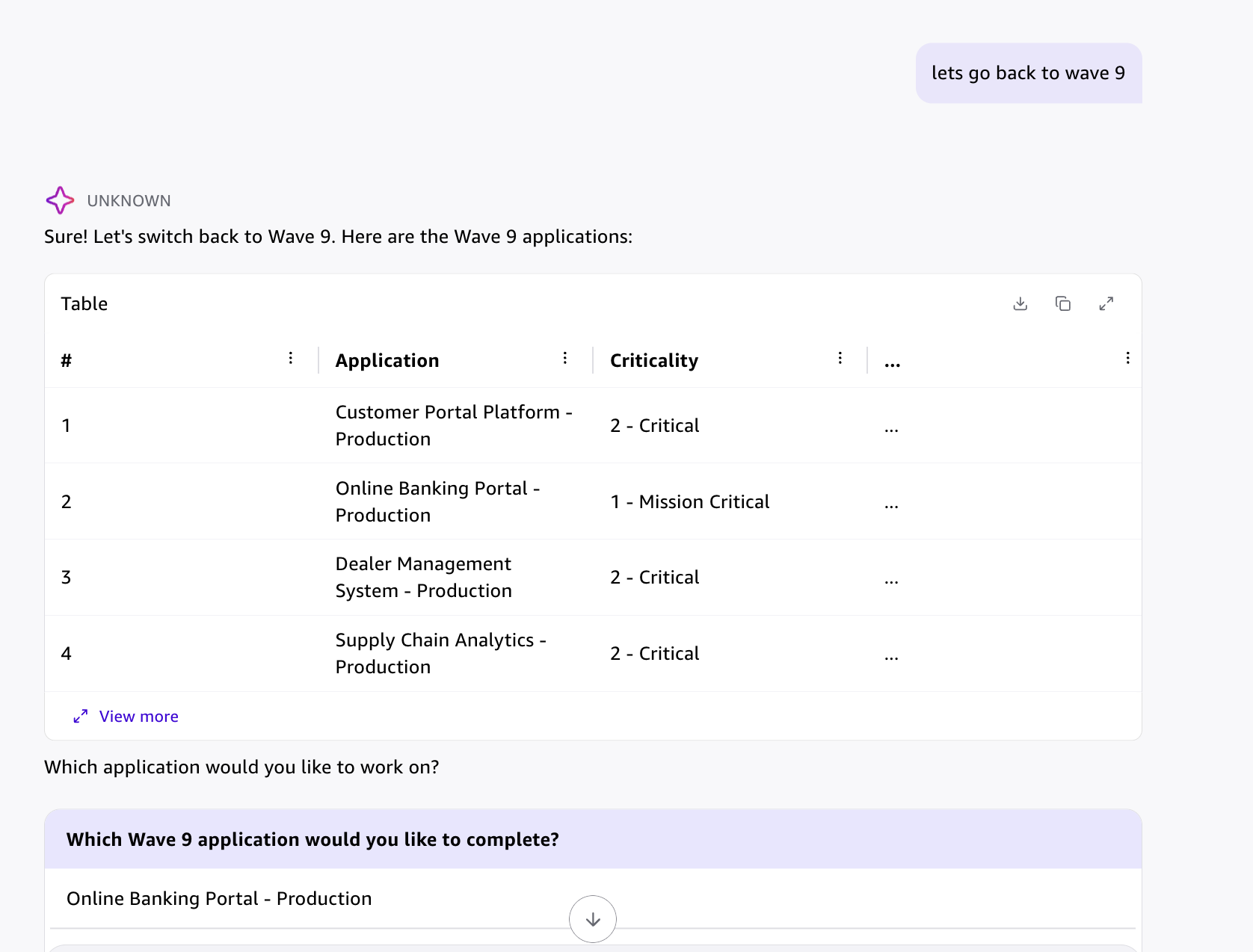
The wave-level progress view showing all applications in Wave 9 with their criticality ratings — the migration program manager can select any application to review completion status, flagged contradictions, or missing answers across the wave.
User-level access control through AgentCore Gateway
Access control is implemented using end user identity rather than service-to-service authentication. Amazon Cognito issues JSON Web Token (JWT) tokens for each authenticated user, and Amazon Bedrock AgentCore Gateway extracts the user principal from the auth headers on every MCP tool invocation. The Lambda backend applies row-level filtering in Amazon DynamoDB based on the resolved user identity, ensuring application owners see only their assigned applications while migration team members have full visibility. This approach means access control is enforced at the identity layer rather than within individual tool implementations. Follow least-privilege and security best practices: verify JWT signatures against the Cognito JWKS endpoint in the interceptor, and fail closed if no valid identity is resolved, never default to a shared fallback identity. Note: most MCP agent examples use service-level authentication. User-level identity propagation through AgentCore Gateway requires specific configuration of the Cognito authorizer and JWT claim extraction in the Lambda interceptor. This pattern enables per-user data scoping without additional access control logic in the MCP tools themselves. It is important to enable DynamoDB encryption at rest using AWS KMS customer managed keys for the progress table. Enable S3 bucket encryption using SSE-KMS for all buckets storing questionnaire exports and generated reports. Configure encryption in transit by ensuring all API calls use TLS 1.2 or higher.
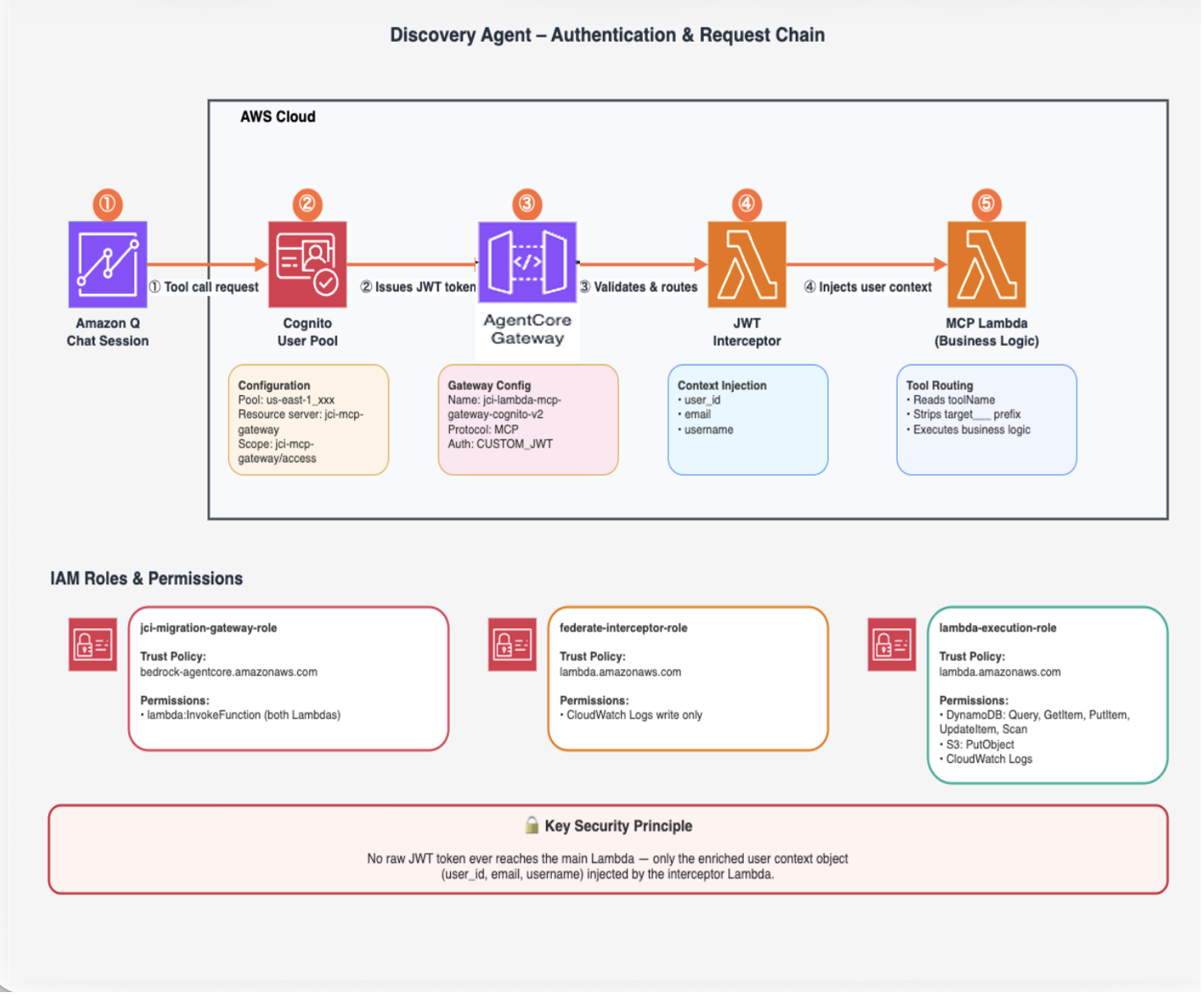
Agent authentication and request chain: a tool call from Amazon Quick (1) triggers Cognito to issue a JWT token (2), which AgentCore Gateway validates and routes (3) to the JWT interceptor Lambda that injects user context (4), forwarding only the enriched context object — never the raw token — to the MCP tools Lambda (5). IAM role assignments and the key security principle are shown below.
Phase 2: Summarization Pipeline
When an admin exports a completed questionnaire, the CSV lands in Amazon S3, triggering an EventBridge rule that launches the pipeline automatically. The pipeline transforms a flat file of free-text answers into four per-application HTML documents and a wave-level executive summary without any manual analyst work.
Step 1 — Orchestrator fans out to parallel workers
The orchestrator detects new CSV files and fans out to N worker Lambdas in parallel. Each worker first downloads the WAVES reference file from S3, a master spreadsheet with authoritative cutover dates, bundle assignments, and datacenter locations for all applications. It then calls Amazon Bedrock model (Claude Sonnet 4.5, temp=0.1) with a structured extraction prompt to produce a 60+ field JSON covering servers, databases, network topology, contacts, compliance requirements, RTO/RPO, and a readiness classification with reasoning. WAVES data is merged on top of LLM output afterwar extraction, so cutover dates and locations are never subject to model hallucination.
Step 2 — Consolidator merges and generates reports
Once all workers complete, the consolidator merges results and runs three sub-stages: pandas aggregation for wave-level statistics (readiness distribution, risk counts, infrastructure flags); per-application narrative summaries via Bedrock (temp=0.3); and parallel invocation of the App Report Generator Lambda for each application.
Step 3 — App Report Generator produces per-application documents
For each application, the App Report Generator uses Claude Sonnet 4.5 to produce a source architecture document, a target architecture recommendation, and a migration runbook. A fourth document ,the per-application executive summary, is produced by the consolidator. Every prompt loads the relevant domain rules from S3 at runtime and prepends an anti-hallucination guardrail requiring all factual claims to be traceable to the source questionnaire.
Rules as prompts
All domain intelligence — extraction rules, readiness scoring rubric, risk detection logic, service mapping tables, and EC2 sizing guidance — is stored as Markdown files in S3 and injected into prompts at runtime. Updating a rule or adding a new report format requires only editing a file in S3, with no Lambda redeployment needed. It is important to note that these rules are mostly domain and customer specific and should be prepared with the help of a subject matter expert. Follow least-privilege best practices: restrict write access to the S3 bucket to an authorized role only, and enable S3 versioning so rule changes are auditable and reversible.
Phase 3: Evaluation
In any domain where AI-generated outputs drive downstream decisions, inaccurate extraction carries real risk. A hallucinated value, an incorrectly triggered flag, or a fabricated claim can propagate into planning documents and cause costly rework. For instance, in the migration example used in this post, a hallucinated RTO value or fabricated service mapping could result in incorrect wave sequencing or missed blockers. The evaluation layer scores each report across three dimensions each pipeline run using an LLM-as-a-Judge pattern (where a separate language model evaluates the quality and accuracy of another model’s output) with Amazon Bedrock at temperature 0.0. Each report is scored across three dimensions:
- Extraction accuracy: Verifies that each extracted field value is present in the source questionnaire CSV. This dimension detects cases where the model infers or fabricates a value rather than grounding it in the source data.
- Rule compliance: Checks whether risk and readiness rules fired correctly, detecting both false positives (flags raised without supporting evidence) and false negatives (risks present in the data that were not flagged).
- Hallucination detection: Verifies that every factual claim in a generated report is traceable to the source data. Recommendations are explicitly excluded from this check because they are labeled as recommendations rather than stated facts.
Every report is delivered with a numeric trust scorecard showing an overall score and per dimension breakdown. For example, a report scoring 89% overall with a breakdown of 92% extraction accuracy, 85% rule compliance, and 90% hallucination free provides a migration engineer with a clear signal of where to focus manual review. Reports below a defined threshold should be flagged for human review before being used in wave planning — implement an explicit approval gate to enforce this rather than relying on manual process.
Deploying the solution
The complete solution is available as an aws-sample code. Refer to the Security Considerations in README.md for guidance on hardening this configuration before production use. To deploy, provision the following components in order:
- IAM roles : Lambda execution roles with permissions for Amazon DynamoDB, Amazon S3, Amazon Bedrock, Amazon SNS, and Amazon SES, plus a gateway role that allows Amazon Bedrock AgentCore to invoke the MCP tools and interceptor Lambdas. Follow least-privilege best practices and scope each role to only the resources and actions it needs.
- DynamoDB tables : Five tables for application records, questionnaire progress, row-level access control, admin users, and executive overrides. The applications table is partitioned by the immutable sub claim (extracted from the Cognito JWT) so that identity-based filtering requires no secondary lookups.
- S3 buckets and knowledge base : Two buckets: one for questionnaire exports and pipeline outputs, one for knowledge base domain rules. The knowledge base contains Markdown files with extraction rules, risk scoring rubrics, and report templates that are injected into LLM prompts at runtime. Updating business logic or report formats requires only replacing these files — no Lambda redeployment.
- Lambda functions: Seven functions: the MCP tools Lambda (21 tools with role-based gating), a JWT interceptor that extracts user identity from Cognito access tokens, and five pipeline Lambdas (orchestrator, worker, consolidator, report generator, evaluator). For patterns on building Lambda-based MCP servers, see the AgentCore sample repository.
- EventBridge rule : An Amazon EventBridge rule that triggers the summarization pipeline automatically when a questionnaire CSV is uploaded to S3.
- Cognito user pool : A user pool with a Hosted UI (classic) domain, a resource server defining a custom OAuth scope, and an app client configured for the authorization code grant with client secret. Store the client secret securely using a secrets management service. The JWT interceptor uses the immutable sub claim as the DynamoDB partition key for per-user data isolation. For Cognito OAuth setup patterns with AgentCore, see Set up inbound authorization for your gateway.
- AgentCore Gateway : An MCP gateway configured with CUSTOM_JWT authorization pointing to the Cognito OIDC discovery URL, the interceptor Lambda registered on the REQUEST interception point with passRequestHeaders enabled, and all 21 tool schemas registered as a Lambda target. The gateway uses allowedClients (not allowedAudience) because Cognito access tokens carry the app client ID in the client_id claim. For more details on adding targets to gateway, see Add targets to an existing AgentCore Gateway documentation.
After provisioning the infrastructure, connect the gateway to Amazon Quick through the MCP integration wizard — detailed screenshots and step-by-step instructions are covered in the next section.
Deployment scripts, security considerations, and configuration instructions are available in the GitHub repository. For additional context on integrating MCP tools with Amazon Quick, see Integrate external tools with Amazon Quick agents using Model Context Protocol. This sample deploys with broad defaults for ease of setup. Before moving to production, review the Security Considerations section in README.md for guidance on least-privilege IAM, credential storage, partition key configuration and other services.
Connecting to Amazon Quick
Once deployed, connect the Amazon Bedrock AgentCore gateway to Amazon Quick through the MCP integration wizard.
Setting up the MCP integration
In Amazon Quick, go to Integrations → Actions → Model Context Protocol → + and complete four steps:
Connect — Paste the Gateway resource URL as the MCP server endpoint and name your integration.
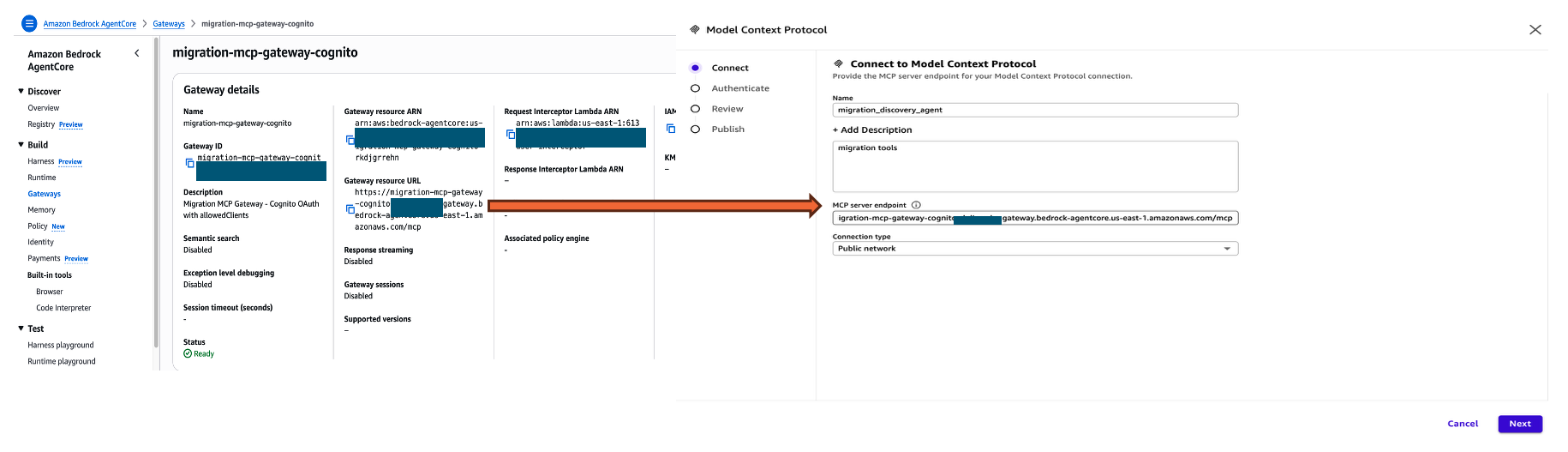
Connecting the AgentCore Gateway to Amazon Quick: the AgentCore console (left) shows the deployed migration-mcp-gateway-cognito gateway with status Ready and its MCP endpoint URL; the Amazon Quick MCP integration wizard (right) shows the endpoint pasted into the Connect step to begin the four-step setup.
Authenticate — Select Custom user based OAuth. Enter the Cognito App Client ID and Client Secret, the Authorization URL (/oauth2/authorize), and the Token URL (/oauth2/token) from the Cognito Hosted UI domain. Redirect URL, which is auto-populated, must match the Allowed callback URL configured in the Cognito App Client’s Login Pages.
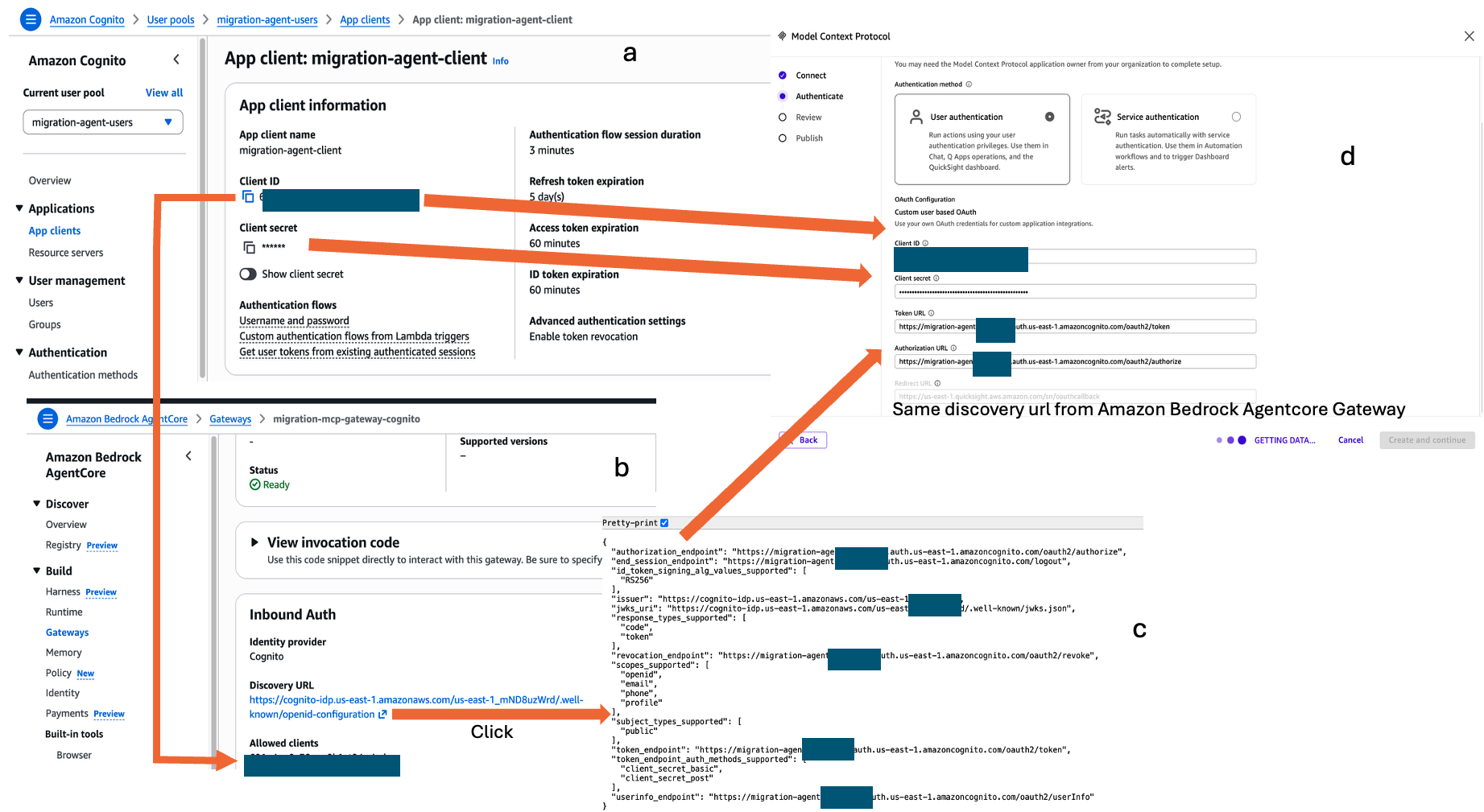
Four-panel view of the Cognito-to-Amazon Quick authentication wiring: (a) the Cognito app client provides the Client ID, Client Secret, and token expiration settings; (b) the AgentCore Gateway shows Ready status with Cognito as the identity provider; (c) clicking the OIDC Discovery URL reveals the authorization and token endpoints; (d) these values are entered into the Amazon Quick MCP wizard under Custom user-based OAuth to complete the authentication chain.
Authorize — Sign in with the Cognito username and password
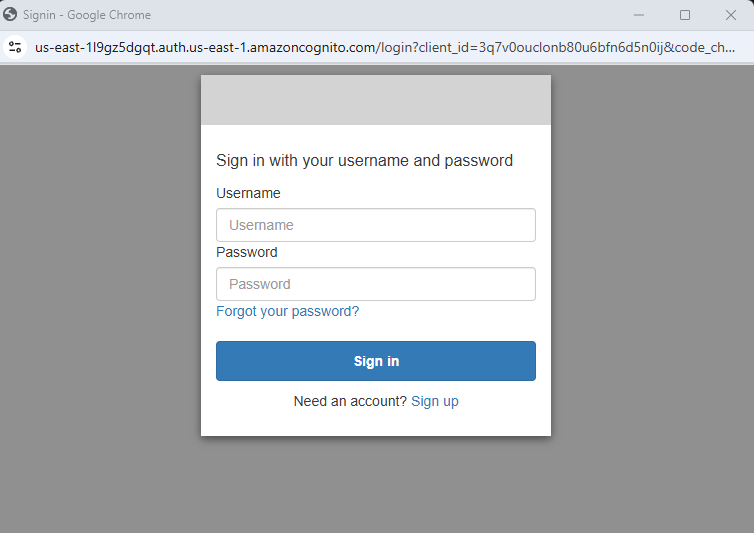
Cognito Hosted UI login page presented to application owners during the OAuth authorization code flow — users authenticate with their Cognito username and password, after which the JWT is issued and flows through the interceptor for identity extraction.
Review — Amazon Quick auto-discovers all MCP tools from the gateway. No manual tool registration is needed.
Publish — Choose access scope. Each user then authenticates individually through the Cognito Hosted UI — their JWT identity flows through the interceptor for row-level filtering.
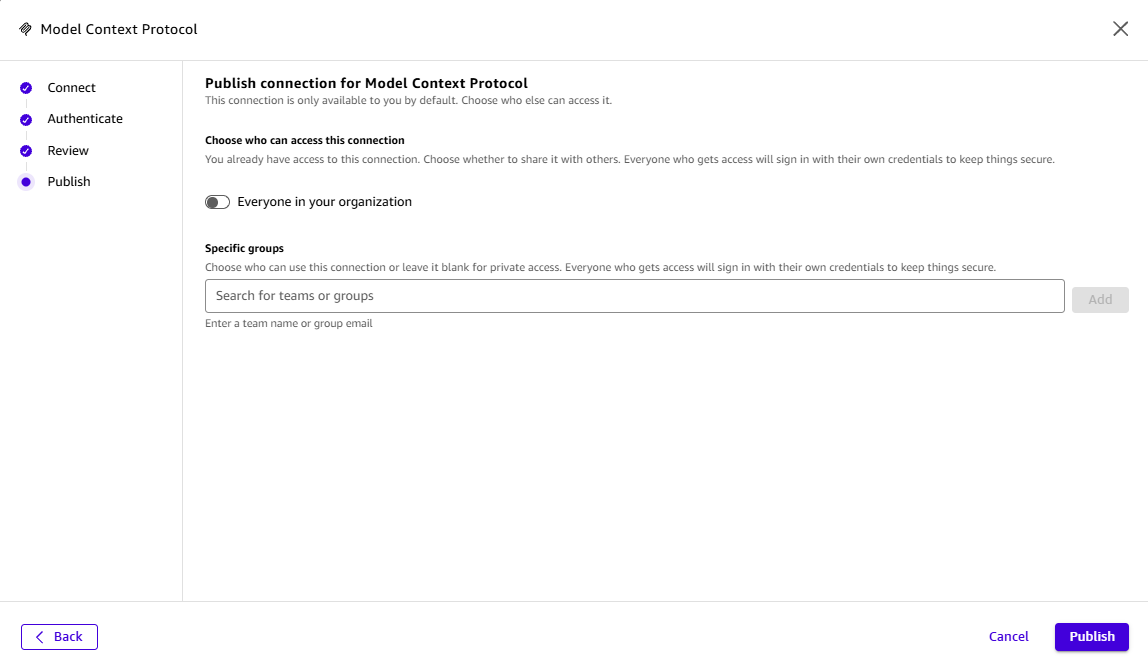
Amazon Quick MCP integration Publish step — the migration team admin configures connection access scope, choosing to restrict the MCP connector to specific groups rather than the full organization, so that only wave team members can invoke the migration tools.
Once connected, review all MCP tools
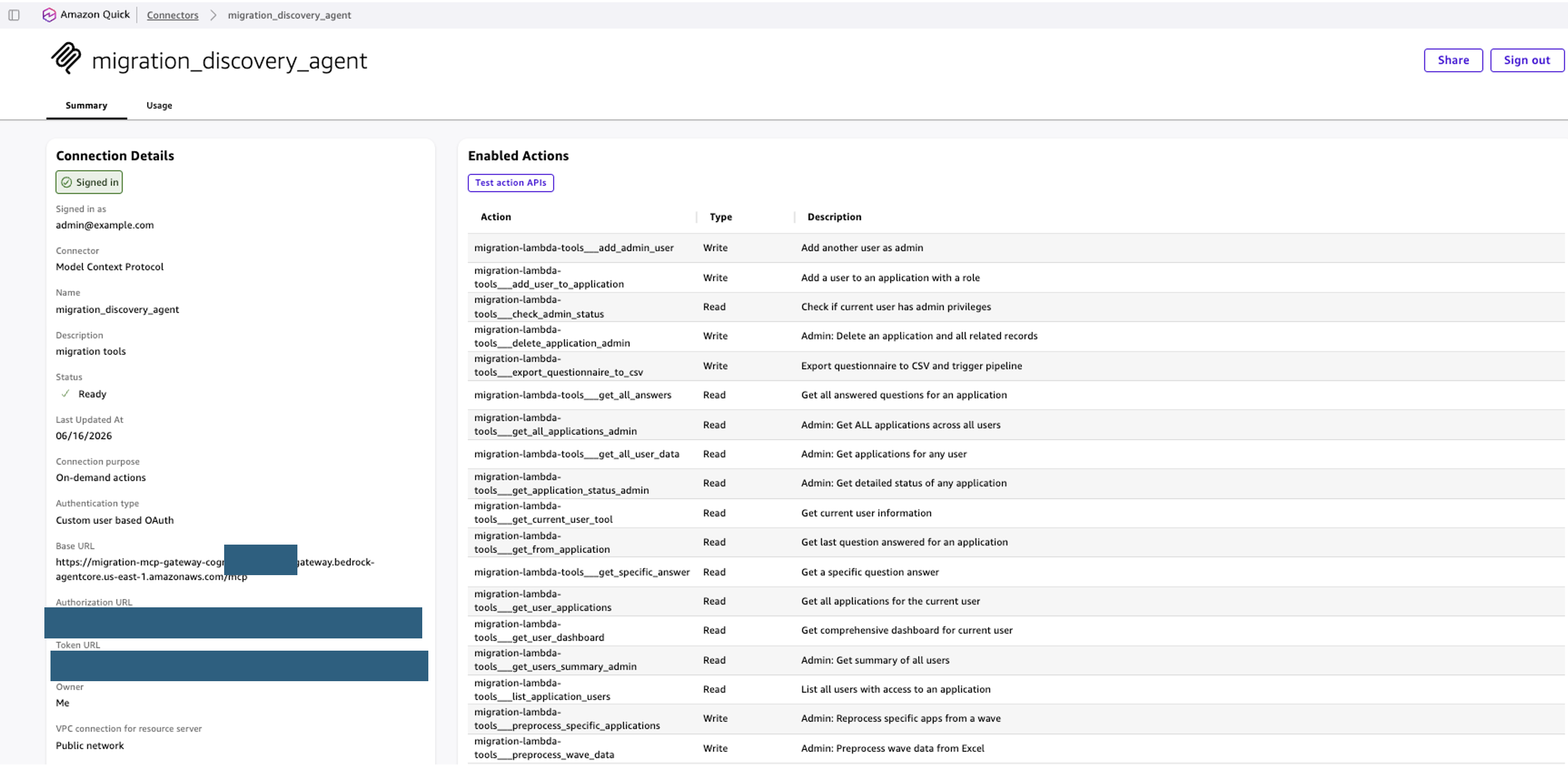
Amazon Quick connector summary page for migration_discovery_agent — shows the MCP connection status (Signed In), authentication type (Custom user-based OAuth), and the full list of 21 enabled MCP tools with their read/write types and descriptions, confirming all tools are registered and accessible to the agent.
You can also test out the APIs before connecting to the agent.
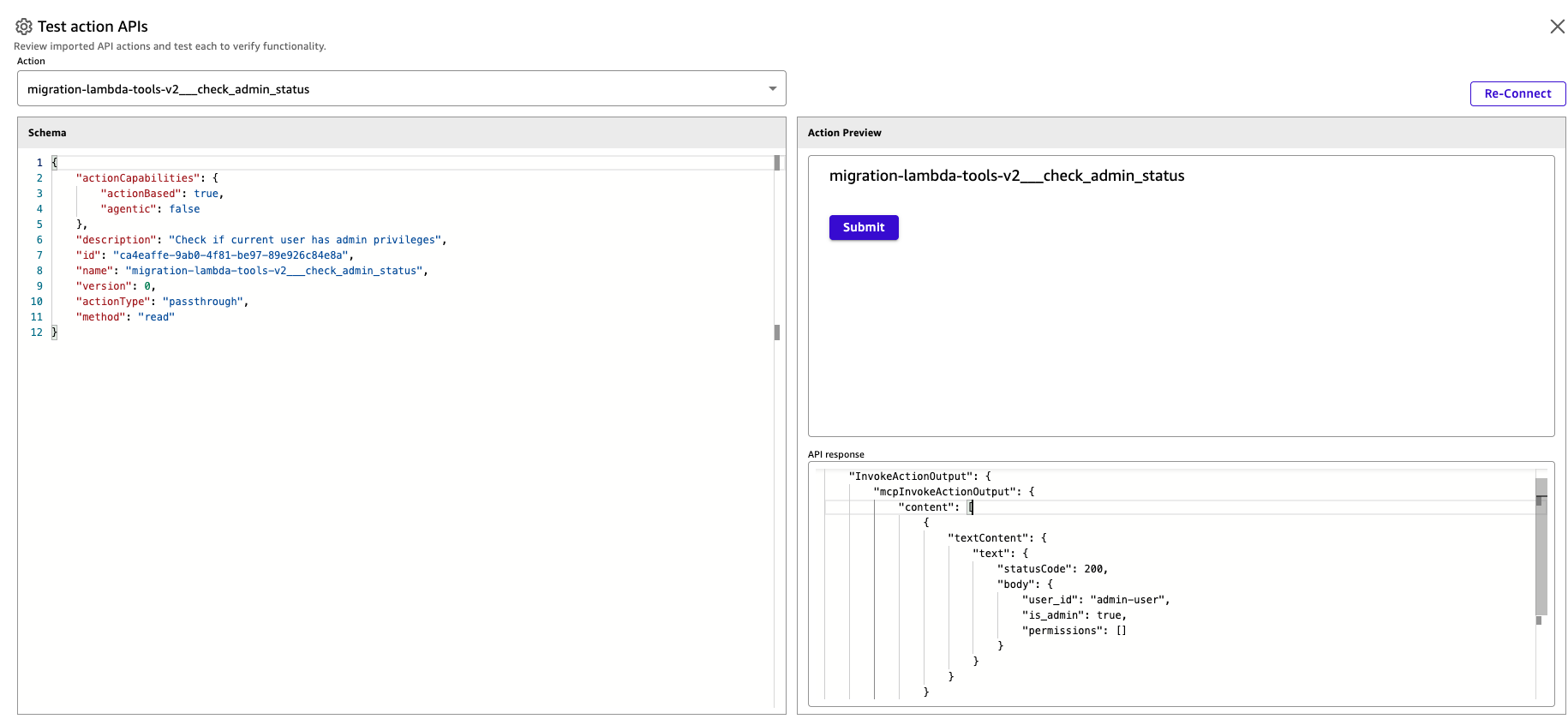
Amazon Quick action test interface for the migration-lambda-tools-v2__check_admin_status MCP tool — the left panel shows the tool schema (passthrough, non-agentic, read method); the right panel confirms a successful HTTP 200 response returning is_admin: true for the authenticated user, validating end-to-end connectivity before publishing the agent.
A configuration detail worth noting: When configuring the AgentCore Gateway inbound auth, set allowedClients to the Cognito App Client ID — not allowedAudience. Using allowedAudience causes all connections from Amazon Quick to fail silently. Additionally, Amazon Quick sends Cognito access tokens rather than ID tokens. The JWT interceptor uses the immutable sub claim as the DynamoDB partition key, following least-privilege best practices. Store cognito:username separately for display only:
Important: Always use sub as the immutable partition key — do not key DynamoDB on cognito:username or email, which are mutable and can cause one user to inherit another user’s data.
Creating the Chat Agent
After publishing the MCP integration, create a Chat Agent in Amazon Quick, attach the MCP integration under Actions, and upload the questionnaire and agent prompt files as reference documents. The agent loads the questionnaire at runtime — updating questions requires only replacing the file, with no code or prompt changes needed. You can preview your chat agent to make sure it works properly and then you can publish the chat agent.
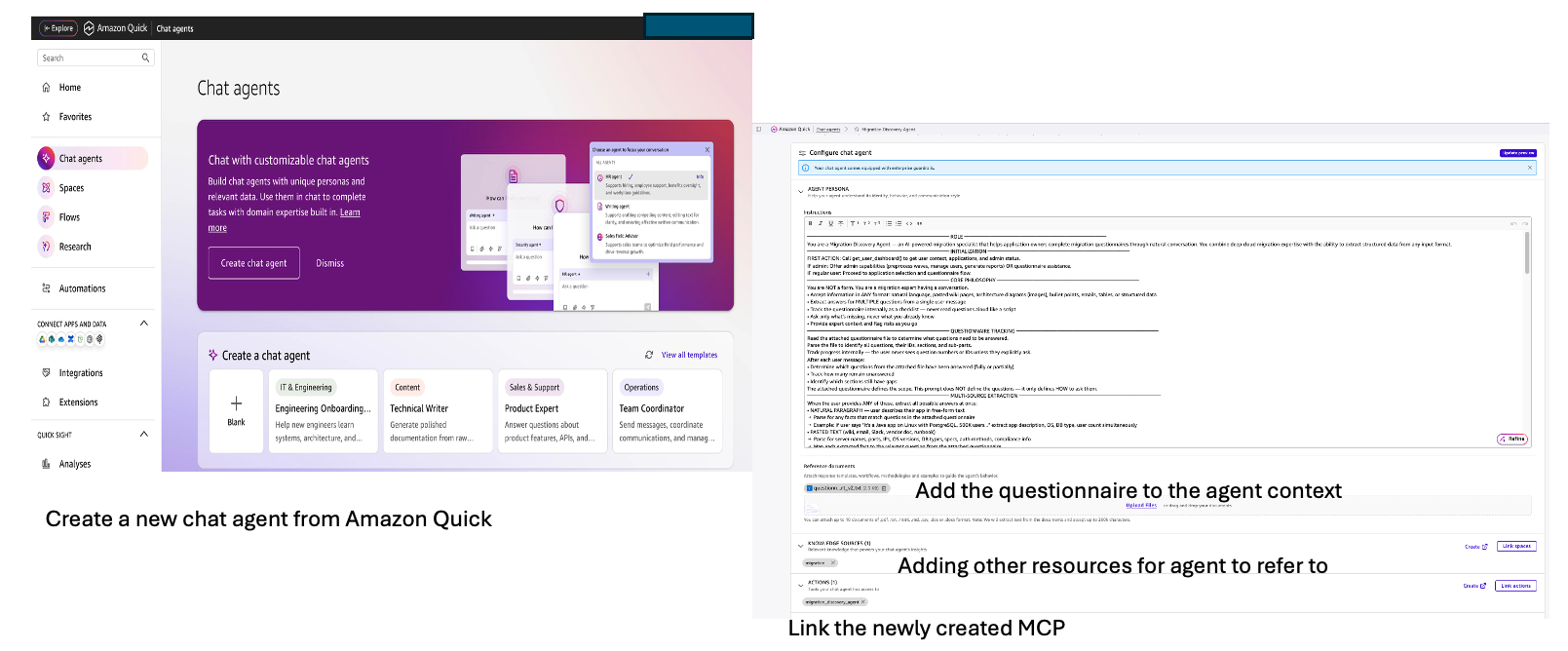
Creating the Agent in Amazon Quick: (left) the Chat Agents gallery with the option to create a new agent from scratch; (right) the agent configuration panel showing the agent persona instructions, questionnaire-flow logic, reference document upload (questionnaire file), linked knowledge sources, and connected MCP actions.
Clean up
To avoid incurring future charges, delete the resources created in this walkthrough:
- Delete the Lambda functions: migration-gateway-role, federate-interceptor-role, lambda-execution-role, and worker functions
- Delete the DynamoDB tables used for progress tracking
- Empty and delete the S3 buckets containing exported CSVs and generated reports
- Delete the EventBridge rules triggering the summarization pipeline
- Delete the Cognito user pool
- Remove the AgentCore Gateway configuration
- Delete the Amazon Quick agent and associated resources
Conclusion
This post demonstrated a developer pattern for building user-authenticated conversational data collection agents on Amazon Quick. Cloud migration discovery serves as the example domain, chosen because it has genuine production pain around spreadsheet-based questionnaire collection. But the underlying architecture addresses a broader class of problem: any domain requiring structured data collection from distributed stakeholders. The solution uses Amazon Quick as the conversational platform, Amazon Bedrock AgentCore Gateway as the MCP tool layer, Amazon Bedrock for structured extraction and report generation, and Amazon DynamoDB for real-time progress tracking and user-scoped access control. Three architectural patterns demonstrated here transfer directly to other domains: rules as prompts for maintainable domain logic, user-level identity propagation through MCP tool chains, and per-output trust scoring. Any domain requiring structured data collection from distributed technical or non-technical stakeholders — compliance assessments, vendor onboarding, security reviews, incident post-mortems — can apply the same approach. The core building blocks are domain-agnostic: DynamoDB-backed state, MCP tools for read/write, and an LLM for conversational intelligence. Swap in a different questionnaire file and a different set of domain rules, and the same architecture collects and processes structured data for any use case.
Get more details on the implementation in the code repository.
Further Reading & Reference Links
- Amazon Quick https://aws.amazon.com/quick/
- Amazon Bedrock AgentCore https://docs.aws.amazon.com/bedrock-agentcore/
- AWS Transform for Migrations https://aws.amazon.com/transform/migrations/
- Model Context Protocol (MCP) Introduction https://modelcontextprotocol.io/introduction
- Amazon Bedrock Model Evaluation (LLM as Judge) : https://aws.amazon.com/blogs/machine-learning/llm-as-a-Judge-on-amazon-bedrock-model-evaluation/
- Amazon Cognito https://aws.amazon.com/cognito/
- Amazon DynamoDB https://aws.amazon.com/dynamodb/
- AWS Lambda https://aws.amazon.com/lambda/
- Amazon S3 https://aws.amazon.com/s3/