Migration & Modernization
How CI Financial ran parallel teams on AWS Transform
Introduction
CI Financial set out to exit VMware before a license renewal deadline. The VMware landscape held roughly 500 servers, and 259 were in scope: 85 applications, 215 application servers, and 44 database servers.
Rather than run the migration as one team, CI Financial and AWS Professional Services ran two teams at the same time with AWS Transform for migrations. A migration on this scale means coordinating many teams, integrating tooling, and holding business continuity throughout. Splitting the work let each team own half the waves, so each carried about half the per-wave effort: not only the per-server cutover, but discovery, readiness, testing, and decommissioning.
AWS Transform replaces manual migration steps with repeatable, automated actions and gives every team a consistent way to work. CI Financial used a shared workspace with separate jobs, and mapped workspace roles to real responsibilities so each team ran independently from different countries and time zones.
The migration ran on an agreed 23-week schedule, paced by the change windows CI Financial approved for cutovers, and completed every wave with zero infrastructure rollbacks. In this blog post, you will learn how to structure a workflow for multiple teams working in parallel in a shared AWS Transform workspace.
The customer
CI Financial is one of Canada’s top three wealth management companies, with more than $550 billion in assets under management (as of August 2025). The firm operates across investment management, wealth advisory, and asset administration in a regulated financial services environment. CI Financial ran a substantial VMware landscape supporting production workloads, databases, and internal business applications. After seeing the AWS Transform vision at re:Invent 2025, CI Financial chose AWS Transform as the primary accelerator for the migration.
The challenge: why one team wasn’t enough
The CI Financial VMware landscape was heterogeneous. The application portfolio spanned a wide range, from real-time trading to batch processing, all sitting on infrastructure composed of Windows, Linux, commercial and open-source databases, and 200 TB of storage. A single team working sequentially would have carried every wave alone. Running two teams in parallel roughly halved each team’s load per wave and let each own its waves and cutover windows without affecting the other. Running them without collision meant choosing the right isolation model before the first cutover.
Team isolation in AWS Transform
AWS Transform provides natural isolation boundaries by way of workspaces and jobs. CI Financial and Professional Services used these boundaries to create operational safety during cutover preparation and delivery.
A workspace is the top-level boundary in AWS Transform. It holds the connector, roles, and resource tags that define a team’s access scope. The team used two workspaces:
- A workspace for testing and pre-Wave 0 readiness checks. Access to this workspace was limited to engineers who were building the migration processes and tools.
- A workspace for the live migrations. Access to this workspace was granted to CI Financial engineers, Professional Services leads, and both migration teams.
Figure 1 shows the workspace and job hierarchy.
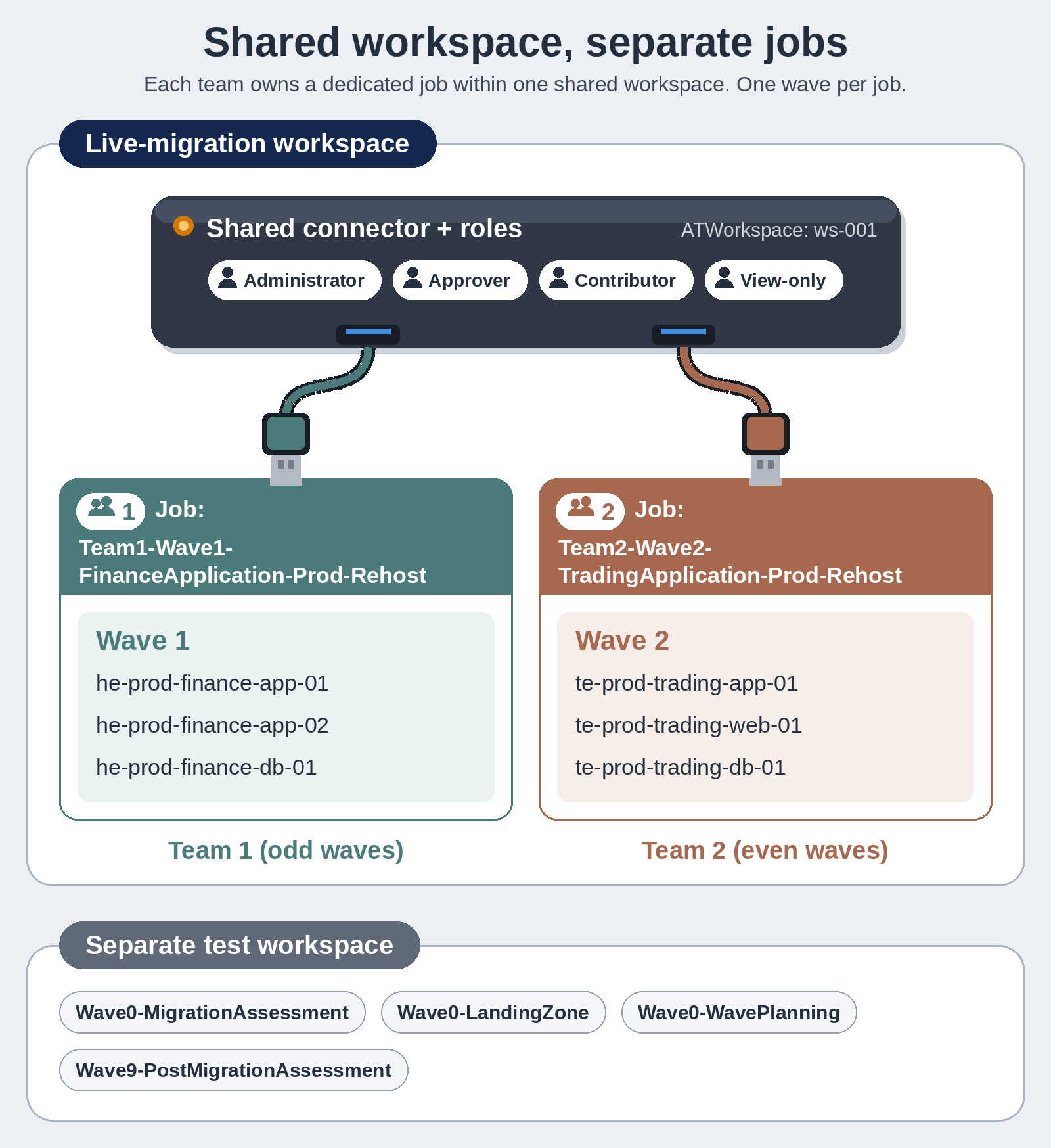
Figure 1. A shared live-migration workspace with separate team jobs, and a separate test workspace for readiness and planning. Job naming convention keeps ownership explicit.
A job is the unit of execution within a workspace. For the live migrations, each wave ran as one job, with servers migrating together in that wave’s cutover window. The naming convention kept each job tied to its wave: {Team}-{Wave}-{Application}-{Environment}-{Disposition}, for example Team1-Wave3-FinanceApplication-Prod-Rehost. The teams also ran exploratory jobs for readiness and testing, such as Wave0-MigrationAssessment for discovery and assessment, Wave0-WavePlanning for inventory grouping, and Wave9-PostMigrationAssessment for post-migration assessment. All of these ran in the separate test workspace rather than the live-migration workspace. AWS Transform connectors and roles are shared within a workspace, which means every team member sees every job’s progress in real time. It also means that once configured, both teams can use these shared resources in their respective jobs. Table 1 below shows the allocation of AWS Transform roles to migration team members.
| AWS Transform role | What the role can do | Who held the role |
|---|---|---|
| Administrator (Admin) | Full control, manages workspace settings | CI Financial stakeholders, Professional Services leads |
| Approver | Approves human-in-the-loop (HITL) gates without full workspace control | Professional Services team leads |
| Contributor | Creates jobs, uploads inventory, drives the chat | Professional Services migration engineers |
| View-only (Read-only) | Read-only visibility into jobs, no changes | CI Financial leads |
Table 1. AWS Transform workspace roles mapped to capability and holder.
This mapping created distinct lanes. CI Financial administrators owned the workspace, access, and connector. Each team’s Approver (a Professional Services lead), cleared the operational gates, tagging verification, test launches, and relaunches, and reviewed the work log after each wave, while the View-only member watched execution in real time without any risk of modifying jobs in progress. Figure 2 shows how to assign the role when inviting a collaborator to a workspace.
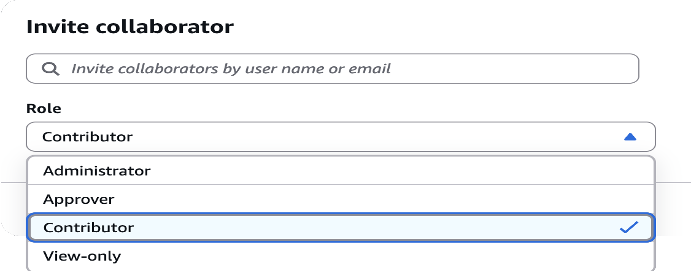
Figure 2. The Invite collaborator modal in AWS Transform. Roles (Administrator, Approver, Contributor, View-only) are assigned at the workspace level and apply to all jobs within that workspace.
Professional Services migration engineers, as Contributors, did the hands-on execution: creating jobs, uploading server inventory, running prompts, and driving the chat through each phase of the cutover. They also generated on-demand metrics reports (time-to-cloud, boot readiness, and post-launch action pass rates) that the team leads reviewed before approving the next gate.
How the teams were structured
Migrations move fastest when the work is split among small teams working in parallel sprints. AWS describes this as the migration factory model (see AWS Prescriptive Guidance: Large Migration Strategy): teams working repeated patterns on hundreds of servers.
Two migration teams, each with four engineers in multiple time zones, ran the waves on an odd/even split: Team 1 took the odd waves, Team 2 the even, with both teams sharing Wave 0 as a pilot. The teams chose the wave split over grouping by account or disposition because it balanced the load and set a tick/tock cadence, where one team ran cutovers while the other prepared its next wave, so the two teams never collided as they moved through the prepare, deliver, and test workflow. The team managed application dependencies during wave planning by grouping servers into waves with minimal inter-dependencies and designated a wave planner who was responsible for managing the wave schedule and advising the migration teams of dependencies and risks.
How the teams delivered within each job
Running two teams in parallel only works if both teams operate the same way. Two mechanisms made that possible: a shared prompt repository that standardized how teams drove AWS Transform, and an automated inventory pipeline that kept input data clean and consistent.
Shared prompt repository
Each stage of the cutover lifecycle in AWS Transform relies on specific prompts: inventory uploads, readiness checks, execution steps, and validation checks. Early in Wave 0, the team created a shared prompt repository that both teams referenced throughout the migration. The repository contained the exact prompts to use at each stage, removing guesswork from cutover execution. And because the prompts encoded the decisions rather than relying on individual expertise, new engineers reached full cutover proficiency in about two working sessions. Figure 3 shows the flywheel of improvements facilitated by the shared prompt repository.
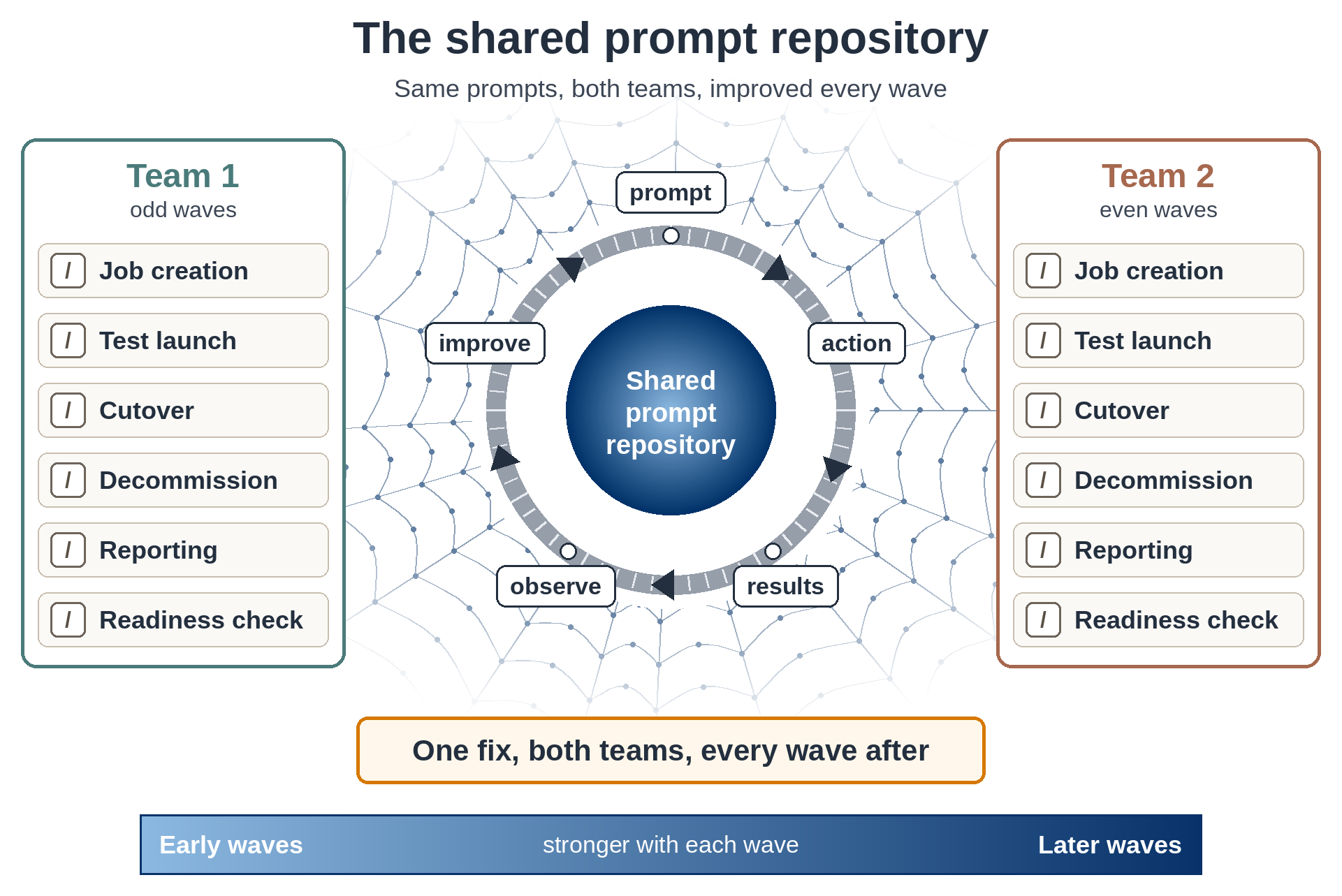
Figure 3. The shared prompt repository and its feedback loop. Both teams work from the same validated prompts, refine them through a continuous prompt, action, results, observe, improve loop, and the repository strengthens each wave.
After every cutover, the team reviewed what happened: which prompts produced clean results, where operators had to intervene, and what could be tightened. Each pass fed the next, so a prompt that worked well in Wave 1 was sharper by Wave 3, refined by two more waves of real data. A shared prompt repository meant each refinement reached both teams and applied to every wave that followed.
Automated inventory pipeline
AWS Transform operates on the data you feed it. If inventory records contain stale host names, wrong IP addresses, or missing application mappings, the resulting migration jobs carry those errors forward.
To solve this, the team built an inventory pipeline script that sat outside AWS Transform. The script pulled server and application data from CI Financial’s source of truth, ran sanity checks looking for incomplete and erroneous data, and formatted the output in the structure AWS Transform expects. No record entered AWS Transform without passing these validations.
Together, the shared prompt repository and the inventory pipeline formed mechanisms which allowed CI Financial to migrate hundreds of servers without sacrificing safety.
Results
The two teams completed every migration wave in 23 weeks, from the Wave 0 pilot through final close-out, ahead of the license renewal deadline. Figure 4 shows the headline results.
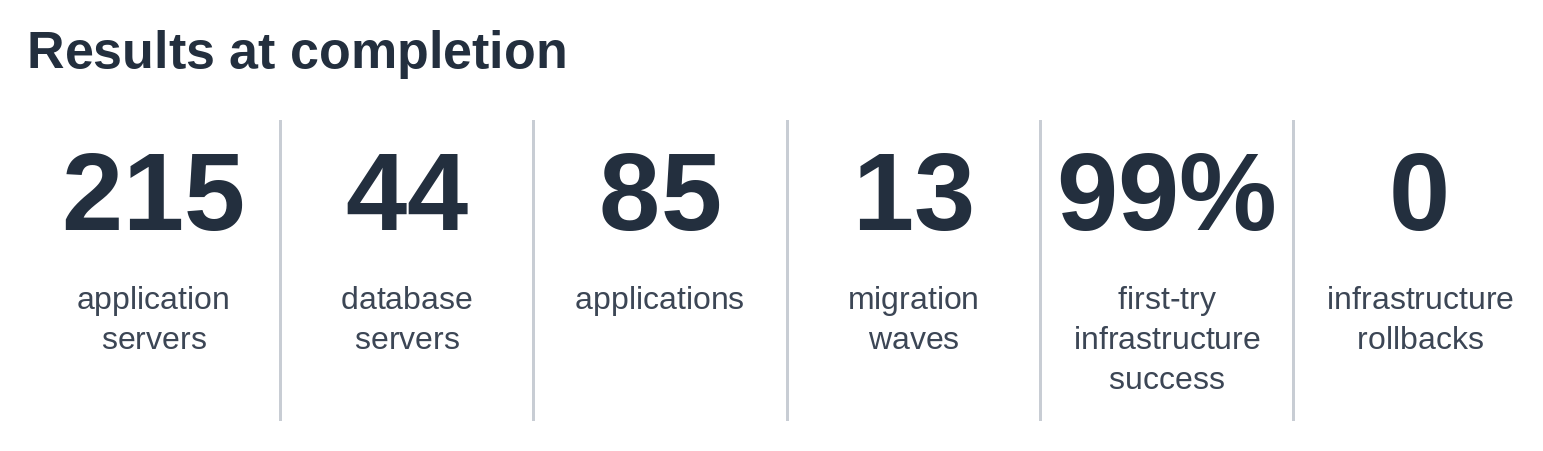
Figure 4. Headline results at completion.
Time to cloud measures one step: the minutes from starting a server’s launch to that server running in AWS. It does not include wave planning, testing, or post-launch work. Time to cloud per server stayed steady as the waves grew, holding an 18-to-27-minute band around a 22-minute average, with the fastest server reaching cloud in 8 minutes 52 seconds.
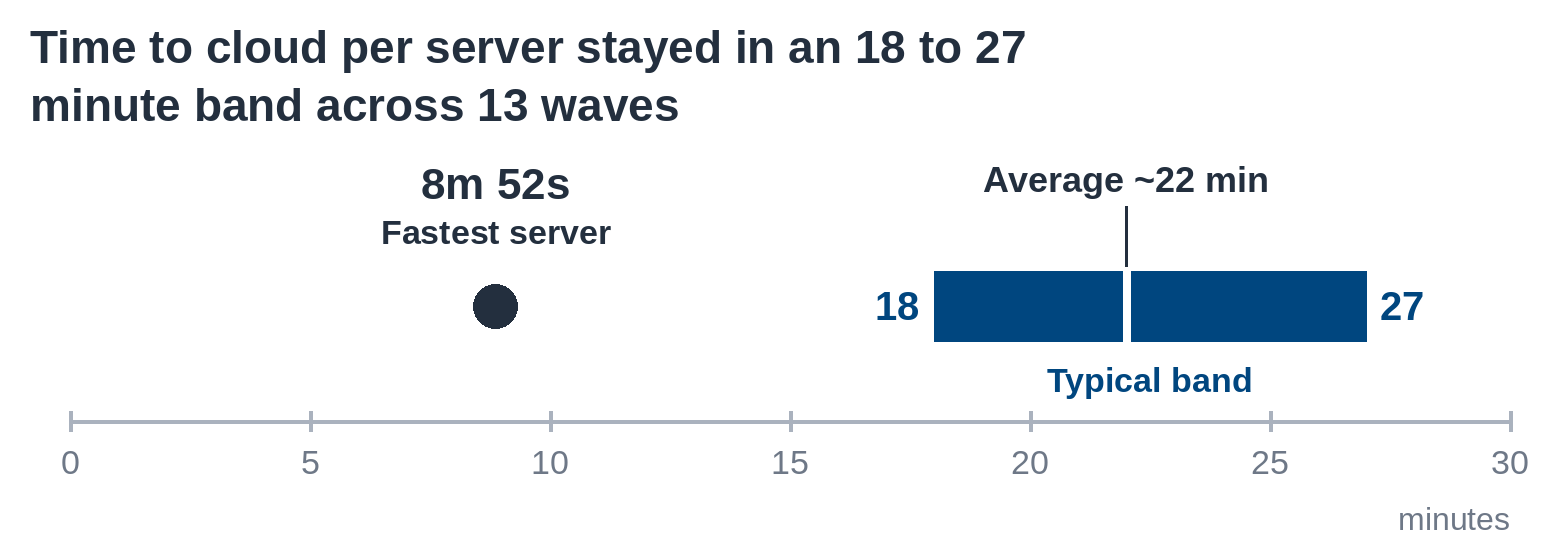
Figure 5. Time to cloud per server across the migration waves.
While AWS Transform helped increase the speed of migrating servers to the cloud, the operating model increased how much migration work was completed within the same period. We measured this as velocity. With the tick/tock cadence enabled by the operating model, we were able to conduct wave prep and cutovers concurrently. Preparing each wave also took less effort. A validated intake file and one reusable prompt took each wave from inventory to launch-ready in under 10 minutes. The intake file gave AWS Transform every detail it needed up front, so the job moved straight to server migration without follow-up questions or extra steps. Without it, the teams would build and cross-check the inventory row by row, then answer prompts for missing details during the job. That work could take an estimated two to three hours per wave. Readiness check followed the same pattern: a repeatable readiness check replaced a manual, server-by-server pre-flight review, saving an estimated 2.5 hours per wave.
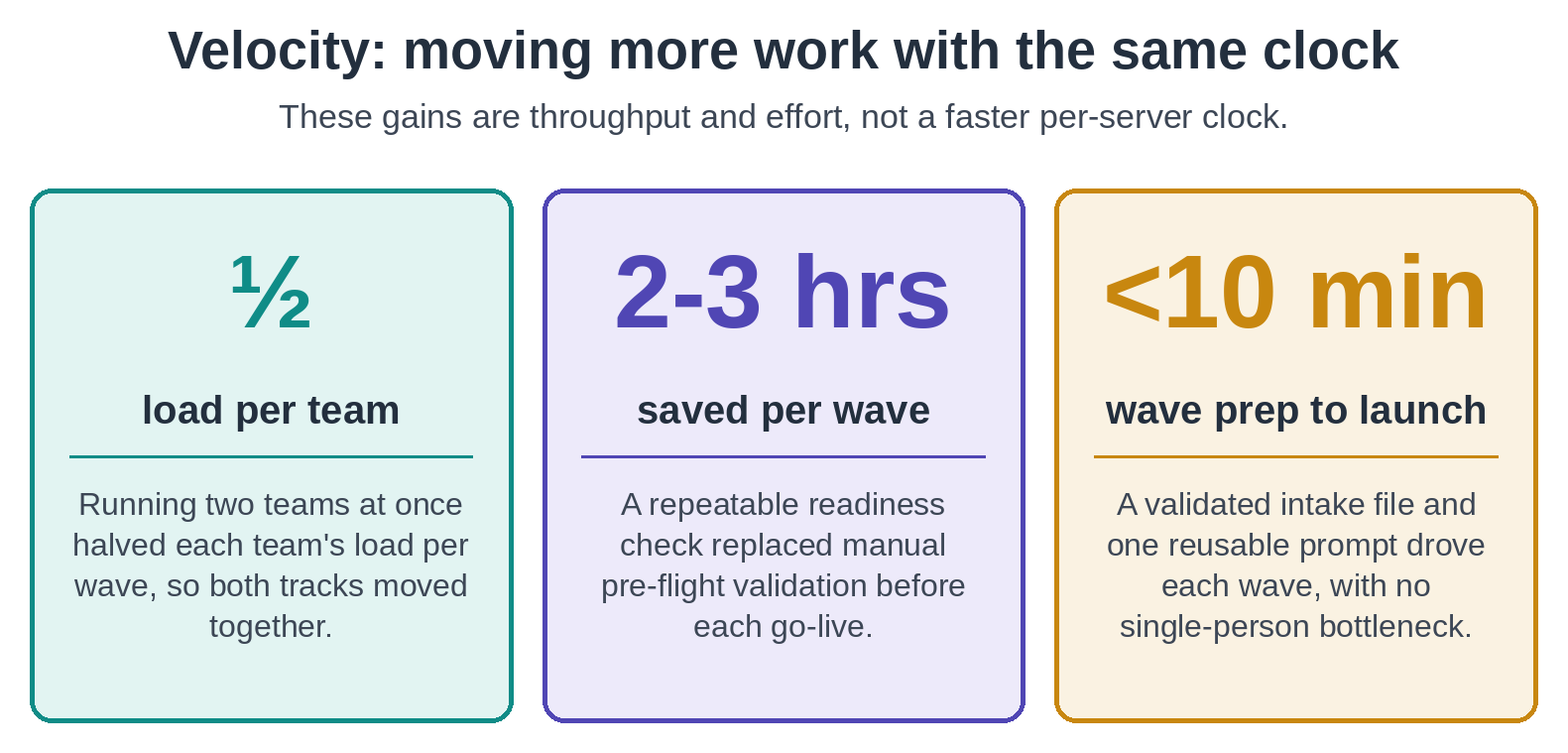
Figure 6. Three velocity gains from the AWS Transform operating model: parallel teams, readiness checks, and fast wave prep.
With AWS Transform and a single prompt, the teams pulled one consolidated view of every server, account, and post-launch action status. AWS Transform generated the per-job data, and Kiro consolidated and styled it into a readable report the teams could expand or compare against business metrics AWS Transform does not provide. That same level of reporting once meant checking each post-launch action by hand, one account at a time, or standing up a tool. Reporting was not the only work that moved into the cutover itself. Servers also arrived production-ready: AWS Transform removed every legacy VMware tool and installed every monitoring agent during cutover rather than afterward, both as post-launch actions, with 471 tools removed and 377 agents installed. These gains held because the teams shared their prompts. Since the prompts encoded the decisions rather than relying on individual expertise, a new engineer reached full cutover proficiency in about two working sessions of knowledge transfer.
Conclusion
This post showed how CI Financial split its VMware-to-AWS migration between two parallel teams using AWS Transform, completing 215 application server and 44 database server migrations in 23 weeks. A shared workspace, roles mapped to defined responsibilities, and a shared prompt repository that kept execution consistent, are what let two teams migrate a heterogeneous landscape in parallel without collision.
To learn more about how parallel migration execution worked at CI Financial, attend our session on How IT leaders actually pulled off their cloud migrations (MAM201) at AWS re:Invent 2026. The session covers the full story: how the teams structured concurrent waves, what worked, what the platform learned from it, and how the patterns apply to your own migration.
To get started with AWS Transform for migrations, visit the AWS Transform product page.
Acknowledgments
Special thanks to Ravi Kishore from CI Financial and Shiva Vaidyanathan from AWS Professional Services for their support of this post. Thanks also to the CI Financial infrastructure, application, database, and security teams, and to the AWS Professional Services delivery team, whose work shaped the operating model, prompts, and validation methods described here.
Related resources
Infrastructure Migrations: Your complete AWS re:Invent 2026 guide
AWS Prescriptive Guidance: Large Migration Strategy
AWS Transform collaborator permissions
Centralized multi-account server migration to AWS with AWS Transform
How resource tagging scopes the AWS Transform connector role