Networking & Content Delivery
Automate prefix lists with Amazon VPC IP Address Manager (IPAM)
In this post, we examine the ability for Amazon VPC IP Address Manager (IPAM) to automate prefix lists updates with prefix list resolver. This new feature uses the IPAM database to generate groups of IP addresses based on connectivity requirements and automates connectivity configurations by propagating IP addresses to Amazon Web Services (AWS) resources, such as security groups and Amazon Virtual Private Cloud (Amazon VPC) route tables using prefix lists.
VPC IPAM streamlines IP planning and monitoring for AWS workloads through automated workflows. VPC IPAM organizes addresses by routing and security requirements while automating allocation to VPCs, thereby replacing spreadsheets. Furthermore, it tracks AWS accounts and VPCs, thereby eliminating bookkeeping.
Managing IP addresses for enterprise networks with expanding cloud workloads creates complexity and errors. Administrators use spreadsheets and scripts to track assignments across accounts and VPCs. Manual updates consume time and cause address conflicts, downtime, and operational issues. Update delays slow application deployment, reducing development velocity while diverting staff from strategic work. Using IPAM prefix list resolvers reduces turnaround time for network configurations in AWS from days to minutes while minimizing manual errors.
Benefits of IPAM managed prefix list updates
The key benefit of this feature is automated connectivity configuration for VPC deployments. After you create a VPC, you configure IP addresses/prefixes in route tables and security groups to control the VPC’s ingress and egress connectivity. This IP address synchronization is currently manual, time-consuming, and error prone. When network changes occur, such as adding a new VPC, you must repeat the process, which can be time-consuming with manual workflows. You can use this new feature to automate the setup and maintenance of VPC IP addresses across AWS services and resources so that your VPCs are ready to host workloads within minutes—a process that previously took days. In summary, this feature provides the following:
- Automated connectivity management: Eliminate manual IP address/prefix synchronization across VPCs, security groups, and route tables
- Reduced deployment time: Configure network connectivity in minutes instead of days
- Minimized errors: Remove human error from repetitive IP address management tasks
- Streamlined maintenance: Automatically update configurations when network changes occur
Prerequisites
The following prerequisites are necessary to follow this post:
- This post assumes that you’re familiar with IPAM core features and functionality and prefix lists. Refer to the respective documentation for more details.
- IPAM setup in Advanced Tier: This feature requires the Advanced Tier of IPAM but it’s included at no added cost.
How IPAM managed prefix lists work
You can use this feature to define your organization’s connectivity requirements in IPAM in the form of “CIDR selection rules.” In these rules, you define the business logic that you want to use for selecting CIDRs from IPAM’s IP database. Then, IPAM uses prefix list resolvers to automate customer-managed prefix lists by synchronizing these selected CIDRs into AWS resources such as VPC route tables or security groups. For example, you can have one rule that selects any CIDR from VPCs tagged with env=prod, and another rule that selects VPC CIDRs tagged with env=dev.
To provide the desired routing and security configurations for your production and development VPCs, IPAM synchronizes the CIDRs appropriately with security groups or VPC route tables through these IPAM prefix list resolvers. IPAM continuously scans your environment, and if any network change is detected that triggers your rules, then IPAM automatically updates the prefix lists. Then, these updates flow into the AWS resources or services where the prefix lists are referenced.
Configuration steps
- To get started, log in to AWS Management Console. Navigate to AWS IP Address Manager (IPAM), select Prefix list resolvers from the left-hand pane, and select Create prefix list resolver.
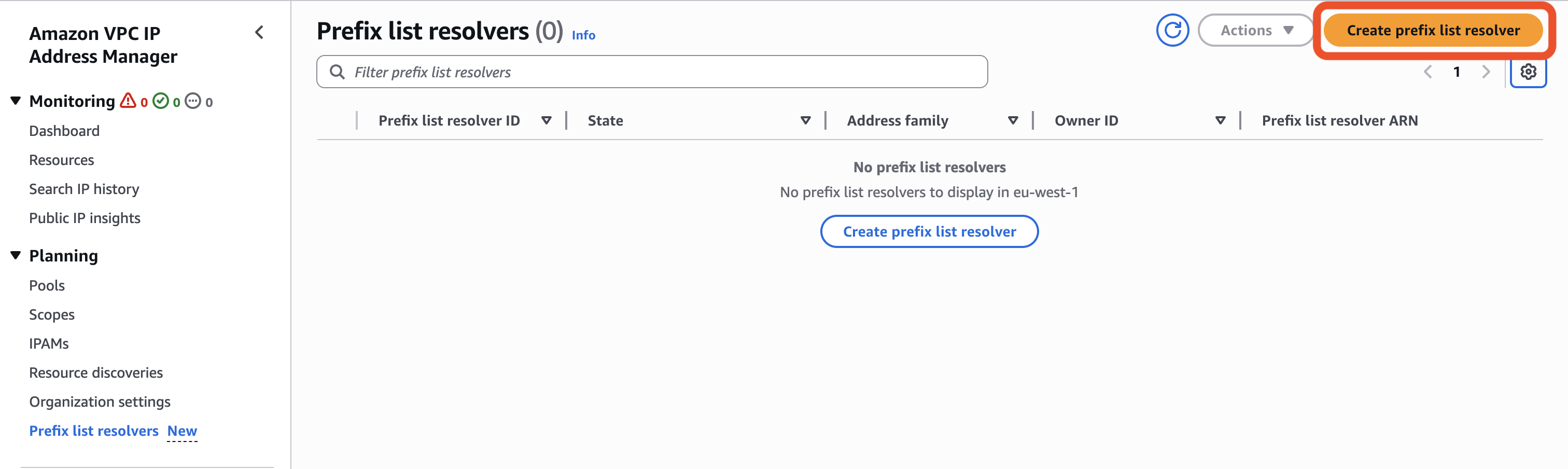
Figure 1: Prefix list resolver pane
- Choose the address family (IPv4 or IPv6) of the prefixes to propagate to the target prefix list. Optionally, specify a Name tag, a Description, and choose Next.
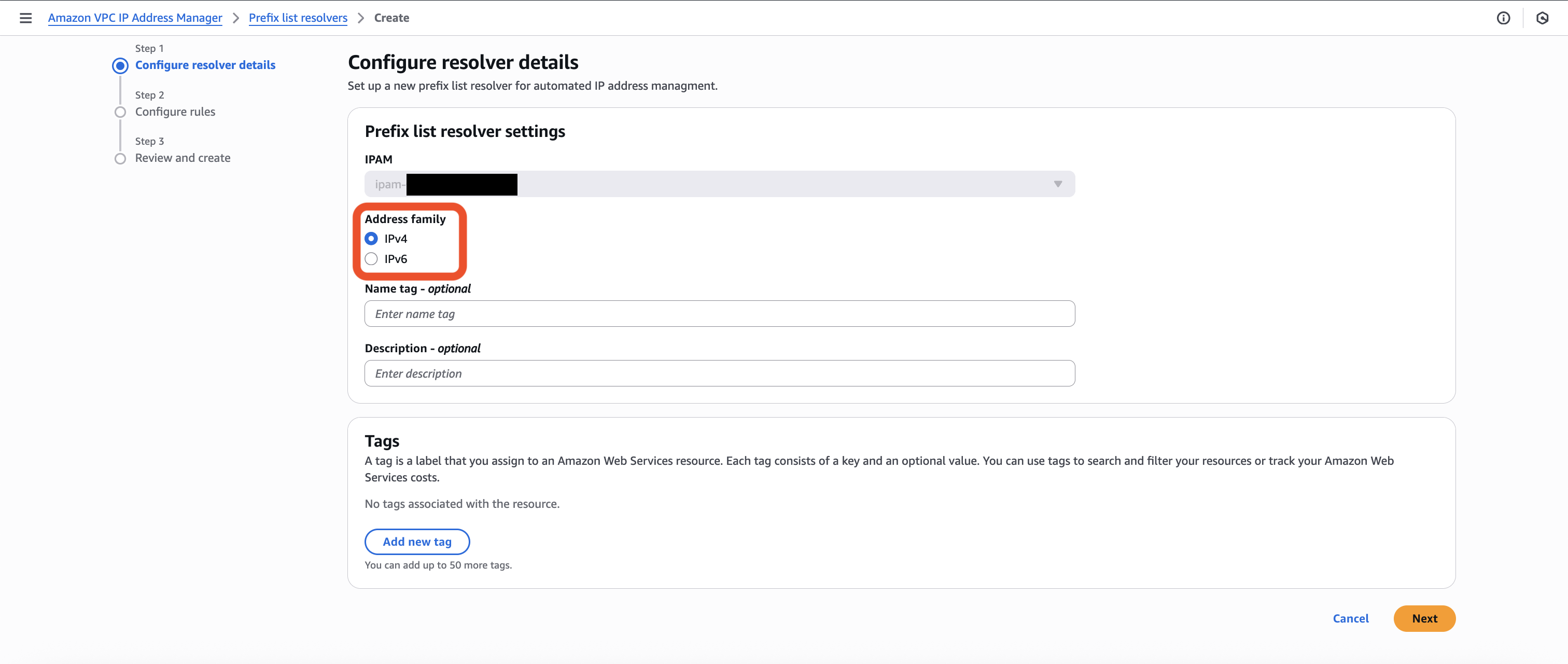
Figure 2: Configure resolver details pane
- In the Configure rules section, you define the rules that determine which prefixes are propagated to the target prefix list.
- Static CIDR is where you statically specify a prefix that is propagated to the target prefix list.
- IPAM pool CIDR is a dynamic propagation of the provisioned CIDR of a given IPAM pool to a target prefix list.
- IPAM resource CIDR is a dynamic propagation of Elastic IPs and Public IP Pools for Public IPAM Scopes, or VPC and Subnets for Private IPAM Scopes, to a target prefix list.
In this example, you will see IPAM pool CIDRs.
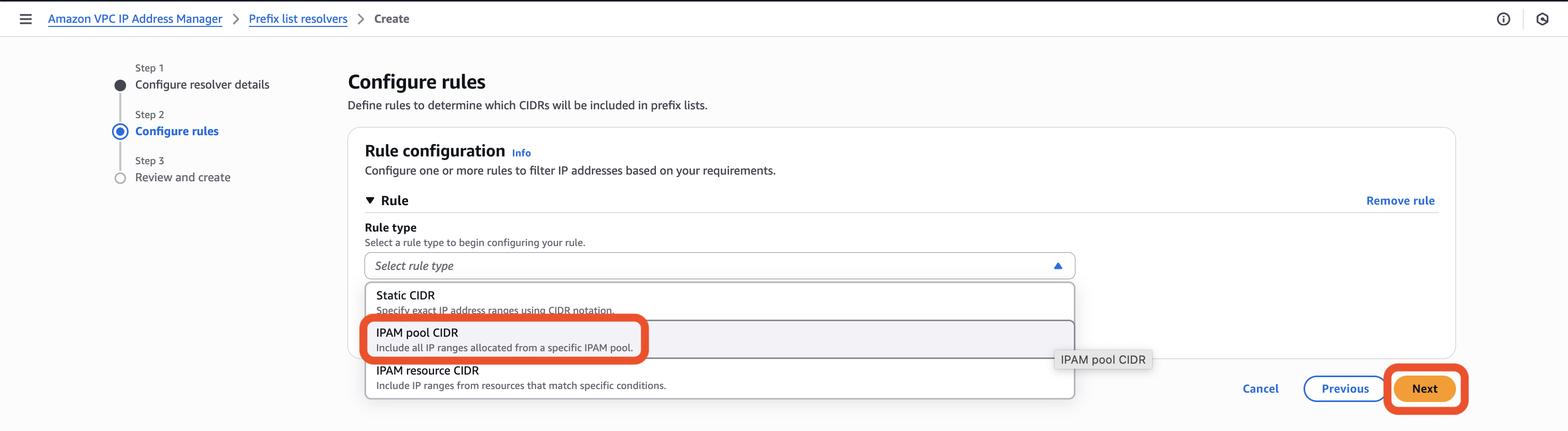
Figure 3: Configure rules pane
- When the rule type is selected, choose the IPAM scope and any other conditions to filter resources. In this example, you filter based on a specific pool ID. Choose Next to continue.
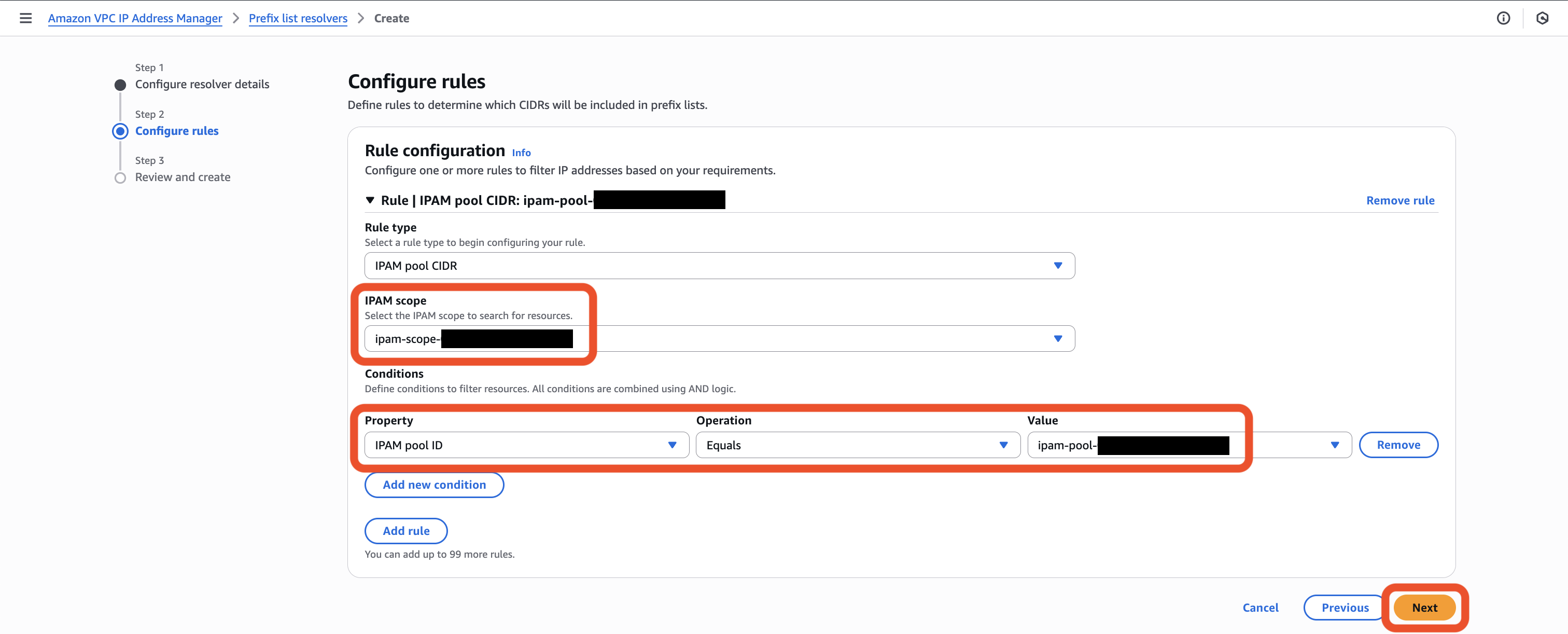
Figure 4: Rule configuration pane with IPAM pool CIDR rule
Multiple conditions on the same rule configuration are evaluated using AND logic. Multiple rules on the same rule configuration are evaluated using OR logic.
When the rule has been configured, choose Next, review your configuration, and choose Validate and create.
- When the prefix list resolver is created, you need to specify the target prefix list to propagate the prefixes based on the rule configuration of the prefix list resolver. Choose the Targets tab within the prefix list resolver and choose Create target.
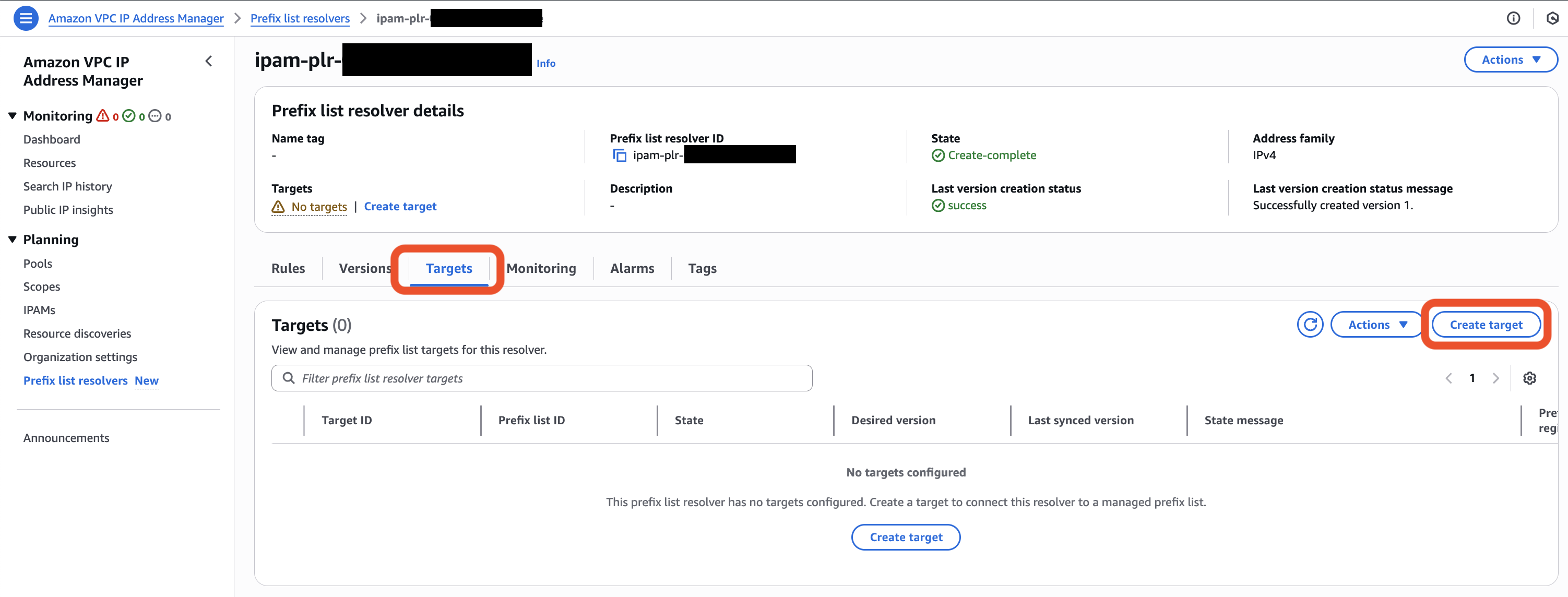
Figure 5: Prefix-list resolver details pane
- When configuring the target, specify the Region where the prefix list is located, and select the target Prefix list. By default, the latest version of the prefix list resolver propagates to the prefix list. Alternatively, you can choose to track a specific prefix list resolver version. Choose Create target.
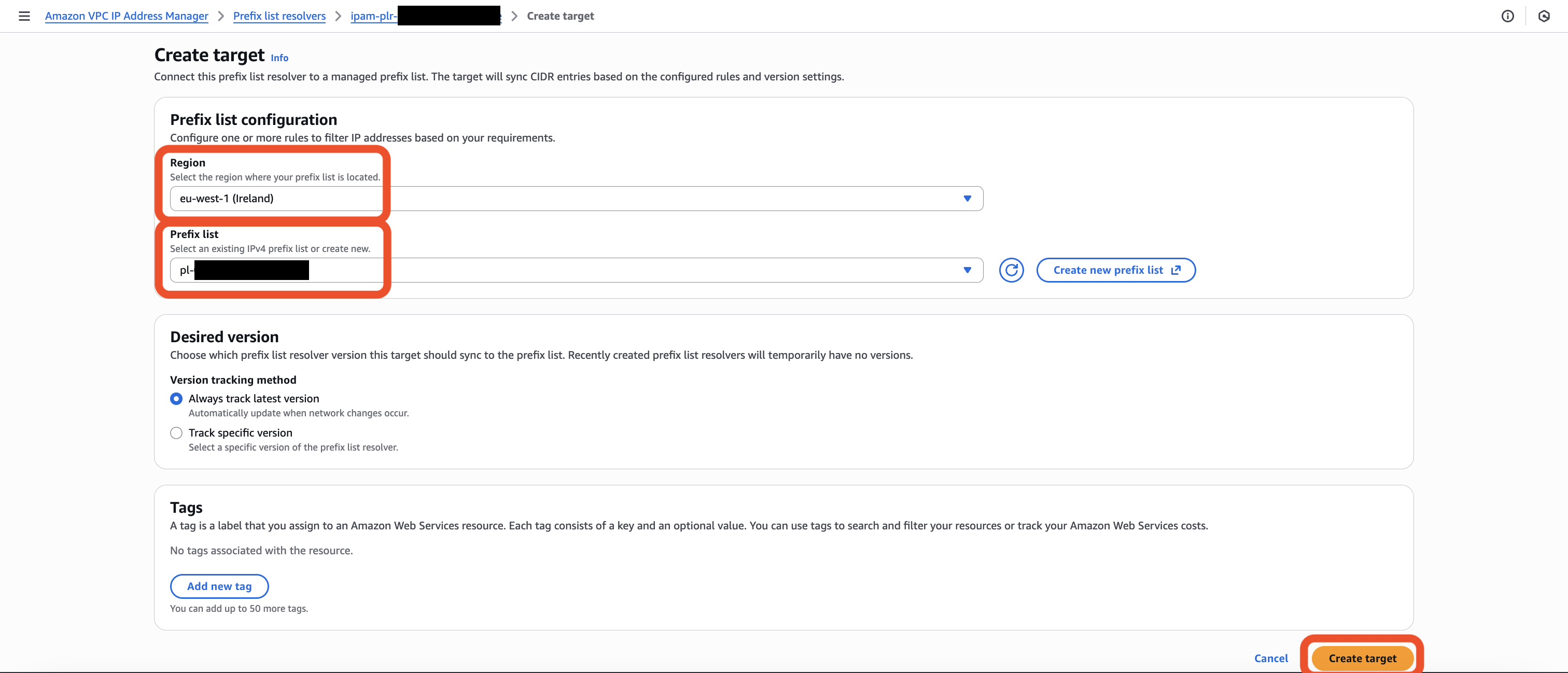
Figure 6: Prefix list resolver target configuration
The prefix list can be in a different location to where the prefix list resolver is configured. The prefix list must reside in an IPAM operating Region. At the conclusion of this step, you have successfully created and configured the target, linking your prefix list resolver to a specific managed prefix list where prefixes are propagated.
- When the target configuration in the prefix list resolver is in a sync-complete state, wait up to five minutes for the propagation to occur. Navigate to the Prefix List in the VPC Console, and you should now see the prefixes that are propagated.
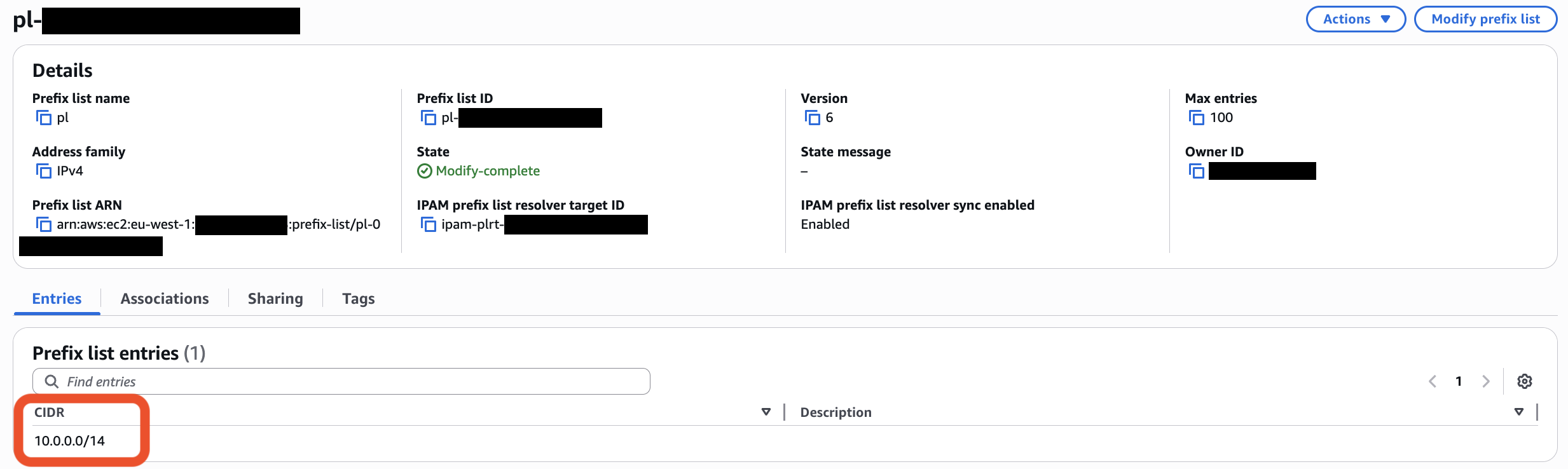
Figure 7: Prefix list containing propagated prefixes from the prefix-list resolver
Monitoring
The prefix list resolver generates versions based on the rules defined, with each version representing a snapshot of CIDRs that match the prefix list resolver criteria at a specific point in time. The version number automatically increments whenever infrastructure changes are detected that match the criteria. For example, if you have a prefix list resolver rule that includes 10.0.0.0/14, which represents the provisioned CIDR of pool X, and you add a second prefix list resolver rule that includes 10.8.64.0/18, which represents the provisioned CIDR of pool Y, then IPAM automatically detects this change and creates Version 2 containing the two.When creating the prefix list resolver target (as shown in Step 6), you can choose whether the selected prefix list tracks a specific version, or if the latest version should be tracked. If the latest version is selected, whenever changes are made to the prefix list resolver rules, or any changes to infrastructure that match (or no longer match) those rules, then the updated prefixes are automatically propagated to the prefix list.
You can monitor version creation and synchronization through the IPAM console by navigating to Prefix list resolvers and selecting the resolver. The Versions tab displays all created versions along with their CIDRs (as shown in Figure 8), while the Monitoring tab presents graphical metrics for version creation success and failure rates (as shown in Figure 9). From the Monitoring tab, you can create Amazon CloudWatch alarms for prefix list resolver version creation, which redirects you to the CloudWatch console to complete the alarm configuration.
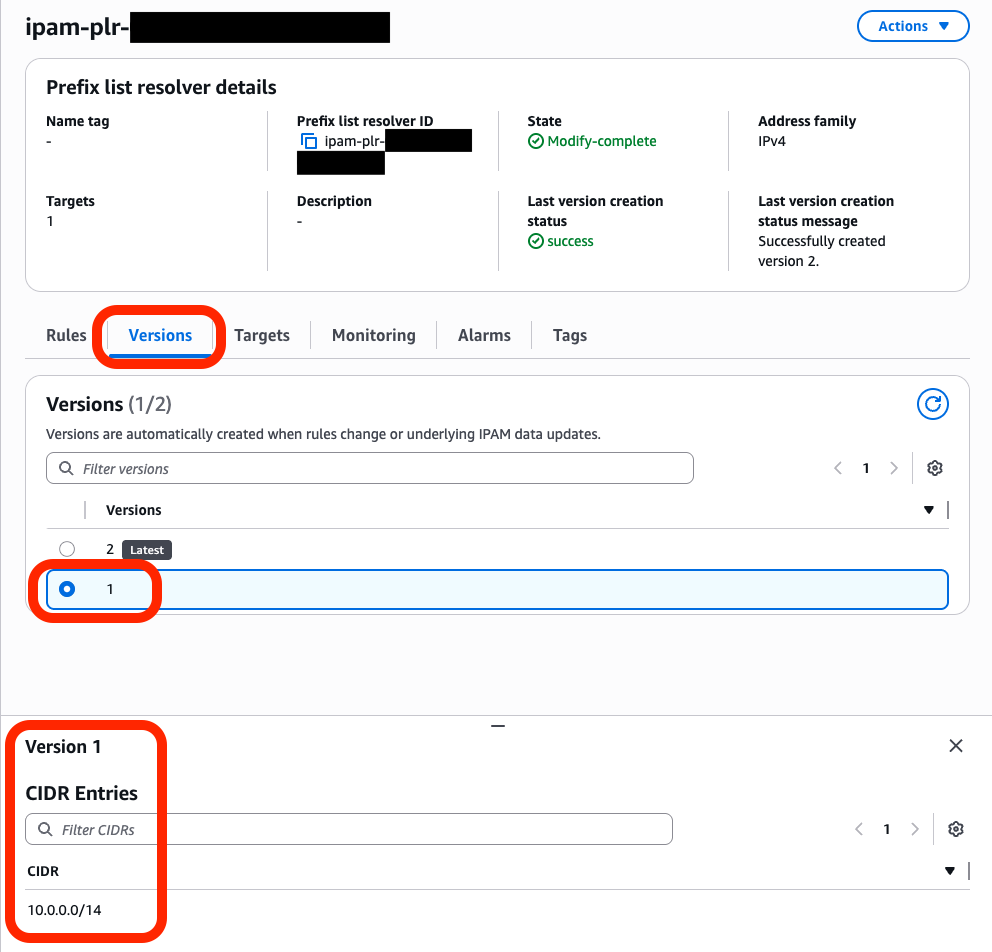
Figure 8-1: Console view for monitoring version creation and CIDR entries
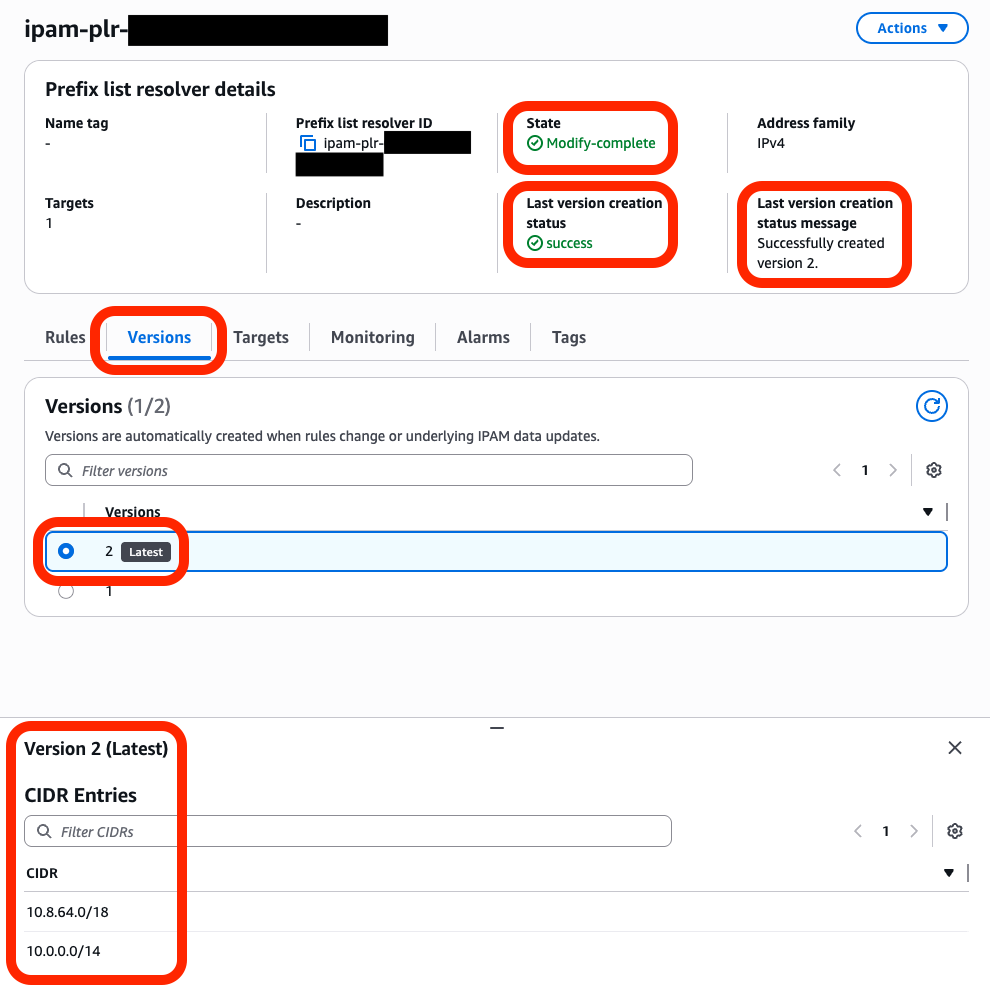
Figure 8-2: Console view for monitoring version creation and CIDR entries
Set CloudWatch alarms on failure metrics to identify when you need to adjust CIDR selection rules to stay within version and prefix list size limits. For detailed information on available metrics, refer to the IPAM prefix list resolver metrics documentation.
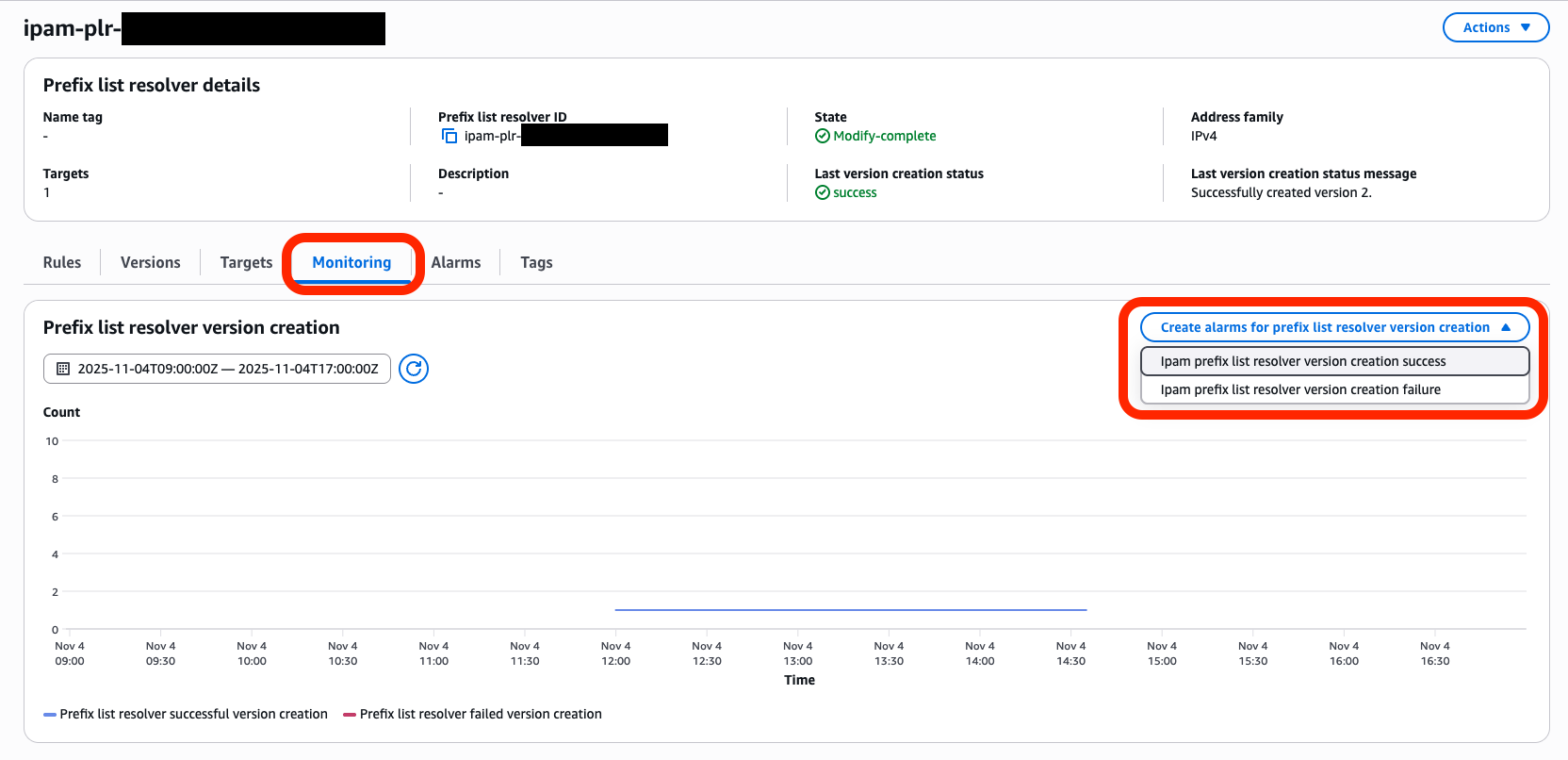
Figure 9: Console view for monitoring and alarm creation
Considerations
- You must specify both address family (IPv4 or IPv6) and scope ID when creating your configuration. Evaluate the AWS accounts, organizational units, and AWS Regions you want to include. Use resource tags to make your CIDR selection more precise. Remember that you need separate configurations for IPv4 and IPv6—you can’t combine the two in a single configuration.
- Select “
sync” mode if you want VPC IPAM to automatically update your prefix lists when network changes happen. Select “audit” mode if you prefer to review changes manually before applying them. Start with audit mode to understand what changes VPC IPAM would make, then switch to sync mode when you feel comfortable. - Define how many CIDRs you want VPC IPAM to update in a single transaction using the sync threshold setting. This prevents large numbers of automatic updates that could impact your network operations. Set this based on your network’s capacity to handle changes.
- VPC IPAM doesn’t manage prefix list sizing. This is configured on the prefix list that you create. When a prefix list reaches its maximum entries, VPC IPAM can’t add more CIDRs and generates failure notifications. Monitor your prefix list usage and resize them before they fill up. VPC IPAM follows first-in-first-out order when space runs out.
- Configure CloudWatch to track the
IpamPlcFailedmetric, which shows how many configurations have synchronization failures. Use Amazon EventBridge to get notifications when VPC IPAM adds or removes CIDRs from your prefix lists. This provides visibility into what VPC IPAM is doing automatically. - You can’t share prefix list configurations through AWS Resource Access Manager (AWS RAM). Only IPAM owners can create and manage these configurations. However, you can still share the prefix lists with other AWS accounts in your organization, just like before.
- When you modify or delete resources such as VPCs or IPAM pools, VPC IPAM automatically updates the related prefix lists based on your configuration rules. If you delete a resource completely, then VPC IPAM removes all CIDRs for that resource from your prefix lists.
- Each CIDR selection rule can only specify one resource type. To include CIDRs from different resource types (such as both VPCs and subnets), create multiple rules in your configuration. VPC IPAM combines results from all rules.
- You can delete IPAM-managed prefix lists using standard APIs, but you must first remove all references to them in your security groups and route tables. Similarly, before deleting a configuration, make sure that no prefix lists reference it.
Conclusion
The new VPC IPAM feature transforms how organizations manage their AWS network configurations. It automates IP address assignments and connectivity settings to remove manual processes that often lead to errors and delays. Network teams can now set up and maintain VPC connectivity in minutes instead of days, freeing up valuable time for other critical tasks. This automation is especially valuable as organizations scale their AWS infrastructure and need to maintain consistent network configurations across their environment. You can use the feature’s ability to continuously monitor and automatically update network settings so that your infrastructure stays aligned with your connectivity requirements.
Try this new IPAM capability today to streamline and automate the setup and maintenance of VPC IPs across AWS services and resources so that your VPCs are ready to host workloads within minutes. For more information, refer to the VPC IPAM documentation.
About the authors

Rizwan Mushtaq
Rizwan is a Principal Solutions Architect at AWS. He helps customers design innovative, resilient, and cost-effective solutions using AWS services. He holds an MS in Electrical Engineering from Wichita State University.

Mevlit Mustafa
Mevlit is a Senior Networking Specialist Solutions Architect at AWS, based in London. He specializes in architecting secure, high-performance, large-scale cloud and hybrid networks for some of AWS’s largest and most complex customers. He holds a bachelor’s degree in computer science from the University of Nottingham. Outside of work, he’s a keen long-distance cyclist and hiker who loves discovering new places.

Pan Mittal
Pan is a Senior Product Manager at Amazon Web Services, leading EC2 networking solutions. He manages IP Address Manager (IPAM) and Bring Your Own IP (BYOIP) products to build capabilities that simplify IP management for AWS customers. With expertise in cloud networking solutions, Pan focuses on delivering customer-centric innovations. Outside of work, he enjoys spending quality time with family and friends.