Networking & Content Delivery
Phased AWS Transit Gateway to AWS Cloud WAN Migration with Terraform and Network MCP Server
If you are planning a phased AWS Transit Gateway to AWS Cloud WAN you face complex coordination challenges across multiple Regions without disrupting production workloads. When you manage hundreds of Amazon Virtual Private Cloud (Amazon VPC) connections spanning global infrastructure, manually tracking route propagation and verifying failover during the transition becomes increasingly difficult and error prone.
This post walks you through a six-phase migration approach using Terraform infrastructure as code (IaC) and validation using AWS Network MCP Server.With this approach, you can reduce operational overhead, remove manual route management, and centralize network management across your infrastructure. With this method, you can migrate environments with large-scale Amazon VPC connections while maintaining minimal or no downtime for production workloads. You perform route validation using MCP servers, coordinate cross-Region changes, and gain real-time visibility into network state throughout each migration phase. You can validate route tables, verify cross-Region changes, and gain real-time visibility into network state throughout each migration phase using AWS Network MCP server. Use this guide as your framework for a first migration or as a validated, repeatable process at scale for multiple environments.
With the phased migration approach, you gain three benefits: reduced risk through incremental validation at each step, operational efficiency by automating manual processes that previously required coordination across multiple teams, and improved visibility into complex routing scenarios through MCP Server discovery tools that can help you identify configuration drift before it impacts production traffic.
With the phased migration approach, you gain three benefits. First, you reduce risk through incremental validation at each step. Second, you improve operational efficiency by automating manual processes that previously required coordination across multiple teams. Third, you gain improved visibility into complex routing scenarios through MCP Server discovery tools that can help you identify configuration drift before it impacts production traffic.
Migration challenges
AWS Transit Gateway remains effective for Regional connectivity and hub-and-spoke architectures. However, at scale and cross-Region connectivity, the operational model presents coordination challenges.
The challenge goes beyond replacing one service with another. If you have hundreds of Amazon VPCs connected through AWS Transit Gateway, you face orchestration issues across multiple phases coordinating non-production and production workloads, integrated with hybrid connectivity (AWS Direct Connect, AWS Site-to-Site VPN, Software-Defined Wide Area Network (SD-WAN)) and deploying using Network Function Groups. The interdependencies between phases mean a misstep early on can cascade downstream.
Then there’s validation. You spend hours analyzing route tables for asymmetric routing, constructing Command Line Interface (CLI) queries to verify segment isolation, and doing side-by-side comparisons of routing behavior across both services. With over 100 routes in a complex deployment, manually tracking what changed after each phase is both tedious and error prone.
Migration approach: Terraform modules and MCP Server validation
To tackle both problems, this post presents a solution with two components:
- Phased Terraform Modules: Reusable infrastructure as code modules aligned to each migration phase. These modules support consistent, repeatable deployments across non-production and production environments.
- AWS Network MCP Server and AWS API MCP Server: Natural language validation so you can query configurations during migration, verify routing behavior, and catch issues without complex CLI commands or manual console navigation.
You get validated workflow that reduces your migration time and risk through the AWS Network MCP Server and AWS API MCP Server.
Prerequisites
Before you begin, confirm you have:
- Familiarity with AWS Transit Gateway and AWS Cloud WAN concepts
- An existing AWS Transit Gateway deployed in a central networking account
- AWS Organizations configured to share the AWS Cloud WAN core network across your organization (optional)
- Terraform version 1.14.0 or later
- AWS Network MCP Server and AWS API MCP Server connected to an AI agent (such as Claude Desktop, Cursor or Kiro-CLI)
- Read-only AWS Identity and Access Management (IAM) permissions for MCP Server validation, plus IAM permissions for deploying AWS Cloud WAN resources and managing AWS Transit Gateway peering configurations (see AWS Cloud WAN IAM documentation and AWS Transit Gateway IAM documentation for detailed permission requirements)
- The Terraform code used in this solution is available in aws-transit-gateway-to-cloudwan-migration-terraform GitHub repository.
Solution overview
This migration follows six distinct phases. You deploy each phase using dedicated Terraform modules and validate it with MCP Servers.
Before making infrastructure changes, start with discovery. Using AWS Network MCP Server and AWS API MCP Server, you can automatically inventory your existing AWS Transit Gateway topology. You don’t need manual CLI discovery. You can also determine how many AWS Cloud WAN segments and Core Network Edges (CNEs) you need based on your current architecture. Figure 1 shows the existing AWS Transit Gateway setup that serves as the starting point. Figure 2 illustrates the six migration phases and the target AWS Cloud WAN architecture. The sections that follow walk through each phase in detail.
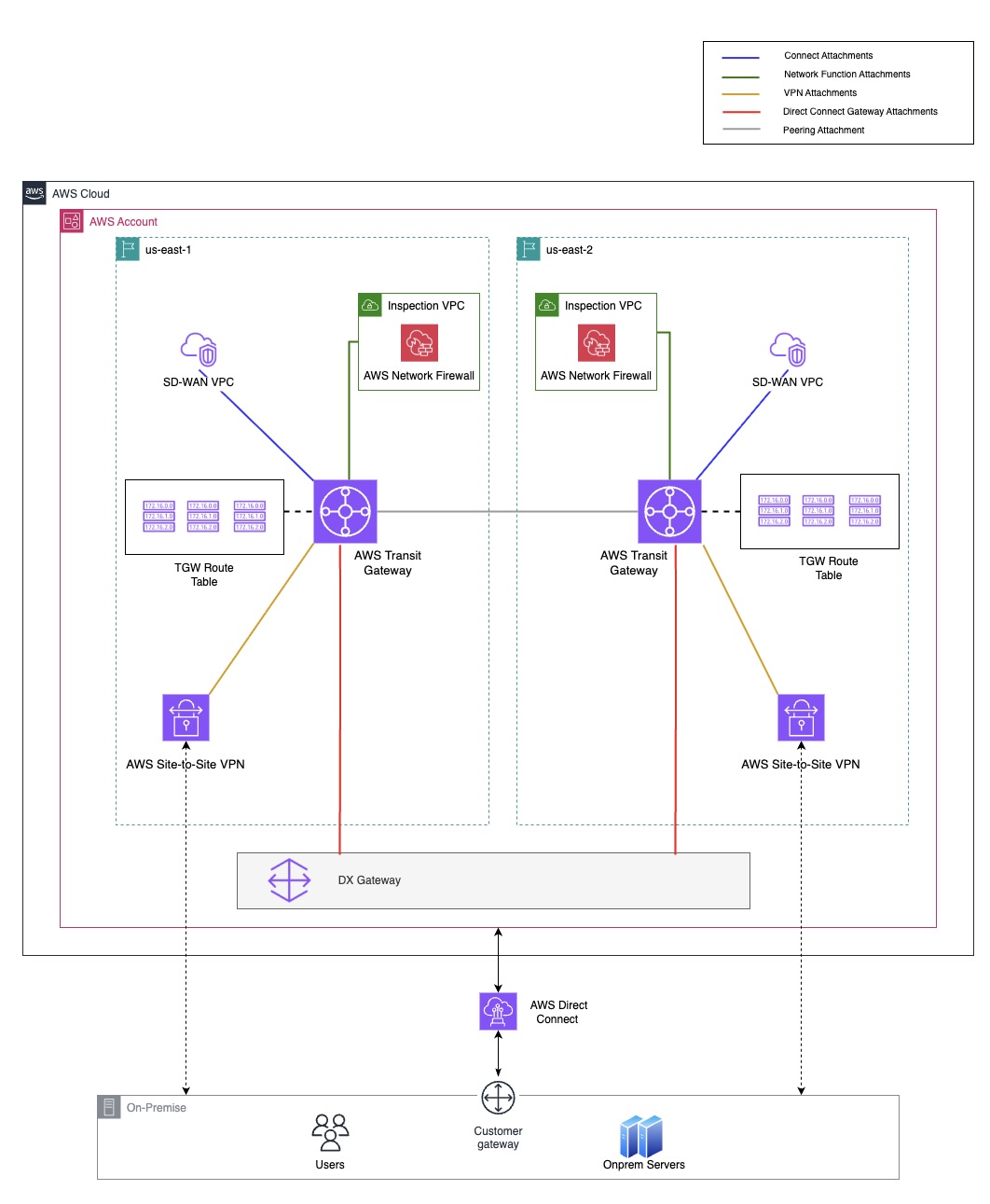
Figure 1: Existing AWS Transit Gateway Setup
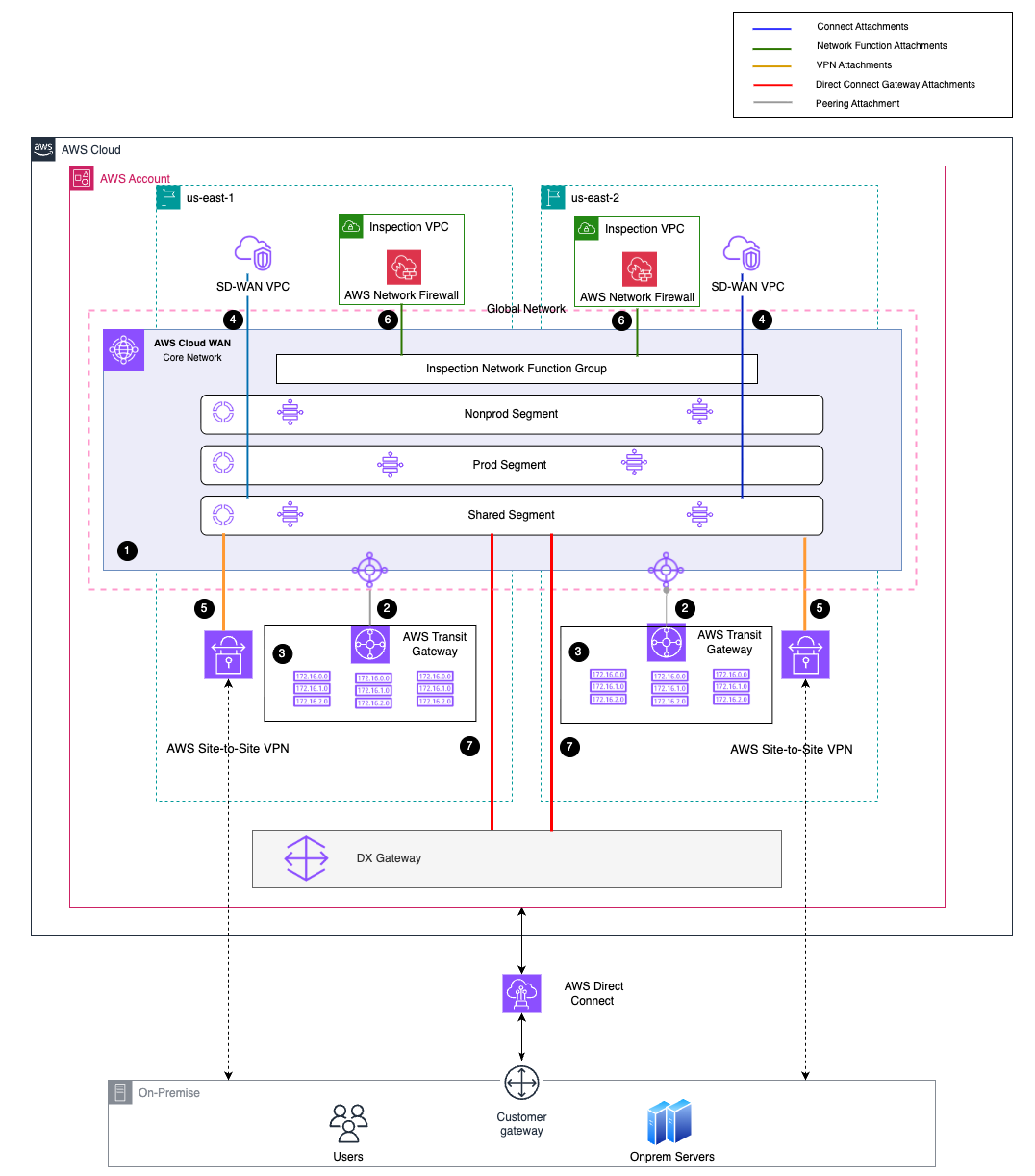
Figure 2 :AWS Transit Gateway to AWS Cloud WAN Migration phases and architecture overview
The following architectural components define this migration across six phases:
- AWS Cloud WAN Core Network: AWS Cloud WAN Core Network within a Global Network, deploying Core Network Edges (CNEs) and segment architecture
- AWS Transit Gateway – AWS Cloud WAN Peering: Peering attachments between AWS Transit Gateway and AWS Cloud WAN CNEs, establishing Border Gateway Protocol (BGP) sessions for route exchange
- AWS Transit Gateway Route Table Attachment: AWS Transit Gateway route tables attachment to corresponding AWS Cloud WAN segments (prod, nonprod, shared) for federation
- SD-WAN Connect Attachment: Connect attachment to the AWS Cloud WAN shared segment
- AWS Site-to-Site VPN Attachment: AWS Site-to-Site VPN connections attachment directly to the AWS Cloud WAN shared segment for on-premises connectivity
- AWS Network Firewall Attachment: Integration of AWS Network Firewall with the AWS Cloud WAN shared segment using Network Function Groups for centralized inspection
- AWS Direct Connect Gateway Attachment: New AWS Direct Connect Gateway attachment to the AWS Cloud WAN shared segment for on-premises connectivity using AWS Direct Connect
Pre-migration discovery and planning
Before starting the six migration phases, complete the following discovery and planning steps.
Before making infrastructure changes, inventory your existing environment. Document the number of AWS Transit Gateways per Region, the hybrid connectivity in place (AWS Network Firewall, SD-WAN, AWS Site-to-Site VPN, AWS Direct Connect), and the total AWS Transit Gateway route tables across your deployment.
Back up your AWS Transit Gateway routes before federation. Here’s why: AWS Cloud WAN uses BGP, so after you federate, routes dynamically propagate across Regions to create a full mesh topology. That might not be what you want. For example, if you have AWS Site-to-Site VPN routes in one Region that shouldn’t be advertised to another, you’ll need to apply advanced routing policies to your core network before proceeding. With over 100 routes in a complex deployment, manually tracking all of this increases the risk of misconfigurations.
This is where MCP Servers can help. Instead of running CLI commands across accounts and Regions, you can ask natural language questions and get quick answers.
Setting up AWS Network MCP Server and AWS API MCP Server with your MCP Client
Configure your AWS Network MCP Server and AWS API MCP Server with your AI agent following the setup guide. With these tools, you can run natural language queries for network discovery and validation throughout the migration.
Discovery: AWS Transit Gateway inventory and assessment
Use MCP Servers to inventory your existing infrastructure through natural language queries. For example:
“Show me all Transit Gateways in my account and how many route tables each has.”
This automated discovery removes the need for manual CLI-based inventory and gives you visibility into your current network architecture: total AWS Transit Gateways, route tables per Region, and attachment counts (Figure 3). This example uses Kiro CLI as the AI agent connected to AWS Network MCP Server and AWS API MCP Server.

Figure 3: Using Network MCP Server to discover all AWS Transit Gateways across Regions and their route table counts
Pre-phase validation: Hybrid connectivity considerations
Before creating new attachments to AWS Cloud WAN, validate your hybrid connectivity requirements and potential impacts. For example:
“Based on my current network architecture, what precautions should I take when creating an AWS Direct Connect attachment to AWS Cloud WAN?”
The MCP Server analyzes your existing setup and provides specific guidance — from creating a new AWS Direct Connect Gateway with a new Amazon Resource Name (ARN) to BGP route advertisement strategies and backup connectivity requirements like using AWS Site-to-Site VPN as failover.

Figure 4: MCP Server guidance on AWS Direct Connect Gateway attachment to AWS Cloud WAN
Post-phase validation: Routes propagated
After completing each migration phase, use MCP Server to validate that changes took effect as expected. For example, after the federation phase:
“Can you tell me all the routes in the shared route table propagated from the core network after federation?”
This confirms that AWS Cloud WAN routes are propagating correctly to AWS Transit Gateway route tables — with next-hop information pointing to the AWS Cloud WAN peering attachment instead of the old static AWS Transit Gateway peering routes (Figure 5).

Figure 5: Verifying routes propagated from Core Network after federation phase
Note: You can use this same pre and post validation approach with MCP Server after each phase of the migration to verify routing behavior and catch issues before moving forward.
Phase one: AWS Cloud WAN foundation deployment
Phase one lays the groundwork. Based on the discovery findings from MCP Servers, you deploy Core Network Edges (CNEs) and create the segments that form your AWS Cloud WAN core network. The discovery phase determines how many segments and CNEs you need to match your existing AWS Transit Gateway architecture. You can also share the core network with your organization at this stage.
Deploying AWS Cloud WAN foundation with terraform.
Use the following Terraform module to create the global network, deploy CNEs in your specified Regions, and apply the network policy that defines your segment architecture:
Base policy configuration
Edit your base core network policy file based on your discovery findings before deployment. Important: you can’t modify some CNE configurations like inside CIDR blocks and ASNs after deployment., so verify these values before proceeding.
If you’re creating Amazon VPC attachments during initial deployment, set create_base_policy = true to establish a LIVE policy that allows attachments. After you create attachments, update the core network policy using aws_networkmanager_core_network_policy_attachment to apply your full policy with static routes and advanced configurations.
Phase two: AWS Transit Gateway to AWS Cloud WAN peering and federation
In Phase two, you establish the critical connection between your existing AWS Transit Gateway and your new AWS Cloud WAN core network through peering attachments. With this federation approach, you can gradually transition workloads without disrupting production traffic because both networks coexist during migration.
This phase uses three Terraform modules: AWS Transit Gateway peering, AWS Transit Gateway policy table, and AWS Transit Gateway route table attachment. The migration follows a three-step process:
- Create AWS Transit Gateway – AWS Cloud WAN peering: Establish peering attachments between AWS Transit Gateway and AWS Cloud WAN CNEs in each Region
- Create AWS Transit Gateway policy tables: Set up policy tables and their associations to control route propagation
- Create AWS Transit Gateway route table attachments with segments: Map each AWS Transit Gateway route table to its corresponding AWS Cloud WAN segment
This post uses a base architecture with three AWS Transit Gateway route tables (prod, nonprod, and shared) and three corresponding AWS Cloud WAN segments, with two CNEs and two AWS Transit Gateways deployed across us-east-1 and eu-west-2. You can modify the modules to match your specific setup.
Step one: Creating AWS Transit Gateway – AWS Cloud WAN peering
The first step establishes peering attachments between AWS Transit Gateway and AWS Cloud WAN CNEs in each Region. Deploy the following Terraform module:
module "AWS_Transit_Gateway_peering_us_east_1" {
This creates peering attachments in both Regions, establishing BGP sessions between AWS Transit Gateway and AWS Cloud WAN CNEs for route exchange.
Step two: Creating AWS Transit Gateway Policy Tables
After establishing peering, create AWS Transit Gateway policy tables to control route propagation and attachment associations. Apply this module to create policy tables:
Step three: Creating AWS Transit Gateway route table attachments with segments
The final step associates each AWS Transit Gateway route table with its corresponding AWS Cloud WAN segment. In the base architecture, this attaches three AWS Transit Gateway route tables (prod, nonprod, and shared) to their appropriate AWS Cloud WAN segments. Run this module to associate route tables with segments:
Phase three: Cross-Region federation using AWS Cloud WAN
Phase three transitions from static AWS Transit Gateway peering routes to AWS Cloud WAN managed routing. After you attach AWS Transit Gateway route tables to AWS Cloud WAN segments in Phase 2, this phase removes static peering routes between AWS Transit Gateways, which allows cross-Region traffic to flow through AWS Cloud WAN.
In each AWS Transit Gateway route table (prod, nonprod, and shared) in both Regions, delete the static routes pointing to the remote AWS Transit Gateway peering attachments. These static routes represent cross-Region destinations that are unavailable in the current AWS Transit Gateway route table but exist in the remote Region’s AWS Transit Gateway route table. After you remove these static peering routes, cross-Region routes automatically populate in the current route table, showing they are propagated using AWS Cloud WAN Core Network which allows cross-Region traffic to flow through AWS Cloud WAN CNEs instead of direct AWS Transit Gateway peering, completing the transition from manual static routing to automated, policy-based route propagation through AWS Cloud WAN.

Figure 6: Static Peering between AWS Transit Gateway

Figure 7: Propagated Peering from AWS Cloud WAN CNE
Phase four: Hybrid connectivity migration
In phase four, you bring your on-premises connectivity into AWS Cloud WAN. Your hybrid connectivity can run over AWS Site-to-Site VPN, AWS Direct Connect, SD-WAN appliances, or a combination, all currently connected to AWS Transit Gateway and running in production. The approach: create additional attachments to AWS Cloud WAN CNEs while keeping existing AWS Transit Gateway connectivity active to maintain minimal or no downtime throughout.
Rather than migrating all hybrid connectivity at once, this solution uses a phased approach – VPN first, then SD-WAN, then AWS Direct Connect.
Step one: AWS Site-to-Site VPN migration
Traffic currently flows through Amazon VPC to AWS Transit Gateway to AWS Site-to-Site VPN. Create an additional VPN attachment to the AWS Cloud WAN CNE while keeping the existing AWS Transit Gateway attachment active. At this stage, the AWS Cloud WAN segment route table will show VPN routes, but traffic continues flowing through AWS Transit Gateway. When Amazon VPCs are attached to segments in Phase 6, the traffic takes a shorter path: Amazon VPC to Segment Route Table to AWS Site-to-Site VPN – removing the AWS Transit Gateway hop.
Step two: SD-WAN appliance migration
SD-WAN migration involves additional steps.
- Your SD-WAN appliance resides in Amazon VPC. First attach this Amazon VPC to AWS Cloud WAN
- The Amazon VPC Attachment acts as transport – connects your Amazon VPC to the AWS Cloud WAN CNE
- A Connect Attachment uses the Amazon VPC Attachment – creates the overlay network using Generic Routing Encapsulation(GRE) protocol
- Connect Peers establish BGP sessions – create the routing connections to your SD-WAN appliance
Start by deploying the Amazon VPC attachment module for the SD-WAN appliance Amazon VPC:
Next, create the Connect attachment using the Amazon VPC attachment as transport:
Finally, create Connect Peers to establish GRE tunnels with BGP sessions:
AWS Direct Connect migration requires creating a new AWS Direct Connect Gateway with a new ARN and Autonomous System Number (ASN). Attach it to the AWS Cloud WAN shared segment and advertise routes from on-premises one by one. Since AWS Direct Connect uses BGP, it will automatically prefer the lower cost path. If an issue occurs, the AWS Site-to-Site VPN attachment from step one serves as your backup, helping minimize impact to traffic.
Phase five: AWS Network Firewall integration using Network Function Groups
In phase five, you integrate AWS Network Firewall with AWS Cloud WAN using Network Function Groups (NFG). Before this phase, firewall traffic takes a longer path: Amazon VPC → segment route table → AWS Transit Gateway route table → AWS Network Firewall. After migration, With AWS Cloud WAN BGP routing, you remove the AWS Transit Gateway hop entirely, optimizing the path to: Amazon VPC → segment route table → AWS Network Firewall.
To configure this, use Network Function Groups and segment actions in the core network policy. First, create an Amazon VPC attachment for the inspection Amazon VPC where your AWS Network Firewall is deployed. Tag it with InspectionVpcs = "true". AWS Cloud WAN automatically associates the attachment with the Network Function Group through attachment policies:
Next, update your core network policy to define the Network Function Group and the attachment policy that automatically associates tagged inspection Amazon VPCs:
And the attachment policy rule:
When you tag Amazon VPC attachments with InspectionVpcs, they are automatically associated with the Network Function Group.
Phase six: Production migration and AWS Transit Gateway decommissioning
In phase six, with shared and nonprod segments fully migrated and validated, you bring production across. Follow the same pattern from earlier phases: attach the production AWS Transit Gateway route table to the prod AWS Cloud WAN segment, create Amazon VPC attachments for production Amazon VPCs, and update Amazon VPC route tables to point to AWS Cloud WAN. After thorough validation, comment out AWS Transit Gateway peering and attachment resources in Terraform and decommission AWS Transit Gateway.
Clean up resources
Running both AWS Transit Gateway and AWS Cloud WAN in parallel incurs dual charges (per-attachment, per-Core Network Edge, and per-GB data processing). Complete decommissioning promptly after validation to reduce costs.
After confirming that traffic flows through AWS Cloud WAN, decommission in this order:
- Verify all traffic paths using MCP Server validation queries.
- Remove Amazon VPC route table entries pointing to AWS Transit Gateway.
- Delete AWS Transit Gateway peering attachments.
- Delete AWS Transit Gateway route tables.
- Delete the AWS Transit Gateway.
- Clean Terraform state by removing AWS Transit Gateway modules and running terraform apply.
- Verify no orphaned resources remain using AWS Network MCP Server.
Monitor Amazon CloudWatch metrics and Amazon VPC Flow Logs for 30 days post-decommissioning. Maintain backup route documentation for at least 30 days.
Conclusion
This post, walked you through migrating from AWS Transit Gateway to AWS Cloud WAN using a six-phase approach with reusable Terraform modules and natural language validation with AWS Network MCP Server. This structured approach gives you a repeatable path to run the transition confidently while maintaining availability for production workloads.
The key takeaway: don’t skip pre-migration discovery. Understanding your existing AWS Transit Gateway topology, backing up route tables before federation, and applying advanced routing policies before creating hybrid connectivity attachments prevent downstream issues. The MCP Server helped identify edge cases early — particularly for Region-specific route advertisement control and AWS Direct Connect cutover validation.
As AWS Cloud WAN continues to evolve with capabilities like advanced routing policies and Network Function Groups, the patterns and modules described here provide a reusable foundation for future network transformations. To get started, explore the following resources:
AWS Documentation
- AWS Cloud WAN Documentation
- AWS Cloud WAN Core Network Policies
- AWS Cloud WAN Advanced Routing Policies
- AWS Cloud WAN Network Function Groups
AWS MCP Servers
About the authors

Dharam Shah
Dharam is a Cloud Infrastructure Architect at AWS, based in Bangalore, India. With three years of experience at Amazon Web Services, he specializes in DevOps, Networking and Generative AI solutions, helping customers navigate their cloud transformation journeys. Beyond work, he enjoys playing badminton and listening to music.

Pooja Banerjee
Pooja is a Senior Cloud Infrastructure Architect at AWS with over 15 years of experience in technology and brings extensive experience in cloud technologies, enterprise architecture, and business transformation. Pooja is passionate about helping customers architect and implement scalable cloud solutions and achieve their business objectives, as well as mentoring the next generation of cloud professionals.