AWS Public Sector Blog
Accelerating government FinOps with Amazon Quick
According to Gartner, “Over 50% of organizations will use industry cloud platforms to accelerate their business initiatives by 2029” and “Gartner predicts 50% of cloud compute resources will be devoted to AI workloads by 2029, up from less than 10% today.”
FinOps teams face a persistent challenge: they must translate massive volumes of cloud financial data into timely, actionable decisions, often across multiple accounts, business units, and billing dimensions. Many teams rely on manual spreadsheet analysis, siloed dashboards, and ad hoc reporting requests that slow the feedback loop between spending and optimization.
To alleviate this problem, Peraton has created a solution that integrates the CloudSPARCC dashboard and data with Quick capabilities to centralize data and insights. This solution is currently deployed at multiple large government agencies.
Peraton is a mission capability integrator that delivers enterprise IT around the world. The company is also an Amazon Web Services (AWS) Premier Tier Services Partner with competencies in DevOps, Cloud Migration & Modernization, and Government Consulting. Peraton’s IT infrastructure and technology strategy are designed to support the delivery of mission-critical services and solutions to its customers on a global scale.
In this post, we explore how Peraton created a solution for centralized cloud financial management solution on AWS and how Amazon Quick can accelerate insights for large government entities.
What is CloudSPARCC?
In a previous post, Create a multicloud FinOps dashboard with Amazon QuickSight using AWS services, we introduced CloudSPARCC, a multicloud FinOps solution powered by Amazon QuickSight built by Peraton that delivers a unified visualization into cloud billing data.
The following diagram shows the solution architecture:
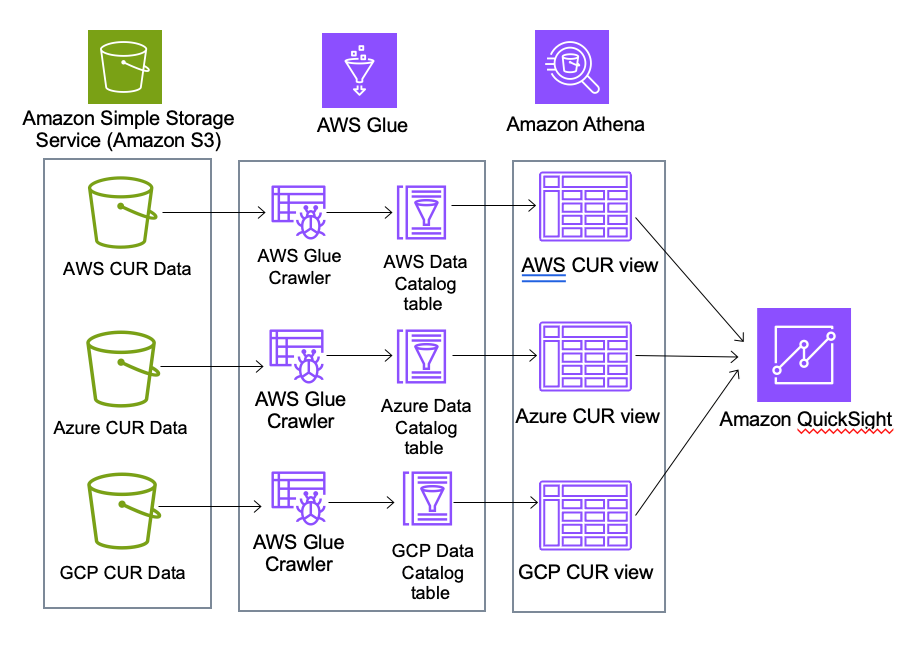
Figure 1: Architecture of CloudSPARCC’s data ingestion to visualization
CloudSPARCC uses several key UI design features to enhance the user experience. The multi-sheet navigation feature enabled the team to create a comprehensive dashboard with nine distinct “sheets,” allowing users to navigate between focused views without overwhelming a single page. Each sheet is configurable with filters and provides diverse visuals and chart types that let users tailor data to their specific needs. To complement these capabilities, the team also applied a refreshed user interface with consistent borders and color schemes throughout to streamline navigation and accelerate pattern recognition across the sheets.
Amazon Quick integration
CloudSPARCC provides the visual layer for exploring cloud costs while Amazon Quick adds an AI-powered interface to that data. This enables teams to ask plain-language spending questions, automate recurring cost reports, and generate detailed reports from a single workspace.
Amazon Quick is built on AWS infrastructure that supports government security requirements, with data encrypted in transit and at rest Amazon Quick does not use customer data for training or improving underlying LLMs. For the latest information on compliance certifications and services in scope, see AWS Services in Scope by Compliance Program.
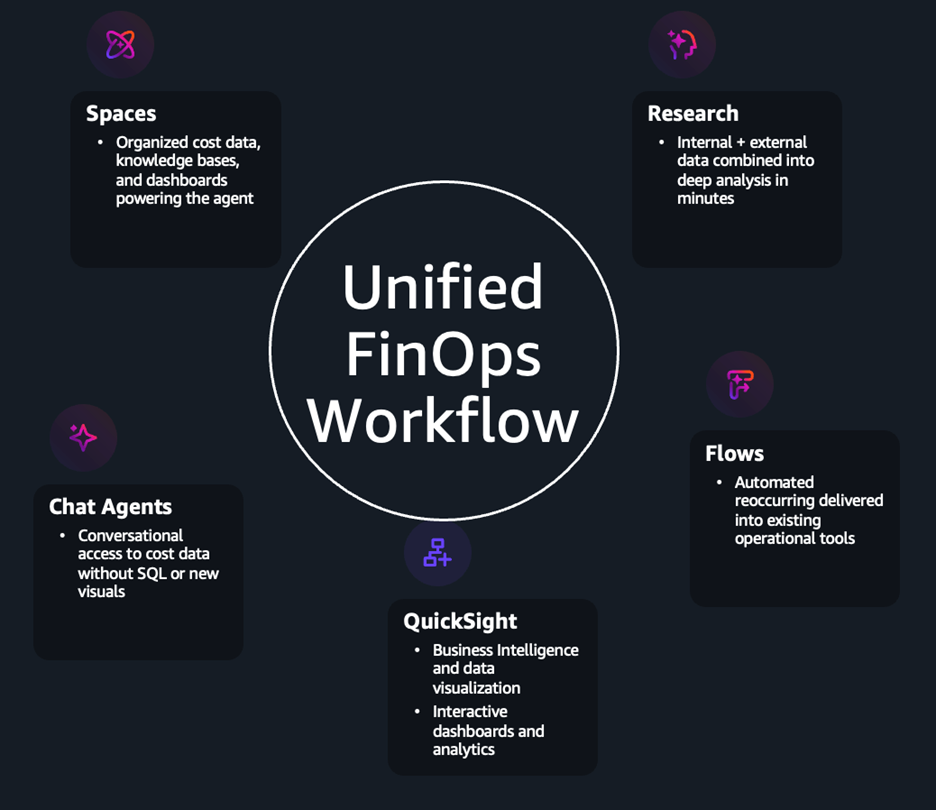
Figure 2: Diagram of a FinOps workflow
The result is a unified FinOps workflow that operates within a single platform. Quick accelerates the speed FinOps teams take to reach deep insights into cost and usage in the cloud environment.
Chat agents
Extracting cost insights from cloud billing data has traditionally required either technical expertise to manipulate and present cost data or reliance on costly third-party solutions to fill the gap. Chat agents, an AI-powered feature within Quick, address both obstacles directly. In Peraton’s case, the team configured the agent to provide direct, conversational access to the organization’s cost datasets. You no longer need to write SQL queries against cost and usage data or manually build dashboard visuals for ad hoc analysis, chat agents allow you to ask questions in plain language and receive precise answers in seconds.
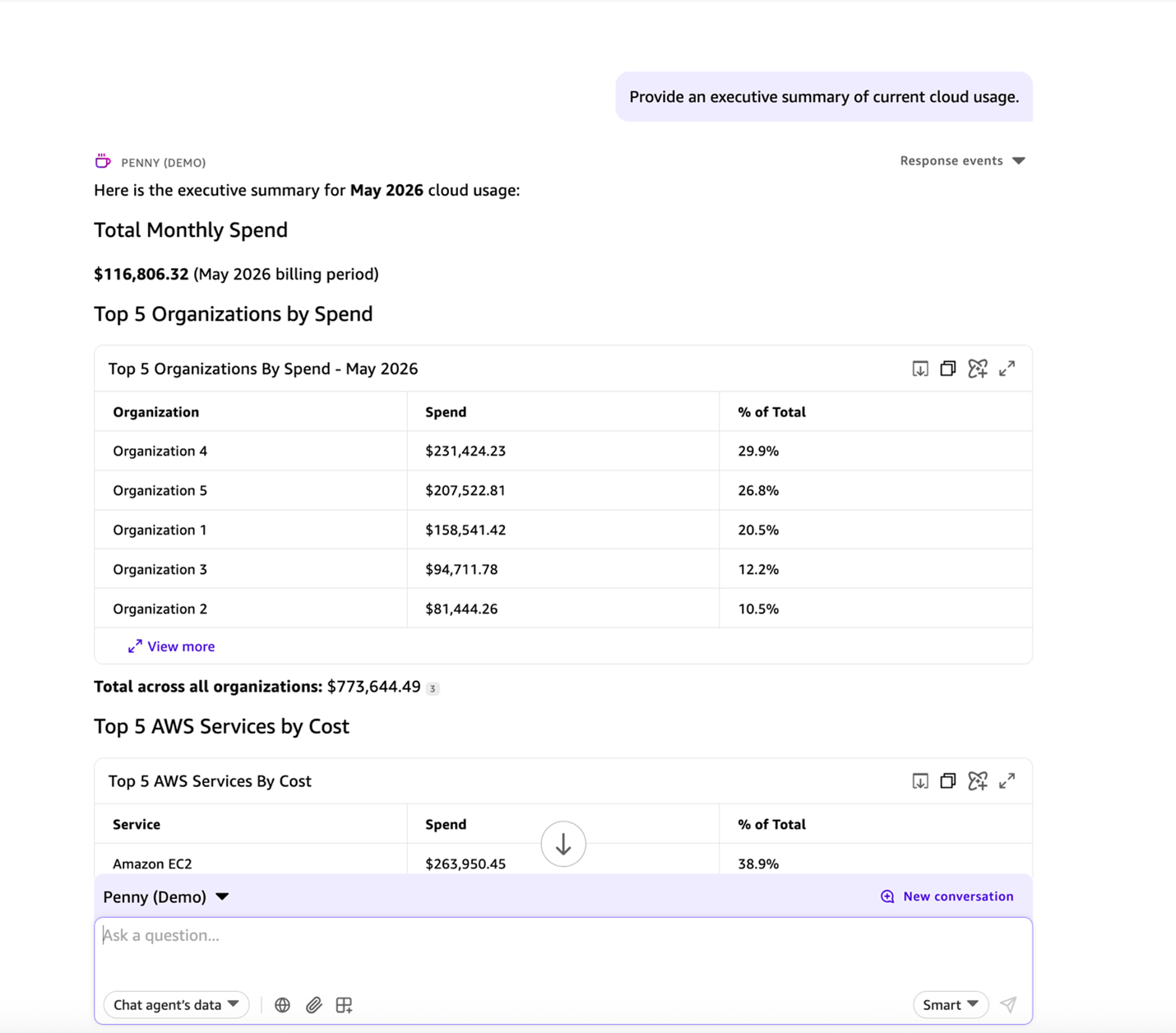
Figure 3: An example of a chat agent conversation
The role of Spaces
The usefulness of any chat agent depends on the data it can access. Spaces play a key role in this process by serving as a centralized repository for teams to store QuickSight dashboards, knowledge bases, topics, and other documentation. When an agent is linked to a Space, it gains access to the knowledge that the Space contains, transforming it into a contextually aware FinOps resource rather than a source of generic answers.
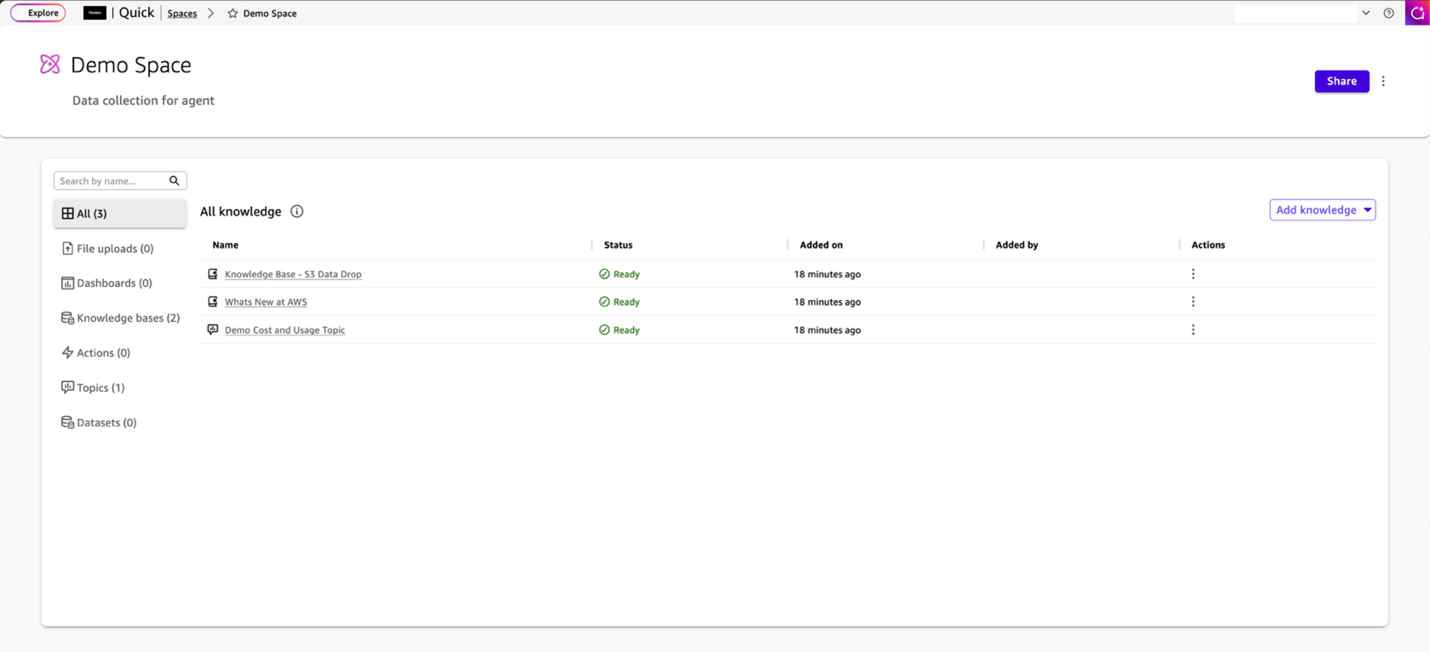
Figure 4: An example of a Quick Space
The Peraton FinOps team configured a Space that contains cost and usage data, supplementary custom cost reports, AWS pricing documentation, their FinOps dashboard, and a web crawler indexed to documentation. The chat agent linked to this Space draws from this context, allowing it to serve as an authoritative expert in relevant cost reporting and Quick help documentation.
In practice, a team member can ask a plain question like “What was our EC2 quarter-over-quarter trends over the last calendar year” and receive an accurate response complete with service breakdowns, account-level details, and live visuals generated directly within the chat window—all without writing custom SQL queries in Amazon Athena or building custom dashboard visuals.
Quick Flows
Quick Flows extend Quick’s capabilities beyond conversational analysis by allowing anyone to build automations that handle repetitive tasks using simple, everyday language prompts. Users can create and define workflows that run on a set schedule, respond to specific events, or run on demand.
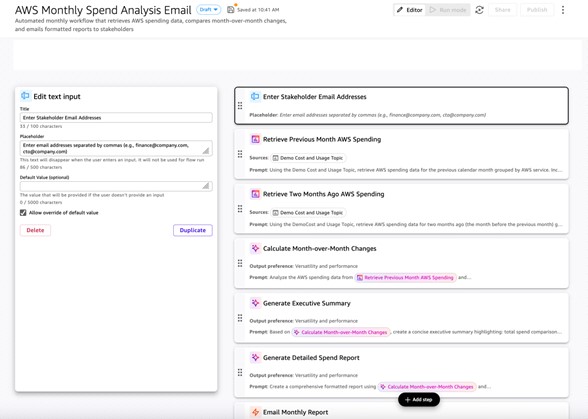
Figure 5: An example of the Quick Flows editor showing the AWS Monthly Spend Analysis Email workflow
The Peraton FinOps team configured a workflow to retrieve the previous month’s AWS spending by service and compare it to the preceding month. The workflow creates a formatted summary and emails it to the appropriate stakeholders automatically on a schedule. Beyond email, Quick Flows integrates with a broad set of enterprise tools such as ServiceNow, Jira, and OneDrive, enabling cost intelligence to flow directly into the ticketing systems, approval workflows, and collaboration tools that teams already use.
Quick Research
Analyzing complex questions often requires consolidating data across multiple sources. For FinOps teams, this is especially true for cost optimization analysis, where billing data, current cloud pricing, and cloud best practices must be evaluated together to inform decisions. Quick Research is built to handle exactly this type of problem.
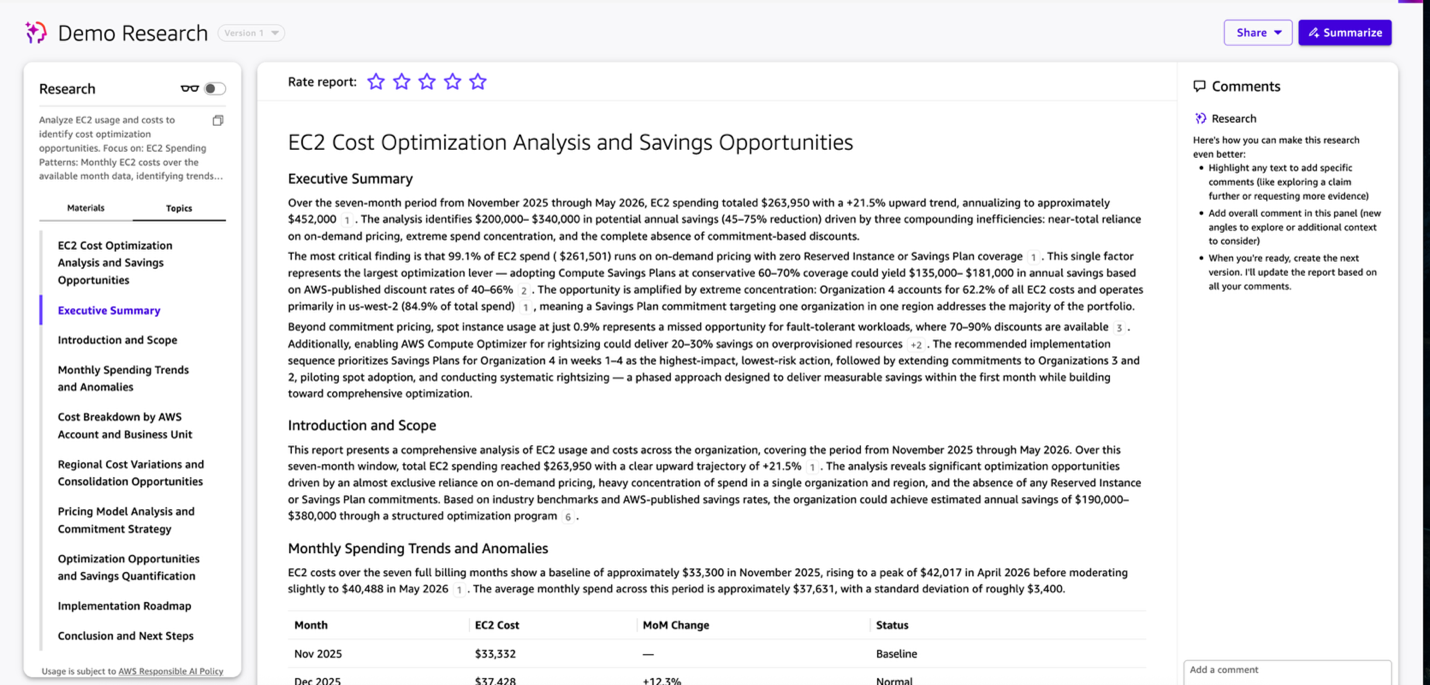
Figure 6: An example output of a Quick Research report
The Peraton FinOps team provided Quick Research with the organization’s cost and usage data, access to live AWS pricing documentation, and cloud best practices. This gave the agent the context needed to perform cost optimization studies such as analyzing Reserved Instance usage across accounts, identifying rightsizing or Savings Plans opportunities, and estimating cost impacts. Work that previously required hours of manual analysis now completes in minutes, with a final report that includes findings, recommendations, projected savings, and implementation timelines.
Conclusion
Amazon Quick’s integrated features create a comprehensive platform for FinOps. By bringing together dashboards, AI agents, automated workflows, and deep research capabilities into a single platform, Quick delivers faster insights, more efficient workflows, and data-driven cloud financial management purpose-built for modern FinOps teams.
To learn more, visit the Amazon Quick documentation and start building your first FinOps Space today.