AWS Public Sector Blog
Solving public IP space asymmetric routing challenges for higher education AWS migrations
Higher education institutions often possess substantial amounts of public IP address space, a legacy that dates to the early days of the internet. In the 1980s and 1990s when IPv4 addresses were being allocated, universities and research institutions were among the first to adopt and implement internet technologies. As a result, they were granted large blocks of IP addresses, often more than they immediately needed, to support their growing networks and research initiatives. Today, many higher education institutions (and other organizations) still use legacy public IP assignments for internal servers that don’t need to be reachable over the internet.
As organizations begin cloud migrations and establish hybrid connectivity using Virtual Private Networks (VPN) or AWS Direct Connect to on-premises networks, the need arises to route these public IPs both internally for legacy internal resources that still have public IPs assigned to them and over the internet for newly deployed internet-exposed resources. This requirement can create asymmetric routing patterns if not appropriately considered. Asymmetric routing occurs when network packets take different paths depending on whether they’re on the inbound leg, such as client requests, or the outbound leg, such as server responses. This can cause performance issues as well as connectivity problems because stateful devices might drop this traffic.
In this post, we look at asymmetric outbound network flows and how to remedy this routing for Amazon Web Services (AWS) workloads. Although this post focuses on higher education use cases, networking concepts such as placing Application Load Balancers (ALBs) in public subnets and keeping servers in private subnets while using NAT (Network Address Translation) gateways for outbound internet traffic, are widely used across many industries for their security and network segmentation capabilities.
Scenario 1: Publicly hosted EC2 instance in AWS
Let’s explore how asymmetric routing might happen in the case of public IPs being routed both over an internet gateway and AWS Site-to-Site VPN to on premises. Note that connectivity to on-premises network can also be established using Direct Connect and Transit Gateway, but for this example we are leveraging a VPN connection.
Assume the following:
- Amazon Virtual Private Cloud (Amazon VPC) Classless Inter-Domain Routing (CIDR) range: 10.0.0.0/16
- On-premises CIDR range: 192.0.2.0/24 (used by both internal resources and external/public-facing resources)
- Connectivity between Amazon VPC and on-premises data center is established by an Internet Protocol Security (IPsec) site-to-site VPN
Let’s say you have a requirement to host a public Amazon Elastic Compute Cloud (Amazon EC2) web app server on AWS. This server must be capable of receiving traffic from on-premises public endpoints in the CIDR range 192.0.2.0/24 on its public IP as well as communicate with internal endpoints over the VPN in the same 192.0.2.0/24 CIDR range over its private IP.
The following diagram shows this architecture, with the Amazon EC2 server being in a public subnet. The route table for this subnet has the following routes:
- Local route for VPC traffic
- 192.0.2.0/24 route for private traffic needing to traverse the VPN
- 0.0.0.0/0 default route to respond to public requests using the internet gateway
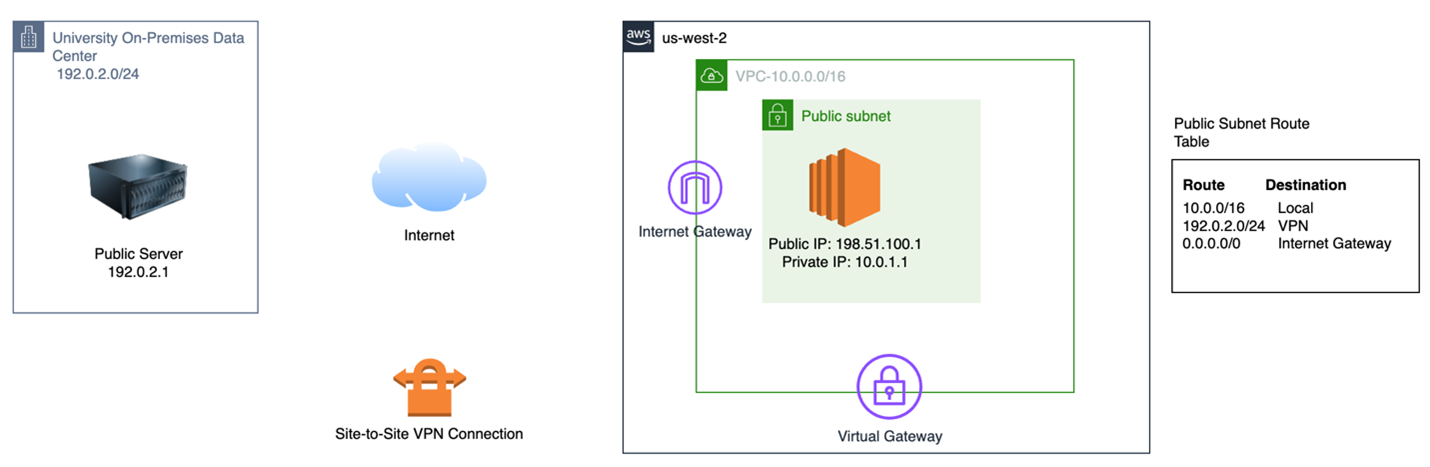
Figure 1: Architecture diagram with server in public subnet and public IP routes to VPN
The following diagram is what a sample flow would look like if an on-premises server made a request to this publicly hosted EC2 instance:
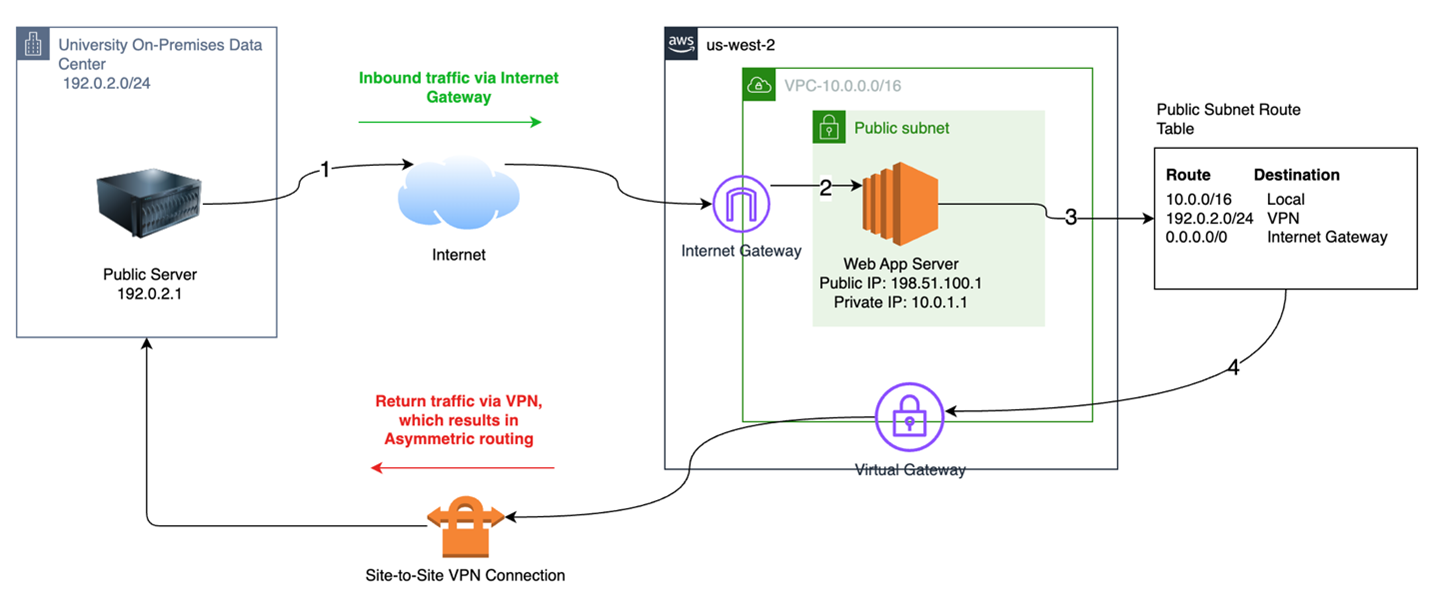
Figure 2: Flow demonstrating how inbound traffic from on-campus public IP flows in through the internet gateway, but VPN route table entries cause the return traffic to be routed over VPN. This causes asymmetric routing.
Here are the steps in the flow:
- On-premises public server with source IP: 192.0.2.1 makes a request to public web app hosted on Amazon EC2 with public IP: 198.51.100.1
- This request is routed to the VPC internet gateway and then forwarded to the EC2 server in the public subnet
- Once the server is ready to respond, VPC routing references the subnet route table, with the packets having the following source and destination IPs:
a) Source Address: 10.0.1.1 (more on why this IP is not the original 198.51.100.1 below)
b) Destination Address: 192.0.2.1 - The route table selects the VPN route because that’s the shortest prefix match, and asymmetric routing occurs where the response packets are sent back to on premises using the VPN, not the internet gateway. Additionally, the source IP changed to the private interface IP 10.0.1.1 because the traffic did not egress out of the Internet Gateway where the one-to-one NAT happens from private to public IPs before egressing to internet. As a result, in addition to the asymmetric routing, the original requesting server would now receive responding traffic coming from an IP different than the one it made the initial request to.
To solve this, you need to use different route tables depending on whether the request came from the internet, or if the request is being initiated to on premises. To use different route tables, you can create different subnets. You can take the following steps:
- Move the EC2 instance to a private subnet, retaining the 192.0.2.0/24 route to the VPN.
- Remove the 192.0.2.0/24 route from the public subnet route table.
- Place an ALB (http/s workloads) or Network Load Balancer (NLB) (not http/s workloads) in the public subnet. The load balancers will be the public endpoints that receive traffic and forward it to backend targets in private subnets.
This is illustrated in the following diagram:
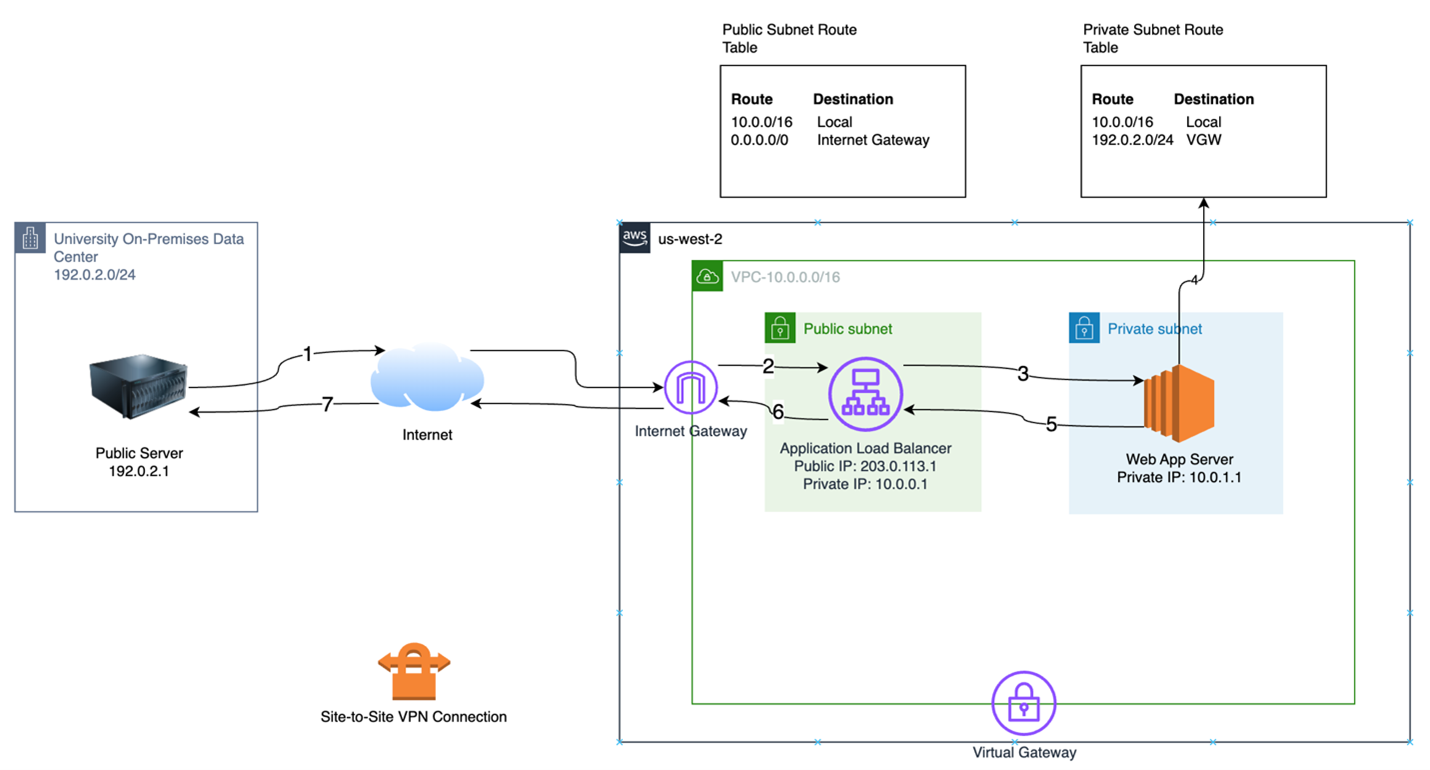
Figure 3: Flow demonstrating ALB in public subnet handling inbound public traffic and response traffic
Look how this changes the flow:
- On-premises public server with source IP: 192.0.2.1 makes a request to public IP of the ALB or NLB (controlled using DNS; assume 203.0.113.1 in this case).
- This request is routed to the VPC internet gateway, then forwarded to the ALB/NLB interface in the public subnet.
- The ALB/NLB chooses a backend target for the request and sends the request to the backend target’s private VPC IP using the local route.
- After the server is ready to respond to the request, VPC routing references the subnet route table with the packets that have the following IP headers:
a) Source Address: 10.0.1.1 (private IP of server)
b) Destination Address: 10.0.0.1 (private IP of NLB) - The route table selects the local route because that’s the shortest prefix match, and the response is returned to the ALB/NLB.
a) Under this architecture, the response is returned to the proxy’s (ALB in this case) private IP using the private route table. The ALB uses its public route table to return traffic to the originating public IP. - The ALB/NLB responds to the initial request using the public route table 0.0.0.0/0 route with the following IP headers:
a) Source Address: 203.0.113.1 (public IP of ALB/NLB)
b) Destination Address: 192.0.2.1 (public IP of original on-premises source) - Response reaches original source of request.
Placing an ALB/NLB in front of workloads means you can establish two different routing patterns. In the following flow, when the server makes a request to on-premises resources in the same public IP range, the traffic flows over the VPN as required:
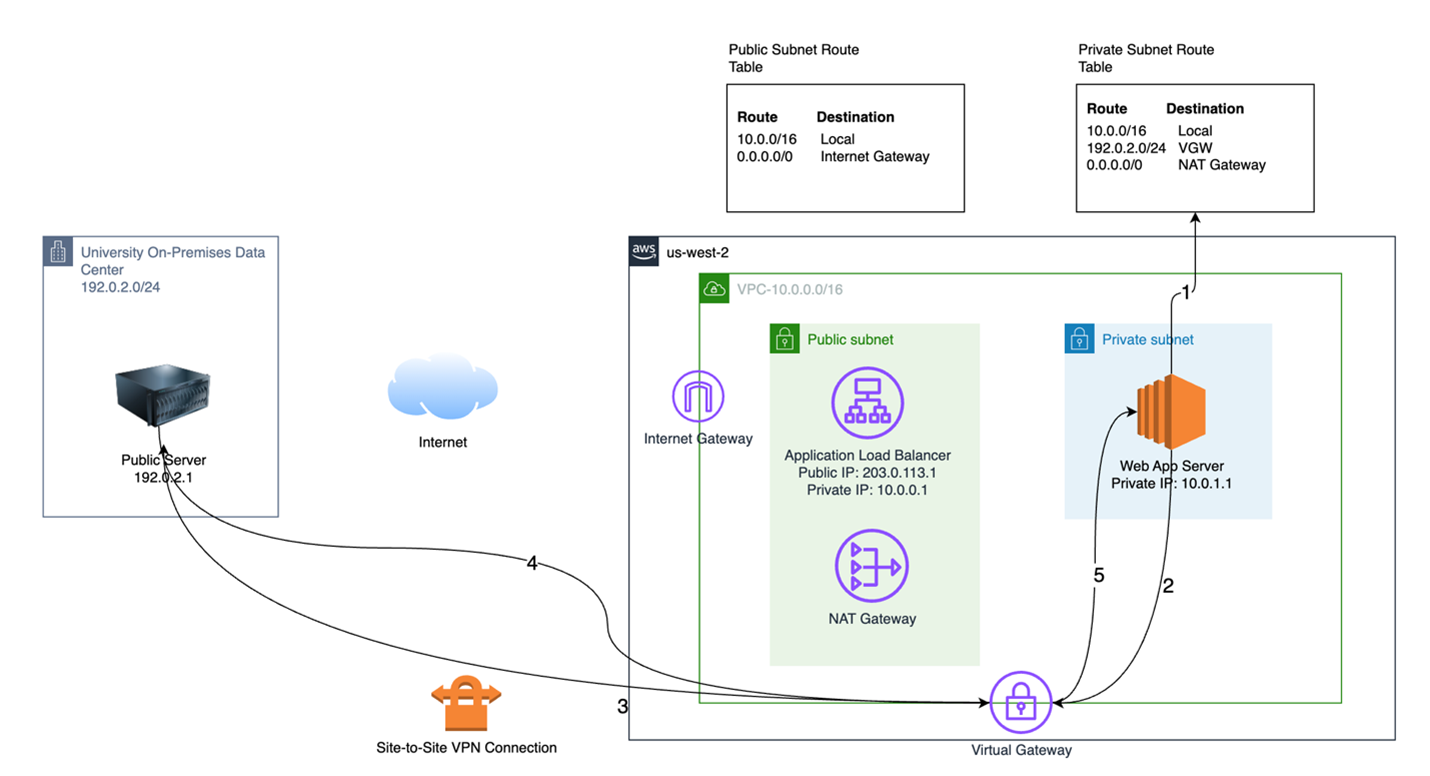
Figure 4: Builds on figure 3, showing that traffic initiated to customer-owned public CIDR range from private subnet traverses VPN
Scenario 2: Privately hosted EC2 instance with egress internet access
To build on the previous scenario, when an instance is in a private subnet, it might need to reach out to the public internet in an outbound-only pattern to get things such as patches and updates. Standard architectures provide NAT gateways for this outbound-only approach. The following is a diagram of this process:
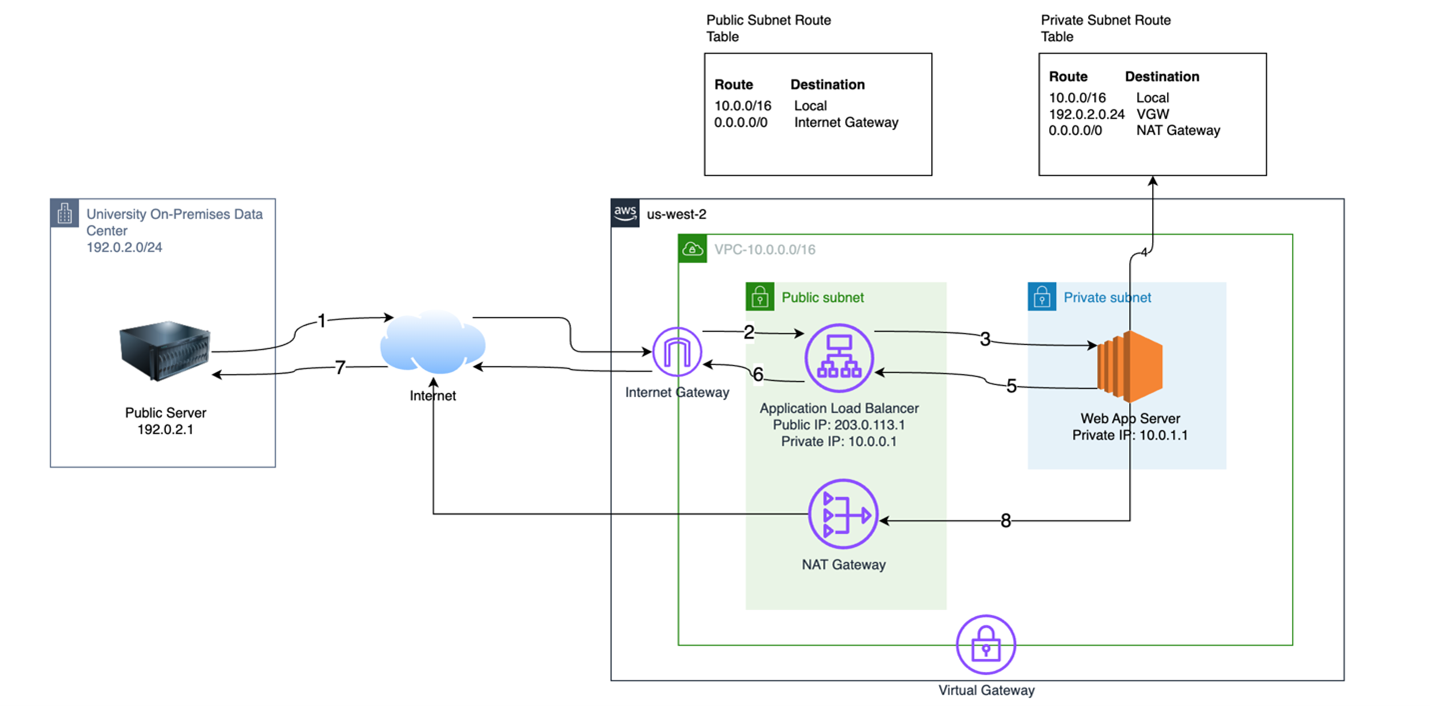
Figure 5: Shows adding NAT gateway to public subnet for outbound-only internet access from private subnet
A default route is added to the private subnet route table so the EC2 instance can reach out to the public internet using a NAT gateway in the public internet, as illustrated by the arrow labeled “8” in the diagram. This NAT IP is different from the public IP at the ALB/NLB level, which is what inbound requests would come into.
Scenario 3: Publicly hosted EC2 instance in AWS needing identical inbound and outbound public IP
Sometimes, the public IPs the EC2 instance uses must be the same for both inbound and outbound internet traffic. Use cases for this occur when reverse DNS lookups are necessary, such as Simple Mail Transfer Protocol (SMTP) servers validating the source of email traffic.
For this to work, the EC2 instance needs to be in a public subnet and assigned a public IP that can be used for both inbound and outbound flows. But how do you solve the original problem that’s reintroduced, which is the inability to route traffic over the VPN without introducing asymmetric routing?
EC2 instances can have multiple interfaces assigned to them. To solve your routing issue, you can assign two elastic network interfaces, which are similar to network interface cards, to the web server with one in a public subnet and another in the private subnet.
The following diagram shows these flows. The flows in red (dashed) arrows illustrate how internet inbound traffic and its response traffic flow using the public interface and internet gateway. Outbound internet traffic also flows out of this interface using the public subnet, the same public IP, and the internet gateway route. Finally, traffic destined for the on-premises public CIDR ranges uses the private subnet interface, which is illustrated with blue (dotted) arrows.
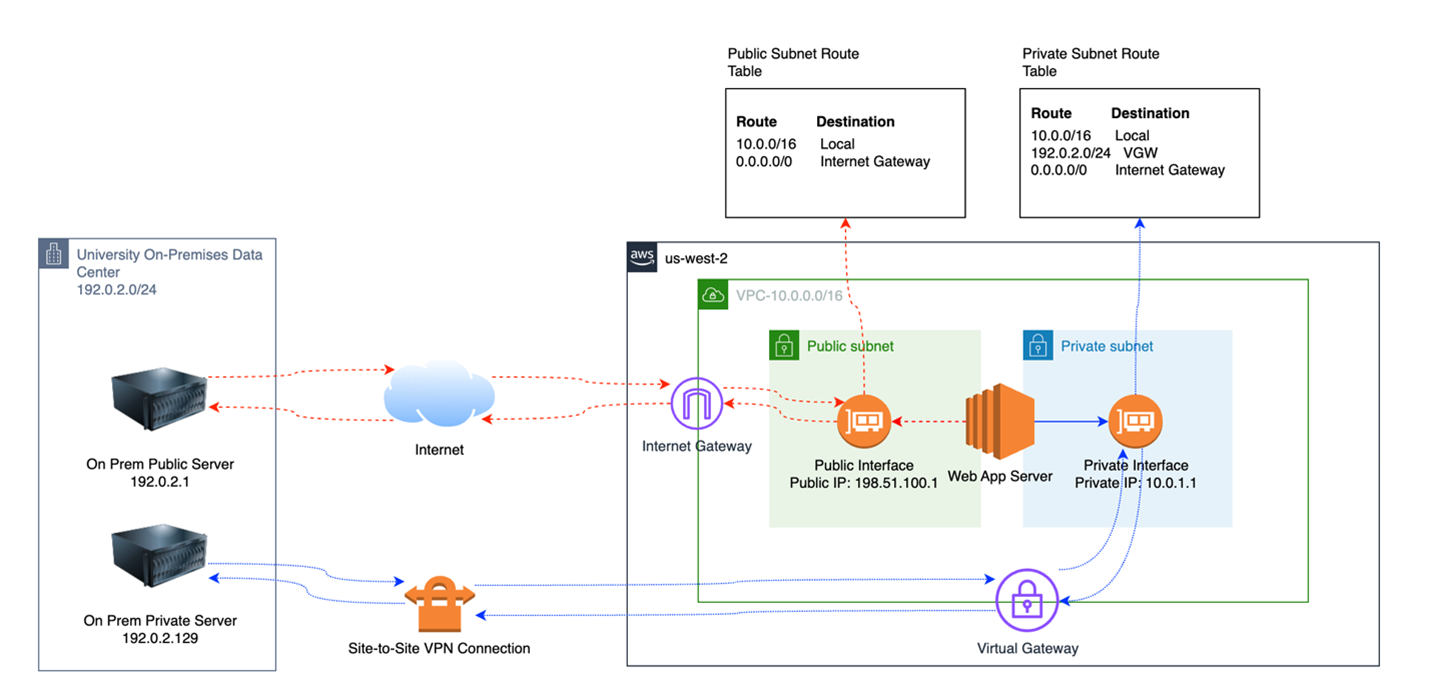
Figure 6: Shows EC2 instance with dual interfaces, one in a public subnet and one in a private subnet
Appropriate operating system (OS)-level routing rules would need to be implemented so traffic egresses from the appropriate interface. This topic is outside of the scope of this post, and a future post detailing these configurations is being developed.
The three previous scenarios demonstrate how higher education institutions can use AWS networking constructs to facilitate appropriate external (public) and internal (private) access to their workloads. Scenario 1 is ideal for if you want to expose your resources publicly from an inbound pattern, but not allow those workloads in private subnets outbound access to the internet. If outbound access is needed, you can use the NAT gateway solution presented in scenario 2. Finally, if you need outbound access but the public outbound IP must be identical to the inbound IP clients see, you can use the dual interface architecture referenced in scenario 3.
Higher education institutions migrating to AWS face unique networking challenges because of their legacy public IP address allocations, but these challenges are solvable with proper architectural planning. By using AWS networking components strategically—whether through load balancers to create routing separation, NAT gateways for more secure outbound traffic, or dual elastic network interfaces for specialized requirements—universities can maintain their existing public IP infrastructure while avoiding the pitfalls of asymmetric routing.
As they continue their cloud migration journey, institutions can leverage these offerings to modernize their infrastructure while preserving the IP resources they’ve maintained since the early days of the internet. To learn more, contact your AWS account team or the AWS Public Sector team.