AWS Security Blog
Introducing API and AI security on AWS, from discovery to protection
APIs have run digital businesses for more than a decade. For a while, there seemed to be nothing new left to say about them. That changed in 2026, when AI endpoints joined them. Teams now run large language model (LLM) inference endpoints, Model Context Protocol (MCP) servers, and Agent2Agent (A2A) servers beside their REST APIs, on services such as Amazon Bedrock, Amazon Bedrock AgentCore, and Amazon Elastic Kubernetes Service (Amazon EKS), and more companies sell their API as the product itself. On the other end, AI agents read API descriptions, pick the tools they need, and chain calls with no person clicking through an app.
APIs have always had two kinds of callers: other services and people who use an app. Now there’s a third: AI agents that act on a person’s behalf. It feels like everyone has a personal AI agent that can call APIs for them. Who knew curl would be important again?
Today, we’re launching capabilities across AWS WAF, Amazon CloudFront, Application Load Balancer, and Amazon API Gateway that help you discover and protect the APIs and AI endpoints that services, apps, and AI agents call:
- API Portal, a new feature in Amazon API Gateway, discovers your APIs and AI endpoints.
- API Security, a new managed rule group in AWS WAF, protects your APIs.
- AI Security, a new managed rule group in AWS WAF, protects your AI endpoints.
All three are generally available today. You can enable discovery in API Portal for one account or for your organization in AWS Organizations. The two rule groups protect the resources that you associate with your protection pack (web ACL). They work together: API Portal shows which discovered endpoints AWS WAF protects, and the security events that AWS WAF detects appear on each managed API’s detail page.
Same APIs, new callers, new attack surface
Your APIs are the same APIs they always were. What changed is how you expose them, who calls them, and what threatens them.
How you expose them.
A new MCP server or LLM endpoint takes minutes to stand up. It can be placed behind a load balancer or a CloudFront distribution without ever passing through your API gateway, so it’s missing from the API registry and the security review. An agent that can reach it doesn’t need your documentation, either, because the endpoint describes itself: an MCP client asks the server for its tools with tools/list, and an A2A client reads the agent card that the server publishes.
Who calls them.
The following table compares the three kinds of callers that reach your APIs today.
|
Caller |
What normal looks like |
What abuse looks like |
What it means for protection |
|
Service to service |
Predictable, authenticated calls that repeat the same pattern |
A stolen API key, or a partner that scrapes beyond its contract |
Track rate and behavior for each API key and endpoint |
|
Person to service, through an app |
Sessions and UI-driven calls at a human pace |
Account takeover and scripted checkouts |
Browser-based signals, such as CAPTCHA and browser fingerprints, apply here |
|
AI agent to service, for a person |
Human intent with machine behavior, from an HTTP client or an automated browser |
An agent with stolen credentials, or a bot that poses as an agent |
Browser signals only go so far, so you need visibility into the API itself |
What threatens them. The APIs behind your web and mobile apps were built for one client: your own app. Your app calls them in the right order, at a human pace, with input it already validated. Legitimate agents now call those same APIs directly, and so do attackers and fraudsters. None of them have to follow the rules that your app follows.
What we’re launching
Here’s how we respond to those changes, as shown in Figure 1. In the figure, services, people, and AI agents call your APIs through their entry points. There, API Portal maps your endpoints, and AWS WAF runs API Security and AI Security on the same traffic to stop threats.
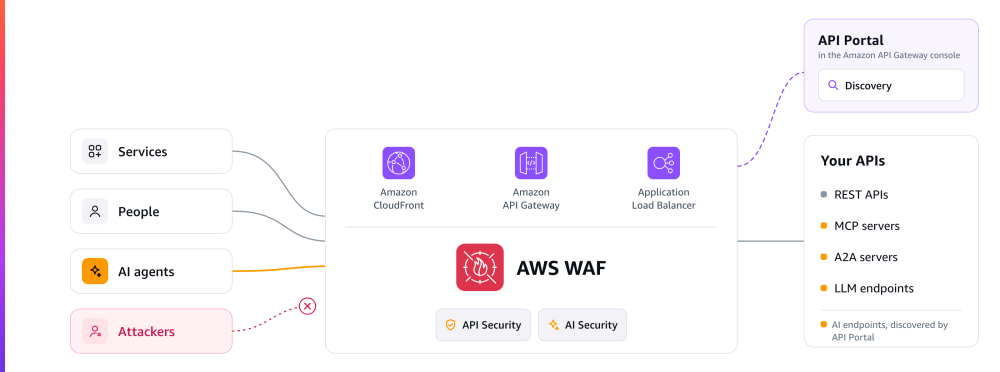
Figure 1: API Portal inventories the APIs and AI endpoints that services, people, and AI agents call. AWS WAF protects the entry points in front of them
- API Portal builds an inventory of your APIs from their configuration and live traffic, identifies which of them are AI endpoints (LLM inference, MCP, and A2A), and shows you what to protect. It does this by analyzing configuration and traffic across your API entry points: CloudFront, Application Load Balancer, and API Gateway.
- API Security covers three kinds of API abuse: broken object level authorization, authentication attacks such as tampered tokens and credential stuffing, and reconnaissance such as probing for undocumented routes. It does this with rules that work from a single request and with behavioral detections that learn your traffic.
- AI Security identifies your AI traffic (LLM inference, MCP, and A2A), validates MCP and A2A requests against their protocol, and checks prompts and responses through Amazon Bedrock Guardrails for prompt attacks, harmful content, and sensitive information.
All three work with Amazon CloudFront, Amazon API Gateway REST APIs, and Application Load Balancer. For the current list of supported resources, protocols, and endpoint types, see AWS WAF API Security and AWS WAF AI Security rule group in the AWS WAF Developer Guide.
The three capabilities live in two places. API Portal is in the Amazon API Gateway console. That’s where it can be found, not what it covers: it discovers APIs behind CloudFront, Application Load Balancer, and API Gateway alike. API Security and AI Security are in the AWS WAF console.
Discover: You can’t secure an invisible API
Ask a platform team how many APIs they run, and you’ll get a number from a registry. Ask what’s answering requests on the internet right now, and the number changes. The MCP server that a team set up for a hackathon isn’t in the registry. Neither is the v1 endpoint that nobody turned off. Both still answer requests.
API Portal builds the inventory from both live traffic and API configuration. You enable discovery in API Portal for one account or for your organization in AWS Organizations, and you can exclude resources that you don’t want in the inventory. It reads the service logs and configuration records of your API entry points. There’s nothing to attach, no logs to forward, and no traffic to reroute. It lists the endpoints that receive traffic, by host, path, and HTTP method. Every endpoint starts as a shadow API: deployed and reachable, but not yet governed. When you promote it, it becomes a managed API. For APIs you manage, API Portal also flags zombie APIs, which have no traffic and no configuration change for a set period, and orphaned APIs, whose owning account was closed or removed from your organization. Retire a zombie API that nothing needs, and resolve the ownership of an orphaned one. For the classification rules, see the API Portal Developer Guide.
API Portal also discovers your AI endpoints. It reports each endpoint’s type, such as an LLM inference endpoint, an MCP server, or an A2A server. It finds them in the traffic at the same entry points (CloudFront, Application Load Balancer, and API Gateway) and lists them in the same inventory as your other APIs, so you don’t build a separate view for them. Combined, one row can show a shadow MCP server that nobody manages yet. Figure 2 shows the inventory.
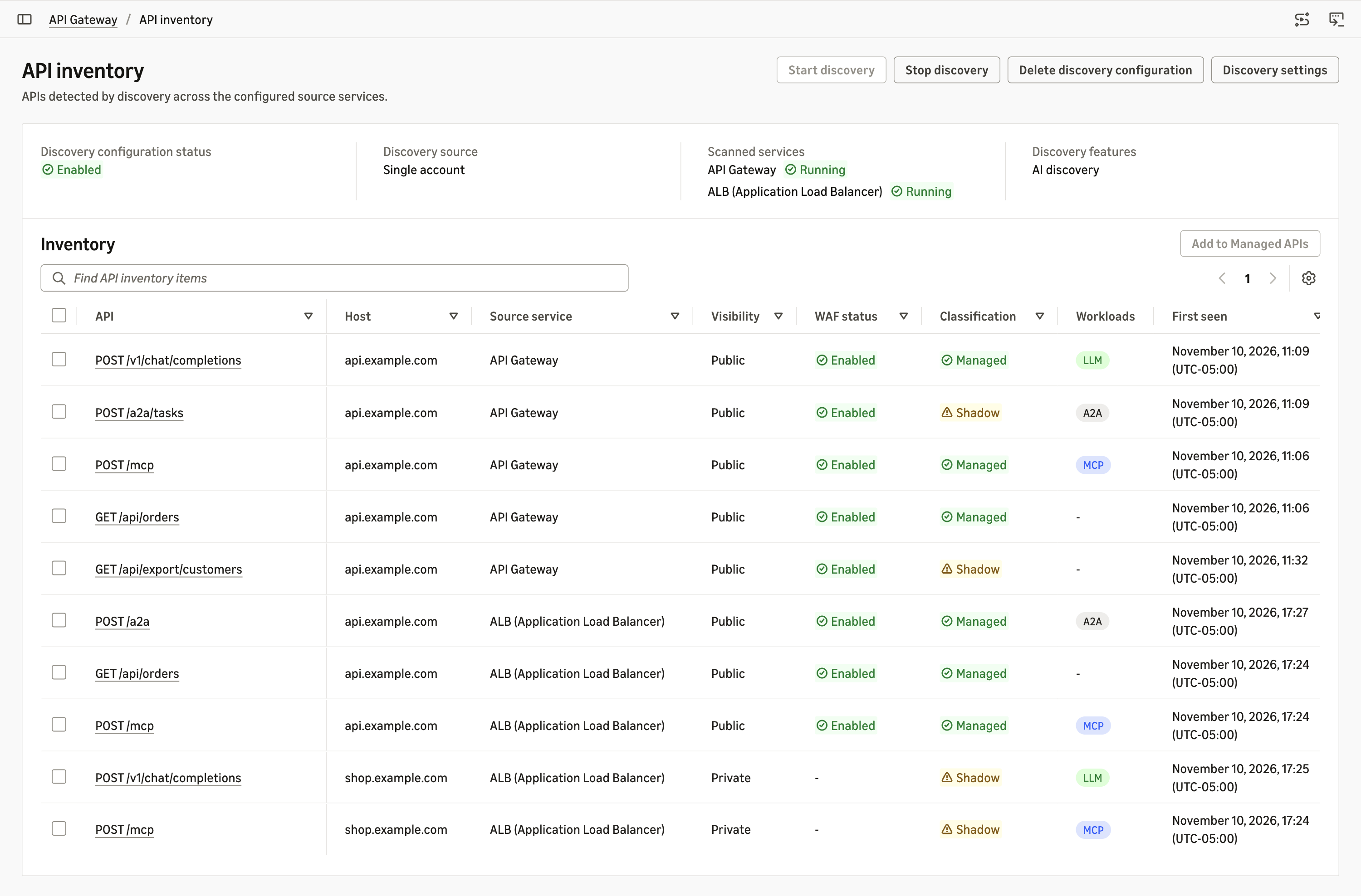
Figure 2: The API inventory in API Portal lists the endpoints discovered behind API Gateway and Application Load Balancer, with each endpoint’s AWS WAF status, classification, and AI workload type
“We can manage our API environment more effectively when we have a clear picture of what’s running across AWS. API Portal gives us that visibility without requiring teams to change how they deploy APIs or route traffic, helping us create a more complete view across the enterprise.”
— Mike Hasani, Senior Software Engineer, Principal Financial Group
Some abuse shows in one request. Some appears only over time.
Two requests show why protecting an API takes two kinds of detection. Here’s the first one:
This JSON Web Token (JWT) declares alg: none. It asks your API to skip signature verification, and a correctly built client doesn’t send that. The API Security managed rule group blocks the request before it reaches your origin, from the first request and with no learning period. The same rules catch other token tampering, such as pointing the token at a signing key that the attacker controls. These rules check the structure of a token in the Authorization header. They don’t verify its signature, so your application still has to validate the token. For the full list of rules and what each one does by default, see API Security managed rule group in the AWS WAF Developer Guide.
Here’s the second one:
Nothing is wrong with this request, and the caller’s token is valid. It’s abuse only if the caller doesn’t own account 1337, and no single request can tell you that. This is broken object level authorization (BOLA), the first entry in the OWASP API Security Top 10.
So, the managed rule group also learns. It builds a baseline from your own traffic and looks for callers who don’t fit it. There’s nothing to set up for this. You don’t turn on logging or mirror traffic.
The hard part is to avoid flagging your own scripts. For example, a nightly export job reads thousands of records on a steady machine schedule. On those two signs alone, it looks like an attacker. So a detection reaches high confidence only when different kinds of signs agree, and at least one is something your own traffic never does. For example, the caller reaches records through a sequence of calls that your app never makes, or your API keeps denying it access. High confidence also needs a caller that AWS WAF can identify from a credential on the request, such as a token. A caller that AWS WAF knows only by IP address stays at medium confidence. Figure 3 compares a nightly export job with an attacker on these signs.
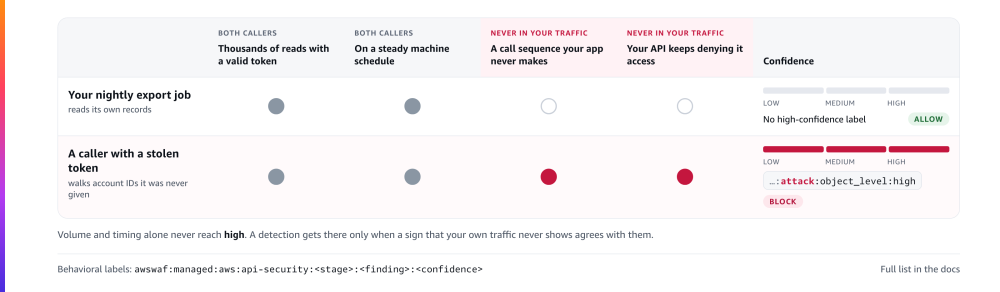
Figure 3: Volume and timing alone don’t reach high confidence. A sign that your own traffic never shows has to agree with them
The behavioral detections cover more than object access. They also flag credential stuffing, where one source presents an unusual number of different credentials in the Authorization header, and probing, where a caller keeps requesting routes or parameters that your traffic never uses.
The same thinking applies to the response, what your APIs send back. The behavioral detections take account of the status codes that your application returns, such as a caller’s rate of denied or failed requests. A caller stands out when, for example, its successful calls turn into a run of authorization failures. API Security doesn’t inspect the content of responses. Figure 4 shows the APIs view of the protection pack (web ACL) dashboard in the AWS WAF console.
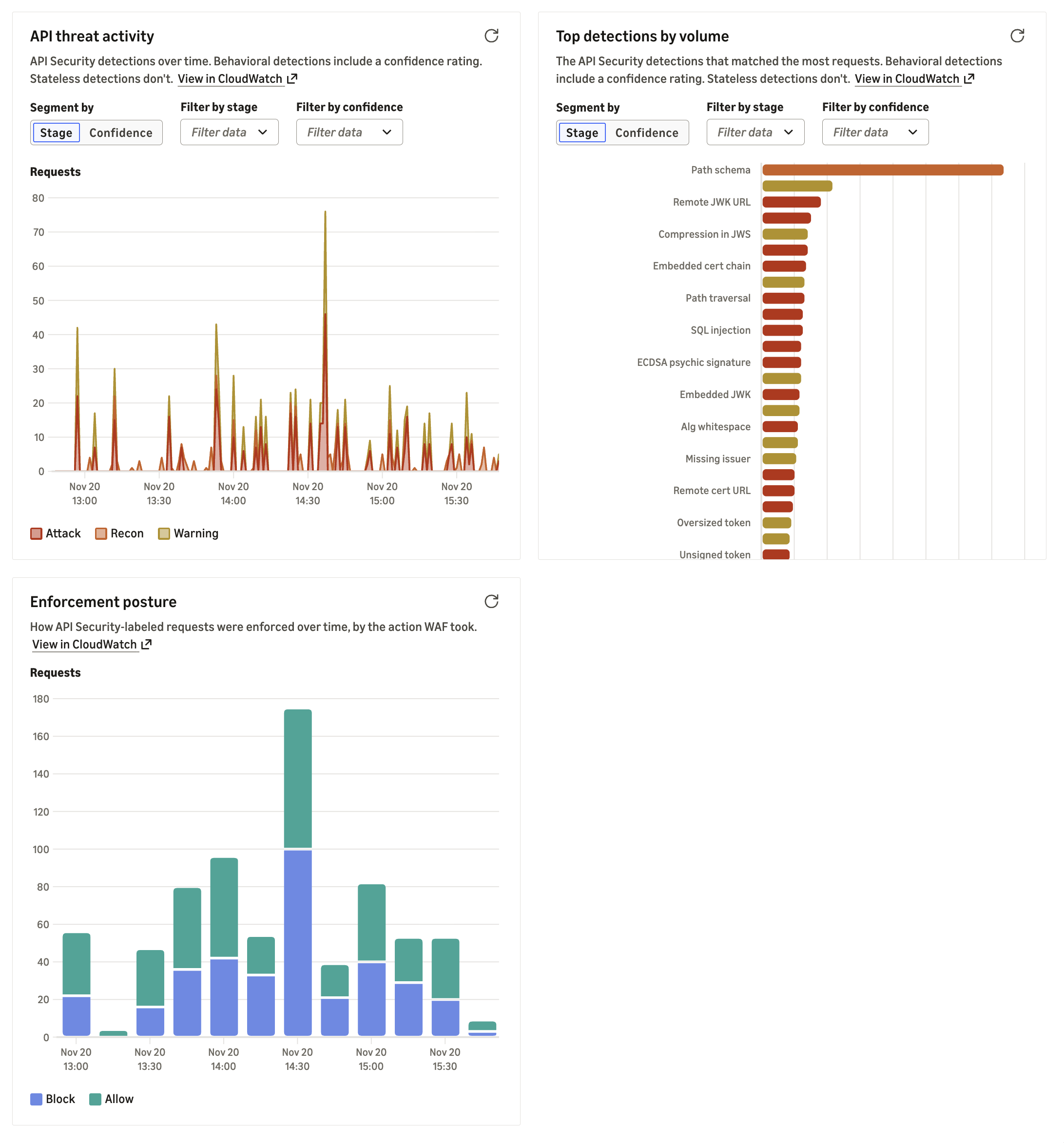
Figure 4: The APIs view of the protection pack (web ACL) dashboard shows API Security detections over time, the detections that matched the most requests, and how AWS WAF handled the labeled requests.
Every detection is a label under awswaf:managed:aws:api-security:. A label starts with a stage (attack, recon, or warning) and names the finding. Behavioral detections also end with a confidence (high, medium, or low). Each rule has its own default action. The single-request rules that identify token tampering and unsafe methods block, and the posture and schema discovery rules count. Behavioral detections block at high confidence and count at medium and low confidence, at either stage. Detections that work from a single request have no confidence. For example, attack:alg_none:jwt_header and attack:object_level:high block, and recon:path_schema counts. AWS WAF also repeats a caller’s finding as an actor_identity label on that caller’s later requests across the whole protection pack (web ACL), for about five minutes after the last detection. At high confidence, the rule group blocks those requests by default. At medium and low confidence it counts them, and your own rules can act on the label.
AI Security understands the protocols that agents speak
LLM inference endpoints, MCP servers, and A2A servers are APIs, too. API Portal shows you which of your endpoints they are, and the API Security managed rule group already inspects their requests like any other API path.
The AI Security managed rule group adds checks made for agent traffic. It first recognizes the traffic and labels each request as LLM, MCP, A2A, or not recognized, so the checks that follow fit each endpoint type. It runs in the same AWS WAF protection pack (web ACL) as your other rules, with no new service to deploy.
Its first layer checks each MCP and A2A request against the protocol version that the request declares in its MCP-Protocol-Version or A2A-Version header. It supports MCP versions 2025-06-18, 2025-11-25, and 2026-07-28, and A2A version 1.0. For the current list, see AI Security managed rule group. These protocol compliance checks are deterministic and run entirely in AWS WAF. They come in two levels. Baseline covers the violations that let a request slip past routing or inspection, as the example that follows shows, and blocks by default. Strict adds malformed requests that are worth flagging but are usually an outdated client, and counts by default. Each failed check also adds its own label, so you can see exactly which check failed. Here’s the kind of trick that Baseline catches. The header tells every component in front of the MCP server that the request only lists tools. The body calls a tool that reads a file:
A gateway or authorizer that trusts the header treats the request as read-only, and the server runs the tool. AWS WAF blocks the request at the API entry point, because the header and the body disagree about the method.
Its second layer checks content through Amazon Bedrock Guardrails. You don’t create or configure a guardrail for this. You turn on the option in the rule group and choose a service role, and AWS WAF assumes that role to call Bedrock Guardrails with your account’s identity. Bedrock Guardrails returns a score for each check. AWS WAF groups the scores into three levels (high, medium, and low), and the rule group has one rule for each check at each level, so you choose the action for each one. AWS WAF picks the checks for each endpoint type and each direction, as the following table shows. Response checks run only when you turn on response inspection. They cover the response body up to the body size that AWS WAF inspects for that resource, and content beyond that size isn’t checked.
|
Bedrock Guardrails check |
What it looks for |
On requests |
On responses |
|
Prompt attack |
Jailbreaks, prompt injection, and attempts to extract the system prompt |
Yes |
MCP and A2A only |
|
Content filter |
Hate, insults, sexual content, violence, and misconduct |
LLM and A2A only |
No |
|
Sensitive information |
Personal data such as card numbers, US Social Security numbers, email addresses, and bank account numbers, plus credentials such as passwords and AWS access keys |
No |
Yes |
By default, AWS WAF blocks a high-severity prompt attack, on the request or the response. Everything else counts and adds a label that names what matched, such as a prompt injection or a card number. You can change the action for any rule. If Bedrock Guardrails can’t check a request, AWS WAF adds a label that says why and lets the request through. The label is guardrails:not_assessed when the content can’t be assessed, such as an empty prompt. It’s guardrails:call_failed when the call to Bedrock Guardrails fails, plus a second label with the reason, such as guardrails:call_failed:throttling. Like every label, these appear in your AWS WAF logs and CloudWatch metrics. For how labels work, see Web request labeling in AWS WAF. To fail closed when the call to Bedrock Guardrails fails, set the Guardrails_CallFailed rule to block. Throttling then blocks requests, too. Content checks run in the supported Regions listed in AWS WAF AI Security rule group. Figure 5 follows one request through these checks.
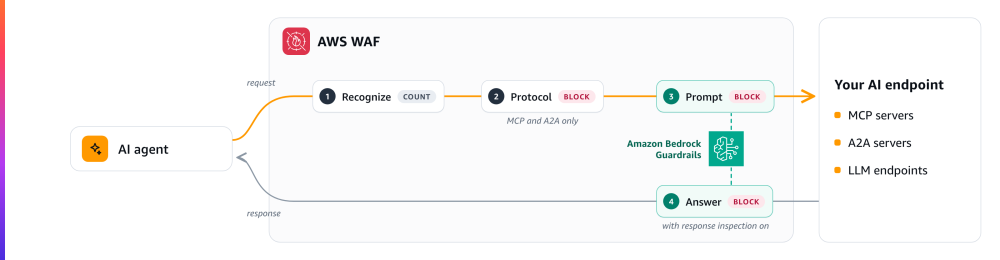
Figure 5: AWS WAF recognizes agent traffic and checks its protocol itself, and calls Amazon Bedrock Guardrails to check the prompt on the way in and the answer on the way out
The AI Security labels follow the same steps, under awswaf:managed:aws:ai-security:. For example, traffic:recognized_mcp says what the traffic is, protocol_compliance_level:baseline:mcp is the level you act on, protocol_compliance_check:mcp_method_mismatch names the check that failed, and request:guardrails:prompt_attack:severity:high carries the Bedrock Guardrails result. For the full label list, supported protocols, and configuration, see AI Security managed rule group. Figure 6 shows the AI endpoints view of the protection pack (web ACL) dashboard.
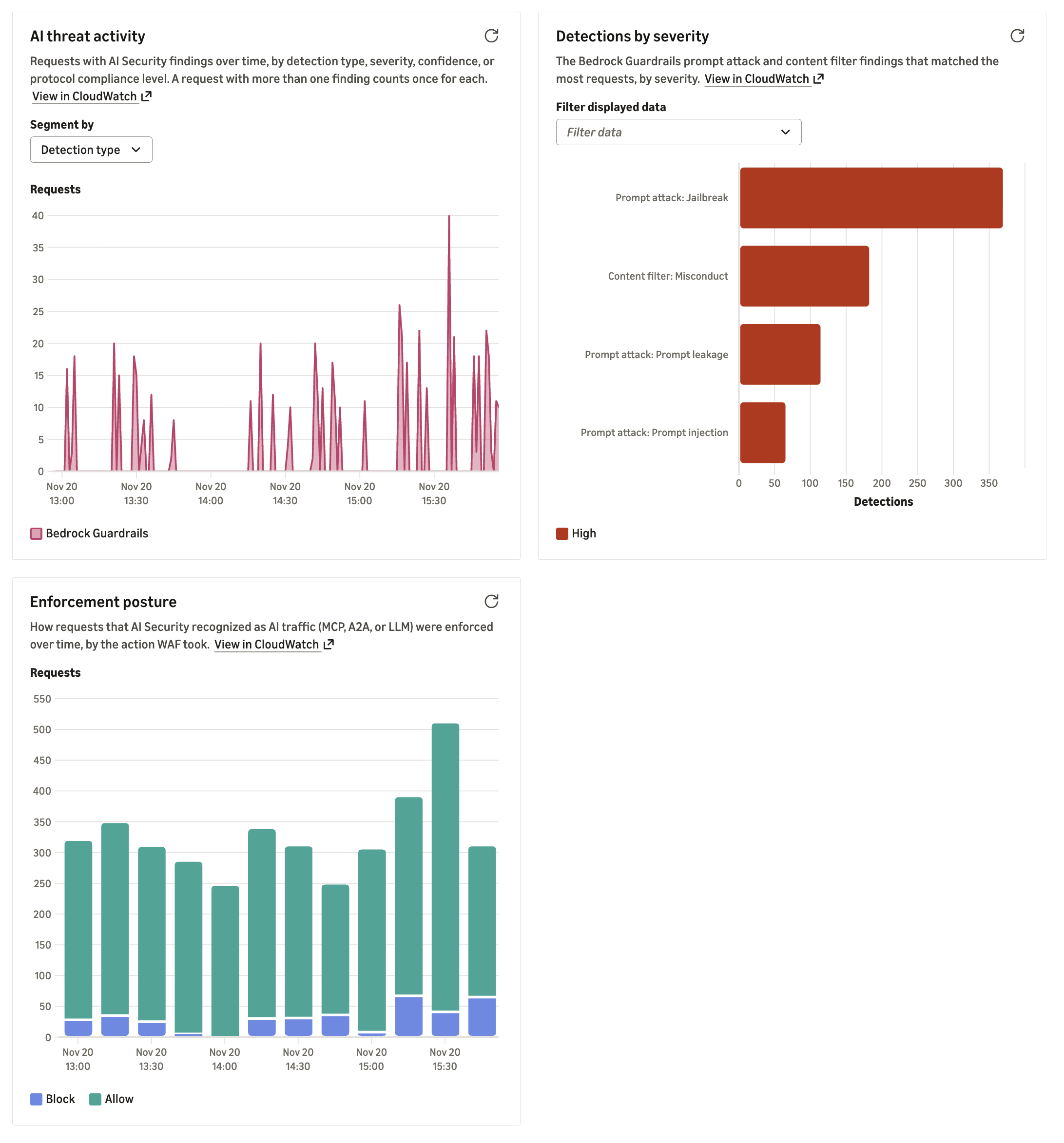
Figure 6: The AI endpoints view of the protection pack (web ACL) dashboard shows AI Security detections over time, the Amazon Bedrock Guardrails findings that matched the most requests, and how AWS WAF handled AI traffic
Every detection is a label, and labels work with the rest of AWS WAF
Every detection from the API Security and AI Security rule groups is also a label on the request. Any rule that runs later in your protection pack can match those labels and combine them with labels from other managed rule groups. Examples are AWS WAF Bot Control, AWS WAF Fraud Control account takeover prevention, and the Amazon IP reputation list. That list draws on MadPot, the threat intelligence tool that Amazon uses to protect customers from cybercrime. Use request labels in your own rules. Labels from response checks, such as sensitive information in a response, drive the AI Security rule group’s own actions and appear in your CloudWatch metrics.
Here are four examples of what that makes possible:
- Rate limits keyed on labels. One probe for your API schema can be noise. Fifty from the same caller in 5 minutes is reconnaissance. A rate-based rule scoped to the reconnaissance labels counts only those requests.
- No unsigned agents on your MCP server. If your MCP server is only for agents you work with, block requests without an access token or a verified Web Bot Auth signature. Then match the Bot Control bot name label for the operators you trust. Application Load Balancer JWT verification, CloudFront Functions, Lambda@Edge, or your MCP server still validates the token itself.
- Two weak signals that add up. A low-confidence API Security label or a Bot Control signal by itself isn’t enough to block. Block only the requests that carry both.
- Tighter limits on sensitive paths. Bot Control targeted protection labels callers by confidence. Use those labels to set a lower rate limit on
/checkoutthan on the rest of your API.
The following rule shows the first example. For each IP address, it counts the requests that carry an API Security reconnaissance label. When an address sends more than 50 requests in 5 minutes, the rule blocks them. Place it after the API Security managed rule group so that its labels are available.
Labels don’t have to stop at AWS WAF. With custom request headers and dynamic label interpolation, AWS WAF can forward the matched labels to your origin. Your application then sees what AWS WAF saw and can show less data, require step-up authentication, or log the request for review. For how it works, see Do more with AWS WAF labels using dynamic label interpolation.
We keep adding labels, so the documentation holds the current lists. See API Security labels, AI Security labels, and AWS WAF Bot Control rule group.
See what the rule groups found, and act on it
Every label is also an Amazon CloudWatch metric, with no extra setup, and appears in your AWS WAF logs. The protection pack (web ACL) dashboard in the AWS WAF console shows them as traffic arrives. In API Portal, each managed API’s detail page shows the security events that AWS WAF detected on it, as shown in Figure 7.
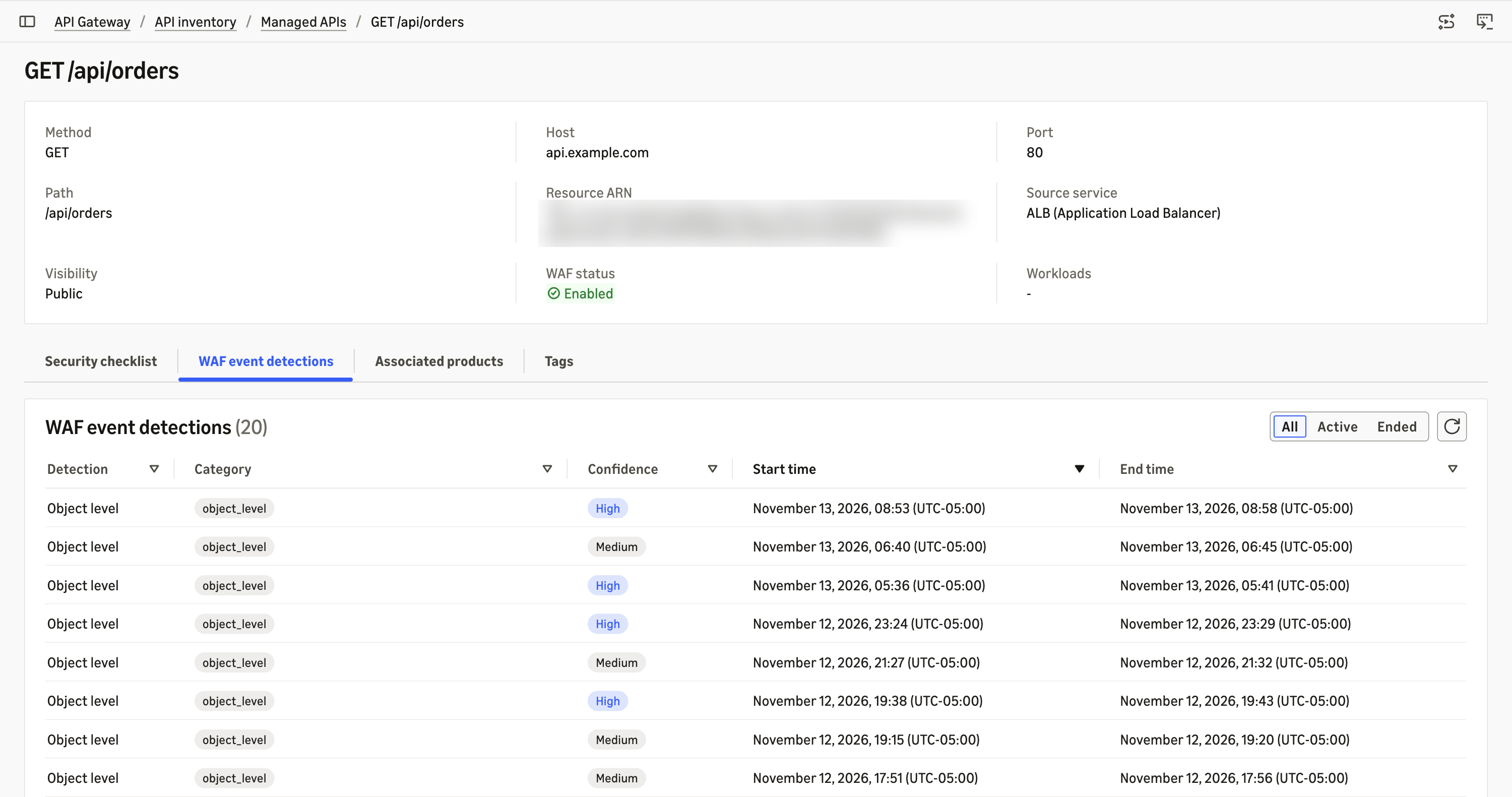
Figure 7: Each managed API’s detail page in API Portal shows the events that AWS WAF detected on it
The managed rule groups enforce their own detections at your API entry points. To write a rule of your own, start from a label. Scope a rate-based rule to the paths it appears on, key it on the IP address or TLS fingerprint, and start in count mode.
When a detection type spikes, your existing alerting can act on it. That can be a CloudWatch alarm, or the observability or security platform that already reads your metrics and logs. For log destinations, see Logging AWS WAF protection pack (web ACL) traffic.
How we test API Security
No single test shows whether a detection works, so we combine several for API Security:
- Automated red teaming – LLM-powered agents run continuously against deliberately vulnerable test APIs that we maintain. They probe, adapt, and chain steps the way an attacker does.
- A growing attack suite – Each working exploit that the agents find becomes a repeatable test case. We replay the suite against the managed rule group when it changes.
- Realistic legitimate traffic – We replay traffic such as batch jobs, seasonal spikes, and power users next to the attacks, so we measure false positives together with detections.
Results from our test environment don’t transfer directly to yours, because your APIs and the attacks against them differ. The numbers that matter come from your own traffic, and the next section shows how to get them. API Security is designed to detect and block callers who walk object IDs to harvest other users’ records, and tokens whose structure shows tampering. It also flags credential stuffing against the Authorization header and callers who probe for routes that your API doesn’t serve. Efficacy and expansion work for API Security, like AWS WAF security in general, is a continuous effort. For the current list of detections, see API Security managed rule group in the AWS WAF Developer Guide.
Check what gets blocked on your own traffic
The managed rule groups apply their default actions from the moment you add them. To see what a rule group finds before it blocks anything, first add it with all rule actions overridden to count, review the results, and then remove the override. Later, to review one rule, override only that rule to count. AWS WAF still evaluates an overridden rule and adds its label, so you see what it would have blocked on your own production traffic.
Behavioral detections need time to learn your traffic. For the learning period, see Testing and deploying AWS WAF API Security. For a step-by-step evaluation, see Testing and tuning your AWS WAF protections.
Availability
API Portal, API Security, and AI Security are generally available today. Detection of data exfiltration and sensitive data exposure in responses for API Security is coming soon.
Pricing
Each capability is priced by the service it runs in. For API Portal, see Amazon API Gateway pricing. For the API Security and AI Security managed rule groups, see AWS WAF pricing. For the content checks that AI Security runs through Bedrock Guardrails, see Amazon Bedrock pricing.
Get started
To get started, complete the following steps:
- In API Portal, enable discovery for one account or for your organization in AWS Organizations, and exclude any resources that you don’t want in the inventory. This step doesn’t need AWS WAF. As the inventory builds, look for endpoints you didn’t expect, such as shadow APIs and AI endpoints, and add them to your managed APIs.
- In the AWS WAF console, add the API Security managed rule group to the protection pack in front of your APIs. Start with all rule actions overridden to count, review what it finds on your own traffic, and then remove the override.
- If you run AI endpoints, add the AI Security managed rule group to the same protection pack. To turn on the Bedrock Guardrails checks, choose a service role that AWS WAF can assume to call Bedrock Guardrails, and turn on response inspection if you want responses checked and your protection pack (web ACL) protects CloudFront or an Application Load Balancer. Start with the four rules that block by default overridden to count, review what they find on your own traffic, and then remove the overrides one rule at a time.
- After the first baseline is available, the behavioral detections label abuse and block it at high confidence. Watch the labels in your CloudWatch metrics, and in your AWS WAF logs if you turn on logging.
- Use those labels in your own rules, such as a lower rate limit on your most sensitive paths.
For step-by-step instructions, see Adding the API Security managed rule group and Adding the AI Security managed rule group in the AWS WAF Developer Guide.
Best practice: Put Amazon CloudFront in front of your APIs
Put Amazon CloudFront in front of your API Gateway APIs, your Application Load Balancers, and any other endpoint that is public on port 80 or 443, and associate your protection pack (web ACL) with the CloudFront distribution. That includes APIs that run outside AWS, with another cloud provider or on premises: CloudFront works with any HTTP or HTTPS origin, so those APIs get the same delivery, acceleration, and protection. The same applies to your MCP servers, A2A servers, and LLM endpoints, whether you host them on Amazon Bedrock AgentCore Gateway, on Amazon EKS, or elsewhere. With this setup:
- AWS WAF inspects requests at the edge, before they reach your origin.
- AWS WAF sees the caller’s own IP address.
- AWS WAF mitigates attacks close to their source.
- For origins in AWS, CloudFront VPC origins mean your Application Load Balancer or private API Gateway REST API isn’t exposed directly to the public internet and is reached through CloudFront.
For more information, see Use AWS WAF protections and Restrict access with VPC origins in the Amazon CloudFront Developer Guide, and the posts Introducing Amazon CloudFront VPC origins and Accessing private Amazon API Gateway endpoints through custom Amazon CloudFront distribution using VPC Origins.
Conclusion
Your APIs are the same APIs they always were. The callers changed, and so did the attack surface. With API Portal, you can see the APIs and AI endpoints that the internet is calling. With API Security and AI Security in AWS WAF, you can protect them at their entry points, without changes to your backend code.
AWS built the building blocks for what comes next: an inventory from traffic, labels that you can act on, and protection where requests first arrive. As agents and the protocols they speak change, those building blocks are where new protection shows up. For the most up-to-date information, see AWS WAF API Security and AWS WAF AI Security in the AWS WAF Developer Guide.
To get started, enable discovery in API Portal, and add the API Security and AI Security managed rule groups in the AWS WAF console.
If you have questions about this post, contact AWS Support or start a new thread on AWS re:Post.