AWS Storage Blog
Automate Amazon EBS gp2 to gp3 migration at scale with AWS Step Functions and AWS Lambda
Organizations managing thousands of Amazon Elastic Block Store (Amazon EBS) volumes across multiple AWS Regions have a significant cost optimization opportunity: migrating from gp2 to gp3 can deliver up to 20% savings, as highlighted by AWS Cost Optimization Hub. With AWS providing the ModifyVolume API for in-place, zero-downtime conversions, the path to savings is clear.
To realize these savings at scale, you need orchestration that goes beyond individual API calls: discovering volumes across all Regions, calculating actual savings, tracking migration progress, handling failures gracefully, and preventing teams from creating new gp2 volumes after migration completes.
This post shows you how to automate the entire EBS gp2 to gp3 migration lifecycle using a serverless solution built with AWS Step Functions, AWS Lambda, and Amazon DynamoDB—from discovery and cost analysis to migration execution and ongoing compliance.
Overview of solution
This solution provides three core capabilities:
- Automated migration workflow:
- Multi-Region volume discovery using Step Functions orchestration
- Cost analysis with AWS Pricing API integration
- Asynchronous migration execution with DynamoDB state tracking
- Detailed CSV reports and Amazon Simple Notification Service (Amazon SNS) notifications
- Governance controls:
- AWS Config rules for continuous compliance monitoring
- Amazon EventBridge integration for real-time detection
- Automated remediation workflows
- Organization-wide prevention:
- Service Control Policies (SCPs) to block gp2 creation
- Works across member accounts in AWS Organizations
The solution uses 10 Lambda functions orchestrated by Step Functions, with DynamoDB for state management, Amazon Simple Storage Service (Amazon S3) for reports, and Amazon SNS for notifications. It deploys in a single Region but discovers and migrates volumes across Regions.
The following diagram illustrates the solution architecture, including Step Functions orchestration, Lambda functions, and supporting services.
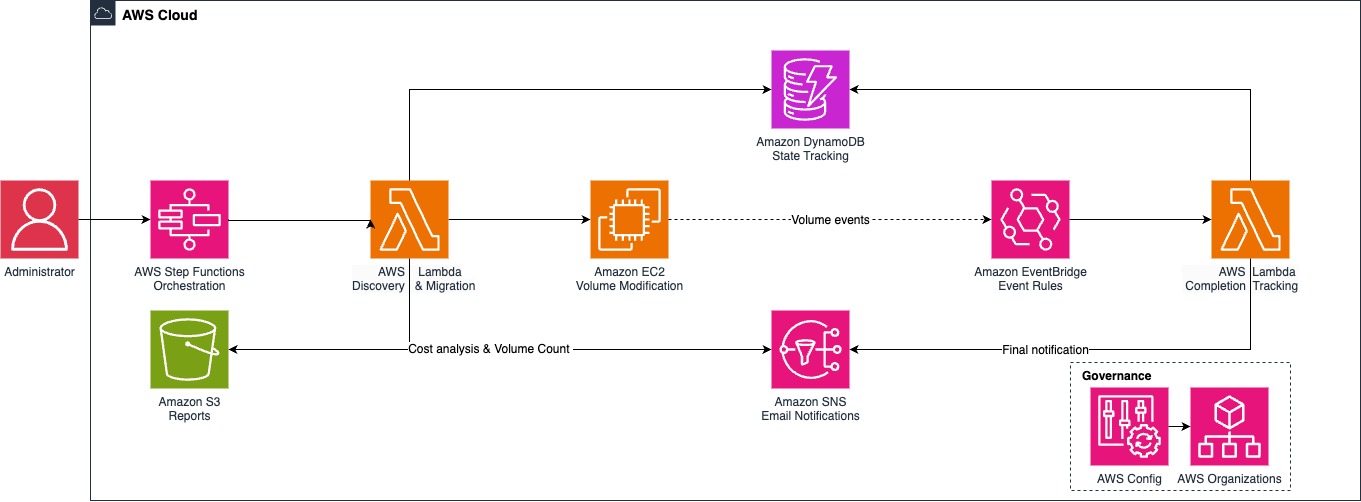
Figure 1. Solution architecture showing Step Functions orchestration, Lambda functions, and supporting services.
Benefits of serverless architecture
EBS volume migration is fundamentally an orchestration effort, not just a series of API calls. Migrations are asynchronous—the ModifyVolume API returns immediately, but actual volume optimization takes hours to complete. During this time, you need:
- State management – Track which volumes are being processed across Regions
- Parallel execution – Migrate hundreds of volumes concurrently without overwhelming APIs
- Retry logic – Handle throttling and transient failures automatically
- Progress tracking – Monitor completion status using EventBridge events
- Governance – Prevent gp2 recreation after migration
An AWS serverless architecture provides these capabilities through Step Functions for orchestration, Lambda for execution, and DynamoDB for state persistence—without managing any infrastructure.
This post shows you how to deploy the solution, run a dry-run analysis, execute migrations, and implement governance controls. The steps include:
- Deploy the solution using AWS CloudFormation.
- Run a dry-run to discover volumes and calculate savings.
- Execute the migration.
- Monitor progress and review reports.
- Implement governance controls.
The solution code is available on GitHub.
Prerequisites
For this walkthrough, you should have the following prerequisites:
- An AWS account with administrator permissions
- The AWS Command Line Interface (AWS CLI) v2 installed and configured
- Python 3.9 or later (for deployment script)
- Valid email addresses for SNS notifications
- Management account access (for governance and SCP deployment modes)
Deploy the solution
To deploy the complete solution, complete the following steps:
- Clone the GitHub repository and navigate to the cloudformation directory:
git clone https://github.com/aws-samples/sample-ebs-gp2-to-gp3-migration.git
cd sample-ebs-gp2-to-gp3-migration/cloudformation- Deploy with full mode (includes migration, governance, and SCP):
export NOTIFICATION_EMAIL="your-email@example.com" && export COMPLIANCE_EMAIL="your-compliance-email@example.com" && ./deploy-complete.sh fullThe deployment creates the necessary resources, including Lambda functions, Step Functions state machine, DynamoDB tables, S3 buckets, and SNS topics.
The solution offers the following deployment modes:
- migration – Migration workflow only (requires NOTIFICATION_EMAIL)
- config – Compliance monitoring only (requires COMPLIANCE_EMAIL)
- scp – Organization-wide prevention (requires management account)
- full – Complete solution (requires both email addresses)
After deployment, check your email and confirm both SNS subscriptions to receive notifications.
Run a dry-run analysis
To run a dry-run analysis, complete the following steps:
- Open the Step Functions console.
- Choose the state machine named EBS-Gp2-Gp3-Complete-Migration-Workflow.
- Choose Start execution.
- Enter one of the following input options:
- Scan all Regions:
{ "all_regions": true, "skip_root": true, "dry_run": true } - Scan specific Regions:
{ "regions": ["us-east-1", "us-west-2"], "skip_root": true, "dry_run": true } - Filter by tags:
{  "all_regions": true,
  "skip_root": true,
  "dry_run": true,
  "tag_filters": [{"key": "Environment", "value": "Production"}]
}
- Scan all Regions:
- Choose Start execution.
Alternatively, you can use the AWS CLI:
aws stepfunctions start-execution --state-machine-arn arn:aws:states:REGION:ACCOUNT:stateMachine:EBS-GP2-GP3-Complete-Migration-Workflow --input '{"all_regions":true,"skip_root":true,"dry_run":true}' --region us-east-2The solution by default is deployed in us-east-2 and therefore the Region in the preceding code is us-east-2.
The analysis completes the following actions:
- Discovers Gp2 volumes across specified Regions
- Calculates cost analysis and potential savings
- Generates CSV reports in S3:
volumesummary.csv, regionalsummary.csv, costanalysis.csv, servicequotas.csv - Sends email notification with cost analysis results
- No actual volume modifications are performed
The following code is a sample email notification:
Subject: EBS Gp2→Gp3 Cost Analysis Complete
Cost Analysis Results:
Volumes Analyzed: 640Current Gp2 Cost: $7783.6/monthProjected Gp3 Cost: $6700.88/monthMonthly Savings: $1082.72 (13.91%)Annual Savings: $12992.64Job ID: ad3ac73d-7dc1-42f9-9c73-53f6e169b64cAnalysis Time: 2026-01-27T02:57:12.013642+00:00
Detailed Reports:s3://ebs-logs-ACCOUNT-REGION/ebs-migration-reports/20260127/
This dry-run phase is critical—it validates your savings assumptions and identifies edge cases like volumes in cooldown periods.
Execute the migration
After reviewing the cost analysis, execute the migration. Complete the following steps:
- On the Step Functions console, choose the state machine.
- Choose Start execution.
- Enter one of the following input options:
- Migrate all Regions:
{ "all_regions": true, "skip_root": true, "dry_run": false } - Migrate specific Regions:
{ "regions": ["us-east-1", "us-west-2"], "skip_root": true, "dry_run": false } - Phased migration by tags:
{
"all_regions": true,
"skip_root": true,
"dry_run": false,
"tag_filters": [{"key": "Environment", "value": "Production"}]
}
- Choose Start execution.
You can also use the AWS CLI:
aws stepfunctions start-execution --state-machine-arn arn:aws:states:REGION:ACCOUNT:stateMachine:EBS-GP2-GP3-Complete-Migration-Workflow --input '{"all_regions":true,"skip_root":true,"dry_run":false}' --region REGIONMigrations are asynchronous and take hours to complete. The solution submits modify-volume API calls in batches and tracks completion using EventBridge events. The Step Functions workflow coordinates this process, updating DynamoDB tables with progress and sending notifications every 30 minutes for long-running migrations.
The solution maintains performance equivalence by matching gp2 baseline IOPS (minimum 3,000 for gp3) and throughput (maximum 250 MiBps). You can optimize these settings later based on actual workload requirements.
Monitor progress
To monitor the migration progress, complete the following steps:
- Track execution status on the Step Functions console or using the AWS CLI:
aws stepfunctions describe-execution --execution-arn EXECUTION-ARN --region REGION- View real-time logs in CloudWatch Logs:
aws logs tail /aws/lambda/ebs-migration-orchestrator --follow --region REGION- Download detailed reports from S3:
aws s3 sync s3://ebs-logs-ACCOUNT-REGION/ebs-migration-reports/ ./reports/You will receive the following email notifications:
- Cost Analysis Complete – After discovery and cost calculation completes
- Migration Progress – During actual migrations (every 30 minutes for long-running jobs)
- Migration Complete – Final summary when migration finishes with links to detailed CSV reports in S3
- Error Alerts – If any failures occur with error details
Email content includes the following information:
- Volume counts and Regions processed
- Cost savings calculations
- Links to detailed CSV reports in S3
- Error details if any failures occur
Implement governance controls
After migration, prevent gp2 volumes from being created again.
Deployment modes are exclusive, not additive. Using ./deploy-complete.sh config or ./deploy-complete.sh scp will remove migration components. To add governance without removing migration, use full mode.
To add governance controls (safe upgrade), run the deployment script with full mode:
export NOTIFICATION_EMAIL="your-email@example.com" && export COMPLIANCE_EMAIL="compliance@example.com" && ./deploy-complete.sh fullThis adds AWS Config rules to detect new gp2 volumes, EventBridge integration for real-time alerts, Lambda functions for compliance evaluation, and creates the SCP policy—all without removing existing migration components.
The SCP is created but not automatically attached for safety. To manually attach the SCP, complete the following steps:
- Open the AWS Organizations console.
- In the navigation pane, under Policies, choose Service control policies.
- Find the policy named PreventGp2VolumeCreation.
- Choose Attach and select target organizational units (not the root account).
Alternatively, you can use the AWS CLI:
aws organizations attach-policy --policy-id p-POLICY-ID --target-id ou-OU-IDTo test SCP enforcement (should fail in member accounts), use the following code:
aws ec2 create-volume --size 1 --volume-type gp2 --availability-zone us-east-1aYou should receive the following error:
User is not authorized to perform: ec2:CreateVolume with an explicit deny in a service control policy
SCP only works in member accounts, not the management account.
Validation
To verify migration success, check for remaining gp2 volumes:
aws ec2 describe-volumes --filters Name=volume-type,Values=gp2 --region REGIONYou should receive the following result:
[] (no gp2 volumes remaining)
Cost considerations
The serverless architecture minimizes operational expenses—estimated $5–20 per month depending on execution frequency, volume count, and Regions scanned. Main costs include Lambda executions, Step Functions transitions, and DynamoDB requests.
Actual savings depend on your volume configuration. For example, with 1,000 volumes × 100 GB = 100 TB, the costs are as follows:
- Gp2 cost: $10,000 per month
- Gp3 cost: $8,000 per month
- Monthly savings: $2,000
- Annual savings: $24,000
Additional IOPS/throughput charges reduce overall savings. Use a dry-run to calculate exact savings for your environment.
Cleaning up
To avoid incurring future charges, delete the resources:
- Delete the CloudFormation stack:
aws cloudformation delete-stack --stack-name ebs-migration-complete-solution --region us-east-2- Optionally, clean up S3 buckets if needed:
aws s3 rm s3://ebs-logs-ACCOUNT-REGION --recursive --region REGION

aws s3 rb s3://ebs-logs-ACCOUNT-REGION --region REGION
Conclusion
Automating EBS gp2 to gp3 migration with serverless architecture delivers immediate cost savings while establishing a foundation for ongoing cloud optimization. The solution handles thousands of volumes across multiple Regions with built-in retry logic, comprehensive logging, and governance controls that prevent gp2 recreation.
By using AWS services like Step Functions, Lambda, and DynamoDB, you transform EBS modernization from a one-time project into a sustainable, governed practice that continuously optimizes your cloud infrastructure.
To get started today, deploy the solution, run a dry-run analysis, and start saving up to 20% on your EBS storage costs.
For more information about EBS volume types and migration best practices, refer to Amazon EBS volume types and Modify an Amazon EBS volume using Elastic Volumes operations.
FAQ
1. Will migrating from gp2 to gp3 cause any downtime?
No. The AWS ModifyVolume API performs in-place conversions with zero downtime, so your workloads continue running uninterrupted during the migration.
2. How much can I save by migrating from gp2 to gp3?
You can save up to 20% on EBS storage costs. The solution includes a dry-run mode that calculates your exact projected savings before any volumes are modified.
3. Where can I find code to help me migrate volumes?
Solution code is available on GitHub.
4. Will my application performance change after migrating from gp2 to gp3?
No. The solution provisions gp3 baseline IOPS (minimum 3,000) and throughput (up to 250 MiBps) to match each volume’s existing gp2 performance, so workloads see equivalent behavior post-migration. You can scale gp3 IOPS or throughput up later without resizing the volume.
5. What happens if a single volume fails to migrate?
The Step Functions workflow has retry logic built into each migration step and continues processing the remaining volumes if one fails. Failures are tracked in DynamoDB and included in the completion notification, so you can review the cause and re-run only the affected volumes.
6. Can I migrate only certain volumes (for example, production only) instead of all gp2 volumes at once?
Yes. The workflow accepts a tag_filters input so you can scope the run to volumes matching specific tags, such as Environment=Production. You can also pass a list of regions to limit the scan, and use skip_root: true to exclude root volumes.
7. How do I prevent new gp2 volumes from being created after I finish migrating?
The solution includes a governance mode that deploys an AWS Config rule to flag any new gp2 volumes, and an optional Service Control Policy that blocks gp2 volume creation across an AWS Organization. You can deploy these alongside or after the migration workflow to keep your account on gp3 going forward.
8. How does this solution compare to AWS Compute Optimizer’s automated EBS optimization?
AWS Compute Optimizer offers a managed, continuously-optimizing approach that recommends and applies upgrades based on observed workload patterns. The solution in this blog gives you full customizability over a one-time fleet migration, for example, generating pre-migration cost reports, and enforcing governance rules to prevent new gp2 creation. The two approaches are complementary.