AWS Storage Blog
Introducing AWS Backup logically air-gapped vault support for Amazon RDS
If you run business-critical applications on Amazon Relational Database Service (Amazon RDS), your database backups are central to business continuity and disaster recovery. But having multiple backup copies doesn’t guarantee you can recover. If backups share the same security boundary as your production environment, a ransomware attack or account compromise can put them at risk along with your data.
AWS Backup now extends logically air-gapped vault support to Amazon RDS DB instances. The vault stores your RDS recovery points, along with the AWS owned key if the vault uses one, in an AWS Backup service-owned account. It’s automatically locked in compliance mode, so recovery points can’t be altered or deleted before their retention period ends. For details, see AWS Backup logically air-gapped vault.
In this post, we walk through how to protect, validate, and recover RDS backups with logically air-gapped vaults, along with the design, encryption, and cost considerations for your recovery strategy.
Building a foundation for reliable recovery
Reliable recovery starts with a foundation: backups that meet a recovery point objective (RPO) your business has approved, cover every resource your applications depend on, and are retained for as long as your business and regulators require. Without that foundation, even well-protected backups might miss the data you need or not go back far enough.
On that foundation rest three pillars, each addressed by an AWS Backup capability. Immutability and isolation, provided by logically air-gapped vaults, keep backups tamper-proof and separate from your production environment. Integrity, validated through AWS Backup restore testing, confirms that your backups are trustworthy and ready to restore. Availability, provided by Multi-party approval with AWS Resource Access Manager (AWS RAM), gives you controlled access to the vault through a path independent of your primary identities. This helps you meet your recovery time objective (RTO) even when the account that owns the backups can no longer be trusted.
Immutability and isolation: Protecting Amazon RDS backups with logically air-gapped vaults
Since the launch of primary backups to logically air-gapped vaults, you can choose a logically air-gapped vault as a primary backup target. Currently, Amazon RDS backups can be copied only to a logically air-gapped vault in the same AWS account and AWS Region as your RDS DB instance.
For Amazon RDS, which does not support full AWS Backup management, AWS Backup uses a dedicated workflow to copy recovery points to logically air-gapped vaults. When you choose a logically air-gapped vault as your primary backup target, AWS Backup first creates a temporary snapshot in a standard backup vault. It then copies the snapshot to the logically air-gapped vault. The temporary snapshot carries a DELETE_AFTER_COPY lifecycle setting, so AWS Backup deletes it automatically after the copy completes. If the copy fails, the temporary recovery point is retained in your backup vault according to the retention period you specified. You still have a usable backup, but it isn’t air-gapped. We explore how different backup copies fit into a comprehensive RDS data protection strategy in the following sections.
Continuous backups for point-in-time recovery (PITR) stay in your standard backup vault, because a copy of a continuous backup becomes a snapshot without PITR. Only snapshots reach the logically air-gapped vault, which means your RPO for the vault depends on how often you take snapshots. If your recovery strategy needs PITR, use the two vaults together: the standard vault for continuous backups and the logically air-gapped vault for isolated, immutable snapshots.
You can also configure an AWS Backup plan that backs up to a standard vault and then uses a copy action to copy the recovery point to a logically air-gapped vault, so you keep recovery points in both vaults.
If you already copy RDS backups to a separate backup account, the following table shows what changes when you use a logically air-gapped vault.
| Consideration | Cross-account copy to a standard vault | Logically air-gapped vault |
| Vault Lock | Vault Lock is optional. Customer configures it | Compliance-mode Vault Lock is always applied |
| Where backups are stored | Customer-owned backup account | AWS Backup service-owned account |
| Encryption | Customer managed key, shared across accounts | AWS owned key by default, or a customer managed key |
| Getting backups to the Recovery account within the same AWS Organization | Copy the snapshot into the Recovery account, then restore | Share the vault through AWS RAM and restore directly |
| Effect of database size on recovery time | A large snapshot takes longer to copy before restoring can start | No copy step before restoring |
| Sharing outside the Organization | Not supported with AWS Backup cross-account copy | Supported through AWS RAM and Multi-party approval |
| Access if the owning account is lost | Depends on recovering that account | Multi-party approval provides an independent access path |
Integrity: Validating Amazon RDS backups with restore testing
An immutable backup is only valuable if you can trust it to restore. AWS Backup restore testing validates your recovery points on a regular schedule, well before an incident forces the question. Share the logically air-gapped vault through AWS RAM with a Forensic account, an isolated account dedicated to restore testing and analysis. You can then run restore testing plans directly against the recovery points in the vault. These are the same recovery points you would restore from during a real incident. Restore testing selects a recovery point, restores it into the Forensic account, and cleans up the restored resources when the test completes. We recommend restoring into a dedicated test virtual private cloud (VPC) and subnet group, which you can define in the restore testing metadata.
A successful restore is only the first check. When a restore job completes, Amazon EventBridge can trigger an AWS Lambda function that runs your own validation logic, such as checking row counts, schema consistency, or application-specific queries. The function then reports the outcome to the restore job through the PutRestoreValidationResult API operation. The restored database also gives application teams a realistic environment for integration testing against real data, without touching production. You can send results to AWS Security Hub for alerting, and AWS Backup Audit Manager provides evidence of recovery readiness for compliance.
For setup guidance and sample code, see Validate recovery readiness with AWS Backup restore testing and Implementing restore testing for recovery validation using AWS Backup.
Availability: Accessing Amazon RDS backups through an independent access path
Backups that are immutable and validated still must be accessible during an incident. For everyday recovery, such as after accidental deletion or data corruption, and for testing, you share the logically air-gapped vault through AWS RAM with a Recovery account, a dedicated account for restores. Authorized users in that account restore Amazon RDS databases directly from the vault, without first copying the backups into their own account, so recovery of large databases can begin immediately.
In a more severe incident, the account that owns the vault, or your entire Organization, might be compromised or inaccessible, and the logically air-gapped vault might be the only clean copy you have left. Multi-party approval gives you an independent path to it. The Recovery account requests access, and a team of designated approvers authorizes the request in the approval portal, using identities from AWS IAM Identity Center. After the request is approved, the Recovery account can restore from the vault. Because no single person can grant that access alone, access to your backups stays controlled even when you can no longer trust your primary environment.
Multi-party approval supports two recovery scenarios: the account that owns the vault is compromised, or the entire Organization is compromised. To cover both, we recommend keeping the approval team and the Recovery account in a separate recovery Organization with its own IAM Identity Center instance. Recovery then doesn’t depend on any identity in the compromised account or Organization.
Recovery scenarios for Amazon RDS
Different incidents call for different recovery strategies, so how many backup copies you need depends on the threats you need to mitigate. Start with a threat modeling exercise that identifies the incidents your RDS databases must survive, and the recovery objectives for each, then match a backup copy to each threat. The following sections describe copies for the threats common to most production databases.
Figure 1 shows how these copies fit into a multi-account architecture, with a Workload account for production resources, a Recovery account for restoring backups during an incident, and a Forensic account for scheduled restore testing and analysis. For details on each account’s role, see Building cyber resiliency with AWS Backup logically air-gapped vault.
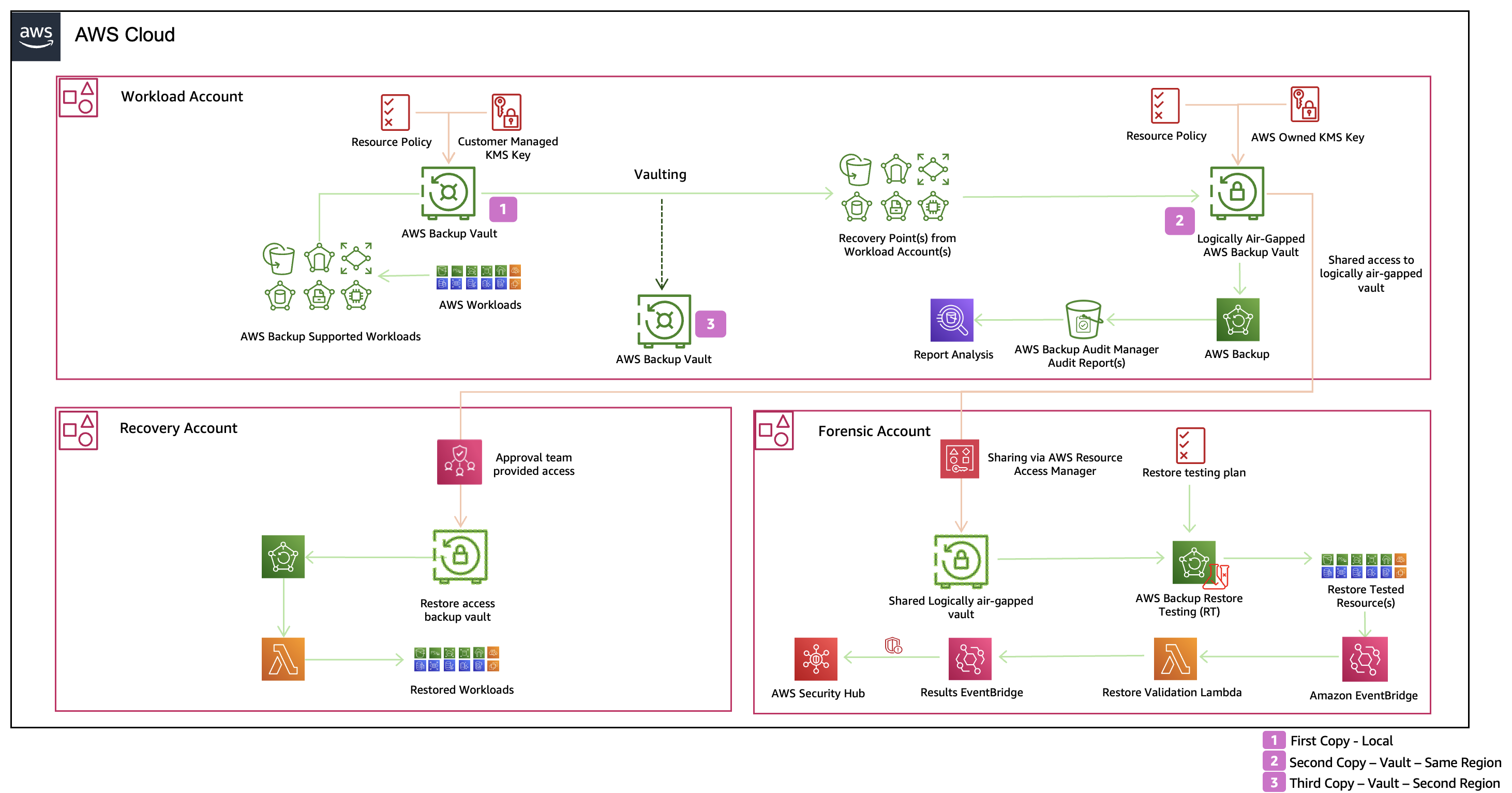
Figure 1: Multi-account architecture for protecting Amazon RDS backups with a logically air-gapped vault
Copy 1: Local backup vault for operational recovery
The first copy stays in a standard backup vault in your Workload account, encrypted with the source instance’s customer managed key. It supports continuous backup with PITR, so you can restore your database to a specific second within your retention window. Because it sits alongside your production workload, it’s the fastest way to recover from accidental deletion or data corruption.
Copy 2: Logically air-gapped vault for cyber recovery
The second copy is stored in a logically air-gapped vault in the same Region. It’s your main line of defense against ransomware, insider threats, and account compromise. Because its backups are stored in a service-owned account and are immutable, this copy stays recoverable even when your primary environment can’t be trusted. Keeping it in the same Region also speeds up recovery, because a cyber incident usually affects your account, not the Region.
Copy 3: Second-Region copy for regional recovery
The third copy protects against a Region-wide disruption, such as a natural disaster or a large-scale infrastructure failure. A cross-Region copy action sends recovery points to a standard backup vault in another Region. You can then restore your database in the secondary Region if the primary Region becomes unavailable. This provides geographic redundancy and helps maintain business continuity during regional disruptions.
Choosing the right approach
With your threat model in hand, decide which of these copies each database needs. Not every database needs all three. A database with a snapshot-based RPO and no PITR requirement might rely on the logically air-gapped vault alone. A business-critical database with strict RPO and regulatory requirements might use all three. Weigh each copy against the cost of the incident it protects you from, and revisit the decision as your threats, recovery objectives, and regulatory requirements change.
Encryption considerations
Encryption is an important consideration when protecting Amazon RDS backups with logically air-gapped vaults. Because AWS Backup doesn’t fully manage Amazon RDS, RDS backups keep the encryption key of the source database. Backups of instances encrypted with the AWS managed key (aws/rds) can’t be copied to a logically air-gapped vault. They must use a customer managed key or be unencrypted. For background, see How encryption works in AWS Backup.
Because you can’t modify the AWS Key Management Service (AWS KMS) key of an existing RDS DB instance directly, the lasting fix is to move the instance to a customer managed key. You can do this by copying a snapshot using the new key and restoring an RDS instance from it, or by using a blue/green deployment. For the options and their downtime trade-offs, see Options for changing AWS KMS encryption key for Amazon RDS databases.
When a logically air-gapped vault is the primary backup target and the source instance uses the aws/rds key, AWS Backup writes the backup to the standard vault only. The backup job still completes successfully, with a message explaining that the backup wasn’t sent to the logically air-gapped vault. For details, see Unsupported resources.
Cost considerations
Storage in a logically air-gapped vault is priced separately from storage in a standard backup vault, at a higher rate. How much you pay overall depends on how you send RDS backups to the vault.
When you choose a logically air-gapped vault as the primary backup target, you pay for both the temporary recovery point that AWS Backup creates in the standard vault, and the recovery point kept in the logically air-gapped vault. Because the temporary recovery point is deleted after the copy completes, you keep only one long-term copy of each backup, which can cost less than retaining full copies in both vaults.
Temporary snapshots might be subject to a minimum billing duration, so less frequent backups, such as daily, usually give greater savings because the temporary recovery point takes up storage for a smaller share of the billing period. If you use a copy action instead, you pay for the recovery points in both vaults for their full retention periods.
Weigh the added storage cost against what it gives you: an isolated, immutable copy of your RDS backups that stays recoverable when your production account can’t be trusted, and a direct restore through AWS RAM without waiting for a cross-account copy. For many business-critical databases, the cost of an unrecoverable database or extended downtime can far outweigh the added storage cost.
For details, see Cost considerations in the AWS Backup documentation and AWS Backup pricing.
Conclusion
In this post, we explored how logically air-gapped vault support for Amazon RDS helps you recover the databases behind your business-critical applications after a cyber event. Reliable recovery rests on a foundation of backups that meet your approved RPO, cover every resource you depend on, and are retained as long as your business and regulators require. On that foundation, logically air-gapped vaults keep your RDS backups isolated and immutable, restore testing confirms you can trust them, and AWS RAM with Multi-party approval keeps them within reach. This protection holds even when your primary account or Organization can no longer be trusted. Together, these three pillars take you from protecting your database backups to recovering them with confidence.
To get started, see Logically air-gapped vault support for Amazon RDS in the AWS Backup documentation. Then revisit your cyber resiliency strategy to see how this capability fits into the way you protect and recover your databases today.