AWS Storage Blog
Orchestrate automated response for Amazon GuardDuty Malware Protection for AWS Backup at scale
Many organizations maintain a backup strategy built on the assumption that the backups themselves are clean. Ransomware can sit dormant in your environment for weeks, spreading across production systems while nightly backup jobs preserve it alongside your data. By the time the threat is identified, those backups are no longer recovery points; they are artifacts of the compromise. Restoring one does not recover your environment; it re-establishes the attacker’s foothold and reverses every containment and remediation step. At scale, with distributed security teams and shrinking detection-to-restore windows, identifying clean recovery points manually is impractical, and without centralized visibility and automated enforcement, a single restore can reintroduce the threat before anyone realizes it has spread. Effective recovery must be both fast and clean.
Amazon GuardDuty Malware Protection for AWS Backup addresses this gap by scanning recovery points for malware as part of the backup lifecycle. In our previous post, we covered initial configuration to enable that detection capability. Detection alone, however, does not stop a restore job from running against an infected recovery point. In a clean, well-documented incident with time to think, that gap is manageable. In a real one, with high pressure, a compressed timeline, and teams still scoping impact, it is not. Detection without a hard stop is merely a better-labeled log entry. Rather than more training or better runbooks, the fix is to remove the manual step entirely by coupling detection to prevention, so a compromised recovery point cannot be restored. This post shows how to implement that pattern, with automated malware detection and response at scale.
In this post, we walk through building a quarantine solution to automatically tag infected recovery points, enforce organization-level restore denial, optionally copy compromised backups to a dedicated forensics account for investigation, and notify security operations teams in real time. At the end of this post, you will have a scalable, event-driven solution that prevents infected backups from reaching production and gives your security teams visibility into compromised recovery points and enforced control over restore operations, so they can act on findings without delay.
Solution overview
The solution uses an event-driven approach and features of AWS Organizations. GuardDuty and AWS Security Hub findings are aggregated in a delegated administrator account, providing centralized visibility across all member accounts. In each workload account, AWS Backup has backup plans covering Amazon Elastic Compute Cloud (Amazon EC2), Amazon Elastic Block Store (Amazon EBS), and Amazon Simple Storage Service (Amazon S3) resources.
When GuardDuty Malware Protection completes a scan and detects threats, an Amazon EventBridge rule matches the THREATS_FOUND event and invokes an AWS Lambda function. That function tags the infected recovery point with a ScanStatus: INFECTED marker, and that tag is what closes the enforcement gap. A service control policy (SCP) at the organizations level denies backup:StartRestoreJob on recovery points carrying that tag. A second SCP condition denies tag removal, so the marker cannot be stripped from the infected recovery points to bypass the block.
This solution blocks restoration before operators can act on the finding. The function also publishes an alert through Amazon Simple Notification Service (Amazon SNS) to notify the security operations team, and you can optionally copy the infected recovery point to a dedicated forensics account where security teams can safely isolate and analyze the compromised files without risk to production environments.
The following diagram illustrates the solution architecture.
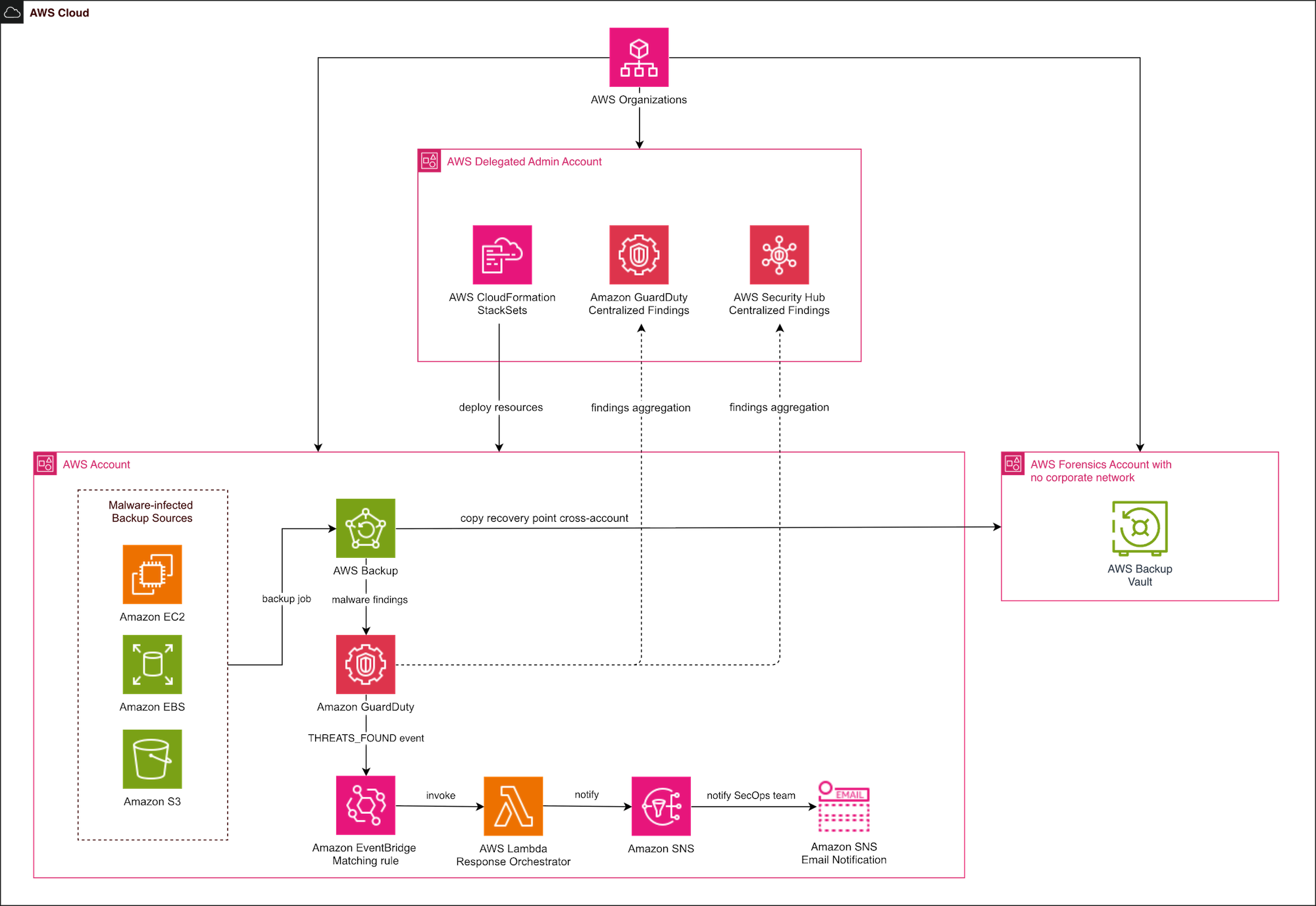
Figure 1: Architectural diagram of the solution
In a multi-account AWS organization, backup scanning happens locally in each member account — the location where backup vaults and recovery points reside. Our architecture uses a delegated administrator account running GuardDuty with Security Hub aggregation to create a single pane of glass across accounts and AWS Regions.
This pattern gives security teams visibility without requiring them to log into individual accounts. It also enables organization-wide analytics: tracking scan results over time, identifying accounts with higher infection rates, and correlating malware findings with other GuardDuty detections.
For enterprises managing hundreds of accounts, we recommend a phased rollout. In the following sections, we walk through the high-level steps for each phase.
Prerequisites
Before implementing a phased rollout, complete the following setup in your management account and have the required IAM permissions in place:
- Enable AWS Organizations AWS Backup, Amazon GuardDuty, AWS Security Hub, and AWS CloudFormation StackSets services in the management account
- Enable AWS Organizations SCPs and Backup policies in the management account
- Ensure IAM roles are present in each AWS member account for AWS Backup scan jobs and Lambda function
- Have AWS console access with permissions to AWS Backup, AWS Lambda, Amazon S3, Amazon EBS, Amazon GuardDuty, Amazon EventBridge, and Amazon SNS
Phase 1: Foundation
The first phase established the foundation of the solution for the AWS Organization by ensuring all required AWS resources are present in each member account.
- Deploy AWS Identity and Access Management (IAM) roles to all member accounts via AWS CloudFormation StackSets.
- Enable GuardDuty Malware Protection in the delegated administrator or security audit account.
- Configure Security Hub aggregation.
- Create organizational-level AWS Backup policy, as shown in the following screenshot. See Backup plan with Amazon GuardDuty Malware Protection scanning for a sample policy.
This phase has zero impact on existing backup workflows and establishes the security infrastructure.
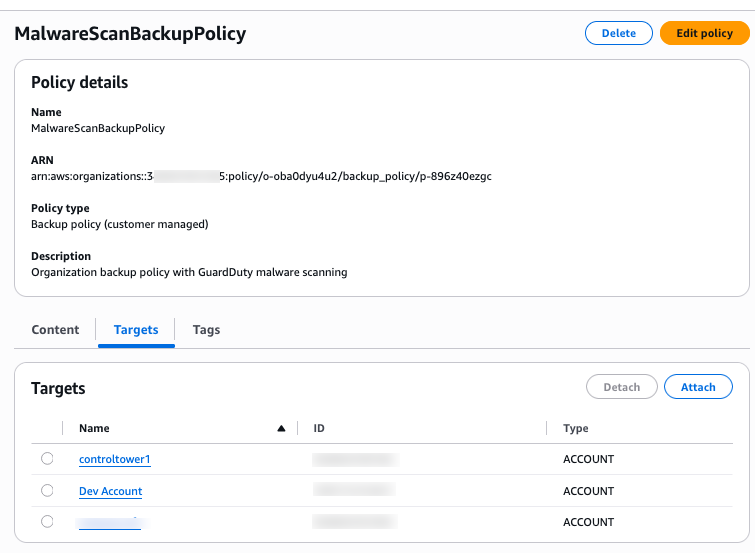
Figure 2: Organizational backup policy with Amazon GuardDuty malware scanning
- In AWS Organizations, create a new SCP to deny restore and removal of tags from the infected recovery points. We used the following SCP policy:
- Next, apply the SCP to the applicable organizational unit (OU) or at the root level.
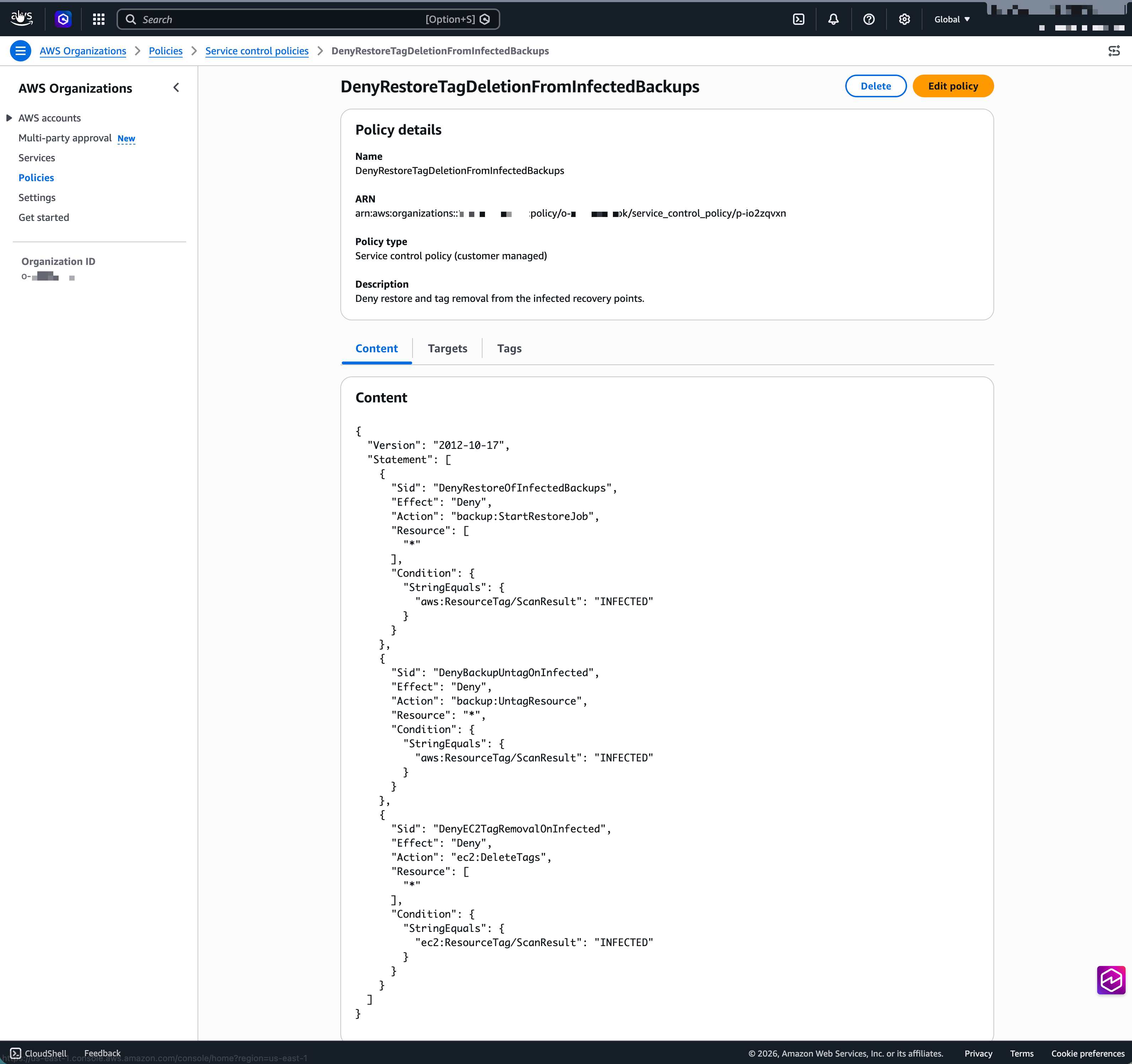
Figure 3: AWS Organizations SCP for denying restore and tag deletion from infected backups
Phase 2: Pilot
In the second phase, you pilot the solution in a small set of accounts covering your Tier 0 workloads.
- Enable malware scanning on the relevant backup plans, as shown in the following screenshot.
- Validate the end-to-end scanning pipeline: backup creation, scan initiation, finding generation, and automated tagging of infected recovery points with an EventBridge invoked Lambda function.
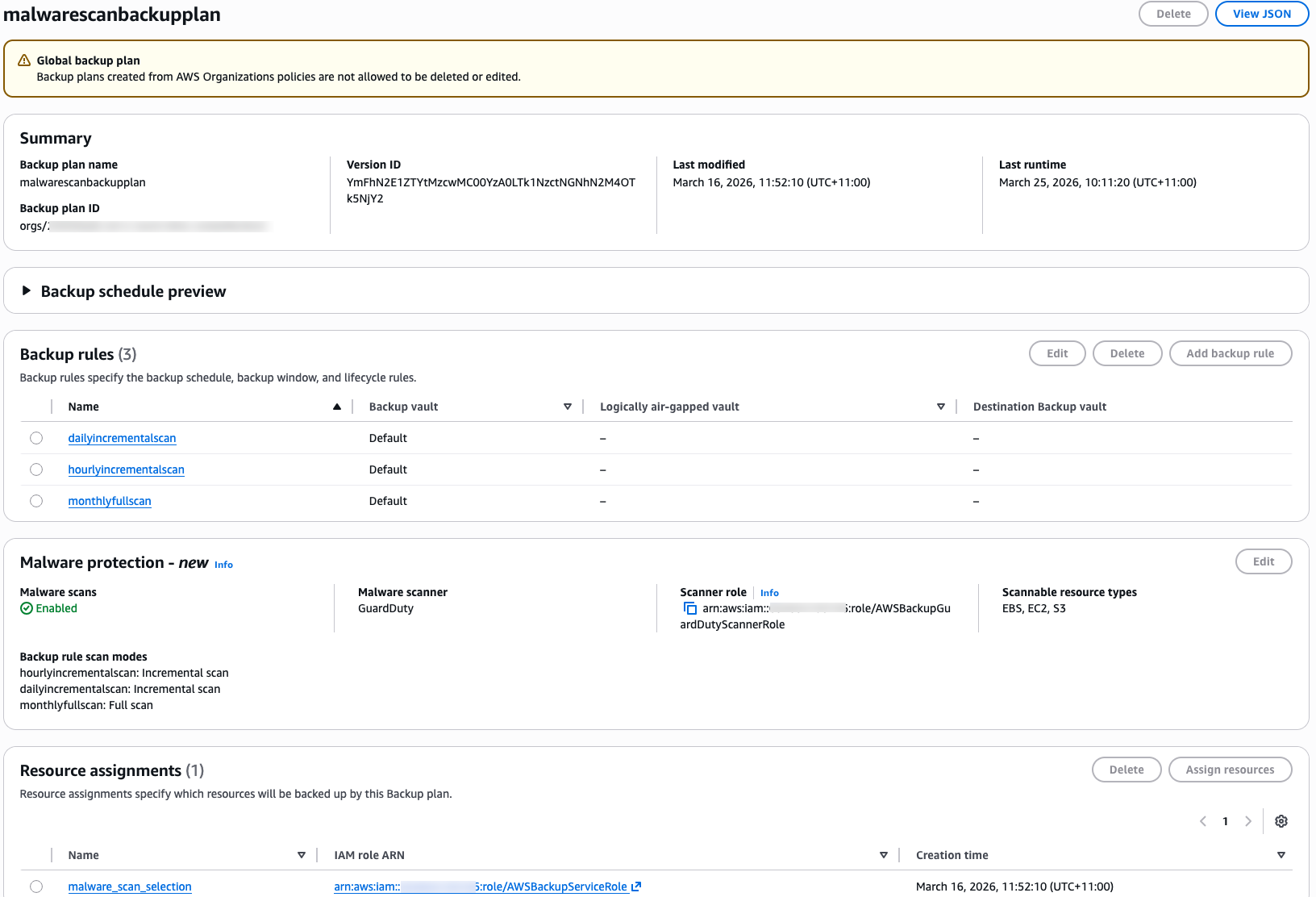
Figure 4: Enabling malware protection in the member account
Use test resources (tagged EC2 instances, EBS volumes, S3 buckets) to simulate malware detection and confirm the quarantine workflow.
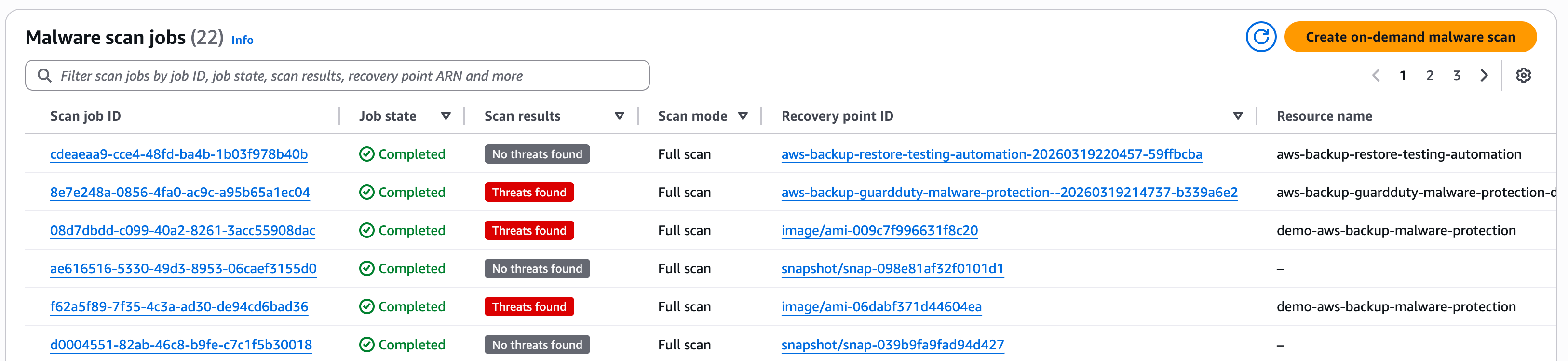
Figure 5: AWS Backup Malware Protection malware scan jobs
Next, set up an automated quarantine workflow and test the end-to-end malware detection, quarantine, and notification system before rolling out the solution to other member accounts. Create an EventBridge rule with a matching THREATS_FOUND event pattern from the scan job.
{
  "source": ["aws.backup"],
  "detail-type": ["Scan Job State Change"],
  "detail": {
    "scanResult": {
      "scanResultStatus": ["THREATS_FOUND"]
    },
    "state": ["COMPLETED"]
  }
} 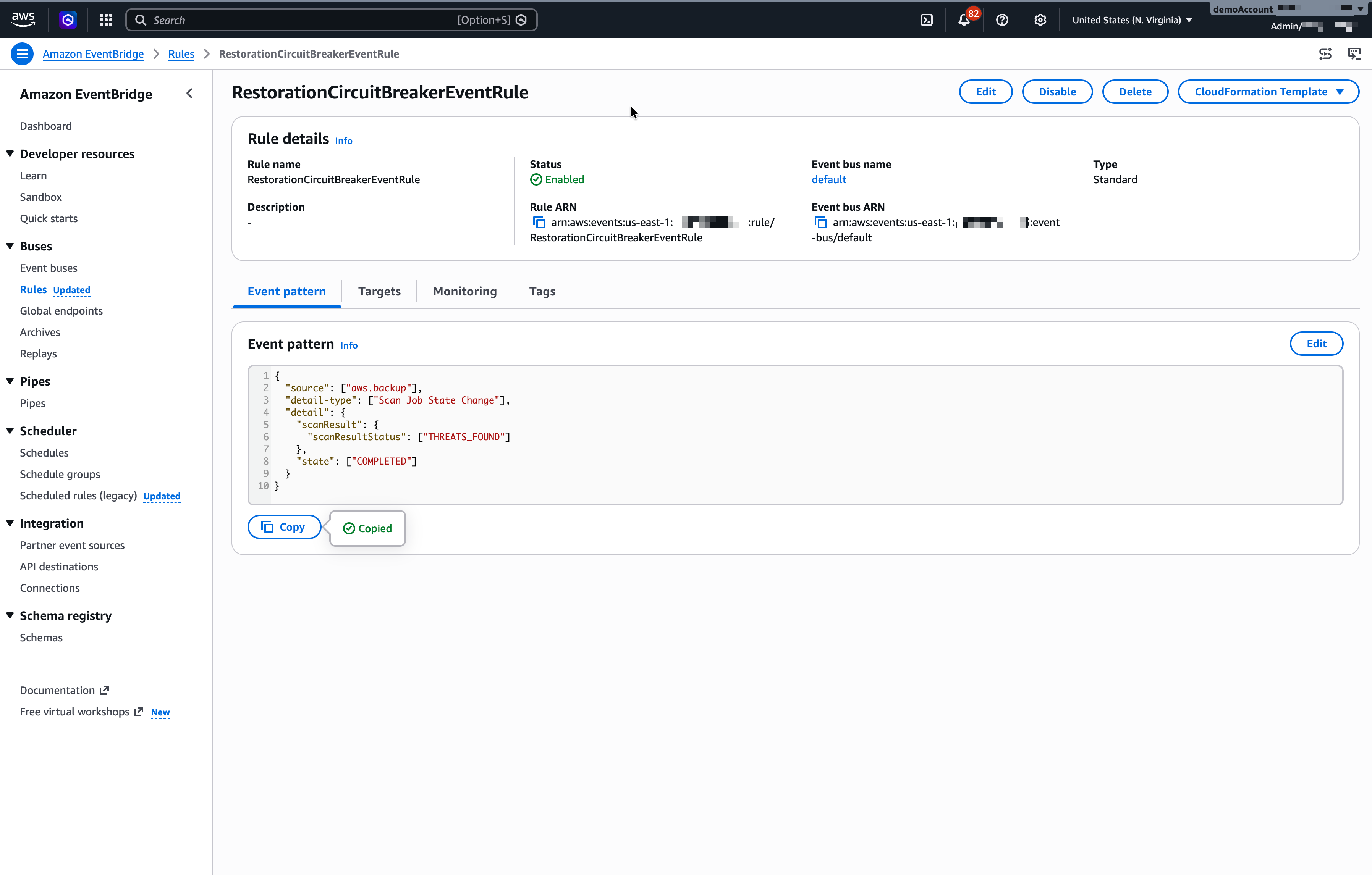
Figure 6: Amazon EventBridge event rule to match malware infection event
Create a Lambda function in the account with the right IAM role. Add an EventBridge event rule to invoke the Lambda function.
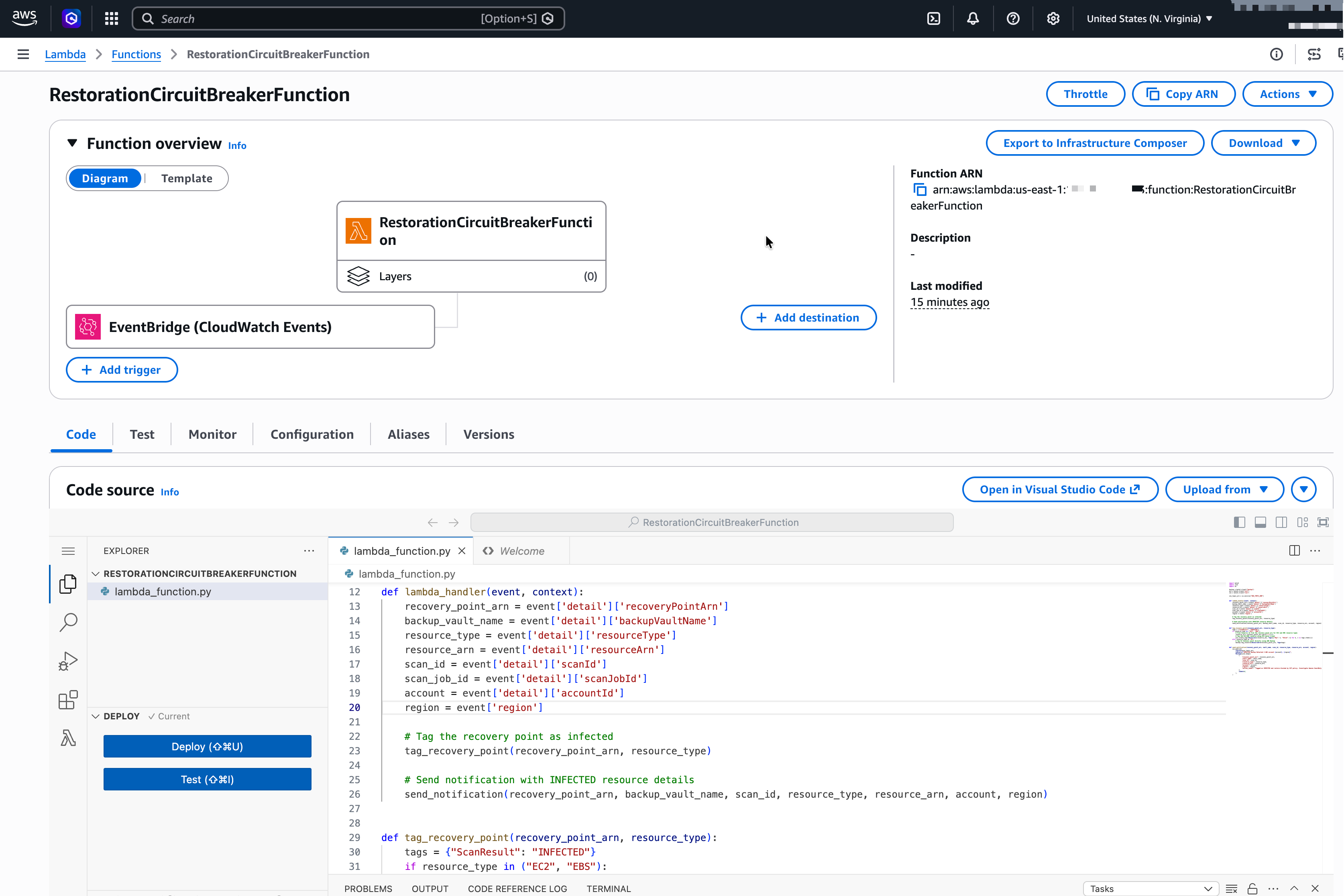
Figure 7: Lambda function to automate tagging and notify about the infected backups
The following is a sample Lambda function code for automated quarantine workflow and notification:
import boto3
import json
import os

backup = boto3.client("backup")
ec2 = boto3.client("ec2")
sns = boto3.client("sns")

sns_topic_arn = os.environ["SNS_TOPIC_ARN"]


def lambda_handler(event, context):
    recovery_point_arn = event['detail']['recoveryPointArn']
    backup_vault_name = event['detail']['backupVaultName']
    resource_type = event['detail']['resourceType']
    resource_arn = event['detail']['resourceArn']
    scan_id = event['detail']['scanId']
    scan_job_id = event['detail']['scanJobId']
    account = event ['detail']['accountId']
    region = event['region']

    # Tag the recovery point as infected
    tag_recovery_point(recovery_point_arn, resource_type)

    # Send notification with INFECTED resource details
    send_notification(recovery_point_arn, backup_vault_name, scan_id, resource_type, resource_arn, account, region)


def tag_recovery_point(recovery_point_arn, resource_type):
    tags = {"ScanResult": "INFECTED"}
    if resource_type in ("EC2", "EBS"):
        # Find resource id from the recovery point arn for EC2 and EBS resource types
        resource_id = recovery_point_arn.split("/")[-1]
        # Tag the EC2/EBS resource using EC2 boto3 client
        ec2.create_tags(Resources=[resource_id], Tags=[{"Key": k, "Value": v} for k, v in tags.items()])
    elif resource_type == "S3":
        # Tag S3 recovery point directly using AWS Backup
       backup.tag_resource(ResourceArn=recovery_point_arn, Tags=tags)


def send_notification(recovery_point_arn, vault_name, scan_id, resource_type, resource_arn, account, region):
    sns.publish(
        TopicArn=sns_topic_arn,
        Subject=f"INFECTED Backup Detected — AWS account {account}, {region}",
        Message=json.dumps(
            {
                "recovery_point_arn": recovery_point_arn,
                "vault_name": vault_name,
                "scan_id": scan_id,
                "resource_type": resource_type,
                "resource_arn": resource_arn,
                "account": account,
                "region": region,
                "action_taken": "Tagged as INFECTED and restore blocked by SCP policy. Investigate Amazon GuardDuty findings for more details.",
            },
            indent=2,
        ),
    )
The Lambda function will tag the infected recovery point with ScanStatus: INFECTED tags.
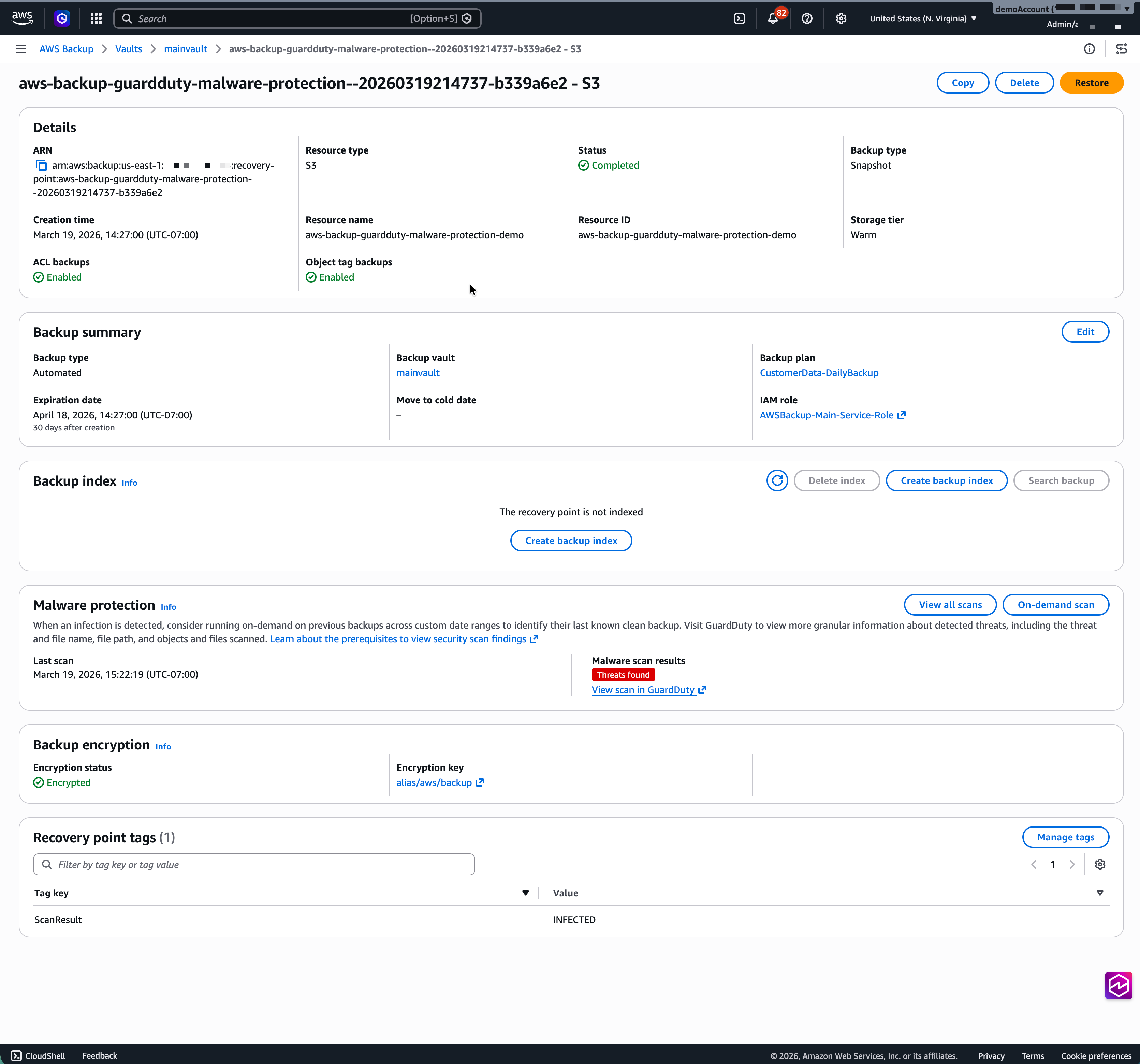
Figure 8: Infected backups are tagged with ScanResult: INFECTED tags
Last step in this phase is to subscribe to an existing or new SNS topic to get notified about threat discovery. Provide the SNS topic Amazon Resource Name (ARN) to the Lambda function to get alerted after scan jobs show a malware infection.
Phase 3: Scale
In this phase, you will scale out the solution to the remaining accounts in your organization.
- Roll out backup plan updates across all member accounts using CloudFormation StackSets or organizational-level backup policies.
- Deploy the automated quarantine solution to member accounts using CloudFormation StackSets.
- Start with Tier 0 business-critical and Tier 1 production workloads, then extend to Tier 2 important workloads.
- Monitor scan costs and adjust frequencies based on actual change rates.
- Verify that Security Hub in the delegated admin or security audit account centralizes findings from all member accounts.
In this blog post, we use EICAR test files to simulate a malware infection.
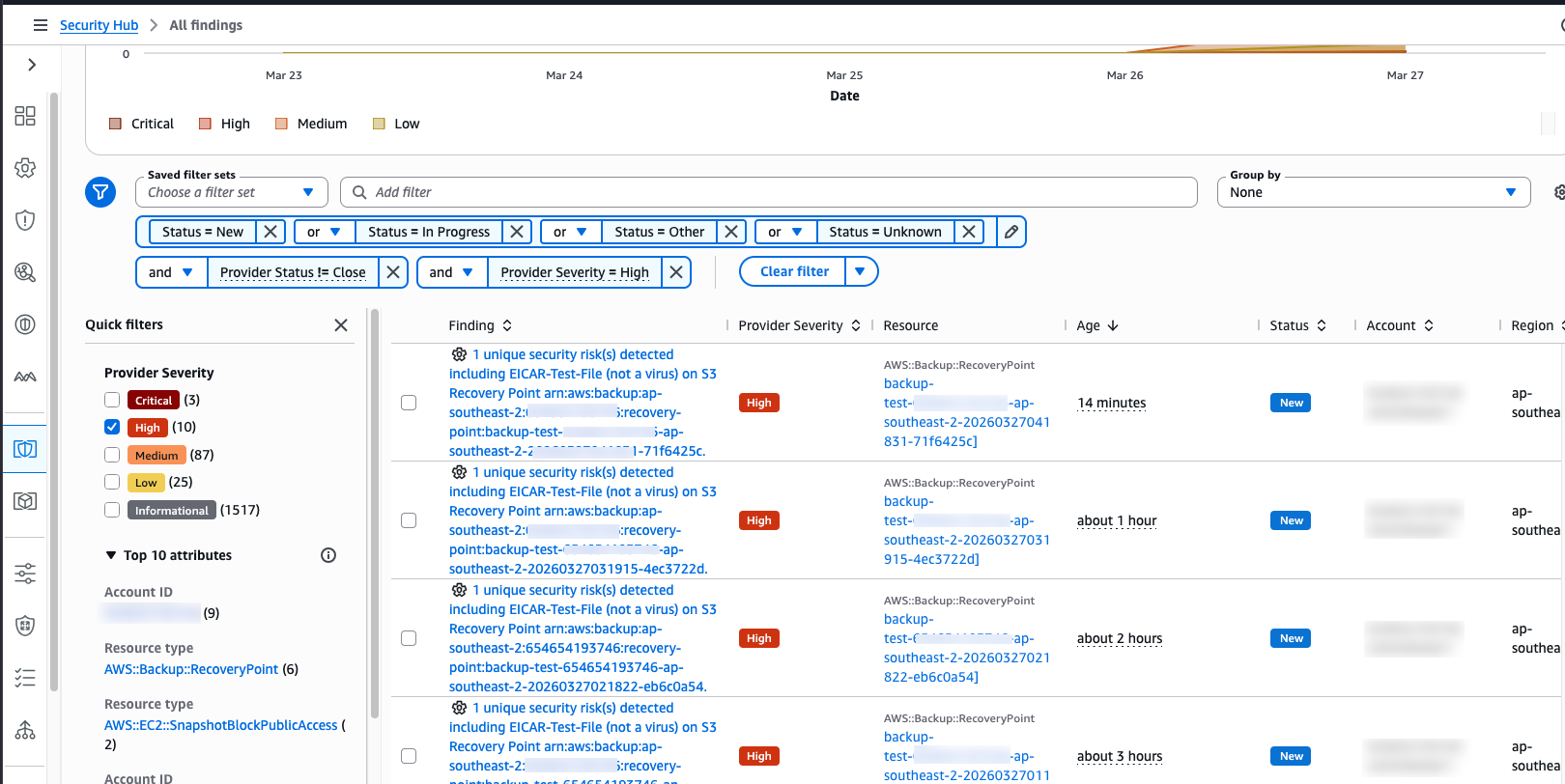
Figure 9: AWS Security Hub centralized malware scan findings
Phase 4: Mature
Once the solution is in place, you can refine your operational processes with the following best practices:
- Integrate scan results into your security posture dashboards.
- Add “find the last clean backup” as a standard step in your incident response runbooks.
- Copy infected recovery points to an isolated forensics account for further security investigation.
- Replicate clean recovery points across AWS Regions to support disaster recovery.
Scaling scan strategy by workload tier
Scanning every backup at full frequency provides maximum confidence, but full scans across high backup volumes can drive scan costs higher than necessary. A more efficient approach is to tier your scanning by matching scan frequency to workload criticality. This preserves strong security coverage while keeping scan cost proportional to the risk associated with each workload.
At the highest criticality level – Tier 0 production systems such as databases, financial platforms, core infrastructure, and internal business applications — the tolerance for an infected restore is zero. Configure these workloads with an incremental scan after every backup and a monthly full scan. AWS Backup captures incremental changes for many resource types. GuardDuty has the ability to scan only the new or changed blocks or objects when a backup is created or updated, improving performance and reducing scanning overhead while achieving full coverage over time. The monthly comprehensive scan acts as a safety net, catching dormant malware that earlier signature-based detection may have missed.
To enable this configuration, turn on malware scanning in your AWS Backup plans and use tag-based resource assignment to bind workloads to the appropriate plan. For example, a tag such as BackupTier: 0 can map a resource to the Tier 0 backup plan, ensuring that any new resource carrying that tag is automatically included in the scan strategy without manual updates to the plan itself.
Clean up
To avoid ongoing charges from resources deployed in this walkthrough, clean up the resources you created:
- Delete the EventBridge rule.
- Delete the Lambda function.
- Delete the SNS topic, if applicable.
- Disable GuardDuty Malware Protection if you enabled it specifically for this walkthrough.
Conclusion
Backup malware protection is an ongoing operational discipline requiring automation, centralized visibility, cost governance, and integrated incident response working together at organizational speed. The solution presented in this post consolidates those elements into a single enforcement boundary that uses tagging combined with an organization-level SCP to close the gap between detection and prevention.
The result is a control that operates structurally rather than procedurally. The moment GuardDuty Malware Protection identifies a compromised recovery point, the Lambda function applies the quarantine tag, the SCP denies any subsequent restore attempt across every member account, and Amazon SNS routes the finding to security operations.
During an active incident, with response teams operating under pressure and working with incomplete information, this automated enforcement prevents an infected backup from being restored before anyone realizes what has happened. Across hundreds of accounts and distributed security teams, that consistency is what separates a control that works in documentation from the one that holds during an actual incident.
Try out the solution for your own use case, and share your feedback and questions in the comments.