亚马逊AWS官方博客
基于 Serverless 构建 Kiro 企业用量费用分摊与自动化报告方案
摘要:利用 AWS Serverless架构实现 Kiro 费用的自动化采集、用户级分摊、CSV 报告生成,并通过飞书 Webhook 推送可视化摘要卡片。
目录
一、概述
随着越来越多企业团队采用 Kiro 作为 AI 辅助开发工具,IT 管理者面临一个现实问题:如何将 Kiro 的使用费用精准分摊到每位开发者或业务部门?
本文介绍一套完整的 Serverless 解决方案,利用 AWS Cost and Usage Report (CUR) 2.0、Amazon Athena、AWS Lambda 和 Amazon EventBridge,实现 Kiro 费用的自动化采集、用户级分摊、CSV 报告生成,并通过飞书 Webhook 推送可视化摘要卡片。整套方案无需管理服务器,按需付费,总运营成本极低。
二、方案架构
核心组件
| 组件 | 用途 |
| AWS CUR 2.0 | 提供用户级、小时粒度的计费原始数据(Parquet 格式) |
| Amazon Athena | 无服务器 SQL 引擎,直接查询 S3 中的 CUR 数据 |
| AWS Lambda | 编排查询、生成 CSV、上传 S3、推送通知 |
| Amazon EventBridge | 定时触发报告生成(如每月 5 日) |
| Amazon S3 | 存储 CUR 原始数据和生成的费用报告 |
| 飞书 Webhook | 推送交互式费用摘要卡片到团队群 |
三、前提条件
- 启用 CUR 2.0 数据导出(详见下方)
- 激活 Cost Allocation Tag(详见下方,⚠️ 必须在有数据之前完成)
- 确认 Kiro 订阅:团队已通过 AWS IAM Identity Center 管理 Kiro Enterprise 订阅,用户已配置
costCenter标签用于费用归属。 - 等待首次数据生成:CUR 2.0 通常在启用后 24 小时内生成首批数据。
3.1 启用 CUR 2.0 数据导出(详细步骤)
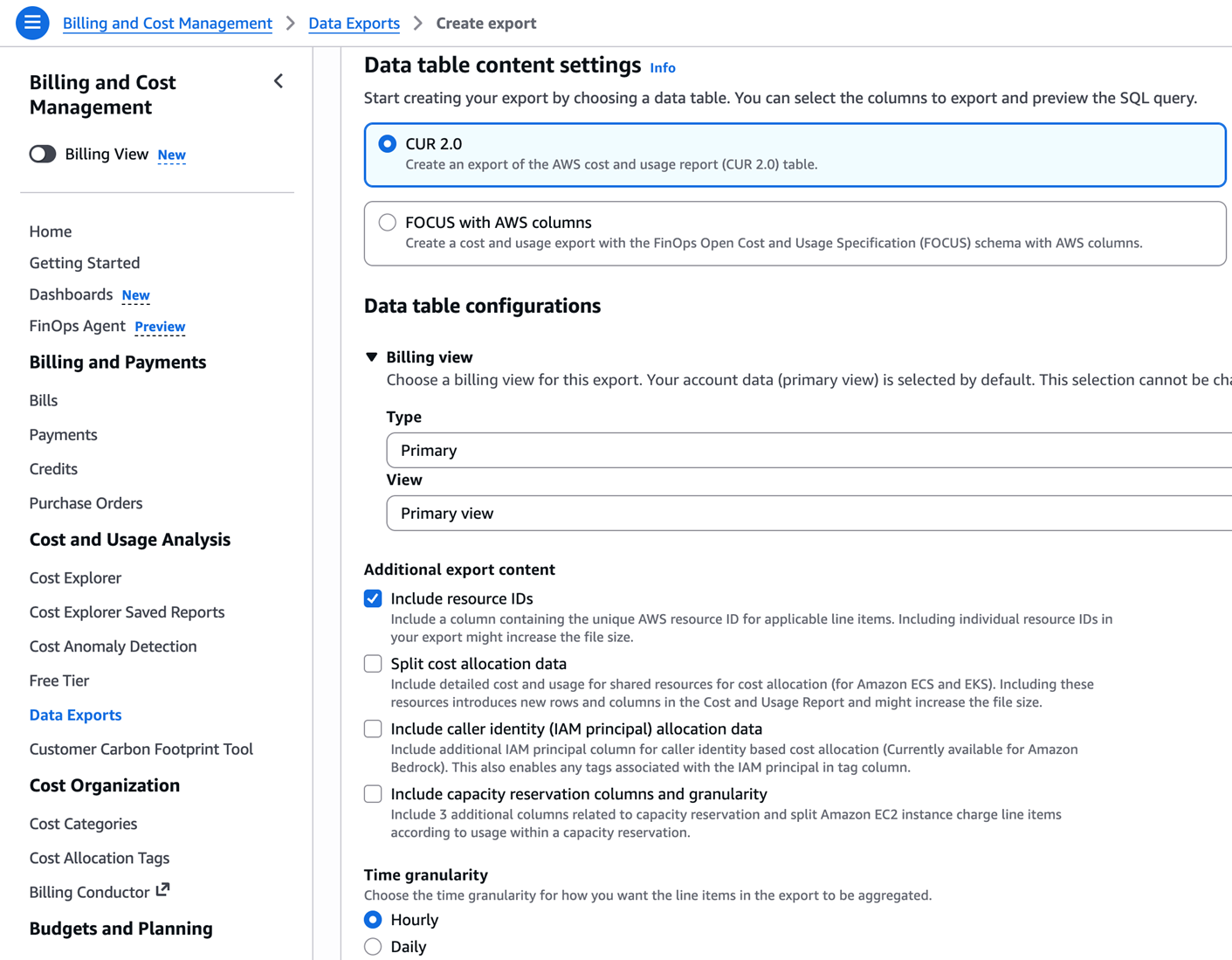
操作路径:AWS Console → Billing and Cost Management → Data Exports → Create export
逐步操作:
- 左侧导航栏选择 Data Exports,点击 Create export
- Export type 选择 Standard data export
- Export name 填写导出名称(例如
Kiro-CUR-V2-Report) - Data table content settings:
- Table 选择 CUR 2.0
- ✅ 勾选 Include resource IDs(必须,否则无
line_item_user_identifier和tags字段) - Time granularity 选 Hourly
- Column selection — 建议全选(勾选顶部全选框)
- Data export refresh cadence — 默认 Daily
- File versioning — 选 Overwrite existing data export file
- Report data integration — 选 Amazon Athena(自动将格式设为 Parquet + Overwrite)
- S3 bucket — 选择或创建存储桶,确认桶策略
- S3 path prefix — 填写前缀目录(例如
CUR) - 点击 Create 完成
[图1] |
开通后记下以下三个值(后续所有步骤都需要用到)
| 记录项 | 示例值 | 用在哪 |
| S3 Bucket Name | my-cur-bucket-123456 |
Athena 建表 LOCATION、Lambda S3_BUCKET |
| S3 Path Prefix | CUR |
Athena 建表 LOCATION 路径 |
| Export Name | Kiro-CUR-V2-Report |
Athena 建表 LOCATION 路径 |
最终 S3 数据路径为:s3://///data/BILLING_PERIOD=YYYY-MM/
⚠️ 配置要点(选错会影响后续步骤)
| 配置项 | 必须选的值 | 选错的后果 |
| Include resource IDs | ✅ 勾选 | line_item_user_identifier 和 tags 为空,无法识别用户和费用归属 |
| Time granularity | Hourly | 选 Monthly 会丢失精细度,无法按天分析 |
| File versioning | Overwrite existing | 选 Create new 每次生成新目录,Partition Projection 路径模板失效 |
| Report data integration | Amazon Athena | 不选则格式为 gzip/csv,与建表 DDL 的 ParquetHiveSerDe 不匹配 |
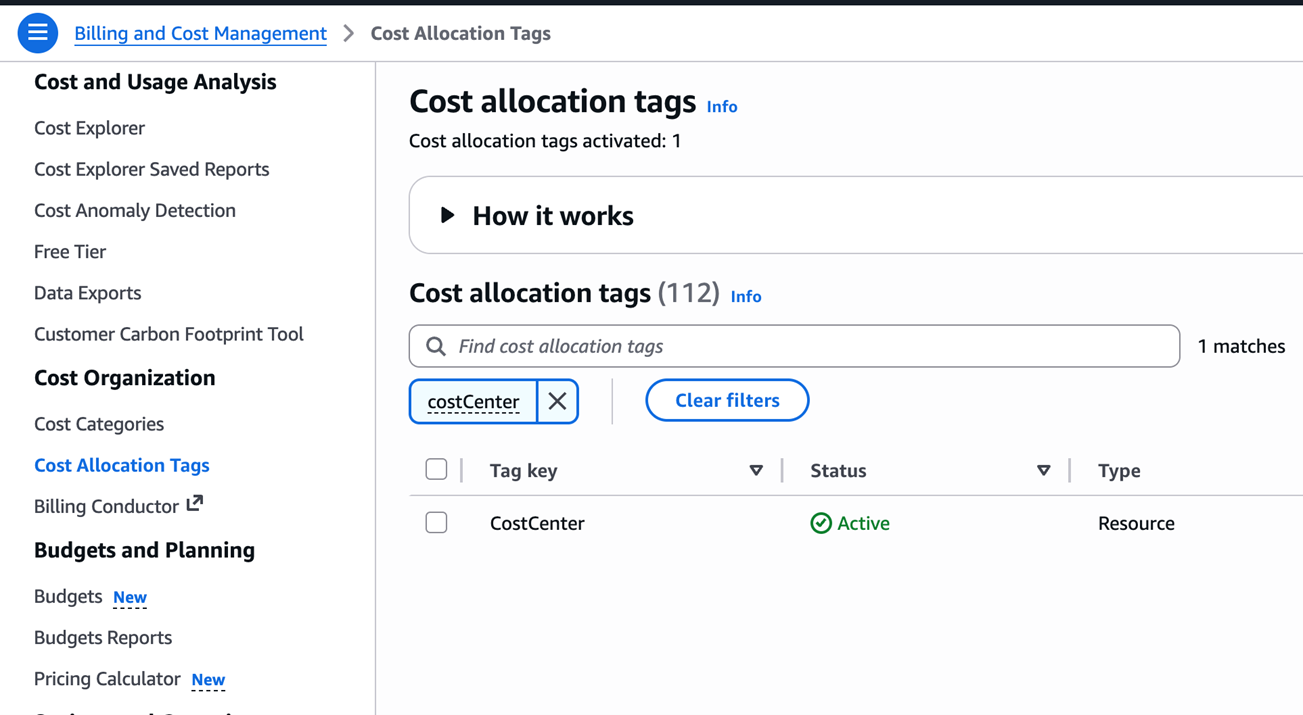
3.2 激活 Cost Allocation Tag(必须步骤)
IAM Identity Center 用户的 costCenter 属性要出现在 CUR 的 tags 字段中,必须手动激活为 Cost Allocation Tag。这一步如果跳过,CUR 里的 tags 字段将是空 Map {},费用无法归属到用户费用中心。
操作路径:AWS Console → Billing and Cost Management → Cost Allocation Tags
- 在搜索框中搜索
costCenter - 勾选该 Tag
- 点击右上角 Activate 按钮
⚠️ 重要时序说明
- 激活后需要等待 24 小时才会在新生成的 CUR 数据中反映
- 激活前已产生的历史数据不会回填
- 建议在创建 CUR 2.0 导出的同时立即激活,避免数据缺失
- 同时确认每位用户在 Identity Center 的 Cost center 字段已填写
[图2] |
四、实施步骤
第一步:在 Amazon Athena 中创建数据库和 CUR 查询表
使用 Athena Partition Projection 自动管理分区,无需手动执行 MSCK REPAIR TABLE 或 ALTER TABLE ADD PARTITION。
① 创建数据库
在 Athena 控制台执行:
CREATE DATABASE IF NOT EXISTS kiro_cost_db;
或通过 AWS CLI:
aws athena start-query-execution \
  --query-string "CREATE DATABASE IF NOT EXISTS kiro_cost_db;" \
  --result-configuration "OutputLocation=s3://<YOUR-CUR-BUCKET>/athena-results/" \
  --region us-east-1
② 创建外部表
在 Athena 控制台执行以下 DDL(将占位符替换为你的实际值):
CREATE EXTERNAL TABLE `kiro_cost_db`.`cur_kiro` (
    bill_bill_type STRING,
    bill_billing_entity STRING,
    bill_billing_period_end_date TIMESTAMP,
    bill_billing_period_start_date TIMESTAMP,
    bill_invoice_id STRING,
    bill_invoicing_entity STRING,
    bill_payer_account_id STRING,
    bill_payer_account_name STRING,
    cost_category MAP<STRING,STRING>,
    discount MAP<STRING,DOUBLE>,
    discount_bundled_discount DOUBLE,
    discount_total_discount DOUBLE,
    identity_line_item_id STRING,
    identity_time_interval STRING,
    line_item_availability_zone STRING,
    line_item_blended_cost DOUBLE,
    line_item_blended_rate STRING,
    line_item_currency_code STRING,
    line_item_legal_entity STRING,
    line_item_line_item_description STRING,
    line_item_line_item_type STRING,
    line_item_net_unblended_cost DOUBLE,
    line_item_net_unblended_rate STRING,
    line_item_normalization_factor DOUBLE,
    line_item_normalized_usage_amount DOUBLE,
    line_item_operation STRING,
    line_item_product_code STRING,
    line_item_tax_type STRING,
    line_item_unblended_cost DOUBLE,
    line_item_unblended_rate STRING,
    line_item_usage_account_id STRING,
    line_item_usage_account_name STRING,
    line_item_usage_amount DOUBLE,
    line_item_usage_end_date TIMESTAMP,
    line_item_usage_start_date TIMESTAMP,
    line_item_usage_type STRING,
    line_item_user_identifier STRING,
    pricing_currency STRING,
    pricing_lease_contract_length STRING,
    pricing_offering_class STRING,
    pricing_public_on_demand_cost DOUBLE,
    pricing_public_on_demand_rate STRING,
    pricing_purchase_option STRING,
    pricing_rate_code STRING,
    pricing_rate_id STRING,
    pricing_term STRING,
    pricing_unit STRING,
    product MAP<STRING,STRING>,
    product_comment STRING,
    product_fee_code STRING,
    product_fee_description STRING,
    product_from_location STRING,
    product_from_location_type STRING,
    product_from_region_code STRING,
    product_instance_family STRING,
    product_instance_type STRING,
    product_instancesku STRING,
    product_location STRING,
    product_location_type STRING,
    product_operation STRING,
    product_pricing_unit STRING,
    product_product_family STRING,
    product_region_code STRING,
    product_servicecode STRING,
    product_sku STRING,
    product_to_location STRING,
    product_to_location_type STRING,
    product_to_region_code STRING,
    product_usagetype STRING,
    reservation_amortized_upfront_cost_for_usage DOUBLE,
    reservation_amortized_upfront_fee_for_billing_period DOUBLE,
    reservation_availability_zone STRING,
    reservation_effective_cost DOUBLE,
    reservation_end_time STRING,
    reservation_modification_status STRING,
    reservation_net_amortized_upfront_cost_for_usage DOUBLE,
    reservation_net_amortized_upfront_fee_for_billing_period DOUBLE,
    reservation_net_effective_cost DOUBLE,
    reservation_net_recurring_fee_for_usage DOUBLE,
    reservation_net_unused_amortized_upfront_fee_for_billing_period DOUBLE,
    reservation_net_unused_recurring_fee DOUBLE,
    reservation_net_upfront_value DOUBLE,
    reservation_normalized_units_per_reservation STRING,
    reservation_number_of_reservations STRING,
    reservation_recurring_fee_for_usage DOUBLE,
    reservation_reservation_a_r_n STRING,
    reservation_start_time STRING,
    reservation_subscription_id STRING,
    reservation_total_reserved_normalized_units STRING,
    reservation_total_reserved_units STRING,
    reservation_units_per_reservation STRING,
    reservation_unused_amortized_upfront_fee_for_billing_period DOUBLE,
    reservation_unused_normalized_unit_quantity DOUBLE,
    reservation_unused_quantity DOUBLE,
    reservation_unused_recurring_fee DOUBLE,
    reservation_upfront_value DOUBLE,
    resource_tags MAP<STRING,STRING>,
    savings_plan_amortized_upfront_commitment_for_billing_period DOUBLE,
    savings_plan_end_time STRING,
    savings_plan_instance_type_family STRING,
    savings_plan_net_amortized_upfront_commitment_for_billing_period DOUBLE,
    savings_plan_net_recurring_commitment_for_billing_period DOUBLE,
    savings_plan_net_savings_plan_effective_cost DOUBLE,
    savings_plan_offering_type STRING,
    savings_plan_payment_option STRING,
    savings_plan_purchase_term STRING,
    savings_plan_recurring_commitment_for_billing_period DOUBLE,
    savings_plan_region STRING,
    savings_plan_savings_plan_a_r_n STRING,
    savings_plan_savings_plan_effective_cost DOUBLE,
    savings_plan_savings_plan_rate DOUBLE,
    savings_plan_start_time STRING,
    savings_plan_total_commitment_to_date DOUBLE,
    savings_plan_used_commitment DOUBLE,
    tags MAP<STRING,STRING>
)
PARTITIONED BY (billing_period STRING)
ROW FORMAT SERDE 'org.apache.hadoop.hive.ql.io.parquet.serde.ParquetHiveSerDe'
STORED AS PARQUET
LOCATION 's3://cur-report-lei-test/CUR/Kiro-CUR-V2-Report/data/'
TBLPROPERTIES (
    'projection.enabled'                      = 'true',
    'projection.billing_period.type'          = 'date',
    'projection.billing_period.format'        = 'yyyy-MM',
    'projection.billing_period.range'         = '2026-05,NOW',
    'projection.billing_period.interval'      = '1',
    'projection.billing_period.interval.unit' = 'MONTHS',
    'storage.location.template'               = 's3://cur-report-lei-test/CUR/Kiro-CUR-V2-Report/data/BILLING_PERIOD=${billing_period}/'
);
ℹ️ 注意:
将 <YOUR-CUR-BUCKET>、<PREFIX>、<EXPORT-NAME> 替换为您实际的 CUR 2.0 导出配置值。projection.billing_period.range 的起始日期设为您启用 CUR 2.0 的月份。
第二步:验证查询
① 先验证 CUR 数据已到位,查看所有服务的行项数量
SELECT line_item_product_code, COUNT(*) as cnt
FROM kiro_cost_db.cur_kiro
WHERE billing_period = '2026-06'
GROUP BY line_item_product_code
ORDER BY cnt DESC
LIMIT 20;
确认结果中包含 Kiro 行项(实测返回 209 条):
② 运行 Kiro 费用分摊核心查询
SELECT
    SPLIT_PART(line_item_user_identifier, 'user/', 2) AS user_id,
    MAX(tags['userAttribute/costCenter']) AS cost_center,
    MAX(CASE WHEN line_item_line_item_type = 'FlatRateSubscription'
             THEN line_item_usage_type END) AS plan_type,
    ROUND(SUM(CASE WHEN pricing_unit = 'Credits'
                   THEN line_item_usage_amount ELSE 0 END), 2) AS used_credits,
    ROUND(SUM(CASE WHEN line_item_line_item_type = 'FlatRateSubscription'
                   THEN line_item_unblended_cost ELSE 0 END), 4) AS subscription_fee,
    ROUND(SUM(CASE WHEN pricing_unit = 'Credits'
                   THEN line_item_unblended_cost ELSE 0 END), 4) AS overage_fee,
    ROUND(SUM(line_item_unblended_cost), 4) AS total_cost
FROM kiro_cost_db.cur_kiro
WHERE billing_period = '2026-06'
  AND line_item_product_code = 'Kiro'
  AND line_item_line_item_type != 'Tax'
GROUP BY line_item_user_identifier
ORDER BY used_credits DESC;
③ 验证 tags 字段(激活 Cost Allocation Tag 后)
SELECT line_item_user_identifier, tags
FROM kiro_cost_db.cur_kiro
WHERE billing_period = '2026-06'
  AND line_item_product_code = 'Kiro'
LIMIT 5;
激活 Tag 前 tags 字段为 {}(空),激活 24 小时后应看到:
查询字段说明
| 字段 | 含义 |
line_item_user_identifier |
Kiro 用户的 IAM Identity Center 身份标识(格式:arn:aws:identitystore::xxxx:user/userId) |
tags['userAttribute/costCenter'] |
用户在 Identity Center 中配置的 costCenter 标签,用于费用归属 |
line_item_line_item_type = 'FlatRateSubscription‘ |
标识订阅费行项(如 Kiro Pro / Enterprise 月费) |
pricing_unit = 'Credits' |
标识积分消耗行项 |
第三步:创建 IAM 角色和策略
为 Lambda 函数创建专用执行角色,遵循最小权限原则。可通过 AWS CLI 一次性完成:
# 1. 创建策略
aws iam create-policy \
  --policy-name KiroCostReportPolicy \
  --policy-document file://policy.json \
  --region us-east-1

# 2. 创建角色(信任 Lambda)
aws iam create-role \
  --role-name KiroCostReportRole \
  --assume-role-policy-document '{
    "Version": "2012-10-17",
    "Statement": [{"Effect": "Allow", "Principal": {"Service": "lambda.amazonaws.com"}, "Action": "sts:AssumeRole"}]
  }' \
  --region us-east-1

# 3. 附加策略到角色
aws iam attach-role-policy \
  --role-name KiroCostReportRole \
  --policy-arn arn:aws:iam::<ACCOUNT-ID>:policy/KiroCostReportPolicy
策略内容(policy.json):
{
    "Version": "2012-10-17",
    "Statement": [
        {
            "Sid": "AthenaQueryAccess",
            "Effect": "Allow",
            "Action": [
                "athena:StartQueryExecution",
                "athena:GetQueryExecution",
                "athena:GetQueryResults",
                "athena:StopQueryExecution"
            ],
            "Resource": "arn:aws:athena:*:*:workgroup/primary"
        },
        {
            "Sid": "GlueCatalogAccess",
            "Effect": "Allow",
            "Action": [
                "glue:GetDatabase",
                "glue:GetTable",
                "glue:GetTables",
                "glue:GetPartition",
                "glue:GetPartitions",
                "glue:BatchGetPartition"
            ],
            "Resource": [
                "arn:aws:glue:*:*:catalog",
                "arn:aws:glue:*:*:database/kiro_cost_db",
                "arn:aws:glue:*:*:table/kiro_cost_db/*"
            ]
        },
        {
            "Sid": "S3CURDataAccess",
            "Effect": "Allow",
            "Action": [
                "s3:GetObject",
                "s3:GetBucketLocation",
                "s3:ListBucket"
            ],
            "Resource": [
                "arn:aws:s3:::<YOUR-CUR-BUCKET>",
                "arn:aws:s3:::<YOUR-CUR-BUCKET>/*"
            ]
        },
        {
            "Sid": "S3AthenaResultsAndReports",
            "Effect": "Allow",
            "Action": [
                "s3:GetObject",
                "s3:PutObject"
            ],
            "Resource": [
                "arn:aws:s3:::<YOUR-CUR-BUCKET>/athena-results/*",
                "arn:aws:s3:::<YOUR-CUR-BUCKET>/kiro-reports/*"
            ]
        },
        {
            "Sid": "CloudWatchLogs",
            "Effect": "Allow",
            "Action": [
                "logs:CreateLogGroup",
                "logs:CreateLogStream",
                "logs:PutLogEvents"
            ],
            "Resource": "arn:aws:logs:*:*:log-group:/aws/lambda/kiro-cost-report:*"
        }
    ]
}
角色名称:KiroCostReportRole
- 信任关系:允许
lambda.amazonaws.com担任此角色
安全最佳实践:相比原始方案使用 "Resource": "*",此处将 Athena 限定到特定 Workgroup,Glue 限定到特定数据库和表,S3 限定到特定桶和前缀,CloudWatch Logs 限定到特定日志组。
第四步:创建 Lambda 函数
基本配置
| 配置项 | 值 |
| 函数名称 | kiro-cost-report |
| Runtime | Python 3.13 |
| 架构 | arm64(Graviton,成本更低) |
| 执行角色 | KiroCostReportRole |
| 超时 | 120 秒 |
| 内存 | 256 MB |
通过 AWS CLI 部署:
# 打包代码
zip -j kiro-cost-report.zip lambda_function.py

# 创建函数
aws lambda create-function \
  --function-name kiro-cost-report \
  --runtime python3.13 \
  --role arn:aws:iam::<ACCOUNT-ID>:role/KiroCostReportRole \
  --handler lambda_function.lambda_handler \
  --zip-file fileb://kiro-cost-report.zip \
  --timeout 120 \
  --memory-size 256 \
  --architectures arm64 \
  --region us-east-1
更新代码时(后续修改后重新部署):
zip -j kiro-cost-report.zip lambda_function.py
aws lambda update-function-code \
  --function-name kiro-cost-report \
  --zip-file fileb://kiro-cost-report.zip \
  --region us-east-1
关于 Runtime 选择:建议使用 Python 3.13,它已经稳定且具备完整的生态支持。Python 3.14 虽已被 Lambda 支持,但仍处于较新阶段,生产环境建议使用更成熟的版本。
Lambda 函数代码(lambda_function.py)
import boto3
import json
import time
import csv
import io
import urllib.request
from datetime import datetime, timedelta

# ===== 配置区 =====
FEISHU_WEBHOOK  = "https://open.feishu.cn/open-apis/bot/v2/hook/<YOUR-WEBHOOK-TOKEN>"
ATHENA_DATABASE = "kiro_cost_db"
ATHENA_TABLE    = "cur_kiro"
ATHENA_OUTPUT   = "s3://<YOUR-CUR-BUCKET>/athena-results/"
ATHENA_REGION   = "us-east-1"
S3_BUCKET       = "<YOUR-CUR-BUCKET>"
S3_REPORT_DIR   = "kiro-reports"
PRESIGN_EXPIRE  = 604800  # 7 天(秒)
# ==================


athena = boto3.client('athena', region_name=ATHENA_REGION)
s3     = boto3.client('s3', region_name=ATHENA_REGION)


def get_billing_period(event):
    """获取计费周期:优先使用事件参数,否则默认当月"""
    if event.get('billing_period'):
        return event['billing_period']
    return datetime.today().strftime('%Y-%m')


def run_athena_query(sql):
    """执行 Athena 查询并返回结果列表"""
    resp = athena.start_query_execution(
        QueryString=sql,
        QueryExecutionContext={'Database': ATHENA_DATABASE},
        ResultConfiguration={'OutputLocation': ATHENA_OUTPUT}
    )
    execution_id = resp['QueryExecutionId']
    print(f"Athena execution_id: {execution_id}")

    # 轮询等待查询完成(最多 3 分钟)
    for i in range(60):
        status = athena.get_query_execution(QueryExecutionId=execution_id)
        state  = status['QueryExecution']['Status']['State']
        if state == 'SUCCEEDED':
            break
        if state in ('FAILED', 'CANCELLED'):
            reason = status['QueryExecution']['Status'].get('StateChangeReason', '')
            raise Exception(f"Athena query {state}: {reason}")
        time.sleep(3)
    else:
        raise Exception("Athena query timed out after 3 minutes")

    # 分页获取所有结果
    rows_all  = []
    paginator = athena.get_paginator('get_query_results')
    for page in paginator.paginate(QueryExecutionId=execution_id):
        rows_all.extend(page['ResultSet']['Rows'])

    if not rows_all:
        return []

    headers = [c['VarCharValue'] for c in rows_all[0]['Data']]
    data    = []
    for row in rows_all[1:]:
        record = {headers[i]: col.get('VarCharValue', '') for i, col in enumerate(row['Data'])}
        data.append(record)
    return data


def generate_csv(rows, period):
    """生成 CSV 格式的费用明细"""
    output = io.StringIO()
    fieldnames = ['user_id', 'cost_center', 'plan_type', 'used_credits',
                  'subscription_fee', 'overage_fee', 'total_cost']
    writer = csv.DictWriter(output, fieldnames=fieldnames, extrasaction='ignore')

    # 写可读性强的表头
    writer.writerow({
        'user_id':          'Identity Center User ID',
        'cost_center':      '成本中心/邮箱',
        'plan_type':        '套餐类型',
        'used_credits':     '积分消耗',
        'subscription_fee': '订阅费(USD)',
        'overage_fee':      '超额费(USD)',
        'total_cost':       '总费用(USD)',
    })

    for r in rows:
        plan = (r.get('plan_type') or '-').replace('USE1-KiroEnterprise-', '')
        writer.writerow({
            'user_id':          r.get('user_id', ''),
            'cost_center':      r.get('cost_center') or '未设置Tag',
            'plan_type':        plan,
            'used_credits':     r.get('used_credits', '0'),
            'subscription_fee': r.get('subscription_fee', '0'),
            'overage_fee':      r.get('overage_fee', '0'),
            'total_cost':       r.get('total_cost', '0'),
        })

    return output.getvalue()


def upload_csv_to_s3(csv_content, period):
    """上传 CSV 到 S3 并生成预签名下载链接"""
    now_str  = (datetime.utcnow() + timedelta(hours=8)).strftime('%Y%m%d_%H%M')
    filename = f"Kiro_Cost_Report_{period}_{now_str}.csv"
    s3_key   = f"{S3_REPORT_DIR}/{filename}"

    s3.put_object(
        Bucket      = S3_BUCKET,
        Key         = s3_key,
        Body        = csv_content.encode('utf-8-sig'),
        ContentType = 'text/csv; charset=utf-8'
    )

    url = s3.generate_presigned_url(
        'get_object',
        Params    = {'Bucket': S3_BUCKET, 'Key': s3_key},
        ExpiresIn = PRESIGN_EXPIRE
    )
    print(f"CSV uploaded: s3://{S3_BUCKET}/{s3_key}")
    return url, filename


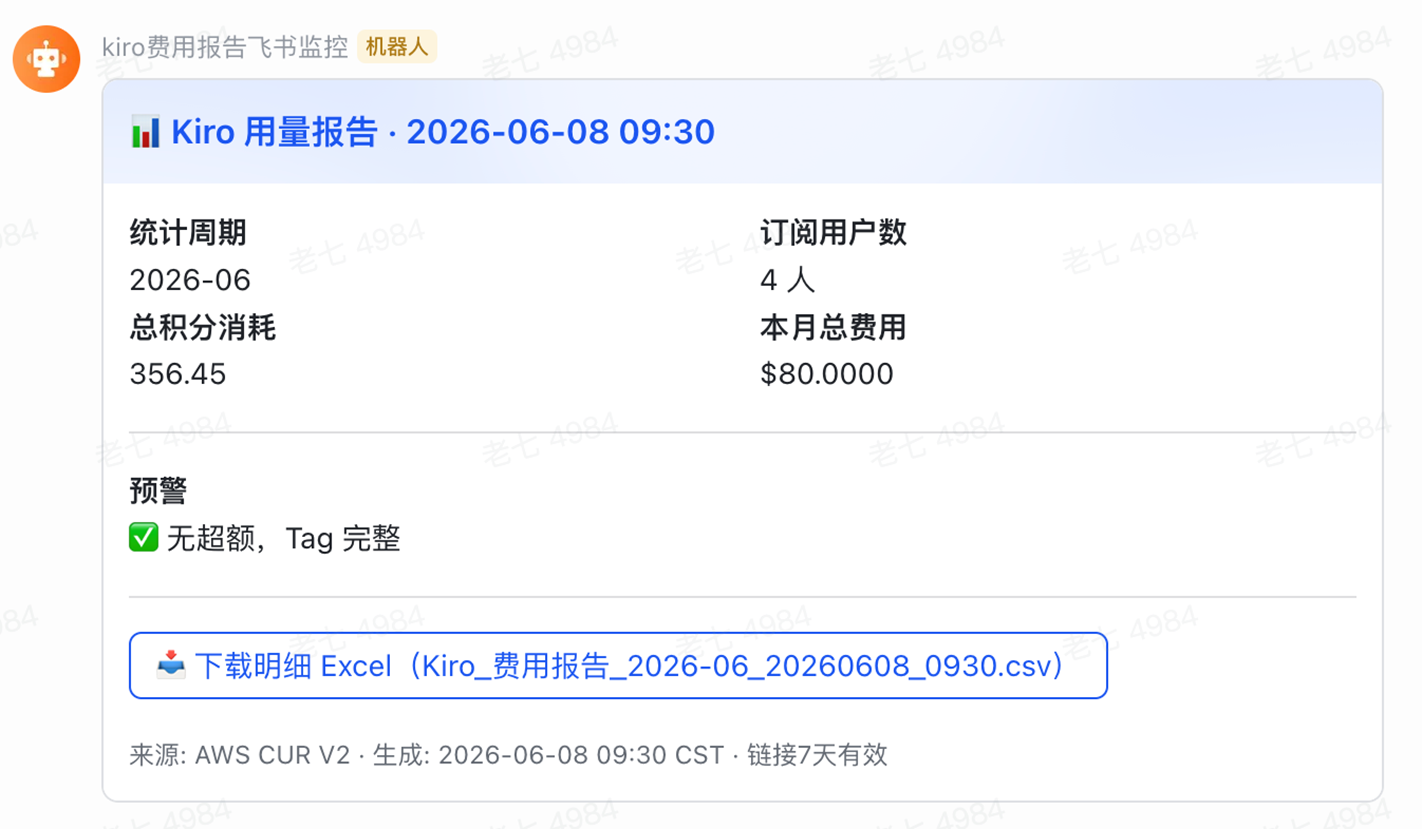
def build_summary_card(period, rows, download_url, filename):
    """构建飞书交互式卡片消息"""
    total_cost    = sum(float(r.get('total_cost') or 0) for r in rows)
    total_credits = sum(float(r.get('used_credits') or 0) for r in rows)
    overage_users = [r for r in rows if float(r.get('overage_fee') or 0) > 0]
    no_tag_users  = [r for r in rows if not r.get('cost_center')]

    warnings = []
    if overage_users:
        names = "、".join([r.get('cost_center') or '未知' for r in overage_users])
        warnings.append(f"???? 超额({len(overage_users)}人):{names}")
    if no_tag_users:
        warnings.append(f"⚠️ 未打 Tag 用户:{len(no_tag_users)} 人,费用无法归属")
    warn_text = "\n".join(warnings) if warnings else "✅ 无超额,Tag 完整"

    gen_time = (datetime.utcnow() + timedelta(hours=8)).strftime('%Y-%m-%d %H:%M')

    return {
        "msg_type": "interactive",
        "card": {
            "header": {
                "title": {"tag": "plain_text", "content": f"???? Kiro 用量报告 · {gen_time}"},
                "template": "blue"
            },
            "elements": [
                {
                    "tag": "div",
                    "fields": [
                        {"is_short": True, "text": {"tag": "lark_md", "content": f"**统计周期**\n{period}"}},
                        {"is_short": True, "text": {"tag": "lark_md", "content": f"**订阅用户数**\n{len(rows)} 人"}},
                        {"is_short": True, "text": {"tag": "lark_md", "content": f"**总积分消耗**\n{total_credits:.2f}"}},
                        {"is_short": True, "text": {"tag": "lark_md", "content": f"**本月总费用**\n${total_cost:.4f}"}},
                    ]
                },
                {"tag": "hr"},
                {
                    "tag": "div",
                    "text": {"tag": "lark_md", "content": f"**预警**\n{warn_text}"}
                },
                {"tag": "hr"},
                {
                    "tag": "action",
                    "actions": [
                        {
                            "tag": "button",
                            "text": {"tag": "plain_text", "content": f"???? 下载明细 ({filename})"},
                            "type": "primary",
                            "url": download_url
                        }
                    ]
                },
                {
                    "tag": "note",
                    "elements": [{"tag": "plain_text",
                        "content": f"来源: AWS CUR 2.0 · 生成: {gen_time} CST · 链接 7 天有效"}]
                }
            ]
        }
    }


def send_feishu(payload):
    """发送消息到飞书 Webhook"""
    body = json.dumps(payload, ensure_ascii=False).encode('utf-8')
    req  = urllib.request.Request(
        FEISHU_WEBHOOK,
        data    = body,
        headers = {'Content-Type': 'application/json; charset=utf-8'},
        method  = 'POST'
    )
    with urllib.request.urlopen(req, timeout=10) as resp:
        result = json.loads(resp.read().decode('utf-8'))
        print(f"Feishu response: {result}")
        if result.get('code') != 0:
            raise Exception(f"Feishu API error: {result}")


def lambda_handler(event, context):
    period = get_billing_period(event)
    print(f"Generating report for period: {period}")

    sql = f"""
    SELECT
        SPLIT_PART(line_item_user_identifier, 'user/', 2)   AS user_id,
        MAX(tags['userAttribute/costCenter'])                AS cost_center,
        MAX(CASE WHEN line_item_line_item_type = 'FlatRateSubscription'
                 THEN line_item_usage_type END)              AS plan_type,
        ROUND(SUM(CASE WHEN pricing_unit = 'Credits'
                       THEN line_item_usage_amount ELSE 0 END), 2)  AS used_credits,
        ROUND(SUM(CASE WHEN line_item_line_item_type = 'FlatRateSubscription'
                       THEN line_item_unblended_cost ELSE 0 END), 4)  AS subscription_fee,
        ROUND(SUM(CASE WHEN pricing_unit = 'Credits'
                       THEN line_item_unblended_cost ELSE 0 END), 4)  AS overage_fee,
        ROUND(SUM(line_item_unblended_cost), 4)             AS total_cost
    FROM {ATHENA_DATABASE}.{ATHENA_TABLE}
    WHERE billing_period = '{period}'
      AND line_item_product_code = 'Kiro'
      AND line_item_line_item_type != 'Tax'
    GROUP BY line_item_user_identifier
    ORDER BY used_credits DESC
    """

    rows = run_athena_query(sql)

    if not rows:
        send_feishu({
            "msg_type": "text",
            "content": {"text": f"⚠️ {period} 暂无 Kiro 计费数据,请检查 CUR 2.0 是否已生成。"}
        })
        return {"status": "no_data", "period": period}

    # 生成 CSV 并上传到 S3
    csv_content         = generate_csv(rows, period)
    download_url, fname = upload_csv_to_s3(csv_content, period)

    # 推送飞书摘要卡片
    card = build_summary_card(period, rows, download_url, fname)
    send_feishu(card)

    print(f"Report completed: {len(rows)} users, file: {fname}")
    return {"status": "ok", "period": period, "users": len(rows), "report": fname}
第五步:配置飞书群机器人
飞书的设置请参考文档:https://open.feishu.cn/document/client-docs/bot-v3/add-custom-bot
获取 Webhook URL 后,将 Lambda 代码配置区的 FEISHU_WEBHOOK 替换为你的地址,重新打包部署:
zip -j kiro-cost-report.zip lambda_function.py

aws lambda update-function-code \
  --function-name kiro-cost-report \
  --zip-file fileb://kiro-cost-report.zip \
  --region us-east-1
第六步:配置 EventBridge 定时触发
在 Amazon EventBridge 控制台创建定时规则:
| 配置项 | 值 |
| 规则名称 | kiro-monthly-cost-report |
| 触发类型 | Schedule |
| Cron 表达式 | cron(0 1 5 * ? *) |
| 目标 | Lambda 函数 kiro-cost-report |
说明:cron(0 1 5 * ? *) 表示每月 5 日 UTC 01:00(北京时间 09:00)执行。选择每月 5 日是因为 CUR 2.0 数据通常在次月初 1-3 天内完成上月最终结算。
第七步:手动测试
通过 AWS CLI 触发测试:
aws lambda invoke \
  --function-name kiro-cost-report \
  --payload '{"billing_period": "2026-06"}' \
  --cli-binary-format raw-in-base64-out \
  --log-type Tail \
  --query "LogResult" \
  --output text \
  --region us-east-1 \
  /tmp/response.json | base64 -d

cat /tmp/response.json
执行成功的输出示例:
{"status": "ok", "period": "2026-06", "users": 1, "report": "Kiro_Cost_Report_2026-06_20260611_1211.csv"}
飞书群测试消息:
[图3] |
五、费用分摊逻辑说明
Kiro 在 CUR 2.0 中的计费行项分为以下类型:
| 行项类型 | 说明 | 对应字段 |
FlatRateSubscription |
月度订阅固定费用(Pro/Enterprise) | line_item_unblended_cost |
按积分计费(pricing_unit = 'Credits') |
超出套餐包含积分的用量费用 | line_item_usage_amount(积分数)、line_item_unblended_cost(美元) |
Tax |
税费(从分摊报告中排除) | — |
用户识别机制
line_item_user_identifier:包含完整的 IAM Identity Center 用户 ARN
- 通过
tags['userAttribute/costCenter']获取用户的成本中心标签(需在 Identity Center 中预配置)
六、运营成本估算
该方案本身的运营成本极低:
| 组件 | 估算月费用 |
| Athena 查询 | ~$0.01(扫描约 200MB CUR 数据) |
| Lambda 执行 | ~$0.001(月执行 1-4 次,每次约 30 秒) |
| S3 存储(报告) | < $0.01 |
| EventBridge | 免费(每月少量触发) |
| 合计 | < $0.05/月 |
七、附录:用户开通自动化
上述文档描述的费用分摊方案依赖 IAM Identity Center 中的用户和 Cost Center 标签。手动通过控制台逐个创建用户效率较低,以下提供基于 Identity Store API 的自动化脚本,实现批量用户开通。
7.1 手动流程 vs 自动化
| 步骤 | 手动操作 | 自动化 API |
| 创建用户 | 控制台填写 Username、邮箱、姓名 | identitystore:CreateUser |
| 打 Tag | 在 Cost Center 字段填写邮箱 | CreateUser 的 Extensions 参数 |
| 分配用户组 | Step 2 选择 Kiro-Pro-20 等组 | identitystore:CreateGroupMembership |
7.2 IAM 权限要求
为运行自动化脚本的角色/用户附加以下策略:
{
    "Version": "2012-10-17",
    "Statement": [
        {
            "Sid": "IdentityStoreUserManagement",
            "Effect": "Allow",
            "Action": [
                "identitystore:CreateUser",
                "identitystore:GetUserId",
                "identitystore:DescribeUser",
                "identitystore:ListGroups",
                "identitystore:CreateGroupMembership"
            ],
            "Resource": "*"
        },
        {
            "Sid": "SSOAdminListInstances",
            "Effect": "Allow",
            "Action": "sso:ListInstances",
            "Resource": "*"
        }
    ]
}
7.3 批量开通脚本
支持单用户和 CSV 批量导入两种模式:
#!/usr/bin/env python3
"""
Kiro 用户自动化开通脚本
使用方式:
  单用户:python kiro-user-provisioning.py --username zhangsan --email zhangsan@company.com \
          --first-name san --last-name zhang --group Kiro-Pro-20
  批量:  python kiro-user-provisioning.py --csv users.csv
"""

import boto3
import argparse
import csv
import sys
import time
from botocore.exceptions import ClientError

IDENTITY_STORE_ID = "d-xxxxxxxxxx"  # 替换为你的 Identity Store ID
REGION = "us-east-1"

identitystore = boto3.client('identitystore', region_name=REGION)


def get_identity_store_id():
    """自动获取 Identity Store ID"""
    global IDENTITY_STORE_ID
    if IDENTITY_STORE_ID == "d-xxxxxxxxxx":
        sso_admin = boto3.client('sso-admin', region_name=REGION)
        response = sso_admin.list_instances()
        if response['Instances']:
            IDENTITY_STORE_ID = response['Instances'][0]['IdentityStoreId']
            print(f"✅ Identity Store ID: {IDENTITY_STORE_ID}")
        else:
            sys.exit("❌ 未找到 IAM Identity Center 实例")


def find_group_id(group_name):
    """根据组名查找 Group ID"""
    response = identitystore.list_groups(
        IdentityStoreId=IDENTITY_STORE_ID,
        Filters=[{'AttributePath': 'DisplayName', 'AttributeValue': group_name}]
    )
    groups = response.get('Groups', [])
    return groups[0]['GroupId'] if groups else None


def check_user_exists(username):
    """检查用户是否已存在"""
    try:
        response = identitystore.get_user_id(
            IdentityStoreId=IDENTITY_STORE_ID,
            AlternateIdentifier={
                'UniqueAttribute': {
                    'AttributePath': 'userName',
                    'AttributeValue': username
                }
            }
        )
        return response['UserId']
    except ClientError as e:
        if e.response['Error']['Code'] == 'ResourceNotFoundException':
            return None
        raise


def create_user(username, email, first_name, last_name, cost_center):
    """创建用户并设置 Cost Center"""
    existing = check_user_exists(username)
    if existing:
        print(f"⚠️  用户 {username} 已存在,跳过")
        return existing

    params = {
        'IdentityStoreId': IDENTITY_STORE_ID,
        'UserName': username,
        'DisplayName': f"{first_name} {last_name}",
        'Name': {'GivenName': first_name, 'FamilyName': last_name},
        'Emails': [{'Value': email, 'Type': 'work', 'Primary': True}],
        'Extensions': {
            'aws:identitystore:enterprise': {
                'costCenter': cost_center or email
            }
        }
    }

    response = identitystore.create_user(**params)
    print(f"✅ 创建用户: {username} (ID: {response['UserId']})")
    return response['UserId']


def add_user_to_group(user_id, group_id, username, group_name):
    """将用户加入组"""
    try:
        identitystore.create_group_membership(
            IdentityStoreId=IDENTITY_STORE_ID,
            GroupId=group_id,
            MemberId={'UserId': user_id}
        )
        print(f"✅ {username} → {group_name}")
    except ClientError as e:
        if e.response['Error']['Code'] == 'ConflictException':
            print(f"⚠️  {username} 已在 {group_name} 中")
        else:
            raise


def provision_from_csv(csv_file):
    """批量开通"""
    get_identity_store_id()
    with open(csv_file, 'r', encoding='utf-8-sig') as f:
        users = list(csv.DictReader(f))

    print(f"???? 共 {len(users)} 个用户\n")
    for i, row in enumerate(users, 1):
        username = row['username'].strip()
        email = row['email'].strip()
        group_name = row['group'].strip()
        cost_center = row.get('cost_center', '').strip() or email

        user_id = create_user(username, email,
                              row['first_name'].strip(),
                              row['last_name'].strip(), cost_center)
        group_id = find_group_id(group_name)
        if group_id:
            add_user_to_group(user_id, group_id, username, group_name)
        else:
            print(f"❌ 组 {group_name} 不存在")

        time.sleep(0.5)  # 避免限流

    print(f"\n✅ 批量开通完成")
7.4 CSV 文件格式
7.5 用户组与 Kiro 套餐映射
根据截图中的 IAM Identity Center 用户组配置:
| 用户组名称 | 对应 Kiro 套餐 |
Kiro-Pro-20 |
Kiro Pro(20 积分/月) |
Kiro-Pro-plus-40 |
Kiro Pro+(40 积分/月) |
Kiro-Power-200 |
Kiro Power(200 积分/月) |
ℹ️ 注意:
当天开通的账号,可能需要次日才能正常使用 Kiro。
八、扩展建议
- 多通知渠道:除飞书外,可扩展支持企业微信、Slack 或 Amazon SNS 邮件通知。
- QuickSight 可视化:将 CUR 数据接入 Amazon QuickSight,构建交互式费用仪表板,支持按部门、项目、时间维度钻取分析。
- 预算告警:结合 AWS Budgets 设置 Kiro 费用阈值,在费用超出预期时实时告警。
- 自动化 Tag 治理:使用 AWS Organizations SCP 或 IAM Identity Center 策略强制所有用户配置 costCenter 标签。
- 历史趋势分析:将每月报告数据写入 DynamoDB 或 S3,构建费用趋势分析。
九、安全考量
- 最小权限:IAM 策略精确到 Workgroup、数据库、表和 S3 前缀级别
- 数据加密:S3 存储桶启用 SSE-S3 或 SSE-KMS 加密
- 网络安全:飞书 Webhook URL 建议存储在 AWS Secrets Manager 中,而非硬编码
- 预签名链接时效:CSV 下载链接 7 天后自动失效
- 审计日志:Lambda 执行日志自动写入 CloudWatch Logs
十、总结
本文展示了如何利用 AWS CUR 2.0 和 Serverless 服务构建一套低成本、全自动的 Kiro 费用分摊方案。该方案的核心价值在于:
- 精准到人:基于 IAM Identity Center 身份实现用户级费用归属
- 自动化运营:EventBridge + Lambda 实现全自动周期性报告,无需人工干预
- 即时可见:飞书卡片让团队管理者第一时间掌握费用动态
- 低运营成本:纯 Serverless 架构,月运营成本低于 $0.05
➡️ 下一步行动:
相关产品:
- Amazon S3 — 适用于 AI、分析和存档的几乎无限的安全对象存储
- Amazon Athena — 使用 SQL 在 S3 中查询数据
- AWS Lambda — 无需服务器即可运行代码
- Amazon IAM — 身份管理和访问权限
- Amazon EventBridge — 大规模构建事件驱动应用程序
相关文章:
- Amazon Bedrock模型推理的Serverless 异步架构 – 处理在线多模态高负载案例
- 基于亚马逊云科技Serverless构建分钟级的近实时IoT设备异常检测系统
- 用 Kiro CLI 自动搭建 FluentBit 日志采集方案:两种 EKS 埋点数据落地 S3 Parquet 的实战对比
- 37GAMES 在 Aurora Serverless v2 高可用及成本优化上的实践
- AWS BYOIP实战:企业公网IP上云迁移方案
*前述特定亚马逊云科技生成式人工智能相关的服务目前在亚马逊云科技海外区域可用。亚马逊云科技中国区域相关云服务由西云数据和光环新网运营,具体信息以中国区域官网为准。
本篇作者
AWS 架构师中心:云端创新的引领者探索 AWS 架构师中心,获取经实战验证的最佳实践与架构指南,助您高效构建安全、可靠的云上应用
|
 |