What Is Dynamic DNS?
What is Dynamic DNS?
Dynamic DNS (DDNS) is a service that can automatically update DNS records when an IP address changes. Domain names convert network IP addresses to human-readable names for recognition and ease of use, such as 18.65.39.22 for aws.amazon.com. The information mapping the name to the IP address is recorded tabularly on the DNS server. However, network administrators use tools and services to allocate IP addresses dynamically and change them frequently. A DDNS service updates the DNS server records every time IP addresses change. With DDNS, domain name management becomes easier and more efficient.
Why is dynamic DNS important?
In the past, IP addresses rarely changed. However, there was a shortage of available IP addresses due to the expansion of the internet and the massive increase in the number of servers, smart sensors, and end-user devices. IPv4 is limited to around four billion addresses.
A new system called IPv6 was introduced to increase the number of IP addresses. However, allocating static public IP addresses was no longer cost-effective. Instead, network administrators and internet service providers use Dynamic Host Configuration Protocol (DHCP) to assign IP addresses dynamically.
Shifting IP addresses causes a mismatch between configured hostnames and the current IP addresses, which results in unreachable services. DDNS updates DNS records with the correct IP address so that these applications, websites, and services remain accessible to users.
Why IP addresses change
Network administrators typically maintain a shared pool of IP addresses. They lease or assign IP addresses to users for a predetermined maximum amount of time or until they terminate their connection.
Whenever a machine joins a network, it gets allocated a new dynamic IP address. When a machine logs off the network, DHCP can reassign the IP address to another device. Hence, dynamic IP addresses can change frequently and at irregular intervals.
How dynamic DNS helps
Developers use domain names to identify application endpoints like APIs or specific server instances in their code. If DNS records are not up-to-date, bugs occur when end users try to access endpoints.
Dynamic DNS ensures that users can continue to access the device or service using the domain name. They don’t need to track and update the IP address manually.
What are the use cases for dynamic DNS?
Dynamic DNS provides flexibility, convenience, and improved accessibility across many use cases.
Home or hobby use
Obtaining a static IP address for hosting home or hobbyist applications is an unnecessary expense. Instead, it is possible to self-host and use dynamic DNS with virtual private network (VPN) access. You can host websites, FTP servers, game servers, or any other service that requires a consistent and accessible domain name.
Remote monitoring at the edge
Organizations that deploy cameras or remote monitoring systems utilize dynamic DNS resolution to access and manage these systems remotely. First, you would associate a domain name with the changing IP address of the monitoring devices. Then, personnel or administrators could view live feeds, monitor events, and manage the system from anywhere with an internet connection. Security must be a significant consideration in these setups.
Development and testing
DDNS is often used for development and testing in local environments. In the cloud, however, an elastic IP address (a static IPv4 address) may be used instead.
How does dynamic DNS work?
Organizations typically subscribe to a dynamic DNS (DDNS) service provided by a DDNS provider. The provider also maintains the DNS servers that handle the DNS records for the associated domain name. Here are the general steps:
-
You register a domain name with the dynamic DNS service provider and configure the DNS settings
-
You provide the provider with the initial IP address for the domain name
-
You install a dynamic DNS client on the device or server instance with a changing IP address
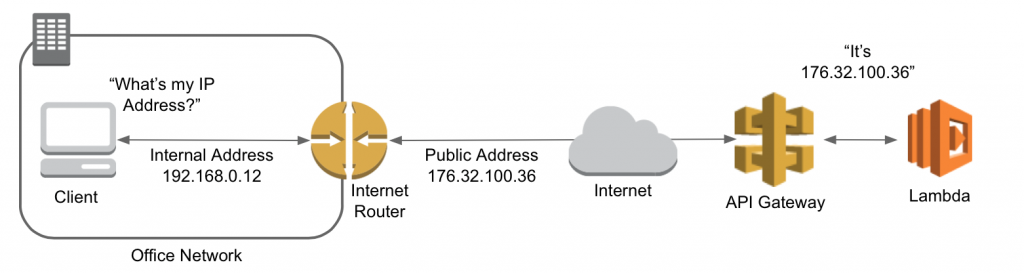
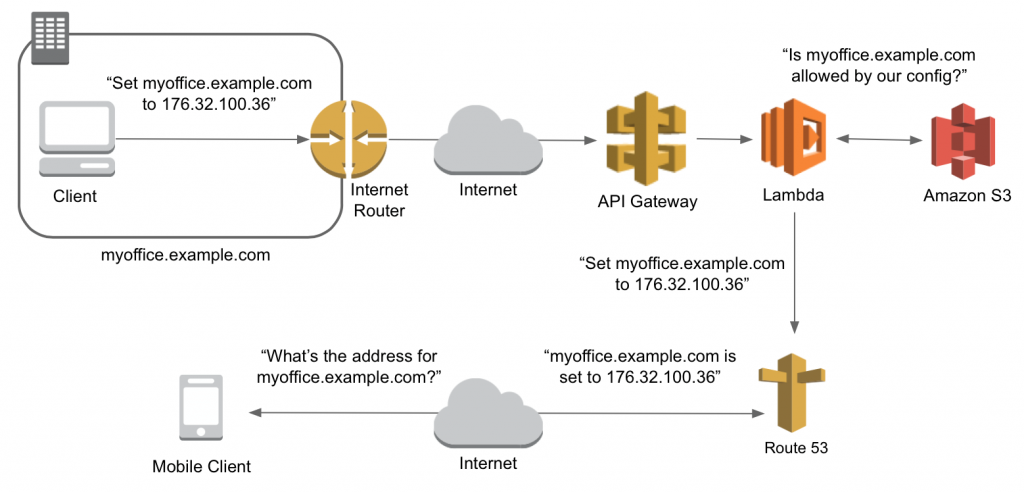
The DDNS client continuously monitors the IP address and detects any changes. It sends a DNS record update notification to the dynamic DNS provider, informing it of the new IP address. The dynamic DNS provider modifies the records to point to the new IP address.
For example, you deploy an app (www.myCRM.com) at 192.0.2.104. When users key in the domain name, they’ll be directed to the app. However, if the app’s IP address has been reassigned to 192.0.2.84, users will see an error page when they type the domain name. With DDNS, the client detects the change and updates the DNS records accordingly to allow consistent access.
The dynamic DNS client continues monitoring the IP address for further changes. Whenever a new change occurs, the process repeats.
What is the difference between DNS and Dynamic DNS?
A DNS service is a globally distributed service that translates human-readable names into numeric IP addresses. DNS servers translate requests for names into IP addresses. They control which server an end user will reach when they type a domain name into their web browser.
DNS versus DDNS
Dynamic DNS (DDNS) is an extension of DNS that automatically updates IP addresses associated with domain names in real time. It expands the capabilities of DNS. With DDNS, organizations and individuals can maintain connectivity and accessibility even in dynamic IP address environments.
DNS is universally supported by all DNS servers and used globally to resolve domain names to IP addresses.
DDNS, on the other hand, requires the support of specific DDNS providers. Organizations must subscribe to DDNS services and configure their devices or routers to work with the chosen DDNS provider.
How can AWS support your dynamic DNS requirements?
Amazon Route 53 provides highly available and scalable Domain Name System (DNS), domain name registration, and health-checking cloud services. It provides an extremely reliable and cost-effective way to route end users to internet applications by translating names like example.com into the numeric IP addresses, such as 192.0.2.1, that computers use to connect.
Here are ways you can benefit from using Route 53:
-
Combine your DNS with health-checking services to route traffic to healthy endpoints
-
Monitor and set alarms on endpoints
-
Purchase and manage domain names, and automatically configure DNS settings
Get started with dynamic DNS on AWS by creating a free account today.
Browse all cloud computing concepts
Browse all cloud computing concepts content here:
Did you find what you were looking for today?
Let us know so we can improve the quality of the content on our pages