AWS Partner Network (APN) Blog
Unified Secrets Security with GitGuardian and AWS Secrets Manager
By: Pierre Le Clezio, Lead Product Manager – GitGuardian
By: Nic Gumina, Senior Security Consultant – AWS
By: Manu Chandrasekhar, Senior DevOps Consultant – AWS
By: Dan Parlin, Security Consultant – AWS
 |
 |
The rise of AI coding assistants and Model Context Protocol (MCP) servers, which provide AI tools with access to external data sources, has accelerated the secret management challenge as developers increasingly share configuration files and context with AI tools that inadvertently expose sensitive credentials. API keys, access tokens, and credentials end up in Git repositories and continuous integration and continuous delivery (CI/CD) logs. While organizations invest in secrets management solutions like AWS Secrets Manager—a fully managed service for storing, rotating, and retrieving credentials—security teams still face a fundamental challenge: you can’t secure what you can’t see.
Organizations lack answers to critical questions. They don’t know which vaulted secrets have been exposed in code, whether developers have shared credentials through AI tool configurations, how many duplicate credentials exist across accounts, or how many orphaned secrets remain that no application uses.The visibility gap leads to:
- Credential exposure: Hardcoded secrets in version control systems create attack vectors that persist even after rotation
- Secret sprawl (the uncontrolled proliferation of credentials across systems): Duplicate credentials across accounts expand your attack surface
- Compliance gaps: Inability to track secret lifecycles undermines audit requirements
- Remediation delays: Without correlation between secret inventory and code exposure, security teams lack the context to prioritize and act quickly.
With multi-account AWS architectures, the need for unified visibility becomes critical. Without it, duplicate credentials and orphaned secrets across accounts go undetected, leaving attack surfaces unaddressed. Organizations need more than just a vault. They need visibility across the entire secret lifecycle, from developer workstations to production environments.
GitGuardian and AWS Secrets Manager
GitGuardian is an AWS Partner specializing in non-human identity (NHI) security, which focuses on protecting machine credentials such as API keys, service accounts, tokens, and secrets management. GitGuardian can be integrated with code repositories, container registries, package registries, documentation platforms, and messaging channels. GitGuardian’s integration with Secrets Manager addresses the visibility challenge that organizations face by bridging the gap between your secret vault and your code. This post focuses on deriving the usage context by integrating Secrets Manager with GitGuardian’s cross-repository scanning capabilities. The following figure illustrates GitGuardian’s key capabilities across the secrets security lifecycle, from detection and remediation to NHI governance.
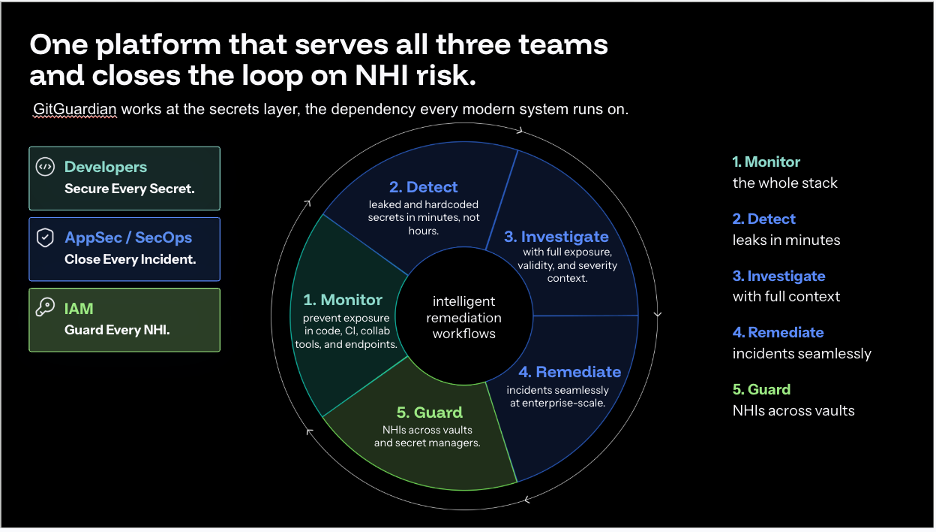
Figure 1: GitGuardian key capabilities
The key component that makes these capabilities possible is ggscout, GitGuardian’s external collector that safely catalogs secrets from Secrets Manager and correlates them with exposed credentials detected across your repositories. ggscout uses the Hashed Message Secret Lookup (HMSL) protocol, a cryptographic hashing approach that converts secrets into secure fingerprints locally within your AWS infrastructure. Because only anonymized fingerprints leave your environment, your actual secrets remain within your AWS infrastructure. Only hashed fingerprints and metadata are transmitted to GitGuardian, maintaining your security posture and compliance requirements while enabling secret correlation and exposure analysis. For most environments, ggscout can run on an Amazon Elastic Compute Cloud (Amazon EC2) t3.small instance, keeping operational costs minimal.
Key capabilities
Using GitGuardian and the Secrets Manager integration, enables teams to gain continuous visibility and control over their secret’s lifecycle. Here are the key capabilities you get from this integration:
- Detect vaulted secret exposures: This capability identifies when secrets stored in Secrets Manager have been exposed in code. When integrated with your organization’s source control systems, GitGuardian’s platform continuously monitors them across both internal repositories and public-facing code and correlates any detected credentials against your Secrets Manager inventory. When a developer accidentally commits a credential that’s already vaulted, you get an immediate alert with full context: which secret was exposed, where it appeared, and whether it’s visible internally or on the public internet. This transforms a raw “secret detected” alert into actionable intelligence, so you can prioritize your response based on the actual scope of exposure.
- Prioritize incident response: Not all secrets pose equal risk. You prioritize remediation based on exposure severity (public compared to internal), sensitivity level, usage context, and rotation status. Knowing which systems depend on the secret, when it was last rotated, and what level of access it grants is crucial for prioritizing remediation. The information about which systems depend on the secret, when the secret was last rotated, and level of access the secret grants you is crucial in making that decision. For instance, a publicly exposed production database credential requires immediate rotation, while a development API key in a private repository might be scheduled for the next sprint.
- Identify secret sprawl across AWS accounts: Multi-account AWS architectures are a best practice for security and organizational boundaries, but they hide duplicate secrets across account boundaries. You gain visibility into identical credentials stored across multiple AWS accounts and unused secrets to decommission. By identifying duplicate secrets, you can consolidate credentials, reduce your attack surface, and simplify attack surface.
- Track remediation progress: GitGuardian’s remediation tracking gives incident managers real-time visibility into the remediation status from pull requests, making it straightforward to monitor code fixes from initiation through PR merge. Teams can streamline the entire secrets remediation lifecycle: tracking pending fixes, verifying secret removal, and confirming pull request activity, all from a single, collaborative workflow.
- Establish continuous governance policies: You can implement rotation policies to identify secrets that haven’t been rotated within your policy time frame, set customizable thresholds to flag long-lived credentials, and automatically surface orphaned secrets for review, turning secrets management from a reactive cleanup into a continuous, policy-driven process.
Prerequisites
Before starting the implementation, ensure you have the following in place:
- An AWS account with appropriate AWS Identity and Access Management (IAM) permissions for Secrets Manager access (cross-account read access if using multi-account architecture)
- A GitGuardian account and API credentials (sign up at GitGuardian)
- Deployment infrastructure: Amazon EC2 (t3.small or larger), Amazon Elastic Kubernetes Service (Amazon EKS) cluster, or Docker environment
- IAM permissions for cross-account Secrets Manager read access (if scanning multiple accounts)
- Source control systems to connect to GitGuardian for code scanning
- AWS Command Line Interface (AWS CLI) installed and configured (required for Amazon EC2 and AWS EKS deployment methods)
Implementation roadmap
When your organization wants to introduce a continuous governance process using GitGuardian, use the following phased approach.
Note: The resources deployed in this implementation (Amazon EC2 instances, Amazon EKS clusters, and AWS Lambda functions) will incur AWS charges. Review the pricing pages for Amazon EC2, Amazon EKS, and AWS Lambda to estimate costs for your environment. Remember to clean up resources when no longer needed to avoid ongoing charges.
Phase 1 – Deployment (1–2 days): Deploy ggscout in your AWS environment using your preferred deployment method: Amazon EC2 instance based, Docker containers for containerized environments, or using Helm charts in an Amazon EKS cluster. Connect ggscout to your GitGuardian account.
Deployment guide: Deploy ggscout to your preferred environment. For detailed deployment steps, see the ggscout documentation. Key configuration parameters include your GitGuardian API token, AWS Region, and Secrets Manager access credentials.
Verification: Verify deployment by checking that ggscout successfully connects to GitGuardian (check logs for connection confirmation) and completes the initial scan (verify that scan completion status in the GitGuardian dashboard shows all configured accounts).
Phase 2 – Assess (2–3 days): Configure read-only access to Secrets Manager across your accounts. Run your initial scan to catalog all secrets and their metadata. Review the baseline report to understand your current secret landscape. The total number of secrets in your AWS environment, their age distribution, rotation status, and any immediate red flags like secrets older than your policy allows become immediately visible, as shown in Figure 2.
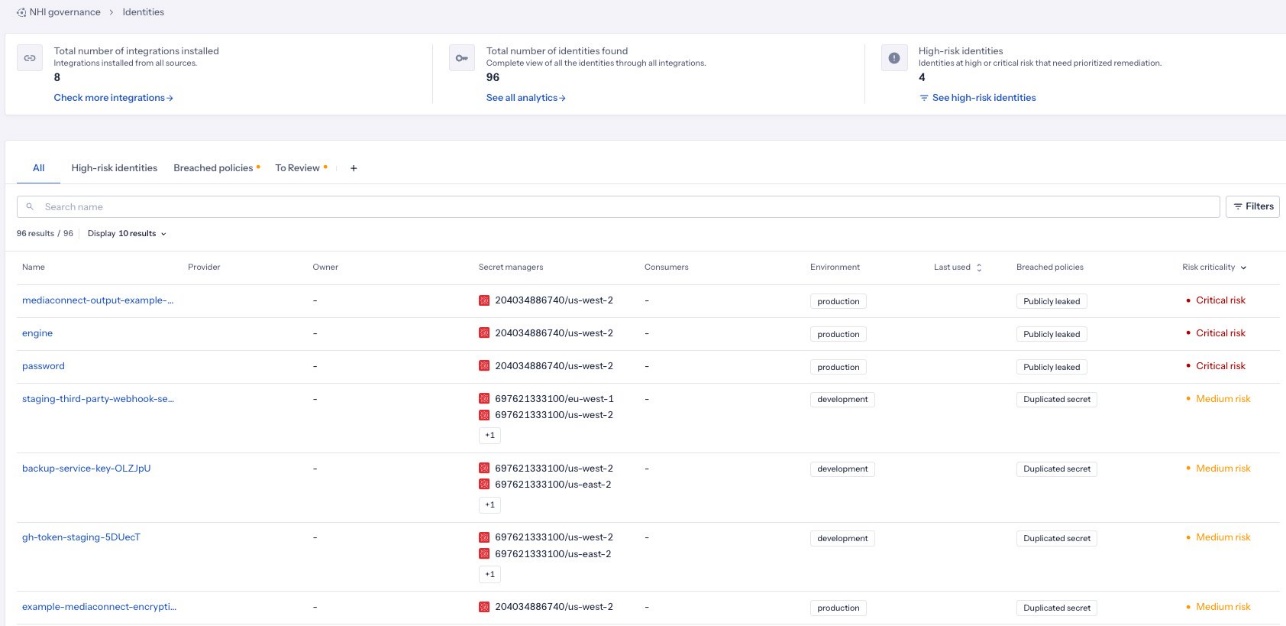
Figure 2: NHI governance with criticality
Phase 3 – Analyze (3–5 days): Review detected exposures that match secrets in Secrets Manager. Identify duplicate secrets across AWS accounts. Prioritize remediation based on exposure severity and secret sensitivity. This analysis reveals which of your vaulted secrets have been exposed in code, where duplicates exist, and which secrets pose the highest risk to your organization. Use this baseline to define or revisit your security tolerance. For example, any public exposure of a production secret requires immediate rotation, while internal exposures in archived repositories can be scheduled.
Analysis guide: For guidance on reviewing scan results and configuring exposure policies, see the GitGuardian NHI governance documentation.
Verification: Confirm analysis completion by verifying that all detected exposures have been reviewed and prioritized in the GitGuardian dashboard.

Figure 3: Tracking secret exposure lifecycle
Phase 4 – Automate (1–2 weeks): Schedule ggscout to run daily or weekly to enable teams to track secret exposure continually, as shown in figure 3. Configure alerts for new exposures of vaulted secrets. Set up automated notifications for secrets approaching rotation deadlines and for re-use of existing secrets as shown in figure 4. After Phase 3 remediation is complete, expand scanning to additional AWS Regions and accounts by deploying ggscout instances or configuring cross-account access. Continuous monitoring detects new exposures as they occur, rather than discovering them weeks or months later during security audits.
Automation guide: For configuring scheduled scans and alert integrations, see the GitGuardian integrations documentation.
Verification: Validate automation by confirming scheduled scans run successfully (check scan history in the GitGuardian dashboard) and test that alerts trigger correctly by simulating an exposure.
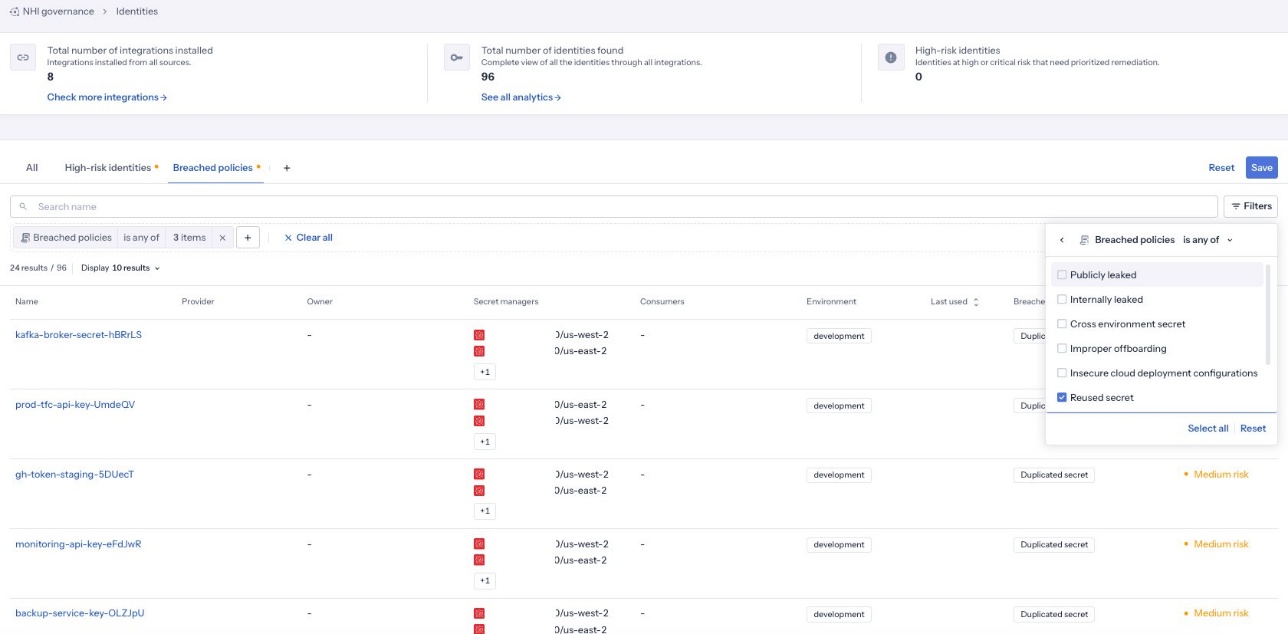
Figure 4: Breached policies for secret duplication
Phase 5 – Monitor (ongoing): By tracking KPIs such as time-to-remediation and rotation compliance rate, teams can move beyond reactive cleanup and start identifying trends across their secrets posture. These metrics simplify identifying recurring gaps, measure improvement over time, and continuously refine governance policies based on real incident data. You can view this metrics using the GitGaurdian monitoring dashboard, as shown in the following figure.
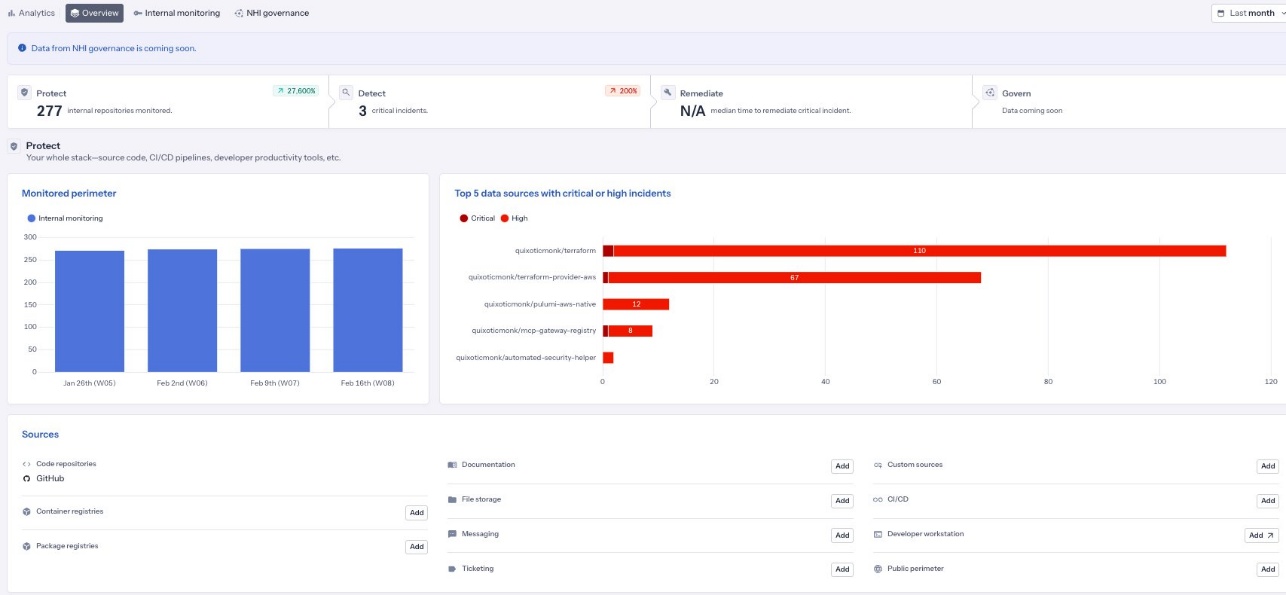
Figure 5: GitGuardian monitoring dashboard overview
Clean up resources
To avoid incurring ongoing AWS charges, delete or decommission all resources created during implementation when they are no longer needed. Follow these steps:
- Stop and terminate Amazon EC2 instances running ggscout: Navigate to the Amazon EC2 console, select the instances, and choose Instance state and then choose Terminate instance.
- Remove the Helm release by running
helm uninstallggscout. - Delete the EKS cluster based on your provisioning method (infrastructure as code, eksctl, or manually from the console )
- Remove Lambda functions created for automated remediation workflows by navigating to the Lambda console and deleting each function associated with the integration.
- Delete any associated IAM roles and policies created for ggscout access, including cross-account roles used for Secrets Manager read access. Review and remove these from the IAM console.
Conclusion
The combination of AWS Secrets Manager and GitGuardian gives you visibility and automation across the secret’s lifecycle, from creation to usage to rotation to decommissioning. By integrating GitGuardian with Secrets Manager, organizations gain continuous visibility into their secrets security posture, detecting exposures as they occur and establishing governance policies that prevent future incidents.You now have the visibility and governance controls to build a unified secrets security strategy. Start by deploying ggscout, running your initial scan, and reviewing the baseline report.After initial deployment, extend the integration with these next steps:
- Implement automated remediation workflows: Use GitGuardian webhooks with Lambda to trigger automatic secret rotation when exposures are detected, reducing mean time to remediation.
- Integrate with your incident response pipeline: Connect GitGuardian alerts to your existing SIEM, ticketing, or ChatOps tools to embed secrets incidents into your established workflows.
For more information and detailed deployment guides, explore these resources:
- AWS Security Best Practices
- GitGuardian ggscout documentation
- GitGuardian integration guides
- AWS blog posts on secrets management

GitGuardian – AWS Partner Spotlight
GitGuardian is an AWS Partner specializing in NHI security and secrets management, providing end-to-end solutions from secrets detection in code to remediation, observability, and proactive prevention of leaks.