AWS Architecture Blog
Build a unified AI agent architecture with DynamoDB and Bedrock
Teams building AI agents on AWS often face a fragmented data architecture: operational data lives in Amazon DynamoDB while vector embeddings for semantic search sit in a separate, purpose-built vector store. This duplication increases infrastructure cost, adds synchronization complexity, and widens the window for stale retrieval results. With the general availability of native vector search in Amazon DynamoDB (launched August 5, 2026), you can now store embeddings alongside your operational data in the same table. You query them using the SearchVectors API operation.
In this post, I show you how to build a unified AI agent architecture where an Amazon Bedrock agent uses a single DynamoDB table for both structured lookups and semantic similarity search. The agent calls AWS Lambda action groups that invoke SearchVectors for natural language retrieval and standard DynamoDB APIs for create, read, update, and delete (CRUD) operations. An Amazon DynamoDB Streams pipeline automatically generates embeddings using Amazon Titan Text Embeddings V2 whenever content changes. This keeps the vector index synchronized without manual intervention.
Use case
Consider a technical knowledge management platform where a team maintains hundreds of internal documents: runbooks, architecture decision records, and troubleshooting guides. Team members interact with a conversational agent to find relevant content (“What’s our retry strategy for payment failures?”), retrieve specific documents by ID, or update existing entries.
Without native vector search, this architecture requires a DynamoDB table for document storage plus a separate vector database (or Amazon OpenSearch Service cluster) for semantic retrieval. The Amazon DynamoDB Streams pipeline must write to both stores, and the agent must route requests to the correct backend. With DynamoDB vector search, you collapse this into a single table and reduce operational overhead.
Solution overview
This solution uses a single-table design in DynamoDB that serves two access patterns: key-value lookups for operational data and approximate nearest neighbor (ANN) search for semantic queries. A Bedrock agent orchestrates user interactions and routes requests to the appropriate action group function.
The following list summarizes the core components:
- DynamoDB table with vector index stores documents, metadata, and 1,024-dimension embeddings in one place.
- Bedrock agent handles conversation orchestration, tool selection, and response synthesis.
- Action group Lambda executes semantic search (using
SearchVectors) and CRUD operations against the same table. - Embedding pipeline Lambda (triggered by DynamoDB Streams) generates embeddings for new or modified content using Amazon Titan Text Embeddings V2.
Architecture
The following diagram illustrates the data flow through the unified architecture.
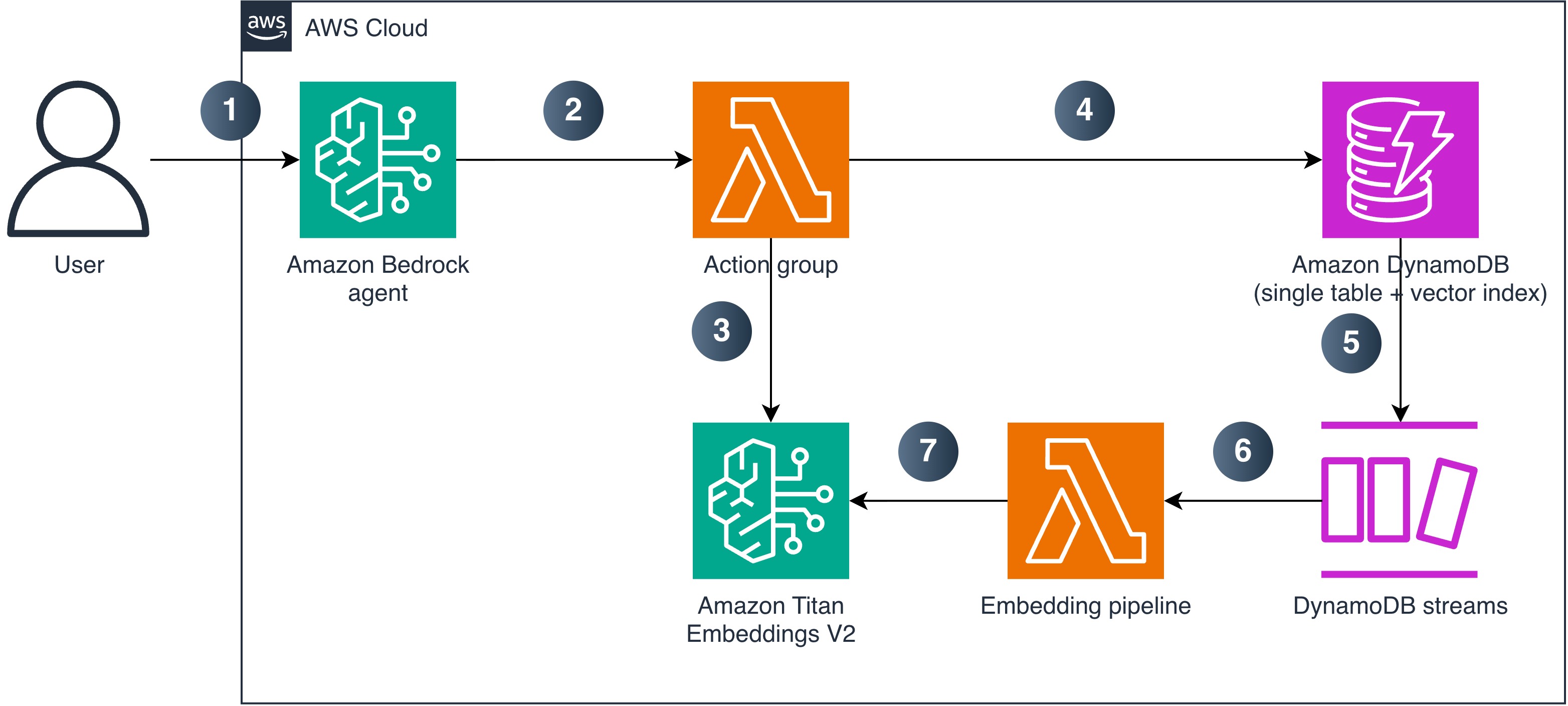
Figure 1: Unified AI agent architecture using DynamoDB vector search and Amazon Bedrock
The numbered steps describe the data and request flow:
- A user sends a natural language query to the Bedrock agent.
- The agent analyzes the request and invokes the appropriate action group Lambda function.
- For semantic search, the action group Lambda generates a query embedding using Amazon Titan Text Embeddings V2.
- The Lambda function calls the DynamoDB
SearchVectorsAPI (or standard CRUD APIs for operational lookups) against the single table with vector index. - When new content is written to the table, DynamoDB Streams captures the change.
- DynamoDB Streams triggers the embedding pipeline Lambda.
- The embedding pipeline Lambda calls Amazon Titan Text Embeddings V2 to generate a vector for the new content and writes it back to the same DynamoDB item, where the vector index automatically indexes it.
Prerequisites
To implement this architecture in your account, you need the following:
- An AWS account with permissions to create DynamoDB tables, Lambda functions, Bedrock agents, and IAM roles.
- DynamoDB Streams enabled on the table with
StreamViewTypeset toNEW_AND_OLD_IMAGES(the embedding pipeline compares old and new content to prevent a write loop). - Access to the Amazon Titan Text Embeddings V2 model (
amazon.titan-embed-text-v2:0) enabled in Amazon Bedrock model access. - Access to an Anthropic Claude or Amazon Nova model for the Bedrock agent foundation model (check model support by Region).
- Python 3.12 or later (for Lambda function code).
Implementation
This section walks through the key components of the architecture.
Designing the single-table schema
The table uses a composite primary key (entity_id as partition key, sk as sort key) and stores embeddings as a list of numbers:
The vector index partitions search results by the category attribute. Choose a partition key with moderate cardinality that matches your query patterns. A very low-cardinality key (a handful of values) concentrates data in few partitions and limits throughput scaling, while a unique-per-item key leaves no neighbors to compare. For multi-tenant workloads, tenant_id is usually the right partition key. For more information, refer to the DynamoDB vector search best practices.
The following AWS Command Line Interface (AWS CLI) command creates the vector index on an existing table:
After creating the index, wait for it to become searchable. Poll DescribeTable until IndexStatus is ACTIVE and Backfilling is no longer true. The first few searches after the index reports ACTIVE can still return ValidationException because SearchVectors is served by a dedicated search endpoint. Treat these as retryable rather than as a failure.
Key constraints to keep in mind:
- DynamoDB vector indexes require on-demand capacity mode (provisioned mode isn’t supported).
- Maximum five vector indexes per table, with up to 4,096 dimensions each.
- The
SearchSchemaHASH attribute is mandatory in everySearchConditionExpression. - Only equality operators are supported in search conditions.
SearchVectorsresponses are limited to 16 MB and don’t support pagination. Project only the attributes you need and keepTopKmodest to stay within this limit.- Items missing the
SearchSchemaHASH attribute (categoryin this example) are silently excluded from the vector index while remaining in the base table.
Building the action group Lambda
The action group Lambda handles both semantic search and operational lookups. The agent invokes it with a function name and parameters based on the tool definition.
The semantic search function generates a query embedding and calls SearchVectors. This index uses COSINE distance, where lower scores indicate greater similarity. Name the field accordingly so the agent doesn’t invert the ranking:
The generate_embedding helper calls Amazon Titan Text Embeddings V2:
The Lambda handler routes requests based on the function name passed by the Bedrock agent:
Automating embeddings with DynamoDB Streams
The embedding pipeline Lambda triggers on INSERT and MODIFY events. It generates an embedding for new or changed content and writes it back to the same item:
The infinite-loop guard is critical. Without it, the Lambda writes back an embedding, which triggers another Streams event, which triggers another embedding generation, and so on. The check compares the content field between old and new images, skipping processing when only the embedding attribute changed. This guard requires StreamViewType = NEW_AND_OLD_IMAGES. Without it, OldImage is empty and the guard never fires.
For production use, configure the event source mapping with ReportBatchItemFailures so that only failed records are retried. Add an Amazon Simple Queue Service (Amazon SQS) dead-letter queue (or on-failure destination) for records that repeatedly fail. Retry Amazon Bedrock InvokeModel calls with exponential backoff to handle throttling.
Defining the agent tool schema
The Bedrock agent needs a function schema that describes the available tools. This tells the agent when and how to call each function:
When to use this pattern
This unified architecture works best when your application already uses DynamoDB as its primary operational store and you want to add semantic search without managing a separate service. Consider the following decision points:
- Use this pattern when your application meets these conditions:
- Documents update frequently and must be immediately searchable.
- Your dataset fits within the DynamoDB vector index constraints.
- You want to minimize infrastructure components.
- Use Amazon Bedrock Knowledge Bases when your source data lives in Amazon Simple Storage Service (Amazon S3), you need managed chunking and ingestion, or you don’t need real-time index updates tied to operational writes.
- Use Amazon OpenSearch Service when you need advanced search features (range filters, aggregations, faceted search), your queries require more than equality-based filtering, or you need results beyond the 100-item
TopKlimit.
Security considerations
The following list highlights the key security aspects of this architecture:
- Least-privilege IAM policies: Scope
dynamodb:SearchVectorsto the specific index ARN (arn:aws:dynamodb:{region}:{account}:table/{table}/index/{index}). The embedding Lambda needs onlydynamodb:UpdateItem, not search permissions. - No fine-grained access control for SearchVectors: DynamoDB condition keys like
dynamodb:LeadingKeysdon’t apply to theSearchVectorsAPI. For multi-tenant workloads, use theSearchSchemaHASH partition key to scope queries by tenant, or use separate tables for strict isolation. - Encryption at rest: DynamoDB encrypts data including vector embeddings using your choice of AWS owned keys, AWS managed keys, or customer managed keys through AWS Key Management Service (AWS KMS).
- Transport encryption: All
SearchVectorstraffic uses TLS. The API routes to a dedicated search endpoint that the AWS SDKs handle automatically. - Bedrock model access: Restrict
bedrock:InvokeModelpermissions to the specific embedding and agent foundation model ARNs required by the solution. - Agent-to-Lambda invocation: Grant
lambda:InvokeFunctiontobedrock.amazonaws.comon the action group Lambda, scoped with anaws:SourceArncondition matching the agent ARN. Without this resource-based policy, the agent can’t invoke the action group.
Clean up
To avoid ongoing charges, delete the resources in the following order:
- Delete the Bedrock agent and its action group.
- Delete the embedding pipeline Lambda function and its event source mapping.
- Delete the DynamoDB table (this also removes the vector index). If you want to keep the table but remove the vector index, run the following command first:
- Delete the action group Lambda function and associated IAM roles.
Conclusion
With this pattern, you can build a unified AI agent architecture that uses a single DynamoDB table for both operational data and vector-based semantic search. The native vector search of DynamoDB combined with Bedrock agent action groups eliminates the need for a separate vector database. DynamoDB Streams-driven embedding generation keeps the index synchronized in real time.
This pattern reduces infrastructure complexity for applications that already rely on DynamoDB and need to add conversational AI capabilities. The automatic embedding pipeline keeps your vector index synchronized with operational writes, and the action group design gives the agent access to both semantic and structured query paths.
Adapt the table schema, embedding dimensions, and agent instructions to your domain. Clone the sample-dynamodb-vector-search-architecture repository to deploy the complete working implementation. For more information about DynamoDB vector search capabilities and limits, refer to the Amazon DynamoDB vector search documentation.
References
- Amazon DynamoDB vector search documentation
- Amazon Bedrock Agents documentation
- Amazon Titan Text Embeddings V2