AWS Cloud Financial Management
Gain per-developer visibility into Kiro Enterprise credit usage
In this post, we introduce the Kiro Cost Optimizer, an open-source, serverless solution that gives you per-developer visibility into Kiro Enterprise credit usage. It ingests Kiro’s daily per-user activity reports, accumulates month-to-date usage per developer, and delivers a consolidated usage visibility report with tier optimization recommendations via email on a schedule you control. The entire stack deploys in minutes with a single AWS CloudFormation template, costs less than a few dollars a year to operate, and requires zero ongoing maintenance.
Kiro Enterprise gives development teams AI-powered coding assistance across IDE and CLI workflows. With four subscription tiers and monthly credit allowances ranging from 1,000 to 10,000 credits, administrators need a clear picture of how each developer actually uses their allocation, for example, which users are consuming credits heavily, which are barely touching them, and where spend is accumulating through overage charges.
Kiro delivers daily per-user activity reports to Amazon Simple Storage Service (Amazon S3), split by client type (IDE, CLI, and web). But turning those raw CSV files into a unified, month-to-date view of credit consumption across your entire organization requires daily correlation, accumulation, and analysis that quickly becomes unsustainable to perform manually. The Kiro Cost Optimizer automates this daily processing, so administrators can spend their time acting on the recommendations instead of assembling the data.
You can find the complete solution in the aws-samples/sample-kiro-cost-optimizer repository on GitHub.
The problem: spotting tier mismatches requires more than daily usage reports
To understand the scale of the challenge, consider the pricing model:
| Tier | Monthly Credits | Base Price | Overage Rate |
|---|---|---|---|
| Kiro Pro | 1,000 | $20/mo | $0.04/credit |
| Kiro Pro+ | 2,000 | $40/mo | $0.04/credit |
| Kiro Pro Max | 5,000 | $100/mo | $0.04/credit |
| Kiro Power | 10,000 | $200/mo | $0.04/credit |
Pricing is subject to change. For the latest tier pricing, see the Kiro Enterprise pricing page.
As adoption of Kiro Enterprise scales across an organization, determining the right tier for each developer becomes an operational burden that grows linearly with headcount. Consider a developer assigned to the Kiro Power tier ($200/month, 10,000 credits) who consistently uses only 800 credits; that’s $180 per month in wasted budget. When multiplied across dozens of similarly over-provisioned users, the waste compounds into thousands of dollars per quarter that could be redirected toward additional seats or tooling investments.
The inverse problem is equally costly. A Kiro Pro user ($20/month, 1,000 credits) who regularly consumes 3,000 credits incurs $80 in overage charges each cycle, bringing their effective monthly cost to $100, the exact price of the Kiro Pro Max tier, which would cover that same usage with zero overage and 2,000 credits of additional headroom. These mismatches are straightforward to spot in isolation but identifying them requires correlating daily CSV reports that Kiro delivers to Amazon S3. Those reports are split across IDE, CLI, and web client types, and surfacing the mismatch means accumulating month-to-date totals per user and running break-even analysis against all four tier price points.
The core insight is that tier optimization is a data pipeline problem, not a human judgment problem. The pricing model is deterministic: given a user’s month-to-date credit consumption and their current tier, the optimal tier is a calculation. The hard part is automating the ingestion, accumulation, and alerting without manual intervention, and that’s what the Kiro Cost Optimizer solves.
Solution overview
The Kiro Cost Optimizer is a fully serverless AWS solution that continuously monitors Kiro Enterprise usage and proactively recommends tier changes to minimize cost. It operates on three principles:
- Ingest daily — Automatically processes Kiro’s per-user activity reports (IDE, CLI, and web) every day at 3 AM UTC, one hour after Kiro delivers them to Amazon S3.
- Accumulate monthly — Maintains per-user month-to-date credit totals in Amazon DynamoDB, tracking active user in the current billing month regardless of whether they have usage on a given day. A 90-day DynamoDB Time to Live (TTL) keeps the table bounded automatically, requiring no manual cleanup.
- Recommend on schedule — Delivers a formatted email report via Amazon Simple Notification Service (Amazon SNS) to the subscribed email address and writes a report to the provided S3 bucket, containing upgrade and downgrade recommendations on a configurable daily, weekly, or monthly cadence. An S3 lifecycle policy is applied to the kiro-user-activity/reports/ directory that deletes current versions of reports older than 90 days and noncurrent versions after 1 day.
Note: The S3 lifecycle policy applies only when use-existing-bucket is set to false in the CloudFormation template parameters.
Recommendation logic
The optimizer runs break-even analysis against all four tiers for each user:
- Upgrade recommendations (always active): For each user, the optimizer computes total monthly cost on the current tier (base price + overage credits × $0.04) and identifies the cheapest higher tier whose total cost is at or below what the user already pays. It can skip tiers, so a heavy Kiro Pro user might go straight to Kiro Pro Max.
- Downgrade recommendations (last 5 days of the month only): During this end-of-month window, when month-to-date usage is a reliable proxy for the full month, the optimizer checks whether a lower tier would be cheaper after accounting for overage and recommends it for the following month.
This two-phase approach prevents premature downgrade recommendations early in the month when low usage is misleading, while still capturing savings before the next billing cycle. Refer to the Kiro Enterprise billing page for more details.
Sample recommendation output
The following is an example of the plain-text report delivered via Amazon SNS and archived to the S3 bucket. Users with a recommendation appear first, then everyone else. The Clients column lists the client types each developer was active on (IDE, CLI, web), and the Models column lists the models they used, including Kiro’s automatic model picker (auto):
What does the admin do with the recommendations?
Tier changes are made in the Kiro Console in the Users tab under the Access management page. Administrators can review the recommendations, adjust individual user tiers in the console, and the new allocation takes effect at the start of the next billing cycle.
Architecture
The solution deploys as a single CloudFormation stack with three independent processing paths:
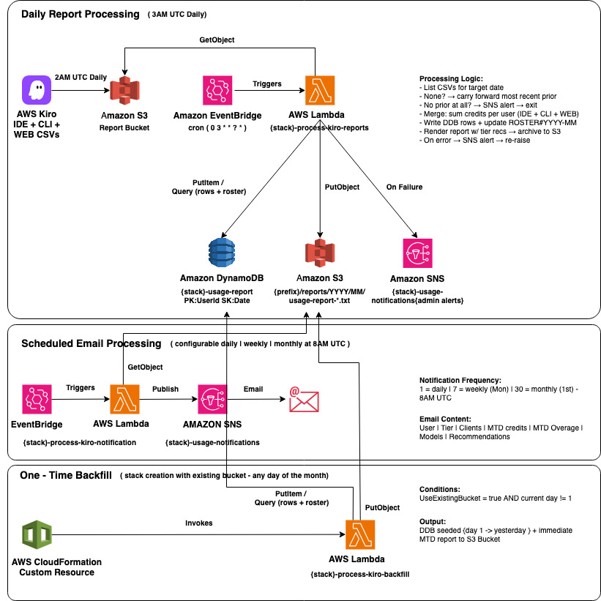
Figure 1: Kiro Cost Optimizer architecture showing daily processing, notification, and backfill paths
Daily report processing (3 AM UTC)
An Amazon EventBridge rule triggers the process-kiro-reports AWS Lambda function daily at 3 AM UTC, one hour after Kiro delivers them to Amazon S3.
The function discovers all CSV files for the target date under the configured S3 prefix. If none exists, it falls back to the most recent prior report. If no historical report is available at all, it alerts via Amazon SNS.
The function then merges credits across client types (IDE, CLI, and web) per user. It captures the client types and models each user touched. It then writes consolidated month-to-date rows to DynamoDB, renders a formatted plain-text report with tier recommendations, and archives that report to Amazon S3.
Any processing error triggers an SNS alert and re-raises the exception for Lambda’s built-in retry.
Scheduled email notification (configurable)
An independently scheduled EventBridge rule triggers the process-kiro-notification Lambda function on the administrator’s chosen frequency, daily, weekly on Mondays, or first day of the month. This function reads the latest archived report from Amazon S3 and publishes it via Amazon SNS to the configured email address.
One-time backfill (stack creation)
When deploying against an existing bucket mid-month, a CloudFormation custom resource invokes the process-kiro-backfill Lambda function during stack creation. It seeds DynamoDB with every report from the first of the current month through yesterday. Month-to-date totals are therefore correct from day one. It then produces an immediate month-to-date report, giving you actionable data right after deployment.
Prerequisites
Before you begin, confirm that you have:
- An AWS account with permissions to deploy CloudFormation stacks, Lambda functions, DynamoDB tables, S3 buckets, SNS topics, and EventBridge rules.
- AWS CLI v2 installed and configured with valid credentials.
- A Kiro Enterprise subscription with administrator access to the Kiro Console.
- (Optional) An existing S3 bucket already receiving Kiro user activity reports. The solution works with both new and pre-existing buckets.
Deployment
Deploying takes a single CLI command:
The stack creates an S3 bucket for the Kiro user activity report. After the stack completes, open the Settings page in the Kiro console, turn on the user activity report, choose CSV as the format, and paste the S3 URI from the stack outputs into the S3 URI field. Next, confirm the SNS subscription by choosing the link in the verification email that Amazon SNS sends to your configured address. Reports start arriving the next day, and the first optimization email follows on the schedule you chose.
For organizations that already have a bucket with reports enabled, set UseExistingBucket=true and BucketName=your-bucket-name. The backfill Lambda automatically seeds the current month’s history, and you receive a complete month-to-date report immediately after stack creation.
Cost and security
Thanks to its serverless architecture, the solution costs less than a few dollars per year to operate for an organization with 100 developers. That total reflects S3 storage, DynamoDB on-demand reads and writes, SNS notifications, Lambda compute, and EventBridge scheduling combined, less than what a single corrected tier assignment saves in one month.
DynamoDB storage stays negligible over time because a 90-day Time to Live (TTL) auto-expires each row 90 days after it is written. These deletes are performed by DynamoDB itself, so they incur no additional IAM permissions or write costs, and 90 days comfortably outlives the current-month read window, so reports are never affected.
The S3 Lifecycle policy on the reports is set to 90 days by default when UseExistingBucket is set to false during deployment, and S3 automatically deletes any reports created by the solution that are older than 90 days. The S3 Lifecycle policy configuration is also provided in the Outputs section of the CloudFormation template, so it can be applied manually to an existing bucket.
Security follows the principle of least privilege: S3 objects are encrypted at rest (AES-256) with public access blocked, the Lambda execution role is scoped to only the specific bucket prefix, DynamoDB table, and SNS topic it needs, and the bucket policy grants s3:PutObject only to the Kiro service principal scoped to your account. For full details, see the CloudFormation template in the repository.
Cleaning up
To avoid incurring future charges, delete the CloudFormation stack when you no longer need the solution:
aws cloudformation delete-stack --stack-name kiro-cost-optimizer
If the stack created a new S3 bucket (UseExistingBucket=false), you must empty the bucket before deletion:
aws s3 rm s3://YOUR-BUCKET-NAME --recursive
Then re-run the delete-stack command. The DynamoDB table, Lambda functions, EventBridge rules, and SNS topic are all deleted automatically with the stack. Note that even without teardown, the DynamoDB table never grows unbounded, because the 90-day TTL auto-expires old rows on an ongoing basis.
Conclusion and next steps
With the Kiro Cost Optimizer running, administrators gain a daily-accumulated, per-developer view of credit consumption that would otherwise require manual CSV correlation across multiple client types. The solution surfaces tier optimization opportunities monthly before the next billing cycle begins, translating raw usage data into concrete dollar-savings recommendations.
Once your initial report arrives, act on the highest-savings recommendations first. A single tier correction recovers more than the solution’s annual operating cost in one billing cycle, so the payback is immediate. Next, tune the notification cadence to match your team’s rhythm by updating the NotificationFrequency parameter, for example, daily for hands-on administrators, weekly for a Monday morning digest, or monthly for set-and-forget governance. To extend this into broader FinOps goals, pair the Kiro Cost Optimizer with subscription groups in the Kiro Console to build a comprehensive cost governance layer around your Kiro Enterprise deployment.
The solution is open source and available in the aws-samples/sample-kiro-cost-optimizer repository. Deploy it today and start optimizing your Kiro Enterprise spend in minutes.