AWS Cloud Financial Management
How to understand and estimate combined AWS WAF and AWS Shield Advanced costs
AWS WAF and AWS Shield Advanced provide robust DDoS mitigation and request filtering, but estimating their combined costs can be complex. This guide helps you understand the pricing components so you can protect your web applications while keeping spend predictable.
Without proper planning and cost management, these security measures can exceed your budget. You might have questions like:
- “I’m currently using AWS WAF to protect my environment. How much will my AWS WAF bill change once I add Shield Advanced?”
- “AWS Shield Advanced pricing includes a Data Transfer Out (DTO) usage fee that varies month to month. How do I forecast what the product will actually cost me?”
- “I want to enable AWS Shield Advanced for a subset of my resources initially and expand coverage gradually. Can I generate estimates for different protection scenarios to support a phased approach?”
This post shows you how to estimate costs for AWS WAF and AWS Shield Advanced — starting with each service independently, then getting granular cost breakdowns when both are enabled together.
Considerations for understanding and estimating AWS WAF costs when enabled with AWS Shield Advanced
- Variable, usage-based pricing — Both services base their pricing on request volume, data transfer, and rule complexity. These fluctuate with traffic patterns, making static estimates unreliable.
- Overlapping cost coverage — When you enable Shield Advanced for a resource, it covers certain AWS WAF charges (up to 1,500 web access control lists (web ACL) capacity units (WCU) and default body size inspection, excluding premium rule sets). Understanding which AWS WAF costs disappear, and which remain requires careful analysis.
- Multiple pricing dimensions — AWS WAF alone has charges for web ACLs, rules, requests (tiered by WCU), Bot Control, Account Takeover Prevention (ATP), CAPTCHA, and Challenge actions. Shield Advanced adds a flat subscription fee and DTO-based charges. Combining these creates a multi-dimensional cost model.
- Organization-level vs. resource-level charges — AWS charges the Shield Advanced $3,000/month subscription fee once per organization, while DTO charges apply per protected resource. This distinction matters when estimating costs for phased rollouts.
- Shifting usage types in billing data — When Shield Advanced is enabled, AWS WAF usage types in your billing data change from standard prefixes (e.g.,
USE1-WebACLV2) to Shield-prefixed variants (e.g.,USE1-ShieldProtected-WebACLV2). This complicates historical cost comparisons.
AWS provides tools to address each of these challenges at different levels of granularity.
Estimating and understanding AWS WAF costs
If you are using AWS WAF independently (without Shield Advanced), you can estimate your costs using the AWS Pricing Calculator or review actual spend in AWS Cost Explorer.
AWS WAF pricing includes charges for web ACLs, rules, requests, and optional intelligent threat mitigation features (Bot Control, Fraud Control, DDoS Protection). For current pricing details, see the AWS WAF Pricing page.
Using the AWS Pricing Calculator
The AWS Pricing Calculator lets you model your AWS WAF configuration and estimate monthly costs before deployment. To estimate:
- Navigate to the AWS Pricing Calculator and search for AWS WAF.
- Enter the number of web ACLs, rules, and expected monthly request volume.
- If using managed rule groups like Bot Control or Fraud Control, add those components.
- Review the monthly estimate.
This approach works well for initial planning and budgeting when you have a reasonable estimate of your expected traffic volume. Figure 1 shows a sample configuration and the resulting cost breakdown.
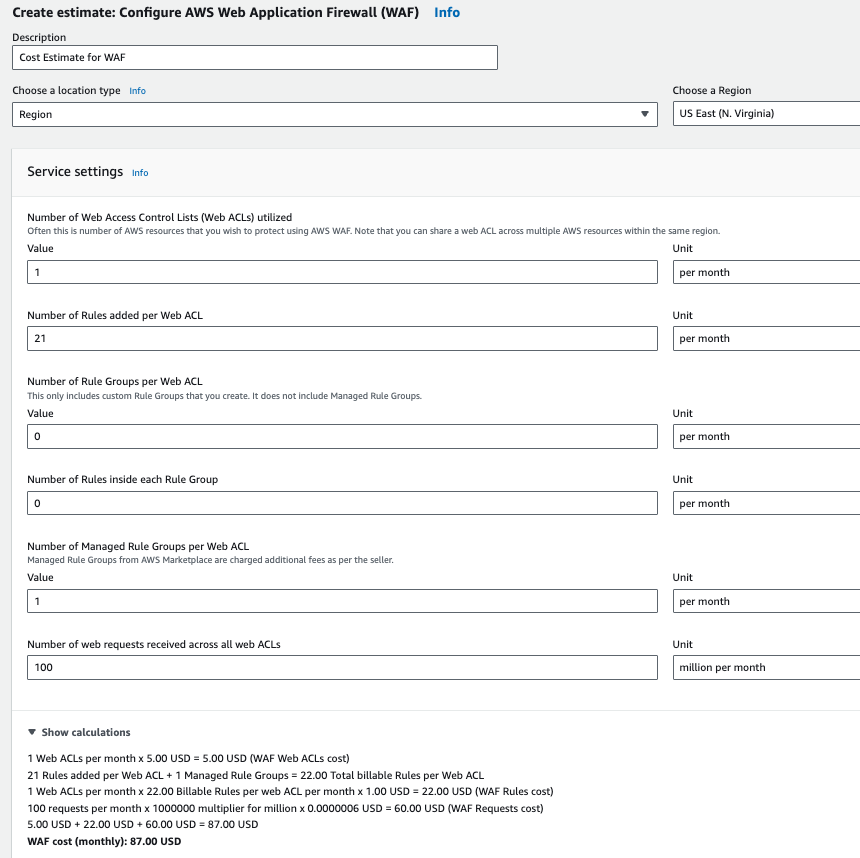
Figure 1: Sample AWS WAF cost estimate in the AWS Pricing Calculator, showing inputs for web ACLs, rules, rule groups, and request volume
Using AWS Cost Explorer
If AWS WAF is already deployed, AWS Cost Explorer provides visibility into your actual spending:
- Go to Cost Explorer in the AWS Management Console.
- Filter by Service = AWS WAF.
- Group by Usage Type to see the breakdown across web ACLs, rules, requests, and managed rule groups.
- Use the date range selector to analyze trends over time and identify cost drivers.
Cost Explorer is useful for understanding your current AWS WAF spend and spotting month-over-month trends before considering Shield Advanced. Figure 2 shows an example of AWS WAF costs grouped by usage type over a six-month period.
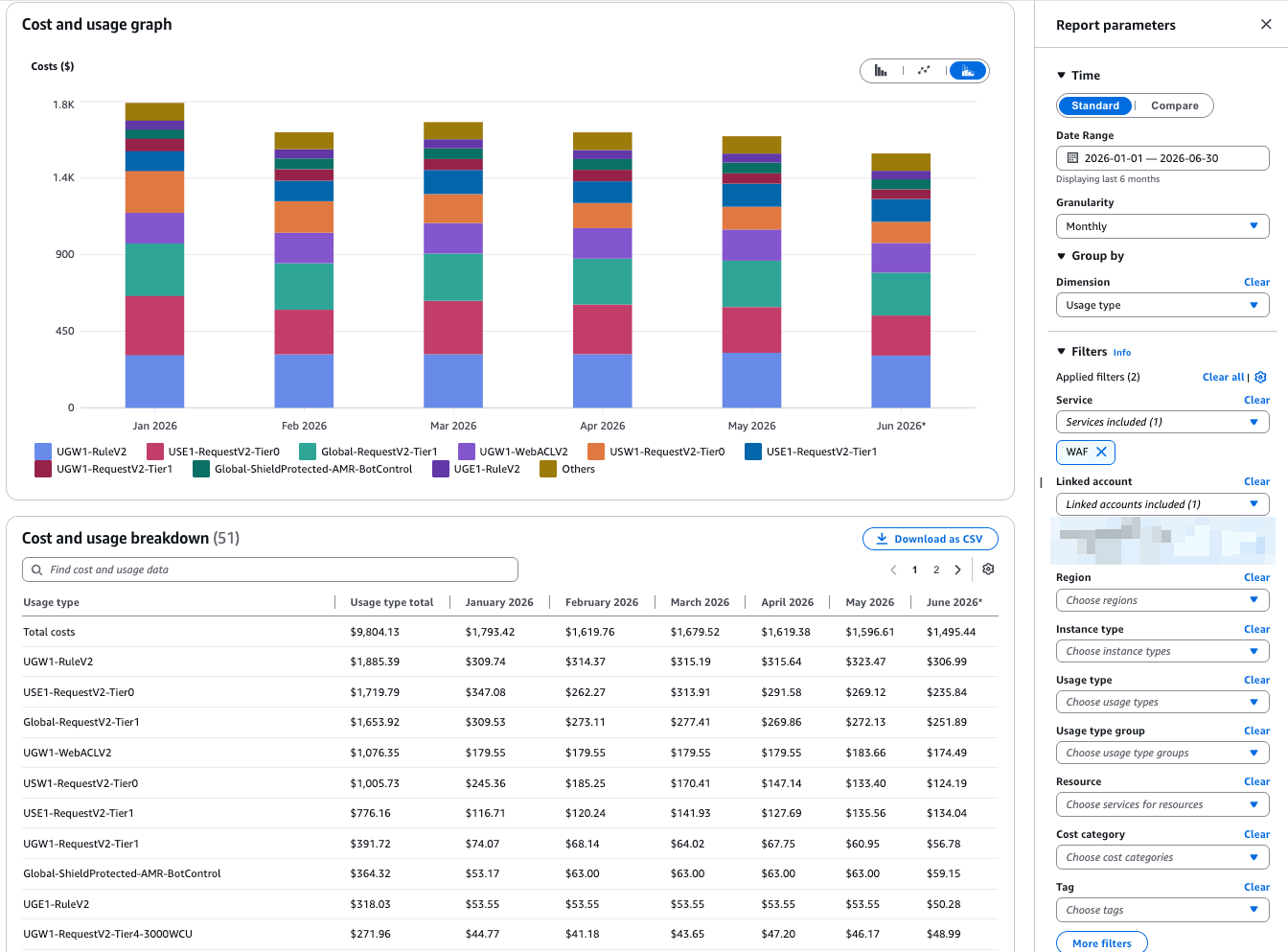
Figure 2: AWS WAF monthly cost and usage breakdown by usage type
Estimating and understand AWS Shield Advanced costs
If you are evaluating Shield Advanced independently, you can estimate your costs using the AWS Pricing Calculator or review actual spend in AWS Cost Explorer.
AWS Shield Advanced pricing includes a monthly subscription fee (per organization) and DTO charges for protected resources. For current pricing details, see the AWS Shield Advanced Pricing page.
Important cost offsets when Shield Advanced is enabled:
- AWS WAF: If you are enabling Shield Advanced on an AWS WAF protected resource, up to 1,500 WCU and default body size inspection are included at no additional AWS WAF charge — excluding premium managed rule sets like Bot Control and Fraud Control
- Anti-DDoS AWS Managed Rule group (AMR): The anti-DDoS AMR and its request fees are waived for up to 50 billion total AWS WAF requests per month across the organization
- AWS Firewall Manager: Shield Advanced and AWS WAF policies are included
- Anti-DDoS AWS Managed Rule group (AMR): The anti-DDoS AMR and its request fees are waived for up to 50 billion total AWS WAF requests per month across the organization
Using the AWS Pricing Calculator
To estimate Shield Advanced costs:
- Navigate to the AWS Pricing Calculator and search for AWS Shield Advanced.
- Enter the number and type of resources you plan to protect (Amazon CloudFront distributions, Application Load Balancers (ALB), Amazon EC2 Elastic IPs, etc.).
- Provide your estimated monthly DTO for each protected resource.
- The calculator will show the subscription fee plus DTO-based charges.
Figure 3 shows a sample Shield Advanced estimate.
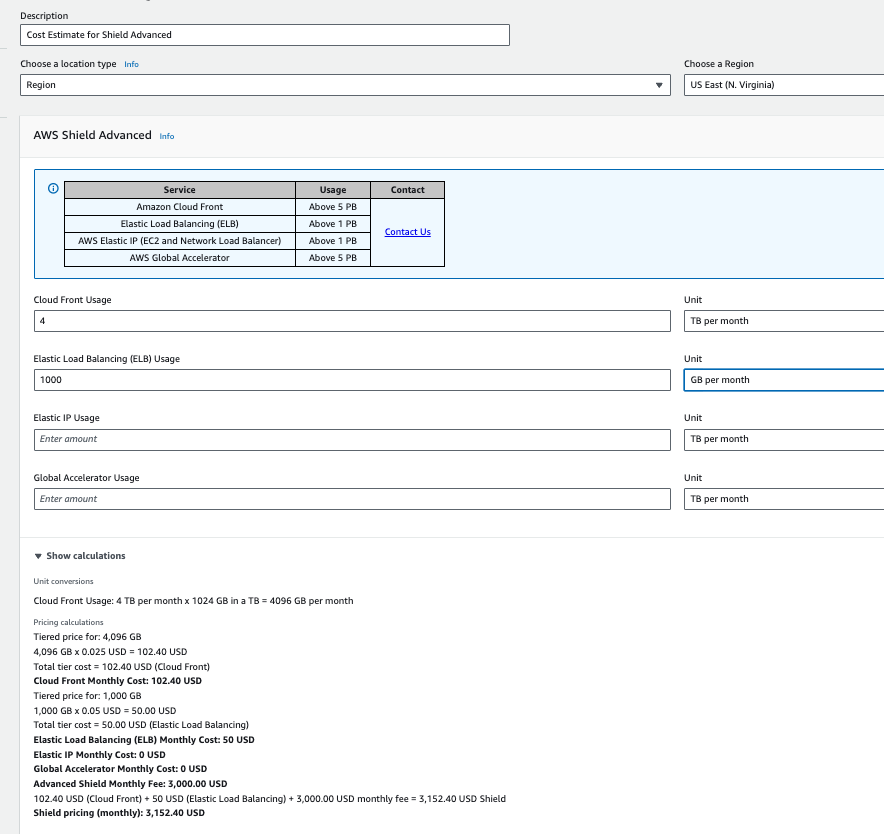
Figure 3: Sample Shield Advanced cost estimate in the AWS Pricing Calculator
Using AWS Cost Explorer
If Shield Advanced is already enabled:
- Go to Cost Explorer and filter by Service = AWS Shield.
- Group by Usage Type to see the subscription fee and DTO charges separately.
- Analyze trends to understand how DTO fluctuations affect your monthly Shield Advanced bill.
Figure 4 illustrates Shield Advanced costs over a six-month period.
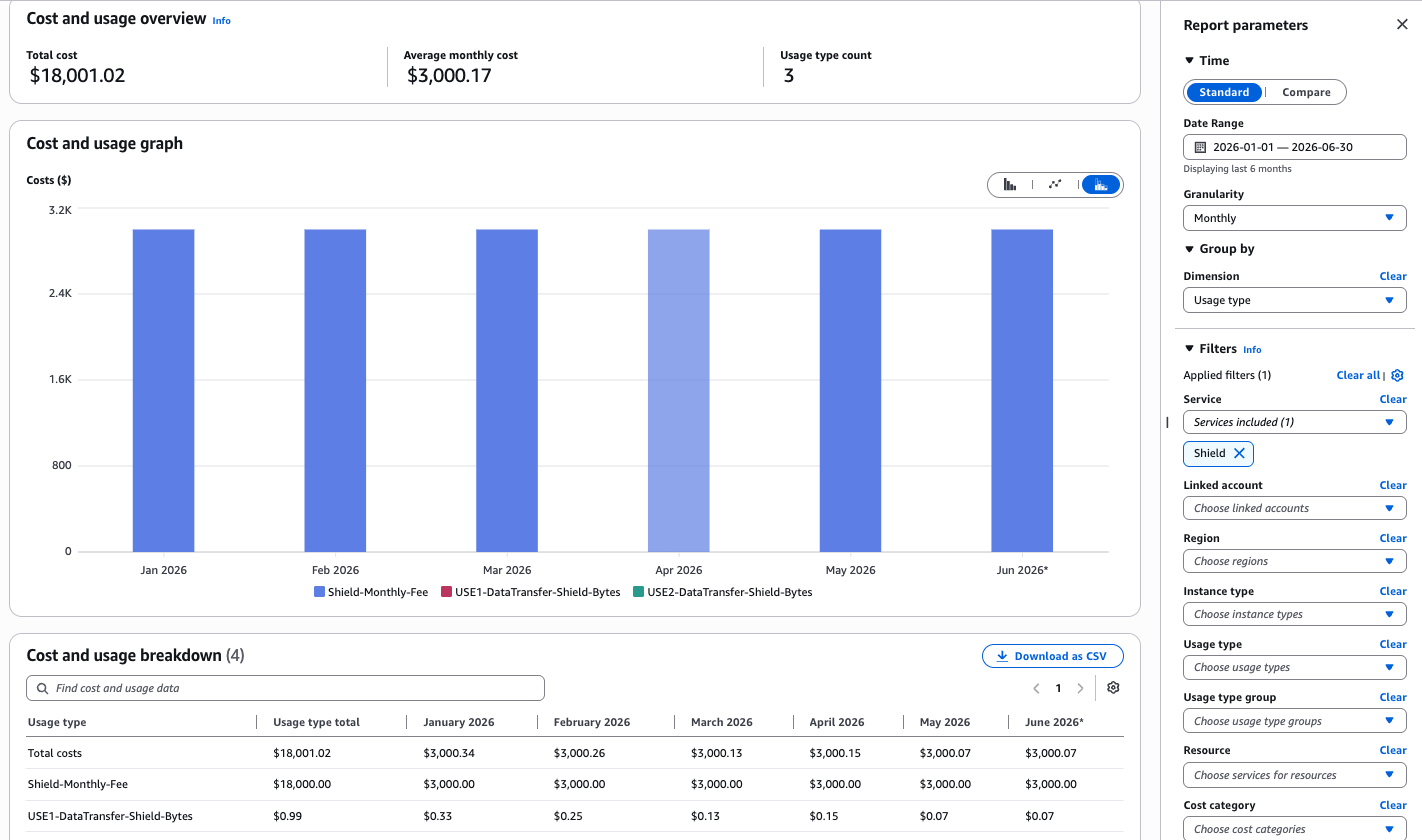
Figure 4: AWS Shield Advanced monthly cost and usage breakdown in Cost Explorer
Note: A standalone Shield Advanced estimate or spend captures only the subscription fee and DTO charges; not the AWS WAF charges that Shield offsets. It therefore overstates the true net cost of enabling Shield Advanced. For the complete picture, analyze both services together using CUR data (see the next section).
Understanding and estimating combined AWS WAF and AWS Shield Advanced costs using AWS Data Exports
While the AWS Pricing Calculator is effective for estimating costs and AWS Cost Explorer for analyzing actual spend, both have limitations when you need granular cost breakdowns for AWS WAF and AWS Shield Advanced working together. This is where the AWS Cost and Usage Report (CUR) data becomes essential.
CUR data provides the most detailed, line-item-level billing data available, allowing you to:
- See exactly which AWS WAF charges are covered by Shield Advanced and which remain
- Analyze costs at the individual resource level
To analyze CUR data, you need to set up AWS Data Exports. The following section covers the prerequisites for this approach.
Prerequisites
To set up AWS Data Exports, follow the Creating data exports user guide, which covers:
- Setting up an Amazon Simple Storage Service (Amazon S3) bucket for data exports
- Processing data exports with Amazon Athena
Note: While AWS Data Exports (CUR) delivery is free, the supporting pipeline incurs minor costs for Amazon S3 storage and Amazon Athena queries. These are typically negligible for single-service analysis, and you can reduce them further by storing CUR in Parquet format and partitioning by date. See Amazon S3 pricing and Amazon Athena pricing.
Understanding Usage Type changes with Shield Advanced
When Shield Advanced is enabled for a resource, the AWS WAF usage types in your billing data change. Understanding this mapping is critical for accurate cost analysis:
| Component | Without Shield Advanced | With Shield Advanced |
| Web ACL | <REGION>-WebACLV2 |
<REGION>-ShieldProtected-WebACLV2 |
| Rules | <REGION>-RuleV2 |
<REGION>-ShieldProtected-RuleV2 |
| Requests | <REGION>-RequestV2-TierN |
<REGION>-ShieldProtected-RequestV2-TierN |
| Body inspection | <REGION>-RequestV2-KB |
<REGION>-ShieldProtected-RequestV2-KB |
| Bot Control | <REGION>-AMR-BotControl* |
<REGION>-ShieldProtected-AMR-BotControl* |
| ATP | <REGION>-AMR-ATP* |
<REGION>-ShieldProtected-AMR-ATP* |
| CAPTCHA | <REGION>-CaptchaAttempted |
<REGION>-ShieldProtected-CaptchaAttempted |
| Challenge | <REGION>-ChallengeServed |
<REGION>-ShieldProtected-ChallengeServed |
| L7 DDoS AMR | <REGION>-AMR-AntiDDoS |
<REGION>-ShieldProtected-AMR-AntiDDoS |
| L7 DDoS AMR Requests | <REGION>-AMR-AntiDDoS-Request |
<REGION>-ShieldProtected-AMR-AntiDDoS-Request |
Where:
<REGION>can be a Commercial, GovCloud, or Global region.- The * symbol represents all related usage types (e.g.,
<REGION>-AMR-BotControl,<REGION>-AMR-BotControl-Request,<REGION>-AMR-BotControl-Targeted,<REGION>-AMR-BotControl-Targeted-Request). - Request tiers (Tier0 through Tier8) correspond to WCU ranges from ≤1,500 to 5,000.
- Default body inspection sizes are 8 KB for ALB and 16 KB for CloudFront, with configurable sizes of 32 KB, 48 KB, or 64 KB.
Scenario: A company’s ecommerce application has been growing steadily, and their combined AWS WAF and Shield Advanced costs have increased month-over-month. The FinOps team needs to understand the cost drivers and forecast future spend. Their environment includes a regional web ACL associated with an ALB in us-east-1 with:
- 1,000 GB/month regional DTO
- Targeted Bot Control enabled
- L7 DDoS Automatic Application Layer Mitigation (AMR) enabled
- 21 custom rules
- 100 million requests/month
- 2,000 WCUs
- Shield Advanced subscription active
CUR query to determine total AWS WAF costs with Shield Advanced:
SELECT
  line_item_resource_id AS ResourceID,
  SUM(CAST(line_item_unblended_cost AS decimal(16,8))) AS TotalSpend,
  line_item_usage_type AS UsageType
FROM
  <CUR Table>
WHERE
  identity_time_interval BETWEEN '2024-08-01' AND '2024-08-31'
  AND (
    (line_item_product_code = 'awswaf'
     AND line_item_usage_account_id = '012345678901'
     AND line_item_resource_id = 'arn:aws:wafv2:us-east-1:012345678901:regional/webacl/Regional-WAF/FFFFFFFF-BBBB-CCCC-DDDD-EEEEEEEEEEEE')
    OR
    (line_item_operation = 'LoadBalancing'
     AND line_item_usage_account_id = '012345678901'
     AND line_item_usage_type LIKE '%-DataTransfer-Shield-Bytes'
     AND line_item_resource_id = 'arn:aws:elasticloadbalancing:us-east-1:012345678901:loadbalancer/app/ALB/a1b2c3d4e5f6g7h8')
  )
GROUP BY
  line_item_resource_id,
  line_item_usage_type
Figure 5 shows the Athena query results for this scenario.
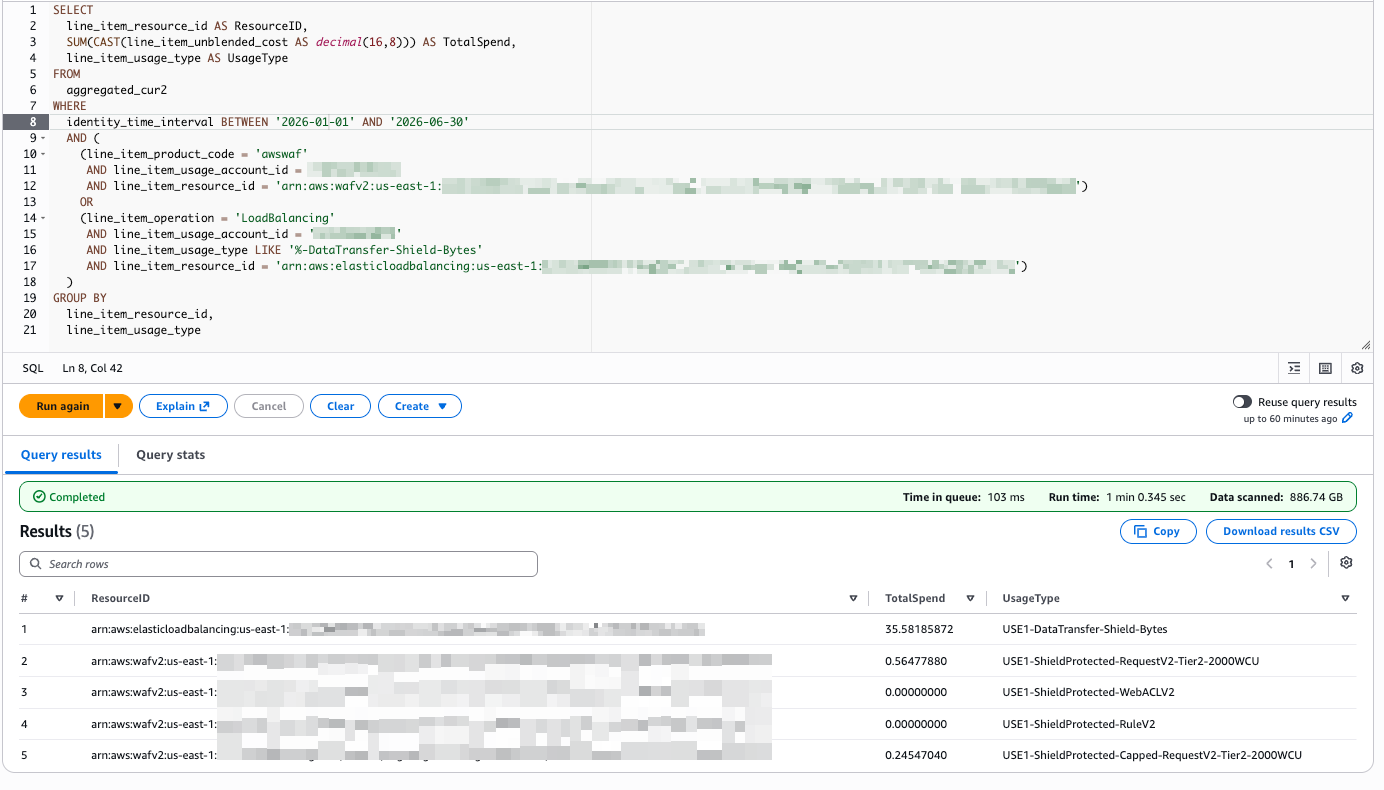
Figure 5: Example screenshot showing Athena query and results for 6-month period
CUR query: Total AWS WAF costs with Shield Advanced (Month over Month trend):
SELECT
  line_item_resource_id AS ResourceID,
  line_item_usage_type AS UsageType,
  date_format(line_item_usage_start_date, '%Y-%m') AS UsageMonth,
  SUM(CAST(line_item_unblended_cost AS decimal(16,8))) AS TotalSpend
FROM
  <CUR Table>
WHERE
  line_item_usage_start_date >= date_trunc('month', date_add('month', -6, current_date))
  AND line_item_usage_start_date < date_trunc('month', current_date)
  AND (
    (line_item_product_code = 'awswaf'
     AND line_item_usage_account_id = '012345678901'
     AND line_item_resource_id = 'arn:aws:wafv2:us-east-1:012345678901:regional/webacl/Regional-WAF/FFFFFFFF-BBBB-CCCC-DDDD-EEEEEEEEEEEE')
    OR
    (line_item_operation = 'LoadBalancing'
     AND line_item_usage_account_id = '012345678901'
     AND line_item_usage_type LIKE '%-DataTransfer-Shield-Bytes'
     AND line_item_resource_id = 'arn:aws:elasticloadbalancing:us-east-1:012345678901:loadbalancer/app/ALB/a1b2c3d4e5f6g7h8')
  )
GROUP BY
  line_item_usage_type,
  line_item_resource_id,
  date_format(line_item_usage_start_date, '%Y-%m')
ORDER BY
  UsageMonth,
  UsageType,
  ResourceID
Figure 6 shows the results of the query.
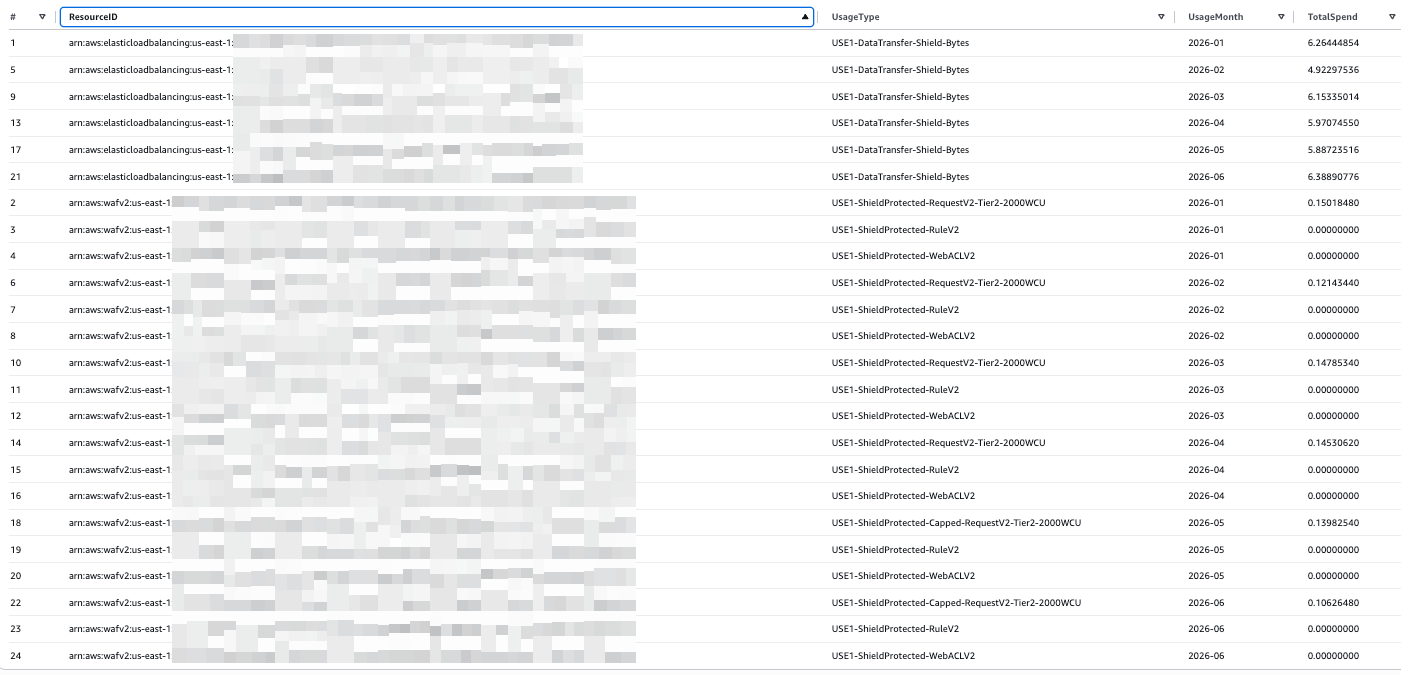
Figure 6: Example screenshot showing Athena results for 6-month month over month trend
Note: The $3,000/month Shield Advanced subscription fee requires a 1-year minimum commitment and is not included in the per-resource calculations above. This fee is billed once per payer account where that payer account, or at least one linked account, is subscribed to AWS Shield Advanced. Additionally, Anti-DDoS AMR request fees are waived for up to 50 billion total WAF requests per month across the organization.
Now that we have the actual spend from combined AWS WAF and Shield Advanced costs, we can return to the questions posed at the beginning of this post. Because Shield Advanced line items don’t exist in your bill until you subscribe, estimate the impact by constructing it from your current WAF usage.
- How much will my AWS WAF bill change once I add Shield Advanced?
- Pull your AWS WAF usage drivers (requests, WCU, rules, DTO) from CUR, subtract the WAF charges Shield absorbs (up to 1,500 WCU, default body inspection, waived anti-DDoS AMR fees), then add Shield’s $3,000/month organization subscription plus per-resource DTO.
- How do I forecast Shield Advanced DTO that varies from month to month?
- To forecast, separate the fixed subscription from variable DTO and project only the variable drivers by your growth rate.
- Can I estimate different scenarios for a phased rollout?
- For phased rollouts, the subscription is counted once; each added resource’s incremental cost is just it’s DTO charges minus absorbed WAF charges.
Conclusion
Understanding and estimating the costs associated with AWS WAF and AWS Shield Advanced doesn’t have to be guesswork. By using the right tool for the right level of detail, you can build accurate cost models:
- AWS Pricing Calculator — Best for initial planning and “what-if” scenarios before deployment.
- AWS Cost Explorer — Best for analyzing current spending trends for each service independently.
- AWS Cost and Usage Reports (CUR) — Essential for granular, resource-level cost analysis when AWS WAF and AWS Shield Advanced are used together.
By carefully analyzing your web application traffic patterns, data transfer usage, and specific security requirements, you can develop accurate cost models that support informed decisions. Whether you are evaluating Shield Advanced for the first time or reviewing an existing subscription, a data-driven approach helps you protect your applications while optimizing your cloud security spending.